
Hibernate缓存策略(一级缓存和EHcache二级缓存)
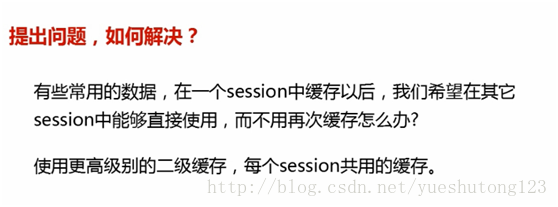
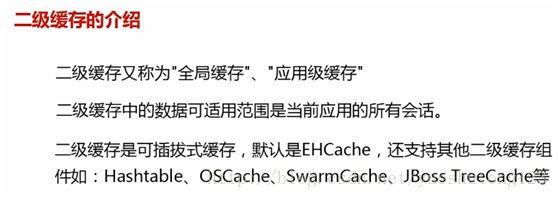
如何配置二级缓存:
第一步:导入EHcache依赖
1)Maven项目:
        <!--此处使用hibernate4-->
        <dependency>
            <groupId>org.hibernate</groupId>
             <artifactId>hibernate-ehcache</artifactId>
            <version>4.3.10.Final</version>
        </dependency>
2)普通项目:
解压下载的hibernate压缩包,找到路径:\hibernate-release-4.3.10.Final\lib\optional\ehcache,把路径下的包全部导入到项目
第二步:在源文件夹下,创建ehcache.xml
<ehcache>

    <!--
        磁盘存储:将缓存中暂时不使用的对象,转移到硬盘,类似于Windows系统的虚拟内存
        path:指定在硬盘上存储对象的路径
        path可以配置的目录有:
            user.home(用户的家目录)
            user.dir(用户当前的工作目录)
            java.io.tmpdir(默认的临时目录)
            ehcache.disk.store.dir(ehcache的配置目录)
            绝对路径(如:d:\\ehcache)
        查看路径方法:String tmpDir = System.getProperty("java.io.tmpdir");
     -->
    <diskStore path="java.io.tmpdir" />

    <!--
        defaultCache:默认的缓存配置信息,如果不加特殊说明,则所有对象按照此配置项处理
        maxElementsInMemory:设置了缓存的上限,最多存储多少个记录对象
        eternal:代表对象是否永不过期 (指定true则下面两项配置需为0无限期)
        timeToIdleSeconds:最大的发呆时间 /秒
        timeToLiveSeconds:最大的存活时间 /秒
        overflowToDisk:是否允许对象被写入到磁盘
        说明:下列配置自缓存建立起600秒(10分钟)有效 。
        在有效的600秒(10分钟)内,如果连续120秒(2分钟)未访问缓存,则缓存失效。
        就算有访问,也只会存活600秒。
     -->
    <defaultCache maxElementsInMemory="10000" eternal="false"
        timeToIdleSeconds="120" timeToLiveSeconds="600" overflowToDisk="true" />

    <!-- (此处为非必需的配置,对应第四步)
        cache:为指定名称的对象进行缓存的特殊配置
        name:指定对象的完整名
     -->
    <cache
        name="StudentCache"
        maxElementsInMemory="10000"
        eternal="false"
        timeToIdleSeconds="300"
        timeToLiveSeconds="600"
        overflowToDisk="true"
        />

</ehcache>
第三步:在hibernate.cfg.xml中配置
     <!-- 配置二级缓存 -->
     <!-- hibernate4以前的版本 配置缓存的提供类-->
     <!-- <property name="hibernate.cache.provider_class">net.sf.ehcache.hibernate.SingletonEhCacheProvider</property> -->
     <!--hibernate4以后版本二级缓存的提供类-->
    <property name="hibernate.cache.region.factory_class">org.hibernate.cache.ehcache.EhCacheRegionFactory</property>
如果是Spring+Hibernate,需要在spring.xml中
<bean id="sessionFactory" class="org.springframework.orm.hibernate4.LocalSessionFactoryBean">
<property name="hibernateProperties">
    <props>
        <prop key="hibernate.dialect">org.hibernate.dialect.MySQLDialect</prop><!-- 方言 -->
        <prop key="hibernate.show_sql">true</prop>
        <prop key="hibernate.format_sql">true</prop>
        <prop key="hibernate.hbm2ddl.auto">update</prop><!-- 更新表结构:有表使用无表创建 -->
        <!-- 开启二级缓存 -->
        <prop key="hibernate.cache.use_second_level_cache">true</prop>
        <!-- 启用查询缓存 -->
        <prop key="hibernate.cache.use_query_cache">true</prop>
        <!-- 配置二级缓存提供商 -->
        <prop key="hibernate.cache.region.factory_class">org.hibernate.cache.ehcache.EhCacheRegionFactory</prop>
        <!-- 加载缓存所需配置文件 -->
        <prop key="hibernate.net.sf.ehcache.configurationResourceName">classpath:ehcache.xml</prop>
    </props>
</property>
...
</bean>
第四步:在需要缓存的对象中开启
<?xml version="1.0"?>
<!DOCTYPE hibernate-mapping PUBLIC "-//Hibernate/Hibernate Mapping DTD 3.0//EN"
"http://hibernate.sourceforge.net/hibernate-mapping-3.0.dtd">
<!-- Generated 2017-9-24 20:49:54 by Hibernate Tools 3.5.0.Final -->
<hibernate-mapping>
    <class name="com.zyzpp.hibernate.Students" table="students">
        <!-- 开启Ehcache缓存 -->
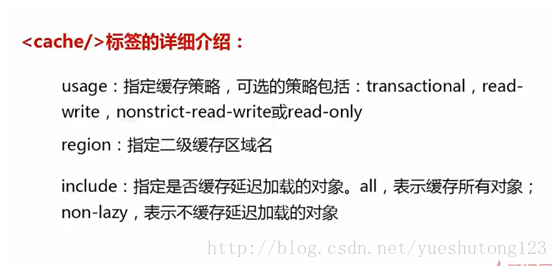
        <!-- usage:缓存策略
             region:指定缓存配置(需单独在ehcache.xml配置)
             include:是否缓存延迟加载的对象(如name,sex,number)
        -->
        <cache usage="read-only" include="all" region="StudentCache"/>

        <id name="id" type="int">
            <column name="id" />
            <generator class="native" />
        </id>
        <property name="name" type="java.lang.String">
            <column name="name" />
        </property>
        <property name="sex" type="java.lang.String">
            <column name="sex" />
        </property>
        <property name="number" type="int">
            <column name="number" />
        </property>
    </class>
</hibernate-mapping>
若是使用hibernate注解:@Cache(usage =CacheConcurrencyStrategy.READ_ONLY)
@Entity
@Table(name = "EMPLOYEE")
@Cache(usage =CacheConcurrencyStrategy.READ_ONLY,include="all", region="")  //开启缓存
public class Employee {
    @Id                             //定义主键
    @GeneratedValue(strategy=GenerationType.IDENTITY)   //主键生成策略:自动选择mysql自增
    @Column(name = "id")                        //对应数据库字段
    private int id;
    @Column(name = "first_name")
    private String firstName;
    @Column(name = "last_name")
    private String lastName;
    @Column(name = "salary")
    private int salary;

    public Employee() {
        //@Entity规定必须有的构造方法
    }
    //....getter
    //....setter
}
Hibernate缓存策略(一级缓存和EHcache二级缓存)的更多相关文章
- hibernate ehcache二级缓存
xml配置 <?xml version="1.0" encoding="UTF-8"?> <ehcache> <!-- Sets ...
- mybatis缓存,包含一级缓存与二级缓存,包括ehcache二级缓存
一,引言 首先我们要明白一点,缓存所做的一切都是为了提高性能.明白了这一点下面我们开始进入正题. 二,mybatis缓存概要 ①.mybatis的缓存有两种,分别是一级缓存和二级缓存.两者都属于查询缓 ...
- hibernate学习(9)——日志,一对一,二级缓存
1.Hibernate中的日志 1 slf4j 核心jar : slf4j-api-1.6.1.jar .slf4j是日志框架,将其他优秀的日志第三方进行整合. 整合导入jar包 log4j 核心 ...
- ssh整合hibernate 使用spring管理hibernate二级缓存,配置hibernate4.0以上二级缓存
ssh整合hibernate 使用spring管理hibernate二级缓存,配置hibernate4.0以上二级缓存 hibernate : Hibernate是一个持久层框架,经常访问物理数据库 ...
- hibernate学习笔记第七天:二级缓存和session管理
二级缓存配置 1.导入ehcache对应的三个jar包 ehcache/*.jar 2.配置hibernate使用二级缓存 2.1设置当前环境开始二级缓存的使用 <property name=& ...
- MyBatis ehcache二级缓存
ehcache二级缓存的开启步骤: 1.导入jar 2.在映射文件中指定用的哪个缓存 3.加一个配置文件,这个配置文件在ehcache jar包中就有 使增删改对二级缓存不刷新: 对一级缓存没有用的, ...
- Hibernate JPA 中配置Ehcache二级缓存
在Hibernate3 JPA里配置了一下非分布式环境的二级缓存,效果不错.具体过程如下: 1, 需要引入的jar包 http://ehcache.org/downloads/catalog 下载的包 ...
- MyBatis笔记——EhCache二级缓存
介绍 ehcache是一个分布式缓存框架. 我们系统为了提高系统并发,性能.一般对系统进行分布式部署(集群部署方式) 不使用分布缓存,缓存的数据在各各服务单独存储,不方便系统开发.所以要使用分布式缓 ...
- 使用Spring Ehcache二级缓存优化查询性能
最近在对系统进行优化的时候,发现有些查询查询效率比较慢,耗时比较长, 通过压测发现,主要耗费的性能 消耗在 查询数据库,查询redis 数据库:连接池有限,且单个查询不能消耗大量的连接池,占用大量IO ...
随机推荐
- (网页)java数组去重总结(转)
转自CSDN: 1.背景 根据不同的业务逻辑,经常会遇到数组中存在多个重复元素的场合,总结了下数组的排序,留个记录. 2.实现方法 总结了四种方法,接下来进行展示 1.方法一 //数组去重方法一 ...
- mysql之全球化和本地化:字符集、校对集、中文编码问题
本文内容: 什么是字符集?什么是校对集? 查看字符集和校对集 设置字符集和校对集 mysql中的中文数据问题 首发日期:2018-04-19 什么是字符集?什么是校对集? 字符集是字母和符号的集合,每 ...
- 原型模式ProtoType
#!/usr/bin/env python # -*- coding: utf-8 -*- # @Time : 2019/3/4 21:49 # @Author : ChenAdong # @emai ...
- JS 同步输入
var txtBigBalance; //金额同步输入 if ($.browser.msie)//IE { $("#txtBalanceP").get(0).onpropertyc ...
- 智能POS承接口碑点餐FAQ
1.一体机正餐后付(正餐6.0.0.8),口碑订单在商家后台无优惠(小票上有),但实收不等于订单金额. 原因:订单回流问题(线上线下数据没有及时回流造成的):造成这个问题的操作: 1.在线下加菜线上同 ...
- 遍历结构体内部元素和值(Name and Value)
代码: DataStruct.MessageStruct ms = new DataStruct.MessageStruct();//实例化结构体 //遍历结构体 foreach (System ...
- Response()的对象
addCookie(Cookie cookie):这个方法是向Response容器中添加一个Cookie,然后服务器容器会自动的将这个Cookie回写给客户机的,至于Cookie的相关知识我们会在后面 ...
- web前端(12)—— 页面布局2
本篇博文,主要就讲定位的问题,也就是页面布局里最重要的,本篇博文不出意外的话,也是css的最后一篇博文了 定位,position属性 定位有三种: 相对定位 绝对定位 固定定位 相对定位,positi ...
- Informix数据库配置与连接
1.环境 数据库版本:12.1 操作系统:Windows Server 2008 客户端:IBM Data Studio 4.1.3 2.配置 数据库安装后默认是无法远程访问的,需要修改sqlhost ...
- react-native 简介及环境
概要 react native 环境搭建 hello react native react native 发布 react native https://facebook.github.io/reac ...