
C# 文件与目录的基本操作(System.IO)
1. 文件操作
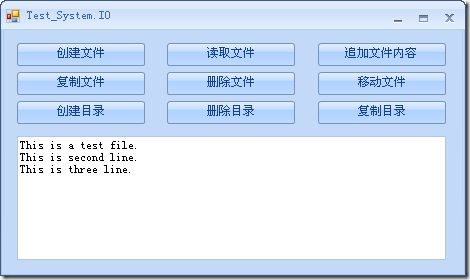
/// <summary>
/// 文件读写操作
/// 为简化代码供大家学习,暂不考虑捕捉异常
/// </summary>
public partial class TestIO : DevComponents.DotNetBar.Office2007Form
{
public TestIO()
{
InitializeComponent();
}
/// <summary>
/// 创建文件
/// </summary>
private void btnCreateFile_Click(object sender, EventArgs e)
{
string path = Application.StartupPath + @"\Test.txt";
FileStream fs = new FileStream(path, FileMode.Create);
StreamWriter sw = new StreamWriter(fs);
sw.WriteLine("This is a test file.");
sw.WriteLine("This is second line.");
sw.Close();
fs.Close();
// 也可以这样创建 StreamWriter
// StreamWriter sw = File.CreateText(path);
}
/// <summary>
/// 读取文件
/// </summary>
private void btnReadFile_Click(object sender, EventArgs e)
{
string path = Application.StartupPath + "\\Test.txt";
textBoxX1.Text = string.Empty;
if (File.Exists(path))
{
FileStream fs = new FileStream(path, FileMode.Open);
StreamReader sr = new StreamReader(fs);
// 也可以这样创建 StreamReader
// File.OpenText(path);
string str = string.Empty;
while (true)
{
str = sr.ReadLine();
if (!string.IsNullOrEmpty(str))
{
textBoxX1.Text += str + "\r\n";
}
else
{
sr.Close();
fs.Close();
break;
}
}
}
else
{
MessageBox.Show("指定的路径下不存在此文件!");
}
}
/// <summary>
/// 追加文件内容
/// </summary>
private void btnAppendFile_Click(object sender, EventArgs e)
{
string path = Application.StartupPath + "\\Test.txt";
FileStream fs = new FileStream(path, FileMode.Append);
StreamWriter sw = new StreamWriter(fs);
// 也可以这样创建 StreamReader
// StreamWriter sw = File.AppendText(path);
sw.WriteLine("This is three line.");
sw.Close();
fs.Close();
}
/// <summary>
/// 复制文件
/// </summary>
private void btnCopyFile_Click(object sender, EventArgs e)
{
string oldPath = Application.StartupPath + "\\Test.txt";
string newPath = Application.StartupPath + "\\TestClone.txt";
File.Copy(oldPath, newPath);
}
/// <summary>
/// 删除文件
/// </summary>
private void btnDeleteFile_Click(object sender, EventArgs e)
{
string path = Application.StartupPath + "\\TestClone.txt";
File.Delete(path);
}
/// <summary>
/// 移动文件
/// </summary>
private void btnMoveFile_Click(object sender, EventArgs e)
{
string oldPath = Application.StartupPath + "\\Test.txt";
// 移动文件的同时也可以使用新的文件名
string newPath = "d:\\NewTest.txt";
File.Move(oldPath, newPath);
}
/// <summary>
/// 创建目录
/// </summary>
private void btnCreateDirectory_Click(object sender, EventArgs e)
{
string path1 = "d:\\Jason1";
// 创建目录 Jason1
DirectoryInfo dDepth1 = Directory.CreateDirectory(path1);
// dDepth2 指向 dDepth1 创建的子目录 Jason2
DirectoryInfo dDepth2 = dDepth1.CreateSubdirectory("Jason2");
// 设置应用程序当前的工作目录为 dDepth2 指向的目录
Directory.SetCurrentDirectory(dDepth2.FullName);
// 在当前目录创建目录 Jason3
Directory.CreateDirectory("Jason3");
}
private void btnDeleteDirectory_Click(object sender, EventArgs e)
{
string path = "d:\\Jason1";
DeleteDirectory(path);
}
/// <summary>
/// 删除目录及其所有子目录,文件
/// </summary>
private static void DeleteDirectory(string path)
{
if (Directory.Exists(path))
{
foreach (string str in Directory.GetFileSystemEntries(path))
{
if (File.Exists(str))
{
File.Delete(str);
}
else
{
DeleteDirectory(str);
}
}
Directory.Delete(path);
}
else
{
MessageBox.Show("该目录不存在!");
}
}
private void btnCopyDirectory_Click(object sender, EventArgs e)
{
string sourcePath = "d:\\Jason1";
string targetPath = "d:\\Jason2";
CopyDirectory(sourcePath, targetPath);
}
/// <summary>
/// 复制目录及其所有内容
/// </summary>
/// <param name="sourcePath">源目录</param>
/// <param name="targetPath">目标目录</param>
private void CopyDirectory(string sourcePath, string targetPath)
{
// 该字符用于在反映分层文件系统组织的路径字符串中分隔目录级别(msdn)
// 在windows系统下实质上是为目录路径加上"\\"
if (targetPath[targetPath.Length - 1] != Path.DirectorySeparatorChar)
{
targetPath += Path.DirectorySeparatorChar;
}
// 目标目录不存在则创建之
if (!Directory.Exists(targetPath))
{
Directory.CreateDirectory(targetPath);
}
// 获取文件系统(含目录和文件)
string[] fileList = Directory.GetFileSystemEntries(sourcePath);
foreach (string fileName in fileList)
{
if (Directory.Exists(fileName))
{
// Path.GetFileName(fileName) 可取出最后一个分级目录名或文件名
CopyDirectory(fileName, targetPath + Path.GetFileName(fileName));
}
else
{
// true 为可覆盖
File.Copy(fileName, targetPath + Path.GetFileName(fileName), true);
}
}
}
}
C# 文件与目录的基本操作(System.IO)的更多相关文章
- c# 命名空间之System.IO(继承关系)
System.IO 命名空间包含允许:读写文件.数据流的类型以及提供基本文件和目录支持的类型. 在这个命名空间中主要的类有: 字节流:Stream.BufferedStream.MemoryStrea ...
- 命名空间System.IO
基本介绍:System.IO 命名空间提供读写文件和数据流的类型.基本文件和目录支持的类型. 原文:http://blog.sina.com.cn/s/blog_48a45b950100erhz.ht ...
- System.IO命名空间下常用的类
System.IO System.IO.Directory 目录 System.IO.Path 文件路径(包含目录和文件名) System.IO.FileInfo 提供创建.复制.删除.移动和打开文件 ...
- System.IO.Path 文件名、路径、扩展名 处理
string filePath =@"E:/Randy0528/中文目录/JustTest.rar"; 更改路径字符串的扩展名.System.IO.Path.ChangeExten ...
- System.IO.Path 文件名、路径、扩展名处理
string filePath =@"E:/Randy0528/中文目录/JustTest.rar"; 更改路径字符串的扩展名.System.IO.Path.ChangeExten ...
- System.IO之内存映射文件共享内存
内存映射文件是利用虚拟内存把文件映射到进程的地址空间中去,在此之后进程操作文件,就 像操作进程空间里的地址一样了,比如使用c语言的memcpy等内存操作的函数.这种方法能够很好的应用在需要频繁处理一个 ...
- System.IO.Directory.Delete目录删除
在程序运行的时候,如果直接获取一个目录路径,然后执行删除(包括子目录及文件): System.IO.Directory.Delete(path,true); 或者 System.IO.Director ...
- IIS目录下文件共享后System.IO.File.Exists返回false
场景:在iis目录下,因为特殊需要共享一个文件夹,给到其他的技术人员访问,突然发现小小的操作,搞“大”了,使用 string path = Server.MapPath("~/file/te ...
- C# System.IO和对文件的读写操作
System.IO命名空间中常用的非抽象类 BinaryReader 从二进制流中读取原始数据 BinaryWriter 从二进制格式中写入原始数据 BufferedStream 字节流的临时存储 ...
随机推荐
- 优秀c++开源项目集合
本文会持续更新, 我希望通过这篇文章把我看到过的优秀开源项目记录下来, 有时间仔细阅读. cockroachdb 前googler开发的开源的spanner数据库: https://github.co ...
- Linux内核访问外设I/O--动态映射(ioremap)和静态映射(map_desc) (转载)
[转](转)Linux内核访问外设I/O资源的方式-静态映射(map_desc)方式 Linux内核访问外设I/O资源的方式 Author: Dongas Date: 08-08-02 我们知道默认外 ...
- ubuntu虚拟环境virtualenv中djanggo连接mysql
在ubuntu服务器上安装MYSQLDB,执行:sudo apt-get install python-mysqldb, 若提示: ---------------------------------- ...
- Docker-利用dockerfile来搭建tomcat服务
在前面的例子中,我们从下载镜像,启动容器,在容器中输入命令来运行程序,这些命令都是手工一条条往里输入的,无法重复利用,而且效率很低.所以就需要一 种文件或脚本,我们把想执行的操作以命令的方式写入其中, ...
- 键盘控制div移动
<!DOCTYPE html><html lang="zh-CN"><head> <meta charset="UTF-8&qu ...
- golang json
1.Go语言的JSON 库 Go语言自带的JSON转换库为 encoding/json 1.1)其中把对象转换为JSON的方法(函数)为 json.Marshal(),其函数原型如下 func Mar ...
- 淘宝封装的一款ui 非常不错
好用的淘宝ui http://m.sui.taobao.org/demos/ 手机端访问地址
- SciTE 文本编辑器
个人一直使用,强大,轻型基于 Scintilla. http://www.scintilla.org/SciTEDownload.html 解压缩后,能右键文件打开 修改注册表, 使能资源管理器 右键 ...
- hiho_1290_demo_day
题目大意 一个MxN的矩阵,矩阵中的有些方格中有障碍物,有些没有,有一个机器人从左上角出发,它只能有两种移动方式:一直向右移动,直到遇到障碍物:一直向下移动,直到遇到障碍物. 现在可以将矩阵中 ...
- AlphaGo实现原理
AlphaGo已经打败了李世石9段,如果你也懂它背后的原理,或许某一天你也可以开发出一款AI来打败dota或者LOL的世界冠军. Mastering the game of Go with deep ...