
(一)【转】asp.net mvc生成验证码
网站添加验证码,主要为防止机器人程序批量注册,或对特定的注册用户用特定程序暴力破解方式,以进行不断的登录、灌水等危害网站的操作。验证码被广泛应用在注册、登录、留言等提交信息到服务器端处理的页面中。
在ASP.NET网站中应用验证码是很容易的,网上有很多的解决方案。最近在做一个OA项目,因系统采用的ASP.NET MVC框架,同样在登录页中需用到验证码,故需将原来在ASP.NET网站中使用的验证码移植到ASP.NET MVC中。
原ASP.NET网站用来生成验证码的类文件ValidateCode.cs:
using System;using System.Drawing;using System.Drawing.Imaging;using System.Web.UI;using System.Drawing.Drawing2D;using System.IO;namespace SeniOA.MVC{ /// <summary> /// 生成验证码的类 /// </summary> public class ValidateCode { public ValidateCode() { } /// <summary> /// 验证码的最大长度 /// </summary> public int MaxLength { get { return 10; } } /// <summary> /// 验证码的最小长度 /// </summary> public int MinLength { get { return 1; } } /// <summary> /// 生成验证码 /// </summary> /// <param name="length">指定验证码的长度</param> /// <returns></returns> public string CreateValidateCode(int length) { int[] randMembers = new int[length]; int[] validateNums = new int[length]; string validateNumberStr = ""; //生成起始序列值 int seekSeek = unchecked((int)DateTime.Now.Ticks); Random seekRand = new Random(seekSeek); int beginSeek = (int)seekRand.Next(0, Int32.MaxValue - length * 10000); int[] seeks = new int[length]; for (int i = 0; i < length; i++) { beginSeek += 10000; seeks[i] = beginSeek; } //生成随机数字 for (int i = 0; i < length; i++) { Random rand = new Random(seeks[i]); int pownum = 1 * (int)Math.Pow(10, length); randMembers[i] = rand.Next(pownum, Int32.MaxValue); } //抽取随机数字 for (int i = 0; i < length; i++) { string numStr = randMembers[i].ToString(); int numLength = numStr.Length; Random rand = new Random(); int numPosition = rand.Next(0, numLength - 1); validateNums[i] = Int32.Parse(numStr.Substring(numPosition, 1)); } //生成验证码 for (int i = 0; i < length; i++) { validateNumberStr += validateNums[i].ToString(); } return validateNumberStr; } /// <summary> /// 创建验证码的图片 /// </summary> /// <param name="containsPage">要输出到的page对象</param> /// <param name="validateNum">验证码</param> public void CreateValidateGraphic(string validateCode) { Bitmap image = new Bitmap((int)Math.Ceiling(validateCode.Length * 12.0), 22); Graphics g = Graphics.FromImage(image); try { //生成随机生成器 Random random = new Random(); //清空图片背景色 g.Clear(Color.White); //画图片的干扰线 for (int i = 0; i < 25; i++) { int x1 = random.Next(image.Width); int x2 = random.Next(image.Width); int y1 = random.Next(image.Height); int y2 = random.Next(image.Height); g.DrawLine(new Pen(Color.Silver), x1, y1, x2, y2); } Font font = new Font("Arial", 12, (FontStyle.Bold | FontStyle.Italic)); LinearGradientBrush brush = new LinearGradientBrush(new Rectangle(0, 0, image.Width, image.Height), Color.Blue, Color.DarkRed, 1.2f, true); g.DrawString(validateCode, font, brush, 3, 2); //画图片的前景干扰点 for (int i = 0; i < 100; i++) { int x = random.Next(image.Width); int y = random.Next(image.Height); image.SetPixel(x, y, Color.FromArgb(random.Next())); } //画图片的边框线 g.DrawRectangle(new Pen(Color.Silver), 0, 0, image.Width - 1, image.Height - 1); //保存图片数据 MemoryStream stream = new MemoryStream(); image.Save(stream, ImageFormat.Jpeg); //输出图片流 containsPage.Response.Clear(); containsPage.Response.ContentType = "image/jpeg"; containsPage.Response.BinaryWrite(stream.ToArray()); } finally { g.Dispose(); image.Dispose(); } } /// <summary> /// 得到验证码图片的长度 /// </summary> /// <param name="validateNumLength">验证码的长度</param> /// <returns></returns> public static int GetImageWidth(int validateNumLength) { return (int)(validateNumLength * 12.0); } /// <summary> /// 得到验证码的高度 /// </summary> /// <returns></returns> public static double GetImageHeight() { return 22.5; } }}
为适合ASP.NET MVC框架,修改其输出图片流的方法CreateValidateGraphic为:
/// <summary>/// 创建验证码的图片/// </summary>/// <param name="containsPage">要输出到的page对象</param>/// <param name="validateNum">验证码</param>public byte[] CreateValidateGraphic(string validateCode){ Bitmap image = new Bitmap((int)Math.Ceiling(validateCode.Length * 12.0), 22); Graphics g = Graphics.FromImage(image); try { //生成随机生成器 Random random = new Random(); //清空图片背景色 g.Clear(Color.White); //画图片的干扰线 for (int i = 0; i < 25; i++) { int x1 = random.Next(image.Width); int x2 = random.Next(image.Width); int y1 = random.Next(image.Height); int y2 = random.Next(image.Height); g.DrawLine(new Pen(Color.Silver), x1, y1, x2, y2); } Font font = new Font("Arial", 12, (FontStyle.Bold | FontStyle.Italic)); LinearGradientBrush brush = new LinearGradientBrush(new Rectangle(0, 0, image.Width, image.Height), Color.Blue, Color.DarkRed, 1.2f, true); g.DrawString(validateCode, font, brush, 3, 2); //画图片的前景干扰点 for (int i = 0; i < 100; i++) { int x = random.Next(image.Width); int y = random.Next(image.Height); image.SetPixel(x, y, Color.FromArgb(random.Next())); } //画图片的边框线 g.DrawRectangle(new Pen(Color.Silver), 0, 0, image.Width - 1, image.Height - 1); //保存图片数据 MemoryStream stream = new MemoryStream(); image.Save(stream, ImageFormat.Jpeg); //输出图片流 return stream.ToArray(); } finally { g.Dispose(); image.Dispose(); }}
在Controller.cs中,添加Action,用来设置将生成的验证码存入Session,并输出验证码图片:
public ActionResult GetValidateCode(){ ValidateCode vCode = new ValidateCode(); string code = vCode.CreateValidateCode(5); Session["ValidateCode"] = code; byte[] bytes = vCode.CreateValidateGraphic(code); return File(bytes, @"image/jpeg");}
调用方式为:在需要使用验证码的页面中,加入<img>标签:
<img id="valiCode" style="cursor: pointer;" src="../Account/GetValidateCode" alt="验证码" />
效果如下图: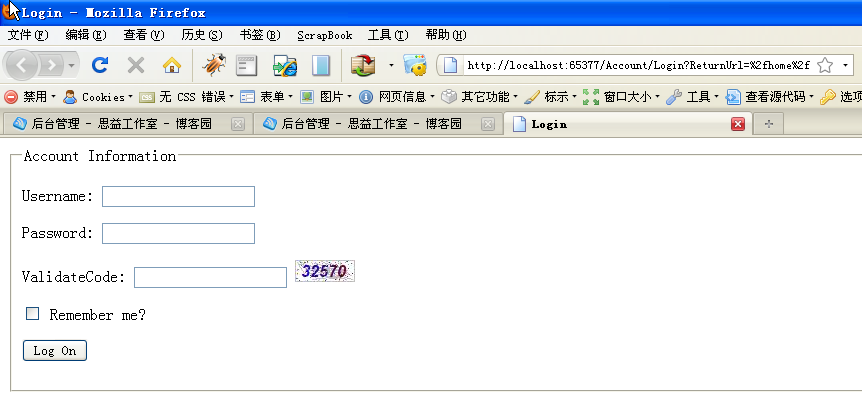
到于Account/Login这个Action中的处理,只需加入对Session中验证码的判断:
[AcceptVerbs(HttpVerbs.Post)]public ActionResult Login(string userName, string password, bool rememberMe, string returnUrl,string code){ if (Session["ValidateCode"].ToString() != code) { ModelState.AddModelError("code", "validate code is error"); return View(); } //此处验证用户名、密码 if (!ValidateLogOn(userName, password)) { return View(); } //验证成功 FormsAuthentication.SetAuthCookie(userName, rememberMe); if (!String.IsNullOrEmpty(returnUrl)) { return Redirect(returnUrl); } else { return RedirectToAction("Index", "Home"); }}
为实现登录页中,点击图片切换验证码,可以登录页中加入此JS代码实现刷新验证码:
<script type="text/javascript" src="http://www.cnblogs.com/Scripts/jquery-1.3.2-vsdoc.js"></script><script type="text/javascript"> $(function() { $("#valiCode").bind("click", function() { this.src = "../Account/GetValidateCode?time=" + (new Date()).getTime(); }); //alert("good"); });</script>
至此,ASP.NET MVC中已成功实现验证码功能。
源【http://www.cnblogs.com/senisoft/archive/2009/09/18/1569721.html】
(一)【转】asp.net mvc生成验证码的更多相关文章
- Asp.net mvc生成验证码
1.生成验证码类 using System; using System.Collections.Generic; using System.Linq; using System.Text; using ...
- ASP.NET MVC 生成验证码
using System.Web.Mvc; using System.Drawing; using System; using System.Drawing.Imaging; using Models ...
- ASP.Net MVC 生成安全验证码
---------html <td>验证码:</td> <td> <img src="/Logi ...
- ASP.NET MVC生成安全验证码
html部分: <!DOCTYPE html> <html lang="en"> <head> <meta charset="U ...
- ASP.NET MVC5 生成验证码
1 ValidateCode.cs using System; using System.Drawing; using System.Drawing.Drawing2D; using System.D ...
- C#工具:ASP.NET MVC生成图片验证码
1.复制下列代码,拷贝到控制器中. #region 生成验证码图片 // [OutputCache(Location = OutputCacheLocation.None, Duration = 0, ...
- ASP.NET MVC 生成EML文件
需求: 点发送邮件按钮的时候, 自动在客户端电脑打开默认邮件的窗口,并且把内容和附件都附加上去. 解决方案: 尝试使用过Microsoft.Office.Interop.Outlook 和 MPAI. ...
- asp.net mvc 生成条形码
using System; using System.Collections; using System.Collections.Generic; using System.Drawing; usin ...
- Asp.net MVC 生成zip并下载
前面有生成Excel或Word的示例,所以就不再重新写了. 这里只提供将指定文件以ZIP的方式下载. 创建一个 Zip工具类 public class ZIPCompressUtil { public ...
随机推荐
- KC705E增强版基于FMC接口的 Kintex-7 XC7K325T PCIeX8 接口卡
一.板卡概述 本板卡基于Xilinx公司的FPGAXC7K325T-2FFG900 芯片,pin_to_pin兼容FPGAXC7K410T-2FFG900 ,支持PCIeX8.64bit DDR3容量 ...
- STM32 HAL 库实现乒乓缓存加空闲中断的串口 DMA 收发机制,轻松跑上 2M 波特率
前言 直接储存器访问(Direct Memory Access,DMA),允许一些设备独立地访问数据,而不需要经过 CPU 介入处理.因此在访问大量数据时,使用 DMA 可以节约可观的 CPU 处理时 ...
- c++ 程序编译后运行时的内存分配
程序编译后运行时的内存分配 太好的文章了,看到不得不转,转自:http://blog.sina.com.cn/s/blog_5420e0000101a0w1.html 一.编译时与运行时的内存情况 1 ...
- 面试突击24:为什么wait和notify必须放在synchronized中?
在多线程编程中,wait 方法是让当前线程进入休眠状态,直到另一个线程调用了 notify 或 notifyAll 方法之后,才能继续恢复执行.而在 Java 中,wait 和 notify/noti ...
- JDK、JRE 和 JVM 有什么用,它们是怎样运行的
JDK如何运作? JDK 功能 以下是JDK的重要组件: JDK 和 JRE:程序员通过使用JDK 创建由 JRE 运行的 Java 程序,其中包括 JVM 和类库. 类库:是一组可动态加载的库,Ja ...
- python中特殊参数self的作用
特殊参数self的作用:self会接收实例化过程中传入的数据,当实例对象创建后,实例便会代替 self,在代码中运行. self代表的是类的实例本身,方便数据的流转.对此,我们需要记住两点: 第一点: ...
- 设计模式在实际业务应用中的介绍之3——外观或门面模式Facade对AOP装配业务工厂的应用
在C#中实现的基于外观或门面模式打造的业务应用案例 以前一直没有想过写一些东西来把项目中用到的知识点及技术实现做一个归纳整理并分享出来.现在打算逐渐的把项目中的一些东西整理并分享出来,与大家共勉! 外 ...
- 使用helm安装ingress,实现用域名的方式访问k8s内部应用
k8s集群版本 k8s集群版本是1.22 提前部署好nginx服务和创建好svc deployment方式部署的nginx服务,1个副本 创建的服务 通过服务可以代理到nginx服务 curl 10. ...
- Kubernetes云供应商架构的未来
首先,我想分享SIG的使命,因为我们用它来指导我们现在和将来的工作.从我们的章程中直接来看,SIG的使命是简化,开发和维护云供应商集成,作为Kubernetes集群的扩展或附加组件.这背后的动机是双重 ...
- .NET组件 vs. COM组件
本文转载:https://www.cnblogs.com/larissa-0464/p/11095203.html 写在前面:我没有开发过COM组件的经验,只是在做文献综述的时候需要了解这方面的知识, ...