
idea设置springboot项目热部署
转自:
https://www.cnblogs.com/zhukf/p/12672180.html
一、什么是热部署?
热部署,就是在应用正在运行的时候升级软件,却不需要重新启动应用。
二、什么是SpringBoot热部署?
SpringBoot热部署就是在项目正在运行的时候修改代码, 却不需要重新启动项目。
有了SpringBoot热部署后大大提高了开发效率,因为频繁的重启项目,势必会浪费很多时间, 有了热部署后,妈妈再也不用担心我修改代码重启项目了~~~
三、SpringBoot热部署的流程
1.pom文件中导入 spring-boot-devtools 依赖:
|
1
2
3
4
5
6
|
<!--SpringBoot热部署配置 --><br><dependency> <groupId>org.springframework.boot</groupId> <artifactId>spring-boot-devtools</artifactId> <scope>runtime</scope> <optional>true</optional></dependency> |
2.继续在pom.xml中添加插件:
|
1
2
3
4
5
6
7
8
9
10
11
12
|
<build> <plugins> <plugin> <groupId>org.springframework.boot</groupId> <artifactId>spring-boot-maven-plugin</artifactId> <configuration> <fork>true</fork> <addResources>true</addResources> </configuration> </plugin> </plugins></build> |
3.设置application.properties
|
1
2
|
#配置项目热部署spring.devtools.restart.enabled=true |
4.在idea中设置自动编译:
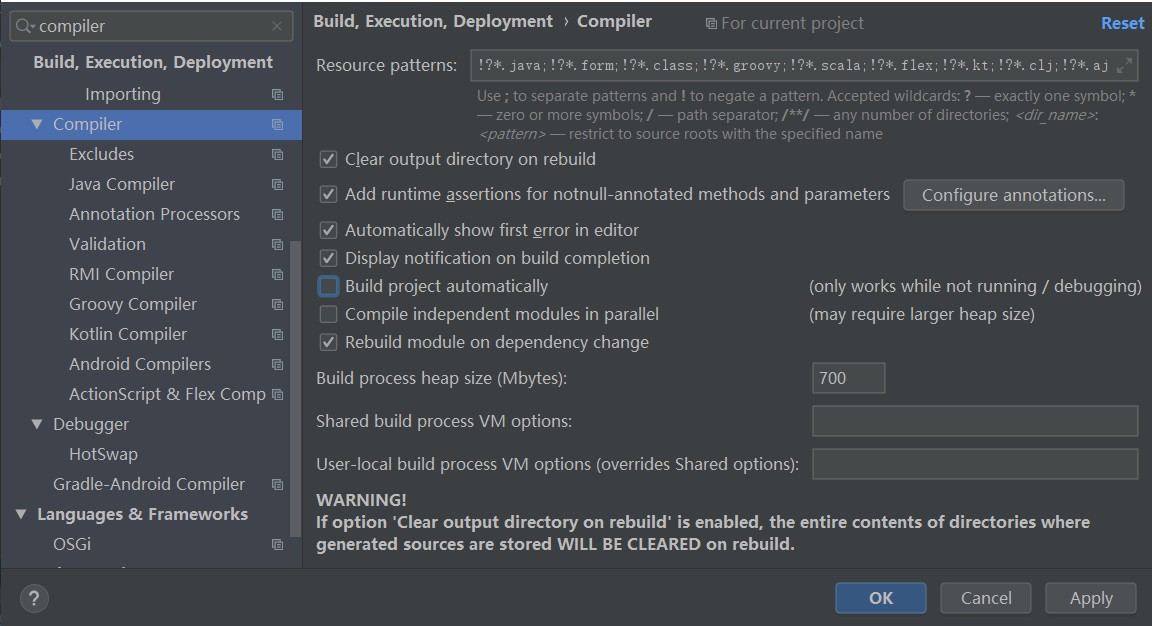
首先ctrl+alt+s打开设置(Other Settings 的设置是对整个工作空间项目都启作用,而Settings…的设置是对整个项目启作用),搜索Compliler,勾选Build project automatically,如下图所示:
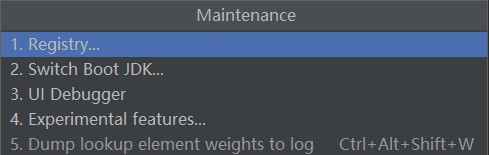
5.按住ctrl + shift + alt + /,出现如下图所示界面,点击Registry...,如下图:
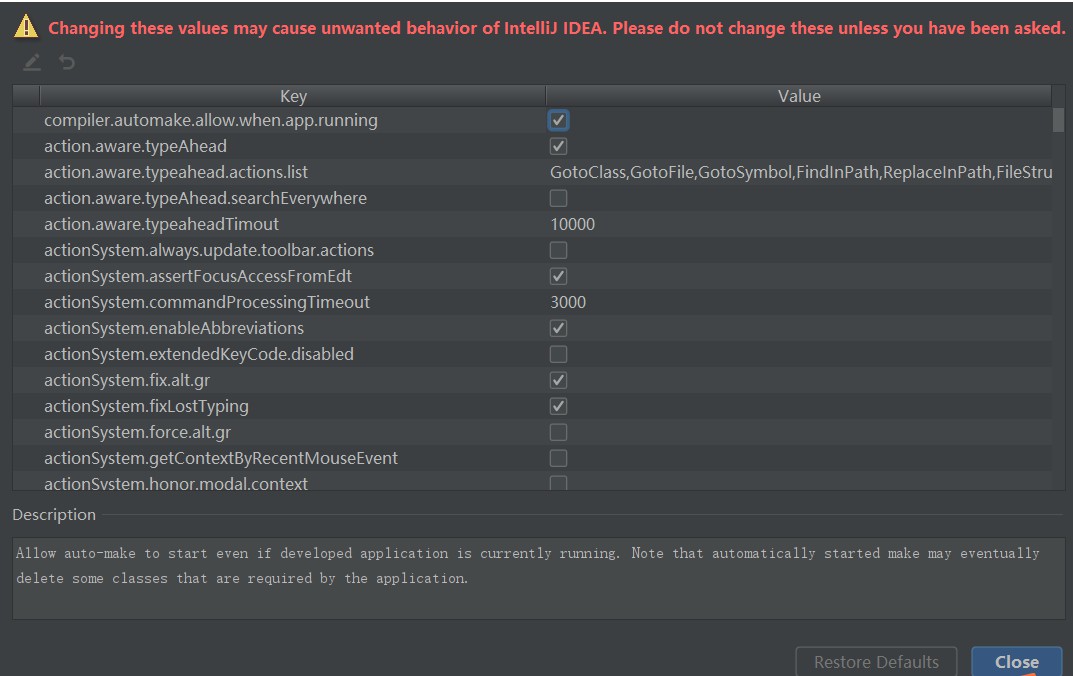
点击进入后,勾选compiler.automake.allow.when.app.running后关闭即可
通过以上步骤,就完成了SpringBoot项目的热部署功能!!!
6.对热部署测试是否成功:
|
1
2
3
4
5
6
7
8
9
10
11
12
13
14
15
|
package com.devtoolsDemo.devtoolsDemo.controller;import org.springframework.web.bind.annotation.RequestMapping;import org.springframework.web.bind.annotation.RestController;@RestController@RequestMapping("/hello")public class HelloDemo { @RequestMapping("/index") public String index() { return "helloworld!"; } } |
启动项目,通过浏览器输入地址:http://localhost:8080/hello/index
结果如下:

新加请求,在不重新启动项目的情况下测试热部署是否配置成功~~~
|
1
2
3
4
5
6
7
8
9
10
11
12
13
14
15
16
17
18
19
20
|
package com.devtoolsDemo.devtoolsDemo.controller;import org.springframework.web.bind.annotation.RequestMapping;import org.springframework.web.bind.annotation.RestController;@RestController@RequestMapping("/hello")public class HelloDemo { @RequestMapping("/index") public String index() { return "helloworld!"; } @RequestMapping("/say") public String say(){ return "I love Java!"; }} |
测试新加请求是否成功,浏览器输入http://localhost:8080/hello/say后结果如下:
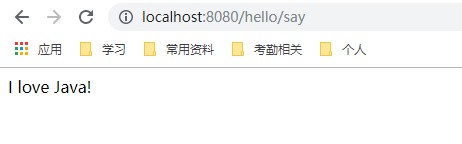
说明我们的热部署配置生效啦~~~
idea设置springboot项目热部署的更多相关文章
- spring-boot项目热部署以及spring-devtools导致同类不能转换
<dependency> <groupId>org.springframework.boot</groupId> <artifactId>spring- ...
- IDEA 配置Springboot项目热部署
实现的方式概述 注意以下的热部署方式在IDEA是默认没有打开自动编译的,手动编译需要快捷键(Ctrl+Shift+F9),自动编译的修改配置如下:(注意刷新不要太快,会有1-2秒延迟) File-Se ...
- idea中gradle的springboot的项目热部署
1:在build.gradle中添加热部署依赖(我gradle版本是5.5.1) // 添加 热部署依赖implementation 'org.springframework.boot:spring- ...
- Springboot静态文件不更新的解决办法,以及Springboot实现热部署
Springboot静态文件不更新的解决办法,以及Springboot实现热部署 原文链接:https://www.cnblogs.com/blog5277/p/9271882.html 原文作者:博 ...
- idea+spring-boot+devtools热部署
idea+spring-boot+devtools热部署 标签: spring-boot 2017-03-20 14:45 2635人阅读 评论(1) 收藏 举报 分类: spring-boot m ...
- SpringBoot工程+热部署进行远程调试
本文转载自:https://blog.csdn.net/qq_31868349/article/details/78553901 SpringBoot工程+热部署进行远程调试 本地端添加配置 在pom ...
- SpringBoot工程热部署
SpringBoot工程热部署 1.在pom文件中添加热部署依赖 <!-- 热部署配置 --> <dependency> <groupId>org.springfr ...
- SpringBoot SpringCloud 热部署 热加载 热调试
疯狂创客圈 Java 高并发[ 亿级流量聊天室实战]实战系列 [博客园总入口 ] 架构师成长+面试必备之 高并发基础书籍 [Netty Zookeeper Redis 高并发实战 ] Crazy-Sp ...
- springBoot开启热部署
springBoot开启热部署 这里使用devtools工具开启热部署 〇.搭建springbboot基础环境 一.添加依赖 <dependency> <groupId>org ...
- Eclipse中使用JRebel实现项目热部署(Maven插件版)
JRebel实现项目热部署(Maven插件版) 热部署,就是在应用运行过程中不进行重启,可直接进行软件升级. 在开发过程中,热部署就是在项目运行过程中变更代码,无需重启服务器即可使代码生效. tomc ...
随机推荐
- C# Linq将DataTable中的某列转换成数组或者List
// 获取到的数据 DataTable picDt = GetPdmPoroductModelPictureData(productModelCode); // 将productCode列转数组 st ...
- 增、改生产订单组件BAPI BAPI_ALM_ORDER_MAINTAIN
转载留存 IT_METHODS LIKE BAPI_ALM_ORDER_METHOD处理方法,必选项,存储CREATE CREATETONOTIF CHANGE DELETE RELEAS ...
- 《SAP MDM主数据管理》.pdf
<SAP MDM主数据管理>.pdf 有需要的联系 wx :erpworld
- geoserver官网
https://www.osgeo.cn/geoserver-user-manual/index.html
- Java实现发红包模拟
1.先画界面 package com.cmk; import javax.swing.*; import java.awt.*; import java.awt.event.KeyAdapter; i ...
- Navicat连接Oracle时报错ORA-28547:完美解决
1. 先用你的IDEA或者别人的连接到oracle数据库(为了查询版本) 1.1 查询版本SQL:select * from v$version; 2. 引入对应的oci.dll文件 链接:https ...
- react 学习笔记更新
生命周期 插槽 组件中间内容用this.props.children访问 是否组件更新 shouldcompontsupdata(props,newstatus){ return false: } 父 ...
- JS篇(003)-请用 js 去除字符串空格?
答案:replace 正则匹配方法.str.trim()方法.JQ 方法:$.trim(str)方法 解析: 方法一:replace 正则匹配方法 去除字符串内所有的空格:str = str.repl ...
- 「SOL」数树 (LOJ/WC2019)
WC 果然还是 WC # 题面 有一张 \(n\) 个点的图,图上有红蓝两种边(可能重叠),且两种边各自形成一个 \(n\) 个点的树. 用 \(m\) 种颜色给图上的所有点染色.若 \(u,v\) ...
- Tomcat put 漏洞批量工具
工具下载 https://share.weiyun.com/96ffd3bf26b09ffece8d01317f3b3efb