
getGlobalVisibleRect和getLocalVisibleRect
在看android官网的demo的时候遇到这两个api,开始不是很明白这两个方法的作用。
通过多次的调试和测试之后慢慢开始有了点眉目,为了防止以后忘记,以此博文为记。
作为测试的目的,我写了这样一个布局
<RelativeLayout xmlns:android="http://schemas.android.com/apk/res/android"

                xmlns:tools="http://schemas.android.com/tools"

                android:layout_width="match_parent"

                android:layout_height="match_parent"

                android:id="@+id/container"

                tools:context=".MainActivity"

                android:paddingLeft="10px">

    <LinearLayout

        android:layout_width="fill_parent"

        android:layout_height="fill_parent"

        android:orientation="vertical"

        android:id="@+id/innerL"

        android:paddingLeft="20px">
        <ImageView

            android:id="@+id/expandedImage"

            android:layout_width="wrap_content"

            android:src="@drawable/thumb1"

            android:layout_height="wrap_content"/>

    </LinearLayout>

</RelativeLayout>
另外为了方便测试,我将虚拟机设置为1dp=1px,大小等于320x480
因为这两个方法在View对象里面,所以基本上继承自View的对象都可以使用。
也是为了方便自己,我使用ImageView作为测试对象,图片大小为160x120px
下面是我自己的一个测试过程:
因为getLocalVisibleRect只有一个参数,所以我从这个方法入手
代码如下
@Override

    protected void onCreate(Bundle savedInstanceState)

    {

        super.onCreate(savedInstanceState);

        setContentView(R.layout.activity_main);

        final ImageView imageView = (ImageView) findViewById(R.id.expandedImage);

        imageView.setOnClickListener(new View.OnClickListener()

        {

            @Override

            public void onClick(View v)

            {

                Rect localRect = new Rect();

                imageView.getLocalVisibleRect(localRect);

                System.out.println("local" + localRect);

            }

        });

    }
程序执行后Logcat输出:
localRect(0, 0 - 160, 120)
很明显localRect变量中的right和bottom正是图片的长和宽。
目前的结论是:getLocalVisibleRect(Rect r)方法可以把视图的长和宽映射到一个Rect对象上。
这里我们先放下这个方法,把注意力集中到getGlobalVisibleRect方法中。
将代码改为:
@Override

    protected void onCreate(Bundle savedInstanceState)

    {

        super.onCreate(savedInstanceState);

        setContentView(R.layout.activity_main);

        final ImageView imageView = (ImageView) findViewById(R.id.expandedImage);

        imageView.setOnClickListener(new View.OnClickListener()

        {

            @Override

            public void onClick(View v)

            {

                Rect globalRect = new Rect();

                imageView.getGlobalVisibleRect(globalRect);

                System.out.println("global" + globalRect);

            }

        });

    }
Logcat输出:
globalRect(30, 81 - 190, 201)
除了30和190可以猜测出是什么(即left和right),其他的基本上没有什么线索,只知道是top和bottom。
30是paddingLeft,即图片向右偏移了30px,因此right很自然就多了30px
top和bottom要知道是什么,我用了最笨的办法,就是用尺子量。

可见,这81像素就是状态栏加上ActionBar的高度,所以Bottom120加上81就是201
目前的结论是:getGlobalVisibleRect方法的作用是获取视图在屏幕坐标系中的偏移量
那么,我的结论真的是正确的吗,其实我也不知道,继续测试下去。
把原先的布局文件改成下面这样的,现在我们重点对LinearLayout进行测试
<RelativeLayout xmlns:android="http://schemas.android.com/apk/res/android"

                xmlns:tools="http://schemas.android.com/tools"

                android:layout_width="match_parent"

                android:layout_height="match_parent"

                android:id="@+id/container"

                tools:context=".MainActivity">

    <LinearLayout

        android:layout_width="320dp"

        android:layout_height="480dp"

        android:orientation="vertical"

        android:id="@+id/innerL"

        android:background="#550000ff"

        android:layout_marginLeft="-50px"

        android:layout_marginTop="30px">

    </LinearLayout>

</RelativeLayout>
布局效果如下:这种布局的目的是让这个View超出屏幕区域

java代码如下:
@Override

    protected void onCreate(Bundle savedInstanceState)

    {

        super.onCreate(savedInstanceState);

        setContentView(R.layout.activity_main);

        final LinearLayout ll = (LinearLayout) findViewById(R.id.innerL);

        ll.setOnClickListener(new View.OnClickListener()

        {

            @Override

            public void onClick(View v)

            {

                Rect localRect = new Rect();

                ll.getLocalVisibleRect(localRect);

                Rect globalRect = new Rect();

                ll.getGlobalVisibleRect(globalRect);

                System.out.println("global" + globalRect);

                System.out.println("local" + localRect);

            }

        });

    }
现在我们可以点击蓝色的这个布局获取数据,这次我们同时获取这两个方法返回的数据
Logcat数据:
globalRect(0, 111 - 271, 480)
localRect(49, 0 - 320, 369)
先来画图分析globalRect中的数据,在前面我们知道globalRect是基于屏幕坐标系的
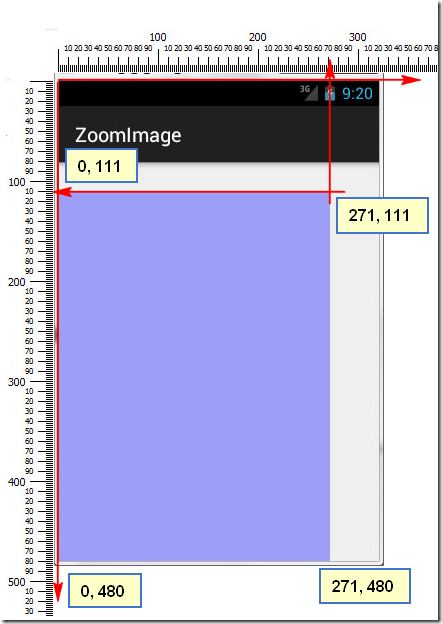
从上图可以看出,蓝色区域的四个点的坐标实际上是LinearLayout在屏幕坐标系的可见区域
结论:
getGlobalVisibleRect方法的作用是获取视图在屏幕坐标中的可视区域
另外需要说的是,getGlobalVisibleRect还可以接受第二个Point类型的参数:
targetView.getGlobalVisibleRect(Rect r, Point gobalOffset)
调用完毕后,globalOffset的值就是targetView原点偏离屏幕坐标原点的距离。
现在来看localRect(49, 0 - 320, 369),初步猜测它是基于视图本身的坐标,
只要该视图没有被遮挡,targetView.getLocalVisibleRect()的坐标总是等于:
(0, 0, targetView.getwidth(), targetView.getheight())
从布局不难看出,我们让它向左偏移了50个像素,因此它本身的坐标也跟着向左移动50像素,
至于为什么是49,这个我也不太清楚。因为视图的top和right在该布局中总是可见,所以是0和320,
而bottom已经超出了屏幕, 所以480(屏幕的高度)-111(ActionBar+statusBar+marginTop)=369.
结论是:
getLocalVisibleRect的作用是获取视图本身可见的坐标区域,坐标以自己的左上角为原点(0,0)
最后测试图:

布局文件代码:
<RelativeLayout xmlns:android="http://schemas.android.com/apk/res/android"

                xmlns:tools="http://schemas.android.com/tools"

                android:layout_width="match_parent"

                android:layout_height="match_parent"

                android:id="@+id/container"

                tools:context=".MainActivity">

    <LinearLayout

        android:layout_width="fill_parent"

        android:layout_height="fill_parent"

        android:orientation="vertical"

        android:id="@+id/innerL">

        <ImageView

            android:id="@+id/img"

            android:layout_width="wrap_content"

            android:layout_height="wrap_content"

            android:src="@drawable/thumb1"/>

    </LinearLayout>

    <TextView

        android:id="@+id/local"

        android:layout_width="wrap_content"

        android:layout_height="wrap_content"

        android:layout_centerHorizontal="true"

        android:layout_centerVertical="true"/>

    <TextView

        android:id="@+id/global"

        android:layout_width="wrap_content"

        android:layout_height="wrap_content"

        android:layout_alignLeft="@id/local"

        android:layout_below="@id/local"/>

    <TextView

        android:id="@+id/offset"

        android:layout_width="wrap_content"

        android:layout_height="wrap_content"

        android:layout_alignLeft="@id/local"

        android:layout_below="@id/global"/>

</RelativeLayout>
程序逻辑:
package com.whathecode.zoomimage;

import android.graphics.Point;

import android.graphics.Rect;

import android.os.Bundle;

import android.support.v7.app.ActionBarActivity;

import android.view.MotionEvent;

import android.view.View;

import android.widget.ImageView;

import android.widget.TextView;

public class MainActivity extends ActionBarActivity

{

    private int lastX = 0;

    private int lastY = 0;

    @Override

    protected void onCreate(Bundle savedInstanceState)

    {

        super.onCreate(savedInstanceState);

        setContentView(R.layout.activity_main);

        ImageView imageView = (ImageView) findViewById(R.id.img);

        imageView.setOnTouchListener(new View.OnTouchListener()

        {

            @Override

            public boolean onTouch(View v, MotionEvent event)

            {

                switch (event.getAction())

                {

                    case MotionEvent.ACTION_DOWN:

                        lastX = (int) event.getRawX();

                        lastY = (int) event.getRawY();

                        break;

                    case MotionEvent.ACTION_MOVE:

                        int dx = (int) event.getRawX() - lastX;

                        int dy = (int) event.getRawY() - lastY;

                        int left = v.getLeft() + dx;

                        int top = v.getTop() + dy;

                        int right = v.getRight() + dx;

                        int bottom = v.getBottom() + dy;

                        v.layout(left, top, right, bottom);

                        lastX = (int) event.getRawX();

                        lastY = (int) event.getRawY();

                        Rect localRect = new Rect();

                        v.getLocalVisibleRect(localRect);

                        ((TextView) findViewById(R.id.local))

                                .setText("local" + localRect.toString());

                        Rect globalRect = new Rect();

                        Point globalOffset = new Point();

                        v.getGlobalVisibleRect(globalRect, globalOffset);

                        ((TextView) findViewById(R.id.global))

                                .setText("global" + globalRect.toString());

                        ((TextView) findViewById(R.id.offset))

                                .setText("globalOffset:" + globalOffset.x + "," + globalOffset.y);

                        break;

                    case MotionEvent.ACTION_UP:

                        break;

                }

                return true;

            }

        });

    }

}
getGlobalVisibleRect和getLocalVisibleRect的更多相关文章
- AnimationsDemo中的ZoomActivity代码分析
AnimationsDemo是android官网的一个动画使用示例. ZoomActivity是demo中的图像缩放动画,因为这种效果比较常见,所以研究了一下代码. 下面是效果图: 毫无疑问这是一个组 ...
- Android 判断一个 View 是否可见 getLocalVisibleRect(rect) 与 getGlobalVisibleRect(rect)
Android 判断一个 View 是否可见 getLocalVisibleRect(rect) 与 getGlobalVisibleRect(rect) [TOC] 这两个方法的区别 View.ge ...
- View的个得区域函数getHitRect,getDrawingRect,getLocalVisibleRect,getGlobalVisibleRect(*)
注意: OnCreate()函数中 调用下面函数,结果全为0,要等UI控件都加载完了才能得到绘制时的值. getHitRect 以父控件的左上为原点,计算当前view在父控件的区域,不管父控件在屏幕的 ...
- getDrawingRect,getHitRect,getLocalVisibleRect,getGlobalVisibleRect
本文主要大体讲下getHitRect().getDrawingRect().getLocalVisibleRect().getGlobalVisibleRect. getLocationOnScree ...
- Android View各种尺寸位置相关的方法探究
Android View各种尺寸位置相关的方法探究 本来想做一个View间的碰撞检测之类的. 动手做了才发现不是想象的那么简单. 首先,写好了碰撞检测的工具类如下: package com.mengd ...
- Android坐标系统
1 背景 去年有很多人私信告诉我让说说自定义控件,其实通观网络上的很多博客都在讲各种自定义控件,但是大多数都是授之以鱼,却很少有较为系统性授之于渔的文章,同时由于自己也迟迟没有时间规划这一系列文章, ...
- view坐标_ _ Android应用坐标系统全面详解
转:http://blog.csdn.net/yanbober/article/details/50419117 1 背景 去年有很多人私信告诉我让说说自定义控件,其实通观网络上的很多博客都在讲各种自 ...
- android应用程序中获取view 的位置
1. 相对位置: getLeft() , getRight(), getTop(), getBottom() 在Android中可以把left相当于X轴值, top相当于Y轴值, 通过这两个值Andr ...
- android坐标
说来说去都不如 画图示意 简单易懂啊!!!真是的! 来吧~~先上张图~~! (一)首先明确一下 android 中的坐标系统 : 屏幕的左上角是坐标系统原点(0,0) 原点向右延伸 ...
随机推荐
- Introduction to Microsoft Dynamics 365 licensing
Microsoft Dynamics 365 will be released on November 1. In preparation for that, Scott Guthrie hosted ...
- JAVA静态代理模式(从现实生活角度理解代码原理)
代理模式(Proxy):为其他对象提供一种代理以控制对这个对象的访问. 代理模式说白了就是"真实对象"的代表,在访问对象时引入一定程度的间接性,因为这种间接性可以附加多种用途. 在 ...
- KEIL中启动文件详解(汇编语言)
原文在此:http://www.cnblogs.com/mddblog/p/4920063.html 概述 在嵌入式系统中,启动文件是整个系统非常关键的部分,它会进行一些底层的初始化,构建程序运行必要 ...
- 【Swift 2.1】共享文件操作小结(iOS 8 +)
前言 适用于 iOS 8 + 本地共享文件列表 声明 欢迎转载,但请保留文章原始出处:) 博客园:http://www.cnblogs.com 农民伯伯: http://over140.cnblogs ...
- RMAN-03002, RMAN-06059, ORA-19625 and ORA-27037 When Running RMAN Backup of Archivelogs
RMAN备份数据库时,出现下面错误错误信息: Starting backup at 25-MAY-15 current log archived allocated channel: ORA_DISK ...
- ORA-01157 & ORA-01110
测试服务器做了RMAN还原后,发现告警日志文件有如下错误信息ORA-01110: data file 206: '/u04/epps/oradata/temp02.dbf' Errors in f ...
- Crontab定时任务配置
CRONTAB概念/介绍 crontab命令用于设置周期性被执行的指令.该命令从标准输入设备读取指令,并将其存放于“crontab”文件中,以供之后读取和执行. cron 系统调度进程. 可以使用它在 ...
- JVM之运行时常量池(Runtime Constant Pool)
基本特性: 方法区的一部分,在方法去中分配,加载泪或者接口后就创建运行时常量区. class文件每一个类或接口的常量池表(constant_pool table)的运行时表现形式, 包括编译期的数值字 ...
- SQL Server自动化运维系列——监控磁盘剩余空间及SQL Server错误日志(Power Shell)
需求描述 在我们的生产环境中,大部分情况下需要有自己的运维体制,包括自己健康状态的检测等.如果发生异常,需要提前预警的,通知形式一般为发邮件告知. 在所有的自检流程中最基础的一个就是磁盘剩余空间检测. ...
- service mysql start出错,
service mysql start出错,mysql启动不了,解决mysql: unrecognized service错误的方法如下: [root@ctohome.com ~]# service ...