
SpringBoot配置双数据源
SpringBoot配置双数据源
一、搭建springboot项目
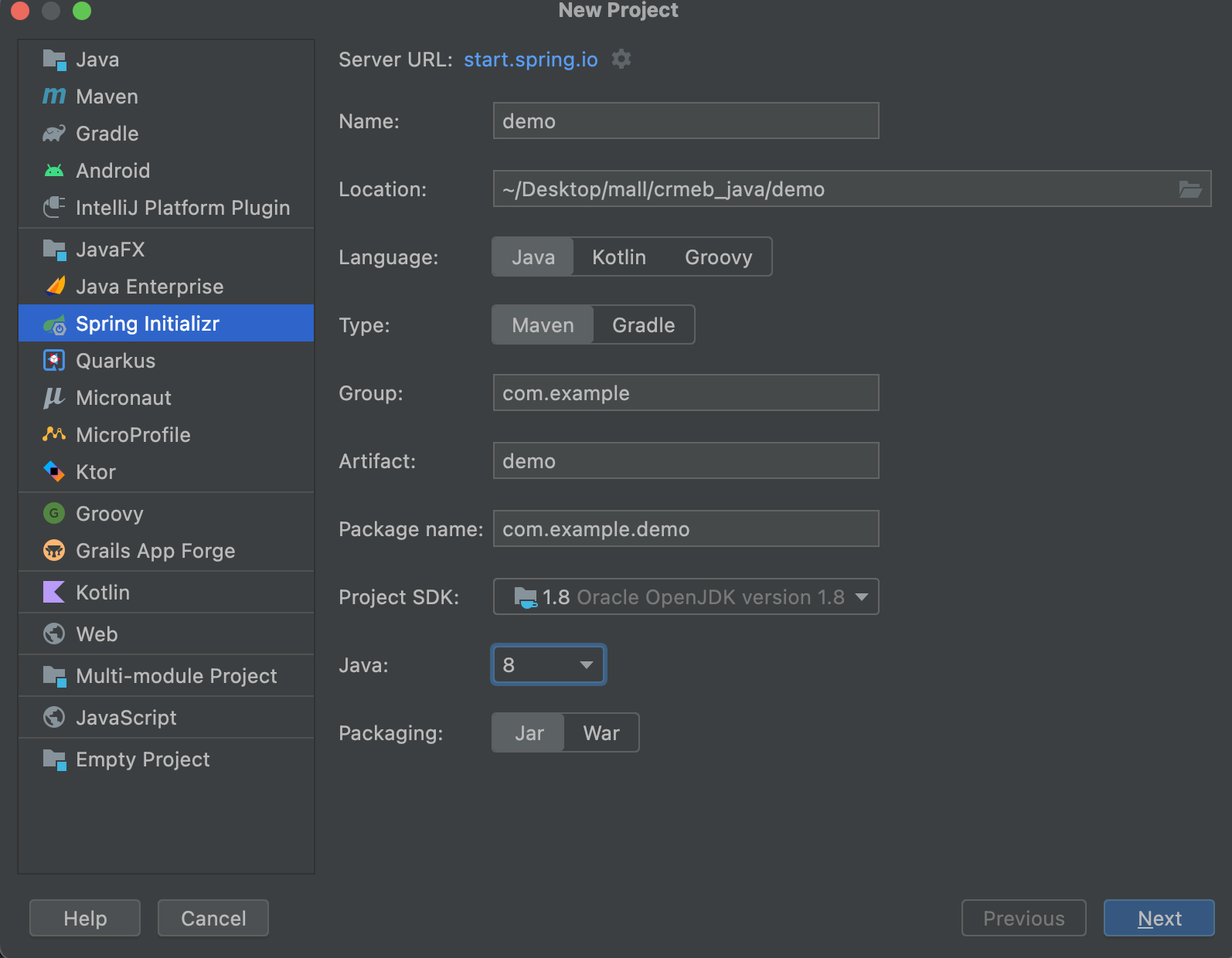
二、添加依赖
<dependencies>

    <!--web服务-->

    <dependency>

        <groupId>org.springframework.boot</groupId>

        <artifactId>spring-boot-starter-web</artifactId>

    </dependency>

    <!--测试-->

    <dependency>

        <groupId>org.springframework.boot</groupId>

        <artifactId>spring-boot-starter-test</artifactId>

        <scope>test</scope>

    </dependency>

    <!--mybatis驱动-->

    <dependency>

        <groupId>org.mybatis.spring.boot</groupId>

        <artifactId>mybatis-spring-boot-starter</artifactId>

        <version>1.3.1</version>

    </dependency>

    <!--mysql驱动-->

    <dependency>

        <groupId>mysql</groupId>

        <artifactId>mysql-connector-java</artifactId>

        <scope>runtime</scope>

    </dependency>

    <!--druid连接池-->

    <dependency>

        <groupId>com.alibaba</groupId>

        <artifactId>druid-spring-boot-starter</artifactId>

        <version>1.1.24</version>

    </dependency>

    <!--lombok插件-->

    <dependency>

        <groupId>org.projectlombok</groupId>

        <artifactId>lombok</artifactId>

        <optional>true</optional>

    </dependency>

  	<!--数据实体类转化-->

    <dependency>

        <groupId>org.mapstruct</groupId>

        <artifactId>mapstruct-jdk8</artifactId>

        <version>1.2.0.Final</version>

    </dependency>

    <dependency>

        <groupId>org.mapstruct</groupId>

        <artifactId>mapstruct-processor</artifactId>

        <version>1.2.0.Final</version>

    </dependency>

		<!--aop依赖,事务所需要-->

    <dependency>

        <groupId>org.springframework.boot</groupId>

        <artifactId>spring-boot-starter-aop</artifactId>

    </dependency>

</dependencies>
三、配置数据源
spring:

  datasource:

    master:

      driver-class-name: com.mysql.jdbc.Driver

      username: root

      password: root

      url: jdbc:mysql://localhost:3306/sys_user?serverTimezone=UTC&autoReconnect=true&useUnicode=true&characterEncoding=utf8&useSSL=false&allowMultiQueries=true

      type: com.alibaba.druid.pool.DruidDataSource

    second:

      driver-class-name: com.mysql.jdbc.Driver

      username: root

      password: root

      url: jdbc:mysql://localhost:3306/t_sys_user?serverTimezone=UTC&autoReconnect=true&useUnicode=true&characterEncoding=utf8&useSSL=false&allowMultiQueries=true

      type: com.alibaba.druid.pool.DruidDataSource

#mybatis:

  #config‐location: classpath:mybatis/mybatis‐config.xml  #指定全局配置文件的位置

  #mapper‐locations: classpath:mapper/*.xml

logging:

  path: ./data_migration

  level:

    root: INFO

    com.cxqy.data: DEBUG
四、编写数据源配置类
1、主数据源配置类 MasterDataSourceConfig
Configuration

@MapperScan(basePackages = MasterDataSourceConfig.PACKAGE, sqlSessionFactoryRef = "masterSqlSessionFactory")

public class MasterDataSourceConfig {

    // 精确到 master 目录,以便跟其他数据源隔离

    static final String PACKAGE = "com.cxqy.data.dao.master";

    static final String MAPPER_LOCATION = "classpath:mapper/master/*.xml";

    @Value("${spring.datasource.master.url}")

    private String url;

    @Value("${spring.datasource.master.username}")

    private String user;

    @Value("${spring.datasource.master.password}")

    private String password;

    @Value("${spring.datasource.master.driver-class-name}")

    private String driverClass;

    @Bean(name = "masterDataSource")

    @Primary

    public DataSource masterDataSource() {

        DruidDataSource dataSource = new DruidDataSource();

        dataSource.setDriverClassName(driverClass);

        dataSource.setUrl(url);

        dataSource.setUsername(user);

        dataSource.setPassword(password);

        return dataSource;

    }

    @Bean(name = "masterTransactionManager")

    @Primary

    public DataSourceTransactionManager masterTransactionManager() {

        return new DataSourceTransactionManager(masterDataSource());

    }

    @Bean(name = "masterSqlSessionFactory")

    @Primary

    public SqlSessionFactory masterSqlSessionFactory(@Qualifier("masterDataSource") DataSource masterDataSource)

            throws Exception {

        final SqlSessionFactoryBean sessionFactory = new SqlSessionFactoryBean();

        sessionFactory.setDataSource(masterDataSource);

        sessionFactory.setMapperLocations(new PathMatchingResourcePatternResolver()

                .getResources(MasterDataSourceConfig.MAPPER_LOCATION));

        return sessionFactory.getObject();

    }

}
2、副数据源配置类 SecondDataSourceConfig
@Configuration

@MapperScan(basePackages = SecondDataSourceConfig.PACKAGE, sqlSessionFactoryRef = "secondSqlSessionFactory")

public class SecondDataSourceConfig {

    // 精确到 cluster 目录,以便跟其他数据源隔离

    static final String PACKAGE = "com.cxqy.data.dao.second";

    static final String MAPPER_LOCATION = "classpath:mapper/second/*.xml";

    @Value("${spring.datasource.second.url}")

    private String url;

    @Value("${spring.datasource.second.username}")

    private String user;

    @Value("${spring.datasource.second.password}")

    private String password;

    @Value("${spring.datasource.second.driver-class-name}")

    private String driverClass;

    @Bean(name = "secondDataSource")

    public DataSource clusterDataSource() {

        DruidDataSource dataSource = new DruidDataSource();

        dataSource.setDriverClassName(driverClass);

        dataSource.setUrl(url);

        dataSource.setUsername(user);

        dataSource.setPassword(password);

        return dataSource;

    }

    @Bean(name = "secondTransactionManager")

    public DataSourceTransactionManager clusterTransactionManager() {

        return new DataSourceTransactionManager(clusterDataSource());

    }

    @Bean(name = "secondSqlSessionFactory")

    public SqlSessionFactory clusterSqlSessionFactory(@Qualifier("secondDataSource") DataSource clusterDataSource)

            throws Exception {

        final SqlSessionFactoryBean sessionFactory = new SqlSessionFactoryBean();

        sessionFactory.setDataSource(clusterDataSource);

        sessionFactory.setMapperLocations(new PathMatchingResourcePatternResolver()

                .getResources(SecondDataSourceConfig.MAPPER_LOCATION));

        return sessionFactory.getObject();

    }

}
此时可以连接两个数据源进行业务编写。
注意避坑
在双数据源的情况下,事务可能会失效,这时候需要指定那一个数据库的操作需要进行事务,指定数据库事务名在配置类中。
1、在启动类BootdoApplication上添加@EnableTransactionManagement 注解
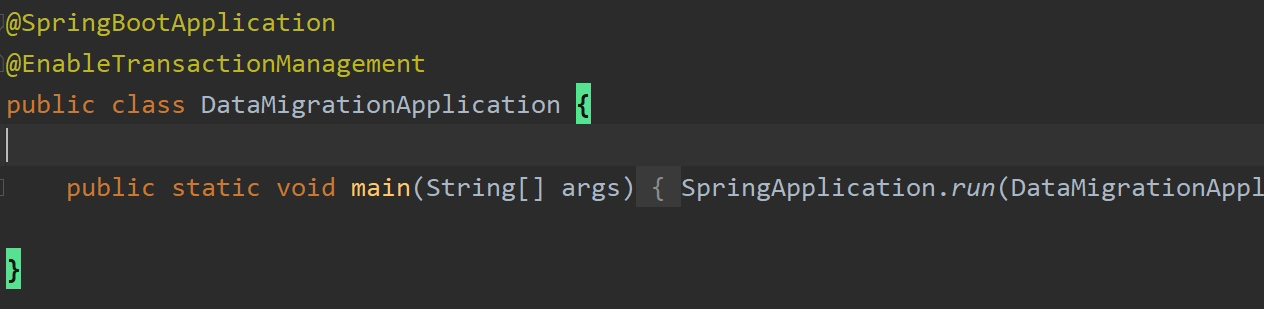
2、在service层添加@Transactional注解
@Transactional(readOnly = true,rollbackFor = Exception.class,transactionManager = "secondTransactionManager",isolation = Isolation.READ_UNCOMMITTED,propagation = Propagation.REQUIRED)

3、查看置顶数据库事务名,在数据源配置类中查看

SpringBoot配置双数据源的更多相关文章
- springboot配置双数据源 MySQL和SqlServer
1. pom文件的驱动jar包加上去, compile 'com.microsoft.sqlserver:mssql-jdbc:6.2.2.jre8' 2. application.yml sprin ...
- spring项目配置双数据源读写分离
我们最早做新项目的时候一直想做数据库的读写分离与主从同步,由于一些原因一直没有去做这个事情,这次我们需要配置双数据源的起因是因为我们做了一个新项目用了另一个数据库,需要把这个数据库的数据显示到原来的后 ...
- springboot配置Druid数据源
springboot配置druid数据源 Author:SimpleWu springboot整合篇 前言 对于数据访问层,无论是Sql还是NoSql,SpringBoot默认采用整合SpringDa ...
- SpringBoot配置多数据源时遇到的问题
SpringBoot配置多数据源 参考代码:Spring Boot 1.5.8.RELEASE同时配置Oracle和MySQL 原作者用的是1.5.8版本的SpringBoot,在升级到2.0.*之后 ...
- springboot 配置多数据源
1.首先在创建应用对象时引入autoConfig package com; import org.springframework.boot.SpringApplication; import org. ...
- spring+mybatis 配置双数据源
配置好后,发现网上已经做好的了, 不过,跟我的稍有不同, 我这里再拿出来现个丑: properties 文件自不必说,关键是这里的xml: <?xml version="1.0&quo ...
- springboot配置双视图解析器
因项目要求,需要同时支持html和jsp页面,所以在springboot的基础上配置双视图解析器. 重点在于,抛开原来的resources目录结构层,这层只放application.propertie ...
- springboot 配置多数据源 good
1.首先在创建应用对象时引入autoConfig package com; import org.springframework.boot.SpringApplication; import org. ...
- spring boot 配置双数据源mysql、sqlServer
背景:原来一直都是使用mysql数据库,在application.properties 中配置数据库信息 spring.datasource.url=jdbc:mysql://xxxx/test sp ...
- springboot配置多数据源mybatis配置失效问题
mybatis配置 #开启驼峰映射 mybatis.configuration.map-underscore-to-camel-case=true #开启打印sql mybatis.configura ...
随机推荐
- Windows 干净启动
1. 卸载设备中全部的第三方反病毒软件与系统优化软件 (例如 360.腾讯电脑管家.鲁大师等).2. 按 "Windows 徽标键+R",输入 "msconfig&quo ...
- python cls方法_关于类方法中的cls
title: python cls方法_关于类方法中的cls author: 杨晓东 permalink: python cls方法_关于类方法中的cls date: 2021-10-02 11:27 ...
- 第五周作业-N67044-张铭扬
1. 搭建chrony服务完成多个主机的时间同步. [root@centos8 ~]# yum -y install chrony [root@centos8 ~]# vim /etc/chrony ...
- HC-SR501人体红外传感器使用说明
1. 模块为全自动感应,当人进入其感应范围则输出高电平,人离开感应范围则自动延时关闭高电平,输出低电平. 2. 传感器有两种触发方式(可通过跳线进行选择):第一种不可重复触发方式,即感应输出高电平后, ...
- 如何用HP 39GS计算器画出双曲线图像
1.双曲线标准方程和参数方程 2.计算器上的操作 1.打开APLET->Parametric->START 2.设置X1(T)=3/COS(T),X2(T)=4*TAN(T) 3.SHIF ...
- VMware-实用网站
二进制包的获取方式 ftp://ftp.redhat.com推荐网站 www.rpmfind.net相应的官方网站http://www.mysql.com
- Vue 权限控制 使用自定义指令 代替v-if
参考了vue-element-admin 指令库的permission 使用Demo(demo.vue) <template> <p>admin组:<span v-per ...
- linux 替换csv的换行符(Linux 替换^M字符 方法)
sed -i 's/^M//g' a.csv 注意:这里的"^M"要使用"CTRL-V CTRL-M"生成,而不是直接键入"^M". 实验: ...
- RabbitMQ-00-Windows10安装RabbitMQ及安装使用过程中遇到的一些问题
Window系统安装教程 安装参考博客:https://blog.csdn.net/spl545056/article/details/81392015 重装RabbitMQ时遇到的问题 安装提示成功 ...
- 自定义Lock实现
1 package com.wyt.lock.test; 2 3 import java.util.concurrent.LinkedBlockingQueue; 4 import java.util ...