
对height 100%和inherit的总结
对height 100%和inherit的总结
欢迎大家来我的博客留言:
https://sxq222.github.io/CSS%...
博客主页:
https://sxq222.github.io
正文:
之前看到一篇相关的文章:http://www.zhangxinxu.com/wor...
在看这个文章的demo时发现一些问题,下面来总结归纳一下:
代码如下
<!DOCTYPE html>

<html lang="en">

<head>

    <meta charset="UTF-8">

    <title>demo</title>

    <style>

        .outer{

            display: inline-block;

            width: 100px;

            height: 100px;

            background: #400;

            border: 10px solid #444;;

        }

        .in{

            background: #6aa;

        }

        .full{

            height: 100%;

        }

        .inherit{

            height: inherit;

        }

    </style>

</head>

<body>

<div class = 'outer'>

    <div class = 'in full'>

    </div>

</div>

<div class = 'outer'>

        <div class = 'in inherit'>

        </div>

</div>

</body>

</html>
效果大致是这个样子:

其中,左边的是height 100%,右边的是height inherit。
下面我们进行一下改动:
    <style>

        .outer{

            display: inline-block;

            width: 100px;

            height: 100px;

            background: #400;

            border: 10px solid #444;;

        }

        .in{

            position: absolute;

            background: #6aa;

            width:100px;

        }

        .full{

            height: 100%;

        }

        .inherit{

            height: inherit;

        }

    </style>
其实就是给两个子元素加上绝对定位。效果如图:

我们发现,100%的元素的高度计算是相对于父元素的了。这也比较容易理解,因为绝对定位的元素,他的计算规则是相对于他最近的position不为static的元素。就算父元素未定位inherit也是相对于直接父元素进行高度计算的。
我们在outer上加上position relative 试一试:
        .outer{

            position: relative;

            display: inline-block;

            width: 100px;

            height: 100px;

            background: #400;

            border: 10px solid #444;;

        }
看来确实是这样的,现在100%和inherit效果是一样的.
再对css进行改动:
        .outer{

            display: inline-block;

            width: 100px;

            height: 100px;

            background: #400;

            border: 10px solid #444;

            box-sizing: border-box;

        }

        .in{

            background: #6aa;

        }

        .full{

            height: 100%;

        }

        .inherit{

            height: inherit;

        }
我们给父元素加上了boxsizing border box,让父元素的高度计算规则改变,下面看看效果:

我们看到 inherit元素的高度变成了父元素的高度,而100%的元素。
我们再给父元素加上padding:
        .outer{

            display: inline-block;

            width: 100px;

            height: 100px;

            background: #400;

            border: 10px solid #444;

            box-sizing: border-box;

            padding: 10px;

        }
效果图:
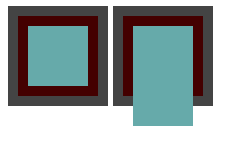
可以看到inherit的高度会与父元素的高度相等,而100%的高度会与父元素content相等。
下面我们给子元素加上绝对定位看看:
        .outer{

            position: relative;

            display: inline-block;

            width: 100px;

            height: 100px;

            background: #400;

            border: 10px solid #444;

            box-sizing: border-box;

            padding: 10px;

        }

        .in{

            left: 0;

            top: 0;

            position: absolute;

            width: 50px;

            background: #6aa;

        }

        .full{

            height: 100%;

        }

        .inherit{

            height: inherit;

        }
效果图:

我们看到,当加上绝对定位时,100%的子元素的高度为:父元素的(content + padding),而inherit的高度就是等于父元素的border-box高度。
下面我们将父元素outer的borde -box 改回去:
        .outer{

            position: relative;

            display: inline-block;

            width: 100px;

            height: 100px;

            background: #400;

            border: 10px solid #444;

            /* box-sizing: border-box; */

            padding: 10px;

        }
效果图:

可以看到,inherit的高度变为父元素content-box的高度。
下面看一看固定定位:
        .outer{

            position: relative;

            display: inline-block;

            width: 100px;

            height: 100px;

            background: #400;

            border: 10px solid #444;

            /* box-sizing: border-box; */

            padding: 10px;

        }

        .in{

            position: fixed;

            width: 50px;

            background: #6aa;

        }

        .full{

            left:300px;

            top: 0;

            height: 100%;

        }

        .inherit{

            left: 0;

            top: 0;

            height: inherit;

        }
可以看到,inherit的高度还是等于父元素盒子模型的高度,而100%的高度变为了视口的高度。
总结
height:inherit的高度,总是等于父元素的盒子模型(content-box、border-box)的高度。
heighe:100%的高度,在文档流中,就等于父元素的content的高度。如果在绝对定位(脱离文档流)中,等于最近已定位父元素的content + padding的高度。在固定定位中,等于视口的高度。
下一步
目前只是阐述和总结了现象,还未解释原理,希望大神能在留言区指点一下。
一开始觉得自己很熟悉CSS的定位、盒子模型,但是现在发现很多东西都是不明白的,这方面的只是还需要深入理解。接下来需要继续学习CSS知识,弄明白这些现象背后的原因。
对height 100%和inherit的总结的更多相关文章
- height:100%与height:inherit的区别
一.兼容性 首先,inherit这个属性只是在ie8+才支持:100%支持ie6: 二.大多数情况下没有区别 在正常情况下height:100%与height:inherit没有任何区别: 1.父元素 ...
- height:100% 布局
常常会碰到需要填满整个浏览器,并且自适应高度的需求.首先肯定会想到给容器设定height:100%,但是会没有效果.原因是body没有高度,所以百分比无法生效. 解决方案:给html,body,标签都 ...
- 设置height:100%无效的解决方法
设置height:100%无效的解决方法 刚接触网页排版的新手,常出现这种情况:设置table和div的高height="100%"无效,使用CSS来设置height:" ...
- 关于 iframe 在ie11 height:100% 无效的巨坑
好的,今天公司分配了个解决ie中的bug的任务,其中,有一个就是iframe 的高度 100% 没有生效的问题: 一开始,由于我真的没有怎么去了解过iframe这个货,所以,网上各种搜索一大堆关于这货 ...
- flex引起height:100%失效
<!DOCTYPE html> <html> <head> <meta http-equiv="Content-Type" content ...
- 父容器根据子容器高度自适应:设置父容器 height:100%;overflow:hidden;
父容器根据子容器高度自适应:设置父容器 height:100%;overflow:hidden;
- height:100%不起作用(无效),div全屏
当父容器是body时,height:100%不起作用(无效),解决办法:在css代码段中添加 html, body{ margin:0; height:100%; } 实现div全屏的时候需要上面那段 ...
- 如何让 height:100%; 起作用
当你设置一个页面元素的高度(height)为100%时,期望这样元素能撑满整个浏览器窗口的高度,但大多数情况下,这样的做法没有任何效果.你知道为什么height:100%不起作用吗? 按常理,当我们用 ...
- height:100%和height:auto的区别
一直不明白height:100%和height:auto的区别,最近在制作前端页面时都用了height:100%;overflow:hidden; ,可是有些浏览器出现莫名的奇妙的问题,但换成heig ...
随机推荐
- Python 细聊可以媲美 PS 的 PIL 图片处理库
1 . 前言 PIL 是 Python Image Library 的简称. PIL 库中提供了诸多用来处理图片的模块,可以对图片做类似于 PS(Photoshop) 的编辑.比如:改变图像大小.旋转 ...
- egg微信小程序支付(服务商)插件封装
下单 通过下单获取prepay_id,然后返回给小程序发起支付 若是服务商,mch_id:传入服务的商户号:sub_mch_id:传入子商户的商户号,算法签名的秘钥是服务商的秘钥. 'use stri ...
- TypeScript-axios模块进行封装的操作与一些想法
所谓封装与模块化,对我这种初学者来说,个人理解就是解耦,比如说,当我们前端一个项目使用了现在流行的模块,但是没有对其进行封装处理,包括一些相同的代码逻辑,把他们分散在各个组件当中,这样一来整个项目对于 ...
- mac电脑sublime text3安装pretty json插件
因http://packagecontrol.io/地址被墙无法实现自动安装,导致sublime Text3安装插件非常麻烦,总是出现There Are No Packages Available F ...
- 使用SymPy
最近工作的原因,需要进行一些积分运算,通过一些搜索得知了SymPy,记录一下使用历程. 1. SymPy介绍 SymPy是关于Symbolic Mathematics的Python库,它旨在成为一个功 ...
- Termux镜像在阿里云镜像站首发上线
镜像下载.域名解析.时间同步请点击阿里云开源镜像站 简介 Termux 是 Android 平台上的一个终端模拟器,它将众多 Linux 上运行的软件和工具近乎完美的移植到了手机端. 无需任何复杂的安 ...
- 记mysql5.7错误only_full_group_by
错误截图为上 mysql版本:5.7.35-0ubuntu0.18.04.1 "this is incompatible with sql_mode=only_full_group_by&q ...
- python发送邮件之宝藏库yagmail
之前使用email模块+smtplib模块发送邮件,虽然可以实现功能,但过程比较繁琐,今天发现一个宝藏库(yagmail),可以说是炒鸡好用啦!!! 贴上实现代码,大家细品 yagmail安装 pip ...
- 配置Openfiler做ISCS实验
在VMware workstation中安装openfiler(linux底层) 系统安装 选择redhat6,64bit 分配30G 2. 3.. 4.5. ...
- CF786B/CF787D Legacy
题目描述: luogu cf cf 题解: 最短路+线段树优化建图. 考虑本题的边是点->点.段->点和点->段,我们可以建线段树然后拆成入点和出点. 入点:儿子->父亲,边权 ...