
记一次vue+vuex+vue-router+axios+elementUI开发(三)
项目用到了状态管理工具 Vuex 中文文档:https://vuex.vuejs.org/zh/guide/
大家都知道,vue中可用props将父组件的数据传递给子组件,但是有个问题,子组件一般不能修改父组件的数据,这时候vuex就派上用场
1、vuex 安装:npm install vuex --save
2、在src中新建一个store文件夹:本人目录结构如下:
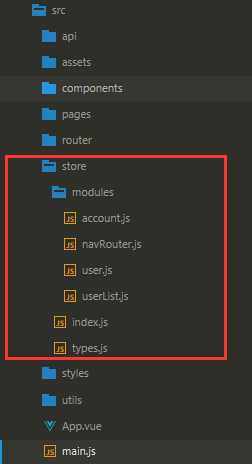
3、在main.js 中引入:
import store from './store'

new Vue({

  el: '#app',

  router,

  store,

  components: { App },

  template: '<App/>'

})
4、这里用到了vuex的modules
在store文件夹中的index.js 中引入modules中的模块,并导入到store中
import Vue from 'vue'

import Vuex from 'vuex'

import user from './modules/user'

import account from './modules/account'

import user_list from './modules/userList'

import nav_router from './modules/navRouter'

Vue.use(Vuex)

// const debug = process.env.NODE_ENV !== 'production'

export default new Vuex.Store({

  modules: {

    user,

    account,

    user_list,

    nav_router,

  },

  // strict: debug,

})
5、modules 中的文件:
包含state、getter、actions、mutations。这里就不一一介绍了,文档里都有用法以及介绍。
import api from 'api/fetch'

import * as types from '../types'

const state = {

    token: '',

    userName: localStorage.getItem('userName') ? localStorage.getItem('userName') : '',

    role_id: sessionStorage.getItem('role_id') ? sessionStorage.getItem('role_id') : '',

}

const getters = {

    userName: state => {

        return state.userName

    },

    roleId: state => state.role_id

}

const actions = {

    userLogin({ commit }, palyload) {

        return api.Login(palyload)

            .then( res => {

                localStorage.setItem('user_token_key', res.data.token)

                localStorage.setItem('userName', res.data.username)

                sessionStorage.setItem('role_id', res.data.role_id)

                commit(types.USER, res.data)

                return res

            })

    }

}

const mutations = {

    [types.USER](state, datas) {

        state.userName = datas.username

        state.token = datas.token

        state.role_id = datas.role_id

    }

}

export default {

    state,

    getters,

    actions,

    mutations,

}
6、在组件中如何获取vuex中的数据呢或者怎么触发vuex的钩子呢,以state为列子。
本人在vue组件中获取state,主要用2中方式
1、vuex提供的mapState: 在组件中
import { mapState } from 'vuex'

computed: {

            ...mapState({

                totalItem: state => state.user_list.user_list_totalItem,

                user_list_loading: state => state.user_list.user_list_loading,

            })

        },
2、在组件中用this.$store.user.state 访问(这里要注意用了modules 之后要在user modules上访问state,否则访问的为undefined)
3、其他的钩子都有对应的触发方式,可前往文档中了解
记一次vue+vuex+vue-router+axios+elementUI开发(三)的更多相关文章
- 记一次vue+vuex+vue-router+axios+elementUI开发(一)
记录自己的vue开发之旅,方便之后查询 一.开发环境 1.安装node.js 自带npm https://nodejs.org/en/ 2. 全局安装vue-cli脚手架 npm install v ...
- 记一次vue+vuex+vue-router+axios+elementUI开发(二)
开发环境跟脚手架初始完毕后,我们开始配置axios请求后台接口 axios使用说明:https://www.kancloud.cn/yunye/axios/234845 1.本人是在脚手架中的sr ...
- vue全家桶router、vuex、axios
main.js import Vue from 'vue' import App from './App' import router from './router' import store fro ...
- day 87 Vue学习六之axios、vuex、脚手架中组件传值
本节目录 一 axios的使用 二 vuex的使用 三 组件传值 四 xxx 五 xxx 六 xxx 七 xxx 八 xxx 一 axios的使用 Axios 是一个基于 promise 的 HT ...
- vue+vuex+axios从后台获取数据存入vuex,组件之间共享数据
在vue项目中组件间相互传值或者后台获取的数据需要供多个组件使用的情况很多的话,有必要考虑引入vuex来管理这些凌乱的状态,今天这边博文用来记录这一整个的过程,后台api接口是使用webpack-se ...
- Vue(5)- axios、vuex
一.内容回顾 1.webpack(前端中工作,项目上线之前对整个前端项目优化) - entry:整个项目的程序入口(main.js或index.js): - output:输出的出口: - loade ...
- day 84 Vue学习六之axios、vuex、脚手架中组件传值
Vue学习六之axios.vuex.脚手架中组件传值 本节目录 一 axios的使用 二 vuex的使用 三 组件传值 四 xxx 五 xxx 六 xxx 七 xxx 八 xxx 一 axios的 ...
- 基于Vue+Vuex+Vue-Router+axios+mint-ui的移动端电商项目
第一步:安装Node 1.打开NodeJS的官网,下载和自己系统相配的NodeJS的安装程序,包括32位还是64位一定要选择好,否则会出现安装问题. 下载地址:https://nodejs.org/e ...
- vue 组件开发、vue自动化工具、axios使用与router的使用(3)
一. 组件化开发 1.1 组件[component] 在网页中实现一个功能,需要使用html定义功能的内容结构,使用css声明功能的外观样式,还要使用js定义功能的特效,因此就产生了一个功能先关的代码 ...
随机推荐
- 一.Linux
1.常用命令 Linux 命令的语法格式命令[选项][参数] Ctrl + l #清屏 clear #清屏 Ctrl +c #结束命令 man su #查看su 帮助信息,q 退出 su --help ...
- spark源码阅读--shuffle过程分析
ShuffleManager(一) 本篇,我们来看一下spark内核中另一个重要的模块,Shuffle管理器ShuffleManager.shuffle可以说是分布式计算中最重要的一个概念了,数据的j ...
- Windows中常用工具
护眼软件 f.lux https://justgetflux.com/ Typora https://www.typora.io/ Markdown工具,小巧,方便. Snipaste https:/ ...
- Fedora搭dokuwiki的步骤 以apache2.4为例
官网下载dokuwiki的包,解压到/var/www/html/下 修改dokuwiki的权限.拥有者/组 为apache 安装PHP 在/etc/httpd/conf 创建dokuwiki的配置文件 ...
- npm err! Unexpected end of JSON input while parsing near解决办法
npm install时出现npm err! Unexpected end of JSON input while parsing near错误 输入 npm cache clean --fore ...
- python day 22 CSS拾遗之箭头,目录,图标
目录 day 4 learn html 1. CSS拾遗之图标 2. html文件的目录结构 3. CSS拾遗之a包含标签 4. CSS拾遗之箭头画法 day 4 learn html 2019/11 ...
- 内网漫游之SOCKS代理大结局
0×01 引言 在实际渗透过程中,我们成功入侵了目标服务器.接着我们想在本机上通过浏览器或者其他客户端软件访问目标机器内部网络中所开放的端口,比如内网的3389端口.内网网站8080端口等等.传统的方 ...
- 安全SECUERITY英文SECUERITY证券
security Alternative forms secuerity (mostly obsolete) English Alternative forms secuerity Pronuncia ...
- 关于控制Broker端入站连接数的讨论
Kafka Broker端处理请求采用Reactor模型.每台Broker上有个类似于Dispatcher的Acceptor线程,还有若干个处理请求的Processor线程(当然真正处理请求逻辑的线程 ...
- rest framework 之路由系统
一.自定义路由 1.urls.py from django.conf.urls import url, include from web.views import s11_render urlpatt ...