
Microsoft.Owin 使用 文件服务
<package id="Microsoft.Owin" version="4.0.1" targetFramework="net461" /><package id="Microsoft.Owin.FileSystems" version="4.0.1" targetFramework="net461" /><package id="Microsoft.Owin.Hosting" version="4.0.2" targetFramework="net461" /><package id="Microsoft.Owin.StaticFiles" version="4.0.1" targetFramework="net461" />appBuilder.UseFileServer(new FileServerOptions()
{
RequestPath = PathString.Empty,
FileSystem = new PhysicalFileSystem(@".\")
}); appBuilder.UseStaticFiles("/Views");
appBuilder.UseStaticFiles("/Scripts");
appBuilder.UseStaticFiles("/js");
appBuilder.UseStaticFiles("/Content"); // Configure Web API for self-host.
HttpConfiguration config = new HttpConfiguration(); // Enable attribute based routing
// http://www.asp.net/web-api/overview/web-api-routing-and-actions/attribute-routing-in-web-api-2
config.MapHttpAttributeRoutes(); // Remove the XML formatter
config.Formatters.Remove(config.Formatters.XmlFormatter); config.Routes.MapHttpRoute(
name: "AfterglowAPI",
routeTemplate: "api/{controller}/{id}",
defaults: new { id = RouteParameter.Optional }
); appBuilder.UseWebApi(config);
}
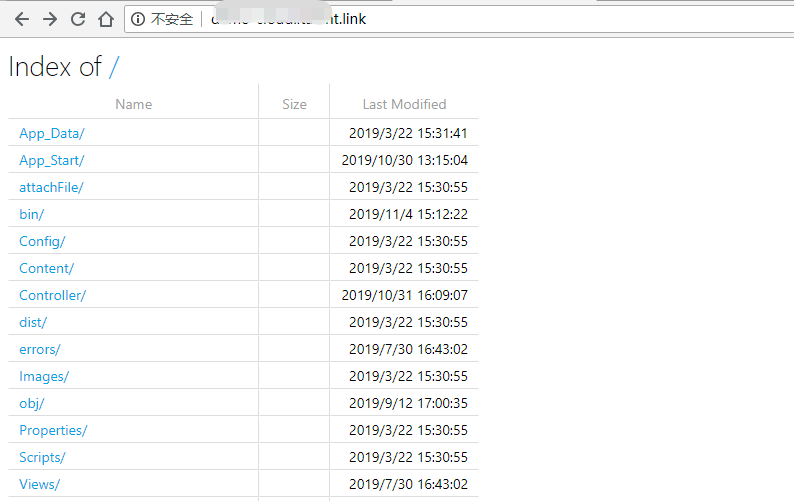
效果:
参考:https://chris.59north.com/post/What-is-OWIN-and-what-is-it-doing-in-my-new-ASPNET-MVC-project
https://mirkomaggioni.com/2016/09/11/owin-middleware-for-static-files/
https://odetocode.com/blogs/scott/archive/2014/02/10/building-a-simple-file-server-with-owin-and-katana.aspx
https://github.com/aspnet/AspNetKatana/tree/dev/src
https://beginor.github.io/2015/12/28/owin-static-file-middleware.html
http://johnatten.com/2015/01/04/asp-net-understanding-owin-katana-and-the-middleware-pipeline/
Microsoft.Owin 使用 文件服务的更多相关文章
- Microsoft.Owin.Security.OAuth搭建OAuth2.0授权服务端
Microsoft.Owin.Security.OAuth搭建OAuth2.0授权服务端 目录 前言 OAuth2.0简介 授权模式 (SimpleSSO示例) 使用Microsoft.Owin.Se ...
- SimpleSSO:使用Microsoft.Owin.Security.OAuth搭建OAuth2.0授权服务端
目录 前言 OAuth2.0简介 授权模式 (SimpleSSO示例) 使用Microsoft.Owin.Security.SimpleSSO模拟OpenID认证 通过authorization co ...
- windows service承载的web api宿主搭建(Microsoft.Owin+service)
今天突然想起改良一下以前搭建的“windows service承载的web api”服务,以前也是直接引用的类库,没有使用nuget包,时隔几年应该很旧版本了吧.所以本次把需要nuget获取的包记录一 ...
- 中国版Azure 文件服务
中国版Azure 文件服务预览版在2015年1月13日已经上线,文件存储使用标准SMB 2.1协议为应用程序提供共享存储. 当我们的虚拟机连接到文件共享后就可以像使用本地共享文件夹一样来读取和写入文件 ...
- 扩展 Microsoft.Owin.Security
微软在 OWIN 框架中对 OAuth 认证的支持非常好, 使用现有的 OWIN 中间件可以做到: 使用 Microsoft.Owin.Security.OAuth 搭建自己的 OAuth2 服务端, ...
- 外网远程顶级域名连接群晖的WebDAV文件服务映射盘符
外网远程顶级域名连接群晖的WebDAV文件服务映射盘符 https://www.cnblogs.com/delphixx/p/11846546.html 电子文件管理规范 1.手机拍照截屏 ...
- Microsoft.Owin.Hosting 实现启动webapp.dll
Microsoft.Owin.Hosting 下面是 asp.net core 实现 using System;using System.Collections.Generic;using Syste ...
- Microsoft Azure 负载平衡服务
Microsoft Azure 为在其中托管的虚拟机(IaaS) 和云服务(PaaS) 提供负载平衡服务.负载平衡支持应用程序伸缩,并且提供应用程序故障恢复以及其他优势. 可以通过以下方式访问负 ...
- Linux 文件服务---------- nfs Server
Linux 文件服务nfs (Network file system)#网络文件系统 ---> 远程文件调用samba #文件共享(unix /linux /windows ) ,只能适用于局域 ...
随机推荐
- Java 堆内存 新生代 (转)
Java 中的堆是 JVM 所管理的最大的一块内存空间,主要用于存放各种类的实例对象.在 Java 中,堆被划分成两个不同的区域:新生代 ( Young ).老年代 ( Old ).新生代 ( You ...
- pandas 之 group by 过程
import numpy as np import pandas as pd Categorizing a dataset and applying a function to each group ...
- PAT 乙级 1013.数素数 C++/Java
题目来源 令 Pi 表示第 i 个素数.现任给两个正整数 M≤N≤104,请输出 PM 到 PN 的所有素数. 输入格式: 输入在一行中给出 M 和 N,其间以空格分隔. 输出 ...
- Zipkin 知识点
在Spring Cloud D版本,zipkin-server通过引入依赖的方式构建工程,自从E版本之后,这一方式改变了,采用官方的jar形式启动. 出处:https://juejin.im/post ...
- Spring Boot 之:Actuator 监控
在 Spring Boot 2.x 中为了安全,Actuator 只开放了两个端点 /actuator/health 和 /actuator/info.可以在配置文件中设置打开. Actuator 默 ...
- 20180516模拟赛T2——string
题解 对于一个字符串A,我们只能把其首字符取出,故如果我们想让A串与B串相等,能重复利用的部分只能是A串结尾与B串开头相等的部分.对于取出的字符,我们可以把'o'放在一个容器中,把'x'放在另一个容器 ...
- 【坑】【数组的坑】1、对象assign复制的假深度,2、数组slice复制的坑,3、还有数组map复制的坑
1.对象复制的坑 Object.assign() Object.assign() //浅复制 基本没用 跟直接用= 一样 Object.assign(true,{}) // 以为是深拷贝,其实只是一级 ...
- js沉思录一:js的核心概念
js的核心概念: 原型.对象(Object).函数(Function); 原型:路由路径上非叶子结点的对象: 对象:无序属性(包括函数)的集合: 函数:函数上下文的集合: 原型: 原型的创建.指定.修 ...
- 优化sql技巧
当表很大的时候可以设计冗余字段,避免与大表连表查询造成性能低下 比如日志表和用户表,日志表通常到后期会相当的大可以做一个username的冗余字段,避免查看username的时候去和user表关联 当 ...
- JS的ES5的扩展内容
JS的ES5 1.严格模式: (1)什么是严格模式: 在全局或函数的第一条语句定义为: 'use strict' 如果浏览器不支持, 只解析为一条简单的语句, 没有任何副作用 (2)严格模式作用: ...