
Gerrit 服务器入门使用-项目的创建与克隆
Gerrit 服务器入门使用-项目的创建与克隆
作者:尹正杰
版权声明:原创作品,谢绝转载!否则将追究法律责任。
一.创建克隆项目
1>.点击"BROWSE"
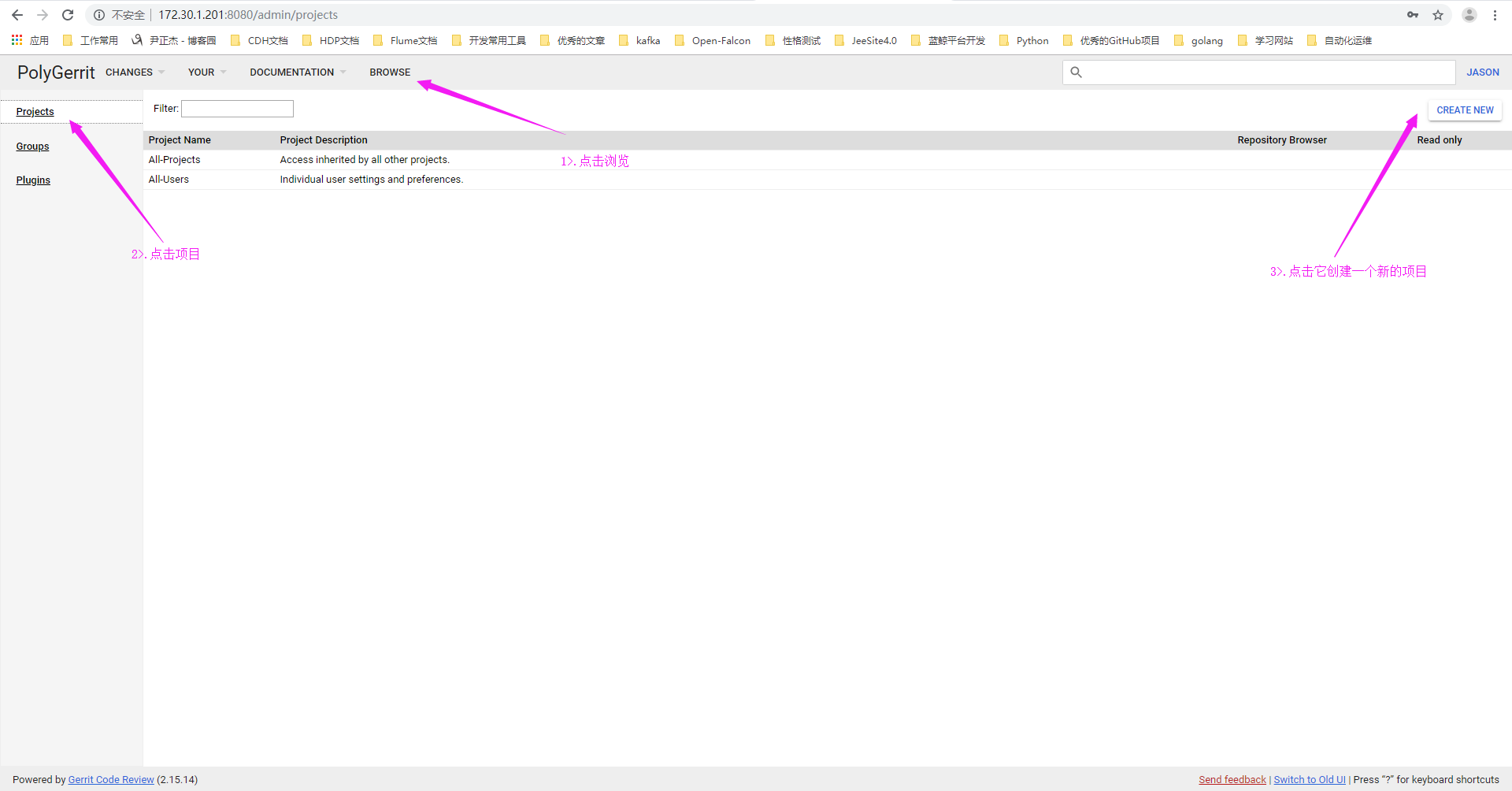
2>.点击"CREATE NEW"
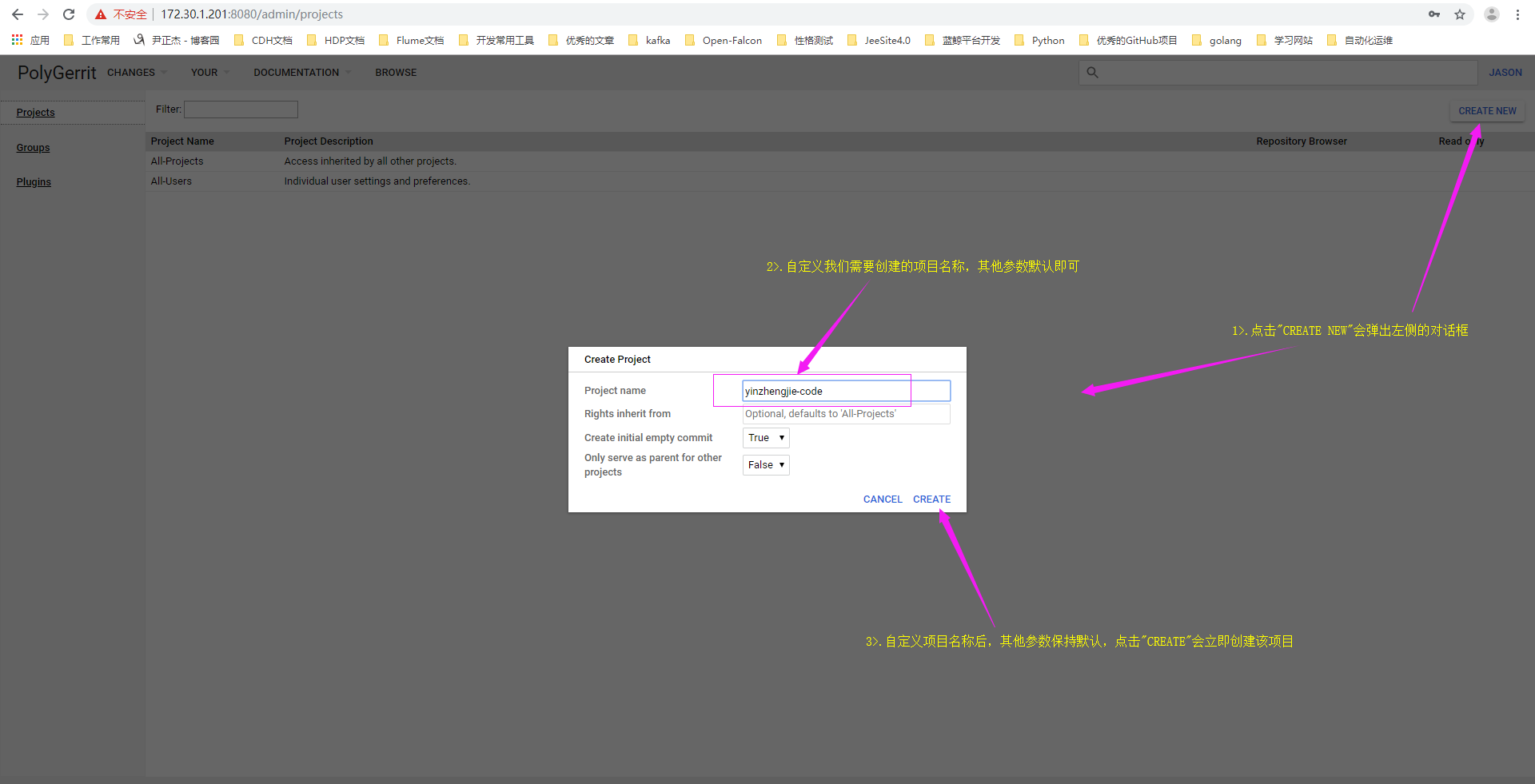
3>.项目创建成功
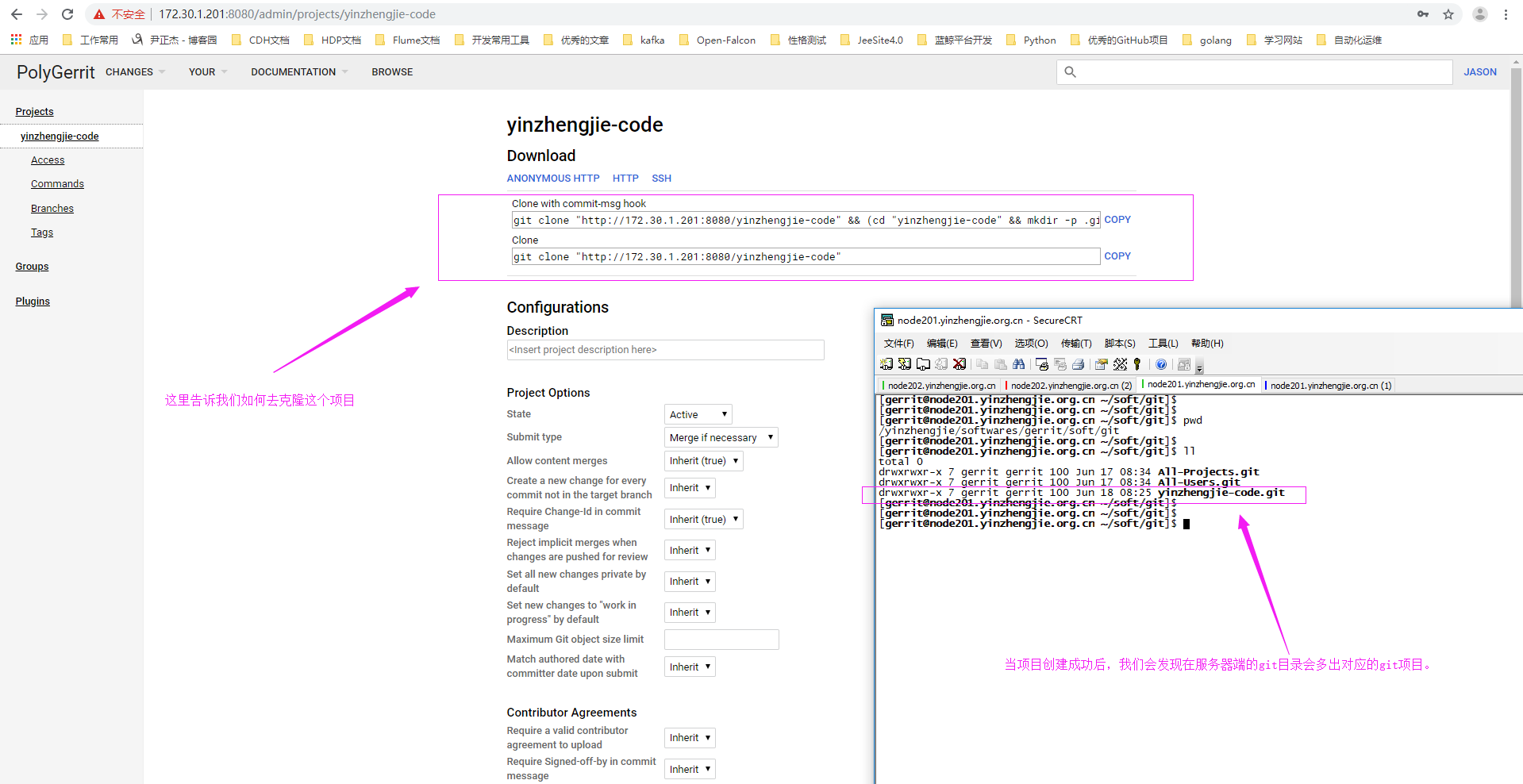
二.基于HTTP方式克隆项目
1>.克隆项目
[gerrit@node201.yinzhengjie.org.cn ~]$

[gerrit@node201.yinzhengjie.org.cn ~]$ ll

total

drwxrwxr-x  gerrit gerrit  Jun  : soft

[gerrit@node201.yinzhengjie.org.cn ~]$

[gerrit@node201.yinzhengjie.org.cn ~]$

[gerrit@node201.yinzhengjie.org.cn ~]$ git clone "http://172.30.1.201:8080/yinzhengjie-code"

Cloning into 'yinzhengjie-code'...

remote: Counting objects: , done

remote: Finding sources: % (/)

remote: Total  (delta ), reused  (delta )

Unpacking objects: % (/), done.

[gerrit@node201.yinzhengjie.org.cn ~]$

[gerrit@node201.yinzhengjie.org.cn ~]$ ll

total

drwxrwxr-x  gerrit gerrit  Jun  : soft

drwxrwxr-x   gerrit gerrit   Jun  : yinzhengjie-code

[gerrit@node201.yinzhengjie.org.cn ~]$

[gerrit@node201.yinzhengjie.org.cn ~]$ ll yinzhengjie-code/

total

[gerrit@node201.yinzhengjie.org.cn ~]$

[gerrit@node201.yinzhengjie.org.cn ~]$
2>.查看Gerrit的用户名
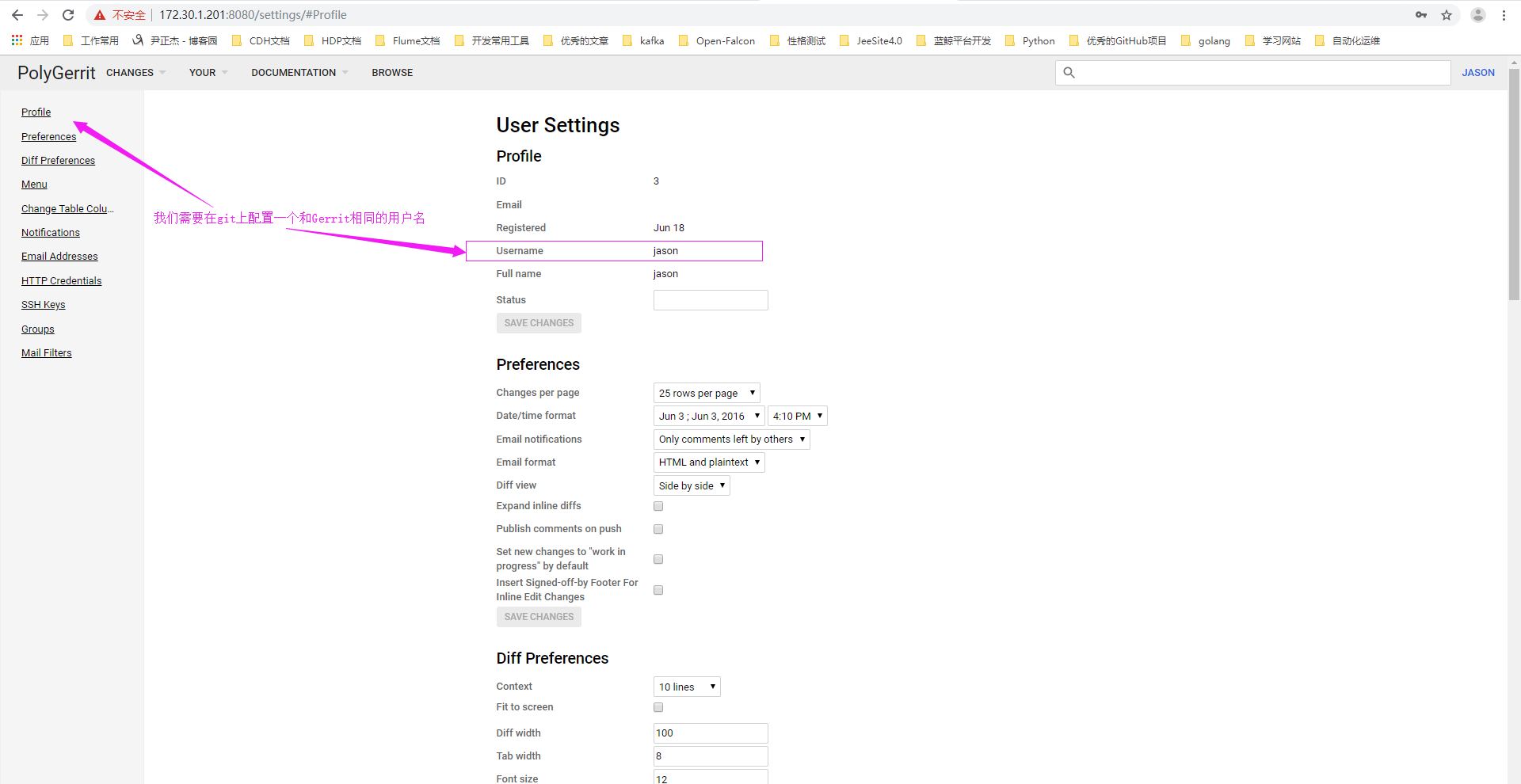
3>.在git上配置和Gerrit上存在的用户名和邮箱(要进入到已经克隆的项目中)
[gerrit@node201.yinzhengjie.org.cn ~]$ ll

total

drwxrwxr-x  gerrit gerrit  Jun  : soft

drwxrwxr-x   gerrit gerrit   Jun  : yinzhengjie-code

[gerrit@node201.yinzhengjie.org.cn ~]$ cd yinzhengjie-code/

[gerrit@node201.yinzhengjie.org.cn ~/yinzhengjie-code]$

[gerrit@node201.yinzhengjie.org.cn ~/yinzhengjie-code]$ git config user.name "jason"

[gerrit@node201.yinzhengjie.org.cn ~/yinzhengjie-code]$

[gerrit@node201.yinzhengjie.org.cn ~/yinzhengjie-code]$ git config user.email "y1053419035@qq.com"

[gerrit@node201.yinzhengjie.org.cn ~/yinzhengjie-code]$
4>.下载commit-msg
[gerrit@node201.yinzhengjie.org.cn ~/yinzhengjie-code]$ curl -Lo .git/hooks/commit-msg http://172.30.1.201:8080/tools/hooks/commit-msg

  % Total    % Received % Xferd  Average Speed   Time    Time     Time  Current

                                 Dload  Upload   Total   Spent    Left  Speed

                 2119k       --:--:-- --:--:-- --:--:-- 2334k

[gerrit@node201.yinzhengjie.org.cn ~/yinzhengjie-code]$
三.通过ssh方式克隆项目
1>.创建密钥
[root@node203.yinzhengjie.org.cn ~]# ssh-keygen -t rsa -P '' -f ~/.ssh/id_rsa

Generating public/private rsa key pair.

Your identification has been saved in /root/.ssh/id_rsa.

Your public key has been saved in /root/.ssh/id_rsa.pub.

The key fingerprint is:

SHA256:jjm9d783Ac7qfftXmgCPRmI6fJ/5yf74YHZSi4ofw7I root@node203.yinzhengjie.org.cn

The key's randomart image is:

+---[RSA ]----+

|                 |

|                 |

|                 |

|        o o  .   |

|     . oSo +o o  |

|      +=..o o= o.|

|      +o+o+oB.ooo|

|       . ==Oo*ooo|

|        Eo+=*=*+*|

+----[SHA256]-----+

[root@node203.yinzhengjie.org.cn ~]#
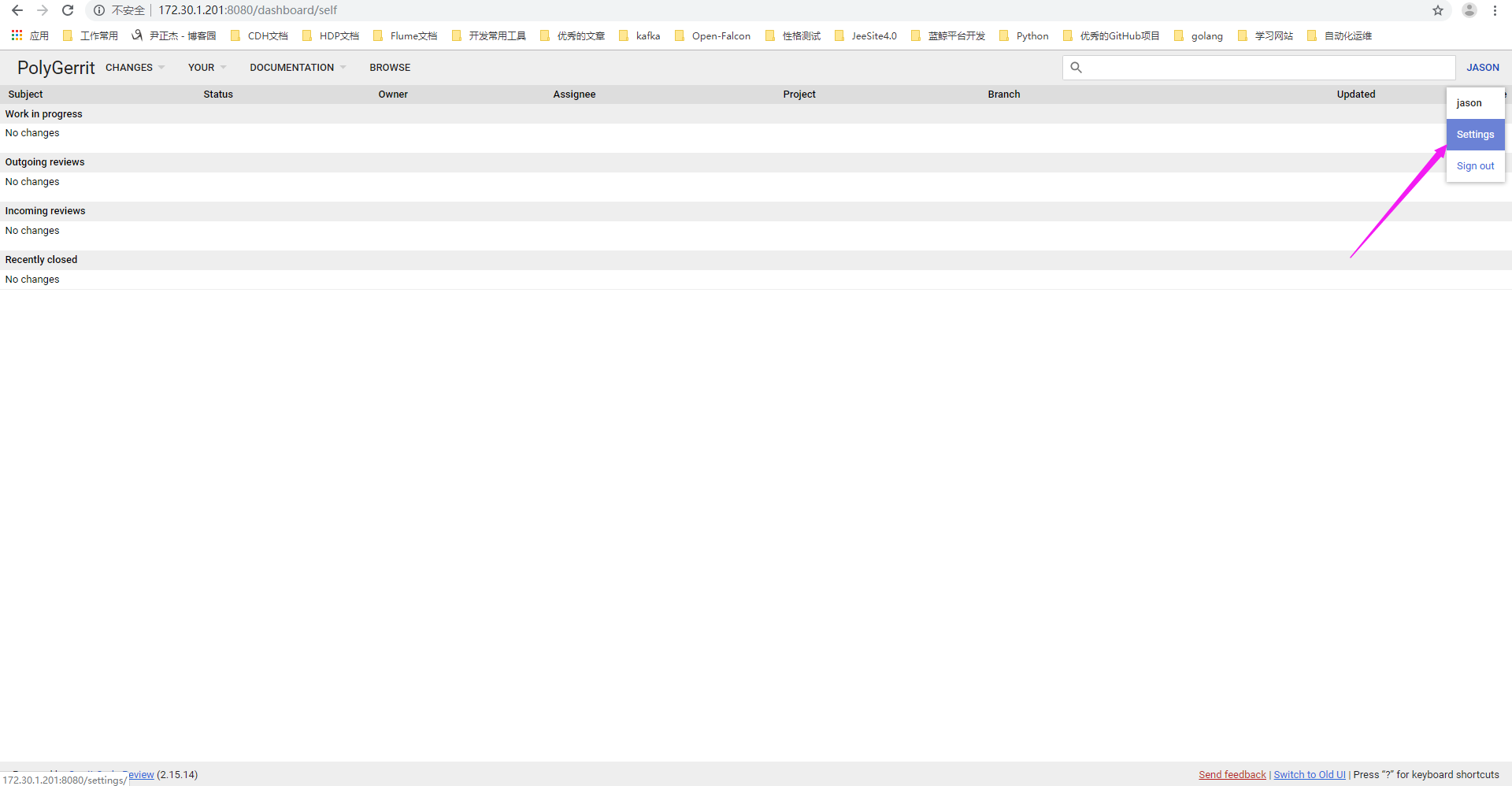
2>.点击设置
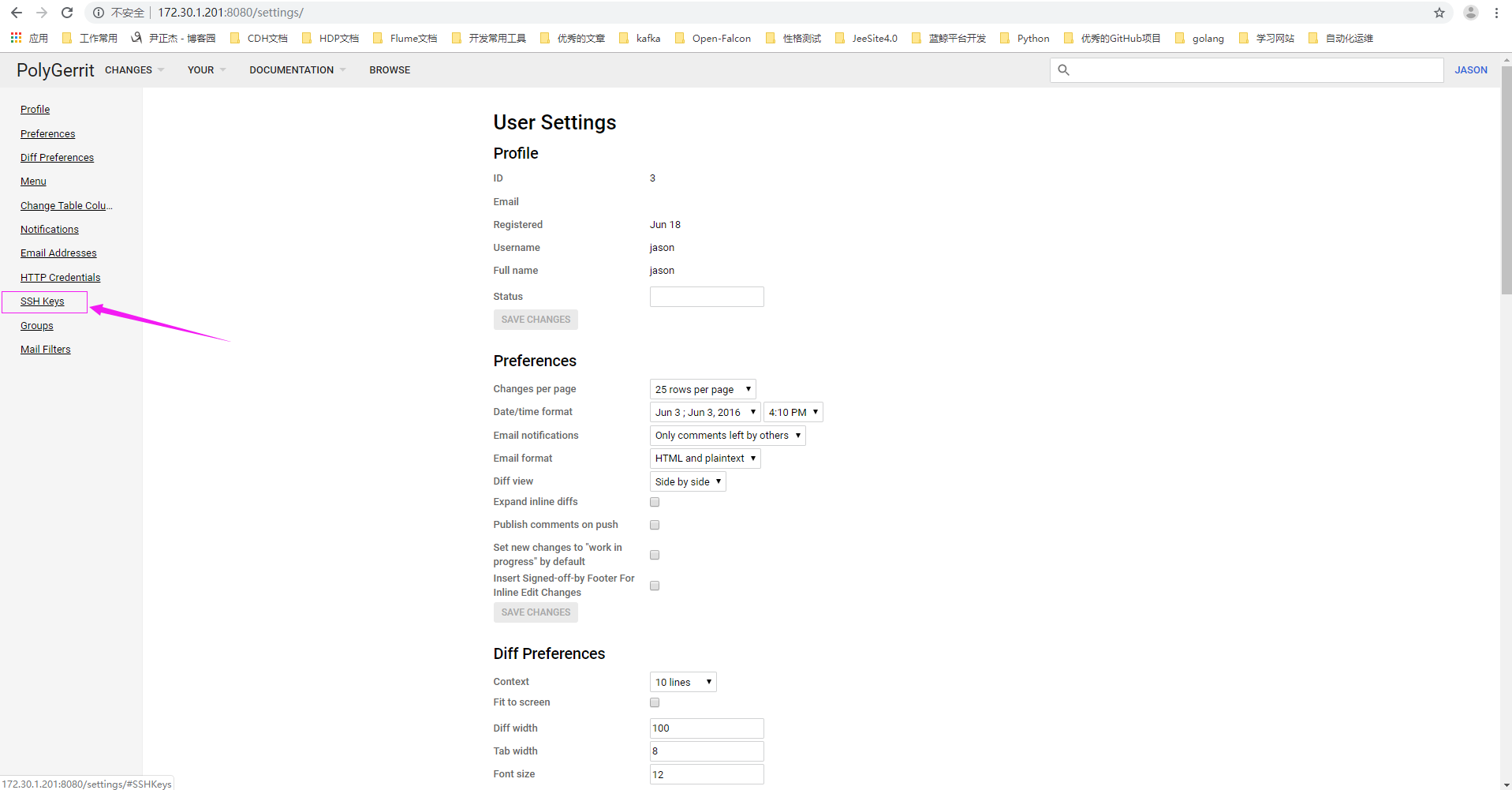
3>.点击“SSH Keys”
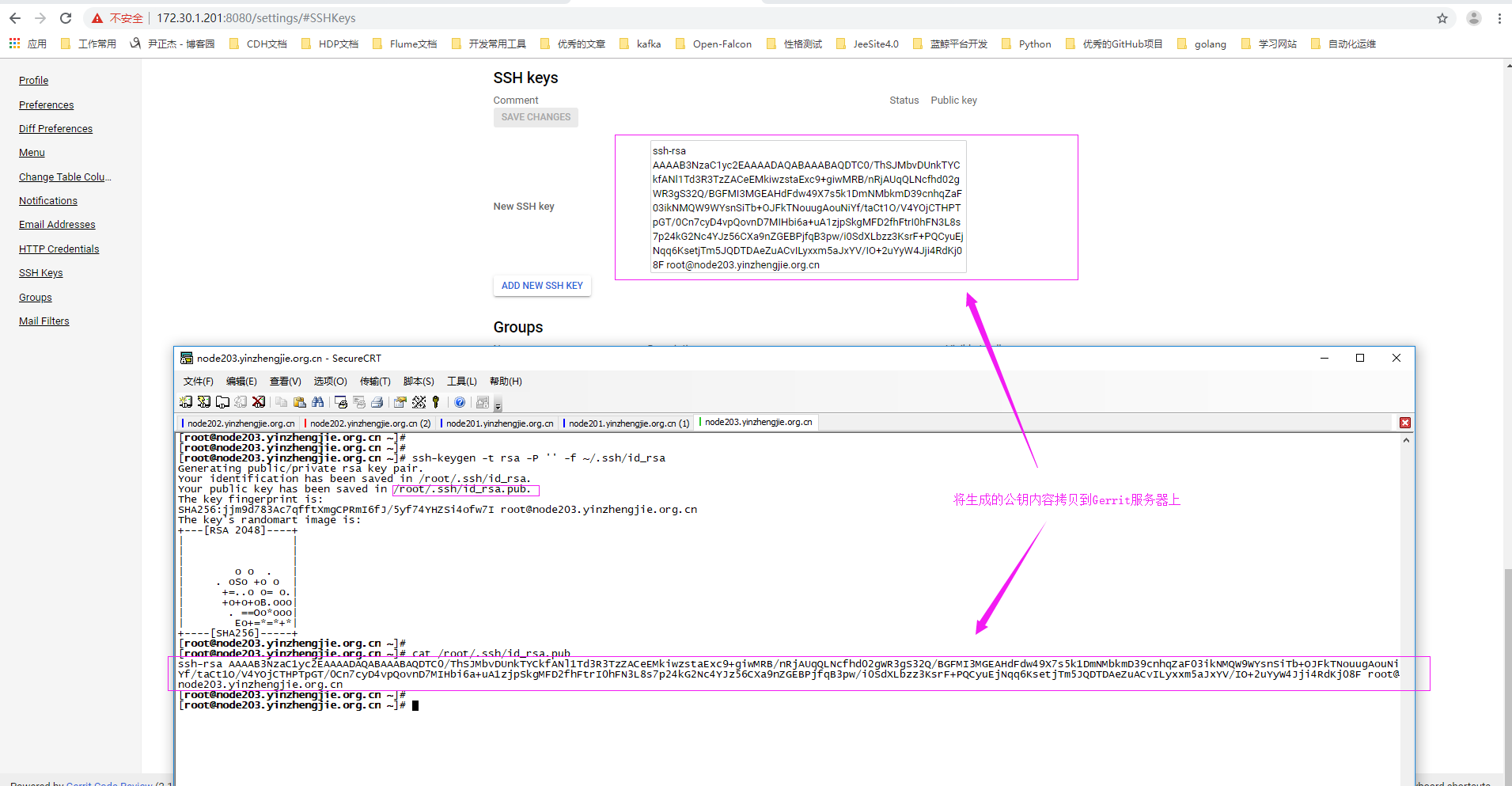
4>.点击"SSH keys",将公钥拷贝到Gerrit上后点击"ADD NEW SSH KEY"
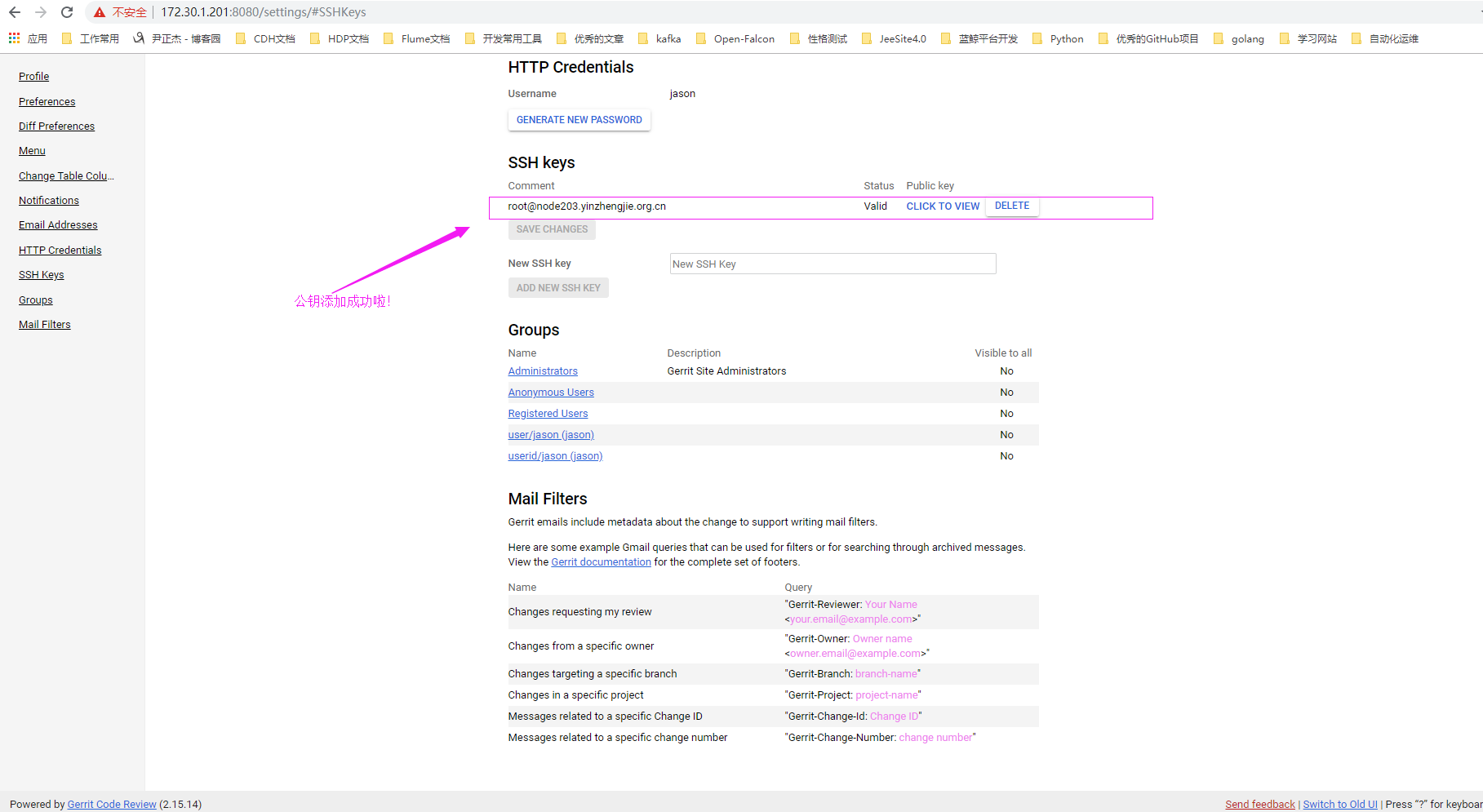
5>.公钥添加成功
6>.查看ssh的克隆命令
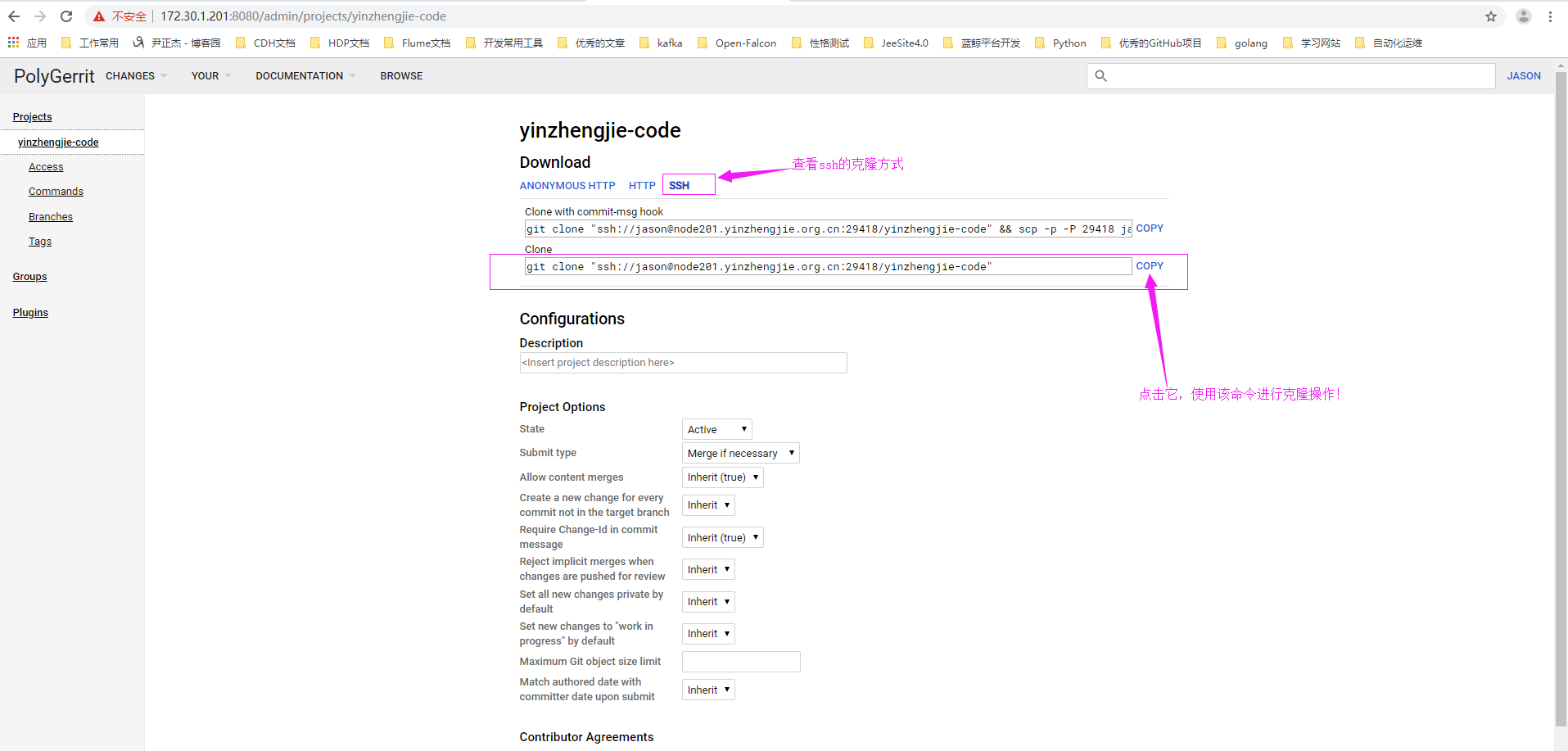
7>.使用ssh的方式克隆代码
[root@node203.yinzhengjie.org.cn ~]# ll

total

[root@node203.yinzhengjie.org.cn ~]#

[root@node203.yinzhengjie.org.cn ~]# git clone "ssh://jason@node201.yinzhengjie.org.cn:29418/yinzhengjie-code"

Cloning into 'yinzhengjie-code'...

The authenticity of host '[node201.yinzhengjie.org.cn]:29418 ([172.30.1.201]:29418)' can't be established.

ECDSA key fingerprint is SHA256:Mx8JcnxxxM/b99YiBG6+S8JP8Q12GNFYz0g/+YO4c0.

ECDSA key fingerprint is MD5:c0:2a:ae::::7b:fb::b3:e8:a5:d9:::6a.

Are you sure you want to continue connecting (yes/no)? yes

Warning: Permanently added '[node201.yinzhengjie.org.cn]:29418,[172.30.1.201]:29418' (ECDSA) to the list of known hosts.

remote: Counting objects: , done

remote: Finding sources: % (/)

remote: Total  (delta ), reused  (delta )

Receiving objects: % (/), done.

[root@node203.yinzhengjie.org.cn ~]#

[root@node203.yinzhengjie.org.cn ~]# ll

total

drwxr-xr-x  root root  Jun  : yinzhengjie-code

[root@node203.yinzhengjie.org.cn ~]#

[root@node203.yinzhengjie.org.cn ~]# ll yinzhengjie-code/

total

[root@node203.yinzhengjie.org.cn ~]#

[root@node203.yinzhengjie.org.cn ~]#
8>.使用另一种方式进行克隆
[root@node203.yinzhengjie.org.cn ~]# ssh -p  jason@172.30.1.201

  ****    Welcome to Gerrit Code Review    ****

  Hi jason, you have successfully connected over SSH.

  Unfortunately, interactive shells are disabled.

  To clone a hosted Git repository, use:

  git clone ssh://jason@node201.yinzhengjie.org.cn:29418/REPOSITORY_NAME.git        #我们根据提示,这种克隆方式也是ok的

Connection to 172.30.1.201 closed.

[root@node203.yinzhengjie.org.cn ~]#
Gerrit 服务器入门使用-项目的创建与克隆的更多相关文章
- WPF入门教程系列(一) 创建你的第一个WPF项目
WPF入门教程系列(一) 创建你的第一个WPF项目 WPF基础知识 快速学习绝不是从零学起的,良好的基础是快速入手的关键,下面先为大家摞列以下自己总结的学习WPF的几点基础知识: 1) C#基础语法知 ...
- 大数据入门:Maven项目的创建及相关配置
目录 Maven项目的创建及相关配置 一.Maven的介绍 1.Maven是什么: 2.Maven作用: 3.Maven项目的目录结构: 4.Maven的三点坐标: 5.maven的pom文件: 6. ...
- 【CuteJavaScript】Angular6入门项目(1.构建项目和创建路由)
本文目录 一.项目起步 二.编写路由组件 三.编写页面组件 1.编写单一组件 2.模拟数据 3.编写主从组件 四.编写服务 1.为什么需要服务 2.编写服务 五.引入RxJS 1.关于RxJS 2.引 ...
- Django---Http协议简述和原理,HTTP请求码,HTTP请求格式和响应格式(重点),Django的安装与使用,Django项目的创建和运行(cmd和pycharm两种模式),Django的基础文件配置,Web框架的本质,服务器程序和应用程序(wsgiref服务端模块,jinja2模板渲染模块)的使用
Django---Http协议简述和原理,HTTP请求码,HTTP请求格式和响应格式(重点),Django的安装与使用,Django项目的创建和运行(cmd和pycharm两种模式),Django的基 ...
- Cocos从入门到精通--《创建第一个项目:HelloWorld》
上节课我们解说了cocos2-x v3.7版本号的下载安装,也展示了使用CocosStudio编译不同平台运行程序的方法,大家是不是对新版本号的Cocos引擎充满期待?今天我们就创建一个project ...
- Gerrit服务器权限管理
Gerrit服务器权限管理 作者:尹正杰 版权声明:原创作品,谢绝转载!否则将追究法律责任. 一.Gerrit权限概述 1>.对象 Gerrit识别单个或多个人员集合. Gerrit不允许使用单 ...
- Python编程:从入门到项目实践高清版附PDF百度网盘免费下载|Python入门编程免费领取
百度网盘:Python编程:从入门到项目实践高清版附PDF免费下载 提取码:oh2g 第一部分 基础知识第1章 起步 21.1 搭建编程环境 21.1.1 Python 2和Python 3 21 ...
- 如何搭建开源code review gerrit服务器
搭建环境:Ubuntu 14.04 一.环境准备 1.Java环境 gerrit依赖,用于安装gerrit环境. 下载:jdk-7u79-linux-x64.tar.gz http://www.ora ...
- Intellij Idea系列之JavaSE项目的创建(一)
Intellij Idea系列之JavaSE项目的创建(一) 一.Intellij Idea于 Intellij Idea是捷克的Jetbrain公司的一款优秀的针对Java程序员的IDE,其自从问世 ...
随机推荐
- 上传下载execl
ajax上传execl + easyexecl解析execl <!DOCTYPE html> <html> <head> <meta charset=&quo ...
- microsoft vs code 绿化
下载地址: https://code.visualstudio.com/#alt-downloads 各个版本比较 User Installer System Installer .zip resou ...
- nginx+tomcat报400的坑
nginx+tomcat的网页,在手机上通过浏览器可以正常访问,但是在自己的app的webview中访问就报400.查了访问日志,每次app中访问该页面,tomcat中就出现一个GET null的申请 ...
- [转]Mathjax语法总结
链接地址:https://blog.csdn.net/ajacker/article/details/80301378
- 修改Window服务器虚拟内存位置
系统采用的是windows server2008操作系统,硬件部门在分配磁盘的时候C盘只有50G,其中虚拟内存就占用了30G,再除去操作系统占用空间,可用自由支配空间较小,会出现在部分异常情况下C盘占 ...
- [K8s] Kubernetes 是什么 不是什么
现在有三种部署方式,传统物理机部署.虚拟机部署.容器化部署. 我们现在所使用的云上服务器一般都是虚拟化出来的,硬件资源独立,操作系统等软件资源亦独立. 容器化的好处是更轻量,复用下层的操作系统,相当于 ...
- Python unittest(PyUnit)单元测试框架
PyUnit(unittest) 是 Python 自带的单元测试框架,用于编写和运行可重复的测试.PyUnit 是 xUnit 体系的一个成员,xUnit 是众多测试框架的总称,PyUnit 主要用 ...
- time 库
time 库的三类函数 时间获取: >>> import time >>> time.time() 1570150181.4052463#单位为秒 >> ...
- C语言提高内容目录
(1)基础 数据类型和变量 内存四区(栈 堆 全局 代码区) (2)指针和字符串操作 指针强化 字符串的基本操作 字符串一级指针内存模型图 字符串做为函数参数 (3)二级指针多级指针 二级指针的输入输 ...
- (十二)一个简单的pdf文件体
%PDF-1.0 % 文件头,说明符合PDF1.0规范 1 0 obj %对象号 产生号(修改次数) ...