
netty5拆包问题解决实例
基于之前的例子(参见netty5自定义私有协议实例),我们修改下客户端handler,让发送的数据超过1024字节:
NettyClientHandler:
    /**

     * 构造PCM请求消息体

     *

     * @return

     */

    private byte[] buildPcmData() throws Exception {

        byte[] resultByte = longToBytes(System.currentTimeMillis());

        // 读取一个本地文件

        String AUDIO_PATH = "D:\\input\\test_1.pcm";

        try (RandomAccessFile raf = new RandomAccessFile(AUDIO_PATH, "r")) {

            byte[] content = new byte[1024];

            raf.read(content);

            resultByte = addAll(resultByte, content);

        }

        return resultByte;

    }

    /**

     * 将两个数组合并起来

     * @param array1

     * @param array2

     * @return

     */

    private byte[] addAll(byte[] array1, byte... array2) {

        byte[] joinedArray = new byte[array1.length + array2.length];

        System.arraycopy(array1, 0, joinedArray, 0, array1.length);

        System.arraycopy(array2, 0, joinedArray, array1.length, array2.length);

        return joinedArray;

    }
原来发送一个8字节的long型当前时间,现在我们加上一个音频文件(你也可以用文本文件)读取到的1024字节二进制流,现在data数据包的总大小是8+1024=1032字节,再加上消息头的10字节,整个客户端二进制流是1042字节。再跑下,只能看到客户端打印了日志,不见服务端日志有啥输出了:
10:41:28.150 [nioEventLoopGroup-1-0] INFO com.wlf.netty.nettyclient.handler.NettyClientHandler - [client] client send data : NettyMessage{header=Header{delimiter=-1410399999, length=1032, type=1, reserved=0}, data=[B@7e29c808}
为啥呢?让我们来debug下NettyMessageDecoder的decode方法,打上端点,用debug模式重起服务端,客户端也需重启:
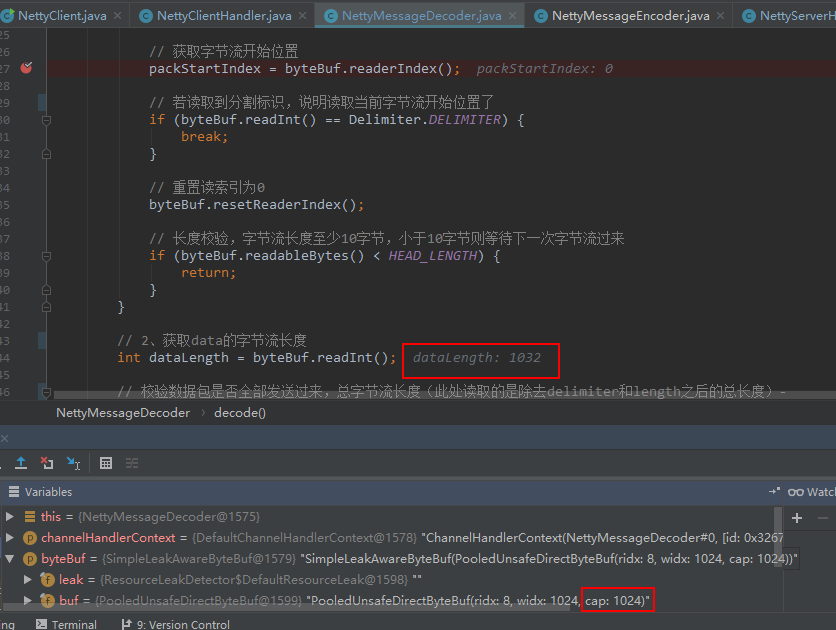
从上图可以看到,服务端每次请求能接收的最大字节流是1024,而我们实际上是整个包是1044字节,所以拆包了。继续debug下去,你会发现第二次请求过来的是剩下的18个字节:

而且你会发现死循环了,程序一直在while里转圈圈,因为第二次发送过来的只是data数据包里剩下的18个字节,没有消息头,满足不了break或者return的条件。既然这里无法解决拆包的问题,那么我们只能另寻他路了。最简单的办法是拿来主义,netty自带的粘包拆包解决方案有4种:固定包大小、指定包大小、固定以换行符结束、指定标志结束。结合我们的这里的场景,我们的消息头里已经有包大小,那么采用第二种方案是最理所当然的选择了。
怎么使用方案二?既然数据包长度我们已经包含在消息头中发送出去,那么就没必要再通过LengthFieldPrepender来计算整个大包(包括消息头)大小并追加一个长度字段来在外面包一层,我们只需通过LengthFieldBasedFrameDecoder来解码即可。那么LengthFieldBasedFrameDecoder怎么解码的?可参考它的源码介绍:
/**

 * A decoder that splits the received {@link ByteBuf}s dynamically by the

 * value of the length field in the message.  It is particularly useful when you

 * decode a binary message which has an integer header field that represents the

 * length of the message body or the whole message.

 * <p>

 * {@link LengthFieldBasedFrameDecoder} has many configuration parameters so

 * that it can decode any message with a length field, which is often seen in

 * proprietary client-server protocols. Here are some example that will give

 * you the basic idea on which option does what.

 *

 * <h3>2 bytes length field at offset 0, do not strip header</h3>

 *

 * The value of the length field in this example is <tt>12 (0x0C)</tt> which

 * represents the length of "HELLO, WORLD".  By default, the decoder assumes

 * that the length field represents the number of the bytes that follows the

 * length field.  Therefore, it can be decoded with the simplistic parameter

 * combination.

 * <pre>

 * <b>lengthFieldOffset</b>   = <b>0</b>

 * <b>lengthFieldLength</b>   = <b>2</b>

 * lengthAdjustment    = 0

 * initialBytesToStrip = 0 (= do not strip header)

 *

 * BEFORE DECODE (14 bytes)         AFTER DECODE (14 bytes)

 * +--------+----------------+      +--------+----------------+

 * | Length | Actual Content |----->| Length | Actual Content |

 * | 0x000C | "HELLO, WORLD" |      | 0x000C | "HELLO, WORLD" |

 * +--------+----------------+      +--------+----------------+

 * </pre>

 *

 * <h3>2 bytes length field at offset 0, strip header</h3>

 *

 * Because we can get the length of the content by calling

 * {@link ByteBuf#readableBytes()}, you might want to strip the length

 * field by specifying <tt>initialBytesToStrip</tt>.  In this example, we

 * specified <tt>2</tt>, that is same with the length of the length field, to

 * strip the first two bytes.

 * <pre>

 * lengthFieldOffset   = 0

 * lengthFieldLength   = 2

 * lengthAdjustment    = 0

 * <b>initialBytesToStrip</b> = <b>2</b> (= the length of the Length field)

 *

 * BEFORE DECODE (14 bytes)         AFTER DECODE (12 bytes)

 * +--------+----------------+      +----------------+

 * | Length | Actual Content |----->| Actual Content |

 * | 0x000C | "HELLO, WORLD" |      | "HELLO, WORLD" |

 * +--------+----------------+      +----------------+

 * </pre>

 *

 * <h3>2 bytes length field at offset 0, do not strip header, the length field

 *     represents the length of the whole message</h3>

 *

 * In most cases, the length field represents the length of the message body

 * only, as shown in the previous examples.  However, in some protocols, the

 * length field represents the length of the whole message, including the

 * message header.  In such a case, we specify a non-zero

 * <tt>lengthAdjustment</tt>.  Because the length value in this example message

 * is always greater than the body length by <tt>2</tt>, we specify <tt>-2</tt>

 * as <tt>lengthAdjustment</tt> for compensation.

 * <pre>

 * lengthFieldOffset   =  0

 * lengthFieldLength   =  2

 * <b>lengthAdjustment</b>    = <b>-2</b> (= the length of the Length field)

 * initialBytesToStrip =  0

 *

 * BEFORE DECODE (14 bytes)         AFTER DECODE (14 bytes)

 * +--------+----------------+      +--------+----------------+

 * | Length | Actual Content |----->| Length | Actual Content |

 * | 0x000E | "HELLO, WORLD" |      | 0x000E | "HELLO, WORLD" |

 * +--------+----------------+      +--------+----------------+

 * </pre>

 *

 * <h3>3 bytes length field at the end of 5 bytes header, do not strip header</h3>

 *

 * The following message is a simple variation of the first example.  An extra

 * header value is prepended to the message.  <tt>lengthAdjustment</tt> is zero

 * again because the decoder always takes the length of the prepended data into

 * account during frame length calculation.

 * <pre>

 * <b>lengthFieldOffset</b>   = <b>2</b> (= the length of Header 1)

 * <b>lengthFieldLength</b>   = <b>3</b>

 * lengthAdjustment    = 0

 * initialBytesToStrip = 0

 *

 * BEFORE DECODE (17 bytes)                      AFTER DECODE (17 bytes)

 * +----------+----------+----------------+      +----------+----------+----------------+

 * | Header 1 |  Length  | Actual Content |----->| Header 1 |  Length  | Actual Content |

 * |  0xCAFE  | 0x00000C | "HELLO, WORLD" |      |  0xCAFE  | 0x00000C | "HELLO, WORLD" |

 * +----------+----------+----------------+      +----------+----------+----------------+

 * </pre>

 *

 * <h3>3 bytes length field at the beginning of 5 bytes header, do not strip header</h3>

 *

 * This is an advanced example that shows the case where there is an extra

 * header between the length field and the message body.  You have to specify a

 * positive <tt>lengthAdjustment</tt> so that the decoder counts the extra

 * header into the frame length calculation.

 * <pre>

 * lengthFieldOffset   = 0

 * lengthFieldLength   = 3

 * <b>lengthAdjustment</b>    = <b>2</b> (= the length of Header 1)

 * initialBytesToStrip = 0

 *

 * BEFORE DECODE (17 bytes)                      AFTER DECODE (17 bytes)

 * +----------+----------+----------------+      +----------+----------+----------------+

 * |  Length  | Header 1 | Actual Content |----->|  Length  | Header 1 | Actual Content |

 * | 0x00000C |  0xCAFE  | "HELLO, WORLD" |      | 0x00000C |  0xCAFE  | "HELLO, WORLD" |

 * +----------+----------+----------------+      +----------+----------+----------------+

 * </pre>

 *

 * <h3>2 bytes length field at offset 1 in the middle of 4 bytes header,

 *     strip the first header field and the length field</h3>

 *

 * This is a combination of all the examples above.  There are the prepended

 * header before the length field and the extra header after the length field.

 * The prepended header affects the <tt>lengthFieldOffset</tt> and the extra

 * header affects the <tt>lengthAdjustment</tt>.  We also specified a non-zero

 * <tt>initialBytesToStrip</tt> to strip the length field and the prepended

 * header from the frame.  If you don't want to strip the prepended header, you

 * could specify <tt>0</tt> for <tt>initialBytesToSkip</tt>.

 * <pre>

 * lengthFieldOffset   = 1 (= the length of HDR1)

 * lengthFieldLength   = 2

 * <b>lengthAdjustment</b>    = <b>1</b> (= the length of HDR2)

 * <b>initialBytesToStrip</b> = <b>3</b> (= the length of HDR1 + LEN)

 *

 * BEFORE DECODE (16 bytes)                       AFTER DECODE (13 bytes)

 * +------+--------+------+----------------+      +------+----------------+

 * | HDR1 | Length | HDR2 | Actual Content |----->| HDR2 | Actual Content |

 * | 0xCA | 0x000C | 0xFE | "HELLO, WORLD" |      | 0xFE | "HELLO, WORLD" |

 * +------+--------+------+----------------+      +------+----------------+

 * </pre>

 *

 * <h3>2 bytes length field at offset 1 in the middle of 4 bytes header,

 *     strip the first header field and the length field, the length field

 *     represents the length of the whole message</h3>

 *

 * Let's give another twist to the previous example.  The only difference from

 * the previous example is that the length field represents the length of the

 * whole message instead of the message body, just like the third example.

 * We have to count the length of HDR1 and Length into <tt>lengthAdjustment</tt>.

 * Please note that we don't need to take the length of HDR2 into account

 * because the length field already includes the whole header length.

 * <pre>

 * lengthFieldOffset   =  1

 * lengthFieldLength   =  2

 * <b>lengthAdjustment</b>    = <b>-3</b> (= the length of HDR1 + LEN, negative)

 * <b>initialBytesToStrip</b> = <b> 3</b>

 *

 * BEFORE DECODE (16 bytes)                       AFTER DECODE (13 bytes)

 * +------+--------+------+----------------+      +------+----------------+

 * | HDR1 | Length | HDR2 | Actual Content |----->| HDR2 | Actual Content |

 * | 0xCA | 0x0010 | 0xFE | "HELLO, WORLD" |      | 0xFE | "HELLO, WORLD" |

 * +------+--------+------+----------------+      +------+----------------+

 * </pre>

 * @see LengthFieldPrepender

 */
巴拉巴拉举了7个例子,对我们这个场景来说,具有参考价值的是最后一个例子,但它解码后的东西不是我们想要的,我们要的是整个大包里的东西。我们要的参数值如下:
lengthFieldOffset = 4 (长度字段的偏差,因为Delimiter长度为4字节,所以偏移量为0+4=4)
lengthFieldLength = 4 (长度字段占的字节数,Length大小为4个字节)
lengthAdjustment = 2 (长度字段后面到消息体之间的字节数,Type+Reserved=2)
initialBytesToStrip = 0 (从解码帧中第一次去除的字节数,所有字段我们全要,所以不去除,0)
BEFORE DECODE AFTER DECODE
+-----------+-----------+--------+--------------+-------------------------+ +-----------+-----------+--------+-------------+-------------------------+
| Delimiter | Length | Type | Reserved | Actual Content | ----> | Delimiter | Length | Type | Reserved | Actual Content |
| 0xCA | 0x0010 | 0xFE | 0x000 | "HELLO, WORLD" | | 0xCA | 0x0010 | 0xFE | 0x000 | "HELLO, WORLD" |
+-----------+-----------+--------+--------------+-------------------------+ +-----------+-----------+--------+-------------+--------------------------+
现在我们分别在客户端和服务端的启动类里加这个解码器,对了,第一个参数是允许传输的二进制流的最大值,我们设大一点,给它一个G:
客户端:
    public void connect(int port, String host) throws Exception {

        NioEventLoopGroup workGroup = new NioEventLoopGroup();

        try {

            Bootstrap bootstrap = new Bootstrap();

            bootstrap.group(workGroup).channel(NioSocketChannel.class).option(ChannelOption.TCP_NODELAY, true)

                    .handler(new ChannelInitializer<SocketChannel>() {

                        @Override

                        public void initChannel(SocketChannel channel) throws Exception {

                            channel.pipeline().addLast(new LengthFieldBasedFrameDecoder(1024*1024*1024,4,4,2,0));

                            channel.pipeline().addLast(new NettyMessageDecoder());

                            channel.pipeline().addLast(new NettyMessageEncoder());

                            channel.pipeline().addLast(new NettyClientHandler());

                        }

                    });

            ChannelFuture future = bootstrap.connect(host, port).sync();

            future.channel().closeFuture().sync();

        } finally {

            workGroup.shutdownGracefully();

        }

    }
服务端:
    public void bind(int port) throws Exception{

        try{

            ServerBootstrap serverBootstrap = new ServerBootstrap();

            serverBootstrap.group(bossGroup, workGroup).channel(NioServerSocketChannel.class)

                    .option(ChannelOption.SO_BACKLOG, 100)

                    .handler(new LoggingHandler(LogLevel.INFO))

                    .childHandler(new ChannelInitializer<SocketChannel>() {

                        @Override

                        public void initChannel(SocketChannel channel) throws Exception {

                            channel.pipeline().addLast(new LengthFieldBasedFrameDecoder(1024*1024*1024,4,4,2,0));

                            channel.pipeline().addLast(new NettyMessageDecoder());

                            channel.pipeline().addLast(new NettyMessageEncoder());

channel.pipeline().addLast(new NettyServerHandler());

                        }

                    });

            // 绑定端口

            ChannelFuture channelFuture = serverBootstrap.bind(port).sync();

            channelFuture.channel().closeFuture().sync();

        }finally {

            bossGroup.shutdownGracefully();

            workGroup.shutdownGracefully();

        }

    }
分别重启服务端和客户端:
客户端输出:
12:35:37.033 [nioEventLoopGroup-1-0] INFO com.wlf.netty.nettyclient.handler.NettyClientHandler - [client] client send data : NettyMessage{header=Header{delimiter=-1410399999, length=1032, type=1, reserved=0}, data=[B@7048748c}
服务端输出:
12:35:37.111 [nioEventLoopGroup-1-0] INFO com.wlf.netty.nettyserver.handler.NettyServerHandler - [server] server receive client message : NettyMessage{header=Header{delimiter=-1410399999, length=1032, type=1, reserved=0}, data=[B@517111}

12:35:37.127 [nioEventLoopGroup-1-0] INFO com.wlf.netty.nettyserver.handler.NettyServerHandler - data length: 1032

12:35:37.127 [nioEventLoopGroup-1-0] INFO com.wlf.netty.nettyserver.handler.NettyServerHandler - startTime: 1570854937033
netty5拆包问题解决实例的更多相关文章
- (入门篇 NettyNIO开发指南)第四章-TIP黏包/拆包问题解决之道
熟悉TCP编程的读者可能都知道,无论是服务端还是客户端,当我们读取或者发送消息的时候,都需要考虑TCP底层的粘包/拆包机制.木章开始我们先简单介绍TCP粘包/拆包的基础知识,然后模拟一个没有考虑TCP ...
- netty之==TCP粘包/拆包问题解决之道(一)
一.TCP粘包/拆包是什么 TCP是一个“流”协议,所谓流,就是没有界限的一长串二进制数据.TCP作为传输层协议并不不了解上层业务数据的具体含义,它会根据TCP缓冲区的实际情况进行数据包的划分,所以在 ...
- catalina.out日志膨胀问题解决实例,日志门面commons-logging的实践
声明:迁移自本人CSDN博客https://blog.csdn.net/u013365635 笔者在公司的时候,遇到一个问题,2个模块A.B Tomcat中的catalina.out及catalina ...
- netty5自定义私有协议实例
一般业务需求都会自行定义私有协议来满足自己的业务场景,私有协议也可以解决粘包和拆包问题,比如客户端发送数据时携带数据包长度,服务端接收数据后解析消息体,获取数据包长度值,据此继续获取数据包内容.我们来 ...
- ByteBuf使用实例
之前我们有个netty5的拆包解决方案(参加netty5拆包问题解决实例),现在我们采用另一种思路,不需要新增LengthFieldBasedFrameDecoder,直接修改NettyMessage ...
- netty网络通信中的tcp拆包问题
工作中的一个项目,我们的一个应用与银行系统进行tcp通信的时候,银行下送的报文有时会分多次返回.在tcp中这种数据包分多次小数据包发送的情况成为拆包问题. 其中一个,也是最常见的思路就是在报文的报文头 ...
- 深入学习Netty(5)——Netty是如何解决TCP粘包/拆包问题的?
前言 学习Netty避免不了要去了解TCP粘包/拆包问题,熟悉各个编解码器是如何解决TCP粘包/拆包问题的,同时需要知道TCP粘包/拆包问题是怎么产生的. 在此博文前,可以先学习了解前几篇博文: 深入 ...
- CentOS7.2 使用Shell安装Oracle12c
一.操作系统说明 1.操作系统 版本 2.磁盘分区用量 二.安装必要的软件包 for pkg in 'binutils' 'compat-libcap1' 'compat-libstdc++-33' ...
- 34.js----JS 开发者必须知道的十个 ES6 新特性
JS 开发者必须知道的十个 ES6 新特性 这是为忙碌的开发者准备的ES6中最棒的十个特性(无特定顺序): 默认参数 模版表达式 多行字符串 拆包表达式 改进的对象表达式 箭头函数 =&> ...
随机推荐
- P3225 [HNOI2012]矿场搭建[割点]
题目描述 煤矿工地可以看成是由隧道连接挖煤点组成的无向图.为安全起见,希望在工地发生事故时所有挖煤点的工人都能有一条出路逃到救援出口处.于是矿主决定在某些挖煤点设立救援出口,使得无论哪一个挖煤点坍塌之 ...
- Java并发(九)【转载】不可不说的Java“锁”事
转载自 美团技术团队,原文链接 不可不说的Java“锁”事 前言 Java提供了种类丰富的锁,每种锁因其特性的不同,在适当的场景下能够展现出非常高的效率.本文旨在对锁相关源码(本文中的源码来自JDK ...
- ado.net核心:DataTable对象
概述 DataTable表示内存中数据的一个表. .net命名空间:System.Data DataTable构造方法 DataTable() //不带参数初始化DataTable 类的新实例. Da ...
- Java - Oscache 缓存
1. web.xml 文件配置 <!-- 配置页面缓存 --> <filter> <filter-name>oscache</filter-name> ...
- Java - 框架之 Spring
一. IOC 和 DI IOC : 控制反转,将对象的创建权反转给了 Spring.DI : 依赖注入,前提是必须要有 IOC 的环境,Spring 管理这个类的时候将类的依赖的属性注入(设置)进来 ...
- webuploader+php如何实现分片+断点续传
这里只写后端的代码,基本的思想就是,前端将文件分片,然后每次访问上传接口的时候,向后端传入参数:当前为第几块文件,和分片总数 下面直接贴代码吧,一些难懂的我大部分都加上注释了: 上传文件实体类: 看得 ...
- C# 中文序列按笔画排序
问题:给定一串含中文的序列,按首字符的笔画数排序 因为默认是按拼音来排序的, 借助Globalization命名空间,包含定义区域性相关信息的类,这些信息包括语言,国家/地区,正在使用的日历,日期.货 ...
- 数码管一些列功能的verilog实现
将数码管各段发光元件的正极连在一起称为共阳数码管,且该共点击链接电路电源的正极,而各段的负极连接驱动电路.它适用于低电平有效的驱动电路,当某段的驱动电平为低电平时,该段发亮:将数码管各段发光元件的负极 ...
- 如何解决”ArcGIS Server Site is currently being configured by another administrative operation“的问题
ArcGIS Server管理员在发布服务或对服务修改的时候,偶尔会遇到以下提示: “ArcGIS Server Site is currently being configured by anoth ...
- UOJ422. 【集训队作业2018】小Z的礼物 [min-max容斥,插头DP]
UOJ 思路 由于没有代码和AC记录的支撑,以下思路可能有错. 看到全部取完,大概可以想到min-max容斥. 由于期望的表达式里面合法方案的个数是在分母里面的,所以可以想到把它记录在状态里. 然而由 ...