
springboot备份mysql后发送邮件并删除备份文件,支持win和Linux
首先加入springboot的邮箱依赖
<!--邮箱依赖-->

<!-- https://mvnrepository.com/artifact/org.springframework.boot/spring-boot-starter-mail -->

<dependency>

    <groupId>org.springframework.boot</groupId>

    <artifactId>spring-boot-starter-mail</artifactId>

</dependency>
邮件实体类
 package com.xiaostudy.shiro_test1.entity;

 import java.io.File;

 /**

  * Created with IntelliJ IDEA.

  * User: xiaostudy

  * Date: 2019/7/23

  * Time: 21:28

  * Description: No Description

  */

 public class MailEntity {

     /**

      * 主题

      */

     private String subject;

     /**

      * 内容

      */

     private String content;

     /**

      * 邮箱

      */

     private String toAccount;

     /**

      * 附件

      */

     private File attachmentFile;

     /**

      * 附件文件名

      */

     private String attachmentFileName;

     public String getSubject() {

         return subject;

     }

     public void setSubject(String subject) {

         this.subject = subject;

     }

     public String getContent() {

         return content;

     }

     public void setContent(String content) {

         this.content = content;

     }

     public String getToAccount() {

         return toAccount;

     }

     public void setToAccount(String toAccount) {

         this.toAccount = toAccount;

     }

     public File getAttachmentFile() {

         return attachmentFile;

     }

     public void setAttachmentFile(File attachmentFile) {

         this.attachmentFile = attachmentFile;

     }

     public String getAttachmentFileName() {

         return attachmentFileName;

     }

     public void setAttachmentFileName(String attachmentFileName) {

         this.attachmentFileName = attachmentFileName;

     }

 }
spring获取bean工具类【不是service和controller层的不能注入bean】
 package com.xiaostudy.shiro_test1.utils;

 import org.springframework.beans.BeansException;

 import org.springframework.beans.factory.NoSuchBeanDefinitionException;

 import org.springframework.context.ApplicationContext;

 import org.springframework.context.ApplicationContextAware;

 import org.springframework.stereotype.Component;

 import java.util.Map;

 /**

  * Spring Context 工具类:可以在其他地方通过静态方法获取Spring配置的Bean

  *

  */

 @Component

 public class SpringContextUtils implements ApplicationContextAware {

     private static ApplicationContext applicationContext;

     @Override

     public void setApplicationContext(ApplicationContext applicationContext)

             throws BeansException {

         if (SpringContextUtils.applicationContext == null) {

             SpringContextUtils.applicationContext = applicationContext;

         }

     }

     public static ApplicationContext getApplicationContext() {

         return applicationContext;

     }

     public static Object getBean(String name) {

         return applicationContext.getBean(name);

     }

     /**

      * 从静态变量applicationContext中取得Bean, 自动转型为所赋值对象的类型.

      */

     public static <T> T getBean(Class<T> requiredType) {

 //        assertContextInjected();

         if(null == applicationContext) {

             return null;

         }

         return applicationContext.getBean(requiredType);

     }

     /**

      * 从静态变量applicationContext中取得Bean, 自动转型为所赋值对象的类型.

      */

     public static <T> Map<String, T> getBeanOfMap(Class<T> requiredType) {

 //        assertContextInjected();

         if(null == applicationContext) {

             return null;

         }

         return applicationContext.getBeansOfType(requiredType);

     }

     /**

      * 检查ApplicationContext不为空.

      */

     /*private static void assertContextInjected() {

         Validate.validState(applicationContext != null, "applicaitonContext属性未注入, 请在applicationContext.xml中定义SpringContextHolder.");

     }*/

     /***

      * 类似于getBean(String name)只是在参数中提供了需要返回到的类型。

      *

      * @param name

      * @param requiredType

      * @return

      * @throws BeansException

      */

     public static <T> T getBean(String name, Class<T> requiredType) {

         return applicationContext.getBean(name, requiredType);

     }

     /**

      * 如果BeanFactory包含一个与所给名称匹配的bean定义,则返回true

      *

      * @param name

      * @return boolean

      */

     public static boolean containsBean(String name) {

         return applicationContext.containsBean(name);

     }

     /**

      * 判断以给定名字注册的bean定义是一个singleton还是一个prototype。

      * 如果与给定名字相应的bean定义没有被找到,将会抛出一个异常(NoSuchBeanDefinitionException)

      *

      * @param name

      * @return boolean

      * @throws NoSuchBeanDefinitionException

      */

     public static boolean isSingleton(String name) {

         return applicationContext.isSingleton(name);

     }

     public static Class<? extends Object> getType(String name) {

         return applicationContext.getType(name);

     }

     /**

      * 获取Spring装配的bean的名称

      */

     public static String[] getBeanNameAll() {

         return applicationContext.getBeanDefinitionNames();

     }

     /***

      * 类似于获取同类型的BEAN

      * @param <T>

      * @param requiredType

      * @return

      * @throws BeansException

      */

     public static <T> Map<String, T> getBeansOfType(Class<T> requiredType) {

         return applicationContext.getBeansOfType(requiredType);

     }

 }
发邮件工具类
 package com.xiaostudy.shiro_test1.utils;

 import com.xiaostudy.shiro_test1.entity.MailEntity;

 //import org.jasypt.encryption.StringEncryptor;

 import org.springframework.beans.factory.annotation.Autowired;

 import org.springframework.boot.autoconfigure.mail.MailProperties;

 import org.springframework.mail.SimpleMailMessage;

 import org.springframework.mail.javamail.JavaMailSender;

 import org.springframework.mail.javamail.MimeMessageHelper;

 import org.springframework.stereotype.Component;

 import javax.mail.MessagingException;

 import javax.mail.internet.MimeMessage;

 /**

  * Created with IntelliJ IDEA.

  * User: xiaostudy

  * Date: 2019/7/23

  * Time: 21:25

  * Description: No Description

  */

 @Component

 public class MailUtils {

     /**

      * 发送邮件,里面有判断是否发文件

      */

     public static void sendMail(MailEntity mailEntity) {

         if(null != mailEntity) {

             if(null != mailEntity.getAttachmentFile() && mailEntity.getAttachmentFile().exists()) {

                 if(null == mailEntity.getAttachmentFileName()) {

                     mailEntity.setAttachmentFileName(mailEntity.getAttachmentFile().getName());

                 }

                 sendMailAttachment(mailEntity);

             } else {

                 sendSimpleMail(mailEntity);

             }

         }

     }

     /**

      * 发送邮件,这里只发内容,不发文件

      */

     public static void sendSimpleMail(MailEntity mailEntity) {

         SimpleMailMessage mimeMessage = new SimpleMailMessage();

         mimeMessage.setFrom(SpringContextUtils.getBean(MailProperties.class).getUsername());

         mimeMessage.setTo(mailEntity.getToAccount());

         mimeMessage.setSubject(mailEntity.getSubject());

         mimeMessage.setText(mailEntity.getContent());

         SpringContextUtils.getBean(JavaMailSender.class).send(mimeMessage);

     }

     /**

      * 发送邮件-附件邮件

      *

      * @param mailEntity

      */

     public static boolean sendMailAttachment(MailEntity mailEntity) {

         JavaMailSender javaMailSender = SpringContextUtils.getBean(JavaMailSender.class);

         try {

             MimeMessage mimeMessage = javaMailSender.createMimeMessage();

             MimeMessageHelper helper = new MimeMessageHelper(mimeMessage, true);

             helper.setFrom(SpringContextUtils.getBean(MailProperties.class).getUsername());

             helper.setTo(mailEntity.getToAccount());

             helper.setSubject(mailEntity.getSubject());

             helper.setText(mailEntity.getContent(), true);

             // 增加附件名称和附件

             helper.addAttachment(mailEntity.getAttachmentFileName(), mailEntity.getAttachmentFile());

             javaMailSender.send(mimeMessage);

             return true;

         } catch (MessagingException e) {

             e.printStackTrace();

             return false;

         }

     }

 }
删除备份文件线程类
 package com.xiaostudy.shiro_test1.thread;

 import com.xiaostudy.shiro_test1.entity.LoginLogEntity;

 import com.xiaostudy.shiro_test1.service.LoginLogService;

 import com.xiaostudy.shiro_test1.utils.DateUtils;

 import com.xiaostudy.shiro_test1.utils.IpUtil;

 import com.xiaostudy.shiro_test1.utils.MakeMD5;

 import com.xiaostudy.shiro_test1.utils.ShiroUtils;

 import java.io.File;

 /**

  * Created with IntelliJ IDEA.

  * User: xiaostudy

  * Date: 2019/7/22

  * Time: 0:05

  * Description: No Description

  */

 public class RemoveBackupSqlFileThread implements Runnable {

     private String filePath;

     private Long start;

     public RemoveBackupSqlFileThread(String filePath) {

         this.filePath = filePath;

         this.start = System.currentTimeMillis();

     }

     @Override

     public void run() {

         try {

             // 前让线程睡1分钟,保证邮件已经发送

             Thread.sleep(1000 * 60);

         } catch (InterruptedException e) {

             e.printStackTrace();

         }

         File file = new File(filePath);

         // 30分钟内,每1分钟删除备份文件,删除文件就结束线程

         while (System.currentTimeMillis() - this.start < 1000 * 60 * 30) {

             if(null != file && file.exists() && file.isFile() && file.delete()) {

                 break;

             }

             try {

                 Thread.sleep(1000 * 60);

             } catch (InterruptedException e) {

                 e.printStackTrace();

             }

         }

     }

 }
1、在win下备份mysql并发送邮件
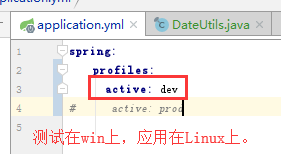
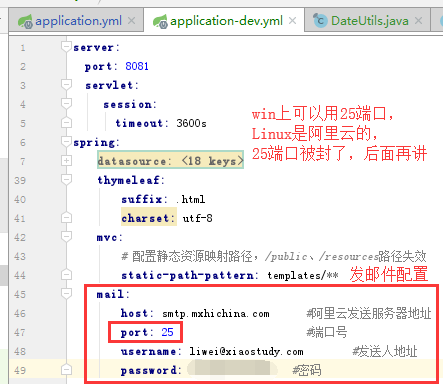
在spirng:后加,如下图
mail:

    host: smtp.mxhichina.com      #阿里云发送服务器地址

    port: 25                      #端口号

    username: 邮箱地址        #发送人地址

    password: 密码  #密码
配置my.ini【因为java运行备份mysql的命令,不能直接用密码】
在最后添加
[client]

host=localhost

user=用户名

password=密码
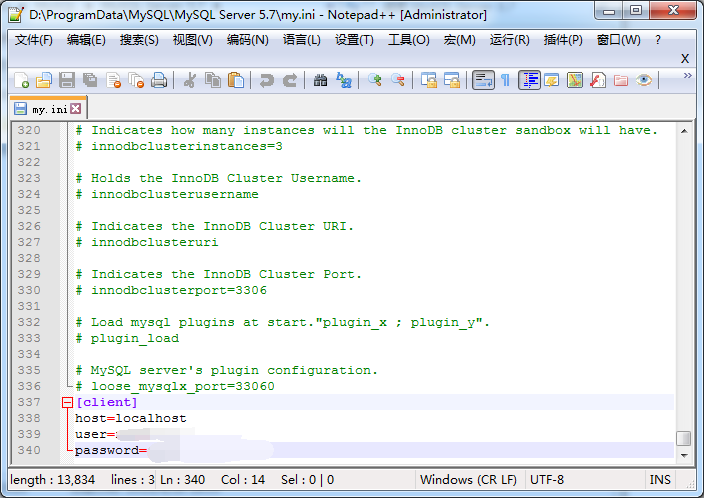
这里说明一下这个my.ini文件,有些是在安装mysql的目录下,有些不是在安装目录下,可以用工具Everything搜一下

备份的命令是
"D:/Program Files/MySQL/MySQL Server 5.7/bin/mysqldump.exe" --defaults-extra-file="D:/ProgramData/MySQL/MySQL Server 5.7/my.ini" -B 数据库名称>C:/temp/20190725.sql
上面为什么要用双引号呢,主要是文件夹名称有空格,cmd识别不了,加双引号就好了。
备份数据,发送邮件,删除备份文件
@GetMapping("backup")

@ResponseBody

public Map backup(){

    String thisDateTime = DateUtils.getDateTime("yyyyMMdd_HHmmss");

    String filePath;

    String shell;

    String[] cmd;

    // 通过获取系统名称是否包含windows来判断是win还是Linux

    if(System.getProperties().getProperty("os.name").toUpperCase().indexOf("WINDOWS") != -1) {

        filePath = "C:/temp/myLog_" + thisDateTime + ".sql";

        shell = "\"D:/Program Files/MySQL/MySQL Server 5.7/bin/mysqldump.exe\" --defaults-extra-file=\"D:/ProgramData/MySQL/MySQL Server 5.7/my.ini\" -B my_log>" + filePath;

        // java运行cmd命令要多加cmd空格/c空格

        shell = "cmd /c " + shell;

    } else {

        filePath = "/home/backup/myLog_" + thisDateTime + ".sql";

        shell = "/usr/local/mysql/bin/mysqldump --defaults-extra-file=/usr/local/mysql/my.cnf -B my_log>" + filePath;

    }

    System.out.println("shell:" + shell);

    Runtime runTime = Runtime.getRuntime();

    if (runTime == null) {

        System.err.println("Create runtime false!");

    }

    try {

        if(System.getProperties().getProperty("os.name").toUpperCase().indexOf("WINDOWS") != -1) {

            runTime.exec(shell);

        } else {

            runTime.exec(new String[]{"/bin/sh", "-c", shell});

        }

    } catch (IOException e) {

        e.printStackTrace();

    }

    MailEntity mailEntity = new MailEntity();

    // 对方邮箱地址

    mailEntity.setToAccount("手机号@163.com");

    mailEntity.setSubject("备份mysql");

    mailEntity.setContent("备份mysql的my_log数据库");

    File file = null;

    long thisTime = System.currentTimeMillis();

    // 这里是处理备份的sql文件是否写入完成,这里是10秒

    while (System.currentTimeMillis() - thisTime < 10*1000) {

        file = new File(filePath);

        if(file.exists() && file.isFile()) {

            break;

        } else {

            try {

                Thread.sleep(200);

            } catch (InterruptedException e) {

                e.printStackTrace();

            }

        }

    }

    mailEntity.setAttachmentFile(file);

    MailUtils.sendMail(mailEntity);

    // 删除备份文件

    new Thread(new RemoveBackupSqlFileThread(filePath)).start();

    Map map = new HashMap();

    map.put("code", "0");

    map.put("msg", "已发送至邮箱");

    return map;

}
注:如果win备份mysql文件大小为0,那么可以考虑用new String[]{"cmd", "/c", shell}。参考下面Linux运行命令方法
2、Linux下备份mysql并发送邮件
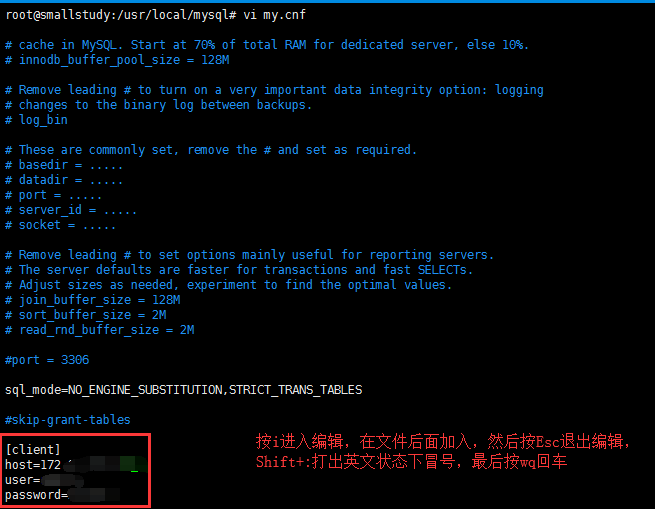
配置my.cnf文件
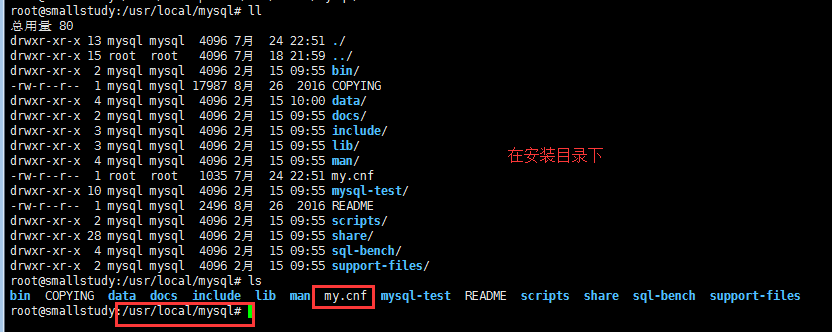
vi my.cnf打开文件【按i进入编辑状态,按Esc退出编辑,按:wq保存退出查看文件】
[client]

host=内网ip

user=用户名

password=密码
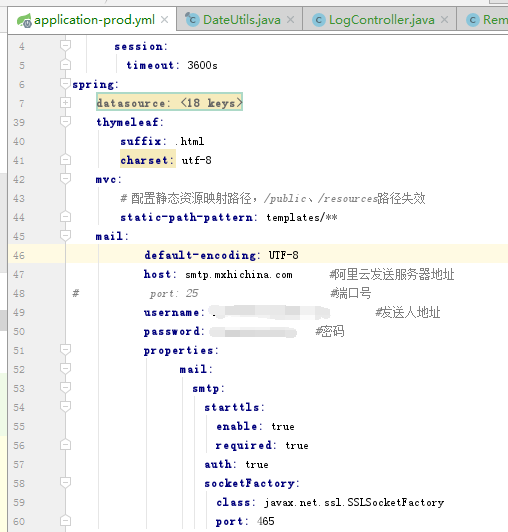
springboot的配置,阿里云服务器封了25端口,要用465端口
 mail:

         default-encoding: UTF-8

         host: smtp.mxhichina.com      #阿里云发送服务器地址

 #            port: 25                      #端口号

         username: 邮箱地址        #发送人地址

         password: 密码   #密码

         properties:

               mail:

                 smtp:

                   starttls:

                     enable: true

                     required: true

                   auth: true

                   socketFactory:

                     class: javax.net.ssl.SSLSocketFactory

                     port: 465
备份数据,发送邮件,删除备份文件
 @GetMapping("backup")

 @ResponseBody

 public Map backup(){

     String thisDateTime = DateUtils.getDateTime("yyyyMMdd_HHmmss");

     String filePath;

     String shell;

     // 通过获取系统名称是否包含windows来判断是win还是Linux

     if(System.getProperties().getProperty("os.name").toUpperCase().indexOf("WINDOWS") != -1) {

         filePath = "C:/temp/myLog_" + thisDateTime + ".sql";

         shell = "\"D:/Program Files/MySQL/MySQL Server 5.7/bin/mysqldump.exe\" --defaults-extra-file=\"D:/ProgramData/MySQL/MySQL Server 5.7/my.ini\" -B my_log>" + filePath;

         shell = "cmd /c " + shell;

     } else {

         filePath = "/home/backup/myLog_" + thisDateTime + ".sql";

         shell = "/usr/local/mysql/bin/mysqldump --defaults-extra-file=/usr/local/mysql/my.cnf -B my_log>" + filePath;

     }

     Runtime runTime = Runtime.getRuntime();

     Map map = new HashMap();

     if (null != runTime) {

         try {

             if(System.getProperties().getProperty("os.name").toUpperCase().indexOf("WINDOWS") != -1) {

                 runTime.exec(shell);

             } else {

                 // linux运行shell命令要加

                 runTime.exec(new String[]{"/bin/sh", "-c", shell});

             }

         } catch (IOException e) {

             e.printStackTrace();

         }

         MailEntity mailEntity = new MailEntity();

         mailEntity.setToAccount("对方邮箱地址");

         mailEntity.setSubject("备份mysql");

         mailEntity.setContent("备份mysql的my_log数据库");

         File file = null;

         long thisTime = System.currentTimeMillis();

         while (System.currentTimeMillis() - thisTime < 10*1000) {

             file = new File(filePath);

             if(file.exists() && file.isFile()) {

                 break;

             } else {

                 try {

                     Thread.sleep(200);

                 } catch (InterruptedException e) {

                     e.printStackTrace();

                 }

             }

         }

         mailEntity.setAttachmentFile(file);

         MailUtils.sendMail(mailEntity);

         // 删除备份文件

         new Thread(new RemoveBackupSqlFileThread(filePath)).start();

         map.put("code", "0");

         map.put("msg", "已发送至邮箱");

     } else {

         map.put("code", "1");

         map.put("msg", "获取Runtime为null,不能运行命令");

     }

     return map;

 }
后面测试定时备份数据和发送邮件
springboot备份mysql后发送邮件并删除备份文件,支持win和Linux的更多相关文章
- mydumper 快速高效备份mysql,按照表生成备份文件,快速恢复
Mydumper是一个针对MySQL和Drizzle的高性能多线程备份和恢复工具.开发人员主要来自MySQL,Facebook,SkySQL公司.目前已经在一些线上使用了Mydumper. Mydum ...
- Linux shell实现每天定时备份mysql数据库
每天定时备份mysql数据库任务,删除指定天数前的数据,保留指定天的数据: 需求: 1,每天4点备份mysql数据: 2,为节省空间,删除超过3个月的所有备份数据: 3,删除超过7天的备份数据,保留3 ...
- Linux实现定时备份MySQL数据库并删除30天前的备份文件
1. MySQL5.6以上版本 2. 修改 /etc/my.cnf 文件 # vim /etc/my.cnf [client] host=localhost user=你的数据库用户 password ...
- centos中创建自动备份Mysql脚本任务并定期删除过期备份
背景: OA系统数据库是mysql,引擎为myisam,可以直接通过拷贝数据库文件的方式进行备份 创建只备份数据库的任务: 创建保存mysql数据库备份文件的目录mysqlbak mkdir /hom ...
- backup4:数据库自动备份,自动删除备份文件
一:手写TSQL 脚本 1,自动备份 每周进行一次Database 的 Full Backup,设置 Schedule Interval 为Weekly use master go ) )+N'.ba ...
- 备份MySQL数据库
备份MySQL数据库脚本: #!/bin/bash # description: MySQL buckup shell script # author: lmj # web site: http:// ...
- Linux下定时备份MySQL数据库的Shell脚本
Linux下定时备份MySQL数据库的Shell脚本 对任何一个已经上线的网站站点来说,数据备份都是必须的.无论版本更新还是服务器迁移,备份数据的重要性不言而喻.人工备份数据的方式不单耗费大量时间 ...
- 脚本备份MySQL数据库和binlog日志
用Mysqldump实现全库备份+binlog的数据还原 首先是为mysql做指定库文件的全库备份 vim mysqlbak.sh #!/bin/bash #定义数据库目录,要能找到mysqldump ...
- Mysql备份系列(4)--lvm-snapshot备份mysql数据(全量+增量)操作记录
Mysql最常用的三种备份工具分别是mysqldump.Xtrabackup(innobackupex工具).lvm-snapshot快照.前面分别介绍了:Mysql备份系列(1)--备份方案总结性梳 ...
随机推荐
- AtCoder Grand Contest 007题解
传送门 \(A\) 咕咕咕 //quming #include<bits/stdc++.h> #define R register #define fp(i,a,b) for(R int ...
- 《自制编程语言--基于C语言 郑钢》学习笔记
<自制编程语言>学习笔记 本仓库内容 <自制编程语言>源码 src/sparrow.tgz <自制编程语言>读书笔记 docs/* <自制编程语言>样章 ...
- 再做一遍floyed
#include<bits/stdc++.h> #define R register int using namespace std; const int inf=0x3f3f3f3f; ...
- Quartz.NET浅谈一 : 简单Job使用(定时发送QQ邮件)
Quartz.NET是一个全功能的开源作业调度系统,可用于从最小的应用程序到大型企业系统. 直接上代码吧... 一.新建一个控制台项目 略过 二.安装Nuget包 三.创建发送邮箱辅助工具类 stat ...
- [luogu 5024] 保卫王国
Problem Here Solution 这大概是一篇重复累赘的blog吧. 最小权覆盖集=全集-最大权独立集 强制取或不取,可以通过将权值修改成inf或者-inf 然后就用动态dp的套路就行了 动 ...
- Intellij IDEA 从入门到上瘾 图文教程
1. IDEA VS Eclipse 核心术语比较 由下图可见:两者最大的转变就在于工作空间概念的转变,并且在IDEA当中,Project和 Module是作为两个不同的概念,对项目结构是具有重大 ...
- 数据结构Java版之广度优先图(十三)
广度优先,则是用的队列,将每一层的节点先存入队列中去,后依次取出队列中的节点,显示与当前节点存在边,但是未被访问过的节点,也就是下一层与之相联系的节点,再将这些节点存入队列.经过层层迭代,就可以完全遍 ...
- java并发编程学习博客
http://www.blogjava.net/xylz/archive/2010/07/08/325587.html 经典
- javascript中对一个对象数组按照对象某个属性进行排序
需求:对timelist排序 安装keys . 分析:timelist 是个数组对象,里面包含属性 keys,val.这里借助数组sort方法 传入function <script> // ...
- python format 时间格式
trainData['survey_time'] = pd.to_datetime(trainData['survey_time'],format = '%Y/%m/%d %H:%M') trainD ...