
EF框架CodeFirst the model backing the 'PModelEntities' context has changed since the database was created. Consider using Code First Migrations to update the database
1.采用code first 做项目时,数据库已经生成,后期修改数据库表结构。再次运行时出现一下问题:
Entity Framework : The model backing the 'ProductModel' context has changed since the database was create
解决方法:
1.打开当前项目中的:程序包管理器控制台
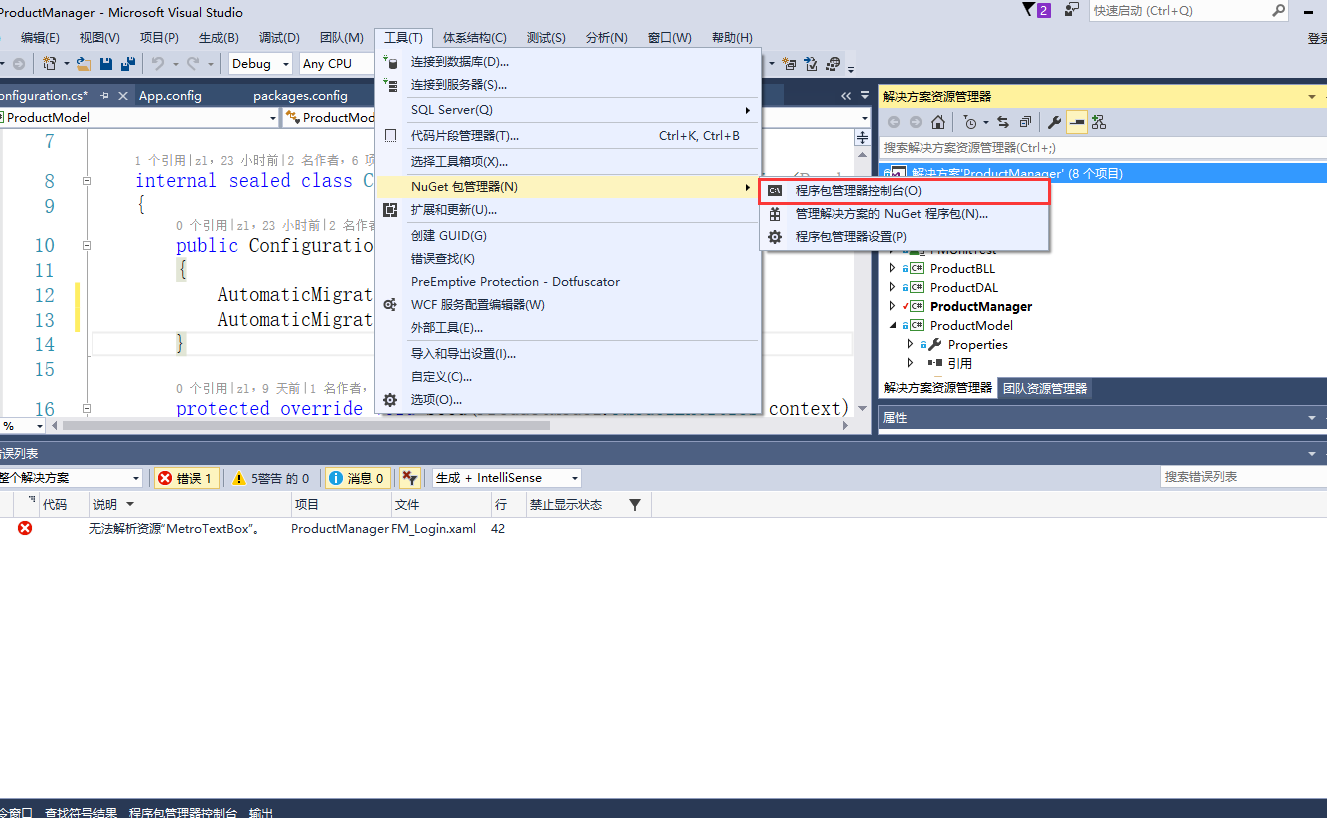
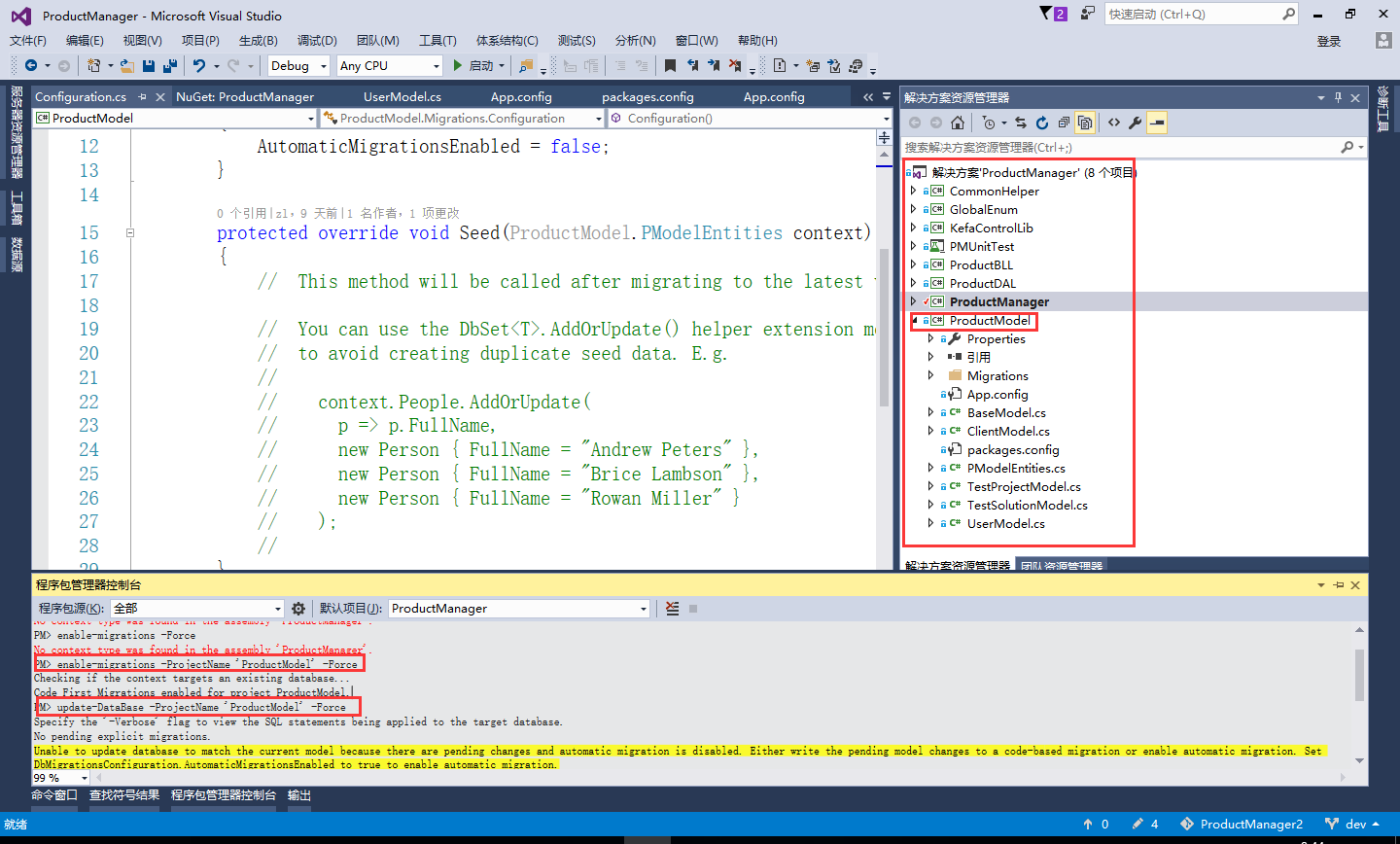
2.输入:enable-migrations -ProjectName 'ProductModel' -Force
解释:’ProductModel‘,ef框架model层所在程序集名称,不清楚请看下面操作时图片
看到执行结果:
Checking if the context targets an existing database...
Code First Migrations enabled for project ProductModel.
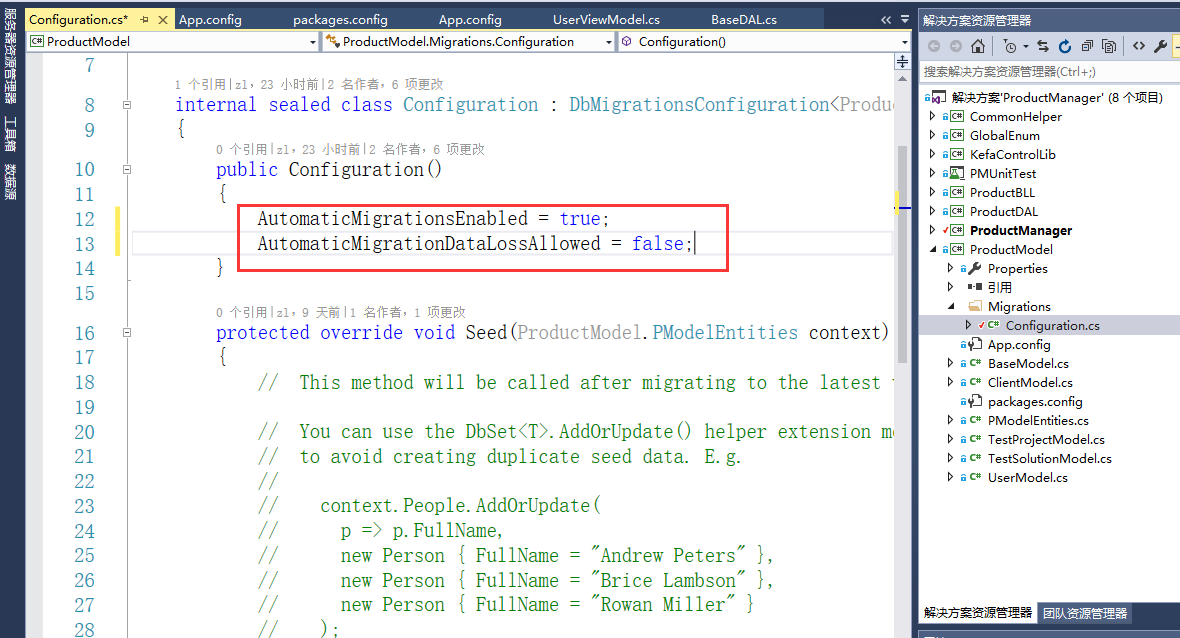
2.打开 ’ProductModel‘,找到Migrations-Configuration
public Configuration()
{
AutomaticMigrationsEnabled = true; (原来为false,改为true)
AutomaticMigrationDataLossAllowed = false; (是否丢数据)
}
3.输入:update-DataBase -ProjectName 'ProductModel' -Force
看到执行结果:
Specify the '-Verbose' flag to view the SQL statements being applied to the target database.
No pending explicit migrations.
Unable to update database to match the current model because there are pending changes and automatic migration is disabled. Either write the pending model changes to a code-based migration or enable automatic migration. Set DbMigrationsConfiguration.AutomaticMigrationsEnabled to true to enable automatic migration.
You can use the Add-Migration command to write the pending model changes to a code-based migration.
4.如果发现有问题,重新生成解决方案
下面时操作时的照片:
EF框架CodeFirst the model backing the 'PModelEntities' context has changed since the database was created. Consider using Code First Migrations to update the database的更多相关文章
- The model backing the 'XXX' context has changed 错误
https://blog.csdn.net/hit_why/article/details/72778785 https://blog.csdn.net/hit_why/article/details ...
- Model backing a DB Context has changed; Consider Code First Migrations
Model增加一个字段,数据库对应的也手动添加了字段但是运行时报错 The model backing the 'TopLogDbContext' context has changed since ...
- .Net EntityFramwork6.0 EF框架开发入门
一.环境 开发环境:Sqlserver2008 R2.Visual Studio2012 二.准备工作 1.新建MVC空项目 2.通过NuGet获取 EntityFramework 包 操作截图 ...
- The model backing has changed
其他信息: The model backing the 'WebTopFormContext' context has changed since the database was created. ...
- EF框架step by step(2)—Model-First
这一篇主要说一下EF框架中,Model First做法,仍然采用上一篇的案例.但增加评论功能.首先打开Blog.edmx文件,在空白处右键,添加新实体Comment,如下图示: 点击确定,关闭窗口. ...
- C# CodeFirst(EF框架)代码优先创建数据库
namespace WebEF.Model{ public class ModelContext:DbContext //继承DBcontext 来自EF框架 { public ModelContex ...
- EF框架step by step(3)—Code-First
CodeFirst是EF框架的第三种方式,也是最为复杂一种方式,本文将以EF4.1版本为基础,简要讲解一下用法,同时,也介绍DbContext的用法. 本文采用的示例仍然是前两篇采用的博客用户的示例. ...
- EF框架搭建小总结--CodeFirst模型优先
前言:之前在下总结编写了一篇 EF框架搭建小总结--ModelFirst模型优先 博文,看到一段时间内该博文的访问量蹭.蹭蹭.蹭蹭蹭...往上涨(实际也不是很多,嘿嘿),但是还是按捺不住内心的喜悦(蛮 ...
- EF框架搭建小总结--CodeFirst代码优先
前言:之前在下总结编写了一篇 EF框架搭建小总结--ModelFirst模型优先 博文,看到一段时间内该博文的访问量蹭.蹭蹭.蹭蹭蹭...往上涨(实际也不是很多,嘿嘿),但是还是按捺不住内心的喜悦(蛮 ...
随机推荐
- jmeter—解决响应乱码问题
问题: 当响应数据或响应页面没有设置编码时,jmeter会按照jmeter.properties文件中,sampleresult.default.encoding 设置的格式解析默认ISO-88 ...
- leetcode-482-License Key Formatting
题目描述: You are given a license key represented as a string S which consists only alphanumeric charact ...
- 【转载】Java 9 新特性——模块化
来自 <http://www.jianshu.com/p/053a5ca89bbb#> 前言 年,我们将迎来 Java 语言的 22 岁生日,22岁,对于一个人而言,正是开始大展鸿图的年纪 ...
- 任务调度SpringTask
一.什么是任务调度 在企业级应用中,经常会制定一些“计划任务”,即在某个时间点做某件事情,核心是以时间为关注点,即在一个特定的时间点,系统执行指定的一个操作.常见的任务调度框架有Quartz和Spri ...
- python 全栈开发:基础复习
格式化输出: username = 'python' password = 'python1' print(''' username:%s password:%s '''%(username,pass ...
- BiliBili, ACFun… And More!【递归算法】
题源:http://acm.uestc.edu.cn/#/problem/show/3 题解: 题意:播放一段视频文件,有播放速度和缓冲速度两种,因为作者的癖好,播放前要缓冲几秒钟(这段时间不计算在总 ...
- PyCharm+selenium环境搭建报错:Traceback (most recent call last): TypeError: 'module' object is not callable
环境搭建好后,代码如下: from selenium import webdriverdriver = webdriver.chrome()driver.get("http://www.ba ...
- 2019.04.07 第三次训练 【WHU校赛】
A: (模拟退火+点到线段最短距离) https://blog.csdn.net/Link_Ray/article/details/89173222 B:✅ C: (线段树+二分) https://b ...
- mysql grant权限总结
2019-01-07 转自 https://blog.csdn.net/wulantian/article/details/38230635 一.权限表 mysql数据库中的3个权限表:user .d ...
- 5 个 iOS 和 Android 最佳的开源自动化工具[转]
自动化测试时下在产品测试上有着非常重要的作用.实现测试自动化有多种积极的方式,包括最大限度地减少测试执行时间:在关键的发布阶段,用更少的时间确保更大的覆盖范围:在产品开发阶段,可靠又重复性地运行以确保 ...