
EF框架CodeFirst the model backing the 'PModelEntities' context has changed since the database was created. Consider using Code First Migrations to update the database
1.采用code first 做项目时,数据库已经生成,后期修改数据库表结构。再次运行时出现一下问题:
Entity Framework : The model backing the 'ProductModel' context has changed since the database was create
解决方法:
1.打开当前项目中的:程序包管理器控制台
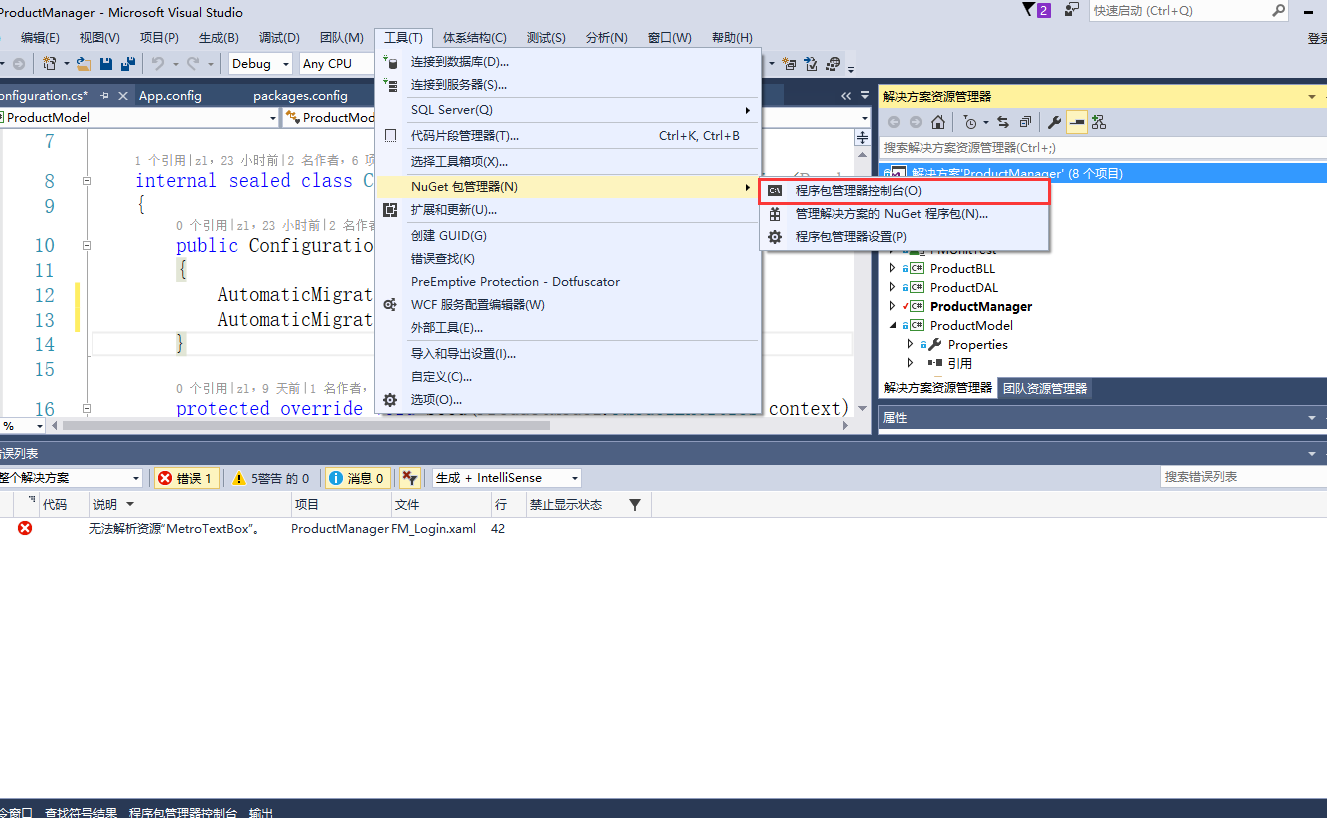
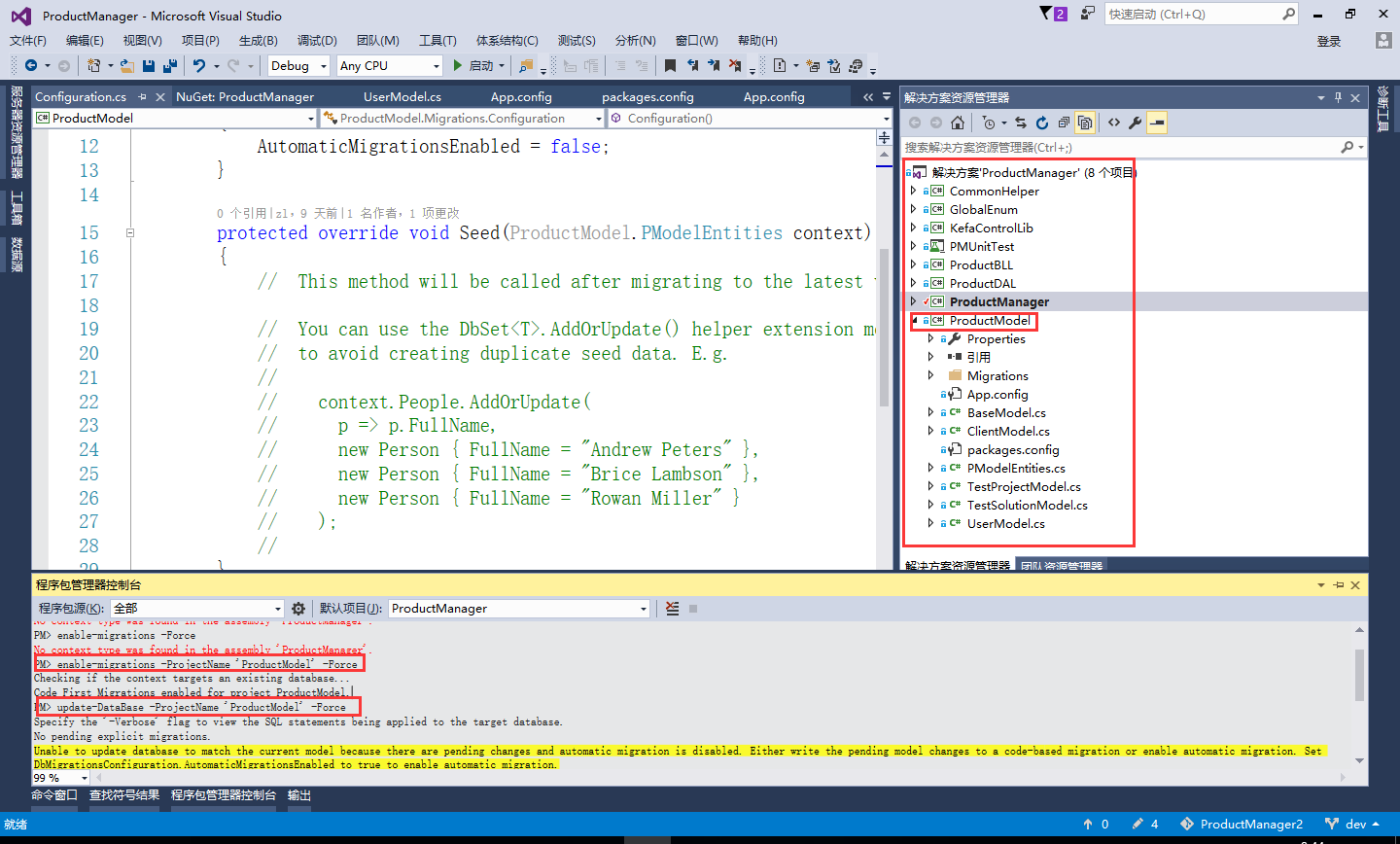
2.输入:enable-migrations -ProjectName 'ProductModel' -Force
解释:’ProductModel‘,ef框架model层所在程序集名称,不清楚请看下面操作时图片
看到执行结果:
Checking if the context targets an existing database...
Code First Migrations enabled for project ProductModel.
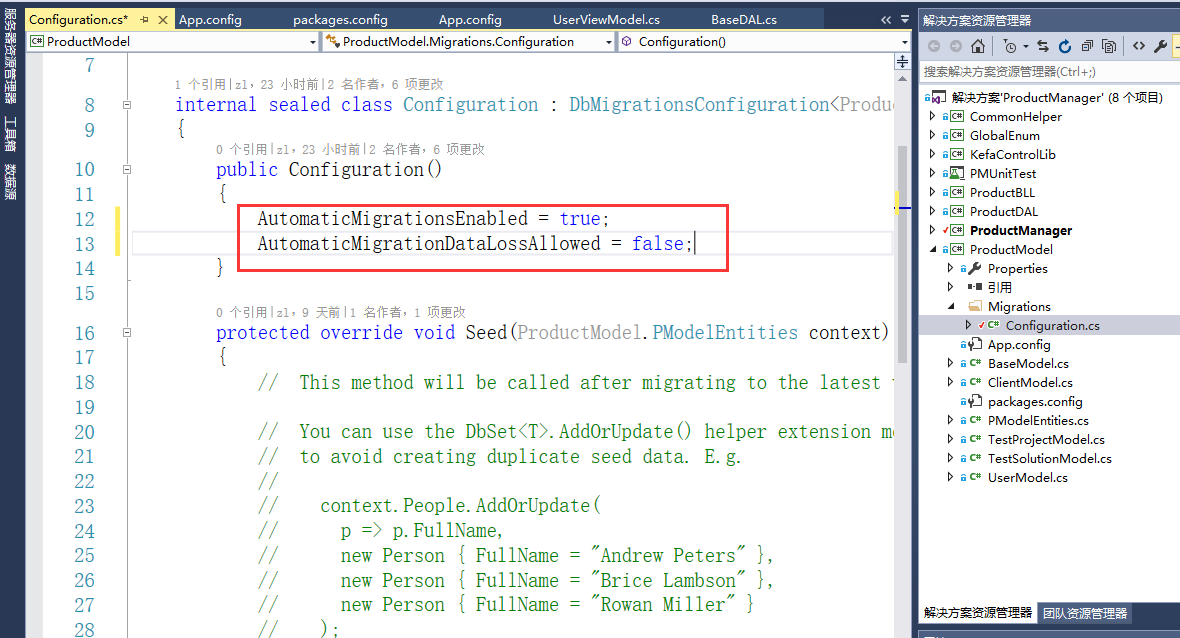
2.打开 ’ProductModel‘,找到Migrations-Configuration
public Configuration()
{
AutomaticMigrationsEnabled = true; (原来为false,改为true)
AutomaticMigrationDataLossAllowed = false; (是否丢数据)
}
3.输入:update-DataBase -ProjectName 'ProductModel' -Force
看到执行结果:
Specify the '-Verbose' flag to view the SQL statements being applied to the target database.
No pending explicit migrations.
Unable to update database to match the current model because there are pending changes and automatic migration is disabled. Either write the pending model changes to a code-based migration or enable automatic migration. Set DbMigrationsConfiguration.AutomaticMigrationsEnabled to true to enable automatic migration.
You can use the Add-Migration command to write the pending model changes to a code-based migration.
4.如果发现有问题,重新生成解决方案
下面时操作时的照片:
EF框架CodeFirst the model backing the 'PModelEntities' context has changed since the database was created. Consider using Code First Migrations to update the database的更多相关文章
- The model backing the 'XXX' context has changed 错误
https://blog.csdn.net/hit_why/article/details/72778785 https://blog.csdn.net/hit_why/article/details ...
- Model backing a DB Context has changed; Consider Code First Migrations
Model增加一个字段,数据库对应的也手动添加了字段但是运行时报错 The model backing the 'TopLogDbContext' context has changed since ...
- .Net EntityFramwork6.0 EF框架开发入门
一.环境 开发环境:Sqlserver2008 R2.Visual Studio2012 二.准备工作 1.新建MVC空项目 2.通过NuGet获取 EntityFramework 包 操作截图 ...
- The model backing has changed
其他信息: The model backing the 'WebTopFormContext' context has changed since the database was created. ...
- EF框架step by step(2)—Model-First
这一篇主要说一下EF框架中,Model First做法,仍然采用上一篇的案例.但增加评论功能.首先打开Blog.edmx文件,在空白处右键,添加新实体Comment,如下图示: 点击确定,关闭窗口. ...
- C# CodeFirst(EF框架)代码优先创建数据库
namespace WebEF.Model{ public class ModelContext:DbContext //继承DBcontext 来自EF框架 { public ModelContex ...
- EF框架step by step(3)—Code-First
CodeFirst是EF框架的第三种方式,也是最为复杂一种方式,本文将以EF4.1版本为基础,简要讲解一下用法,同时,也介绍DbContext的用法. 本文采用的示例仍然是前两篇采用的博客用户的示例. ...
- EF框架搭建小总结--CodeFirst模型优先
前言:之前在下总结编写了一篇 EF框架搭建小总结--ModelFirst模型优先 博文,看到一段时间内该博文的访问量蹭.蹭蹭.蹭蹭蹭...往上涨(实际也不是很多,嘿嘿),但是还是按捺不住内心的喜悦(蛮 ...
- EF框架搭建小总结--CodeFirst代码优先
前言:之前在下总结编写了一篇 EF框架搭建小总结--ModelFirst模型优先 博文,看到一段时间内该博文的访问量蹭.蹭蹭.蹭蹭蹭...往上涨(实际也不是很多,嘿嘿),但是还是按捺不住内心的喜悦(蛮 ...
随机推荐
- robot framework学习笔记之九-杂记
Setup和Teardown 假设Suite1下面有Test1和Test2,若它们都设置了Setup和Teardown,那么它们的执行顺序是:Suite1-Setup->Test1-Setup- ...
- 部署LVS-NAT群集
案例环境 LVS调度器作为Web服务器池的网关,LVS两块网卡,分别连接内外网,外网地址172.16.16.172.24,同时也作为整个群集的VIP,内网地址为192.168.7.21-24/24,是 ...
- day00 -----博客作业1
问题1.使用while循环输入 1 2 3 4 5 6 8 9 10 i = 0 while i<10: i+=1 if i ==7: continue print(i) 问题2 求1- ...
- java_I/O字节流
I/O流(Stream) INPUT:输入流,从文件里读OUPUT:输出流,写内容到文件 IO流分为:字符流和字节流 字符流:处理纯文本文件. 字节流:处理可以所有文件. 测试字节输出流OuPut(写 ...
- Java中静态变量的声明位置
Java中静态变量只能是成员变量,局部方法中的局部变量除final外不能有任何其他修饰符,例如: public class Test { static String x = "1" ...
- 关于 unsigned long long 于 long long
long long 最大只有19位 : unsigned long long 最大有20位 ,原因牺牲了符合位来换取更大的记录
- 【GIS新探索】GeoHash原理和编解码实现
1.什么是GeoHash geohash基本原理是将地球理解为一个二维平面,将平面递归分解成更小的子块,每个子块在一定经纬度范围内拥有相同的编码.不好理解,没关系,我来找个图. 就像上面这张图,一个坐 ...
- Zynq-7000 FreeRTOS(二)中断:PL中断请求
总结Zynq-7000的PL发送给PS一个中断请求,为FreeRTOS中断做准备. UG585的P225显示了系统的中断框图,如下图所示. 图:ZYNQ器件的中断框图 UG585的P227画出来中断控 ...
- 什么是WCF(转)
什么是WCF(Windows Communication Foundation(WCF)) 大家可以百度一下了解什么是WCF.当然有些人看到密密麻麻的黑框白字就懒的读.即使读了 可能也没明白确切的含义 ...
- 【JAVA-WEB】在url上追加sessionid
HttpSession session = request.getSession(); url = url+";jsessionid="+session.getId();