
python接口自动化2-发送post请求详解(二)
前言
发送post的请求参考例子很简单,实际遇到的情况却是很复杂的,首先第一个post请求肯定是登录了,但登录是最难处理的。登录问题解决了,后面都简单了。
一、查看官方文档
1.学习一个新的模块,其实不用去百度什么的,直接用help函数就能查看相关注释和案例内容。
>>import requests
>>help(requests)
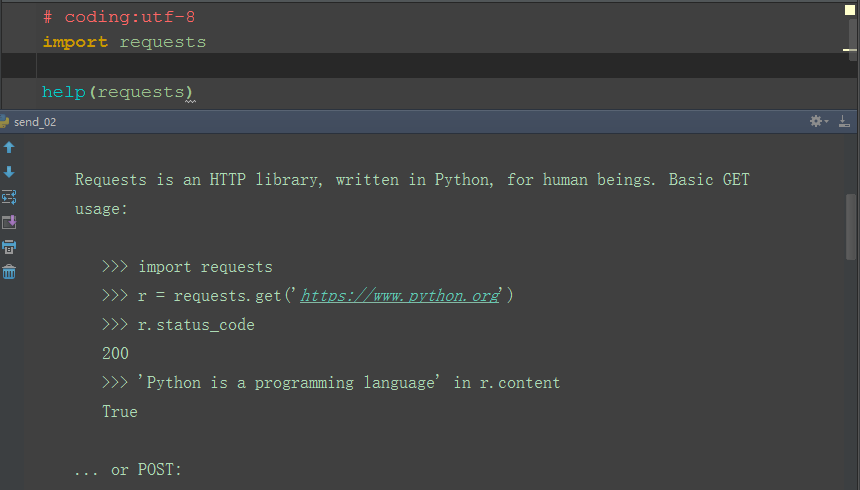
2.查看python发送get和post请求的案例
>>> import requests
>>> r = requests.get('https://www.python.org')
>>> r.status_code
200
>>> 'Python is a programming language' in r.content
True
... or POST:
>>> payload = dict(key1='value1', key2='value2')
>>> r = requests.post('http://httpbin.org/post', data=payload)
>>> print(r.text)
{
...
"form": {
"key2": "value2",
"key1": "value1"
},
...
}
二,发送post请求
♦1.用上面给的案例,做个简单修改,发个post请求
♦2.payload参数是字典类型,传到如下图的form里
实例代码:
import requests#导入request模块

import json

url = 'https://httpbin.org/post'
payload= {"pw":'1011634093@qq.com',"un":"password"}#值以字典的形式传入

response = requests.post(url=url,data=payload)

print(response.text)
运行结果:
F:\Python\python.exe F:/Python/Interface_automation/post_requests.py

{"args":{},"data":"","files":{},
"form":{"pw":"1011634093@qq.com","un":"password"},#
  "headers":{"Accept":"*/*","Accept-Encoding":"gzip, deflate",
  "Connection":"close","Content-Length":"",
  "Content-Type":"application/x-www-form-urlencoded",
  "Host":"httpbin.org","User-Agent":"python-requests/2.18.4"},

"json":null,"origin":"61.175.197.202","url":"https://httpbin.org/post"}

Process finished with exit code
三、json
♦1.post的body是json类型,也可以用json参数传入。
♦2.先导入json模块,用dumps方法转化成json格式。
♦3.返回结果,传到data里
实例代码如下:
import requests#导入request模块

import json#导入json模块

url = 'https://httpbin.org/post'body= {"pw":'1011634093@qq.com',"un":"password"}

data_json = json.dumps(body)#转化成json类型

response = requests.post(url=url,data=data_json,)

print(response.status_code)

print(response.text)
运行结果:
F:\Python\python.exe F:/Python/Interface_automation/post_requests.py

b'{"args":{},
"data":"{\\"pw\\": \\"1011634093@qq.com\\",
\\"un\\": \\"password\\"}","files":{},"form":{},
"headers":{"Accept":"*/*","Accept-Encoding":"gzip, deflate",
"Connection":"close","Content-Length":"45","Host":"httpbin.org",
"User-Agent":"python-requests/2.18.4"},"json":{"pw":"1011634093@qq.com","un":"password"},#json类型
"origin":"61.175.197.202","url":"https://httpbin.org/post"}\n'

Process finished with exit code
四、headers
♦4.1.我们在请求数据时也可以加上自定义的headers(通过headers关键字参数传递)有时候有的特殊的请求必须加上headers头信息:
实例代码:

import requests#导入request模块

import json

url = 'https://httpbin.org/post'

headers  = {"Connection":'keep-alive',"Host":"httpbin.org"}#值以字典的形式传入

response = requests.post(url=url,headers=headers)#用关键字headers传入

print(response.text)
数据结果:
F:\Python\python.exe F:/Python/Interface_automation/post_requests.py

{"args":{},"data":"","files":{},"form":{},
"headers":{"Accept":"*/*","Accept-Encoding":"gzip, deflate","Connection":"close","Content-Length":"","Host":"httpbin.org","User-Agent":"python-requests/2.18.4"},
"json":null,"origin":"61.175.197.202","url":"https://httpbin.org/post"}

Process finished with exit code
♦4.2.headers的取出方法:
我们有一下一种取出方法:
print(response.headers)#打印出响应头

print(response.headers['Connection'])#取得部分响应头以做判断:

print(response.headers.get('Connection'))#或者这样也可以
代码实例:
import requests#导入request模块

import json

url = 'https://httpbin.org/post'

headers  = {"Connection":'keep-alive',"Host":"httpbin.org"}#值以字典的形式传入

response = requests.post(url=url,headers=headers)#用关键字headers传入

print(response.headers)#打印出响应头

print(response.headers['Connection'])#取得部分响应头以做判断:

print(response.headers.get('Connection'))#或者这样也可以

print(response.text)
输出结果:
F:\Python\python.exe F:/Python/Interface_automation/post_requests.py

{'Connection': 'keep-alive', 'Server': 'gunicorn/19.8.1', 'Date': 'Tue, 29 May 2018 08:30:55 GMT', 'Content-Type': 'application/json', 'Content-Length': '', 'Access-Control-Allow-Origin': '*', 'Access-Control-Allow-Credentials': 'true', 'Via': '1.1 vegur'}

keep-alive#print(response.headers['Connection'])#取得部分响应头以做判断:
keep-alive#print(response.headers.get('Connection'))#或者这样也可以
{"args":{},"data":"","files":{},"form":{},"headers":{"Accept":"*/*","Accept-Encoding":"gzip, deflate","Connection":"close","Content-Length":"","Host":"httpbin.org","User-Agent":"python-requests/2.18.4"},"json":null,"origin":"61.175.197.202","url":"https://httpbin.org/post"} Process finished with exit code
♦在我看来不管是get请求还是post请求我们都是发送我们想要发送的数据给服务器,然后查看服务器相应回来的数据看看这些书是否和我们想要的内容是否相符,只是get和post的请求机制不一样,但是所要做的思路是一样的。
后面我会在整理一下requests模块中的其他的东西。
python接口自动化2-发送post请求详解(二)的更多相关文章
- python接口自动化26-发xml格式post请求《转载》
python接口自动化26-发xml格式post请求 https://cloud.tencent.com/developer/article/1164987
- python接口自动化1-发送get请求
前言 requests模块,也就是老污龟,为啥叫它老污龟呢,因为这个官网上的logo就是这只污龟,接下来就是学习它了. 一.环境安装 1.用pip安装requests模块 >>pip in ...
- python接口自动化25-发xml格式post请求
前言 post请求相对于get请求多一个body部分,body部分常见的数据类型有以下四种(注意是常见的,并不是只有4种) application/x-www-form-urlencoded appl ...
- python接口自动化之发送get(三)
1.安装requests requests是python的第三方库,需要进行安装.安装之前最好先关闭fiddler cmd(win+R快捷键)输入:pip install requests 其他命令: ...
- python接口自动化发送get请求 详解(一)
前言:接口自动化实现自动化脚本比较稳定,主要用到requests模块,后面我会把这个模块单独拉出来写一下. 一.环境安装 1.用pip安装requests模块 >>pip install ...
- python+pytest接口自动化(5)-发送post请求
简介 在HTTP协议中,与get请求把请求参数直接放在url中不同,post请求的请求数据需通过消息主体(request body)中传递. 且协议中并没有规定post请求的请求数据必须使用什么样的编 ...
- python接口自动化2-发送post请求
发送post的请求参考例子很简单,实际遇到的情况却是很复杂的,首先第一个post请求肯定是登录了,但登录是最难处理的.登录问题解决了,后面都简单了. 一.查看官方文档 1.学习一个新的模块,其实不用去 ...
- 跨域发送HTTP请求详解
------------吾亦无他,唯手熟尔,谦卑若愚,好学若饥------------- 本篇博客讲述几种跨域发HTTP请求的几种方法,POST请求,GET请求 目录: 一,采用JsonP的方式(只能 ...
- python接口自动化1-发送get请求【转载】
本篇转自博客:上海-悠悠 原文地址:http://www.cnblogs.com/yoyoketang/tag/python%E6%8E%A5%E5%8F%A3%E8%87%AA%E5%8A%A8%E ...
随机推荐
- Socket、RPC通信实例,简单版本,仅供查阅
TCP/IP Socket 如果使用TCP协议来传递数据,客户端和服务器端需要分别经过以下步骤: server: 创建socket对象 - bind(绑定socket到指定地址和端口) - liste ...
- Unity Shader-简单均值模糊
http://blog.csdn.net/puppet_master/article/details/52547442 与Amplify中的Simple Blur例子实现一样
- Eclipse 安装PyDev开发Python及初步使用
Eclipse 安装PyDev插件后可开发Python 参考网址:https://blog.csdn.net/wscdylzjy/article/details/44066977 具体请参考上述网址, ...
- 在Linux(Ubuntu)下安装Arial、Times New Roman等字体
在Linux下做文档.作图的时候,可能需要用到Arial和Times New Roman等字体.但是由于版权问题,Linux一般是不直接提供这些字体的. 注意字体也是有版权的!不过有版权也不代表一定会 ...
- cocos2dx中使用tolua++使lua调用c++函数
一直想学学cocos2dx中如何使用tolua++工具使得lua脚本调用C++函数,今天就来搞一下,顺便记录下来: 首先,我们打开cocos2dx-2.2.4中projects下的test的VS工程, ...
- 拒绝枯燥,有意思的 Loading 页面动效设计
互联网时代,网络“提速”日益频繁,人们打开Web或软件的速度越来越快,一般页面缓冲和加载地过程也是几不可查.然而,在某些情况下,例如软件急需加载大量页面,首页急需加载大量内容,用户下载文件过大,甚至是 ...
- kbmMWtable for XE5 接近尾声
为了支持多平台开发的delphi XE5,kbmmwtable 做了非常大的改动. 目前已经可以在ios 和android 上建立和查询数据表了,但是众说周知,在ios 和android 上 使用Li ...
- [转]How do I run msbuild from the command line using Windows SDK 7.1?
本文转自:http://stackoverflow.com/questions/6319274/how-do-i-run-msbuild-from-the-command-line-using-win ...
- 团体程序设计天梯赛L1-019 谁先倒 2017-03-22 17:35 33人阅读 评论(0) 收藏
L1-019. 谁先倒 时间限制 400 ms 内存限制 65536 kB 代码长度限制 8000 B 判题程序 Standard 作者 陈越 划拳是古老中国酒文化的一个有趣的组成部分.酒桌上两人划拳 ...
- XXX 不是当前用户的有效责任,请联系您的系统管理员
EBS中,有时进入一些基于OA Framework 的Web页面时,会出现这种现象: XXX 不是当前用户的有效责任,请联系您的系统管理员 ( or: xxx is not a valid resp ...