
PURGE 的用法说明
PURGE
Purpose
Use the PURGE statement to remove a table or index from your recycle bin and release all of the space associated with the object, or to remove the entire recycle bin, or to remove part of all of a dropped tablespace from the recycle bin.
使用PURGE语句从回收站删除一个表或索引,并释放与该对象关联的所有空间,或者删除整个回收站,或者删除回收站中丢弃的表空间的一部分。
Caution:
You cannot roll back a PURGE statement, nor can you recover an object after it is purged.
注意:purge后不能回滚和恢复
To see the contents of your recycle bin, query the USER_RECYCLEBIN data dictionary review. You can use the RECYCLEBIN synonym instead. The following two statements return the same rows:
要查看回收站的内容,请查询user_UNK clebin数据字典评审。可以使用回收的同义词。
以下两个语句返回相同的行:
SELECT * FROM RECYCLEBIN;
SELECT * FROM USER_RECYCLEBIN;
Prerequisites(先决条件)
The database object must reside in your own schema or you must have the DROP ANY... system privilege for the type of object to be purged, or you must have the SYSDBA system privilege.
数据库对象必须驻留在自己的模式中,否则您必须DROP ANY…要清除的对象类型的系统特权,或者必须具有SYSDBA权限
Syntax(语法)
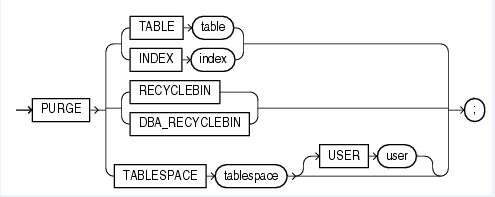
TABLE or INDEX
Specify the name of the table or index in the recycle bin that you want to purge. You can specify either the original user-specified name or the system-generated name Oracle Database assigned to the object when it was dropped.
指定要清除的回收站中的表或索引的名称。可以指定原始用户指定的名称或系统生成的名称Oracle数据库,该数据库被丢弃时指定给该对象。
• If you specify the user-specified name, and if the recycle bin contains more than one object of that name, then the database purges the object that has been in the recycle bin the longest.
如果指定用户指定的名称,并且如果回收站包含不止一个该名称的对象,那么数据库就会清除在回收站中最长的对象。
• System-generated recycle bin object names are unique. Therefore, if you specify the system-generated name, then the database purges that specified object.
系统生成的回收站对象名是唯一的。因此,如果指定系统生成的名称,那么数据库就会清除指定的对象。
When the database purges a table, all table partitions, LOBs and LOB partitions, indexes, and other dependent objects of that table are also purged.
当数据库清理一个表时,所有表分区、LOB和LOB分区、索引以及该表的其他相关对象也被清除。
RECYCLEBIN
Use this clause to purge the current user's recycle bin. Oracle Database will remove all objects from the user's recycle bin and release all space associated with objects in the recycle bin.
使用此子句清除当前用户的回收站。Oracle数据库将删除用户回收站中的所有对象,并释放与回收站中的对象相关的所有空间。
DBA_RECYCLEBIN
This clause is valid only if you have SYSDBA system privilege. It lets you remove all objects from the system-wide recycle bin, and is equivalent to purging the recycle bin of every user. This operation is useful, for example, before backward migration.
此条款仅当拥有SYSDBA系统特权时才有效。它允许从系统范围内的回收站中删除所有对象,并且相当于清除每个用户的回收站。例如,该操作在向后迁移之前是有用的。
TABLESPACE tablespace
Use this clause to purge all the objects residing in the specified tablespace from the recycle bin.
使用此子句将所有驻留在指定表空间中的对象从回收站中清除。
USER user
Use this clause to reclaim space in a tablespace for a specified user. This operation is useful when a particular user is running low on disk quota for the specified tablespace.
用户使用此子句在指定用户的表空间中回收空间。当特定的用户在指定的表空间上运行低磁盘配额时,此操作非常有用。
Examples
Remove a File From Your Recycle Bin: Example The following statement removes the table test from the recycle bin. If more than one version of test resides in the recycle bin, Oracle Database removes the version that has been there the longest:
从回收站删除一个文件:例如下面的语句从回收站删除了表测试。如果多个版本的测试驻留在回收站中,Oracle数据库删除了在那里最长的版本:
PURGE TABLE test;
To determine system-generated name of the table you want removed from your recycle bin, issue a SELECT statement on your recycle bin. Using that object name, you can remove the table by issuing a statement similar to the following statement. (The system-generated name will differ from the one shown in the example.)
要确定从回收站中删除的表的系统生成的名称,请在回收站上发布一个SELECT语句。使用该对象名称,可以通过发出类似以下语句的语句删除表。(系统生成的名称与示例中显示的名称不同)。
PURGE TABLE RB$$33750$TABLE$0;
Remove the Contents of Your Recycle Bin: Example
删除回收站的内容:例如
To remove the entire contents of your recycle bin, issue the following statement:
删除回收箱的全部内容
PURGE RECYCLEBIN;
示例:
1) 首先查一下回收站:
Select * From RECYCLEBIN;
2)创建并删除同一表三次:
CREATE TABLE recycle_tmp(version NUMBER(10));

INSERT INTO recycle_tmp VALUES(1);

COMMIT;

SELECT * FROM RECYCLE_TMP;

DROP TABLE recycle_tmp;

SELECT object_name, original_name, operation, droptime FROM RECYCLEBIN;
此时回收站只有一条记录:

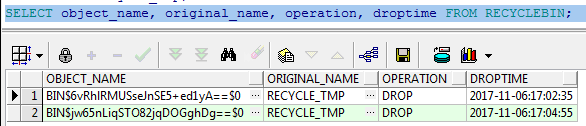
再重复2)的操作,此时回收站有两条记录:
CREATE TABLE recycle_tmp(version NUMBER(10));

INSERT INTO recycle_tmp VALUES(2);

COMMIT;

DROP TABLE recycle_tmp;

SELECT object_name, original_name, operation, droptime FROM RECYCLEBIN;
3)清空版本1(默认删除最早版本)
PURGE TABLE recycle_tmp;

SELECT object_name, original_name, operation, droptime FROM RECYCLEBIN;

4)清空版本2(根据回收站OBJECT_NAME清除表)
PURGE TABLE  "BIN$jw65nLiqSTO82jqDOGghDg==$0";

SELECT object_name, original_name, operation, droptime FROM RECYCLEBIN;
5)还原版本(使用闪回flashback)
FLASHBACK TABLE recycle_tmp TO BEFORE DROP;

SELECT object_name, original_name, operation, droptime FROM RECYCLEBIN;
此时回收站已空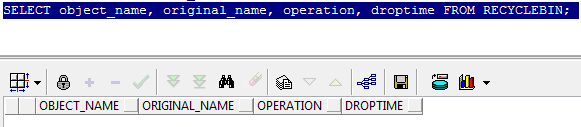
6)删除版本3,后清空回收站
DROP TABLE recycle_tmp;

PURGE RECYCLEBIN;

SELECT object_name, original_name, operation, droptime FROM RECYCLEBIN;
回收站以清空
PURGE 的用法说明的更多相关文章
- Oracle purge 用法介绍
http://blog.csdn.net/indexman/article/details/27379597
- 理解Docker(1):Docker 安装和基础用法
本系列文章将介绍Docker的有关知识: (1)Docker 安装及基本用法 (2)Docker 镜像 (3)Docker 容器的隔离性 - 使用 Linux namespace 隔离容器的运行环境 ...
- [Linux] yum和apt-get用法及区别
一般来说著名的linux系统基本上分两大类: 1.RedHat系列:Redhat.Centos.Fedora等 2.Debian系列:Debian.Ubuntu等 RedHat 系列 1 常见的安装包 ...
- linux sudo apt-get用法详解
APT的使用(Ubuntu Linux软件包管理工具一)apt-cache search # ------(package 搜索包)apt-cache show #------(package 获取包 ...
- 【转】MySQL GRANT REVOKE用法
MySQL的权限系统围绕着两个概念: 认证->确定用户是否允许连接数据库服务器 授权->确定用户是否拥有足够的权限执行查询请求等. 如果认证不成功的话,哪么授权肯定是无法进行的. revo ...
- Linux中yum和apt-get用法及区别
Linux中yum和apt-get用法及区别 一般来说著名的linux系统基本上分两大类: 1.RedHat系列:Redhat.Centos.Fedora等 2.Debian系列:Debi ...
- [转]Oracle 清除incident和trace -- ADRCI用法
在oracle11g中,dump file的目录已经有所改变,bdump和udump整合到trace中,cdump独立出一个. E:\ora11g\app\Administrator\diag\rdb ...
- robocopy的用法,数据库局域网备份
robocopy,我主要是用来进行局域网数据库备份使用,不得不说这个小工具速度还是蛮快的,同时属于系统内置功能,用着还算方便. 这项功能就是RoboCopy,它是一个命令行的目录复制命令,自从Wind ...
- Docker 安装和基础用法
理解Docker(1):Docker 安装和基础用法 本系列文章将介绍Docker的有关知识: (1)Docker 安装及基本用法 (2)Docker 镜像 (3)Docker 容器的隔离性 - 使用 ...
随机推荐
- 我最近用Python写了一个算法,不需要写任何规则就能自动识别一个网页的内容
我最近用Python写了一个算法,不需要写任何规则就能自动识别一个网页的内容,目前测试了300多个新闻网站的新闻页,都能准确识别
- C# 文件操作系列一
在.Net环境中,所有关于文件操作的类都在System.IO命名空间下,注:在修改文件时,安全性显得格外重要,但是本随笔不过多讲述安全性,这里假设我们有足够的权限. 1.管理文件系统 先通过一幅图来了 ...
- hibernate_Session接口_load_get
hibernate读取数据库内容,用 1,session.get(Class类型,主键); 立马发出sql语句.从数据库中取出值装到对象里去 2,session.load(Class类型,主键); 从 ...
- SSM的XML和WEB.XML的配置
显示层(handler/controller): request请求到springmvc的前端控制器,从处理器映射器找相应的handler(用@RequestMapping(" " ...
- MyBatis异常总结
1 Invalid bound statement 1 org.apache.ibatis.binding.BindingException: Invalid bound statement (not ...
- 浅谈内存映射I/O(MMIO)与端口映射I/O(PMIO)的区别
最近在看NVMeDirect和SPDK的源码,觉得有必要梳理一下MMIO和PMIO的区别.关于MMIO和PMIO,维基百科上是这么讲滴, Memory-mapped I/O (MMIO) and po ...
- selector.select()和selector.selectedKeys()
当调用selector.select()时会阻塞: This method performs a blocking selection operation. It returns only after ...
- 剑指offer(1-10)编程题
二维数组中的查找 替换空格 从尾到头打印链表 重建二叉树 用两个栈实现队列 旋转数组的最小数字 斐波那契数列 跳台阶 变态跳台阶 矩形覆盖 1 .在一个二维数组中,每一行都按照从左到右递增的顺序排序, ...
- APU (美国AMD公司研发的加速处理器)
APU(Accelerated Processing Unit)中文名字叫加速处理器,是AMD“融聚未来”理念的产品,它第一次将中央处理器和独显核心做在一个晶片上,它同时具有高性能处理器和最新独立显卡 ...
- JDK1.7新特性(4):java语言动态性之反射API
直接通过一个代码示例来熟悉java中通过反射来对构造函数/域以及方法处理的相关API: package com.rampage.jdk7.chapter2; import java.lang.refl ...