
Android简单例子——AlertDialog
最近学习了一段时间的Android,在网上找了些小的Demo,自己模拟这做了下,首先谢谢那些提供例子的朋友
今天主要学习的是简单的Dialog的使用(实现退出对话框)和自定义对话框
1.实现退出对话框
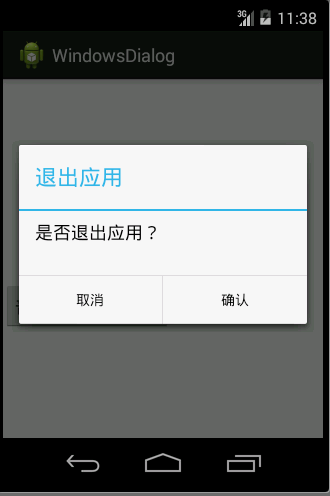
普通模式的对话框使用比较简单,主要是设置对话框标题、设置对话框内容、设置对话框中的按钮,以及增加监听事件,主要代码如下
//普通样式的对话框

        btn2 = (Button) findViewById(R.id.btn2);

        btn2.setOnClickListener(new OnClickListener() {

            @Override

            public void onClick(View v) {

                // TODO Auto-generated method stub

                /**声明一个Builder对象在当前Activity**/

                AlertDialog.Builder  ad = new Builder(MainActivity.this) ;

                /**设置标题**/

                ad.setTitle("退出应用");

                /**设置主题内容**/

                ad.setMessage("是否退出应用?");

                /**设置按钮**/

                ad.setPositiveButton("确认", new DialogInterface.OnClickListener() {

                      /**按钮增加监听时间,关闭activity**/

                      public void onClick(DialogInterface dialog, int which) {

                          MainActivity.this.finish();

                          System.exit(0);

                      } }

                );

                /**设置按钮**/

                ad.setNegativeButton("取消", new DialogInterface.OnClickListener() {

                    /**设置取消监听时间,关闭当前dilaog**/

                   public void onClick(DialogInterface dialog, int which) {

                     dialog.dismiss();

                   }

                 });

                ad.create().show();

            }

        });
2.自定义对话框
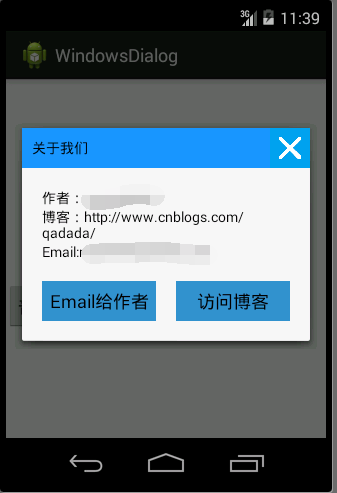
自定义对话框相对来说使用就复杂了,主要是为自定义的对话框设置样式,在学习这个内容的时候,学会了selector的使用
Android中的Selector主要是用来改变ListView和Button控件的默认背景
例如在这个demo中定义的两个按钮样式
1.
<?xml version="1.0" encoding="utf-8"?>

<selector xmlns:android="http://schemas.android.com/apk/res/android">

    <!--

        1.android:state_focused:当控件获得焦点的时候

        2.android:state_pressed:当控件按下的时候

        3.android:state_selected:当控件选中的时候

     -->

    <item android:drawable="@drawable/linkbtnbgedim" android:state_pressed="true"/>

    <item android:drawable="@drawable/linkbtnbg"/>

</selector>
2.
<?xml version="1.0" encoding="utf-8"?>

<selector xmlns:android="http://schemas.android.com/apk/res/android">

    <item android:drawable="@drawable/imgcanceled" android:state_pressed="true"/>

    <item android:drawable="@drawable/imgcancel"/>

</selector>
自定义对话框的样式代码
<?xml version="1.0" encoding="utf-8"?>

<RelativeLayout xmlns:android="http://schemas.android.com/apk/res/android"

    android:layout_width="match_parent"

    android:layout_height="match_parent"

    android:orientation="vertical" >

    <!-- 顶部,使用相对布局,更容易方便才做 -->

    <RelativeLayout

        android:id="@+id/customviewlayTitle"

        android:layout_width="fill_parent"

        android:layout_height="wrap_content"

        android:background="#1A94F9" >

        <TextView

            android:id="@+id/customviewtvTitle"

            android:layout_width="wrap_content"

            android:layout_height="wrap_content"

            android:layout_centerVertical="true"

            android:padding="10dp"

            android:text="关于我们"

            android:textColor="#000000" />

        <ImageButton

            android:id="@+id/customviewtvimgCancel"

            android:layout_width="40dp"

            android:layout_height="40dp"

            android:layout_alignParentRight="true"

            android:layout_centerVertical="true"

            android:background="@drawable/canceltor" />

    </RelativeLayout>

    <!-- 中间内容 -->

    <LinearLayout

        android:id="@+id/customviewlayMessage"

        android:layout_width="wrap_content"

        android:layout_height="wrap_content"

        android:orientation="vertical"

        android:layout_below="@id/customviewlayTitle"

        android:padding="20dp" >

        <TextView

            android:id="@+id/orthertv0"

            android:layout_width="wrap_content"

            android:layout_height="wrap_content"

            android:text="作者:maozhanlei"

            android:textColor="#000000" />

        <TextView

            android:id="@+id/orthertv1"

            android:layout_width="wrap_content"

            android:layout_height="wrap_content"

            android:linksClickable="true"

            android:text="博客:http://www.cnblogs.com/qadada/"

            android:textColor="#000000" />

        <TextView

            android:id="@+id/orthertv2"

            android:layout_width="wrap_content"

            android:layout_height="wrap_content"

            android:linksClickable="true"

            android:text="Email:mzl0819@gmail.com"

            android:textColor="#000000" />

    </LinearLayout>

    <!-- 底部按钮 -->

    <LinearLayout

        android:id="@+id/customviewlayLink"

        android:layout_width="fill_parent"

        android:layout_height="wrap_content"

        android:layout_below="@id/customviewlayMessage"

        android:orientation="horizontal"

        android:paddingLeft="20dp"

        android:paddingRight="20dp"

        android:paddingBottom="20dp">

        <Button

            android:id="@+id/ortherbtnemil"

            android:layout_width="fill_parent"

            android:layout_height="40dp"

            android:background="@drawable/linkbtnbged"

            android:linksClickable="true"

            android:layout_weight="1"

            android:layout_marginRight="10dp"

            android:text="Email给作者" />

        <Button

            android:id="@+id/ortherbtnweb"

            android:layout_width="fill_parent"

            android:layout_height="40dp"

            android:linksClickable="true"

            android:background="@drawable/linkbtnbged"

            android:text="访问博客"

            android:layout_marginLeft="10dp"

            android:layout_weight="1"/>

    </LinearLayout>

</RelativeLayout>
核心java代码
    /**

     * 点击主界面按钮点监听

     *

     */

    private void onClickBtnListener() {

        Builder builder=myBuilder(MainActivity.this);

        /**调用Build的show方法设置为显示,并返回一个AlertDialog对象**/

        final AlertDialog dialog=builder.show();

        /**点击屏幕外侧对话框是否显示**/

        dialog.setCanceledOnTouchOutside(false);

        /**点击右侧的按钮关闭对话框**/

        imageCloseDialog(dialog);

        sendEmailClickListener(dialog);

        openBlogListener(dialog);

    }

    /**

     * 访问blog的监听事件

     * @param dialog

     */

    private void openBlogListener(final AlertDialog dialog) {

        Button ortherbtnweb = (Button)customView.findViewById(R.id.ortherbtnweb);

        ortherbtnweb.setOnClickListener(new OnClickListener() {

            /* 点击访问博客按钮,访问我的博客网站

             * @see android.view.View.OnClickListener#onClick(android.view.View)

             */

            @Override

            public void onClick(View v) {

                // TODO Auto-generated method stub

                Uri uri = Uri.parse("http://blog.csdn.net/asinzuo");

                Intent intent = new Intent(Intent.ACTION_VIEW, uri);

                startActivity(intent);

                dialog.dismiss();

            }

        });

    }

    /**

     * 发送邮件按钮事件

     * @param dialog

     */

    private void sendEmailClickListener(final AlertDialog dialog) {

        Button ortherbtnemil = (Button) customView.findViewById(R.id.ortherbtnemil);

        ortherbtnemil.setOnClickListener(new OnClickListener() {

            /* 启动发送邮件的服务

             * @see android.view.View.OnClickListener#onClick(android.view.View)

             */

            @Override

            public void onClick(View v) {

                // TODO Auto-generated method stub

                Intent i = new Intent(Intent.ACTION_SEND);

                i.setType("text/plain");

                i.setType("message/rfc822") ; // 真机上使用这行

                i.putExtra(Intent.EXTRA_EMAIL, new String[]{"asinzuo@qq.com"});

                i.putExtra(Intent.EXTRA_SUBJECT,"windows风格dialog反馈");

                i.putExtra(Intent.EXTRA_TEXT,"内容");

                startActivity(Intent.createChooser(i, "选择应用"));

                dialog.dismiss();

            }

        });

    }

    /**

     * 点击关闭图片,关闭弹出框

     * @param dialog

     */

    private void imageCloseDialog(final AlertDialog dialog) {

        /**从customView中获得关闭按钮,返回值是一个ImageButton**/

        ImageButton customviewtvimgCancel=(ImageButton)customView.findViewById(R.id.customviewtvimgCancel);

        /**为ImageButton设置监听事件,使用匿名内部类实现**/

        customviewtvimgCancel.setOnClickListener(new OnClickListener() {

            public void onClick(View v) {

                /**调用AlertDiloag的dismiss方法,进行关闭**/

                dialog.dismiss();

            }

        });

    }

    /**

     * 生成一个Builder对象

     * @param mainActivity

     * @return

     */

    private Builder myBuilder(MainActivity mainActivity) {

        // TODO Auto-generated method stub

        /**

         * 它的作用类似于findViewById()。不同点是LayoutInflater是用来找res/layout/下的xml布局文件,并且实例化;

         * 而findViewById()是找xml布局文件下的具体widget控件

         *

         */

        /**从指定的activity中获得一个LayoutInflater对象**/

        final LayoutInflater inflater=this.getLayoutInflater();

        /**inflate()的作用就是将一个用xml定义的布局文件查找出来,返回值是view类型**/

        customView=inflater.inflate(R.layout.windowsdialog, null);

        /**创建一个Builder对象**/

        AlertDialog.Builder builder=new AlertDialog.Builder(mainActivity);

        return builder.setView(customView);

    }
Android简单例子——AlertDialog的更多相关文章
- Android简单例子——IpHone样式AlertDialog
此例子源于网络,下载下来之后,自己加了写注释,作为总结,发到博客中,谢谢原作者 通过这个例子学到的东西 1.自定义对话框的使用 2.程序中使用颜色如何进行存放,增加复用性 3.加深线性布局.常用控件的 ...
- android json解析及简单例子+Android与服务器端数据交互+Android精彩案例【申明:来源于网络】
android json解析及简单例子+Android与服务器端数据交互+Android精彩案例[申明:来源于网络] android json解析及简单例子:http://www.open-open. ...
- Android简单逐帧动画Frame的实现(二)
Android简单逐帧动画Frame的实现 Android简单逐帧动画Frame的实现 1.逐帧动画 即是通过播放预先排序好的图片来实现动态的画面,感觉像是放电影. 2.实现步骤: 1. 在工程里 ...
- android中的AlertDialog具体概述
android的AlertDialog具体解释 AlertDialog的构造方法所有是Protected的.所以不能直接通过new一个AlertDialog来创建出一个AlertDialog. 要创建 ...
- Hibernate4.2.4入门(一)——环境搭建和简单例子
一.前言 发下牢骚,这段时间要做项目,又要学框架,搞得都没时间写笔记,但是觉得这知识学过还是要记录下.进入主题了 1.1.Hibernate简介 什么是Hibernate?Hibernate有什么用? ...
- AgileEAS.NET SOA 中间件平台.Net Socket通信框架-简单例子-实现简单的服务端客户端消息应答
一.AgileEAS.NET SOA中间件Socket/Tcp框架介绍 在文章AgileEAS.NET SOA 中间件平台Socket/Tcp通信框架介绍一文之中我们对AgileEAS.NET SOA ...
- spring mvc(注解)上传文件的简单例子
spring mvc(注解)上传文件的简单例子,这有几个需要注意的地方1.form的enctype=”multipart/form-data” 这个是上传文件必须的2.applicationConte ...
- ko 简单例子
Knockout是在下面三个核心功能是建立起来的: 监控属性(Observables)和依赖跟踪(Dependency tracking) 声明式绑定(Declarative bindings) 模板 ...
- mysql定时任务简单例子
mysql定时任务简单例子 ? 1 2 3 4 5 6 7 8 9 如果要每30秒执行以下语句: [sql] update userinfo set endtime = now() WHE ...
随机推荐
- SharePoint用户控件编写的简单介绍
转:http://www.it165.net/design/html/201204/1131.html 我们开发中,通常需要写各种各样的部件来实现我们的展示或者功能,下面就介绍下刚刚接触的QuickP ...
- LR测试工具性能指标详解
这篇文章将对LoadRunner测试工具的性能指标从以下三点进行详解. 第一点.Web资源分析是从服务器入手对Web服务器的性能分析. 1.Hits per Second "每秒点击次数&q ...
- HDOJ/HDU 1241 Oil Deposits(经典DFS)
Problem Description The GeoSurvComp geologic survey company is responsible for detecting underground ...
- ubuntu 手动添加jar到本地仓库
前言:maven仓库的下载速度太慢了,而且有些jar不存在,或者加入自己开发的依赖包,还是要学会自己手动加入jar.下面以 javax.servlet-api为例. 1.获取下载的javax.serv ...
- 在Jersey中如何处理泛型集合
Jersey是一个标准的Restful Web service框架,可以方便的实现Restful的Server端和客户端. 本文主要介绍使用Jersey客户端时如何将Json格式的数组转换成java的 ...
- Gradle DSL method found: ‘android()’错误
Gradle DSL method found: ‘android()’错误 和上个错误一样这个也是因为在新版本的Gradle中android()方法已经废弃,但是要注意android()只是在整个项 ...
- 升级cocoapods到1.2 beta版本的方法
最近写Swfit3.0, 要用到一些框架, 然后就用cocoapods嘛, 结果说要cocoapods1.1.0版本才行, 而自己的是cocoapods1.0.1版本的, 所以就想着升级嘛, 结果就遇 ...
- SQL用replace替换文本部分内容
替换文本内容 update tk_question set stem=replace(cast(stem as varchar(max)) ,'被替换文本','替换文本') 查询字段内容长度 sele ...
- 抓取用户openid
获取用户微信openid用户无感知情况下 传参为 appid appsecret 当前网址 session_name名称 <?php //获取微信的openid function get_wx_ ...
- Hibernate学习之表一对多,多对一关系
代码: person类: public class Person { private long id; private String name; private int age; private Da ...