
iOS UIKit:CollectionView之设计 (1)
collection view(UICollectionView对象)使用灵活和可扩展的布局来描述有序的数据项,其一般情况下以网格的形式来展示内容,但并非一定如此。
1 基础
为了将数据展示在屏幕中,Collection View需要搭配其它多种对象,其中有些是用户可选对象,而有些则是必须使用类型。
1.1 配合对象
collection views的设计思想与table view的设计思想类似,都是将数据与展示分开,并且也涉及data source和delegate等多种类型,如表 11所示,涉及的每个类,及其负责的功能。
表 11 The classes and protocols for implementing collection views
|
Purpose |
Classes/Protocols |
Description |
|
顶层容器和管理 |
UICollectionView UICollectionViewController |
UICollectionView对象定义了可视化区域,该类继承UIScrollView; UICollectionViewController对象负责管理collection view对象,其继承UIViewController类。 |
|
内容管理 |
UICollectionViewDataSource(protocol) UICollectionViewDelegate(protocol) |
Data source对象是collection view最重要的对象,其管理和创建显示的内容。 Delegate对象提供了用户与collection view对象交换的方式。 |
|
展示 |
UICollectionReusableView UICollectionViewCell |
所有在collection view中展示的view对象都必须是UICollectionReusableView实例化对象,这个类提供了一种循环使用的机制。 UICollectionViewCell对象是一种循环使用的view,其是主要的使用对象。 |
|
布局 |
UICollectionViewLayout UICollectionViewLayoutAttributes UICollectionViewUpdateItem |
UICollectionViewLayout对象负责管理cell和view的位置、大小和可视化属性。 在collection view布局执行区间,布局对象(layout object)创建了布局属性(UICollectionViewLayoutAttributes对象),从而告诉cell的布局信息。 不管数据项什么时候被插入、删除和移动,布局对象(layout object)都会接收到UICollectionViewUpdateItem对象。用户从来都不需要手动创建该对象。 |
|
流布局 |
UICollectionViewFlowLayout UICollectionViewDelegateFlowLayout |
UICollectionViewFlowLayout是一种实体布局类,用户使用该类对象来实现网格布局或流式布局。 |
如图 11所示展示了collection view相关对象之间的协作关系,collection view对象从data source对象中获得显示的cell对象;layout 对象使用layout attribute对象来管理cell对象的位置,并将这些layout attribute对象发送给collection view对象;最终collection view对象合并layout 信息和cell信息,并在视图中创建可视化内容。
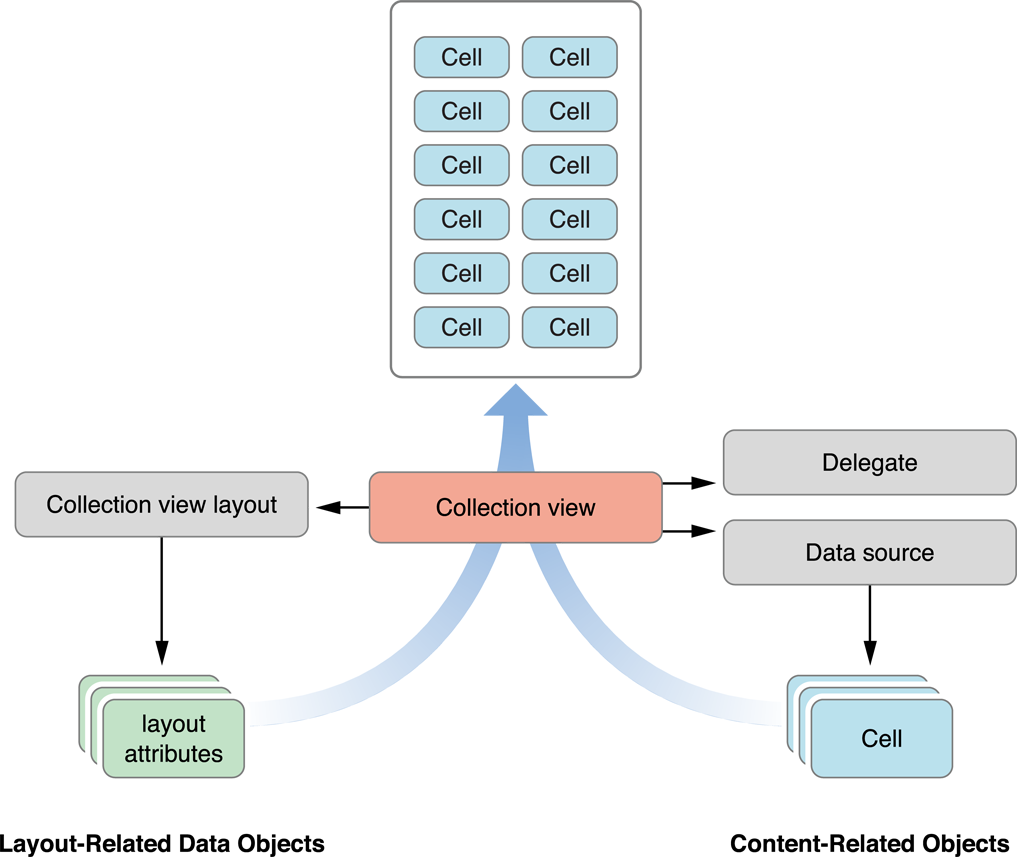
图 11 Merging content and layout to create the final presentation
1.2 Reusable Views
Collection view使用view的循环利用程序来改善性能。当view对象离开屏幕时,则将其移入reuse queue,而不是将其删除;当有新的内容需要被展示在屏幕时,那么可以使用reuse queue中的view对象,只是数据不同而已。为了促进循环使用,所有在collection view中显示的view类都必须继承UICollectionReusableView类。
Collection view支持如下三种可循环使用类型,每种类型都有明确的用处和用法:
1) Cells
该类型为collection view的主要显示内容,其工作是描述简单项的内容。每个cell对象都是UICollectionViewCell类的实例化对象。
2) Supplementary views
该类型为展示collection view的section信息。与cell对象类似,supplementary view对象也是数据驱动类型,不同的是supplementary view不是强制的,其使用和布置都是由layout object管理。
3) Decoration views
该类型为一种可视化装饰类型,而且它不是由data source管理的数据驱动类型,而是完全由layout object管理。
1.3 Layout Object
layout object完全负责可视化组件的位置和样式,虽然data source提供显示的view对象,但是layout object负责管理view对象的位置、尺寸和显示外观。这种分开独立的责任使得在不修改view对象的情况下,可动态改变view对象的布局。
注意不要将collection view的布局管理与app的子view的布局管理相混淆。collection view的布局管理不需要直接管理这些view对象,相反,layout object创建一些布局信息来描述cells、supplementary views,、和 decoration views对象的位置、尺寸和可视化外观,使得collection view应用这些信息来构建这些view对象的布局。
2 Data Source 与Delegate
与table view类似,collection view也需要data source对象和delegate对象。
- Data source(必选):其是collection view展示的对象提供者。
- Delegate(可选):其提供collection view与用户(开发工程师)进行信息交换的方式。
2.1 管理内容
Data source对象负责管理collection view的内容,其中data source对象所属的类必须遵守UICollectionViewDataSource协议。Data source必须向collection view对象提供如下的信息:
- collection view包含多少项section;
- collection view每项section又包含了多少个item(cell);
- 每项section和每个item展示什么内容。
Collection view使用多层深度NSIndexPath对象来定位数据项。对于item对象,NSIndexPath对象仅包含两层深度的内容,即一个section数和一个item数;但对于supplementary 和decoration view对象,NSIndexPath对象则可能包含更多层的内容,主要依赖app是如何布局和设计。
NSIndexPath对象是由layout object创建和提供,即section和item的可视化信息是由layout object决定,不同的布局信息展示的section和item信息是完全不同的。如图 21所示,flow layout object展示的section对象是在垂直方向上连续布局,而custom layout提供的section则是非连续的布局安排。

图 21 Sections arranged according to the arrangement of layout objects
2.1.1 数据模型
Apple官方建议采用二维的section和item来组织底层的数据模型,采用这种方式来组织能够更快的访问数据。如图 22所示,底层数组中包含多个子数组,每个数组描述一个section对象的内容,而每个section数组又包含多个item元素。
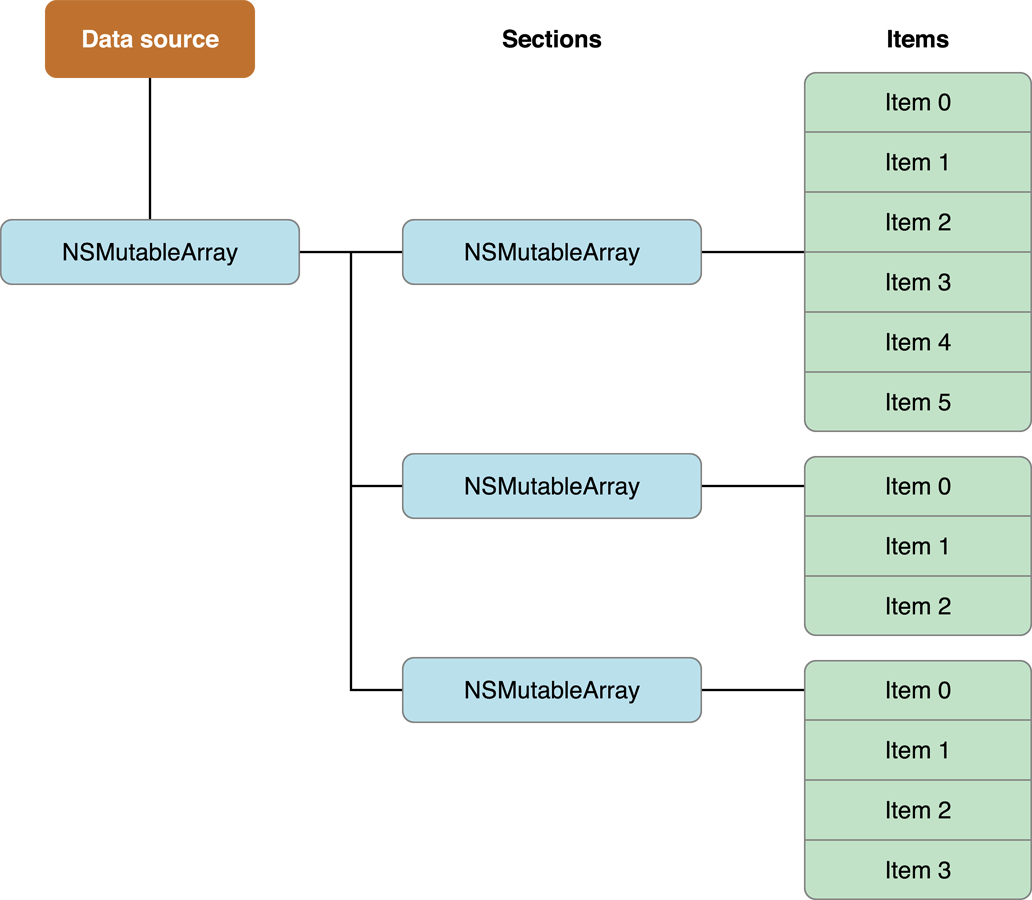
图 22 Arranging data objects using nested arrays
2.1.2 模型数量
collection view会不断向data source询问有多少项section和多少个item,当如下事件发生时,collection view对象就会询问data source这些信息:
a) collection view第一次被展示时;
b) 修改collection view对象的data source对象时;
c) 用户精确的调用collection view对象的reloadData方法时;
d) collection view delegate对象执行performBatchUpdates:completion:方法时,或者是其执行的move、 insert或 delete 方法。
为了回答collection view这些信息,所以data source对象需要实现UICollectionViewdataSource协议两个方法:
1) numberOfSectionsInCollectionView:方法
该方法返回collection view中有多少项section对象。该方法为可选类型,若未实现该方法,则默认返回为1。
2) collectionView:numberOfItemsInSection:方法
该方法返回每项section有多少个item,并且该方法为必选类型。
如下所示的实现,_data为预先定义的二维数组:
1 - (NSInteger)numberOfSectionsInCollectionView:(UICollectionView*)collectionView {

2     // _data is a class member variable that contains one array per section.

3     return [_data count];

4 }

5

6 - (NSInteger)collectionView:(UICollectionView*)collectionView numberOfItemsInSection:(NSInteger)section {

7 NSArray* sectionArray = [_data objectAtIndex:section];

8 return [sectionArray count];

9  }
2.2 Cells和Supplementary Views配置
Data source对象的另一个重要任务是提供collection view具体显示的内容:cell和supplementary view对象。Collection view不会遍历这些内容,只是向layout object查询layout attribute信息,然后将布局信息应用于显示内容。为了向collection view提供这些cell和supplementary view对象,需要用户(开发工程师)实现如下内容:
1) 在storyboard文件中,必须嵌入cell或view模版;同时可以选择为每个cell或supplementary view注册(关联)一个controller类。
2) 在data source中,配置reuse queue并配置合适的cell和supplementary view。
为了尽可能高效地使用cell和supplementary view对象,每个collection view都维护一个内置的cell和supplementary view队列(reuse queue)。即当需要显示这些cell和view对象时,不需要进行创建,从而节省的时间和硬件性能。
2.2.1 注册
为了配置和注册cell和supplementary view对象,有两种方式:program和storyboard。
1) storyboard方式
这种方式使用非常简单,只需从库中拖拽item到collection view,并配置相关的属性,其实就是创建collection view与cell(或supplementary view)直接关系。
- 若是cell对象:从库中拖拽一个collection view cell控件到collection view视图中,然后创建定制的class,并将此class关联到cell控件中,同时为cell控件设置reusable view identifier值。
- 若是supplementary view对象:从库中拖拽一个Collection Reusable View控件到collection view视图中,然后创建定制的class,并将此class关联到该控件中,同时为该控件设置reusable view identifier值。
2) program方式
这种方式是使用UICollectionView对象的不同方法来注册cell和supplementary view对象。
- 若是cell对象
|
- (void)registerClass:(Class)cellClass forCellWithReuseIdentifier:(NSString *)identifier - (void)registerNib:(UINib *)nib forCellWithReuseIdentifier:(NSString *)identifier |
|
参数语义: cellClass:为cell控件关联的类class属性; identifier:为在以后要重复使用的标识符; nib:为包含cell对象的nib对象。 |
- 若是supplementary view对象
|
- (void)registerClass:(Class)viewClass forSupplementaryViewOfKind:(NSString *)elementKind withReuseIdentifier:(NSString *)identifier - (void)registerNib:(UINib *)nib forSupplementaryViewOfKind:(NSString *)kind withReuseIdentifier:(NSString *)identifier |
|
参数语义: viewClass:为view控件关联的类class属性; elementKind:layout object定义的标识符; identifier:为在以后要重复使用的标识符; nib:为包含view对象的nib对象。 kind: |
注册cell和supplementary view对象,必须在进行出队之前进行;并且一旦注册之后,即可重复使用cell和supplementary view对象,而无需在重复注册。Apple不推荐在出队一个或多个对象之后,再修改注册信息。
2.2.2 出队和配置
当Collection view需要显示内容时,它就会向Data source 对象请求cell和supplementary view对象。这里的请求其实是调用UICollectionViewDataSource协议的两个方法:
- (UICollectionViewCell  *)collectionView:(UICollectionView *)collectionView


                   cellForItemAtIndexPath:(NSIndexPath *)indexPath

-(__kindof UICollectionReusableView*)dequeueReusableSupplementaryViewOfKind:(NSString*)elementKind


                                                        withReuseIdentifier:(NSString*)identifier

                                                               forIndexPath:(NSIndexPath *)indexPath
其中第一个方法是返回cell对象,用户必须实现该方法;而第一个方法返回supplementary view对象,其是可选方法,具体依赖布局的类型。但两个方法内部都可以按如下操作:
1) 从如下两个方法出队cell对象或supplementary view对象:
- dequeueReusableCellWithReuseIdentifier:forIndexPath:
- dequeueReusableSupplementaryViewOfKind:withReuseIdentifier:forIndexPath:
2) 使用index path对象配置数据信息;
3) 返回cell或view对象。
Reuse queue会自动从storyboard或nib中创建这些cell和supplementary view对象,并且调用其initWithFrame:方法进行初始化,所以用户可以在关联的class中实现该方法。在创建显示内容后,即可对其进行配置,如下所示:
1 - (UICollectionViewCell *)collectionView:(UICollectionView *)collectionView

2                   cellForItemAtIndexPath:(NSIndexPath *)indexPath {

3     MyCustomCell* newCell = [self.collectionView dequeueReusableCellWithReuseIdentifier:MyCellID

4                                                                  forIndexPath:indexPath];

5

6     newCell.cellLabel.text = [NSString stringWithFormat:@"Section:%d, Item:%d", indexPath.section, indexPath.item];

7     return newCell;

8 }
注意:
若返回的cell和supplementary view对象为nil,或者是其它原因不能显示,那么将导致一个assert错误并中断app。
2.3 section和item编辑
为了插入、删除或移动section对象和item对象,需要按如下步骤操作:
- 更新data source的数据模型;
- 调用UICollectionView对象的插入、删除或移动的合适方法。
2.3.1 简单编辑
与UITableView类似,UICollectionView也提供了一些方法来编辑单一的某一项section,或一个item。如下所示当用户点击collection view的一个item时,就将其删除:
1 - (void)collectionView:(UICollectionView *)collectionView didSelectItemAtIndexPath:(NSIndexPath *)indexPath

2 {

3     [_array[indexPath.section] removeObjectAtIndex:indexPath.item];

4     NSArray * indexs = [NSArray arrayWithObjects:[NSIndexPath indexPathForItem:indexPath.item inSection:indexPath.section],

5                                                          nil];

6     [collectionView deleteItemsAtIndexPaths:indexs];

7 }
除了上述的删除操作外,还有插入和交换等操作方法,具体内容可参考UICollectionViewDelegate。
2.3.2 批量编辑
与UITableView类的批量操作不同,UICollectionView类提供performBatchUpdates:completion:方法来完成(而不是放在两个方法之间),将UICollectionView的编辑方法都放在如下方法的block中。
|
- (void)performBatchUpdates:(void (^)(void))updates completion:(void (^)(BOOL finished))completion |
|
参数语义: updates:为更新的block,对collection view的section或item编辑都放在该block中; completion:为完成后的操作,可以为nil。 |
如下所示,当用户点击collection view的某一项时,将其删除并插入一项新内容,即替换新项:
 1 - (void)collectionView:(UICollectionView *)collectionView didSelectItemAtIndexPath:(NSIndexPath *)indexPath

 2 {

 3     [_array[indexPath.section] removeObjectAtIndex:indexPath.item];

 4     [_array[indexPath.section] insertObject:@"hlw" atIndex:indexPath.item];

 5     NSArray * indexs = [NSArray arrayWithObjects:[NSIndexPath indexPathForItem:indexPath.item inSection:indexPath.section],

 6                                                          nil];

 7     [collectionView performBatchUpdates:^{

 8         [collectionView deleteItemsAtIndexPaths:indexs];

 9         [collectionView insertItemsAtIndexPaths:indexs];

10     } completion:nil];

11 }
2.4 Selection与Highlight
2.4.1 状态
1) 基本概念
collection view支持对cell进行多种操作:单选、多选和不可选。Collection view会自动探测到对cell的操作。可以将collection view cell有两种特殊状态:
- selection:该状态是cell的一种长期的状态,是指cell被选择过;
- highlight:该状态是cell的一种短暂状态,是指cell目前被强调。
2) 背景视图
Collection view会修改cell的属性来指明其cell是selection状态或是hightlight状态,并且UICollectionViewCell对象有一个selectedBackgroundView属性(为UIView类型),当cell对象为selection或hightlight状态时,那么cell将显示selectedBackgroundView属性的背景视图。
 1 - (UICollectionViewCell *)collectionView:(UICollectionView *)collectionView cellForItemAtIndexPath:(NSIndexPath *)indexPath

 2 {

 3     contentCell *cell = [collectionView dequeueReusableCellWithReuseIdentifier:@"Cell" forIndexPath:indexPath];

 4     cell.myLabel.text =[NSString stringWithFormat:@"S%ld: %@",indexPath.section,_array[indexPath.section][indexPath.item]];

 5

 6     UIView* backgroundView = [[UIView alloc] initWithFrame:cell.bounds];

 7     backgroundView.backgroundColor = [UIColor redColor];

 8     cell.backgroundView = backgroundView;  //一般情况下显示的背景

 9

10     UIView* selectedBGView = [[UIView alloc] initWithFrame:cell.bounds];

11     selectedBGView.backgroundColor = [UIColor whiteColor];

12     cell.selectedBackgroundView = selectedBGView;  //当被选中过,或处于强调,则显示该背景

13     return cell;

14 }
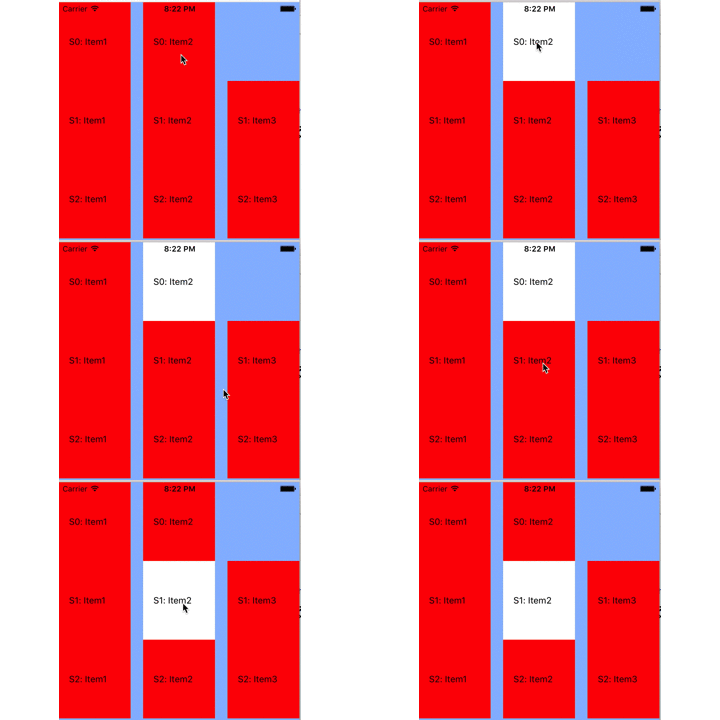
影 21 效果图
3) 状态区别
selection和hightlight两种状态之间存在细微的区别,两者分别由UICollectionViewCell类的selected属性以及highlighted属性来标识。并且当用户触碰cell对象时,其状态的变化也不一样,如图 23所示,当点击cell过程中selected和highlighted的变化:
- 当手指按下cell对象时,hightlighted为YES,而selected为NO;
- 当手指抬起时,hightlighted为NO,而selected为NO;
- 当最后结束点击时,hightlighted为NO,而selected为YES。
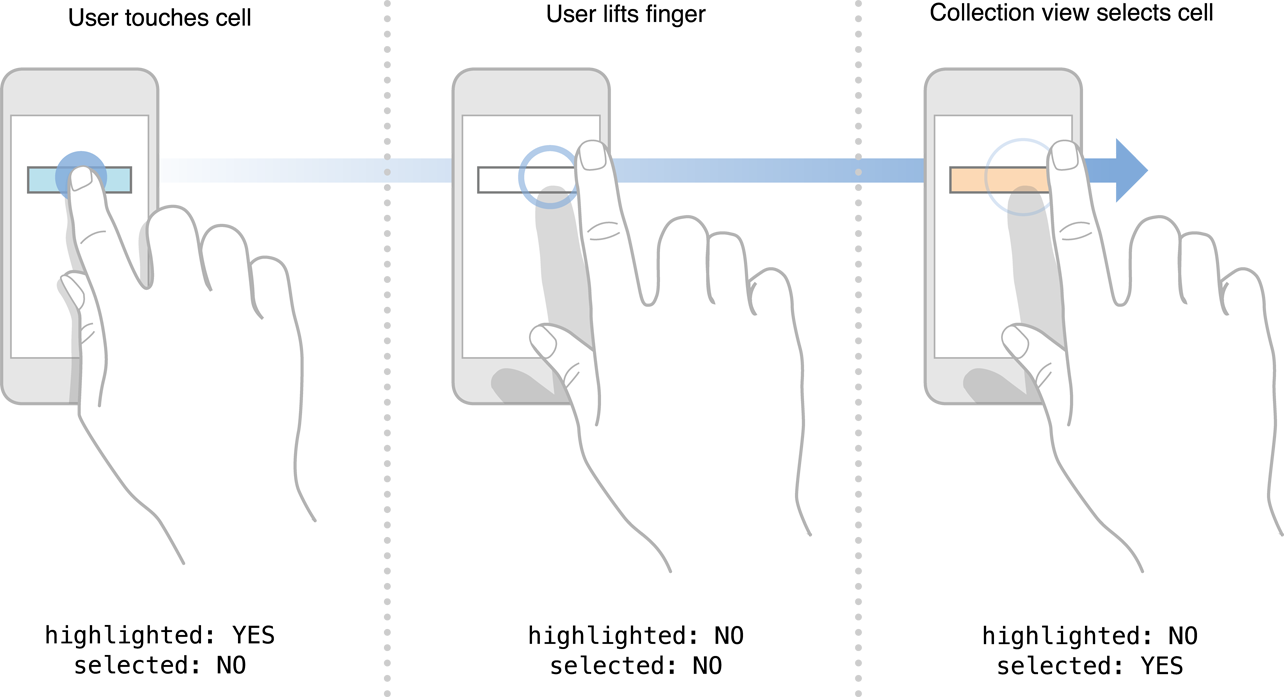
图 23 Tracking touches in a cell
2.4.2 响应方法
根据cell的两种状态变化,collection view delegate提供如下的方法来响应cell状态的变化,用户可以根据需要实现这些方法或之一:
|
collectionView:shouldSelectItemAtIndexPath: collectionView:shouldDeselectItemAtIndexPath: collectionView:didSelectItemAtIndexPath: collectionView:didDeselectItemAtIndexPath: collectionView:shouldHighlightItemAtIndexPath: collectionView:didHighlightItemAtIndexPath: collectionView:didUnhighlightItemAtIndexPath: |
2.5 Edit Menu
当长按cell对象时,会出现一个上下文菜单,有3个菜单项:cut、copy和paste。但要显示这个上下文菜单,必须实现UICollectionViewDelegate的3个方法:
1) collectionView:shouldShowMenuForItemAtIndexPath:方法
该方法必须返回YES,指明要上下文菜单。
2) collectionView:canPerformAction:forItemAtIndexPath:withSender:方法
该方法也必须返回YES,然后立即会出现一个有3项的菜单。
3) collectionView:performAction:forItemAtIndexPath:withSender:方法
当用户选择3个菜单项之一,则会执行该方法。
如下所示,当用户点击某一项菜单项,则输出相应的名字:
 1 -(BOOL)collectionView:(UICollectionView *)collectionView shouldShowMenuForItemAtIndexPath:(NSIndexPath *)indexPath

 2 {

 3     return YES;

 4 }

 5 -(BOOL)collectionView:(UICollectionView *)collectionView canPerformAction:(SEL)action forItemAtIndexPath:(NSIndexPath *)indexPath withSender:(id)sender

 6 {

 7     return YES;

 8 }

 9

10 -(void)collectionView:(UICollectionView *)collectionView performAction:(SEL)action forItemAtIndexPath:(NSIndexPath *)indexPath withSender:(id)sender

11 {

12     NSLog(@"%@",NSStringFromSelector(action));

13 }
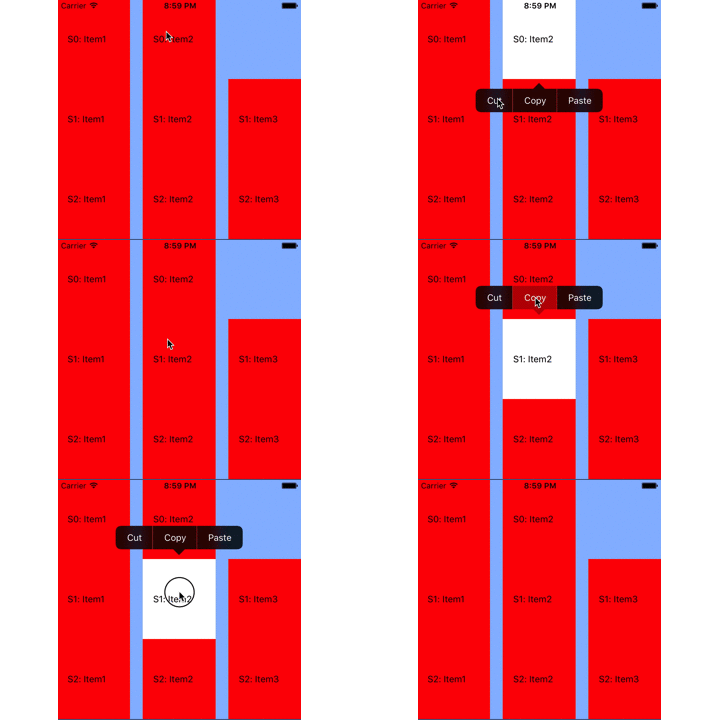
影 22 效果图
5 参考文献
[1] Collection View Programming Guide for IOS.
iOS UIKit:CollectionView之设计 (1)的更多相关文章
- iOS interface guidelines (界面设计指南)<一>
一. 为iOS而设计 1.iOS体现的主题: (1)Deference(顺从):UI的存在就是为了让顾客更加容易理解和进行交互,而不是要和顾客玩智力游戏 (2)Clarity(清晰):在每个 ...
- iOS UIKit:viewController之动画(5)
当弹出一个view controller时,UIKit提供了一些标准转换动画,并且也支持用户自定义的动画效果. 1 UIView动画 UIView是自带动画实现功能,其中有两种方式实现: ...
- iOS类的合理设计,面向对象思想
每天更新的东西可能有反复的内容.当时每一部分的知识点是不同的,须要大家认真阅读 这里介绍了iOS类的合理设计.面向对象思想 main.m #import <Foundation/Foundati ...
- iOS UIKit:CollectionView之布局(2)
Collection view使用UICollectionViewFlowLayout对象来管理section中的cell,该对象是一种流布局方式,即在collection view中的section ...
- iOS UIKit:App
1.App生命周期 IOS架构是由许多设计模式实现,如model-view-controller 和 delegation模式. 1.1 main函数 与其它框架类似,IOS框架的入口也是从main函 ...
- ios UIKit动力
UIkit动力学是UIkit框架中模拟真实世界的一些特性. UIDynamicAnimator 主要有UIDynamicAnimator类,通过这个类中的不同行为来实现一些动态特性. 它一般有两种初始 ...
- ios UIKit动力 分类: ios技术 2015-07-14 12:55 196人阅读 评论(0) 收藏
UIkit动力学是UIkit框架中模拟真实世界的一些特性. UIDynamicAnimator 主要有UIDynamicAnimator类,通过这个类中的不同行为来实现一些动态特性. 它一般有两种初始 ...
- iOS UIKit Dynamics入门 UIKit动力学,实现重力、连接、碰撞、悬挂等动画效果
本文为转载文章 版权归原文所有 什么是UIKit动力学(UIKit Dynamics) 其实就是UIKit的一套动画和交互体系.我们现在进行UI动画基本都是使用CoreAnimation或者UIVie ...
- Livecoding.tv 现正举行iOS及Android App设计比赛
近日,Livecoding.tv, 一个为世界各地的程序员提供在线实时交流的平台,在其网站上发布了一篇通知, 宣布从4月15日至5月15日,会为iOS和Android的开发者举办一场本地移动app设计 ...
随机推荐
- VisualStudio替换所有空行
[一篮饭特稀原创,转载请注明出自http://www.cnblogs.com/wanghafan/p/3371620.html] Ctrl+Shift+H 查找内容\r\n\r\n //如果要替换 ...
- [转贴]Eclipse IDE for c++配置
从工作到现在已经有快一年多没用过C/C++了,现在想重新捡起来,但是以前一直是在windows下面进行开发,使用最多的是Eclipse和Myeclipse,因为这些都是开源的软件,并不收费,所以现在也 ...
- SharedPreference.Editor的apply跟commit方法的異同
相同点: 1.二者都可提交preference的修改数据 2.二者都是原子操作 区别: 1.apply没有返回值而commit返回boolean表明修改是否提交成功 2.apply是将修改数据原子提交 ...
- Exception Handling Statements (C# Reference)
Exception Handling Statements (C# Reference) C# provides built-in support for handling anomalous sit ...
- XP中IIS“HTTP 500 - 内部服务器错误”解决方法
我先把主要过程叙述一下,叙述完有每个问题的具体操作方法. 今天我在XP上安装IIS,运行网站出现"HTTP 500 - 内部服务器错误". 打开HTML没有问题,打开ASP文件时就 ...
- POJ2676 Sudoku(dfs)
题目链接. 题目大意: 就是数独游戏.横竖,每一个9宫方块,必须有1~9,且不重复. 分析: 直接DFS.一开始在原图上搜,会TLE.把要补全的空格,放入数组,这样就不用遍历整个图寻找要填的空格了. ...
- Beta Round #9 (酱油杯noi考后欢乐赛)PLQ的寻宝
题目:http://www.contesthunter.org/contest/Beta%20Round%20%EF%BC%839%20%28%E9%85%B1%E6%B2%B9%E6%9D%AFno ...
- Linux无线网络设置(wpa_supplicant的使用)
主机环境:Gentoo Linux 3.1.10 WPA Supplicant工具包可以让您连接到那些使用WPA的AP.因为还只是beta版,所以它的配置方法仍会常常变化——尽管如此,在大部分情况下它 ...
- wpa_supplicant对wep,wpa,wpa2的psk和隐藏ap的scan_ssid扫描配置
# 请不要修改下面这一行内容,否则将不能正常工作ctrl_interface=/var/run/wpa_supplicant # 确保只有root用户能读取WPA的配置ctrl_interface_g ...
- Selenium WebDriver + Grid2 + RSpec之旅(六) ----多浏览器的并行执行
Selenium WebDriver + Grid2 + RSpec之旅(六) ----多浏览器的并行执行 由于浏览器的发展,浏览器种类繁多.为了保证系统能在各种浏览器上叱咤风云,减少测试人员的测试工 ...