
消息通信机制NSNotificationCenter -备
消息通信机制NSNotificationCenter的学习。最近写程序需要用到这类,研究了下,现把成果和
NSNotificationCenter是专门供程序中不同类间的消息通信而设置的,使用起来极为方便,
长话短说。
设置通知,就是说要在什么地方(哪个类)接受通知,一般在初始化中做。
[[NSNotificationCenter defaultCenter] addObserver:self selector:@selector(test:) name:@"test" object:nil];
我仅对以上参数做以说明:addObserver 这个是观察者,就是说 在什么地方接收通知;
selector 这个是收到通知后,调用何种方法;
name: 这个是通知的名字,也是通知的唯一标示,编译器就通过这个找到通知的。
发送通知,就是说此时要调用观察者处的方法。
[[NSNotificationCenter defaultCenter] postNotificationName:@"test" object:searchFriendArray];
我仅对以上参数做以说明:
postNotificationName:通知的名字,也是通知的唯一标示,编译器就通过这个找到通知的。
object:传递的参数
发送通知时,默认调用test方法。
- (void) test:(NSNotification*) notification
{
searchFriendArrary = [notification object];//通过这个获取到传递的对象
}
小结:关于详解iPhone开发之消息通信机制NSNotificationCenter的内容介绍我那了,希望通过本文的学习能对你有所帮助。
iOS push机制

Provider是指某个iPhone软件的Push服务器,APNS是Apple Push Notification Service的缩写,是苹果的服务器。
上图可以分为三个阶段:
第一阶段:应用程序把要发送的消息、目的iPhone的标识打包,发给APNS。
第二阶段:APNS在自身的已注册Push服务的iPhone列表中,查找有相应标识的iPhone,并把消息发送到iPhone。
第三阶段:iPhone把发来的消息传递给相应的应用程序,并且按照设定弹出Push通知。
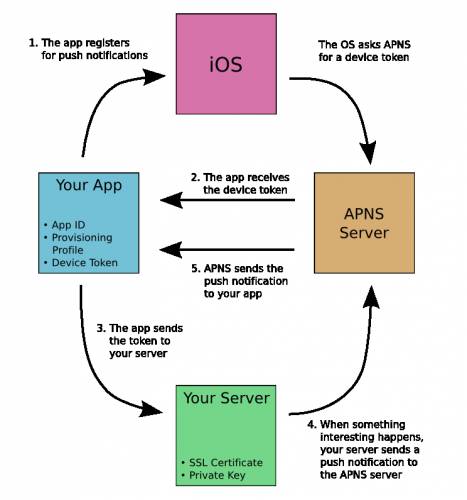
从上图我们可以看到:
1、应用程序注册消息推送。
2、iOS从APNS Server获取device token,应用程序接收device token。
3、应用程序将device token发送给PUSH服务端程序。
4、服务端程序向APNS服务发送消息。
5、APNS服务将消息发送给iPhone应用程序。
无论是iPhone客户端和APNS,还是Provider和APNS,都需要通过证书进行连接。
下面我介绍一下几种用到的证书。
一、CSR文件
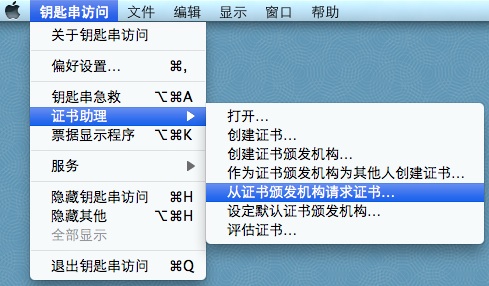
1、生成Certificate Signing Request(CSR)
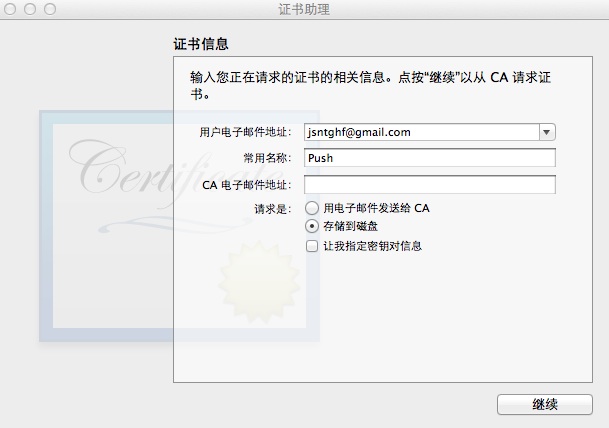
2、填写你的邮箱和常用名称,并选择保存到硬盘。
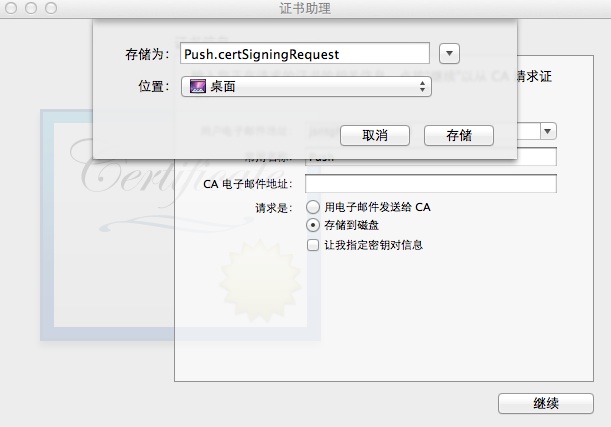
这样就在本地生成了一个Push.certSigningRequest文件。
二、p12文件
1、导出密钥。
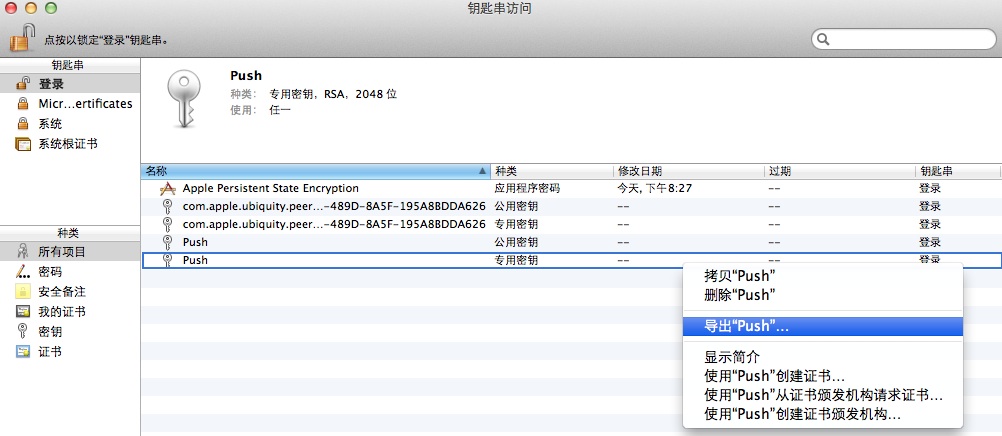
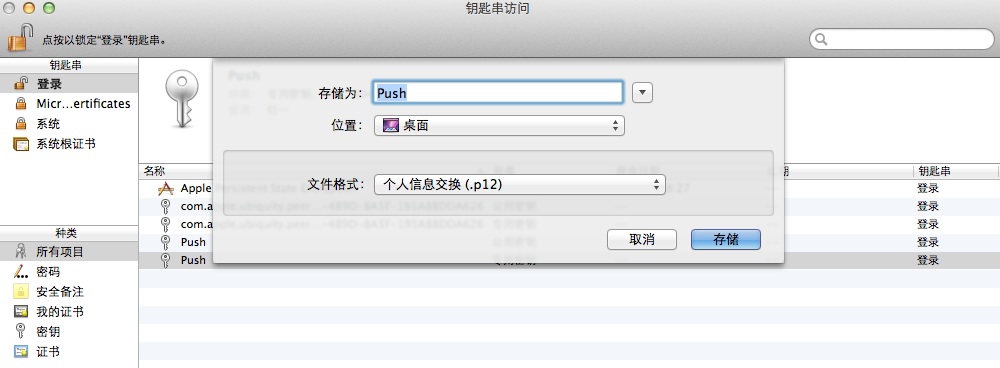
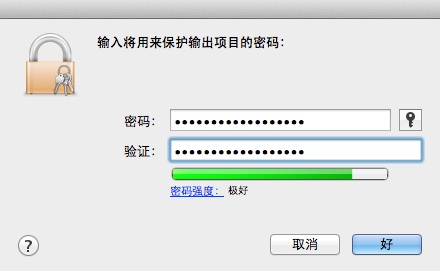
这样就生成了一个Push.p12文件。
三、SSL certificate文件
1、用你付过费的帐号登录到iOS Provisioning Portal,并新建一个App ID,这个过程可以参考:iOS应用的真机调试,这样就会生成下面这条记录:

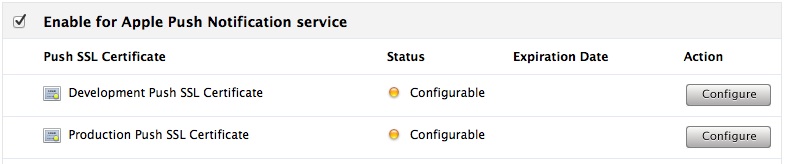
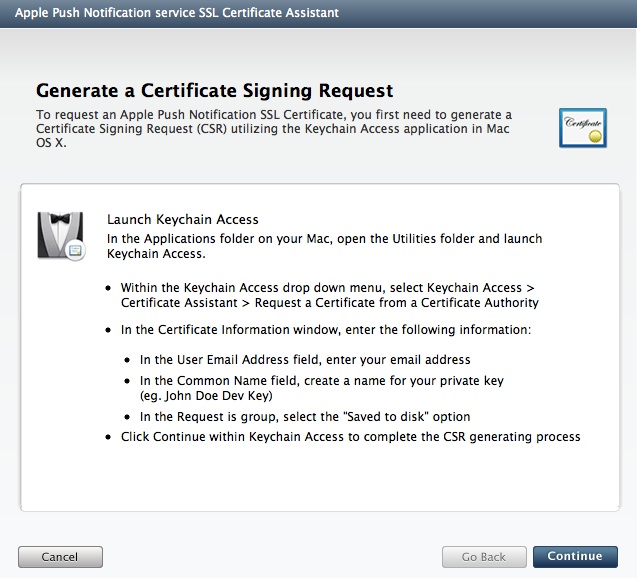
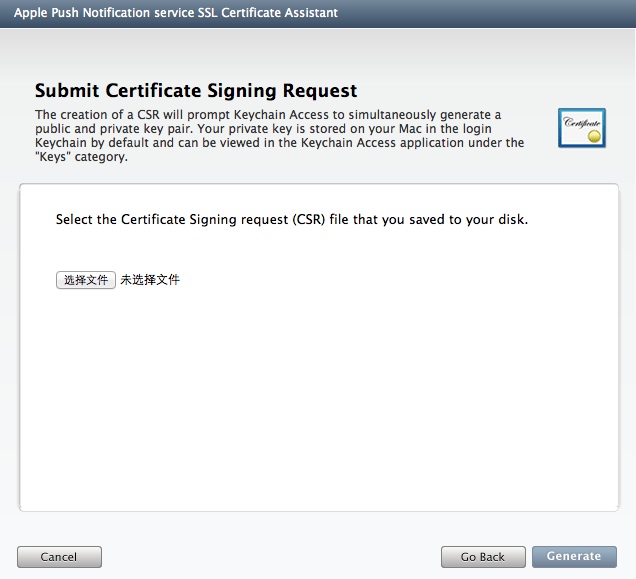
5、选择前面生成好的Push.certSigningRequest文件,点击Generate,出现如下所示的页面:
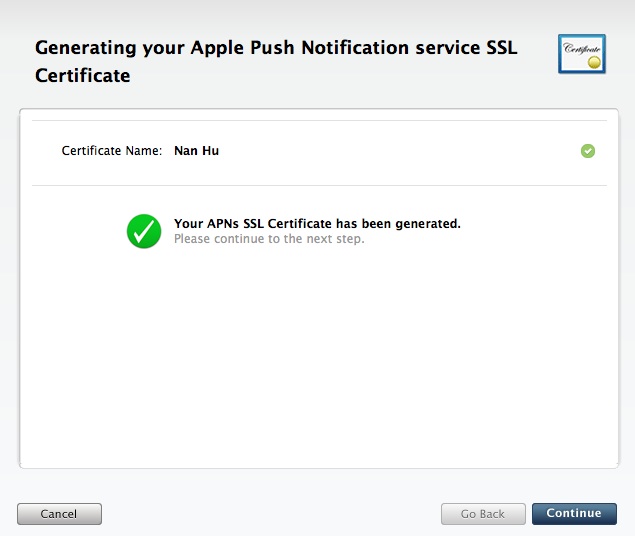
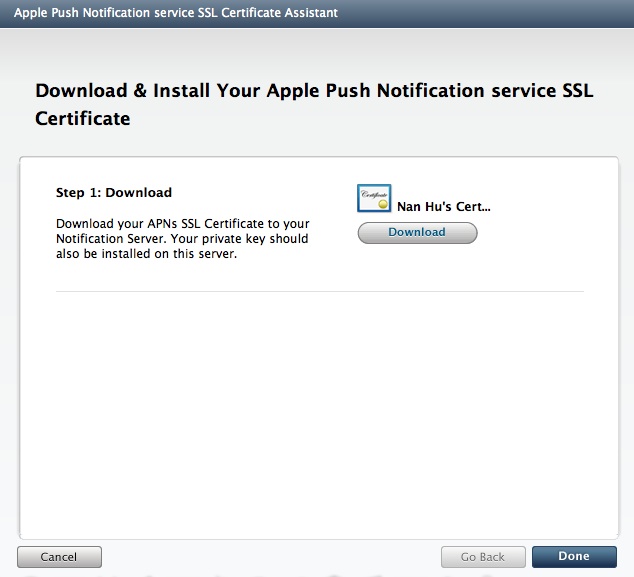
7、点击Download,并将文件命名为aps_developer_identity.cer。
8、点击Done,你会发现状态变成了Enabled:
、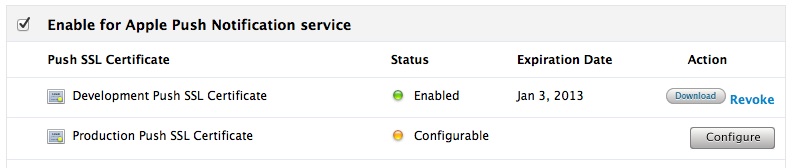
注意:有的App ID的Apple Push Notification service列是灰色的,并且不允许使用Configure按钮,这是因为APNS不支持带通配符的App ID。
到现在为止,我们已经生成了三个文件:
1、Push.certSigningRequest
2、Push.p12
3、aps_developer_identity.cer
在项目的AppDelegate中的didFinishLaunchingWithOptions方法中加入下面的代码:
- [[UIApplication sharedApplication] registerForRemoteNotificationTypes:(UIRemoteNotificationTypeAlert | UIRemoteNotificationTypeSound | UIRemoteNotificationTypeBadge)];
通过registerForRemoteNotificationTypes方法,告诉应用程序,能接受push来的通知。
在项目的AppDelegate中添加下面的方法来获取deviceToken:
- - (void)application:(UIApplication *)app didRegisterForRemoteNotificationsWithDeviceToken:(NSData *)deviceToken {
- NSString *token = [NSString stringWithFormat:@"%@", deviceToken];
- NSLog(@"My token is:%@", token);
// 把token发送给服务器保存起来
//NSLog(@"Did register for remote notifications: %@", deviceToken);
//ASIFormDataRequest *request = [ASIFormDataRequest requestWithURL:[NSURL URLWithString:HX_API_PUSH]];
//NSLog(@"%@", [request url]);
//[request setPostValue:[self hexToken:deviceToken] forKey:@"token"];
//[request setPostValue:@"com.chinaamc.hxjjhd" forKey:@"app"];
//[request setPostValue:@"0" forKey:@"unread"];
//NSString * appversion =[[[NSBundle mainBundle] infoDictionary] objectForKey:@"CFBundleVersion"];//版本号
//[request setPostValue:appversion forKey:@"userid"];
//[request setDelegate:self];
//[request setDidFinishSelector:@selector(requestDidFinishPush:)];
//[request setDidFailSelector:@selector(requestDidFailPush:)];
//[request startAsynchronous];
- }
- - (void)application:(UIApplication *)app didFailToRegisterForRemoteNotificationsWithError:(NSError *)error {
- NSString *error_str = [NSString stringWithFormat: @"%@", error];
- NSLog(@"Failed to get token, error:%@", error_str);
- }
获取到的deviceToken,我们可以提交给后台应用程序,发送通知的后台应用程序除了需要知道deviceToken之外,还需要一个与APNS连接的证书。
这个证书可以通过我们前面生成的两个文件中得到。
1、将aps_developer_identity.cer转换成aps_developer_identity.pem格式
- openssl x509 -in aps_developer_identity.cer -inform DER -out aps_developer_identity.pem -outform PEM
2、将p12格式的私钥转换成pem
- openssl pkcs12 -nocerts -out Push_Noenc.pem -in Push.p12
3、创建p12文件
- openssl pkcs12 -export -in aps_developer_identity.pem -inkey Push_Noenc.pem -certfile Push.certSigningRequest -name "aps_developer_identity" -out aps_developer_identity.p12
这样我们就得到了在.net或java等后台应用程序中使用的证书文件:aps_developer_identity.p12
如果后台应用是php的话,那么可以按照iOS消息推送机制中pem文件的生成这篇文章中的方法来生成php后台应用程序中使用的证书文件:ck.pem
注意:有的App ID的Apple Push Notification service列是灰色的,并且不允许使用Configure按钮,这是因为APNS不支持带通配符的App ID。
到现在为止,我们已经生成了三个文件:
1、Push.certSigningRequest
2、Push.p12
3、aps_developer_identity.cer
在项目的AppDelegate中的didFinishLaunchingWithOptions方法中加入下面的代码:
- [[UIApplication sharedApplication] registerForRemoteNotificationTypes:(UIRemoteNotificationTypeAlert | UIRemoteNotificationTypeSound | UIRemoteNotificationTypeBadge)];
通过registerForRemoteNotificationTypes方法,告诉应用程序,能接受push来的通知。
在项目的AppDelegate中添加下面的方法来获取deviceToken:
- - (void)application:(UIApplication *)app didRegisterForRemoteNotificationsWithDeviceToken:(NSData *)deviceToken {
- NSString *token = [NSString stringWithFormat:@"%@", deviceToken];
- NSLog(@"My token is:%@", token);
- }
- - (void)application:(UIApplication *)app didFailToRegisterForRemoteNotificationsWithError:(NSError *)error {
- NSString *error_str = [NSString stringWithFormat: @"%@", error];
- NSLog(@"Failed to get token, error:%@", error_str);
- }
获取到的deviceToken,我们可以提交给后台应用程序,发送通知的后台应用程序除了需要知道deviceToken之外,还需要一个与APNS连接的证书。
这个证书可以通过我们前面生成的两个文件中得到。
1、将aps_developer_identity.cer转换成aps_developer_identity.pem格式
- openssl x509 -in aps_developer_identity.cer -inform DER -out aps_developer_identity.pem -outform PEM
2、将p12格式的私钥转换成pem
- openssl pkcs12 -nocerts -out Push_Noenc.pem -in Push.p12
3、创建p12文件
- openssl pkcs12 -export -in aps_developer_identity.pem -inkey Push_Noenc.pem -certfile Push.certSigningRequest -name "aps_developer_identity" -out aps_developer_identity.p12
这样我们就得到了在.net或java等后台应用程序中使用的证书文件:aps_developer_identity.p12
如果后台应用是php的话,那么可以按照iOS消息推送机制中pem文件的生成这篇文章中的方法来生成php后台应用程序中使用的证书文件:ck.pem
消息通信机制NSNotificationCenter -备的更多相关文章
- Python并发编程之线程消息通信机制任务协调(四)
大家好,并发编程 进入第四篇. 本文目录 前言 Event事件 Condition Queue队列 总结 . 前言 前面我已经向大家介绍了,如何使用创建线程,启动线程.相信大家都会有这样一个想法,线程 ...
- NSNotificationCenter消息通信机制
作用:NSNotificationCenter是专门供程序中不同类间的消息通信而设置的. 注册通知:即要在什么地方接受消息 [[NSNotificationCenter defaultCenter] ...
- 【单页应用之通信机制】view之间应该如何通信
前言 在单页应用中,view与view之间的通信机制一直是一个重点,因为单页应用的所有操作以及状态管理全部发生在一个页面上 没有很好的组织的话很容易就乱了,就算表面上看起来没有问题,事实上会有各种隐忧 ...
- Android 消息队列机制
在非UI线程使用Handler进行线程通信时,一般都需要进行3个步骤: 创建Looper Looper.prepar() 创建Handler 启动消息循环Looper.loop() 通过这3步,基本就 ...
- 浅议NetMQ常见模式和消息加密机制
浅议NetMQ常见模式和消息加密机制 概述 在传统企业级开发中,消息队列机制已经成为一种非常常见的技术实现手段,而基于NetMQ则看起来有点像一朵"奇葩",看起来从名字似乎是一个消 ...
- IOS 消息机制(NSNotificationCenter)
消息机制 NSNotificationCenter 一直都在频繁使用,但是却对其原理不是十分了解.今天就花些时间,把消息机制原理重头到尾好好过一遍. iOS 提供了一种 "同步的" ...
- iOS开发-消息通知机制(NSNotification和NSNotificationCenter)
iOS中委托模式和消息机制基本上开发中用到的比较多,一般最开始页面传值通过委托实现的比较多,类之间的传值用到的比较多,不过委托相对来说只能是一对一,比如说页面A跳转到页面B,页面的B的值改变要映射到页 ...
- 进程间通信机制(管道、信号、共享内存/信号量/消息队列)、线程间通信机制(互斥锁、条件变量、posix匿名信号量)
注:本分类下文章大多整理自<深入分析linux内核源代码>一书,另有参考其他一些资料如<linux内核完全剖析>.<linux c 编程一站式学习>等,只是为了更好 ...
- NSNotificationCenter消息通信(KVO)
NSNotificationCenter是程序不同类间的消息通信. 注册消息通知: [[NSNotificationCenter defaultCenter]addObserver:self sele ...
随机推荐
- Visual Studio创建跨平台移动应用_02.Cordova Extension
1简介 本章节是关于Visual Studio Tools for Apache Cordova的,目前此产品只发布了预览版.Visual Studio for Apache Cordova帮助熟悉V ...
- Flask+Mysql搭建网站之其他笔记
写在前面 之前用过python的另外一个框架,Django.感觉Django比Flask的资料要多.做这个网站的时候,遇到一些棘手的问题,怎么百度也就只能找到翻来覆去的官方文档以及miguelgrin ...
- Web —— java web 项目 Tomcat 的配置 与 第一个web 项目创建
目录: 0.前言 1.Tomcat的配置 2.第一个Web 项目 0.前言 刚刚开始接触web开发,了解的也不多,在这里记录一下我的第一个web项目启动的过程.网上教程很多,使用的java IDE 好 ...
- Spring 3 来创建 RESTful Web Services
Spring 3 创建 RESTful Web Services 在 Java™ 中,您可以使用以下几种方法来创建 RESTful Web Service:使用 JSR 311(311)及其参考实现 ...
- iOS 通过个推 推送原理
目前使用过的第三方推送很多,有极光, 友盟,个推等,现在主要针对个推,谈谈我对推送流程的理解. 在项目中,如果想要实现评论 推送功能 需要进行以下步骤: 1. 在用户登录的时候 通过 [GeTui ...
- [CSS3 + HTML5] Modernizr
Modernizr is a library for detecting whether the user's browsers have certain features and based on ...
- 【经典面试题】实现平方根函数sqrt
本文将从一道经典的面试题说起:实现平方根函数,不得调用其它库函数. 函数原型声明例如以下: double Sqrt(double A); 二分法 二分法的概念 求,等价于求方程的非负根(解).求解方程 ...
- 05-XML遍历递归显示到TreeView上(XDocument类)
1.XML文件(x1.xml): <?xml version="1.0" encoding="utf-8" ?> <itcast> &l ...
- maven的pom.xml深入理解
maven的pom.xml的具体使用和各个xml标签的作用.这样设计的原理是什么? maven实战的第17章-18章是架构方面的知识
- asp.net微信开发第十篇----使用百度编辑器编辑图文消息,上传图片、微信视频
经过几天的资料收集,终于完成了该编辑器的图片上传,视频插入功能,视频插入功能主要借用了该编辑器的插入iframe功能,如原始插件图: 修改后的插件图如下(其中我隐藏掉了一些不需要使用的插件功能): 配 ...