
PHPCMS V9二次开发]自定义字段模型-文本组
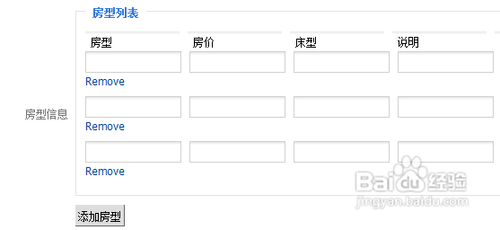
phpcms v9,我们在做类似于酒店房型等类型的时候,需要用到文本组字段模型,但phpcms并未提供该模型。如下图所示效果:
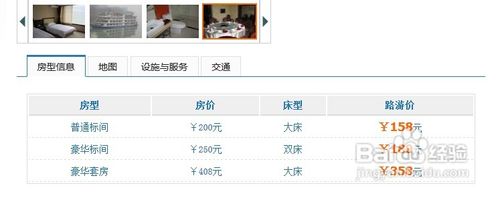
展示效果如下:
步骤/方法
打开phpcms\modules\content\fields目录,复制文件夹downfiles,并改名为textgroups。
打开phpcms\modules\content\fields\fields.inc.php文件,增加字段类型:
'textgroups'=>'多文件上传',
打开phpcms\modules\content\fields\textgroups目录(第一步复制的文件夹),修改以下文件:
form.inc.php
function textgroups($field, $value, $fieldinfo) {
extract(string2array($fieldinfo['setting']));
$list_str = '';
if($value) {
$value = string2array(html_entity_decode($value,ent_quotes));
if(is_array($value)) {
foreach($value as $_k=>$_v) {
$list_str .= "<div id='textsgroups{$_k}'> <input type='text' name='{$field}_fx[]' value='{$_v[fx]}' style='width:100px;' class='input-text'> <input type='text' name='{$field}_fj[]' value='{$_v[fj]}' style='width:100px;' class='input-text'> <input type='text' name='{$field}_cx[]' value='{$_v[cx]}' style='width:100px;' class='input-text'> <input type='text' name='{$field}_kd[]' value='{$_v[kd]}' style='width:100px;' class='input-text'> <input type='text' name='{$field}_vip[]' value='{$_v[vip]}' style='width:100px;' class='input-text'> <a href=\"javascript:remove_div('textsgroups{$_k}')\">".l('remove_out')."</a></div>";
}
}
}$string ='<script type=text/javascript>
function add_textsfile(returnid) {
var ids = parseint(math.random() * 10000);
var str = "<li id=\'textsgroups"+ids+"\'> <input type=\'text\' name=\'"+returnid+"_fx[]\' value=\'\' style=\'width:100px;\' class=\'input-text\'> <input type=\'text\' name=\'"+returnid+"_fj[]\' value=\'\' style=\'width:100px;\' class=\'input-text\'> <input type=\'text\' name=\'"+returnid+"_cx[]\' value=\'\' style=\'width:100px;\' class=\'input-text\'> <input type=\'text\' name=\'"+returnid+"_kd[]\' value=\'\' style=\'width:100px;\' class=\'input-text\'> <input type=\'text\' name=\'"+returnid+"_vip[]\' value=\'\' style=\'width:100px;\' class=\'input-text\'> <a href=\"javascript:remove_div(\'textsgroups"+ids+"\')\">remove</a> </li>";
$(\'#\'+returnid).append(str);
}</script>';
$string .= '<input name="info['.$field.']" type="hidden" value="1">
<fieldset class="blue pad-10">
<legend>'.l('mm_fxlist').'</legend><div id="tt">
<input type="text" value="'.l('mm_fx').'" readonly style="width:100px;border:0;" class="input-text">
<input type="text" value="'.l('mm_fj').'" readonly style="width:100px;border:0;" class="input-text">
<input type="text" value="'.l('mm_cx').'" readonly style="width:100px;border:0;" class="input-text">
<input type="text" value="'.l('mm_kd').'" readonly style="width:100px;border:0;" class="input-text">
<input type="text" value="'.l('mm_lyj').'" readonly style="width:100px;border:0;" class="input-text">
</div>';
$string .= $list_str;
$string .= '<ul id="'.$field.'" class="piclist"></ul>
</fieldset>
<div class="bk10"></div>
';
$string .= $str."<input type=\"button\" class=\"button\" value=\"".l('mm_addfx')."\" onclick=\"add_textsfile('{$field}')\">";
return $string;
}修改input.inc.php
function textgroups($field, $value) {
$hotel = $_post[$field.'_fx'];
$hotel_fj = $_post[$field.'_fj'];
$hotel_cx = $_post[$field.'_cx'];
$hotel_kd = $_post[$field.'_kd'];
$hotel_vip = $_post[$field.'_vip'];
$array = $temp = array();
if(!empty($hotel)) {
foreach($hotel as $key=>$hote) {
$temp['fx'] = $hote;
$temp['fj'] = $hotel_fj[$key];
$temp['cx'] = $hotel_cx[$key];
$temp['kd'] = $hotel_kd[$key];
$temp['vip'] = $hotel_vip[$key];
$array[$key] = $temp;
}
}
$array = array2string($array);
return $array;
}修改的output.inc.php
function textgroups($field, $value) {
return string2array($value);
}
更新后台缓存。在模型中新建字段,可以看到文本组,创建后就可以添加。
前台调用:<table>
<tr><th>房型</th><th>房价</th><th>床型</th><th>路游价</th></tr>
{loop $fxinfo $v} <!--$fxinfo为字段名称-->
<tr><td>{$v[fx]}</td><td>¥{$v[fj]}元</td><td>{$v[cx]}</td><td><strong style="color:#f60;font-size:18px;font-family:tahoma,helvetica,arial,sans-serif;">¥{$v[vip]}</strong>元</td></tr>
{/loop}
</table>
注意事项
注意修改几个文件中的函数名称,这个很容易忽略。
注意文件内容中引号的闭合和js代码。
PHPCMS V9二次开发]自定义字段模型-文本组的更多相关文章
- [PHPCMS V9二次开发]自定义字段模型-添加字段类型
步骤/方法 打开phpcms\modules\content\fields目录,复制文件夹downfiles,并改名为textgroups. 打开phpcms\modules\content\fiel ...
- phpcms v9二次开发之模型类的应用(1)
在<phpcms二次开发之模型类model.class.php>中讲到了模型类的建立方法,接下来我讲一下模型类的应用. 前段时间我基于phpcms v9开发了一个足球网.足球网是 ...
- phpcms v9二次开发之模型类的应用(2)
二.模型操作方法select()--查询语句 //查询级别管理列表信息 public function levellists() { $lelists = $this->l ...
- PHPCMS V9二次开发便捷自定义后台入口文件夹
phpcms v9二次开发便捷自定义后台入口文件夹 最新发布的phpcms v9由于采用了mvc的设计模式,所以它的后台访问地址是固定的,虽然可以通过修改路由配置文件来实现修改,但每次都修改路由配置文 ...
- phpcms v9二次开发之数据模型类
系统模型类:model.class.php数据模型类的位置:/phpcms/libs/classes phpcms v9二次开发中,我们要经常需要对模块的数据表进行查询.添加.修改和删除数据等操作,所 ...
- PHPCMS V9 二次开发常用代码集
0:调用最新文章,带所在版块 {pc:get sql="SELECT a.title, a.catid, b.catid, b.catname, a.url as turl ,b.url a ...
- phpcms v9二次开发笔记
phpcms是基于MVC结构的. 安装: 下载phpcms_v9.5.9_UTF8.zip:新建目录phpcms,将压缩包里install_package目录下所有文件复制到phpcms目录.浏览器输 ...
- V9 二次开发技术篇之 模型数据库
应V9粉丝的建议,本人今天讲一下 MVC中的M 数据库模型 首先 在 phpcms\model 建一个模型文件test_model.class.php <?phpdefined('IN_PHP ...
- phpcms V9 二次开发------(获取点击数详解)
关于phpcms V9的点击数的使用应该有不少数是直接调用网上搜索到的代码,但是对于一些想要深入研究开发的人来说,看到网上的代码后更是不解,本人这几天看了看,了解了一些东西,在这里写出来分享一下,首先 ...
随机推荐
- Ftp的断点下载实现
思路:首先获取本地临时文件的大小,在通过FTp的REST命令获取远程文件的偏移,然后再RETR命令在偏移处下载.while循环对比本地文件和远程文件的字节大小,如此 不断的反复以上过程,直到远程文件字 ...
- Ubuntu14.04 安装QQ国际版wine-qqintl
Ubuntu14.04安装qq国际版方式: 首先下载,链接为: https://pan.baidu.com/s/1boPitVD 密码:jp1j 也可去Ubuntu中文的Kylin(优麒麟)官网下载 ...
- GCC依赖库顺序问题
今天在把linux下做的ipmsg移植到windows过程中,因为包含了一个开源库SimpleSocket,而这个库又引用了winsock2,没太注意就写下了下面的makefile: g++ -o t ...
- 32位vs2010的项目如何在64位系统上运行
64位注册 1. 关闭Visual Studio.2. 在Visual Studio Tools目录,以管理员身份运行Visual Studio Command Prompt (2010),[注:这个 ...
- 服务器端javascript——Rhino和Node
Node: Node是v8 javasript解析器的一个特别版本,侧重于异步I/O,网络和HTTP 入门见:http://www.cnblogs.com/wishyouhappy/p/3647037 ...
- tengine rpm制作
最近又在centos6.4下折腾tengine了,刚好不久前看了rpm包的制作方法,所以又有了搞个rpm包的想法. 1 安装centos的开发环境集成包及tengine的依赖包 1 yum group ...
- C#中用PadLeft、PadRight 补足位数
在 C# 中可以对字符串使用 PadLeft 和 PadRight 进行轻松地补位. PadLeft(int totalWidth, char paddingChar) //在字符串左边用 paddi ...
- 组合数学第一发 hdu 2451 Simple Addition Expression
hdu 2451 Simple Addition Expression Problem Description A luxury yacht with 100 passengers on board ...
- OpenSSL与公钥私钥证书签名的千丝万缕
导语 人对任何事物的认识都是阶段性的,从无知到知晓,从懵懂到半知半解,从误解到将信将疑,从晕头转向到下定决心吃透. 介绍 OpenSSL是一个强大的命令行工具,它可以用来处理许多种跟PKI(Publi ...
- Linux shell 之 提取文件名和目录名的一些方法
很多时候在使用Linux的shell时,我们都需要对文件名或目录名进行处理,通常的操作是由路径中提取出文件名,从路径中提取出目录名,提取文件后缀名等等.例如,从路径/dir1/dir2/file.tx ...