
Demo_塔防(自动生成怪物,导航,炮塔攻击,怪物掉血死忙)
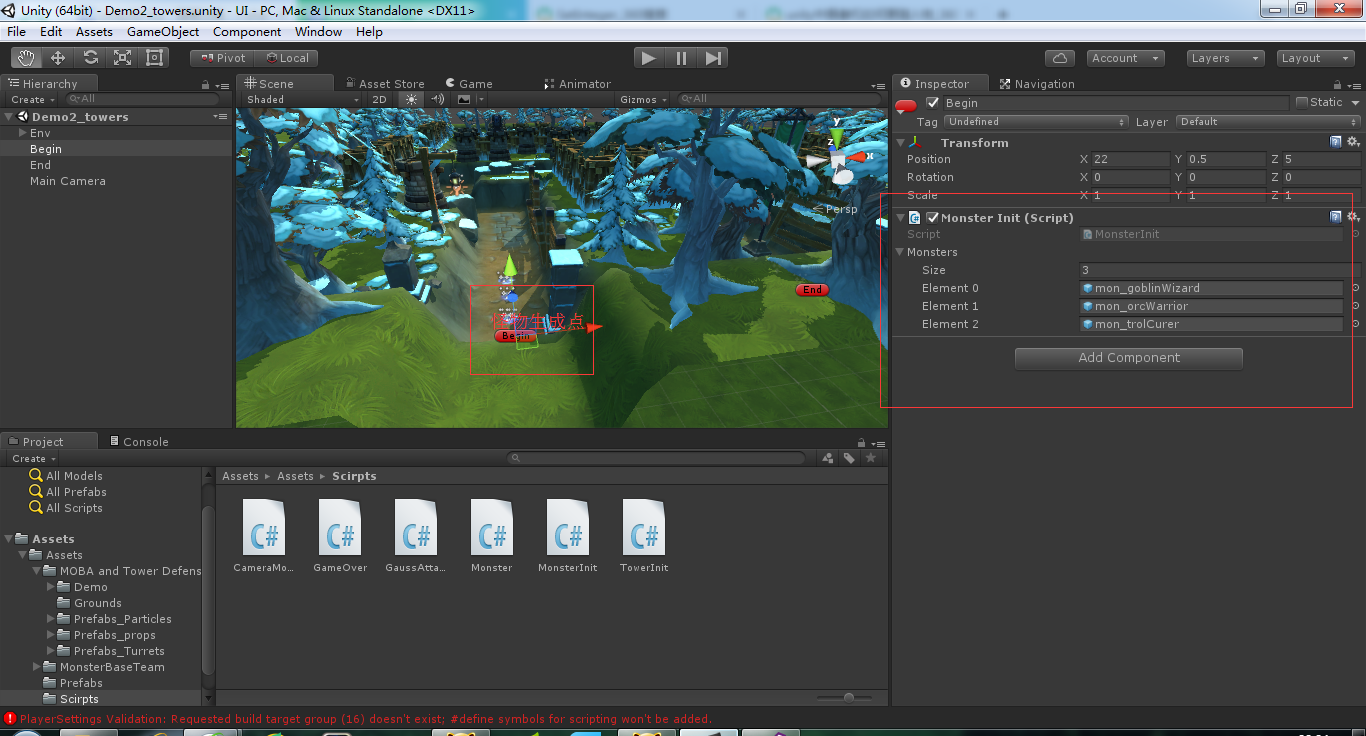
using UnityEngine;

using System.Collections;

public struct WaveMsg

{

    //该波次生成的怪物

    public GameObject monster;

    //时间间隔

    public float waveInterval;

    //生成个数

    public float count;

    //生成间隔

    public float interval;

    //怪物血量

    public float hp;

    /// <summary>

    /// 构造函数

    /// </summary>

    /// <param name="monster">Monster.</param>

    /// <param name="waveInterval">Wave interval.</param>

    /// <param name="count">Count.</param>

    /// <param name="interval">Interval.</param>

    public WaveMsg(GameObject monster,float waveInterval,

            float count,float interval,float hp)

    {

        this.monster = monster;

        this.waveInterval = waveInterval;

        this.count = count;

        this.interval = interval;

        this.hp = hp;

    }

}

public class MonsterInit : MonoBehaviour {

    //怪物预设体

    public GameObject[] monsters;

    //波次信息

    public WaveMsg[] waveMsg;

    //每波怪之间的时间计时器

    private float waveTimer;

    //每个怪之前的时间计时器

    private float monsterTimer;

    //波次计数器

    private int count;

    //怪物个数计数器

    private int monsterCount;

    //游戏开关

    private bool gameBegin = true;

    void Awake()

    {

        waveMsg = new WaveMsg[]{

            new WaveMsg(monsters[],,,,),

            new WaveMsg(monsters[],2.5f,,1.5f,),

            new WaveMsg(monsters[],,,1f,),

            new WaveMsg(monsters[],,,0.5f,),

            new WaveMsg(monsters[],,,0.5f,)

        };

    }

    void Update()

    {

        if (gameBegin) {

            //波次计时器计时

            waveTimer += Time.deltaTime;

            if (waveTimer >= waveMsg [count].waveInterval) {

                //如果当前生成怪的个数不够,继续生成

                if (monsterCount < waveMsg [count].count) {

                    //计时器计时

                    monsterTimer += Time.deltaTime;

                    //计时结束

                    if (monsterTimer > waveMsg [count].interval) {

                        //生成怪物

                        GameObject currentMaster = Instantiate (

                            waveMsg [count].monster,

                            transform.position,

                            Quaternion.identity) as GameObject;

                        //给新生成的怪物设置血量值

                        currentMaster.GetComponent<Monster> ().hp =

                            waveMsg [count].hp;

                        //怪物个数++

                        monsterCount++;

                        //计时器清零

                        monsterTimer = ;

                    }

                } else {

                    //波次加一

                    count++;

                    if (count < waveMsg.Length) {

                        //怪物个数清零

                        monsterCount = ;

                        //波次计时器清零

                        waveTimer = ;

                    } else {

                        //表示怪兽生成结束

                        gameBegin = false;

                    }

                }

            }

        }

    }

}
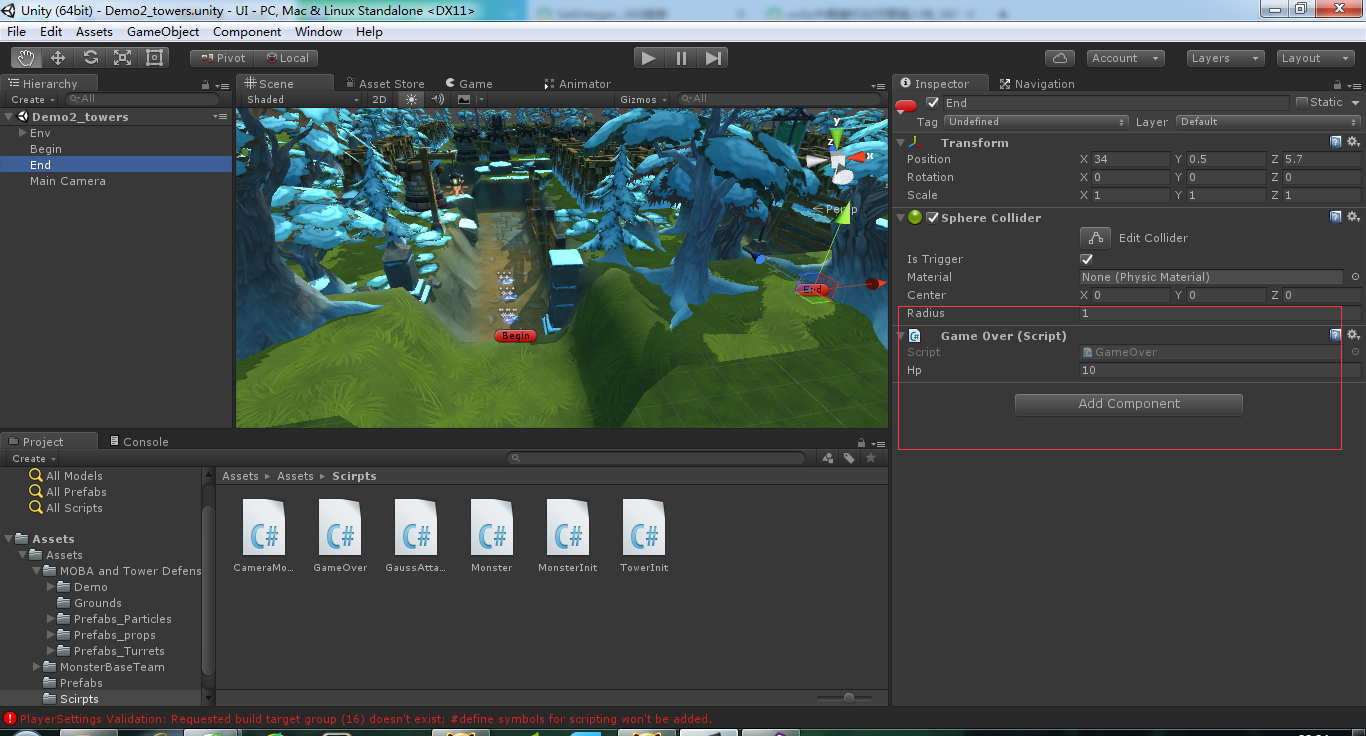
using UnityEngine;

using System.Collections;

public class GameOver : MonoBehaviour {

    //血量

    public int hp = ;

    //触发

    void OnTriggerEnter(Collider other)

    {

        //如果是怪物

        if (other.tag == "Monster") {

            //减血操作

            if (--hp <= ) {

                Debug.Log ("GameOver");

            }

            //销毁怪物

            Destroy (other.gameObject);

        }

    }

}
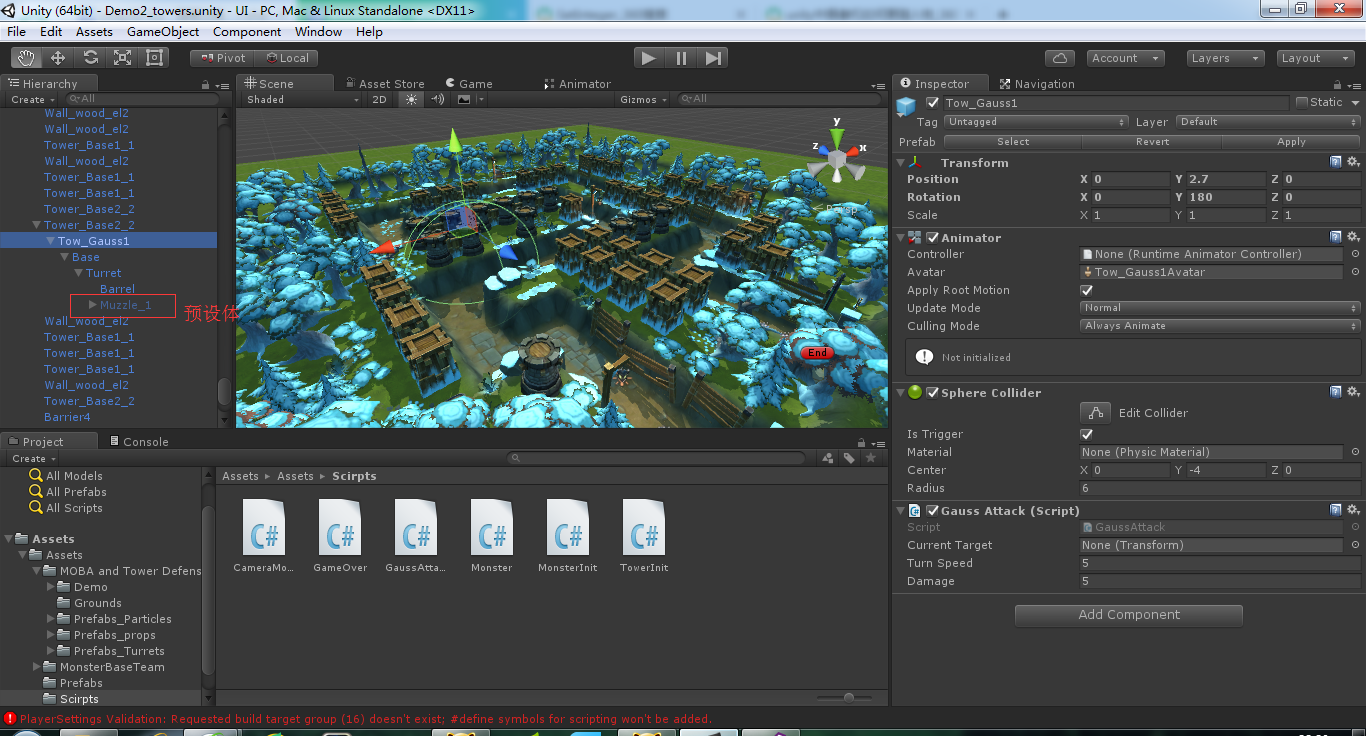
using UnityEngine;

using System.Collections;

using System.Collections.Generic;

public class GaussAttack : MonoBehaviour {

    //攻击队列

    Queue<Transform> monsters;

    //当前攻击目标

    public Transform currentTarget;

    //炮筒旋转速度

    public float turnSpeed = ;

    //发射特效

    private GameObject muzzle;

    //炮塔伤害值

    public float damage = ;

    void Awake()

    {

        monsters = new Queue<Transform> ();

        muzzle = transform.Find ("Base/Turret/Muzzle_1").gameObject;

    }

    void Update()

    {

        if (currentTarget) {

            //转向

            LookAtTargetSmooth();

            //给敌人减血

            currentTarget.GetComponent<Monster>().hp-=Time.deltaTime * damage;

            //如果当前目标已经死亡

            if (!currentTarget.GetComponent<Monster> ().monsterAlive) {

                //切换下一个目标

                TargetSwitch ();

            }

        }

    }

    /// <summary>

    /// 平滑旋转看向敌人

    /// </summary>

    void LookAtTargetSmooth()

    {

        //方向向量

        Vector3 dir = currentTarget.position - transform.position;

        //目标旋转

        Quaternion qua = Quaternion.LookRotation (dir);

        //先找到炮筒

        Transform gun = transform.GetChild ().GetChild ();

        //炮筒转向目标四元数

        gun.rotation = Quaternion.Lerp (gun.rotation, qua,

            Time.deltaTime * turnSpeed);

    }

    /// <summary>

    /// 进入攻击范围

    /// </summary>

    /// <param name="other">Other.</param>

    void OnTriggerEnter(Collider other)

    {

        //如果是怪物

        if (other.tag == "Monster") {

            //进队列

            monsters.Enqueue (other.transform);

            // 如果没有攻击目标

            if (currentTarget == null) {

                TargetSwitch ();

            }

        }

    }

    void OnTriggerExit(Collider other)

    {

        //如果是怪物,且在队列内

        if (other.tag == "Monster" && other.transform == currentTarget) {

            //切换下一个目标

            TargetSwitch ();

        }

    }

    /// <summary>

    /// 切换目标

    /// </summary>

    void TargetSwitch()

    {

        //如果队列中有数据

        if (monsters.Count > ) {

            //队列中出来的怪物即为下一个攻击目标

            currentTarget = monsters.Dequeue ();

            //有怪,开枪

            muzzle.SetActive (true);

        } else {

            //如果队列中没有数据,此时目标为空

            currentTarget = null;

            //没怪,停止开枪

            muzzle.SetActive (false);

        }

    }

}

using UnityEngine;

using System.Collections;

public class CameraMove : MonoBehaviour {

    private float hor,ver;

    public float moveSpeed = ;

    void Update()

    {

        hor = Input.GetAxis ("Horizontal");

        ver = Input.GetAxis ("Vertical");

        transform.position += new Vector3 (hor,,ver)

            * Time.deltaTime * moveSpeed;

        //24 0 2

        //40 0 35

        transform.position = new Vector3 (

            Mathf.Clamp(transform.position.x,24f,40f),

            transform.position.y,

            Mathf.Clamp(transform.position.z,2f,35f)

        );

    }

}
using UnityEngine;

using System.Collections;

public class TowerInit : MonoBehaviour {

    //射线碰撞检测器

    RaycastHit hit;

    //炮塔预设体

    public GameObject towerPrefab;

    void Update()

    {

        //获取屏幕射线

        Ray r = Camera.main.ScreenPointToRay (

            Input.mousePosition);

        //射线碰撞到了碰撞体

        if (Physics.Raycast (r, out hit)) {

            //如果该物体名字中包含‘Base’字符串,且基座没有子物体

            if (hit.collider.name.Contains ("Base") &&

                hit.transform.childCount == ) {

                if (Input.GetMouseButtonDown ()) {

                    ///TODO:生成炮塔

                    GameObject currentTower = Instantiate (

                        towerPrefab,

                        hit.transform.position + Vector3.up * 2.7f,

                        Quaternion.identity) as GameObject;

                    //设置炮塔为基座的子物体

                    currentTower.transform.SetParent (hit.transform);

                }

            }

        }

    }

}
炮塔需要触发事件设置好范围来检测怪物,进入范围触发事件攻击。
地图设置导航。
怪物添加刚体,设置动力学。避免出现碰撞弹奏,或者穿透现象。
Demo_塔防(自动生成怪物,导航,炮塔攻击,怪物掉血死忙)的更多相关文章
- 使用Python从Markdown文档中自动生成标题导航
概述 知识与思路 代码实现 概述 Markdown 很适合于技术写作,因为技术写作并不需要花哨的排版和内容, 只要内容生动而严谨,文笔朴实而优美. 为了编写对读者更友好的文章,有必要生成文章的标题导航 ...
- PHP自动生成后台导航网址的最佳方法
'http://www.jbxue.com'=> '脚本学堂首页', </script>
- Markdown使用TOC自动生成导航栏
经常使用markdown 的玩家一定很想要一个自动生成的导航栏吧,自己写的基本思路就是 轮询监听滚动条的位置,通过抛锚和跳锚实现,这里介绍一下今天的主角,markdown-toc插件: https:/ ...
- vite插件-自动生成vue组件文档
特点 支持热更新 快速启动,依赖于 vite,无需另起服务 自动生成组件导航 ui 采用了vant-ui的样式 核心方法覆盖率达到了 92.86% 使用 yarn add vite-plugin-vu ...
- SpringBoot系列——Spring-Data-JPA(究极进化版) 自动生成单表基础增、删、改、查接口
前言 我们在之前的实现了springboot与data-jpa的增.删.改.查简单使用(请戳:SpringBoot系列——Spring-Data-JPA),并实现了升级版(请戳:SpringBoot系 ...
- fiddler4自动生成jmeter脚本
接口.性能测试任务当遇到从浏览器或移动app自己抓包的情况出现时就变得巨苦逼了,苦在哪里?苦在需要通过抓包工具抓报文,需要通过抓包报文梳理业务逻辑.需要将梳理的逻辑编写成脚本.最最苦的情况是,自己抓包 ...
- JavaScript自动生成博文目录导航
转载于:JavaScript自动生成博文目录导航 我们在写博客的时候,如果博文里面有目录,会给人结构清晰.一种一目了然的感觉,看目录就知道这篇博文要讲解的内容,并且点击目录标题就可以跳转到 具体的内容 ...
- JavaScript自动生成博文目录导航/TOP按钮
博客园页面添加返回顶部TOP按钮 进入网页管理->设置 在"页面定制CSS代码"中添加如下css样式,当然你可以改为自己喜欢的样式 此处可以将背景色background-co ...
- JavaScript:自动生成博文目录导航
感谢 孤傲苍狼 分享了 自动生成博文目录的方法,本文仅作存档使用. 图 1:效果预览 CSS 样式 #TOCbar{ font-size:12px; text-align:left; position ...
随机推荐
- centos 6.x 安装redis
1.yum 安装 yum install redis 如果提示找不到包的话 可以yum install epel-release 先安装epel第三方库 2.源码安装 https://redis ...
- 【POJ3580】【splay版】SuperMemo
Description Your friend, Jackson is invited to a TV show called SuperMemo in which the participant i ...
- JQUERY、AJAX双击DIV,直接修改DIV内的内容
最近在做后台功能开发的时候,用到对排序字段的修改,感觉只为了修改一个排序值,而要重新进入编辑页比较麻烦,于是自己动手写…… 最近在做后台功能开发的时候,用到对排序字段的修改,感觉只为了修改一个排序值, ...
- 『重构--改善既有代码的设计』读书笔记----Extract Class
在面向对象中,对于类这个概念我们应该有一个清晰的责任认识,就是每个类应该只有一个变化点,每个类的变化应该只受到单一的因素,即每个类应该只有一个明确的责任.当然了,说时容易做时难,很多人可能都会和我一样 ...
- 源码来袭!!!基于jquery的ajax分页插件(demo+源码)
前几天打开自己的博客园主页,无意间发现自己的园龄竟然有4年之久了.可是看自己的博客列表却是空空如也,其实之前也有写过,但是一直没发布(然而好像并没有什么卵用).刚开始学习编程时就接触到博客园,且在博客 ...
- echshop jquery与transpart冲突解决?
<script type="text/javascript">$(function() {window.__Object_toJSONString = Object.p ...
- 使用Raphael 画图(一) 基本图形 (javascript)
Raphael是什么? Raphael 是一个用于在网页中绘制矢量图形的 Javascript 库.它使用 SVG W3C 推荐标准和 VML 作为创建图形的基础,你可以通过 JavaScript 操 ...
- MySQL账号授权操作
Mysql权限控制 - 允许用户远程连接 设置mysql root密码: mysql -u root mysql> SET PASSWORD FOR 'root'@'localhost' = P ...
- “layout_”下划线开头的属性
观看幕课网的视频的收获 “layout_”下划线开头的属性都是交给父容器去处理的属性,如: android:layout_width="match_parent" android: ...
- WPF小程序:贪吃蛇
原文地址:http://hankjin.blog.163.com/blog/static/337319372009535108234/ 一共两个文件:EasterEgg.xaml + EasterEg ...