
Json.Net学习笔记(十) 保持对象引用
更多内容见这里:http://www.cnblogs.com/wuyifu/archive/2013/09/03/3299784.html
默认情况下,Json.Net将通过对象的值来序列化它遇到的所有对象。如果工个list包含两个Person引用,这两个引用都指向同一个对象,Json序列化器将输出每一个引用的所有名称和值。
定义类:
public class Person
{
public DateTime BirthDate { get; set; }
public DateTime LastModified { get; set; }
public string Name { get; set; }
}
测试:
Person p = new Person()
{
BirthDate = new DateTime(1985, 11, 27, 0, 0, 0, DateTimeKind.Utc),
LastModified = new DateTime(2010, 12, 20, 0, 0, 0, DateTimeKind.Utc),
Name = "James"
};
List<Person> people = new List<Person>();
people.Add(p);
people.Add(p);
string json = JsonConvert.SerializeObject(people, Formatting.Indented);
Console.WriteLine(json);
输出结果:
[
{
"BirthDate": "\/Date(501897600000)\/",
"LastModified": "\/Date(1292803200000)\/",
"Name": "James"
},
{
"BirthDate": "\/Date(501897600000)\/",
"LastModified": "\/Date(1292803200000)\/",
"Name": "James"
}
]
在大多数情况下这是期望的结果,但是在某些场景下,将list中的第二项作为第一项的一个引用来输出会是一个更好的解决方案。如果上面的Json现在被反序列化,返回的list会包含两个完全分离的对象,它们具有相同的值。通过值来输出引用也会在对象上导致循环引用的发生。
>PreserveReferencesHandling
string json2 = JsonConvert.SerializeObject(people, Formatting.Indented,
new JsonSerializerSettings() { PreserveReferencesHandling = PreserveReferencesHandling.Objects });
Console.WriteLine(json2);
输出结果:
[
{
"$id": "1",
"BirthDate": "\/Date(501897600000)\/",
"LastModified": "\/Date(1292803200000)\/",
"Name": "James"
},
{
"$ref": "1"
}
]
List<Person> deserializedPeople = JsonConvert.DeserializeObject<List<Person>>(json2,
new JsonSerializerSettings { PreserveReferencesHandling = PreserveReferencesHandling.Objects });
Console.WriteLine(deserializedPeople.Count);// 2
Person p1 = deserializedPeople[0];
Person p2 = deserializedPeople[1];
Console.WriteLine(p1.Name);// James
Console.WriteLine(p2.Name);// James
bool equal = Object.ReferenceEquals(p1, p2);// true
在list中的第一个Person被序列化时增加了一个额外的对象Id,现在第二个Person对象仅仅是第一个的引用。
现在使用PreserveReferencesHandling后,在序列化时只创建了一个Person对象,list中包含它的两个引用,原来我们叫作反射(mirroring) 。
>IsReference on JsonObjectAttribute, JsonArrayAttribute and JsonPropertyAttribute
在对象序列化器上设置PreserveReferencesHandling,将会改变所有对象被序列化和反序列化的方式。为了更加细致地控制对象和成员被序列化为一个引用,可以在JsonObjectAttribute, JsonArrayAttribute 和 JsonPropertyAttribute上使用IsReference 属性.
在JsonObjectAttribute, JsonArrayAttribute 上设置IsReference 为true,意味着Json序列化器总是会序列这个类型为一个引用。在JsonPropertyAttribute上设置IsReference为true将只序列化这个属性为一个引用。
[JsonObject(IsReference = true)]

    public class EmployeeReference

    {

        public string Name { get; set; }

        public EmployeeReference Manager { get; set; }

    }
测试:
static void Main(string[] args)

        {

            List<EmployeeReference> empList = new List<EmployeeReference>();

            var empRef = new EmployeeReference

            {

                Name = "d1",

                Manager = new EmployeeReference

                {

                    Name="d2",

                    Manager  = new EmployeeReference

                    {

                        Name = "d3",

                        Manager = null

                    }

                }

            };

            empList.Add(empRef);

            empList.Add(empRef);

            string empRefJson = JsonConvert.SerializeObject(empList, Formatting.Indented);

            Console.WriteLine(empRefJson);

            Console.ReadLine();

        }
输出结果:
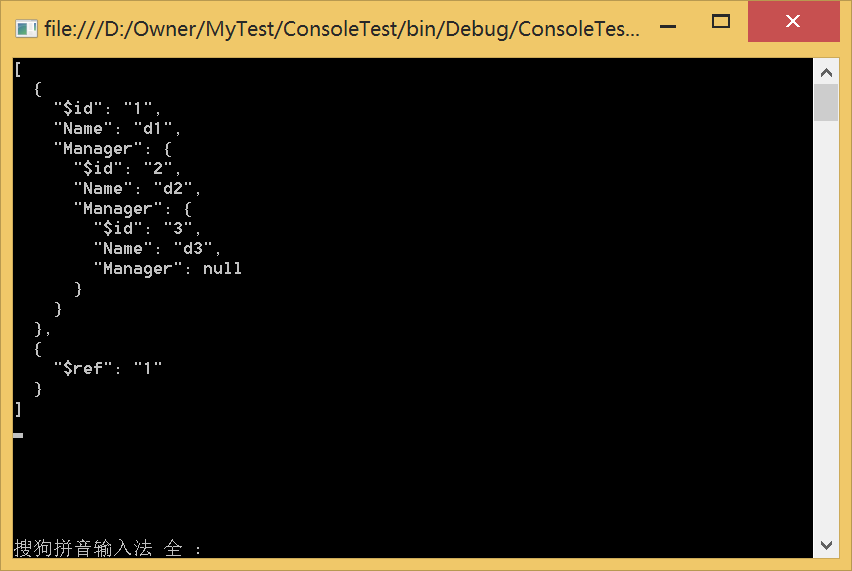
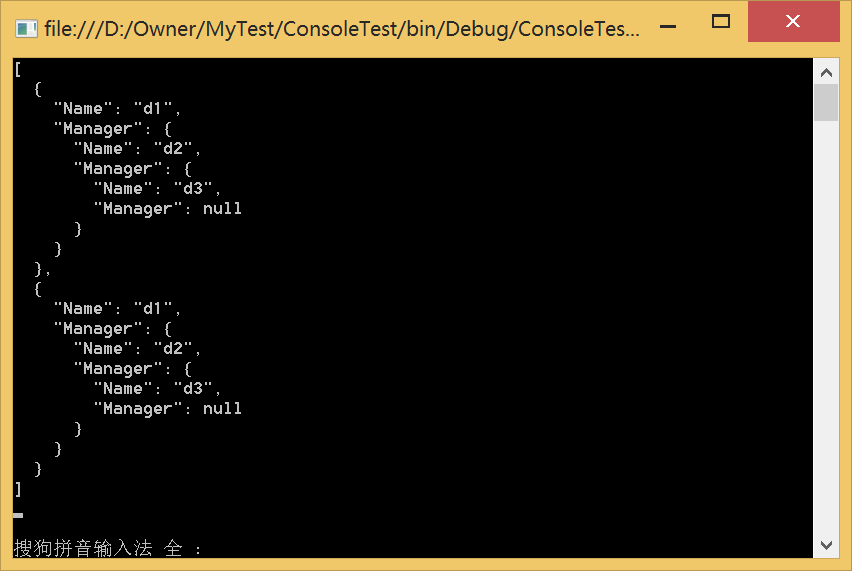
如果去掉 [JsonObject(IsReference = true)],那么输出如下:
>IReferenceResolver
要想定制引用的生成方式,可以继承自IReferenceResolver接口来使用Json序列化器。
Json.Net学习笔记(十) 保持对象引用的更多相关文章
- python3.4学习笔记(十四) 网络爬虫实例代码,抓取新浪爱彩双色球开奖数据实例
python3.4学习笔记(十四) 网络爬虫实例代码,抓取新浪爱彩双色球开奖数据实例 新浪爱彩双色球开奖数据URL:http://zst.aicai.com/ssq/openInfo/ 最终输出结果格 ...
- Json.Net学习笔记
http://www.cnblogs.com/xiaojinhe2/archive/2011/10/28/2227789.html Newtonsoft.Json(Json.Net)学习笔记 http ...
- Learning ROS for Robotics Programming Second Edition学习笔记(十) indigo Gazebo rviz slam navigation
中文译著已经出版,详情请参考:http://blog.csdn.net/ZhangRelay/article/category/6506865 moveit是书的最后一章,由于对机械臂完全不知,看不懂 ...
- python3.4学习笔记(十八) pycharm 安装使用、注册码、显示行号和字体大小等常用设置
python3.4学习笔记(十八) pycharm 安装使用.注册码.显示行号和字体大小等常用设置Download JetBrains Python IDE :: PyCharmhttp://www. ...
- python3.4学习笔记(十九) 同一台机器同时安装 python2.7 和 python3.4的解决方法
python3.4学习笔记(十九) 同一台机器同时安装 python2.7 和 python3.4的解决方法 同一台机器同时安装 python2.7 和 python3.4不会冲突.安装在不同目录,然 ...
- python3.4学习笔记(十六) windows下面安装easy_install和pip教程
python3.4学习笔记(十六) windows下面安装easy_install和pip教程 easy_install和pip都是用来下载安装Python一个公共资源库PyPI的相关资源包的 首先安 ...
- python3.4学习笔记(十五) 字符串操作(string替换、删除、截取、复制、连接、比较、查找、包含、大小写转换、分割等)
python3.4学习笔记(十五) 字符串操作(string替换.删除.截取.复制.连接.比较.查找.包含.大小写转换.分割等) python print 不换行(在后面加上,end=''),prin ...
- python3.4学习笔记(十二) python正则表达式的使用,使用pyspider匹配输出带.html结尾的URL
python3.4学习笔记(十二) python正则表达式的使用,使用pyspider匹配输出带.html结尾的URL实战例子:使用pyspider匹配输出带.html结尾的URL:@config(a ...
- python3.4学习笔记(十) 常用操作符,条件分支和循环实例
python3.4学习笔记(十) 常用操作符,条件分支和循环实例 #Pyhon常用操作符 c = d = 10 d /= 8 #3.x真正的除法 print(d) #1.25 c //= 8 #用两个 ...
随机推荐
- Android性能优化之ViewStub
http://www.cnblogs.com/lwbqqyumidi/p/4047108.html ViewStub是Android布局优化中一个很不错的标签/控件,直接继承自View.虽然Andro ...
- CentOS 6.5下搭建NFS文件服务器
环境介绍:服务器: 192.168.0.1客户机: 192.168.0.2安装软件包:服务器和客户机都要安装nfs 和 rpcbind 软件包:yum -y install nfs-utils rpc ...
- Java循环性能随笔
for iterator做迭代循环性能最好 然后是foreach 然后是提前声明好变量的for循环 最后是每次都要计算集合size的for package test; import j ...
- 使用Physics_Body_Editor获得json文件的类
[转自]:http://www.cocoachina.com/bbs/read.php?tid=209290 工具介绍,json文件获得方法,请参考原帖 MyBodyParser.h // // My ...
- c读写文件相关
1.打开文件: 函数原型: FILE * fopen(const char * path,const char * mode); 返回值: 文件顺利打开后,指向该流的文件指针就会被返回.如果文件打开失 ...
- PHP 数组转JSON数据(convert array to JSON object);
<?php header('Content-type: appliction/json; charset=shift-JIS'); $data =array(); class Test { pu ...
- 防止iframe嵌套
如果你哪个页面不想被嵌套 下面js代码可以解决(我的是火狐) 慎用 <script type="text/javascript"> window.on ...
- Html禁止粘贴 复制 剪切
oncopy="return false;" onpaste="return false;" oncut="return false;"
- 字体圆润属性的使用-webkit-font-smoothing: antialiased
字体渲染和抗锯齿技术 据称该属性在window下不起作用,不知win10如何,但是在OS和ios中会有不同的展示效果,主要也是展示在webkit内核中,以及android和ios中 大概是说字体渲染的 ...
- php中判断变量是否为空
从数据库中取出值后判断是否为空,这个看起来很简单,只要和null比较一下就可以了,其实不然, if($obj==null){ } 这样写会报错的:Notice: Trying to get prope ...