
八、uboot 代码流程分析---board_init_f
接着上一节,板子开始做前期初始化工作。
8.1 board_init_f
board_f.c (common)
 /* 板子初次初始化。boot_flags = 0 */

 void board_init_f(ulong boot_flags)

 {

     gd->flags = boot_flags;

     gd->have_console = ;

     if (initcall_run_list(init_sequence_f))

         hang();

 #if !defined(CONFIG_ARM) && !defined(CONFIG_SANDBOX) && \

         !defined(CONFIG_EFI_APP) && !CONFIG_IS_ENABLED(X86_64)

     /* NOTREACHED - jump_to_copy() does not return */

     hang();

 #endif

 }
boot_flags 标志位0,且终端标志位也为0,在 initcall_run_list(init_sequence_f) 链表中执行板子初始化过程
8.2 init_sequence_f 函数数组
 static init_fnc_t init_sequence_f[] = {

     setup_mon_len,      ///< 设置gd->mon_len为编译出来的u-boot.bin+bss段的大小

     initf_malloc,   ///< 设置内存池的大小 gd->malloc_limit = 0x400, gd->malloc_ptr = 0

     initf_console_record,   ///< 为空,直接返回 0

     arch_cpu_init,        ///< 基本arch cpu相关设置, 未做初始化

     mach_cpu_init,        ///< SoC/machine 相关CPU设置, 未作设置

     initf_dm,           ///< 驱动模型的初始化, 未开宏

     arch_cpu_init_dm,   ///< 驱动模型相关的 CPU 初始化, 未开宏

     mark_bootstage,        /* need timer, go after init dm */

 #if defined(CONFIG_BOARD_EARLY_INIT_F)

     board_early_init_f, ///< 时钟和 GPIO 的初始化

 #endif

 #if defined(CONFIG_ARM) || defined(CONFIG_MIPS) || \

         defined(CONFIG_BLACKFIN) || defined(CONFIG_NDS32) || \

         defined(CONFIG_SH) || defined(CONFIG_SPARC)

     timer_init,        ///<  定时器初始化

 #endif

     env_init,        ///<  initialize environment, 初始化环境变量结构体 default_environment

                     ///< env_dataflash.c 中是此时的实际调用

     init_baud_rate,        /* 波特率设置 */

     serial_init,        /* 串行通信初始化 */

     console_init_f,        /* 在重定位之前使能串口功能 */

     display_options,    /* 打印 uboot 版本信息 */

     display_text_info,    /* 打印 uboot 配置信息 */

     print_cpuinfo,        /* 显示 CPU 信息 */

 #if defined(CONFIG_DISPLAY_BOARDINFO)

     show_board_info,    ///< 显示板子信息,需要复写函数

 #endif

     announce_dram_init, ///< 打印了一个 DRAM: 字符串

     /* TODO: unify all these dram functions? */

 #if defined(CONFIG_ARM) || defined(CONFIG_X86) || defined(CONFIG_NDS32) || \

         defined(CONFIG_MICROBLAZE) || defined(CONFIG_AVR32) || \

         defined(CONFIG_SH)

     dram_init,        /* 配置 DRAM 大小, gd->ram_size =     0x04000000 , 即 64MB*/

 #endif

     /*

      * Now that we have DRAM mapped and working, we can

      * relocate the code and continue running from DRAM.

      *

      * Reserve memory at end of RAM for (top down in that order):

      *  - area that won't get touched by U-Boot and Linux (optional)

      *  - kernel log buffer

      *  - protected RAM

      *  - LCD framebuffer

      *  - monitor code

      *  - board info struct

      */

     setup_dest_addr,    ///< 重定位地址设置 gd->relocaddr = gd->ram_top = 0x3400 0000

     reserve_round_4k,

     reserve_trace,  ///< trace 设置,移动gd->relocaddr,未配置,不动

 #if !defined(CONFIG_BLACKFIN) && !defined(CONFIG_XTENSA)

     reserve_uboot,  ///< 留出 uboot.bin 的空间 gd->relocaddr 下移后, gd->start_addr_sp = gd->relocaddr

 #endif

 #ifndef CONFIG_SPL_BUILD

     reserve_malloc,

     reserve_board,

 #endif

     setup_machine,  ///< 不做初始化

     reserve_global_data,    ///< 初始化 global_data 的空间,gd->start_addr_sp -= sizeof(gd_t);

     reserve_fdt,    ///< 未开特性

     reserve_arch,   ///< 未做任务

     reserve_stacks, ///< gd->start_addr_sp 16字节对齐

     setup_dram_config,  ///< DRAM配置前面已经做了

     show_dram_config,   ///< 显示 DRAM 的大小 64M

     display_new_sp, ///< 打印当前栈

     reloc_fdt,  ///< 未作配置

     setup_reloc,    ///< gd->reloc_off = gd->relocaddr reloc_off 设置为栈顶

     NULL,

 };
8.2.1 setup_mon_len
 /* 设置gd->mon_len为编译出来的u-boot.bin+bss段的大小 */

 static int setup_mon_len(void)

 {

     gd->mon_len = (ulong)&__bss_end - (ulong)_start;

     return ;

 }
_start 的地址为 0
8.2.2 initf_malloc
 /* 设置内存池的大小 */

 int initf_malloc(void)

 {

 #if CONFIG_VAL(SYS_MALLOC_F_LEN)

     assert(gd->malloc_base);    /* Set up by crt0.S */

     gd->malloc_limit = CONFIG_VAL(SYS_MALLOC_F_LEN);

     gd->malloc_ptr = ;

 #endif

     return ;

 }
8.2.3 设置重定位地址---setup_dest_addr
 /* 设置重定位地址 */

 static int setup_dest_addr(void)

 {

     debug("Monitor len: %08lX\n", gd->mon_len);

     /*

      * Ram is setup, size stored in gd !!

      */

     debug("Ram size: %08lX\n", (ulong)gd->ram_size);

 #ifdef CONFIG_SYS_SDRAM_BASE         /* JZ2440 = CONFIG_SYS_SDRAM_BASE = 0x30000000 */

     gd->ram_top = CONFIG_SYS_SDRAM_BASE;

 #endif

     gd->ram_top += get_effective_memsize(); /* gd->ram_top = 0x30000000 + 0x400 0000 = 0x3400 0000 */

     /* 此段依然返回 SDRAM 顶端地址 0x3400 0000 */

     gd->ram_top = board_get_usable_ram_top(gd->mon_len);

     gd->relocaddr = gd->ram_top;    /* 重定位地址为  0x3400 0000 */

     debug("Ram top: %08lX\n", (ulong)gd->ram_top);

     return ;

 }
gd->relocaddr = 0x34000000 指向 SDRAM 的顶端
8.2.4 uboot 和 bss段---reserve_uboot
 /* 预留 uboot 区,gd->start_addr_sp = gd->relocaddr -= gd->mon_len  */

 static int reserve_uboot(void)

 {

     /*

      * reserve memory for U-Boot code, data & bss

      * round down to next 4 kB limit

      */

     gd->relocaddr -= gd->mon_len;

     gd->relocaddr &= ~( - );

 #if defined(CONFIG_E500) || defined(CONFIG_MIPS)

     /* round down to next 64 kB limit so that IVPR stays aligned */

     gd->relocaddr &= ~( - );

 #endif

     debug("Reserving %ldk for U-Boot at: %08lx\n", gd->mon_len >> ,

           gd->relocaddr);

     gd->start_addr_sp = gd->relocaddr;

     return ;

 }
栈 gd->start_addr_sp 指向 uboot 段 基地址
8.2.5 堆区---reserve_malloc
 /* malloc 堆区预留大小 */

 static int reserve_malloc(void)

 {

     /*  PHYS_FLASH_1 = 0x00000000

         CONFIG_SYS_FLASH_BASE = PHYS_FLASH_1

         CONFIG_ENV_ADDR = CONFIG_SYS_FLASH_BASE + 0x070000 = 0x070000

         CONFIG_ENV_IS_IN_FLASH

         CONFIG_ENV_SIZE = 0x10000 */

     /* CONFIG_SYS_MALLOC_LEN = 4 * 1024 * 1024 = 0x40 0000 */

     /* TOTAL_MALLOC_LEN = CONFIG_SYS_MALLOC_LEN */

     gd->start_addr_sp = gd->start_addr_sp - TOTAL_MALLOC_LEN;

     debug("Reserving %dk for malloc() at: %08lx\n",

           TOTAL_MALLOC_LEN >> , gd->start_addr_sp);

     return ;

 }
栈 gd->start_addr_sp 指向 malloc 段 基地址
8.2.6 预留 bd 区域 --- reserve_board
 /* board 信息结构体分配区域 */

 static int reserve_board(void)

 {

     if (!gd->bd) {

         gd->start_addr_sp -= sizeof(bd_t);

         gd->bd = (bd_t *)map_sysmem(gd->start_addr_sp, sizeof(bd_t));

         memset(gd->bd, '\0', sizeof(bd_t));

         debug("Reserving %zu Bytes for Board Info at: %08lx\n",

               sizeof(bd_t), gd->start_addr_sp);

     }

     return ;

 }
栈 gd->start_addr_sp 指向 bd 段 基地址
8.2.7 预留全局数据区域---reserve_global_data
 /* 预留 GD 区域 */

 static int reserve_global_data(void)

 {

     gd->start_addr_sp -= sizeof(gd_t);

     gd->new_gd = (gd_t *)map_sysmem(gd->start_addr_sp, sizeof(gd_t));

     debug("Reserving %zu Bytes for Global Data at: %08lx\n",

           sizeof(gd_t), gd->start_addr_sp);

     return ;

 }
栈 gd->start_addr_sp 指向 gd 段 基地址
8.2.8 栈区预留区---reserve_stacks
 /* 栈区预留区,gd->start_addr_sp 指向 栈底基地址 */

 static int reserve_stacks(void)

 {

     /* make stack pointer 16-byte aligned */

     gd->start_addr_sp -= ;

     gd->start_addr_sp &= ~0xf;

     /*

      * let the architecture-specific code tailor gd->start_addr_sp and

      * gd->irq_sp

      */

     return arch_reserve_stacks();

 }
gd->start_addr_sp 指向 栈底基地址
8.3 小节
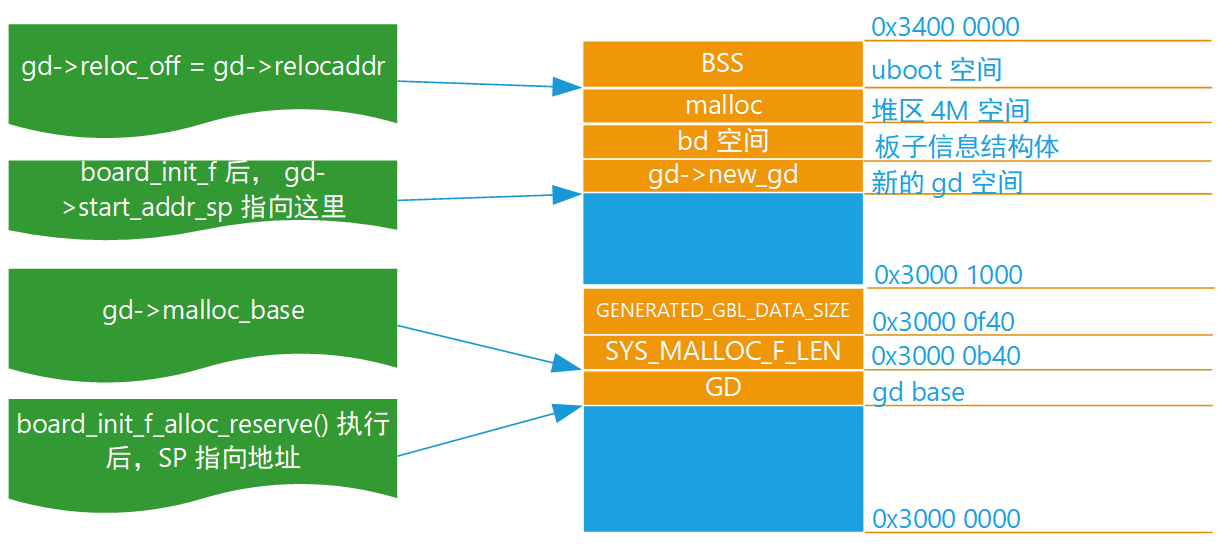
代码执行完后,则返回,当前栈地址指向栈处,依然有大部分区域未分配。
当前分配的区域如下:
八、uboot 代码流程分析---board_init_f的更多相关文章
- 六、uboot 代码流程分析---start.S
6.1 _start 入口函数 6.1.1 vectors.S (arch\arm\lib) 从上一节可以知道,uboot 的入口函数为 _start .此 函数定义在 vectors.S (arch ...
- 七、uboot 代码流程分析---C环境建立
7.1 start.S 修改 在上一节中的流程中,发现初始化的过程并没由设置看门狗,也未进行中断屏蔽 如果看门狗不禁用,会导致系统反复重启,因此需要在初始化的时候禁用看门狗:中断屏蔽保证启动过程中不出 ...
- 十、uboot 代码流程分析---run_main_loop
调用 board_init_r,传入全局 GD 和 SDRAM 中的目的地址 gd->rellocaddr void board_init_r(gd_t *new_gd, ulong dest_ ...
- 九、uboot 代码流程分析---relloc_code
执行完 board_init_f 后,重新跳转回 _main 中执行. 9.1 relloc_code 前 9.1.1 gd 设置 在调用board_init_f()完成板卡与全局结构体变量 gd 的 ...
- u-boot启动流程分析(2)_板级(board)部分
转自:http://www.wowotech.net/u-boot/boot_flow_2.html 目录: 1. 前言 2. Generic Board 3. _main 4. global dat ...
- imx6 uboot启动流程分析
参考http://blog.csdn.net/skyflying2012/article/details/25804209 这里以imx6平台为例,分析uboot启动流程对于任何程序,入口函数是在链接 ...
- Uboot启动流程分析(三)
1.前言 在前面的文章Uboot启动流程分析(二)中,链接如下: https://www.cnblogs.com/Cqlismy/p/12002764.html 已经对_main函数的整个大体调用流程 ...
- Uboot启动流程分析(二)
1.前言 在前面的文章Uboot启动流程分析(一)中,链接如下: https://www.cnblogs.com/Cqlismy/p/12000889.html 已经简单地分析了low_level_i ...
- Uboot启动流程分析(一)
1.前言 Linux系统的启动需要一个bootloader程序,该bootloader程序会先初始化DDR等外设,然后将Linux内核从flash中拷贝到DDR中,最后启动Linux内核,uboot的 ...
随机推荐
- U9财务体系
- OpenJS Foundation
OpenJS Foundation Introducing the OpenJS Foundation https://openjsf.org/ The Node.js Foundation and ...
- Java动态代理、XML、正则
15.1 动态代理 在之后学习Spring框架时,Spring框架有一大核心思想,就是AOP,(Aspact-Oriented-Programming 面向切面编程) 而AOP的原理就 ...
- wamp下php报错session_start(): open(d:/wamp/tmp\sess_ku776hvb06ko4lv9d11e7mnfj1, O_RDWR) failed: No such file or directory
报错提示 session_start(): open(d:/wamp/tmp\sess_ku776hvb06ko4lv9d11e7mnfj1, O_RDWR) failed: No such file ...
- MT【23】用算术几何不等式证明数列极限存在
评:如果不需要精确到3,上界的求法可以利用$$(1+\frac{1}{n})^n*\frac{1}{2}*\frac{1}{2}<(\frac{n+\frac{1}{n}*n+\frac{1}{ ...
- MT【8】和e有关的一个极限
解答: 评:这里涉及到e有关的极限的单调性,求导数得:
- Leetcode 326.3的幂 By Python
给定一个整数,写一个函数来判断它是否是 3 的幂次方. 示例 1: 输入: 27 输出: true 示例 2: 输入: 0 输出: false 示例 3: 输入: 9 输出: true 示例 4: 输 ...
- 【BZOJ4161】Shlw loves matrixI (常系数齐次线性递推)
[BZOJ4161]Shlw loves matrixI (常系数齐次线性递推) 题面 BZOJ 题解 \(k\)很小,可以直接暴力多项式乘法和取模. 然后就是常系数齐次线性递推那套理论了,戳这里 # ...
- [hgoi#2019/2/16t2]friend
题目描述 在一个遥远的国度里有n个人,每个人手上写着4个互不相同的数. 这个国度比较奇怪,如果两个人至少有一个数字相同,则他们是一对朋友. 现在这n个人按序号从左到右排成了一排,每个人都想知道在他左边 ...
- Shell基础知识(一)
教程链接:shell从入门到入门 这个网站还有其他教程,可以尝试下看看. 普及类文章:bash/cmd/dos之间有什么区别与联系 >> bash是Linux下的一个shell应用程序 ...