
OpenGL——二维几何变换
平移、旋转、缩放的实现
#include<iostream>

#include <math.h>

#include<Windows.h>

#include <GL/glut.h>

using namespace std;

GLsizei winWidth = , winHeight = ;

GLfloat xwcMin = 0.0, xwcMax = 225.0;

GLfloat ywcMin = 0.0, ywcMax = 225.0;

class wcPt2D {

public:

    GLfloat x, y;

};

typedef GLfloat Matrix3x3[][];

Matrix3x3 matComposite;

const GLdouble pi = 3.14159;

void init()

{

    //窗口背景为白色

    glClearColor(1.0, 1.0, 1.0, 0.0);

}

void matrix3x3SetIdentity(Matrix3x3 matIdent3x3)

{

    GLint row, col;

    for (row = ; row < ; row++) {

        for (col = ; col < ; col++) {

            matIdent3x3[row][col] = (row == col);

        }

    }

}

void matrix3x3PreMultiply(Matrix3x3 m1, Matrix3x3 m2)

{

    GLint row, col;

    Matrix3x3 matTemp;

    for (row = ; row < ; row++) {

        for (col = ; col < ; col++) {

            matTemp[row][col] = m1[row][] * m2[][col] + m1[row][] * m2[][col] +

                m1[row][] * m2[][col];

        }

    }

    for (row = ; row < ; row++) {

        for (col = ; col < ; col++) {

            m2[row][col] = matTemp[row][col];

        }

    }

}

void translate2D(GLfloat tx, GLfloat ty)

{

    Matrix3x3 matTransl;

    matrix3x3SetIdentity(matTransl);

    matTransl[][] = tx;

    matTransl[][] = ty;

    matrix3x3PreMultiply(matTransl, matComposite);

}

void rotate2D(wcPt2D pivotPt, GLfloat theta)

{

    Matrix3x3 matRot;

    matrix3x3SetIdentity(matRot);

    matRot[][] = cos(theta);

    matRot[][] = -sin(theta);

    matRot[][] = pivotPt.x * ( - cos(theta)) + pivotPt.y * sin(theta);

    matRot[][] = sin(theta);

    matRot[][] = cos(theta);

    matRot[][] = pivotPt.y * ( - cos(theta)) - pivotPt.x * sin(theta);

    matrix3x3PreMultiply(matRot, matComposite);

}

void scale2D(GLfloat sx, GLfloat sy, wcPt2D fixedPt)

{

    Matrix3x3 matScale;

    matrix3x3SetIdentity(matScale);

    matScale[][] = sx;

    matScale[][] = ( - sx) * fixedPt.x;

    matScale[][] = sy;

    matScale[][] = ( - sy) * fixedPt.y;

    matrix3x3PreMultiply(matScale, matComposite);

}

void transformVerts2D(GLint nVerts, wcPt2D * verts)

{

    GLint k;

    GLfloat temp;

    for (k = ; k < nVerts; k++) {

        temp = matComposite[][] * verts[k].x + matComposite[][] * verts[k].y + matComposite[][];

        verts[k].y = matComposite[][] * verts[k].x + matComposite[][] * verts[k].y + matComposite[][];

        verts[k].x = temp;

    }

}

void triangle(wcPt2D *verts)

{

    glBegin(GL_TRIANGLES);

    for (GLint k = ; k < ; k++) {

        glVertex2f(verts[k].x, verts[k].y);

    }

    glEnd();

}

void displayFcn()

{

    GLint nVerts = ;

    wcPt2D verts[] = { {50.0,25.0},{150.0,25.0},{100.0,100.0} };

    wcPt2D centroidPt;

    GLint xSum = , ySum = ;

    for (GLint k = ; k < nVerts; k++) {

        xSum += verts[k].x;

        ySum += verts[k].y;

    }

    centroidPt.x = GLfloat(xSum) / GLfloat(nVerts);

    centroidPt.y = GLfloat(ySum) / GLfloat(nVerts);

    wcPt2D pivPt, fixedPt;

    pivPt = centroidPt;

    fixedPt = centroidPt;

    GLfloat tx = 0.0, ty = 100.0;

    GLfloat sx = 0.5, sy = 0.5;

    GLdouble theta = pi / ;

    glClear(GL_COLOR_BUFFER_BIT);

    glColor3f(200.0 / 255.0, 200.0 / 255.0, 169.0 / 255.0);

    triangle(verts);

    matrix3x3SetIdentity(matComposite);

    scale2D(sx, sy, fixedPt);

    transformVerts2D(nVerts, verts);

    glColor3f(137.0 / 255.0, 190.0 / 255.0, 178.0 / 255.0);

    triangle(verts);

    matrix3x3SetIdentity(matComposite);

    rotate2D(pivPt, theta);

    transformVerts2D(nVerts, verts);

    glColor3f(69.0 / 255.0, 137.0 / 255.0, 148.0 / 255.0);

    triangle(verts);

    matrix3x3SetIdentity(matComposite);

    translate2D(tx, ty);

    transformVerts2D(nVerts, verts);

    glColor3f(178.0 / 255.0, 200.0 / 255.0, 187.0 / 255.0);

    triangle(verts);

    glFlush();

}

void winReshapeFcn(GLint newWidth, GLint newHeight)

{

    glMatrixMode(GL_PROJECTION);

    glLoadIdentity();

    gluOrtho2D(xwcMin, xwcMax, ywcMin, ywcMax);

    glClear(GL_COLOR_BUFFER_BIT);

}

int main(int argc, char* argv[])

{

    glutInit(&argc, argv);

    glutInitDisplayMode(GLUT_RGB | GLUT_SINGLE);

    glutInitWindowPosition(, );

    glutInitWindowSize(winWidth, winHeight);

    glutCreateWindow("二维几何变换");

    init();

    glutDisplayFunc(displayFcn);

    glutReshapeFunc(winReshapeFcn);

    glutMainLoop();

    system("pause");

    return ;

}
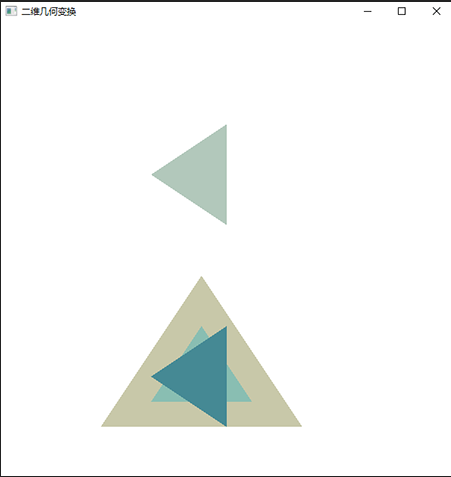
运行结果
OpenGL——二维几何变换的更多相关文章
- [opengl] 画一个可移动的自行车 二维几何变换(平移、旋转、缩放)
#include <cmath> #include "glut.h" #include "iostream" using namespace std ...
- [图形学] Chp8.4 OpenGL 二维观察函数——视口
这节有几个显示窗口的控制函数,可以调整视口,创建子窗口,最小化为图标,设置图标名称,隐藏显示等. gluOrtho2D (xwmin, xwmax, ywmin, ywmax); // 定义二维裁剪窗 ...
- 【opengl】OpenGL中三维物体显示在二维屏幕上显示的变换过程
转自:http://blog.sina.com.cn/s/blog_957b9fdb0100zesv.html 为了说明在三维物体到二维图象之间,需要经过什么样的变换,我们引入了相机(Camera)模 ...
- openGL实现二维图形和三维图形
openGL是一个强大的底层图形库,其命令最初的时候使用C语言实现的.openGL定义了一个图形程序接口,常用于制作处理三维图像,功能强大,调用方便,在图像处理十分受欢迎. 实现图形主要使用的是ope ...
- OpenGL屏幕二维坐标转化成三维模型坐标
我们把OpenGL里模型的三维坐标往二维坐标的转化称为投影,则屏幕上的二维坐标往三维坐标转化则可以称为反投影,下面我们来介绍一下反投影的方法. 主要是gluUnProject函数的使用,下面是代码: ...
- VC6下OpenGL 开发环境的构建外加一个简单的二维网络棋盘绘制示例
一.安装GLUT 工具包 GLUT 不是OpenGL 所必须的,但它会给我们的学习带来一定的方便,推荐安装. Windows 环境下的GLUT 本地下载地址:glut-install.zip(大小约为 ...
- OpenGL中的二维编程——从简单的矩形开始
一.OpenGL的组成 图元函数(primitive function)指定要生成屏幕图像的图元.包括两种类型:可以在二维.三维或者四维空间进行定义的几何图元,如多边形:离散实体:位图. 属性函数(a ...
- Win窗口坐标二维坐标与OpenGl的世界坐标系的之间的相互转换
Win窗口坐标二维坐标与OpenGl的世界坐标系的转换 几何处理管线擅长于使用视图和投影矩阵以及用于裁剪的视口把顶点的世界坐标变换为窗口坐标. 但是,在有些情况下,需要逆转这个过程.一种常见的情形是: ...
- VC、OpenGL、ArcGIS Engine开发的二维三维结合的GIS系统
一.前言 众所周知,二维GIS技术发展了近四十年,伴随着计算机软硬件以及关系型数据库的飞速发展,二维GIS技术已日臻完善.在对地理信息的分析功能上有着无可比拟的优势.一些宏观的地理信息,一维的地理信息 ...
随机推荐
- JetBrains Rider 2018.1 汉化
之前说过了JetBrains系列的破解(最新版本也可以破解)https://www.cnblogs.com/dunitian/p/8478252.html 不少人对全英文的开发环境还是不太适应,那就来 ...
- jdk TreeMap工作原理分析
TreeMap是jdk中基于红黑树的一种map实现.HashMap底层是使用链表法解决冲突的哈希表,LinkedHashMap继承自HashMap,内部同样也是使用链表法解决冲突的哈希表,但是额外添加 ...
- 【GPU编解码】GPU硬编码 (转)
一.OpenCV中的硬编码 OpenCV2.4.6中,已实现利用GPU进行写视频,编码过程由cv::gpu::VideoWriter_GPU完成,其示例程序如下. 1 int main(int arg ...
- WIN10平板 如何关闭自动更新
运行,services.msc打开组策略 找到Windows Update,设置启动类型为禁用即可
- SQL Server为字段添加默认值
SQL Server为字段添加默认值 if not exists ( select * from sys.columns as c join sys.objects as o on c.default ...
- 【PMP】合同类型
合同类型与适用场景 图形解读: 总价类 (1)固定总价类合同:货物的采购价格在一开始就已确定,并且不允许改变(除非工作范围发生变更) (2)总价加激励费合同:同会设置价格上限,高于此价格的上限的全部成 ...
- javascript验证QQ号、邮箱和手机号码
//验证QQ号码5-11位 function isQQ(qq) { var filter = /^\s*[.0-9]{5,11}\s*$/; if (!filter.test(qq)) { retur ...
- android中Textview 和图片同时显示时,文字省略号显示,图片自动靠到右边
很纠结的一个标题,实在是不知道怎么去描述这个现象. 上图片吧,先看看需求是什么样的. 1.需求: 视频与票的图标跟在标题后面显示,当标题过长时icon显示到省略号…后(textview省略号显示, ...
- java 自动化测试平台构建思想
很多人迷信于自动化测试平台,认为这玩意是万能的,对于测试人员,不需要写代码,只需要在平台上选择一下,输入一点参数,就能达到测试的目的.想法是不错的,但关键在于实现这个平台的过程,这个就需要一个WEB开 ...
- 实例展示elasticsearch集群生态,分片以及水平扩展.
elasticsearch用于构建高可用和可扩展的系统.扩展的方式可以是购买更好的服务器(纵向扩展)或者购买更多的服务器(横向扩展),Elasticsearch能从更强大的硬件中获得更好的性能,但是纵 ...