
java 格式化
一. 可以之际像c语言一样用System.out.printf()格式化输出
二. System.out.format
1. format()方法模仿自printf(), 可用于PrintStream或PrintWrter对象,其中也包括System.out对象
三.Formatter类
1.在java中所有新的格式化功能都由java.util.Formatter类处理,可以将Formatter看做是一个翻译器,它将你的格式化字符串与数据翻译成需要的结果,formatter的构造器器经过重载可以接受多种输出的目的地
package strings;

//: strings/Turtle.java

import java.io.*;

import java.util.*;

public class Turtle {

  private String name;

  private Formatter f;

  public Turtle(String name, Formatter f) {

    this.name = name;

    this.f = f;

  }

  public void move(int x, int y) {

    f.format("%s The Turtle is at (%d,%d)\n", name, x, y);

  }

  public static void main(String[] args) {

    PrintStream outAlias = System.out;

    Turtle tommy = new Turtle("Tommy", //所有的tommy都将输出到System.out

      new Formatter(System.out));

    Turtle terry = new Turtle("Terry", //所有的Terry都将输出到System.out一个别名中, 这种最常用

      new Formatter(outAlias));

    tommy.move(0,0);

    terry.move(4,8);

    tommy.move(3,4);

    terry.move(2,5);

    tommy.move(3,3);

    terry.move(3,3);

  }

} /* Output:

Tommy The Turtle is at (0,0)

Terry The Turtle is at (4,8)

Tommy The Turtle is at (3,4)

Terry The Turtle is at (2,5)

Tommy The Turtle is at (3,3)

Terry The Turtle is at (3,3)

*///:~
2. 格式化说明符
Formatter类格式化抽象语法: %[argument_index][flags][width][.precision]conversion
- 用"-"标志来改变对齐方向(默认右对齐),添加了"-"表示左对齐
- argument_index控制输出顺序 当有多个参数要输出时(比如format("s: %2$s %s\n", "sdffads","fds");)输出结果为s: fds sdffads
- width: 控制一个域的最小尺寸,
- flags
- precision(精度): 用来指明最大尺寸,用于String时,它表示打印String时输出字符的最大数量.用于浮点数时,表示小数显示的位数(默认6位),小数过多则舍入,过少则在尾部补零.用于整数时,会出发异常.
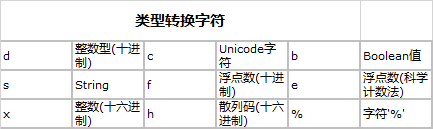
- public final class Locale extends Object
- Locale 对象表示了特定的地理、政治和文化地区
- 字段摘要
- Locale.CHINA
- 用于表示中国常量
- Locale.US
- 用于表示美国常量
- Locale.JAPAN
- 用于表示日本常量
- 使用方法: String.format(Locale.US,"i = %d, l = %d, f = %f, d = %f",i,l,f,d);
2.如果需要用变量统一控制格式化宽度可以使用下面的方法
package strings;

import java.util.*;

class Receipt {

    public static final int ITEM_WIDTH = 15;

    public static final int QTY_WIDTH = 5;

    public static final int PRICE_WIDTH = 10;

    private static final String TITLE_FRMT = "%-" + ITEM_WIDTH + "s %" + QTY_WIDTH + "s %" + PRICE_WIDTH + "s\n";

    private static final String ITEM_FRMT = "%-" + ITEM_WIDTH + "." + ITEM_WIDTH + "s %" + QTY_WIDTH + "d %"

            + PRICE_WIDTH + ".2f\n";

    private static final String TOTAL_FRMT = "%-" + ITEM_WIDTH + "s %" + QTY_WIDTH + "s %" + PRICE_WIDTH + ".2f\n";

    private double total = 0;

    Formatter f = new Formatter(System.out, Locale.US);

    public void printTitle() {

        f.format(TITLE_FRMT, "Item", "Qty", "Price");

        f.format(TITLE_FRMT, "----", "---", "-----");

    }

    public void print(String name, int qty, double price) {

        f.format(ITEM_FRMT, name, qty, price);

        total += price;

    }

    public void printTotal() {

        f.format(TOTAL_FRMT, "Tax", "", total * 0.06);

        f.format(TITLE_FRMT, "", "", "-----");

        f.format(TOTAL_FRMT, "Total", "", total * 1.06);

    }

}

public class E04_CustomizableReceipt {

    public static void main(String[] args) {

        Receipt receipt = new Receipt();

        receipt.printTitle();

        receipt.print("Jack's Magic Beans", 4, 4.25);

        receipt.print("Princess Peas", 3, 5.1);

        receipt.print("Three Bears Porridge", 1, 14.29);

        receipt.printTotal();

    }

}
四. String.format()
- String.format()是一个static方法,接受与Formatter.format()方法一样的参数,但返回一个String对象.
- String.format()内部,它也是创建一个Formatter对象,然后将你传入的参数转给Formatter.
package strings;

//: strings/DatabaseException.java

public class DatabaseException extends Exception {

  public DatabaseException(int transactionID, int queryID,

    String message) {

    super(String.format("(t%d, q%d) %s", transactionID,

        queryID, message));

  }

  public static void main(String[] args) {

    try {

      throw new DatabaseException(3, 7, "Write failed");

    } catch(Exception e) {

      System.out.println(e);

    }

  }

} /* Output:

DatabaseException: (t3, q7) Write failed

*///:~
五. 一个十六进制转储(dump)工具
//: net/mindview/util/Hex.java

package object;

import java.io.*;

public class Hex {

  public static String format(byte[] data) {

    StringBuilder result = new StringBuilder();

    int n = 0;

    for(byte b : data) {

      if(n % 16 == 0)

        result.append(String.format("%05X: ", n));

      result.append(String.format("%02X ", b));

      n++;

      if(n % 16 == 0) result.append("\n");

    }

    result.append("\n");

    return result.toString();

  }

  public static void main(String[] args) throws Exception {

    if(args.length == 0)

      // Test by displaying this class file:

      System.out.println(

        format(BinaryFile.read("bin/object/Hex.class")));

    else

      System.out.println(

        format(BinaryFile.read(new File(args[0]))));

  }

} /* Output: (Sample)

00000: CA FE BA BE 00 00 00 31 00 52 0A 00 05 00 22 07

00010: 00 23 0A 00 02 00 22 08 00 24 07 00 25 0A 00 26

00020: 00 27 0A 00 28 00 29 0A 00 02 00 2A 08 00 2B 0A

00030: 00 2C 00 2D 08 00 2E 0A 00 02 00 2F 09 00 30 00

00040: 31 08 00 32 0A 00 33 00 34 0A 00 15 00 35 0A 00

00050: 36 00 37 07 00 38 0A 00 12 00 39 0A 00 33 00 3A

...

*///:~

//: net/mindview/util/BinaryFile.java

// Utility for reading files in binary form.

package object;

import java.io.*;

public class BinaryFile {

  public static byte[] read(File bFile) throws IOException{

    BufferedInputStream bf = new BufferedInputStream(

      new FileInputStream(bFile));

    try {

      byte[] data = new byte[bf.available()];

      bf.read(data);

      return data;

    } finally {

      bf.close();

    }

  }

  public static byte[]

  read(String bFile) throws IOException {

    return read(new File(bFile).getAbsoluteFile());

  }

} ///:~
六.最全的示例
package strings;

import java.math.*;

import java.util.*;

import static net.mindview.util.Print.*;

public class E05_ComplexConversion {

    public static void main(String[] args) {

        Formatter f = new Formatter(System.out, Locale.US);

        char u = 'a';

        print("u = 'a'");

        f.format("s: %1$-10s\n", u);

        f.format("c: %1$-10c\n", u);

        f.format("b: %1$-10.10b\n", u);

        f.format("h: %1$-10.10h\n", u);

        int v = 1000;

        print("v = 1000");

        f.format("d 1: %1$(,0+10d\n", v);

        f.format("d 2: %1$-(, 10d\n", v);

        f.format("d 3, v = -v: %1$-(, 10d\n", -v);

        f.format("c, v = 121: %1$-10c\n", 121);

        f.format("b: %1$-10.10b\n", v);

        f.format("s: %1$-10.10s\n", v);

        f.format("x: %1$-10x\n", v);

        f.format("h: %1$-10.10h\n", v);

        BigInteger w = new BigInteger("50000000000000");

        print("w = new BigInteger(\"50000000000000\")");

        f.format("d 1: %1$(,0+10d\n", w);

        f.format("d 2: %1$-(, 10d\n", w);

        f.format("d 3, w = -w: %1$-(, 10d\n", w.negate());

        f.format("b: %1$-10.10b\n", w);

        f.format("s: %1$-10.10s\n", w);

        f.format("x 1: %1$(0+10x\n", w);

        f.format("x 2: %1$-( 10x\n", w);

        f.format("x 3, w = -w: %1$-( 10x\n", w.negate());

        f.format("h: %1$-10.10h\n", w);

        double x = 179.543;

        print("x = 179.543");

        f.format("b: %1$-10.10b\n", x);

        f.format("s: %1$-10.10s\n", x);

        f.format("f 1: %1$#(,0+10.2f\n", x);

        f.format("f 2: %1$#(,- 10.2f\n", x);

        f.format("f 3, x = -x: %1$#(,0+10.2f\n", -x);

        f.format("e 1: %1$#(0+10.2e\n", x);

        f.format("e 2: %1$#(- 10.2e\n", x);

        f.format("e 3, x = -x: %1$#(0+10.2e\n", -x);

        f.format("h: %1$-10.10h\n", x);

        Object y = new Object();

        print("y = new Object()");

        f.format("b: %1$-10.10b\n", y);

        f.format("s: %1$-10.10s\n", y);

        f.format("h: %1$-10.10h\n", y);

        boolean z = false;

        print("z = false");

        f.format("b: %1$-10.10b\n", z);

        f.format("s: %1$-10.10s\n", z);

        f.format("h: %1$-10.10h\n", z);

    }

}/*
u = 'a'
s: a
c: a
b: true
h: 61
v = 1000
d 1: +00001,000
d 2: 1,000
d 3, v = -v: (1,000)
c, v = 121: y
b: true
s: 1000
x: 3e8
h: 3e8
w = new BigInteger("50000000000000")
d 1: +50,000,000,000,000
d 2: 50,000,000,000,000
d 3, w = -w: (50,000,000,000,000)
b: true
s: 5000000000
x 1: +2d79883d2000
x 2: 2d79883d2000
x 3, w = -w: (2d79883d2000)
h: 8842a1a7
x = 179.543
b: true
s: 179.543
f 1: +000179.54
f 2: 179.54
f 3, x = -x: (00179.54)
e 1: +01.80e+02
e 2: 1.80e+02
e 3, x = -x: (1.80e+02)
h: 1ef462c
y = new Object()
b: true
s: java.lang.
h: 6d06d69c
z = false
b: false
s: false
h: 4d5
*/
java 格式化的更多相关文章
- JAVA格式化时间日期
JAVA格式化时间日期 import java.util.Date; import java.text.DateFormat; /** * 格式化时间类 * DateFormat.FULL = 0 * ...
- 7.20.01 java格式化输出 printf 例子
java格式化输出 printf 例子 importjava.util.Date; publicclassPrintf { publicstaticvoidmain(String[] args) { ...
- Java格式化时间
Java格式化时间 将秒或者毫秒值格式化成指定格式的时间 效果图 工具类 工具类里我只列出了一种格式的格式化方式,可以根据自己的需求,修改"yyyy-MM-dd hh:mm:ss" ...
- 【转】java格式化输出 printf 例子
[转]java格式化输出 printf 例子 转自http://www.cnblogs.com/TankMa/archive/2011/08/20/2146913.html#undefined imp ...
- java格式化时间到毫秒
转自:https://blog.csdn.net/iplayvs2008/article/details/41910835 java格式化时间到毫秒: SimpleDateFormat formatt ...
- 8.Java格式化输出
JAVA中字符串输出格式 1.使用format函数 System.out.format("%d %f",10,10.5); 2.使用Formatter类 构造函数Formatte ...
- java 格式化时间
java.text.DateFormat format1 = new java.text.SimpleDateFormat("yyyy-MM-dd hh:mm:ss"); form ...
- java 格式化日期(DateFormat)
import java.text.DateFormat; import java.util.Date; /** * 格式化时间类 DateFormat.FULL = 0 * DateFormat.DE ...
- Java格式化输出
Java的格式化输出等同于String.Format,与C有很大的相似,比如 System.out.printf("%8.2f", x);在printf中,可以使用多个参数,例如: ...
- java 格式化输出方法
在javaSE5中推出了printf方法来输出文本到控制台,在java中现在有如下方法可以输出文本: 1.System.out.println(....) //输出并换行 2.System.out.f ...
随机推荐
- struts下载
struts下载地址:http://struts.apache.org/download.cgi
- 2018acm-icpc西安邀请赛后记
第一次参加icpc的邀请赛,有一点小激动,深知大一弱队实力弱,赛前给队友的目标就是拿块铜,不打铁. 热身赛因为没有用过pc^2,codeblocks又用不习惯的原因,开始调工程调了很久,差一点拿到A题 ...
- 因缺失log4j.properties 配置文件导致flume无法正常启动。
因缺失log4j.properties 配置文件导致flume无法正常启动 作者:尹正杰 版权声明:原创作品,谢绝转载!否则将追究法律责任. 一.报错:log4j:WARN No appenders ...
- MySQL 获得当前日期时间 函数【转】
获得当前日期+时间(date + time)函数:now() mysql> select now(); +---------------------+ | now() | +---------- ...
- xml/map转换器,递归设计思路【纯原】
xml/map转换器 xml转换: xml/map转换器 xml合并: xml合并 snagit图片:http://pan.baidu.com/s/1nuKJD13 git样例: https://gi ...
- PHP5.5+Nginx1.9
1. 安装Nginx:http://www.cnblogs.com/vurtne-lu/p/7010065.html 2. 编译安装 [root@zabbix opt]# wget http://cn ...
- CodeChef - CRYPCUR
题目链接 AMRExchange is the latest cryptocurrency exchange that has become very popular among cryptocurr ...
- bzoj千题计划300:bzoj4823: [Cqoi2017]老C的方块
http://www.lydsy.com/JudgeOnline/problem.php?id=4823 讨厌的形状就是四联通图 且左右各连一个方块 那么破坏所有满足条件的四联通就好了 按上图方式染色 ...
- mysql alter 用法,修改表,字段等信息
一: 修改表信息 1.修改表名 alter table test_a rename to sys_app; 2.修改表注释 alter table sys_application comment '系 ...
- pandas数据表
安装 pip3 install pandas s=pd.Series([1,3,6,90,44,1]) #创建序列[用列表创建].数据源的维度必须是一维 #data 指定数据源 print(s ...