
python接口自动化测试二十九:yaml配置文件的写和读
yaml 通常用来存储数据,类似于json
安装:pip install ruamel.yaml

建一个空的yaml文件

写入数据
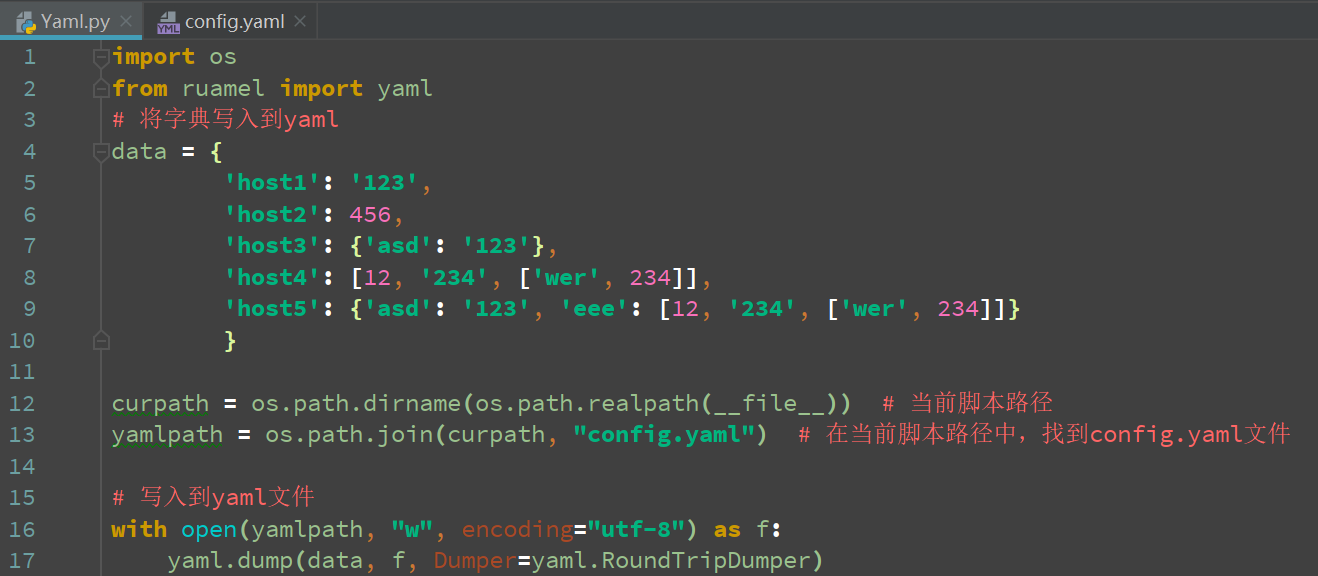
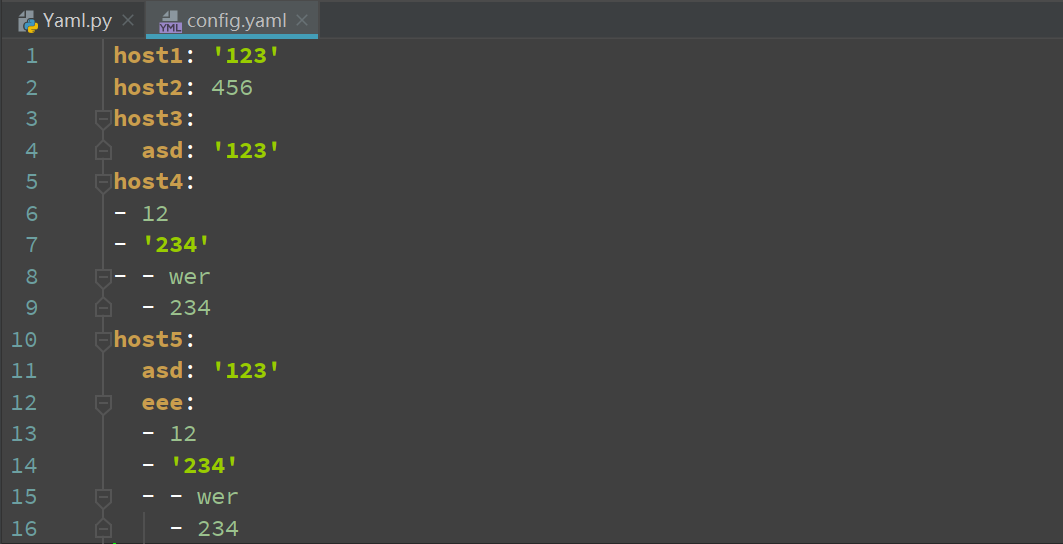
import os
from ruamel import yaml
# 将字典写入到yaml
data = {
        'host1': '123',
        'host2': 456,
        'host3': {'asd': '123'},
        'host4': [12, '234', ['wer', 234]],
        'host5': {'asd': '123', 'eee': [12, '234', ['wer', 234]]}
        }

curpath = os.path.dirname(os.path.realpath(__file__))  # 当前脚本路径
yamlpath = os.path.join(curpath, "config.yaml")  # 在当前脚本路径中,找到config.yaml文件

# 写入到yaml文件
with open(yamlpath, "w", encoding="utf-8") as f:
    yaml.dump(data, f, Dumper=yaml.RoundTripDumper)
读取yaml文件
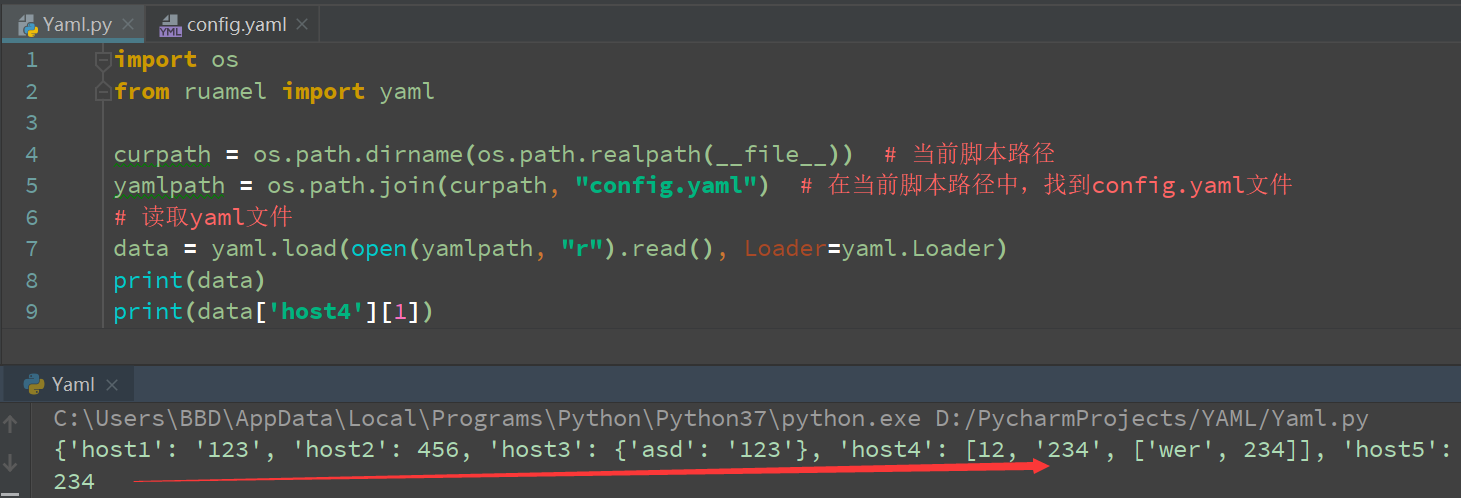
import os
from ruamel import yaml

curpath = os.path.dirname(os.path.realpath(__file__))  # 当前脚本路径
yamlpath = os.path.join(curpath, "config.yaml")  # 在当前脚本路径中,找到config.yaml文件
# 读取yaml文件
data = yaml.load(open(yamlpath, "r").read(), Loader=yaml.Loader)
print(data)
print(data['host4'][1])
封装起来以后好调用
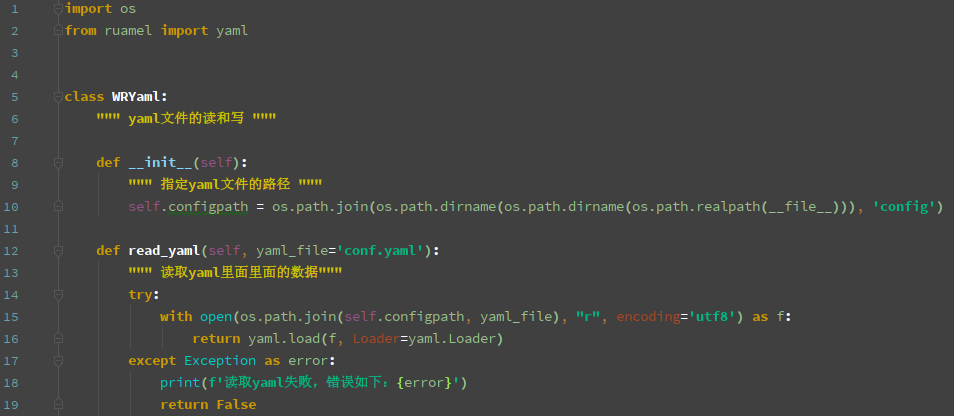

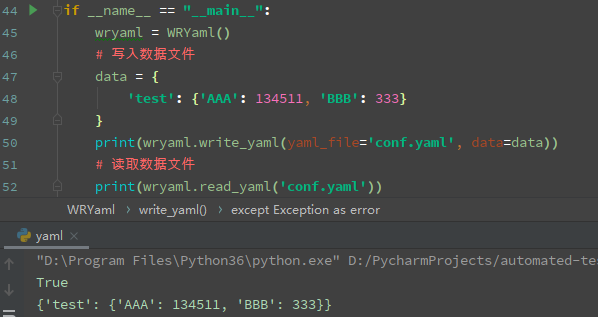
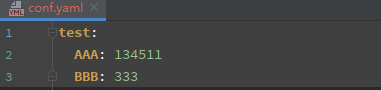
import os
from ruamel import yaml

class WRYaml:
    """ yaml文件的读和写 """

    def __init__(self):
        """ 指定yaml文件的路径 """
        self.configpath = os.path.join(os.path.dirname(os.path.dirname(os.path.realpath(__file__))), 'config')

    def read_yaml(self, yaml_file='conf.yaml'):
        """ 读取yaml里面里面的数据"""
        try:
            with open(os.path.join(self.configpath, yaml_file), "r", encoding='utf8') as f:
                return yaml.load(f, Loader=yaml.Loader)
        except Exception as error:
            print(f'读取yaml失败,错误如下:{error}')
            return False

    def write_yaml(self, data, yaml_file='conf.yaml', mode='w'):
        """ 往yaml里面写入数据
            yamlFile:yaml文件名
            data:要写入的数据
            mode:写入方式: w,覆盖写入, a,追加写入
            将原数据读取出来,如果没有要加入的key,则创建一个,如果有,则执行key下面的数据修改
        """
        try:
            old_data = self.read_yaml(yaml_file) or {}
            for data_key, data_value in data.items():
                if not old_data.get(data_key):
                    old_data.setdefault(data_key, {})
                for value_key, value_value in data_value.items():
                    old_data[data_key][value_key] = value_value
            with open(os.path.join(self.configpath, yaml_file), mode, encoding="utf-8") as f:
                yaml.dump(old_data, f, Dumper=yaml.RoundTripDumper)
            return True
        except Exception as error:
            print(f'yaml文件写入失败,错误如下:\n{error}')
            return False

if __name__ == "__main__":
    wryaml = WRYaml()
    # 写入数据文件
    data = {
        'test': {'AAA': 134511, 'BBB': 333}
    }
    print(wryaml.write_yaml(yaml_file='conf.yaml', data=data))
    # 读取数据文件
    print(wryaml.read_yaml('conf.yaml'))
python接口自动化测试二十九:yaml配置文件的写和读的更多相关文章
- python接口自动化测试二十六:使用pymysql模块链接数据库
#!/usr/bin/env python# -*- coding: utf-8 -*-# @Time : 2018/5/28 18:51# @Author : StalloneYang# ...
- python接口自动化测试二十五:执行所有用例,并生成HTML测试报告
import requestsimport unittest class TestQQ(unittest.TestCase): '''测试QQ号接口''' # 此注释将展示到测 ...
- python接口自动化测试二十八:连接SQL sever操作
1.中文乱码问题: (1).文件头加上# -*- coding:utf-8 -*- 或者 #coding=utf8 (2).pymssql.connect连接串中charset是要跟你数据库的编码一样 ...
- python接口自动化测试二十四:上传多个附件,参数化
# 添加多个附件参数化files = [("1.png", "1.png") ("2.png", "2.png") ]d ...
- python接口自动化测试二十二:文件下载
文件下载类型: Content-Type: octets/stream 一般为文件类型:
- python接口自动化测试二十:函数写接口测试
# coding:utf-8import requestsimport refrom bs4 import BeautifulSoup # s = requests.session() # 全局的s ...
- python接口自动化测试二十七:密码MD5加密 ''' MD5加密 ''' # 由于MD5模块在python3中被移除 # 在python3中使用hashlib模块进行md5操作 import hashlib # 待加密信息 str = 'asdas89799,.//plrmf' # 创建md5对象 hl = hashlib.md5() # Tips # 此处必须声明encode # 若写法为
python接口自动化测试二十七:密码MD5加密 ''' MD5加密 '''# 由于MD5模块在python3中被移除# 在python3中使用hashlib模块进行md5操作import has ...
- python接口自动化测试二:常用操作
url = '接口地址' r = requests.get(url) # 发送get请求 print(r.status_code) ...
- python接口自动化测试二十三:文件上传
# 以禅道为例: 一.创建一个类,类里面写一个登录方法: import requestsclass LoginZentao(): def __init__(self, s): # 初始化 self.s ...
随机推荐
- springmvc的controller中使用@Transactional无效
最近看mybatis的时候做了一个练习,但是进行事务处理的时候出了问题,如下 package com.henu.lz.controller; import org.springframework.be ...
- Math对象小笔记
来,总结下Math对象的常用方法和属性 1.E 自然对数的底数 Math.E; //2.718281828459045 2.PI 圆周率 Math.PI; //3.141592653589793 3 ...
- 函数和常用模块【day04】:高阶函数(七)
本节内容 1.介绍 2.具体实用 3.eval()函数 一.介绍 高阶函数:变量可以指向函数,函数的参数能接收变量,那么一个函数就可以接收另一个函数作为参数. 二.具体实用 其实说白了,高阶函数功能就 ...
- myeclipse设置,提高开发效率
全局搜索,打开一个文件,却把另外一个给关掉. 解决办法: 在myeclipse中window-preferences-general-search找到第一行的一个选项reuse editors to ...
- JAVA记录-Spring两大特性
1.IOC控制反转 Ioc—Inversion of Control,即“控制反转”,不是什么技术,而是一种设计思想.在Java开发中,Ioc意味着将你设计好的对象交给容器控制,而不是传统的在你的对象 ...
- luogu 1030 求先序遍历
此题给出中序遍历和后序遍历后的序列,乍一看确乎想不出法子解决,毕竟是逆向思维: 但是后序遍历的特殊性质 son1,son2,x 使得后序的末尾便是根节点,再由中序天然的递归性质便可递归输出,用下fin ...
- Python - Scrapy 框架
Scrapy 是采用Python 开发的一个快速可扩展的抓取WEB 站点内容的爬虫框架.Scrapy,Python开发的一个快速,高层次的屏幕抓取和web抓取框架,用于抓取web站点并从页面中提取结构 ...
- JavaScript之正方教务系统自动化教评[插件-转载]
[声明]本插件系学院学长原创,非博主所创,发布此处,仅供学习和效仿. /** * @name:正方教务系统自动化教评-插件 * * @author:chenzhongshu * @date:2017- ...
- NULL、0、nullptr的区别
某些时候,我们需要将指针赋值为空指针,以防止野指针. 有人喜欢使用NULL作为空指针常量使用,例如:int* p = NULL;. 也有人直接使用0值作为空指针常量,例如:int* p = 0;. ...
- Hive配置永久显示表字段名并且不显示表名
1 配置文件 hive/conf下hive-site.xml /mnt/software/hive-1.1.0-cdh5.7.0/conf 2 添加配置项 <!--不显示表名--> < ...