
SpringMybatis 整合JavaWeb

需要用到新的jar包
<dependency>
  <groupId>org.springframework</groupId>
  <artifactId>spring-web</artifactId>
  <version>4.2.1.RELEASE</version>
</dependency>
pom文件
<project xmlns="http://maven.apache.org/POM/4.0.0" xmlns:xsi="http://www.w3.org/2001/XMLSchema-instance"

         xsi:schemaLocation="http://maven.apache.org/POM/4.0.0 http://maven.apache.org/maven-v4_0_0.xsd">

    <parent>

        <artifactId>01Mybatis</artifactId>

        <groupId>cn.kitty</groupId>

        <version>1.0-SNAPSHOT</version>

    </parent>

    <modelVersion>4.0.0</modelVersion>

    <artifactId>Mybatis-SpringSSM</artifactId>

    <packaging>war</packaging>

    <name>Mybatis-Spring SSM Maven Webapp</name>

    <url>http://maven.apache.org</url>

    <dependencies>

        <!--<dependency>

            <groupId>log4j</groupId>

            <artifactId>log4j</artifactId>

            <version>1.2.17</version>

        </dependency>-->

        <!-- https://mvnrepository.com/artifact/org.mybatis/mybatis -->

        <dependency>

            <groupId>org.mybatis</groupId>

            <artifactId>mybatis</artifactId>

            <version>3.4.1</version>

        </dependency>

        <!-- https://mvnrepository.com/artifact/mysql/mysql-connector-java -->

        <dependency>

            <groupId>mysql</groupId>

            <artifactId>mysql-connector-java</artifactId>

            <version>5.1.39</version>

        </dependency>

        <!-- https://mvnrepository.com/artifact/junit/junit -->

        <!-- https://mvnrepository.com/artifact/junit/junit -->

        <dependency>

            <groupId>junit</groupId>

            <artifactId>junit</artifactId>

            <version>4.11</version>

            <scope>test</scope>

        </dependency>

        <!-- https://mvnrepository.com/artifact/org.hamcrest/hamcrest-all -->

        <!--<dependency>

            <groupId>org.hamcrest</groupId>

            <artifactId>hamcrest-all</artifactId>

            <version>1.3</version>

            <scope>test</scope>

        </dependency>-->

        <!-- https://mvnrepository.com/artifact/org.springframework/spring-beans -->

        <dependency>

            <groupId>org.springframework</groupId>

            <artifactId>spring-beans</artifactId>

            <version>4.2.1.RELEASE</version>

        </dependency>

        <!-- https://mvnrepository.com/artifact/org.springframework/spring-context -->

        <dependency>

            <groupId>org.springframework</groupId>

            <artifactId>spring-context</artifactId>

            <version>4.2.1.RELEASE</version>

        </dependency>

        <!-- https://mvnrepository.com/artifact/org.aspectj/aspectjweaver -->

        <!--织入-->

        <dependency>

            <groupId>org.aspectj</groupId>

            <artifactId>aspectjweaver</artifactId>

            <version>1.8.10</version>

        </dependency>

        <!--配置c3p0-->

        <!-- https://mvnrepository.com/artifact/c3p0/c3p0 -->

        <dependency>

            <groupId>c3p0</groupId>

            <artifactId>c3p0</artifactId>

            <version>0.9.1.2</version>

        </dependency>

        <!--Spring-jdbc需要的jar-->

        <dependency>

            <groupId>org.springframework</groupId>

            <artifactId>spring-jdbc</artifactId>

            <version>4.2.1.RELEASE</version>

        </dependency>

      <!--mybatisSpring jar-->

        <!--spring整合mybatis-->

        <!--Mybatis+Spring整合-->

        <dependency>

            <groupId>org.mybatis</groupId>

            <artifactId>mybatis-spring</artifactId>

            <version>1.3.0</version>

        </dependency>

        <!--JavaEE的依赖-->

        <dependency>

            <groupId>javaee</groupId>

            <artifactId>javaee-api</artifactId>

            <version>5</version>

        </dependency>

        <!-- Spring整合JavaWeb的包 -->

        <dependency>

            <groupId>org.springframework</groupId>

            <artifactId>spring-web</artifactId>

            <version>4.2.1.RELEASE</version>

        </dependency>

    </dependencies>

    <build>

    <resources>

        <resource>

            <directory>src/main/java</directory>

            <includes>

                <include>**/*.xml</include>

            </includes>

        </resource>

    </resources>

    </build>

</project>
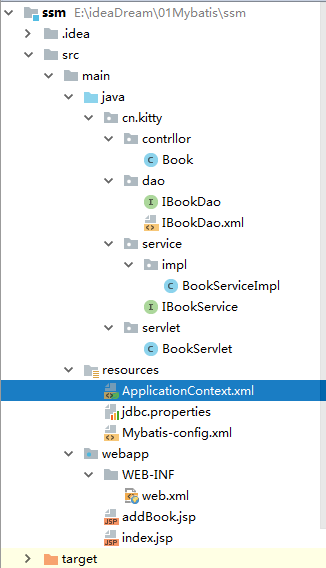
package cn.kitty.contrllor;

public class Book {

    private  int bookid;

    private String bookname;

    private int bookprice ;

    public Book() {

    }

    public Book(int bookid, String bookname, int bookprice) {

        this.bookid = bookid;

        this.bookname = bookname;

        this.bookprice = bookprice;

    }

    public int getBookid() {

        return bookid;

    }

    public void setBookid(int bookid) {

        this.bookid = bookid;

    }

    public String getBookname() {

        return bookname;

    }

    public void setBookname(String bookname) {

        this.bookname = bookname;

    }

    public int getBookprice() {

        return bookprice;

    }

    public void setBookprice(int bookprice) {

        this.bookprice = bookprice;

    }

}
IBookDao.xml
<?xml version="1.0" encoding="UTF-8" ?>

<!DOCTYPE mapper

        PUBLIC "-//mybatis.org//DTD Mapper 3.0//EN"

        "http://mybatis.org/dtd/mybatis-3-mapper.dtd">

<mapper namespace="cn.kitty.dao.IBookDao">

    <insert id="addBook">

  insert book (bookname,bookprice) VALUES (#{bookname},#{bookprice})

    </insert>

</mapper>
IBookService
package cn.kitty.service;

import cn.kitty.contrllor.Book;

public interface IBookService {

    public  void addBook(Book book);

}
IBookServiceImpl
package cn.kitty.contrllor.service.impl;

import cn.kitty.contrllor.controller.Book;

import cn.kitty.contrllor.dao.IBookDao;

import cn.kitty.contrllor.service.IBookService;

public class BookServiceImpl implements IBookService {

    private IBookDao dao;

    public void addBook(Book book) {

      dao.addBook(book);

    }

    public IBookDao getDao() {

        return dao;

    }

    public void setDao(IBookDao dao) {

        this.dao = dao;

    }

}
BookServlet
package cn.kitty.servlet;

import cn.kitty.contrllor.Book;

import cn.kitty.service.IBookService;

import org.springframework.web.context.WebApplicationContext;

import org.springframework.web.context.support.WebApplicationContextUtils;

import javax.servlet.ServletException;

import javax.servlet.http.HttpServlet;

import javax.servlet.http.HttpServletRequest;

import javax.servlet.http.HttpServletResponse;

import java.io.IOException;

public class BookServlet extends HttpServlet {

    protected void doPost(HttpServletRequest request, HttpServletResponse response) throws ServletException, IOException {

        //解决乱码

        request.setCharacterEncoding("utf-8");

        response.setCharacterEncoding("utf-8");

        String bookname=request.getParameter("bookname");

        int bookprice=Integer.parseInt(request.getParameter("bookprice"));

        Book book=new Book();

        book.setBookname(bookname);

        book.setBookprice(bookprice);

//调度service实现添加  01 ApplicationContext

//02程序一启动,在初始化ServletContext (Servlet上下文)application类型 应用程序在初始化

//application 我们可以开一个监听器,顺便的将Spring容器同时也给初始化

        //01 ApplicaitionContext context=new ClassPathXmlApplicationContext("ApplicationContext.xml");

//02.WebApplicationContext context= WebApplicationContextUtils.getRequiredWebApplicationContext(getServletContext());

        WebApplicationContext context= WebApplicationContextUtils.getRequiredWebApplicationContext(getServletContext());

        IBookService bookService = (IBookService)context.getBean("bookService");

        bookService.addBook(book);

        request.getRequestDispatcher("/index.jsp").forward(request,response);

    }

    protected void doGet(HttpServletRequest request, HttpServletResponse response) throws ServletException, IOException {

           doPost(request ,response);

    }

}
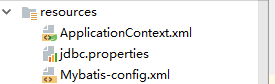
ApplicationContext.xml
<?xml version="1.0" encoding="UTF-8"?>

<beans xmlns="http://www.springframework.org/schema/beans"

       xmlns:aop="http://www.springframework.org/schema/aop"

       xmlns:context="http://www.springframework.org/schema/context"

       xmlns:tx="http://www.springframework.org/schema/tx"

       xmlns:p="http://www.springframework.org/schema/p"

       xmlns:xsi="http://www.w3.org/2001/XMLSchema-instance"

       xsi:schemaLocation="

        http://www.springframework.org/schema/beans http://www.springframework.org/schema/beans/spring-beans.xsd

        http://www.springframework.org/schema/aop http://www.springframework.org/schema/aop/spring-aop.xsd

        http://www.springframework.org/schema/context  http://www.springframework.org/schema/context/spring-context.xsd

        http://www.springframework.org/schema/tx  http://www.springframework.org/schema/tx/spring-tx.xsd

">

    <!--01.识别jdbc.properties文件-->

    <context:property-placeholder location="classpath:jdbc.properties"></context:property-placeholder>

    <bean id="dataSource" class="com.mchange.v2.c3p0.ComboPooledDataSource">

        <property name="jdbcUrl" value="jdbc:mysql:///aount"></property>

        <property name="driverClass" value="com.mysql.jdbc.Driver"></property>

        <property name="user" value="root"></property>

        <property name="password" value=""></property>

    </bean>

    <!--03.工厂配置-->

    <bean id="sessionFactory" class="org.mybatis.spring.SqlSessionFactoryBean">

        <property name="dataSource" ref="dataSource"></property>

        <!--big config path-->

        <property name="configLocation" value="classpath:Mybatis-config.xml"></property>

    </bean>

    <!--dao  实现类 映射文件的扫描器可以动态的在内存中构建接口的实现类,代理对象-->

    <bean class="org.mybatis.spring.mapper.MapperScannerConfigurer">

        <property name="basePackage" value="cn.kitty.dao"></property>

    </bean>

    <!--service-->

    <bean id="bookService" class="cn.kitty.service.impl.BookServiceImpl">

        <property name="dao" ref="IBookDao"></property>

    </bean>

    <!--06.事务管理器-->

    <bean id="transactionManager" class="org.springframework.jdbc.datasource.DataSourceTransactionManager">

        <property name="dataSource" ref="dataSource"></property>

    </bean>

    <!-- 07.AspectJ AOP 配置事务 -->

    <tx:advice id="txAdvice" transaction-manager="transactionManager">

    <tx:attributes>

        <tx:method name="addBook" isolation="DEFAULT" propagation="REQUIRED"/>

    </tx:attributes>

</tx:advice>

    <aop:config>

        <!--配置了切点Pointcut  * *..service.*.*(..))-->

        <aop:pointcut id="mypoint" expression="execution(* *..service.*(..))"/>

        <!--顾问-->

        <aop:advisor advice-ref="txAdvice" pointcut-ref="mypoint"></aop:advisor>

    </aop:config>

</beans>
jdbc.perperties
jdbc.driver=com.mysql.jdbc.Driver

jdbc.url=jdbc:mysql:///aount

jdbc.username=root

jdbc.password=
Mybatis-config.xml
<?xml version="1.0" encoding="UTF-8" ?>
<!DOCTYPE configuration
PUBLIC "-//mybatis.org//DTD Config 3.0//EN"
"http://mybatis.org/dtd/mybatis-3-config.dtd">
<configuration>
<!--<typeAliases>
<package name="cn.kitty.controllerroller"></package>
</typeAliases>-->
<!-- <mappers>
<!–<package name="cn.kitty.dao"></package>–>
<mapper resource="cn/kitty/dao/IBookDao.xml"/>
</mappers>-->
</configuration>
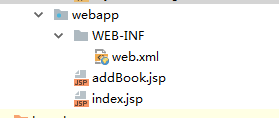
<!DOCTYPE web-app PUBLIC

 "-//Sun Microsystems, Inc.//DTD Web Application 2.3//EN"

 "http://java.sun.com/dtd/web-app_2_3.dtd" >

<web-app>

  <display-name>Archetype Created Web Application</display-name>

  <context-param>

    <param-name>contextConfigLocation</param-name>

    <param-value>classpath:ApplicationContext.xml</param-value>

  </context-param>

  <listener>

    <listener-class>org.springframework.web.context.ContextLoaderListener</listener-class>

  </listener>

  <servlet>

    <servlet-name>BookServlet</servlet-name>

    <servlet-class>cn.kitty.servlet.BookServlet</servlet-class>

  </servlet>

  <servlet-mapping>

    <servlet-name>BookServlet</servlet-name>

    <url-pattern>/BookServlet</url-pattern>

  </servlet-mapping>

  <welcome-file-list>

    <welcome-file>addBook.jsp</welcome-file>

  </welcome-file-list>

</web-app>
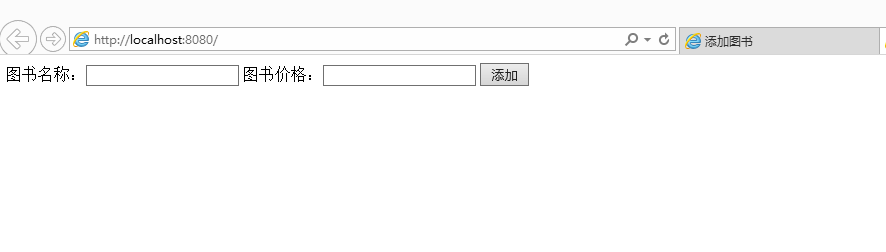
addBook.jsp
<%@ page contentType="text/html;charset=UTF-8" language="java" %>

<html>

<head>

    <title>添加图书</title>

    <form  name="add" method="post" action="/BookServlet" >

        图书名称:<input  name="bookname"/>

        图书价格:<input name="bookprice"/>

        <input type="submit" value="添加">

    </form>

</head>

<body>

</body>

</html>
index.jsp
<%@ page contentType="text/html;charset=UTF-8" language="java" %>

<html>

<body>

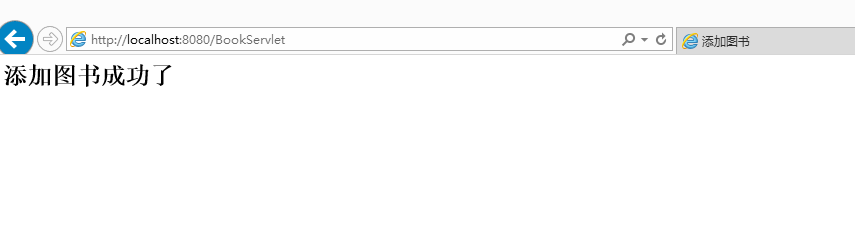
<h2>添加图书成功了</h2>

</body>

</html>

SpringMybatis 整合JavaWeb的更多相关文章
- mybatis快速入门(七)-spring-mybatis整合
今天写写spring-mybatis整合吧,先写个原始dao类的整合,下一节在写个动态代理的整合,我就不写太详细了,因为前面的章节基本上都有了,我直接就一口气都写出来需要那些文件然后在直接贴代码,首先 ...
- Mybatis学习笔记之二(动态mapper开发和spring-mybatis整合)
一.输入映射和输出映射 1.1 parameterType(输入类型) [传递简单类型] 详情参考Mybatis学习笔记之一(环境搭建和入门案例介绍) 使用#{}占位符,或者${}进行sql拼接. [ ...
- SpringBoot整合JavaWeb
一.SpringBoot整合Servlet的两种方式 1.通过注解扫描完成Servlet组件的注册 编写Servlet package com.example.demo.servlet; import ...
- spring-mybatis整合异常2
org.springframework.beans.factory.BeanCreationException: Error creating bean with name 'dataSource' ...
- spring-mybatis整合异常
Failed to read artifact descriptor for XXXXXX:jar:XXXX.RELEAS 原因是maven的本地仓库没有设置好.在别处拷贝过来的项目会有自己的仓库位置 ...
- spring-mybatis整合项目 异常处理2
org.apache.ibatis.builder.BuilderException: Error parsing Mapper XML. The XML location is 'com/imooc ...
- spring-mybatis整合项目 异常处理
java.lang.reflect.InvocationTargetException at java.base/jdk.internal.reflect.NativeMethodAccessorIm ...
- SSM-Spring-22:Spring+Mybatis+JavaWeb的整合
------------吾亦无他,唯手熟尔,谦卑若愚,好学若饥------------- 众所周知,框架Spring来整合别的框架,但是Mybatis出现的晚,Spring就没有给他提供支持,那怎么办 ...
- 【Spring】XML配置整合Mybatis
注意:项目开发使用了mybatis的mapper代理! 首先是mybatis自己的配置文件,被spring整合之后,只有typeAliases存在了,其他都整合在了spring-mybatis.xml ...
随机推荐
- CAS缺点
CAS虽然很高效的解决原子操作,但是CAS仍然存在三大问题.ABA问题,循环时间长开销大和只能保证一个共享变量的原子操作 1. ABA问题.因为CAS需要在操作值的时候检查下值有没有发生变化,如 ...
- openssl生成RSA公钥和私钥对
在ubuntu上要使用openssl的话需要先进行安装,命令如下: sudo apt-get install openssl 安装完成就可以使用openssl了. 首先需要进入openssl的交互界面 ...
- IOP知识点(2)
1 URL资源访问不足时,需要添加URL权限 2 重定向问题解决办法:3 cloud-service-factory 项目 gradlew方法 1 URL资源访问不足时,需要添加URL权 ...
- 基于Extjs+SpringMVC+MyBatis+Oracle的B/S信息系统简化开发思路
要在上层简化就得有下层强大的架构作为支撑,通过采用企业级的各种框架,虽然学习成本高一些,但用好了效率也自然高. 数据层简化: 首先所有表都有名称为ID的主键字段.有与表同名的序列作为自增key. 数据 ...
- APP网络优化篇
Android Addresses are cached for 600 seconds (10 minutes) by default. Failed lookups are cached for ...
- pip安装时遇到的问题集锦,持续更新!
1.Python安装时出现Could not fetch URL https://pypi.python.org/simple/pool/: There was a problem confirmin ...
- 使用github(一)
一.使用Github(目的.基本概念) 1.目的 借助github托管项目代码 2.基本概念 (1)仓库(Repository) 仓库即项目的意思,你想在github上开源一个项目,那就必须要新建一个 ...
- Cocos Creator 获得设备分辨率
var b = cc.director.getWinSizeInPixels() var bx = b.width var by = b.height
- JDK源码调试常见错误。
1.删除不需要的代码,即swing相关的代码 2.执行命令时要将前提环境进入文件夹如下: 起初没有完全执行第一条,因为网上说可以根据需要选择相关的代码,于是就没有删除,以后第一次模仿网上的例子的时候要 ...
- 工厂模式&策略模式。
抽象.封装,具体事情做得越多,越容易犯错误.这每个做过具体工作的人都深有体会,相反,官做得越高,说出的话越抽象越笼统,犯错误可能性就越少.好象我们从编程序中也能悟出人生道理.(百度百科) 不断抽象封装 ...