
Linux Centos 6.5_x86安装Nginx
一、下载
地址:http://nginx.org/en/download.html
或者在linux上使用wget命令下载:
wget http://124.202.164.5/files/40950000082BD3BE/nginx.org/download/nginx-1.8.1.tar.gz
二、编译安装
[root@root3 soft]# tar -zxvf nginx-1.8..tar.gz

nginx-1.8./

nginx-1.8./auto/

nginx-1.8./conf/

nginx-1.8./contrib/

nginx-1.8./src/

nginx-1.8./configure

nginx-1.8./LICENSE

nginx-1.8./README

...
[root@root3 soft]# cd nginx-1.8.
nginx-1.8.]# ./configure

checking for OS

 + Linux 2.6.-.el6.i686 i686

checking for C compiler ... found

 + using GNU C compiler

 ...

 ./configure: error: the HTTP rewrite module requires the PCRE library.

You can either disable the module by using --without-http_rewrite_module

option, or install the PCRE library into the system, or build the PCRE library

statically from the source with nginx by using --with-pcre=<path> option.
Nginx的一些模块需要其他第三方库的支持,比如gzip模块需要zlib库,rewrite模块需要pcre库,ssl需要openssl库等。
上述error说明,没有安装pcre库。
安装zlib、zlib-devel、openssl、openssl-devel、pcrepcre-devel
[root@root3 ~]# yum install zlib zlib-devle openssl openssl-devel pcre pcre-devel
重新./configure
[root@root3 nginx-1.8.]# ./configure

checking for OS

 + Linux 2.6.-.el6.i686 i686

checking for C compiler ... found

 + using GNU C compiler

 + gcc version: 4.4.  (Red Hat 4.4.-) (GCC)

...

Configuration summary

  + using system PCRE library

  + OpenSSL library is not used

  + md5: using system crypto library

  + sha1: using system crypto library

  + using system zlib library

  nginx path prefix: "/usr/local/nginx"

  nginx binary file: "/usr/local/nginx/sbin/nginx"

  nginx configuration prefix: "/usr/local/nginx/conf"

  nginx configuration file: "/usr/local/nginx/conf/nginx.conf"

  nginx pid file: "/usr/local/nginx/logs/nginx.pid"

  nginx error log file: "/usr/local/nginx/logs/error.log"

  nginx http access log file: "/usr/local/nginx/logs/access.log"

  nginx http client request body temporary files: "client_body_temp"

  nginx http proxy temporary files: "proxy_temp"

  nginx http fastcgi temporary files: "fastcgi_temp"

  nginx http uwsgi temporary files: "uwsgi_temp"

  nginx http scgi temporary files: "scgi_temp"
[root@root3 nginx-1.8.]# make

[root@root3 nginx-1.8.]# make install
安装成功!。
按照以上命令,Nginx默认被安装到/usr/local/nginx下。另外您可以通过./configure --help命令查看Nginx可选择编译项目。可参考《Nginx手动编译的编译选项解析》。
三、启动、停止、平滑重启
a)启动
Nginx的安装目录是/usr/local/nginx,那么Nginx的启动命令就是:
/usr/local/nginx/sbin/nginx -c /usr/local/nginx/conf/nginx.conf
其中参数“-c”指定了配置文件的路径,如果不加"-c'参数,Nginx会默认加载其安装目录的的conf子目录的nginx.conf文件。在本例中是/usr/local/nginx/conf/nginx.conf。
如果配置文件正确,则显示以下信息:
nginx: the configuration file /usr/local/nginx/conf/nginx.conf syntax is ok

nginx: configuration file /usr/local/nginx/conf/nginx.conf test is successful
测试是否启动成功:
[root@mch conf]# ps -ef|grep nginx

root              : ?        :: nginx: master process /usr/local/nginx/sbin/nginx -c /usr/local/nginx/conf/nginx.conf

oracle         : ?        :: nginx: worker process

oracle         : ?        :: nginx: worker process

oracle         : ?        :: nginx: worker process

oracle         : ?        :: nginx: worker process

oracle         : ?        :: nginx: worker process

oracle         : ?        :: nginx: worker process

oracle         : ?        :: nginx: worker process

oracle         : ?        :: nginx: worker process

root           : pts/    :: grep nginx
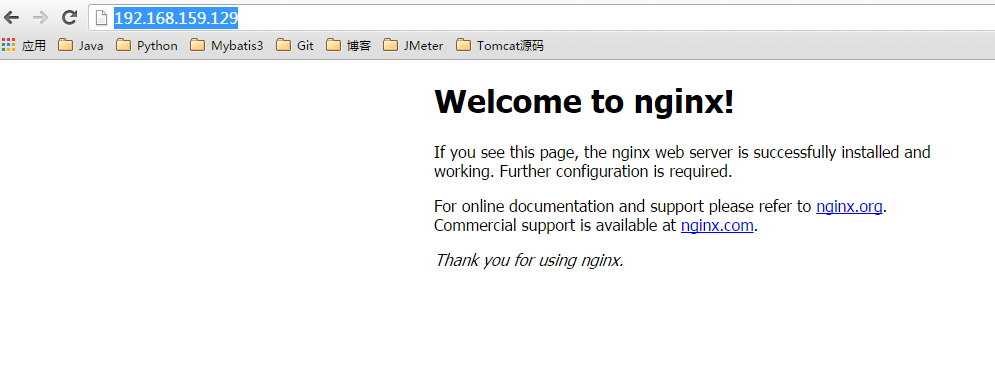
通过浏览器访问:IP地址:Nginx端口号(端口号是在nginx.conf中server模块中配置的),我的是:http://192.168.159.129:80/
b) 停止
Nginx的停止的方法有很多种,一般是通过发送系统信号给Nginx主进程的方式来停止Nginx。
我们通过ps命令查看Nginx的主进程号:
[root@mch ~]# ps -ef | grep nginx

root              : ?        :: nginx: master process /usr/local/nginx/sbin/nginx -c /usr/local/nginx/conf/nginx.conf

oracle         : ?        :: nginx: worker process

oracle         : ?        :: nginx: worker process

oracle         : ?        :: nginx: worker process

oracle         : ?        :: nginx: worker process

oracle         : ?        :: nginx: worker process

oracle         : ?        :: nginx: worker process

oracle         : ?        :: nginx: worker process

oracle         : ?        :: nginx: worker process

root           : pts/    :: grep nginx
从上边可以看到:其中备注为master process的进程,表示他是主进程,另外8个“worker process”,表示是子进程,其中2439是主进程号。
a)从容停止Nginx
kill - QUIT Nginx主进程号。
或:
kill -QUTI /usr/local/nginx/nginx.pid
b)快速停止Nginx
kill - TERM Nginx主进程号
kill - TERM /usr/local/nginx/nginx.pid
或:
kill - INT Nginx主进程号
kill - INT /usr/local/nginx/nginx.pid
c)强制停止所有nginx进程
kill -9 nginx
c)平滑重启
重启之前要确认配置文件nginx.conf的语法是否正确,否则nginx不会加载新的配置文件。通过以下命令判断neginx配置文件是否正确:
/usr/local/nginx/sbin/nginx -t -c /usr/local/nginx/conf/nginx.conf
控制台出现如下结果说明配置文件正确:
     nginx: the configuration file /usr/local/nginx/conf/nginx.conf syntax is ok

     nginx: configuration file /usr/local/nginx/conf/nginx.conf test is successful
查看nginx主进程号:
[root@mch /]# ps -ef|grep nginx

root              Oct13 ?        :: nginx: master process /usr/local/nginx/sbin/nginx -c /usr/local/nginx/conf/nginx.conf

oracle         : ?        :: nginx: worker process

oracle         : ?        :: nginx: worker process

oracle         : ?        :: nginx: worker process

oracle         : ?        :: nginx: worker process

oracle         : ?        :: nginx: worker process

oracle         : ?        :: nginx: worker process

oracle         : ?        :: nginx: worker process

oracle         : ?        :: nginx: worker process

root           : pts/    :: grep nginx
重启Nginx:
kill -HUP Nginx主进程号
kill -HUP /usr/local/nginx/nginx.pid
参考文档:
《实战Nginx:取代Apache的高性能Web服务器》
Linux Centos 6.5_x86安装Nginx的更多相关文章
- Linux Centos平台下安装Nginx
以home下安装为例,切换到home目录下 cd /home 安装依赖 nginx相关依赖 yum -y install make gcc gcc-c++ openssl openssl-devel ...
- Linux : centOS 与 Ubuntu 安装 Nginx
源码下载: wget http://nginx.org/download/nginx-1.14.0.tar.gz 解压:tar –zxvf xxx 安装依赖: yum -y install open ...
- Linux系统运维笔记(四),CentOS 6.4安装Nginx
Linux系统运维笔记(四),CentOS 6.4安装Nginx 1,安装编译工具及库文件 yum -y install make zlib zlib-devel gcc-c++ libtool op ...
- Centos 7下安装nginx,使用yum install nginx,提示没有可用的软件包
Centos 7下安装nginx,使用yum install nginx,提示没有可用的软件包. 18 (flaskApi) [root@67 flaskDemo]# yum -y install n ...
- Linux CentOS 6.6安装JDK1.7
Linux CentOS 6.6安装JDK1.7 目录 1.下载JDK 2.卸载JDK 3.安装JDK 3.1..rpm后缀格式JDK安装方式 3.2..tar.gz后缀格式JDK安装方式 4.验证安 ...
- 在CentOS 7中安装nginx服务器
简要地介绍一下,如何在CentOS 7中安装nginx服务器 下载对应当前系统版本的nginx包(package) # wget http://nginx.org/packages/centos/ ...
- Linux CentOS 编绎安装Python 3.5
Linux CentOS 编绎安装Python 3.5 先决条件(若无安装,则不能编绎使用idle3):yum install tk-devel xz -d Python-3.5.0.tar.xzta ...
- Red hat Linux(Centos 5/6)安装R语言
Red hat Linux(Centos 5/6)安装R语言1 wget http://cran.rstudio.com/src/base/R-3/R-3.0.2.tar.gz2 tar xzvf R ...
- Linux Centos 系统上安装BT客户端 Transmission
Linux Centos 系统上安装BT客户端 Transmission Transmission是一种BitTorrent客户端,特点是一个跨平台的后端和其上的简洁的用户界面,以MIT许可证和G ...
随机推荐
- 传输层TCP协议
目录 首部格式数据单位特定注意自动重传请求ARQ具体实现发送缓存接收缓存滑动窗口确认丢失和确认迟到超时重传时间选择报文段的发送时机运输连接发送TCP请求客户端拥塞处理相关概念避免拥塞具体实现TCP 的 ...
- python 之分发包
setuptools python包的根目录设置setup.py from setuptools import setup, find_packages setup( name = 'm' versi ...
- React-native 初始化项目很慢
我是在Mac环境下,利用facebook开源的react-native创建原生app项目缓慢的问题 一:确定自己的环境配置是否有问题 二:打开终端,输入命令行 brew install wget 点击 ...
- 踩坑实录 Android studio中关于 No cached version of **** available for of处理办法
当我们添加某些依赖库(Okhttp.Retrofit)时, Android studio 会报如下错误: Error:A problem occurred configuring project ': ...
- Access中的自定义排序设置方式
一.问题起因 最近有网友提问说,Access中在用查询指定排序方式时,为什么只有升序跟降序,怎么米有自定义排序了?竟然比Excel都弱啊! 其实这是对Access的误解,我这就给大家来解一下疑惑.案例 ...
- 微信小程序首页总结
效果图如下 首先从大的方面来讲,就是设置了window的属性 "navigationBarBackgroundColor": "#AFE2E6",//bar ...
- 玩转 SSH(七):使用 dubbo + zookeeper 实现服务模块化
一.创建 SSMVCAnnoDemo 项目 点击菜单,选择“File -> New Project” 创建新项目.选择使用 archetype 中的 maven-quickstart 模版创建. ...
- C# Task 源代码阅读(1)
平时我们开发中,经常使用Task,后续的.net版本种很多都和Task有关,比如asyn,await有了Task 我们很少就去关注Thread 了.Task 给我们带来了很多的便利之处.是我们更少的去 ...
- 在多个Activity中回传值(startActivityForResult())
业务逻辑: MainActivity打开A,A打开B,B把值传回MainActivity.适用在多个Activity中回传值. 实例:微信中选择国家-->省份-->城市的实现 实现方式分析 ...
- 常用SQL_官方文档使用
SQL语句基础理论 SQL是操作和检索关系型数据库的标准语言,标准SQL语句可用于操作关系型数据库. 5大主要类型: ①DQL(Data Query Language,数据查询语言)语句,主要由于se ...