
【Owin 学习系列】2. Owin Startup 类解析
Owin Startup 类解析
每个 Owin 程序都有 startup 类,在这个 startup 类里面你可以指定应用程序管道模型中的组件。你可以通过不同的方式来连接你的 startup 类和运行时,这些取决于你选择的宿主模型(OwinHost, IIS, and IIS-Express)。
你可以通过下面几种方式来连接你的 startup 类和宿主程序。
- 命名约定:Katana 会在 namespace 中查找一个叫 Startup 的类。
- OwinStartup 特性:这是开发者最常用的一种方式,下面的特性将会设置 startup 类到 命名空间 OwinDemo 下面的 Startup 类。OwinStartup 特性会覆盖命名约定。
[assembly: OwinStartup(typeof(OwinDemo.Startup))]
- Configuration 文件中的 appSetting 元素,appSetting 元素会覆盖命名约定和 OwinStartup 特性。你可以有多个 startup 类 (每个都使用 OwinStartup 特性) ,可以用下面的配置文件来选择使用哪一个 startup 类。
<appSettings>

  <add key="owin:appStartup" value="OwinDemo.Startup2" />

</appSettings>
startup.cs 代码
using System;

using Microsoft.Owin;

using Owin;

[assembly: OwinStartup(typeof(OwinDemo.Startup))]

namespace OwinDemo

{

    public class Startup

    {

        public void Configuration(IAppBuilder app)

        {

            // For more information on how to configure your application, visit http://go.microsoft.com/fwlink/?LinkID=316888

            app.Run(context =>

            {

                context.Response.ContentType = "text/plain";

                return context.Response.WriteAsync("Hello, world.");

            });

        }

    }

    public class Startup2

    {

        public void Configuration(IAppBuilder app)

        {

            // For more information on how to configure your application, visit http://go.microsoft.com/fwlink/?LinkID=316888

            app.Run(context =>

            {

                context.Response.ContentType = "text/plain";

                return context.Response.WriteAsync("Hello, this is Owin startup class 2.");

            });

        }

    }

}
F5 运行以后会进入 startup2 类,可以通过浏览器看到结果。

你也在配置文件中指定 startup 类的别名,同时也要在 OwinStartup 特性里设定,然后就会根据别名和 OwinStartup 特性找到对应的 startup 类。
<appSettings>

  <add key="owin:appStartup" value="ProductionConfiguration" />

</appSettings>
using System;

using Microsoft.Owin;

using Owin;

[assembly: OwinStartup("ProductionConfiguration", typeof(OwinDemo.Startup2))]

namespace OwinDemo

{

    public class Startup

    {

        public void Configuration(IAppBuilder app)

        {

            // For more information on how to configure your application, visit http://go.microsoft.com/fwlink/?LinkID=316888

            app.Run(context =>

            {

                context.Response.ContentType = "text/plain";

                return context.Response.WriteAsync("Hello, world.");

            });

        }

    }

    public class Startup2

    {

        public void Configuration(IAppBuilder app)

        {

            // For more information on how to configure your application, visit http://go.microsoft.com/fwlink/?LinkID=316888

            app.Run(context =>

            {

                context.Response.ContentType = "text/plain";

                return context.Response.WriteAsync("Hello, this is Owin startup class 2.");

            });

        }

    }

}
如果要关闭 OWIN startup 发现,那么只需要在 appSetting 里面加入下面的代码
<add key="owin:AutomaticAppStartup " value="false" />
指定 Owin startup 类的 Configuration 方法
<add key="owin:appStartup" value="OwinDemo.Startup2.ConfigurationTwo" />

public class Startup2

    {

        public void Configuration(IAppBuilder app)

        {

            // For more information on how to configure your application, visit http://go.microsoft.com/fwlink/?LinkID=316888

            app.Run(context =>

            {                context.Response.ContentType = "text/plain";

                return context.Response.WriteAsync("Hello, this is Owin startup class 2.");

            });

        }

        public void ConfigurationTwo(IAppBuilder app)

        {

            // For more information on how to configure your application, visit http://go.microsoft.com/fwlink/?LinkID=316888

            app.Run(context =>

            {

                context.Response.ContentType = "text/plain";

                return context.Response.WriteAsync("Hello, this is Owin startup class 2 and ConfigurationTwo.");

            });

        }

    }
F5 运行以后可以看到结果

web.config 配置文件里有多个 owin:appStartup 值,那么会启用最后一个配置 OwinDemo.Startup2 。
<appSettings>

    <add key="owin:appStartup" value="OwinDemo.Startup2.ConfigurationTwo" />

    <add key="owin:appStartup" value="OwinDemo.Startup2" />

  </appSettings>
使用 Owinhost.exe
Nuget 里安装 OwinHost
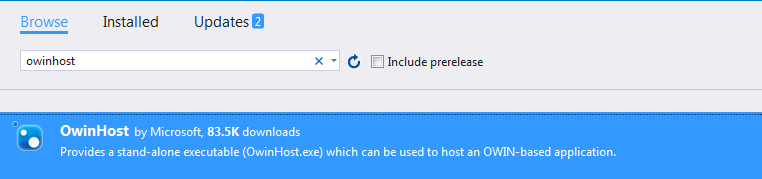
导航到你的应用程序文件夹(包含了 web.config 的文件夹),然后运行 Owinhost.exe
..\packages\Owinhost<Version>\tools\Owinhost.exe

最后访问 http://localhost:5000/ ,就可以看到效果了。
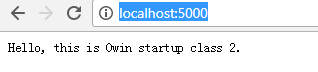
也可以通过指定 OwinHost.exe 后面的参数访问不同的 startup 类
..\packages\OwinHost.3.1.\tools\Owinhost.exe OwinDemo.Startup2.ConfigurationTwo

源代码链接:
链接: http://pan.baidu.com/s/1bOfTRC 密码: xfhk
参考链接:
https://docs.microsoft.com/zh-cn/aspnet/aspnet/overview/owin-and-katana/owin-startup-class-detection
【Owin 学习系列】2. Owin Startup 类解析的更多相关文章
- 【Owin 学习系列】1. 第一个 Owin 程序
IIS 中的 Owin 在 IIS 里面部署 Owin,既能得到 Owin 管道模型的灵活性和模块特性,也能很好地利用 IIS 成熟的配置,Owin 程序将会跑在 ASP.NET request 的管 ...
- Java并发包源码学习系列:ReentrantReadWriteLock读写锁解析
目录 ReadWriteLock读写锁概述 读写锁案例 ReentrantReadWriteLock架构总览 Sync重要字段及内部类表示 写锁的获取 void lock() boolean writ ...
- asp.net core 系列 2 启动Startup类介绍
一.Startup类 ASP.NET Core 应用是一个控制台应用,它在其 Program.Main 方法中创建 Web 服务器.其中Main方法是应用的托管入口点,Main 方法调用 WebHos ...
- Android学习系列(20)--App数据格式之解析Json
JSON数据格式,在Android中被广泛运用于客户端和网络(或者说服务器)通信,非常有必要系统的了解学习. 恰逢本人最近对json做了一个简单的学习,特此总结一下,以飨各位. 为了文 ...
- 【SpringCloud微服务实战学习系列】创建应用及解析
一.创建应用 使用官方Spring Initializr工具生成基础项目(http://start.spring.io/) 导入Intellij idea中 目录结构如下: 二.目录结构说明: src ...
- 【Spring源码深度解析学习系列】复杂标签属性解析(四)
一.创建用于属性承载的BeanDefinition BeanDefiniton是一个接口,在Spring中存在三种实现:RootBeanDefinition.ChildBeanDefinition.G ...
- CobaltStrike逆向学习系列(3):Beacon C2Profile 解析
这是[信安成长计划]的第 3 篇文章 关注微信公众号[信安成长计划] 0x00 目录 0x01 Controller 端分析 0x02 Beacon 端分析 0x03 展示图 在上一篇文章中完成了 S ...
- Caffe学习系列(10):命令行解析
训练网络命令: sudo sh ./build/tools/caffe train --solver=examples/mnist/train_lenet.sh 用预先训练好的权重来fine-tuni ...
- Java并发包源码学习系列:挂起与唤醒线程LockSupport工具类
目录 LockSupport概述 park与unpark相关方法 中断演示 blocker的作用 测试无blocker 测试带blocker JDK提供的demo 总结 参考阅读 系列传送门: Jav ...
随机推荐
- 通过JSP+servlet实现文件上传功能
在TCP/IP中,最早出现的文件上传机制是FTP.它将文件由客户端到服务器的标准机制. 但是在JSP中不能使用FTP来上传文件,这是有JSP的运行机制所决定的. 通过为表单元素设置Method=&qu ...
- React+Redux开发实战项目【美团App】,没你想的那么难
README.md 前言 开始学习React的时候,在网上找了一些文章,读了官网的一些文档,后来觉得React上手还是蛮简单的, 然后就在网上找了一个React实战的练手项目,个人学完之后觉得这个项目 ...
- css__金属质感的文字
金属质感的文字 网上看到的优秀思想!神奇的css~~~~ css div.a { width: 300px; text-align: center; color: white; background: ...
- flask 扩展之 -- flask-login
一. 使用 Werkzeug 实现密码散列. generate_password_hash(password, method=pbkdf2:sha1, salt_length=8) 将原始密码作为输入 ...
- redhat 6.8 配置centos6的yum源
1. 检查是否安装yum包[root@node1 rpms]# rpm -qa|grep yum 2. 删除自带的yum包[root@node1 rpms]# rpm -qa|grep yum|xar ...
- javascript封装的函数
/*获取一个指定长度随机数*/ csdn.random = function (len) { if (!len) len = 5; var r = Math.random().toString(); ...
- Canvas画布实现自定义时钟效果
<!doctype html> <html> <head> <meta charset="utf-8"> <title> ...
- CSS样式之连接方式
前言:上一篇博客是HTML基本结构和标签,是笔者学习HTML的笔记,本篇博客开始记录CSS,废话不多说,直接进入主题. 首先,我们要知道CSS是什么.简单地说,CSS层叠样式表是用来表现HTML或XM ...
- Selective Search for Object Recognition 论文笔记【图片目标分割】
这篇笔记,仅仅是对选择性算法介绍一下原理性知识,不对公式进行推倒. 前言: 这篇论文介绍的是,如果快速的找到的可能是物体目标的区域,不像使用传统的滑动窗口来暴力进行区域识别.这里是使用算法从多个维度对 ...
- Vijos 1004 伊甸园日历游戏 博弈
描述 Adam和Eve玩一个游戏,他们先从1900.1.1到2001.11.4这个日期之间随意抽取一个日期出来.然后他们轮流对这个日期进行操作: 1 : 把日期的天数加1,例如1900.1.1变到19 ...