
Quartz.Net 使用
Quartz.NET 是一套很好的任务调度框架。
下面介绍如何使用:
在项目Nuget包管理器中搜索:quartz

安装后会添加如下dll:
<packages>
  <package id="Common.Logging" version="3.0.0" targetFramework="net452" />
  <package id="Common.Logging.Core" version="3.0.0" targetFramework="net452" />
  <package id="Quartz" version="2.3.3" targetFramework="net452" />
</packages>
简单场景
先定义一个Job,需要实现IJob接口:
public class HelloJob : IJob
    {
        public void Execute(IJobExecutionContext context)
        {
            Console.WriteLine("Hello " + DateTime.Now.ToString());
        }
    }
启动Job:
static void Main(string[] args)
        {
            ISchedulerFactory schedFact = new StdSchedulerFactory();
            IScheduler sched = schedFact.GetScheduler();
            sched.Start();
            IJobDetail job = JobBuilder.Create<HelloJob>()
                .WithIdentity("myJob", "group1")
                .Build();
            ITrigger trigger = TriggerBuilder.Create()
              .WithIdentity("myTrigger", "group1")
              .StartNow()
              .WithSimpleSchedule(x => x
                  .WithIntervalInSeconds()
                  .RepeatForever())
              .Build();
            sched.ScheduleJob(job, trigger);
        }

这里有几个概念:
- IScheduler - the main API for interacting with the scheduler.
- IJob - an interface to be implemented by components that you wish to have executed by the scheduler.
- IJobDetail - used to define instances of Jobs.
- ITrigger - a component that defines the schedule upon which a given Job will be executed.
- JobBuilder - used to define/build JobDetail instances, which define instances of Jobs.
- TriggerBuilder - used to define/build Trigger instances.
TriggerBuilder的触发类型有以下四种:
- WithCalendarIntervalSchedule
- WithCronSchedule
- WithDailyTimeIntervalSchedule
- WithSimpleSchedule
每个Job和Trigger都有自己的身份标识Identity。
使用JobDataMap
static void Main(string[] args)
        {
            ISchedulerFactory schedFact = new StdSchedulerFactory();
            IScheduler sched = schedFact.GetScheduler();
            sched.Start();

            IJobDetail job = JobBuilder.Create<DumbJob>()
    .WithIdentity("myJob", "group1")
    .UsingJobData("jobSays", "Hello World!")
    .UsingJobData("myFloatValue", 3.141f)
    .Build();
            ITrigger trigger = TriggerBuilder.Create()
              .WithIdentity("myTrigger", "group1")
              .StartNow()
              .WithSimpleSchedule(x => x
                  .WithIntervalInSeconds()
                  .RepeatForever())
              .Build();
            sched.ScheduleJob(job, trigger);
        }
public class DumbJob : IJob
    {
        public void Execute(IJobExecutionContext context)
        {
            JobKey key = context.JobDetail.Key;
            JobDataMap dataMap = context.JobDetail.JobDataMap;
            string jobSays = dataMap.GetString("jobSays");
            float myFloatValue = dataMap.GetFloat("myFloatValue");
            Console.Error.WriteLine("Instance " + key + " of DumbJob says: " + jobSays + ", and val is: " + myFloatValue);
        }
    }

可以看到,通过JobDataMap可以给Job传递参数。
JobDataMap也可以从上下文获取:
JobKey key = context.JobDetail.Key;
            //JobDataMap dataMap = context.JobDetail.JobDataMap;
            JobDataMap dataMap = context.MergedJobDataMap;
还可以设置为属性注入:
public class DumbJob : IJob
    {
        public string JobSays { private get; set; }
        public float MyFloatValue { private get; set; }

        public void Execute(IJobExecutionContext context)
        {
            JobKey key = context.JobDetail.Key;
            JobDataMap dataMap = context.MergedJobDataMap;
            Console.Error.WriteLine("Instance " + key + " of DumbJob says: " + JobSays + ", and val is: " + MyFloatValue);
        }
    }
并发限制
修改HelloJob如下:
public class HelloJob : IJob
    {
        public void Execute(IJobExecutionContext context)
        {
            Console.WriteLine("Hello " + DateTime.Now.ToString());
            Thread.Sleep( * );
        }
    }

可以看到仍然是每3秒跑一次,说明有多个实例在运行。
加上并发限制:
[DisallowConcurrentExecution]
    public class HelloJob : IJob
    {
        public void Execute(IJobExecutionContext context)
        {
            Console.WriteLine("Hello " + DateTime.Now.ToString());
            Thread.Sleep( * );
        }
    }

可以看到是每隔5秒才运行。
关于Job还有几个概念:
- Durability - if a job is non-durable, it is automatically deleted from the scheduler once there are no longer any active triggers associated with it. In other words, non-durable jobs have a life span bounded by the existence of its triggers.
- RequestsRecovery - if a job "requests recovery", and it is executing during the time of a 'hard shutdown' of the scheduler (i.e. the process it is running within crashes, or the machine is shut off), then it is re-executed when the scheduler is started again. In this case, the JobExecutionContext.Recovering property will return true.
- PersistJobDataAfterExecution is an attribute that can be added to the Job class that tells Quartz to update the stored copy of the JobDetail's JobDataMap after the Execute() method completes successfully (without throwing an exception), such that the next execution of the same job (JobDetail) receives the updated values rather than the originally stored values.
Trigger 相关:
Priority
Misfire
Calendars
SimpleTrigger:
Build a trigger for a specific moment in time, with no repeats:
// trigger builder creates simple trigger by default, actually an ITrigger is returned
ISimpleTrigger trigger = (ISimpleTrigger) TriggerBuilder.Create()
    .WithIdentity("trigger1", "group1")
    .StartAt(myStartTime) // some Date
    .ForJob("job1", "group1") // identify job with name, group strings
    .Build();
Build a trigger for a specific moment in time, then repeating every ten seconds ten times:
trigger = TriggerBuilder.Create()
    .WithIdentity("trigger3", "group1")
    .StartAt(myTimeToStartFiring) // if a start time is not given (if this line were omitted), "now" is implied
    .WithSimpleSchedule(x => x
        .WithIntervalInSeconds(10)
        .WithRepeatCount(10)) // note that 10 repeats will give a total of 11 firings
    .ForJob(myJob) // identify job with handle to its JobDetail itself
    .Build();
Build a trigger that will fire once, five minutes in the future:
trigger = (ISimpleTrigger) TriggerBuilder.Create()
    .WithIdentity("trigger5", "group1")
    .StartAt(DateBuilder.FutureDate(5, IntervalUnit.Minute)) // use DateBuilder to create a date in the future
    .ForJob(myJobKey) // identify job with its JobKey
    .Build();
Build a trigger that will fire now, then repeat every five minutes, until the hour 22:00:
trigger = TriggerBuilder.Create()
    .WithIdentity("trigger7", "group1")
    .WithSimpleSchedule(x => x
        .WithIntervalInMinutes(5)
        .RepeatForever())
    .EndAt(DateBuilder.DateOf(22, 0, 0))
    .Build();
Build a trigger that will fire at the top of the next hour, then repeat every 2 hours, forever:
trigger = TriggerBuilder.Create()
    .WithIdentity("trigger8") // because group is not specified, "trigger8" will be in the default group
    .StartAt(DateBuilder.EvenHourDate(null)) // get the next even-hour (minutes and seconds zero ("00:00"))
    .WithSimpleSchedule(x => x
        .WithIntervalInHours(2)
        .RepeatForever())
    // note that in this example, 'forJob(..)' is not called
    //  - which is valid if the trigger is passed to the scheduler along with the job
    .Build();

scheduler.scheduleJob(trigger, job);
CronTrigger
http://www.quartz-scheduler.net/documentation/quartz-2.x/tutorial/crontrigger.html
Expressions:
- 1. Seconds
- 2. Minutes
- 3. Hours
- 4. Day-of-Month
- 5. Month
- 6. Day-of-Week
- 7. Year (optional field)
"0 0 12 ? * WED" - which means "every Wednesday at 12:00 pm".
可以把上面的“WED"替换成: "MON-FRI", "MON, WED, FRI", or even "MON-WED,SAT".
上面表达式的“*”表示“每月”
如果Minutes的数值是 '0/15' ,表示从0开始每15分钟执行
如果Minutes的数值是 '3/20' ,表示从3开始每20分钟执行,也就是‘3/23/43’
‘?’只能用在day-of-month 和 day-of-week,表示没有特定的值
'L' 只能用在 day-of-month 和 day-of-week fields. 如 "L" 在 day-of-month 表示 "当月最后一天" . 单独用在 day-of-week 表示 "7" or "SAT". "6L" or "FRIL" 表示"当月最后一个星期五".
'W' :"15W" 在 day-of-month 表示: "离15号最近的周一到周五".
'#' :"6#3" 或 "FRI#3" 在 day-of-week 表示 "当月第三个星期五".
Seconds范围:0-59
Minutes范围:0-59
Hours范围:0-23
Day-of-Month范围:0-31(需要注意月份没有31天的)
Month范围:0-11 或者使用JAN, FEB, MAR, APR, MAY, JUN, JUL, AUG, SEP, OCT, NOV and DEC.
Day-of-Week范围:1-7 (1 = Sunday) 或SUN, MON, TUE, WED, THU, FRI and SAT.
CronTrigger Example 1 - 每5分钟执行
"0 0/5 * * * ?"
CronTrigger Example 2 -每5分钟的第10秒执行
"10 0/5 * * * ?"
CronTrigger Example 3 - 每个星期三和星期五的10:30, 11:30, 12:30, 13:30执行
"0 30 10-13 ? * WED,FRI"
CronTrigger Example 4 - 每月第5天和第20天从8点到9点每30分钟执行. 注意 10:00 不会执行, 只有 8:00, 8:30, 9:00 ,9:30
"0 0/30 8-9 5,20 * ?"Build a trigger that will fire every other minute, between 8am and 5pm, every day:
trigger = TriggerBuilder.Create()
    .WithIdentity("trigger3", "group1")
    .WithCronSchedule("0 0/2 8-17 * * ?")
    .ForJob("myJob", "group1")
    .Build();
Build a trigger that will fire daily at 10:42 am:
// we use CronScheduleBuilder's static helper methods here
trigger = TriggerBuilder.Create()
    .WithIdentity("trigger3", "group1")
    .WithSchedule(CronScheduleBuilder.DailyAtHourAndMinute(10, 42))
    .ForJob(myJobKey)
    .Build();
or -
trigger = TriggerBuilder.Create()
    .WithIdentity("trigger3", "group1")
    .WithCronSchedule("0 42 10 * * ?")
    .ForJob("myJob", "group1")
    .Build();
Build a trigger that will fire on Wednesdays at 10:42 am, in a TimeZone other than the system's default:
trigger = TriggerBuilder.Create()
    .WithIdentity("trigger3", "group1")
    .WithSchedule(CronScheduleBuilder
        .WeeklyOnDayAndHourAndMinute(DayOfWeek.Wednesday, 10, 42)
        .InTimeZone(TimeZoneInfo.FindSystemTimeZoneById("Central America Standard Time")))
    .ForJob(myJobKey)
    .Build();
or -
trigger = TriggerBuilder.Create()
    .WithIdentity("trigger3", "group1")
    .WithCronSchedule("0 42 10 ? * WED", x => x
        .InTimeZone(TimeZoneInfo.FindSystemTimeZoneById("Central America Standard Time")))
    .ForJob(myJobKey)
    .Build();
TriggerListeners and JobListeners
Adding a JobListener that is interested in a particular job:
scheduler.ListenerManager.AddJobListener(myJobListener, KeyMatcher<JobKey>.KeyEquals(new JobKey("myJobName", "myJobGroup")));
Adding a JobListener that is interested in all jobs of a particular group:
scheduler.ListenerManager.AddJobListener(myJobListener, GroupMatcher<JobKey>.GroupEquals("myJobGroup"));
Adding a JobListener that is interested in all jobs of two particular groups:
scheduler.ListenerManager.AddJobListener(myJobListener,
    OrMatcher<JobKey>.Or(GroupMatcher<JobKey>.GroupEquals("myJobGroup"), GroupMatcher<JobKey>.GroupEquals("yourGroup")));
Adding a JobListener that is interested in all jobs:
scheduler.ListenerManager.AddJobListener(myJobListener, GroupMatcher<JobKey>.AnyGroup());SchedulerListeners
Adding a SchedulerListener:
scheduler.ListenerManager.AddSchedulerListener(mySchedListener);
Removing a SchedulerListener:
scheduler.ListenerManager.RemoveSchedulerListener(mySchedListener);
JobStores
Quartz 默认是存在内存的,也就是如下配置:
quartz.jobStore.type = Quartz.Simpl.RAMJobStore, Quartz
还可以存在数据库中,可以从https://github.com/quartznet/quartznet database目录中找到建库脚本
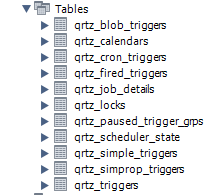
可以看到创建了11张表,都是以qrtz_ 开头的,这个可以在配置里更改
quartz.jobStore.tablePrefix = QRTZ_
配置使用数据库:
quartz.jobStore.type = Quartz.Impl.AdoJobStore.JobStoreTX, Quartz
配置数据库代理:
quartz.jobStore.driverDelegateType = Quartz.Impl.AdoJobStore.StdAdoDelegate, Quartz
这里类型有:
MySQLDelegate
SqlServerDelegate
OracleDelegate
SQLiteDelegate
配置使用哪个数据库:
quartz.jobStore.dataSource = myDS
配置连接属性:
 quartz.dataSource.myDS.connectionString = Server=localhost;Database=quartz;Uid=quartznet;Pwd=quartznet
 quartz.dataSource.myDS.provider = MySql-
配置所有的JobDataMap 都是string类型:
quartz.jobStore.useProperties = true
配置集群:
quartz.jobStore.clustered=true
配置线程池:
quartz.threadPool.type = Quartz.Simpl.SimpleThreadPool, Quartz
quartz.threadPool.threadCount =
quartz.threadPool.threadPriority = Normal
配置读取配置:
quartz.plugin.jobInitializer.type=Quartz.Plugin.Xml.XMLSchedulingDataProcessorPlugin
quartz.plugin.jobInitializer.fileNames=~/quartz_jobs.xml
quartz.plugin.jobInitializer.failOnFileNotFound=true
配置实例名:
quartz.scheduler.instanceName = QuartzTest
如果不配置的话默认是QuartzScheduler,如下图所示:
只保留简单的HelloJob,运行,查看数据库,可以看到这几张表里有数据:
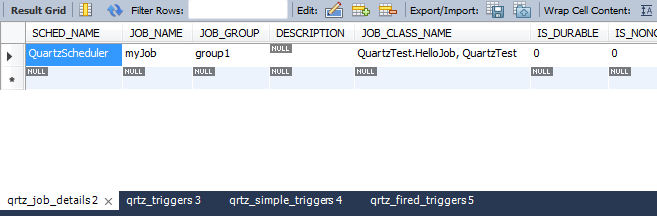
更改重复次数为10次,先运行3次:
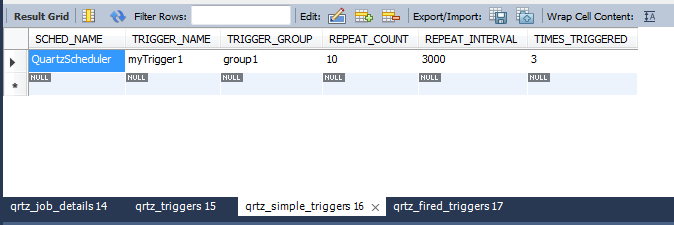
可以看到最后字段是3次,重新运行程序:
ISchedulerFactory schedFact = new StdSchedulerFactory();
            IScheduler sched = schedFact.GetScheduler();
            sched.Start();
注意这里不要再加任务了。

可以看到剩余次数Repeat_Count是7次了,当这7次运行完后这几个表就清空了。
使用配置文件配置任务
在项目根目录下创建quartz_jobs.xml并设置始终复制
<?xml version="1.0" encoding="utf-8" ?>
<job-scheduling-data xmlns="http://quartznet.sourceforge.net/JobSchedulingData"
        xmlns:xsi="http://www.w3.org/2001/XMLSchema-instance"
                 version="2.0">

  <processing-directives>
    <overwrite-existing-data>false</overwrite-existing-data>
  </processing-directives>

  <schedule>

    <job>
      <name>HelloJob</name>
      <group>jobGroup1</group>
      <description>jobDesciption1</description>
      <job-type>Jobs.SimpleJob, Jobs</job-type>
      <durable>true</durable>
      <recover>true</recover>
    </job>

    <trigger>
      <simple>
        <name>simpleName</name>
        <group>simpleGroup</group>
        <description>SimpleTriggerDescription</description>
        <job-name>HelloJob</job-name>
        <job-group>jobGroup1</job-group>
        <start-time>--01T17::.0Z</start-time>
        <end-time>--04T18::.0Z</end-time>
        <misfire-instruction>SmartPolicy</misfire-instruction>
        <repeat-count></repeat-count>
        <repeat-interval></repeat-interval>
      </simple>
    </trigger>

    <job>
      <name>TestJob</name>
      <group>Test</group>
      <description>TestJob测试</description>
      <job-type>Jobs.TestJob,Jobs</job-type>
      <durable>true</durable>
      <recover>false</recover>
    </job>
    <trigger>
      <cron>
        <name>TestJobTrigger</name>
        <group>Test</group>
        <job-name>TestJob</job-name>
        <job-group>Test</job-group>
        <start-time>--04T00::+:</start-time>
        <cron-expression>/ * * * * ?</cron-expression>
      </cron>
    </trigger>

  </schedule>

</job-scheduling-data>
运行程序,发现数据库里有了记录,可是却没有运行任务。关了再次运行才开始跑任务,而如果这里的配置是true的话,再次运行也只是写库,不运行任务:
<processing-directives>
    <overwrite-existing-data>true</overwrite-existing-data>
  </processing-directives>
这里关键就在<start-time>节点,把两个时间节点注释后可以正常运行:
<?xml version="1.0" encoding="utf-8" ?>
<job-scheduling-data xmlns="http://quartznet.sourceforge.net/JobSchedulingData"
        xmlns:xsi="http://www.w3.org/2001/XMLSchema-instance"
                 version="2.0">

  <processing-directives>
    <overwrite-existing-data>true</overwrite-existing-data>
  </processing-directives>

  <schedule>

    <job>
      <name>HelloJob</name>
      <group>jobGroup1</group>
      <description>jobDesciption1</description>
      <job-type>Jobs.SimpleJob, Jobs</job-type>
      <durable>true</durable>
      <recover>true</recover>
    </job>

    <trigger>
      <simple>
        <name>simpleName</name>
        <group>simpleGroup</group>
        <description>SimpleTriggerDescription</description>
        <job-name>HelloJob</job-name>
        <job-group>jobGroup1</job-group>
        <!--<start-time>--01T17::.0Z</start-time>
        <end-time>--04T18::.0Z</end-time>-->
        <misfire-instruction>SmartPolicy</misfire-instruction>
        <repeat-count></repeat-count>
        <repeat-interval></repeat-interval>
      </simple>
    </trigger>

    <job>
      <name>TestJob</name>
      <group>Test</group>
      <description>TestJob测试</description>
      <job-type>Jobs.TestJob,Jobs</job-type>
      <durable>true</durable>
      <recover>false</recover>
    </job>
    <trigger>
      <cron>
        <name>TestJobTrigger</name>
        <group>Test</group>
        <job-name>TestJob</job-name>
        <job-group>Test</job-group>
        <!--<start-time>--04T00::+:</start-time>-->
        <cron-expression>/ * * * * ?</cron-expression>
      </cron>
    </trigger>

  </schedule>

</job-scheduling-data>
下面是其他园友总结的:
Quartz.NET 入门
Quartz.NET 2.0 学习笔记(3) :通过配置文件实现任务调度
job 任务,这个节点是用来定义每个具体的任务的,多个任务请创建多个job节点即可
- name(必填) 任务名称,同一个group中多个job的name不能相同,若未设置group则所有未设置group的job为同一个分组,如:<name>sampleJob</name>
- group(选填) 任务所属分组,用于标识任务所属分组,如:<group>sampleGroup</group>
- description(选填) 任务描述,用于描述任务具体内容,如:<description>Sample job for Quartz Server</description>
- job-type(必填) 任务类型,任务的具体类型及所属程序集,格式:实现了IJob接口的包含完整命名空间的类名,程序集名称,如:<job-type>Quartz.Server.SampleJob, Quartz.Server</job-type>
- durable(选填) 具体作用不知,官方示例中默认为true,如:<durable>true</durable>
- recover(选填) 具体作用不知,官方示例中默认为false,如:<recover>false</recover>
trigger 任务触发器,用于定义使用何种方式出发任务(job),同一个job可以定义多个trigger ,多个trigger 各自独立的执行调度,每个trigger 中必须且只能定义一种触发器类型(calendar-interval、simple、cron)
calendar-interval 一种触发器类型,使用较少,此处略过
simple 简单任务的触发器,可以调度用于重复执行的任务
- name(必填) 触发器名称,同一个分组中的名称必须不同
- group(选填) 触发器组
- description(选填) 触发器描述
- job-name(必填) 要调度的任务名称,该job-name必须和对应job节点中的name完全相同
- job-group(选填) 调度任务(job)所属分组,该值必须和job中的group完全相同
- start-time(选填) 任务开始执行时间utc时间,北京时间需要+08:00,如:<start-time>2012-04-01T08:00:00+08:00</start-time>表示北京时间2012年4月1日上午8:00开始执行,注意服务启动或重启时都会检测此属性,若没有设置此属性或者start-time设置的时间比当前时间较早,则服务启动后会立即执行一次调度,若设置的时间比当前时间晚,服务会等到设置时间相同后才会第一次执行任务,一般若无特殊需要请不要设置此属性
- repeat-count(必填) 任务执行次数,如:<repeat-count>-1</repeat-count>表示无限次执行,<repeat-count>10</repeat-count>表示执行10次
- repeat-interval(必填) 任务触发间隔(毫秒),如:<repeat-interval>10000</repeat-interval> 每10秒执行一次
cron复杂任务触发器--使用cron表达式定制任务调度(强烈推荐)
- name(必填) 触发器名称,同一个分组中的名称必须不同
- group(选填) 触发器组
- description(选填) 触发器描述
- job-name(必填) 要调度的任务名称,该job-name必须和对应job节点中的name完全相同
- job-group(选填) 调度任务(job)所属分组,该值必须和job中的group完全相同
- start-time(选填) 任务开始执行时间utc时间,北京时间需要+08:00,如:<start-time>2012-04-01T08:00:00+08:00</start-time>表示北京时间2012年4月1日上午8:00开始执行,注意服务启动或重启时都会检测此属性,若没有设置此属性,服务会根据cron-expression的设置执行任务调度;若start-time设置的时间比当前时间较早,则服务启动后会忽略掉cron-expression设置,立即执行一次调度,之后再根据cron-expression执行任务调度;若设置的时间比当前时间晚,则服务会在到达设置时间相同后才会应用cron-expression,根据规则执行任务调度,一般若无特殊需要请不要设置此属性
- cron-expression(必填) cron表达式,如:<cron-expression>0/10 * * * * ?</cron-expression>每10秒执行一次
TriggerListeners and JobListeners
可以使用监听器来监视任务和触发器的执行状态:
public class MyJobListener : IJobListener
    {
        public string Name
        {
            get
            {
                return "myJobListener";
            }
        }

        public void JobExecutionVetoed(IJobExecutionContext context)
        {

        }

        public void JobToBeExecuted(IJobExecutionContext context)
        {
            Console.WriteLine("Job{0}开始执行。", context.JobDetail.Key);
        }

        public void JobWasExecuted(IJobExecutionContext context, JobExecutionException jobException)
        {
            if(jobException==null)
            {
                Console.WriteLine("Job{0}执行完成。", context.JobDetail.Key);
            }
            else
            {
                Console.WriteLine("Job{0}执行失败:{1}", context.JobDetail.Key, jobException.Message);
            }
        }
    }
IScheduler sched = StdSchedulerFactory.GetDefaultScheduler();
                MyJobListener myJobListener = new MyJobListener();
                sched.ListenerManager.AddJobListener(myJobListener, GroupMatcher<JobKey>.GroupEquals("Test"));
                sched.Start();

The ITriggerListener Interface
public interface ITriggerListener
{
     string Name { get; }

     void TriggerFired(ITrigger trigger, IJobExecutionContext context);

     bool VetoJobExecution(ITrigger trigger, IJobExecutionContext context);

     void TriggerMisfired(ITrigger trigger);

     void TriggerComplete(ITrigger trigger, IJobExecutionContext context, int triggerInstructionCode);
}
Job-related events include: a notification that the job is about to be executed, and a notification when the job has completed execution.
The IJobListener Interface
public interface IJobListener
{
    string Name { get; }

    void JobToBeExecuted(IJobExecutionContext context);

    void JobExecutionVetoed(IJobExecutionContext context);

    void JobWasExecuted(IJobExecutionContext context, JobExecutionException jobException);
}
Adding a JobListener that is interested in a particular job:
scheduler.ListenerManager.AddJobListener(myJobListener, KeyMatcher<JobKey>.KeyEquals(new JobKey("myJobName", "myJobGroup")));
Adding a JobListener that is interested in all jobs of a particular group:
scheduler.ListenerManager.AddJobListener(myJobListener, GroupMatcher<JobKey>.GroupEquals("myJobGroup"));
Adding a JobListener that is interested in all jobs of two particular groups:
scheduler.ListenerManager.AddJobListener(myJobListener,
    OrMatcher<JobKey>.Or(GroupMatcher<JobKey>.GroupEquals("myJobGroup"), GroupMatcher<JobKey>.GroupEquals("yourGroup")));
Adding a JobListener that is interested in all jobs:
scheduler.ListenerManager.AddJobListener(myJobListener, GroupMatcher<JobKey>.AnyGroup());
Quartz.Net 使用的更多相关文章
- 免费开源的DotNet任务调度组件Quartz.NET(.NET组件介绍之五)
很多的软件项目中都会使用到定时任务.定时轮询数据库同步,定时邮件通知等功能..NET Framework具有“内置”定时器功能,通过System.Timers.Timer类.在使用Timer类需要面对 ...
- Quartz
Quartz是一个开源的作业调度框架,它完全由Java写成,并设计用于J2SE和J2EE应用中.它提供了巨大的灵 活性而不牺牲简单性.你能够用它来为执行一个作业而创建简单的或复杂的调度. eg: ja ...
- Spring Quartz实现任务调度
任务调度 在企业级应用中,经常会制定一些"计划任务",即在某个时间点做某件事情 核心是以时间为关注点,即在一个特定的时间点,系统执行指定的一个操作 任务调度涉及多线程并发.线程池维 ...
- topshelf和quartz内部分享
阅读目录: 介绍 基础用法 调试及安装 可选配置 多实例支持及相关资料 quartz.net 上月在公司内部的一次分享,现把PPT及部分交流内容整理成博客. 介绍 topshelf是创建windows ...
- Quartz.net持久化与集群部署开发详解
序言 我前边有几篇文章有介绍过quartz的基本使用语法与类库.但是他的执行计划都是被写在本地的xml文件中.无法做集群部署,我让它看起来脆弱不堪,那是我的罪过. 但是quart.net是经过许多大项 ...
- Quartz.net开源作业调度框架使用详解
前言 quartz.net作业调度框架是伟大组织OpenSymphony开发的quartz scheduler项目的.net延伸移植版本.支持 cron-like表达式,集群,数据库.功能性能强大更不 ...
- quartz.net 时间表达式----- Cron表达式详解
序言 Cron表达式:就是用简单的xxoo符号按照一定的规则,就能把各种时间维度表达的淋漓尽致,无所不在其中,然后在用来做任务调度(定时服务)的quart.net中所认知执行,可想而知这是多么的天衣无 ...
- Quartz.NET Windows 服务示例
想必大家在项目中处理简单的后台持续任务或者定时触发任务的时候均使用 Thread 或者 Task 来完成,但是项目中的这种需求一旦多了的话就得将任务调度引入进来了,那今天就简单的介绍一下 Quartz ...
- [Quartz笔记]玩转定时调度
简介 Quartz是什么? Quartz是一个特性丰富的.开源的作业调度框架.它可以集成到任何Java应用. 使用它,你可以非常轻松的实现定时任务的调度执行. Quartz的应用场景 场景1:提醒和告 ...
- 关于Quartz.NET作业调度框架的一点小小的封装,实现伪AOP写LOG功能
Quartz.NET是一个非常强大的作业调度框架,适用于各种定时执行的业务处理等,类似于WINDOWS自带的任务计划程序,其中运用Cron表达式来实现各种定时触发条件是我认为最为惊喜的地方. Quar ...
随机推荐
- Akka(38): Http:Entityof ByteString-数据传输基础
我们说过Akka-http是一个好的系统集成工具,集成是通过数据交换方式实现的.Http是个在网上传输和接收的规范协议.所以,在使用Akka-http之前,可能我们还是需要把Http模式的网上数据交换 ...
- C语言之计算log2
#include<stdio.h>int main(){int num,count=0,i=0,ret=0;scanf("%d",&num);count=num ...
- Struts1.2,struts2.0原理分析
struts1原理: 1.首先我们表单提交到action 2.进入到web.xml 3.web.xml拦截*.do 4.交给ActionServlet 5.找到path属性,获得url 6.找到nam ...
- 最强离线安装MySQL_8.0.2方法
最强离线安装MySQL_8.0.2方法,一次就能安装成功. 按照此方式,离线安装MySQL五分钟都花不到,节省了大量的宝贵时间. 前戏,假设你已经从MySQL官网中获取了下面这个压缩包: 解压之后变成 ...
- Struts2超链接
Structs2中的<s:url>标签可以生成一个URL 地址,而且可以内嵌<s:param>标签,为URL指定请求参数. 具体属性有: action:可选属性,指定生成的 U ...
- 用lua+redis实现一个简单的计数器功能 (一)
首先安装环境 依赖环境有 luajit http://luajit.org ngx_devel_kit https://github.com/simpl/ngx_devel_kit echo-ngin ...
- C# 使用Task实现任务超时,多任务一起执行
简介:充分使用Task的异步功能代码实现:1.实现了任务超时 退出任务 2.多个任务一起执行 /// <summary> ///做事 需要 ms秒 才能完成 / ...
- 初识分布式计算:从MapReduce到Yarn&Fuxi
这些年,云计算.大数据的发展如火如荼,从早期的以MapReduce为代表的基于文件系统的离线数据计算,到以Spark为代表的内存计算,以及以Storm为代表的实时计算,还有图计算等等.只要数据规模 ...
- CCF-201412-2-Z字形扫描
问题描述 试题编号: 201412-2 试题名称: Z字形扫描 时间限制: 2.0s 内存限制: 256.0MB 问题描述: 问题描述 在图像编码的算法中,需要将一个给定的方形矩阵进行Z字形扫描(Zi ...
- django同时查询两张表的数据,合并检索对象返回
原始需求: 1.一篇文章内容分N个版块,每篇文章的版块数量不同. 2.有个文章搜索功能,需要同时搜索标题和内容. 实现思路: 1.由于每篇文章的内容版块数量不同,因此将每个文章的标题和内容分开存入2张 ...