
安卓Service完全解析(中)
摘要: 版权声明:本文出自汪磊的博客,转载请务必注明出处。
在上一篇中我们学习了Android Service相关的许多基础但是重要的内容,基本涵盖大部分平日里的开发工作。今天我们继续学习一下稍微高级一点的用法,即:远程Service用法,使用远程Service可以实现安卓跨进程通信的功能。下面我们就开始学习一下吧。
什么是远程Service?
所谓的远程Service就是与调用者不在同一进程的Service即可叫做远程Service。那是不是也有近程Service?其实不叫近程Service,专业叫法叫做本地Service,就是调用者与Service在同一进程。
调用远程Service的桥梁-AIDL接口定义语言
由于远程服务与调用者不在同一进程,我们不能再像调用本地服务一样的方式去调用远程服务,
那么如何才能让Activity与一个远程Service建立关联呢?这就要使用AIDL来进行跨进程通信了(IPC)。
AIDL(Android Interface Definition Language)是Android接口定义语言的意思,它可以用于让某个Service与多个应用程序组件之间进行跨进程通信,从而可以实现多个应用程序共享同一个Service的功能。(本篇着重讲解与远程服务通信的过程,不涉及AIDL接口定义语言的细节讲解)
废话少说,下面我们通过一个简单的Demo来讲解一下与远程Service通信的过程。
首先我们新建一个远程服务Demo的工程,新建RemoteService.aidl文件,代码如下:
 package com.wl.remoteservice;

 interface RemoteService{

     int call(int a,int b);

 }
我们点击完保存之后,在gen目录下会生成一个与之对应的java文件,如下:
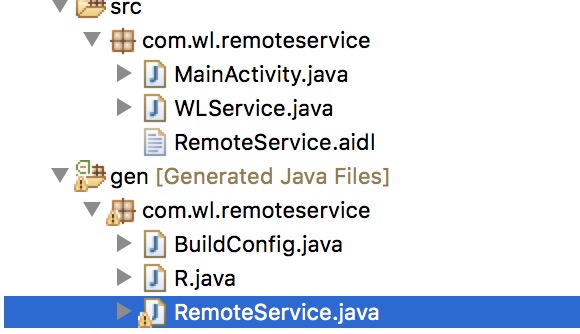
关于文件中内容我们暂时不细究,会在下篇的时候在研究一下。
然后编写Service类,新建WLService继承Service,如下:
 public class WLService extends Service {

     private static final String TAG = "HEART";

     @Override

     public IBinder onBind(Intent intent) {

         Log.i(TAG, "onBind");

         return new MyBinder();

     }

     private int methodInRemoteService(int a,int b){

         return a+b;

     }

     private class MyBinder extends RemoteService.Stub{

         @Override

         public int call(int a,int b) {

             return methodInRemoteService(a,b);

         }

     }

     @Override

     public void onCreate() {

         Log.i(TAG, "onCreate");

         super.onCreate();

     }

     @Override

     public boolean onUnbind(Intent intent) {

         Log.i(TAG, "onUnbind");

         return super.onUnbind(intent);

     }

     @Override

     public void onDestroy() {

         Log.i(TAG, "onDestroy");

         super.onDestroy();

     }

 }
这里我们定义了一个内部类MyBinder继承自RemoteService.Stub,那这个stub是什么玩意呢?点进去看一下,如下
public static abstract class Stub extends android.os.Binder implements com.wl.remoteservice.RemoteService
看定义我们就明白了,原来MyBinder就是Binder子类并且实现了RemoteService接口,所以在onBind的时候返回其实例也就容易理解了。
接下来,在清单文件注册Service。这里我们需要在另一个应用程序启动WLService,但是在另一个应用程序中去绑定Service的时候并没有WLService这个类,这时就必须使用到隐式Intent了。现在修改AndroidManifest.xml中的代码,给WLService加上一个action,如下所示:
         <service android:name="com.wl.remoteservice.WLService">

             <intent-filter >

                 <action android:name="com.wanglei.remoteservice"/>

             </intent-filter>

         </service>
然后我们新建一个项目用以调用上面项目中的远程服务,新项目就叫做:调用远程服务。
首先需要将RemoteService.aidl拷贝过来,记住需要连同原包路径一同拷贝过来,如下:

接下来,修改布局文件:
 <LinearLayout xmlns:android="http://schemas.android.com/apk/res/android"

     xmlns:tools="http://schemas.android.com/tools"

     android:layout_width="match_parent"

     android:layout_height="match_parent"

     android:orientation="vertical"

     tools:context=".MainActivity" >

     <Button

         android:layout_width="fill_parent"

         android:layout_height="wrap_content"

         android:onClick="bind"

         android:text="绑定服务" />

     <Button

         android:layout_width="fill_parent"

         android:layout_height="wrap_content"

         android:onClick="unbind"

         android:text="解除绑定服务" />

     <Button

         android:layout_width="fill_parent"

         android:layout_height="wrap_content"

         android:onClick="click"

         android:text="调用远程服务方法" />

 </LinearLayout>
然后编写MainActivity中代码,如下:
 public class MainActivity extends Activity {

     private static final String TAG = "HEART";

     private RemoteService mRemoteService;

     private MyConn conn;

     @Override

     protected void onCreate(Bundle savedInstanceState) {

         super.onCreate(savedInstanceState);

         setContentView(R.layout.activity_main);

     }

     public void bind(View view){

         Intent intent = new Intent();

         intent.setAction("com.wanglei.remoteservice");

         conn = new MyConn();

         bindService(intent, conn, BIND_AUTO_CREATE);//异步的操作

     }

     public void unbind(View view){

         unbindService(conn);

     }

     public void click(View view){

         if(null != mRemoteService){

             try {

                 int result = mRemoteService.call(10,20);

                 Log.i(TAG, "result = "+result);

             } catch (RemoteException e) {

                 e.printStackTrace();

             }

         }

     }

     private class MyConn implements ServiceConnection{

         @Override

         public void onServiceConnected(ComponentName name, IBinder service) {

             mRemoteService = RemoteService.Stub.asInterface(service);

         }

         @Override

         public void onServiceDisconnected(ComponentName name) {

         }

     }

 }
会发现和上篇讲的bind服务差别不大,这里我们需要在另一程序里面绑定服务所以需要用隐式意图开启。
这里我们需要注意一下,在安卓5.0出来以后,服务意图必须用显式调用,调用bind服务的时候会报如下警告

我们找一下源码,看看哪里报的这个警告,终于在 sdk/sources/android-21/android/app/ContextImpl.Java目录下找到报警告的代码:
     private void validateServiceIntent(Intent service) {

         if (service.getComponent() == null && service.getPackage() == null) {

             if (getApplicationInfo().targetSdkVersion >= Build.VERSION_CODES.LOLLIPOP) {

                 IllegalArgumentException ex = new IllegalArgumentException(

                         "Service Intent must be explicit: " + service);

                 throw ex;

             } else {

                 Log.w(TAG, "Implicit intents with startService are not safe: " + service

                         + " " + Debug.getCallers(2, 3));

             }

         }

     }
好了找到报错的原因了,那怎么解决呢?观察源码发现最外层if判断的时候有个service.getPackage() == null,我们只需要使其不为null不就可以了,这也是谷歌推荐的解决方法
我们将绑定服务的方法改为如下:
 public void bind(View view){

         Intent intent = new Intent();

         intent.setAction("com.wanglei.remoteservice");

         intent.setPackage("com.wl.remoteservice");//设置为Service所在包名

         conn = new MyConn();

         bindService(intent, conn, BIND_AUTO_CREATE);//异步的操作

 }
这样修改就好了,当然还有另外一种解决方法,将隐式意图变为显示意图,方法如下:
 public static Intent getExplicitIntent(Context context, Intent implicitIntent) {

         // Retrieve all services that can match the given intent

         PackageManager pm = context.getPackageManager();

         List<ResolveInfo> resolveInfo = pm.queryIntentServices(implicitIntent, 0);

         // Make sure only one match was found

         if (resolveInfo == null || resolveInfo.size() != 1) {

             return null;

         }

         // Get component info and create ComponentName

         ResolveInfo serviceInfo = resolveInfo.get(0);

         String packageName = serviceInfo.serviceInfo.packageName;

         String className = serviceInfo.serviceInfo.name;

         ComponentName component = new ComponentName(packageName, className);

         // Create a new intent. Use the old one for extras and such reuse

         Intent explicitIntent = new Intent(implicitIntent);

         // Set the component to be explicit

         explicitIntent.setComponent(component);

         return explicitIntent;

     }
好了,通过以上两种方式就可以解决了,到此我们两个项目都已经编写完毕,先运行远程服务demo项目,在运行调用远程服务项目,点击绑定远程服务按钮,然后点击调用远程服务按钮,打印如下:

到此为止,我们成功调用了远程服务中的方法,跨进程通信成功实现,不过有些刚接触的同学可能还有些混乱,怎么觉得那么混乱,比平时用的组建多那么多步骤,那我们总结一下调用远程服务的步骤:
1.编写aidl文件
2.创建远程服务类,在服务的内部创建一个内部类提供一个方法,可以间接调用服务的方法
3.实现服务的onbind方法,返回服务内部类实例
4.拷贝aidl文件到另一工程联同包名
5.在activity 绑定服务。bindService();
6.在服务成功绑定的时候 会执行一个方法 onServiceConnected 传递过来一个 IBinder对象进行类型转换
7.调用远程服务里面的方法。
好了,到这里关于服务的所有最重要的部分都已经讲解完了,通过(上)(中)两篇相信你对服务有了一个全面的认识。
安卓Service完全解析(中)的更多相关文章
- 安卓Service完全解析(上)
版权声明:本文出自汪磊的博客,转载请务必注明出处. 关于安卓Service相信很多安卓开发者都听说过,作为安卓四大组件之一,即使不经常用也应该听说过,但并不是每一个人都掌握的特别详细,全面.那么今天我 ...
- Android Service完全解析,关于服务你所需知道的一切(下)
转载请注册出处:http://blog.csdn.net/guolin_blog/article/details/9797169 在上一篇文章中,我们学习了Android Service相关的许多重要 ...
- Android Service完全解析,关于服务你所需知道的一切(上)
转载请注明出处:http://blog.csdn.net/guolin_blog/article/details/11952435 相信大多数朋友对Service这个名词都不会陌生,没错,一个老练的A ...
- 【转】Android Service完全解析,关于服务你所需知道的一切(下) ---- 不错
原文网址:http://blog.csdn.net/guolin_blog/article/details/9797169 转载请注册出处:http://blog.csdn.net/guolin_bl ...
- WebGIS实现在线要素编辑之ArcGIS Server 发布Feature Service 过程解析
WebGIS实现在线要素编辑之ArcGIS Server 发布Feature Service 过程解析 FeatureService也称要素服务,其最大的好处就是支持在线要素编辑,并将编辑同步更新到后 ...
- [转]Android Service完全解析,关于服务你所需知道的一切
目录(?)[+] Android Service完全解析,关于服务你所需知道的一切(上) 分类: Android疑难解析2013-10-31 08:10 6451人阅读 评论(39) 收藏 举报 ...
- (转) Android Service完全解析,关于服务你所需知道的一切(上)
相信大多数朋友对Service这个名词都不会陌生,没错,一个老练的Android程序员如果连Service都没听说过的话,那确实也太逊了.Service作为Android四大组件之一,在每一个应用程序 ...
- Android Service完全解析,关于服务你所需知道的一切(下) (转载)
转自:http://blog.csdn.net/guolin_blog/article/details/9797169 转载请注册出处:http://blog.csdn.net/guolin_blog ...
- Android Service完全解析,关于服务你所需知道的一切(上) (转载)
转自:http://blog.csdn.net/guolin_blog/article/details/11952435 转载请注明出处:http://blog.csdn.net/guolin_blo ...
随机推荐
- bootstrap轮播和百叶窗
轮播 在bootstrap里面,有设置的图片轮播的代码: <div id="carousel-example-generic" class="carousel sl ...
- 开源 .net license tool, EasyLicense !
介绍: 过去我常常像是否有一个帮助授权的软件,它可以非常简单的创建license,并且非常容易的验证license. 这是一个非常普通和公共的功能,但是我没有找到合适的开源软件,大部分开源软件都比较复 ...
- 【转】iOS 9 Storyboard 教程(一上)
转自:http://blog.csdn.net/yangmeng13930719363/article/details/49886547 Storyboard是在iOS5之后新增的一个令人兴奋的功能, ...
- 手机app微信支付后台处理流程
第一步:客户在手机app确认订单,提交订单后,app将订单详情传给后台,后台将订单存入数据库,将存入数据库的id返回给app. 第二步:这时候手机端app会让客户选择哪种付款方式,我们做的是微信,所以 ...
- MySQL(四)--练习题
 2.1 编写一条 SQL 语句,从 Product(商品)表中选取出“登记日期(regist_date)在 2009 年 4 月 28 日之后”的商品.查询结果要包含 product_name 和 ...
- CSS三种引入方式:内联、页级、外联
1.内联CSS 内联CSS也可称为行内CSS或者行级CSS,它直接在标签内部引入,显著的优点是十分的便捷.高效:但是同时也造成了不能够重用样式的缺点,如果代码行数到达一定长度不建议采用.通常内联CSS ...
- [图形学] Chp14 GLU曲面裁剪函数程序示例及样条表示遗留问题
样条表示这章已经看完,最后的GLU曲面裁剪函数,打算按书中的示例实现一下,其中遇到了几个问题. 先介绍一下GLU曲面裁剪函数的使用方法. 1 裁剪函数是成对出现的: gluBeginTrim和gluE ...
- Java Web - HTML 常用标签
1.HTML head, title, body 标签 其中 meta 中的keywords是为了快速的让搜索引擎找到 <html> <head> <title>这 ...
- 第三章:3.3 post 请求
1. 在 from表单中将 属性 methtod="post‘ 改变成post 2. 访问主页地址:http://localhost:8000/index 3. 以上出现的错误. 查资料发现 ...
- POWERSHELL将域中的计算机移动到指定OU
POWERSHELL处理域中计算机的过程 由于集团公司规模较大,存在几个分公司并处在不同地理位置.采用域集中管理,各分公司都有自己的域控制器,分别负责各分公司的DNS解析,DHCP地址分配,及客户端登 ...