
java使用poi自定义excel标题头并导出(springmvc+poi)
项目使用的是jeecg开源框架(springmvc+spring+hibernate+。。。。。。等)此代码仅供参考!如有更好的意见或建议可留言。
创建excel大致分这几步:
1、创建HSSFWorkbook对象(也就是excel文档对象)

2、通过HSSFWorkbook对象创建sheet对象(也就是excel中的sheet)

3、通过sheet对象创建HSSFROW对象(row行对象)
4、通过HSSFROW对象创建列cell并set值(列名)
 controller 层

     /**

      * excel自定义导出

      * @param hAqscTieupsummary

      * @param request

      * @param response

      * @param dataGrid

      * @param modelMap

      * @return

      */

     @SuppressWarnings("deprecation")

     @RequestMapping(params = "exportEXL")

     public String exportEXL(HAqscTieupsummaryEntity hAqscTieupsummary,

             HttpServletRequest request, HttpServletResponse response,

             DataGrid dataGrid, ModelMap modelMap) {

         try {

             String dateType = "yyyy";

             SimpleDateFormat df = new SimpleDateFormat(dateType);// 设置日期格式

             SimpleDateFormat df1 = new SimpleDateFormat("yyyy.MM.dd");// 设置日期格式

             // 创建HSSFWorkbook对象(excel的文档对象)

             HSSFWorkbook wb = new HSSFWorkbook();

             HSSFRow row = null;

             HSSFCell cell = null;

             // 建立新的sheet对象(excel的表单) 并设置sheet名字

             HSSFSheet sheet = wb.createSheet("占压管线台账信息");

             sheet.setDefaultRowHeightInPoints(30);// 设置缺省列高sheet.setDefaultColumnWidth(20);//设置缺省列宽

             //----------------标题样式---------------------

             HSSFCellStyle titleStyle = wb.createCellStyle();        //标题样式

             titleStyle.setAlignment(HSSFCellStyle.ALIGN_CENTER);

             titleStyle.setVerticalAlignment(HSSFCellStyle.VERTICAL_CENTER);

             Font ztFont = wb.createFont();

             ztFont.setItalic(false);                     // 设置字体为斜体字

             ztFont.setColor(Font.COLOR_NORMAL);            // 将字体设置为“红色”

             ztFont.setFontHeightInPoints((short)16);    // 将字体大小设置为18px

             ztFont.setFontName("宋体");             // 将“宋体”字体应用到当前单元格上

             ztFont.setBoldweight(HSSFFont.BOLDWEIGHT_BOLD);    //加粗

 //             ztFont.setUnderline(Font.U_DOUBLE);         // 添加(Font.U_SINGLE单条下划线/Font.U_DOUBLE双条下划线)

 //              ztFont.setStrikeout(true);                  // 是否添加删除线

              titleStyle.setFont(ztFont);

             //-------------------------------------------

              //----------------二级标题格样式----------------------------------

              HSSFCellStyle titleStyle2 = wb.createCellStyle();        //表格样式

              titleStyle2.setAlignment(HSSFCellStyle.ALIGN_CENTER);

              titleStyle2.setVerticalAlignment(HSSFCellStyle.VERTICAL_CENTER);

              Font ztFont2 = wb.createFont();

              ztFont2.setItalic(false);                     // 设置字体为斜体字

              ztFont2.setColor(Font.COLOR_NORMAL);            // 将字体设置为“红色”

              ztFont2.setFontHeightInPoints((short)11);    // 将字体大小设置为18px

              ztFont2.setFontName("宋体");             // 字体应用到当前单元格上

              ztFont2.setBoldweight(HSSFFont.BOLDWEIGHT_BOLD);    //加粗

 //                 ztFont.setUnderline(Font.U_DOUBLE);         // 添加(Font.U_SINGLE单条下划线/Font.U_DOUBLE双条下划线)

 //                  ztFont.setStrikeout(true);                  // 是否添加删除线

              titleStyle2.setFont(ztFont2);

             //----------------------------------------------------------

             //----------------单元格样式----------------------------------

             HSSFCellStyle cellStyle = wb.createCellStyle();        //表格样式

             cellStyle.setAlignment(HSSFCellStyle.ALIGN_CENTER);

             cellStyle.setVerticalAlignment(HSSFCellStyle.VERTICAL_CENTER);

             cellStyle.setBorderBottom(HSSFCellStyle.BORDER_THIN); //下边框

             cellStyle.setBorderLeft(HSSFCellStyle.BORDER_THIN);//左边框

             cellStyle.setBorderTop(HSSFCellStyle.BORDER_THIN);//上边框

             cellStyle.setBorderRight(HSSFCellStyle.BORDER_THIN);//右边框

             Font cellFont = wb.createFont();

             cellFont.setItalic(false);                     // 设置字体为斜体字

             cellFont.setColor(Font.COLOR_NORMAL);            // 将字体设置为“红色”

             cellFont.setFontHeightInPoints((short)10);    // 将字体大小设置为18px

             cellFont.setFontName("宋体");             // 字体应用到当前单元格上

 //            cellFont.setBoldweight(HSSFFont.BOLDWEIGHT_BOLD);

             cellStyle.setFont(cellFont);

             cellStyle.setWrapText(true);//设置自动换行

             //----------------------------------------------------------

             // ----------------------创建第一行---------------

             // 在sheet里创建第一行,参数为行索引(excel的行),可以是0~65535之间的任何一个

             row = sheet.createRow(0);

             // 创建单元格(excel的单元格,参数为列索引,可以是0~255之间的任何一个

             cell = row.createCell(0);

             // 合并单元格CellRangeAddress构造参数依次表示起始行,截至行,起始列, 截至列

             sheet.addMergedRegion(new CellRangeAddress(0, 0, 0, 19));

             // 设置单元格内容

             cell.setCellValue("占压城市地下管线、输油气管道、化工产品管道违法违规建设汇总表");

             cell.setCellStyle(titleStyle);

             // ----------------------------------------------

             // ------------------创建第二行(单位、填表日期)---------------------

             row = sheet.createRow(1); // 创建第二行

             cell = row.createCell(0);

             cell.setCellValue("填报单位名称(盖章): ");

             cell.setCellStyle(titleStyle2);

             sheet.addMergedRegion(new CellRangeAddress(1, 1, 0, 3));

             cell = row.createCell(4);

             sheet.addMergedRegion(new CellRangeAddress(1, 1, 4, 5));

             TSBaseUser tb = ResourceUtil.getSessionUserName();    //获取当前登录用户信息

             String uid = tb.getId();

             String deptId = userDao.getDeptId(uid);

             String deptName = userDao.getDeptName(deptId);

             cell.setCellValue(deptName);

 //            cell.setCellValue("*****");

             cell.setCellStyle(titleStyle2);

             cell = row.createCell(13); // 填表时间

             sheet.addMergedRegion(new CellRangeAddress(1, 1, 13, 16));

             cell.setCellValue("填表时间:"+df1.format(new Date()));

             cell.setCellStyle(titleStyle2);

 //            HSSFCell cell14 = row.createCell(15); // 填表时间

 //            cell14.setCellValue();

 //            cell14.setCellValue("2017.11.30");

 //            cell14.setCellStyle(titleStyle2);

             // ----------------------------------------------

             // ------------------创建表头start---------------------

             row = sheet.createRow(2); // 创建第三行

             sheet.addMergedRegion(new CellRangeAddress(2, 3, 0, 0));

             cell = row.createCell(0);

             cell.setCellValue("序号");

             cell.setCellStyle(cellStyle);

             sheet.addMergedRegion(new CellRangeAddress(2, 3, 1, 1));

             cell = row.createCell(1);

             cell.setCellValue("隐患等级评定");

             cell.setCellStyle(cellStyle);

             sheet.addMergedRegion(new CellRangeAddress(2, 3, 2, 2));

             cell = row.createCell(2);

             cell.setCellValue("隐患名称");

             cell.setCellStyle(cellStyle);

             sheet.addMergedRegion(new CellRangeAddress(2, 2, 3, 5));

             cell = row.createCell(3);

             cell.setCellValue("位置描述");

             cell.setCellStyle(cellStyle);

             cell = row.createCell(4);

             cell.setCellStyle(cellStyle);

             cell = row.createCell(5);

             cell.setCellStyle(cellStyle);

             sheet.addMergedRegion(new CellRangeAddress(2, 2, 6, 10));

             cell = row.createCell(6);

             cell.setCellValue("管线情况");

             cell.setCellStyle(cellStyle);

             cell = row.createCell(7);

             cell.setCellStyle(cellStyle);

             cell = row.createCell(8);

             cell.setCellStyle(cellStyle);

             cell = row.createCell(9);

             cell.setCellStyle(cellStyle);

             cell = row.createCell(10);

             cell.setCellStyle(cellStyle);

             sheet.addMergedRegion(new CellRangeAddress(2, 2, 11, 13));

             cell = row.createCell(11);

             cell.setCellValue("占压物情况");

             cell.setCellStyle(cellStyle);

             cell = row.createCell(12);

             cell.setCellStyle(cellStyle);

             cell = row.createCell(13);

             cell.setCellStyle(cellStyle);

             sheet.addMergedRegion(new CellRangeAddress(2, 2, 14, 14));

             cell = row.createCell(14);

             cell.setCellValue("占压物用途");

             cell.setCellStyle(cellStyle);

             sheet.addMergedRegion(new CellRangeAddress(2, 3, 15, 15));

             cell = row.createCell(15);

             cell.setCellValue("已采用的安全防护措施");

             cell.setCellStyle(cellStyle);

             sheet.addMergedRegion(new CellRangeAddress(2, 3, 16, 16));

             cell = row.createCell(16);

             cell.setCellValue("备注");

             cell.setCellStyle(cellStyle);

             sheet.addMergedRegion(new CellRangeAddress(2, 3, 17, 17));

             cell = row.createCell(17);

             cell.setCellValue("联系人电话");

             cell.setCellStyle(cellStyle);

             sheet.addMergedRegion(new CellRangeAddress(2, 3, 18, 18));

             cell = row.createCell(18);

             cell.setCellValue("是否已和区管委和供热办联系");

             cell.setCellStyle(cellStyle);

             sheet.addMergedRegion(new CellRangeAddress(2, 3, 19, 19));

             cell = row.createCell(19);

             cell.setCellValue("是否采取防范措施");

             cell.setCellStyle(cellStyle);

             //--------------------------- 创建第四行--------------------

             row = sheet.createRow(3);

             sheet.addMergedRegion(new CellRangeAddress(3, 3, 3, 3));

             cell = row.createCell(3);

             cell.setCellValue("所在区县");

             cell.setCellStyle(cellStyle);

             cell = row.createCell(0);

             cell.setCellStyle(cellStyle);

             sheet.addMergedRegion(new CellRangeAddress(3, 3, 4, 4));

             cell = row.createCell(4);

             cell.setCellValue("所在街道");

             cell.setCellStyle(cellStyle);

             cell = row.createCell(1);

             cell.setCellStyle(cellStyle);

             sheet.addMergedRegion(new CellRangeAddress(3, 3, 5, 5));

             cell = row.createCell(5);

             cell.setCellValue("详细地址");

             cell.setCellStyle(cellStyle);

             sheet.addMergedRegion(new CellRangeAddress(3, 3, 6, 6));

             cell = row.createCell(6);

             cell.setCellValue("管线建成时间");

             cell.setCellStyle(cellStyle);

             sheet.addMergedRegion(new CellRangeAddress(3, 3, 7, 7));

             cell = row.createCell(7);

             cell.setCellValue("管线埋深");

             cell.setCellStyle(cellStyle);

             sheet.addMergedRegion(new CellRangeAddress(3, 3, 8, 8));

             cell = row.createCell(8);

             cell.setCellValue("管径");

             cell.setCellStyle(cellStyle);

             sheet.addMergedRegion(new CellRangeAddress(3, 3, 9, 9));

             cell = row.createCell(9);

             cell.setCellValue("管线压力等级");

             cell.setCellStyle(cellStyle);

             sheet.addMergedRegion(new CellRangeAddress(3, 3, 10, 10));

             cell = row.createCell(10);

             cell.setCellValue("占压管线长度");

             cell.setCellStyle(cellStyle);

             sheet.addMergedRegion(new CellRangeAddress(3, 3, 11, 11));

             cell = row.createCell(11);

             cell.setCellValue("占压单位(个人)名称");

             cell.setCellStyle(cellStyle);

             sheet.addMergedRegion(new CellRangeAddress(3, 3, 12, 12));

             cell = row.createCell(12);

             cell.setCellValue("占压物建成时间");

             cell.setCellStyle(cellStyle);

             sheet.addMergedRegion(new CellRangeAddress(3, 3, 13, 13));

             cell = row.createCell(13);

             cell.setCellValue("占压物面积(平方米)");

             cell.setCellStyle(cellStyle);

             sheet.addMergedRegion(new CellRangeAddress(3, 3, 14, 14));

             cell = row.createCell(14);

             cell.setCellValue("经营、出租、自用、居住");

             cell.setCellStyle(cellStyle);

             cell = row.createCell(15);

             cell.setCellStyle(cellStyle);

             cell = row.createCell(16);

             cell.setCellStyle(cellStyle);

             cell = row.createCell(17);

             cell.setCellStyle(cellStyle);

             cell = row.createCell(18);

             cell.setCellStyle(cellStyle);

             cell = row.createCell(19);

             cell.setCellStyle(cellStyle);

             //-------------------------表头end---------------------

             CriteriaQuery cq = new CriteriaQuery(HAqscTieupsummaryEntity.class,

                     dataGrid);

             org.jeecgframework.core.extend.hqlsearch.HqlGenerateUtil.installHql(cq,

                     hAqscTieupsummary, request.getParameterMap());

             List<HAqscTieupsummaryEntity> hAqscTieupsummarys = this.hAqscTieupsummaryService

                     .getListByCriteriaQuery(cq, false);

             for (int i = 0; i < hAqscTieupsummarys.size(); i++) {    //向表格插入数据

                 List<Object> data = new ArrayList<>();        //将前台传来的数据存入到list中

 //                System.out.println(hAqscTieupsummarys.get(i).getSeqNum());

                 HAqscTieupsummaryEntity entity = hAqscTieupsummarys.get(i);

                 data.add(entity.getSeqNum());

                 String yhjb = entity.getYhDjpd();

                 String hyjb =  dao.getHyjb(yhjb);

                 data.add(hyjb);    //隐患级别

                 data.add(entity.getYhName());

                 String countryName = dao.getCountryByCode(entity.getAtcounty());    //区县

                 data.add(countryName);

                 String code = entity.getAtdistrict();

                 String streetName = dao.getStreetByCode(code);    //街道

                 data.add(streetName);

                 data.add(entity.getAddress());

                 Date buildtime = entity.getPipelineBuildtime();

                 if (buildtime!=null) {

                     String format = df.format(buildtime);

                     data.add(format);

                 }else{

                     data.add("");

                 }

                 data.add(entity.getPipelineDepth());

                 data.add(entity.getPipeSize());

                 data.add(entity.getPipelinePr());

                 data.add(entity.getTppipelineLength());

                 data.add(entity.getTieupName());

                 Date goodsBuildtime = entity.getTieupgoodsBuildtime();

                 if (buildtime!=null) {

                     String format = df.format(goodsBuildtime);

                     data.add(format);

                 }else{

                     data.add("");

                 }

                 data.add(entity.getTieupgoodsArea());

                 String useType = entity.getTieupgoodsUse();

                 data.add(dao.getUseType(useType));

                 data.add(entity.getUseSecuritymeasures());

                 data.add(entity.getRemark());

                 data.add(entity.getTelephone());

                 data.add(dao.getIsContact(entity.getIsContact()));

                 data.add(entity.getIsUsesecuritymeasures());

                 int rowNum = 4+i;    //从第四行开始

                 row = sheet.createRow(rowNum);

                 for (int j = 0; j < data.size(); j++) {        //将数据添加到单元格中

 //                    System.out.println(data.get(j));

                     sheet.addMergedRegion(new CellRangeAddress(rowNum, rowNum, j, j));

                     cell = row.createCell(j);

                     cell.setCellValue(""+data.get(j)+"");

                     cell.setCellStyle(cellStyle);

                 }

             }

             // 输出Excel文件

             OutputStream output = response.getOutputStream();

             response.reset();

             response.setHeader("Content-disposition",

                     "attachment; filename=details.xls");    //filename =  文件名

             response.setContentType("application/msexcel");

             wb.write(output);

             output.close();

         } catch (IOException e) {

             // TODO Auto-generated catch block

             e.printStackTrace();

         }

         return null;

     }
 前台请求地址:

 <t:dgToolBar title="导出" icon="icon-putout" funname="ExportXls"></t:dgToolBar>

 //导出

 function ExportXls() {

     JeecgExcelExport("hAqscTieupsummaryController.do?exportEXL","hAqscTieupsummaryList");

 }
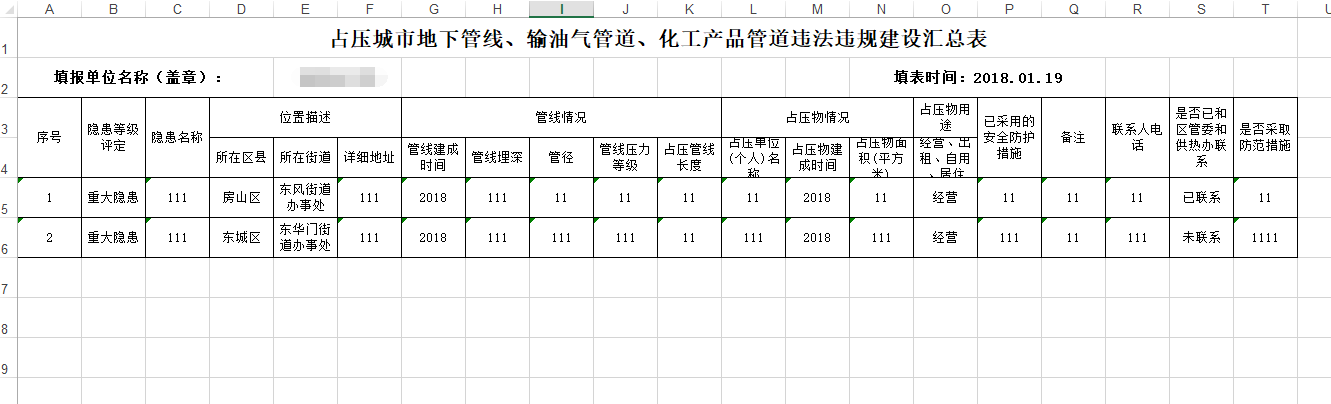
excel导出模版如下:
java使用poi自定义excel标题头并导出(springmvc+poi)的更多相关文章
- java使用POI操作excel文件,实现批量导出,和导入
一.POI的定义 JAVA中操作Excel的有两种比较主流的工具包: JXL 和 POI .jxl 只能操作Excel 95, 97, 2000也即以.xls为后缀的excel.而poi可以操作Exc ...
- 使用JDBC+POI把Excel中的数据导出到MySQL
POI是Apache的一套读MS文档的API,用它还是可以比较方便的读取Office文档的.目前支持Word,Excel,PowerPoint生成的文档,还有Visio和Publisher的. htt ...
- java使用jxl,poi解析excel文件
public interface JavaExcel { /** * 使用jxl写excel文件 */ public void writeJxlExcel(); /** * 使用jxl读excel文件 ...
- 【原创】POI操作Excel导入导出工具类ExcelUtil
关于本类线程安全性的解释: 多数工具方法不涉及共享变量问题,至于添加合并单元格方法addMergeArea,使用ThreadLocal变量存储合并数据,ThreadLocal内部借用Thread.Th ...
- 自己封装的poi操作Excel工具类
自己封装的poi操作Excel工具类 在上一篇文章<使用poi读写Excel>中分享了一下poi操作Excel的简单示例,这次要分享一下我封装的一个Excel操作的工具类. 该工具类主要完 ...
- 自己的包poi操作Excel工具
在前面的文章<使用poi读写Excel>中分享了一下poi操作Excel的简单演示样例.这次要分享一下我封装的一个Excel操作的工具类. 该工具类主要完毕的功能是:读取Excel.汇总E ...
- java通过poi读取excel中的日期类型数据或自定义类型日期
Java 读取Excel表格日期类型数据的时候,读出来的是这样的 12-十月-2019,而Excel中输入的是 2019/10/12 或 2019-10-12 poi处理excel时,当excel没 ...
- JAVA POI替换EXCEL模板中自定义标签(XLSX版本)满足替换多个SHEET中自定义标签
个人说明:为了简单实现导出数据较少的EXCEL(根据自定义书签模板) 一.替换Excel表格标签方法```/** * 替换Excel模板文件内容 * @param map * 需要替换的标签建筑队形式 ...
- 10、借助POI实现Java生成并打印excel报表(1)
10.1.了解 Apache POI 实际开发中,用到最多的是把数据库中数据导出生成报表,尤其是在生产管理或者财务系统中用的非常普遍.生成报表格式一般是EXCEL或者PDF .利用Apache PO ...
随机推荐
- springboot 热部署的两种方式
问题的提出: 在编写代码的时候,你会发现我们只是简单把打印信息改变了,就需要重新部署,如果是这样的编码方式,那么我们估计一天下来就真的是打几个Hello World就下班了.那么如何解决热部署的问题呢 ...
- gearman学习笔记1
1.简介 gearman是一个分布式开发框架,适合处理一些必须处理但是不影响主流程的操作,比如保存日志.发送邮件.缩略图片等.最早是基于perl语言的,2008年发布的时候改为C++语言开 ...
- jar包后台启动--nohup篇
直接java -jar TestHttps-0.0.1-SNAPSHOT.jar的话是前段启动,但是窗口关闭之类的程序也就关闭了 我们可以nohup java -jar TestHttps-0.0.1 ...
- 在Azure上部署IPv6的App通过IOS App Store审核
随着中国企业出海Go Global,越来越多的用户开始在Global Azure部署自己的应用.由于对Global Azure功能和文档的不熟悉,使用过程中或多或少遇到了一些坑.事实上呢,这些并不是坑 ...
- 运算符关键字。数据区别大小写。日期范围。判空的两种写法。NOT IN的两种写法。IN范围可含NULL,但NOT IN值范围不能含NULL。
比较:>,<,=,>=,<=,<>(!=) 逻辑:AND,OR,NOT 范围:BETWEEN...AND... 范围:IN,NOT IN 判空:IS NULL, I ...
- AVL树的单双旋转操作
把必须重新平衡的节点称为å.对于二叉树,å的两棵子树的高度最多相差2,这种不平衡可能有四种情况: 对å的左儿子的左子树进行插入节点(左-左) 对å的左儿子的右子树进行插入节点(左-右) 对å的右儿子的 ...
- bzoj 2727: [HNOI2012]双十字
Description 在C 部落,双十字是非常重要的一个部落标志.所谓双十字,如下面两个例子,由两条水平的和一条竖直的"1"线段组成,要求满足以下几个限制: 我们可以找到 5 个 ...
- JS画几何图形之五【过圆外一点作切线】
样例:http://www.zhaojz.com.cn/demo/draw9.html 依赖:[点].[直线].[圆] //画切线 //point 圆外的一点 //dot 圆心 //r 半径 func ...
- 【WebGL】《WebGL编程指南》读书笔记——第6章
一.前言 最近重感冒发烧,妈蛋好难受,请假了3天,驾校也没去,简直僵硬!今天继续WebGL的学习. 二.正文 A. GLSL支持两种数据值类型: 整数型(int)与浮点型( ...
- Ubuntu16.04 添加 Docker用户组
Ubuntu16.04 添加 Docker用户组 将用户添加到docker用户组就不用每次都 sudo了. ### 首先创建用户组 sudo groupadd docker 将用户加如组 sudo g ...