
iOS开发之UITableView及cell重用
1、UITanleview有的两种风格
一种是Plain,一种是Grouped,可以从这里设置风格:

他们样式分别如下:
Plain:

Grouped:

2、tableView展示数据的过程:
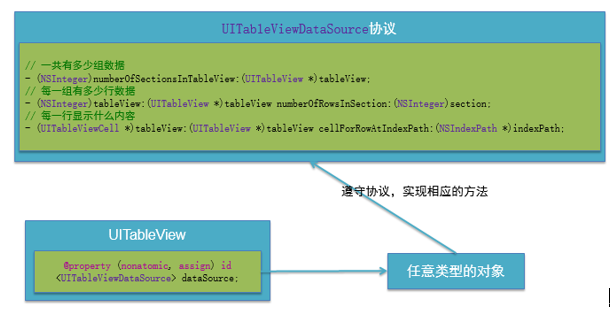
(1)首先,控制器要遵守UITableViewDataSource协议
@interface ViewController () <UITableViewDataSource>
(2)调用数据源的下面方法得知一共有多少组数据
- (NSInteger)numberOfSectionsInTableView:(UITableView *)tableView;
(3)调用数据源的下面方法得知每一组有多少行数据
- (NSInteger)tableView:(UITableView *)
tableView numberOfRowsInSection:(NSInteger)section;
(4)调用数据源的下面方法得知每一行显示什么内容
- (UITableViewCell *)tableView:(UITableView *)
tableView cellForRowAtIndexPath:(NSIndexPath *)indexPath;
(5)设置分组头部标题
- (NSString *)tableView:(UITableView *)
tableView titleForHeaderInSection:(NSInteger)section;
(6)设置分组尾部标题
- (NSString *)tableView:(UITableView *)
tableView titleForFooterInSection:(NSInteger)section;
(7)滑动删除
/**
* 如果实现了这个方法,就自动实现了滑动删除的功能
* 点击了删除按钮就会调用
* 提交了一个编辑操作就会调用(操作:删除\添加)
* @param editingStyle 编辑的行为
* @param indexPath 操作的行号
*/
- (void)tableView:(UITableView *)tableView commitEditingStyle:
(UITableViewCellEditingStyle)editingStyle forRowAtIndexPath:
(NSIndexPath *)indexPath
{
if (editingStyle == UITableViewCellEditingStyleDelete) { // 提交的是删除操作,默认就是传的删除
// 1.删除模型数据
[self.contacts removeObjectAtIndex:indexPath.row];
// 2.刷新表格
// 局部刷新某些行(使用前提:模型数据的行数不变)
[self.tableView deleteRowsAtIndexPaths:@[indexPath]
withRowAnimation:UITableViewRowAnimationTop];
// 3.归档
[NSKeyedArchiver archiveRootObject:self.contacts toFile:
MJContactsFilepath];
} else if (editingStyle == UITableViewCellEditingStyleInsert) {
// 1.修改模型数据
MJContact *contact = [[MJContact alloc] init];
contact.name = @"jack";
contact.phone = @"10086";
[self.contacts insertObject:contact atIndex:indexPath.row + 1];
// 2.刷新表格
NSIndexPath *nextPath =
[NSIndexPath indexPathForRow:indexPath.row + 1 inSection:0];
[self.tableView insertRowsAtIndexPaths:@[nextPath] withRowAnimation:UITableViewRowAnimationBottom];
// [self.tableView reloadData];
}
}
例如:
#import "ViewController.h"
@interface ViewController () <UITableViewDataSource>
@property (weak, nonatomic) IBOutlet UITableView *tableView;
@end
@implementation ViewController
- (void)viewDidLoad
{
[super viewDidLoad];
// 设置数据源
self.tableView.dataSource = self;
}
#pragma mark - 数据源方法
/**
* 一共有多少组数据
*/
- (NSInteger)numberOfSectionsInTableView:(UITableView *)tableView
{
return 2;
}
/**
* 第section组有多少行
*/
- (NSInteger)tableView:(UITableView *)
tableView numberOfRowsInSection:(NSInteger)section
{
if (section == 0) {
return 3;
} else {
return 4;
}
}
/**
* 每一行显示怎样的内容(cell)
*/
- (UITableViewCell *)tableView:(UITableView *)
tableView cellForRowAtIndexPath:(NSIndexPath *)indexPath
{
UITableViewCell *cell = [[UITableViewCell alloc]
initWithStyle:UITableViewCellStyleDefault reuseIdentifier:nil];
if (indexPath.section == 0) { // 家禽(第0组)
if (indexPath.row == 0) { // 第0组的第0行
cell.textLabel.text = @"鸡";
} else if (indexPath.row == 1) { // 第0组的第1行
cell.textLabel.text = @"鸭";
} else if (indexPath.row == 2) {
cell.textLabel.text = @"鹅";
}
} else if (indexPath.section == 1) { // 水果(第1组)
if (indexPath.row == 0) { // 第1组的第0行
cell.textLabel.text = @"苹果";
} else if (indexPath.row == 1) { // 第1组的第1行
cell.textLabel.text = @"橘子";
} else if (indexPath.row == 2) {
cell.textLabel.text = @"香蕉";
} else if (indexPath.row == 3) {
cell.textLabel.text = @"西瓜";
}
}
return cell;
}
/**
* 第section组显示怎样的头部标题
*/
- (NSString *)tableView:(UITableView *)
tableView titleForHeaderInSection:(NSInteger)section
{
if (section == 0) {
return @"家禽类";
} else if (section == 1) {
return @"水果类";
}
}
/**
* 第section组显示怎样的尾部标题
*/
- (NSString *)tableView:(UITableView *)
tableView titleForFooterInSection:(NSInteger)section
{
if (section == 0) {
return @"这是家禽类结尾";
} else if(section == 1) {
return @"这是水果类结尾";
}
}
@end
(7)设置行高的两种方法:
方法一:直接调用rowHeight方法
self.tableView.rowHeight = 60;
方法二,使用代理
首先通过连线或者用self.tableView.delegate = self;代码设置代理,然后使ViewController遵守UITableViewDelegate协议。之后调用下列方法直接返回行高即可:
-(CGFloat)tableView:(UITableView *)tableView heightForRowAtIndexPath:
(NSIndexPath *)indexPath
{
return 60;
}
3、Cell简介
UITableView的每一行都是一个UITableViewCell,通过dataSource的tableView:cellForRowAtIndexPath:方法来初始化每一行。
UITableViewCell内部有个默认的子视图:contentView,contentView是UITableViewCell所显示内容的父视图,可显示一些辅助指示视图。
辅助指示视图的作用是显示一个表示动作的图标,可以通过设置UITableViewCell的accessoryType来显示,默认是UITableViewCellAccessoryNone(不显示辅助指示视图),其他值如下:
还可以通过cell的accessoryView属性来自定义辅助指示视图(比如往右边放一个开关)
4、UITableViewCell的contentView
contentView下默认有3个子视图:
其中2个是UILabel(通过UITableViewCell的textLabel和detailTextLabel属性访问)
第3个是UIImageView(通过UITableViewCell的imageView属性访问)
UITableViewCell还有一个UITableViewCellStyle属性,用于决定使用contentView的哪些子视图,以及这些子视图在contentView中的位置
5、给UITableView设置背景
// 设置背景(背景view不用设置尺寸, backgroundView的优先级 > backgroundColor)
UIImageView *bgView = [[UIImageView alloc] init];
bgView.image = [UIImage imageNamed:@"buttondelete"];
cell.backgroundView = bgView;
//点击时的颜色
UIView *selectedbgView = [[UIView alloc] init];
selectedbgView.backgroundColor = [UIColor greenColor];
cell.selectedBackgroundView = selectedbgView;
6、设置UITableView分割线属性
注意apple里RGB值输入的是比例,而且是Float型,比如RGB(255,0,255)应按如下输入:
self.tableView.separatorColor = [UIColor colorWithRed:255/255.0 green:255/255.0 blue:0 alpha:255/255.0];
设置风格,比如无分割线:
self.tableView.separatorStyle = UITableViewCellSeparatorStyleNone;
7、在最顶部底部放置控件
表格的头部控件(直接显示表格的最顶部)
self.tableView.tableHeaderView =
[UIButton buttonWithType:UIButtonTypeContactAdd];
self.tableView.tableHeaderView = [[UISwitch alloc] init];//底部放置控件
self.tableView.tableFooterView = [[UISwitch alloc] init];//底部放置控件
8、Cell的重用原理
每次有新的一行进入屏幕,都会调用UITableViewCell *cell = [[UITableViewCell alloc] initWithStyle:UITableViewCellStyleDefault reuseIdentifier:nil]方法,新创建一这个新的行,当往回拖UITableView时,以前的行又会进入屏幕,这时又会再一次创建一个新的这一行并分配新的内存,但最后那些不用的行会最终被销毁,其实最消耗内存的其实是创建和销毁这个过程,创建、销毁速度太快会使内存飙升。
iOS设备的内存有限,如果用UITableView显示成千上万条数据,就需要成千上万个UITableViewCell对象的话,那将会耗尽iOS设备的内存。要解决该问题,需要重用UITableViewCell对象
重用原理:当滚动列表时,部分UITableViewCell会移出窗口,UITableView会将窗口外的UITableViewCell放入一个对象池中,等待重用。当UITableView要求dataSource返回UITableViewCell时,dataSource会先查看这个对象池,如果池中有未使用的UITableViewCell,dataSource会用新的数据配置这个UITableViewCell,然后返回给UITableView,重新显示到窗口中,从而避免创建新对象。
还有一个非常重要的问题:有时候需要自定义UITableViewCell(用一个子类继承UITableViewCell),而且每一行用的不一定是同一种UITableViewCell,所以一个UITableView可能拥有不同类型的UITableViewCell,对象池中也会有很多不同类型的UITableViewCell,那么UITableView在重用UITableViewCell时可能会得到错误类型的UITableViewCell
解决方案:UITableViewCell有个NSString *reuseIdentifier属性,可以在初始化UITableViewCell的时候传入一个特定的字符串标识来设置reuseIdentifier(一般用UITableViewCell的类名)。当UITableView要求dataSource返回UITableViewCell时,先通过一个字符串标识到对象池中查找对应类型的UITableViewCell对象,如果有,就重用,如果没有,就传入这个字符串标识来初始化一个UITableViewCell对象
Cell的重用示例代码:
- (UITableViewCell *)tableView:(UITableView *)tableView cellForRowAtIndexPath:(NSIndexPath *)indexPath
{
// 1.定义一个cell的标识
static NSString *ID = @"mjcell";
// 2.从缓存池中取出cell
UITableViewCell *cell =
[tableView dequeueReusableCellWithIdentifier:ID];
// 3.如果缓存池中没有cell
if (cell == nil) {
cell = [[UITableViewCell alloc]
initWithStyle:UITableViewCellStyleSubtitle reuseIdentifier:ID];
}
// 4.设置cell的属性...
return cell;
}
9、为 UITableView添加右侧索引条
- (NSArray *)sectionIndexTitlesForTableView:(UITableView *)tableView
{
return [self.groups valueForKeyPath:@"title"];
}
在其中返回一个数组,return [self.groups valueForKeyPath:@"title"];代表从self.groups中取“title”的值赋值给索引名称,点击索引,会根据索引顺序使UITableView跳到对应顺序section。
10、监听UITableView的选中
首先要把ViewController设置为UITableView的代理,并使ViewController遵守UITableViewDelegate协议。主要常用下面两个方法:
- (void)tableView:(UITableView *)tableView didSelectRowAtIndexPath:
(NSIndexPath *)indexPath;------选中行时调用
- (void)tableView:(UITableView *)tableView didDeselectRowAtIndexPath:
(NSIndexPath *)indexPath;------取消选中时候调用
11、UITableView数据刷新
全局刷新:
[self.tableView reloadData];
局部刷新:
NSIndexPath *path = [NSIndexPath indexPathForRow:row inSection:0];
[self.tableView reloadRowsAtIndexPaths:@[path] withRowAnimation:
UITableViewRowAnimationBottom];//刷新第0组的第row行
iOS开发之UITableView及cell重用的更多相关文章
- iOS开发之UITableView的使用
这一篇记录的是iOS开发中UITableView的使用,iOS中的UITableView跟Android中的ListView特别相似,以下用一个Demo来说明: 1.Xcode中新建projectTe ...
- iOS开发之UITableView中计时器的几种实现方式(NSTimer、DispatchSource、CADisplayLink)
最近工作比较忙,但是还是出来更新博客了.今天博客中所涉及的内容并不复杂,都是一些平时常见的一些问题,通过这篇博客算是对UITableView中使用定时器的几种方式进行总结.本篇博客会给出在TableV ...
- iOS开发之UITableView使用总结
什么是UITableView 在众多移动应用中,能看到各式各样的表格数据 在iOS中,要实现表格数据展示,最常用的做法就是使用UITableView UITableView继承自UIScrollVie ...
- 李洪强IOS开发之iOS好项目收集
李洪强IOS开发之iOS好项目收集 在这里收集一些最近出现的比较实用好玩的框架或者项目,会不断更新 项目 简述 日期 SCTableViewCell 类似与QQ侧滑删除Cell的Demo 201501 ...
- 李洪强iOS开发之RunLoop的原理和核心机制
李洪强iOS开发之RunLoop的原理和核心机制 搞iOS之后一直没有深入研究过RunLoop,非常的惭愧.刚好前一阵子负责性能优化项目,需要利用RunLoop做性能优化和性能检测,趁着这个机会深入研 ...
- iOS开发之Socket通信实战--Request请求数据包编码模块
实际上在iOS很多应用开发中,大部分用的网络通信都是http/https协议,除非有特殊的需求会用到Socket网络协议进行网络数 据传输,这时候在iOS客户端就需要很好的第三方CocoaAsyncS ...
- iOS开发之UISearchBar初探
iOS开发之UISearchBar初探 UISearchBar也是iOS开发常用控件之一,点进去看看里面的属性barStyle.text.placeholder等等.但是这些属性显然不足矣满足我们的开 ...
- iOS开发之UIImage等比缩放
iOS开发之UIImage等比缩放 评论功能真不错 评论开通后,果然有很多人吐槽.谢谢大家的支持和关爱,如果有做的不到的地方,还请海涵.毕竟我一个人的力量是有限的,我会尽自己最大的努力大家准备一些干货 ...
- iOS开发之 Xcode6 添加xib文件,去掉storyboard的hello world应用
iOS开发之 Xcode6.1创建仅xib文件,无storyboard的hello world应用 由于Xcode6之后,默认创建storyboard而非xib文件,而作为初学,了解xib的加载原理 ...
随机推荐
- ThreadLocal模式的原理
在JDK的早期版本中,提供了一种解决多线程并发问题的方案:java.lang.ThreadLocal类.ThreadLocal类在维护变量时,实际使用了当前线程(Thread)中的一个叫做Thread ...
- DB2_自动生成值
生成数字序列的两种方法 在 DB2 中可以用两种方法自动生成一个数字序列: 定义带有 IDENTITY 属性的列. 创建 SEQUENCE 对象. IDENTITY 列 当用 IDENTITY 属性定 ...
- CSS sliod属性
CSS solid 属性 制作过网页的人都有为画线而烦恼的经历,先来认识一下“Border”(画边框),它是CSS的一个属性,用它可以给能确定范围的HTML标记(如TD.DIV等等)画边框,它可以定义 ...
- HTTP学习(一)初识HTTP
作为一名准前端开发工程师,必须要对http基础知识有一定的了解,可是想学习HTTP相关的知识,发现国内只有两本相关的图书,<HTTP权威指南>和<图解http>,所有的书但凡带 ...
- 继续学习ant
今天由于打电话,打了两个小时的电话,结果一下子错过了学习的时间段,表示很惭愧,不过查了一些资料,感觉还不错,明天继续学习吧! ant入门到精通Ant 的最完整build.xml解释ant实用实例Ant ...
- JLOI2015 解题报告
JLOI2015 真的不愧是NOI出题组出的,题目难度够吊.不过每一道都是结论题和乱搞题真的很不好玩... T1:[JLOI2015]有意义的字符串 首先贴下popoqqq的blog吧 感性的认识就是 ...
- oracle系列笔记(2)---多表查询
多表查询 这篇文章主要讲四点: (1)oracle多表查询 (2)SQL99标准的连接查询 (3)子查询 (4)分级查询 oracle多表查询有两种方式,一种是oracle所 ...
- Matlab立体标定mat转换成Opencv的CvMat
最近在做基于双目视觉的三维重建.比较opencv和matlab工具箱的立体标定结果精度时,发现貌似如果手工选取角点不那么离谱的话,matlab标定结果精度更高也更鲁棒.就想先用matlab标定好相机, ...
- HttpRequest获取文件流,HttpResponse输出文件流
HttpResponse输出文件: Response.Clear(); Response.ContentType = "application/octet-stream"; //通 ...
- 如何通过Visual Studio来管理我们的数据库项目
某日的一个早晨,产品早上来告诉我说要把之前变更的一个功能更改回原来的设计内容,作为程序员大家都最讨厌需求来回反复变更,但是没有办法,苦逼的程序员最终还是继续要改,毕竟是给老板打工的,但是发现我们之前的 ...