
toastr 通知提示插件
jquery toastr 一款轻量级的通知提示框插件。
网页开发中经常会用到提示框,自带的alert样式无法调整,用户体验差。
所以一般通过自定义提示框来实现弹窗提示信息,而jquery toastr正是为此的一款非常棒的插件。
开发中用angular比较多,所以笔记记录了angular一些常见使用,与jquery版本有些许不同 ,相差不大。
在HTML引用js文件
<link rel="stylesheet" type="text/css" href="angular-toastr.css" />

<script type="text/javascript" src="angular-toastr.tpls.js"></script>
在angular模版中注入依赖
angular.module('app', ['ngAnimate', 'toastr'])
toastr使用中会用到动画,所以需加上ngAnimate,如果不引入ngAnimate,没有动画效果,不影响显示。
开始使用
1.成功提示
toastr.success('Hello world!', 'Toastr fun!');

2.普通提示
toastr.info('We are open today from 10 to 22', 'Information');

3.错误提示
toastr.error('Your credentials are gone', 'Error');
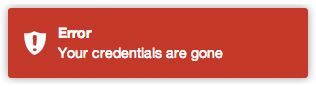
4.警告提示
toastr.warning('Your computer is about to explode!', 'Warning');
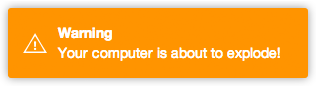
第一个参数为提示内容,第二个参数为提示标题,如果不需要标题,则可省略第二个参数
toastr.success('I don\'t need a title to live');

关闭提示框
toastr.clear([toast]);
获取当前显示的提示框
toastr.active();
刷新打开的提示框(第二个参数配置超时时间)
toastr.refreshTimer(toast, 5000);
全局配置
app.config(function(toastrConfig) {

  angular.extend(toastrConfig, {

    autoDismiss: false,

    containerId: 'toast-container',

    maxOpened: 0,

    newestOnTop: true,

    positionClass: 'toast-top-right',

    preventDuplicates: false,

    preventOpenDuplicates: false,

    target: 'body'

  });

});
- autoDismiss: true 显示最新的toastr
- containerId: 默认为"toast-container",设置toastr容器的id名称.
- maxOpened: 页面一次性最多显示多少个toastr.
- newestOnTop: true 新的toastr会显示在旧的toastr前面
- positionClass: 设置toastr显示位置的class
- preventDuplicates: true 重复内容的提示框只出现一次,无论提示框是打开还是关闭
- preventOpenDuplicates: true 重复内容的提示框在开启时只出现一个 如果当前的提示框已经打开,不会多开。直到提示框关闭后,才可再开)
- target: 默认为'body', 设置toastr的目标容器
| positionClass | |
|---|---|
| toast-top-left | 顶端左边 |
| toast-top-right | 顶端右边 |
| toast-top-center | 顶端中间 |
| toast-top-full-width | 顶端中间(宽度铺满) |
| toast-bottom-right | 底部右边 |
| toast-bottom-left | 底部左边 |
| toast-bottom-center | 底部中间 |
| toast-bottom-full-width | 底部中间(宽度铺满) |
app.config(function(toastrConfig) {

  angular.extend(toastrConfig, {

    allowHtml: false,

    closeButton: false,

    closeHtml: '<button>×</button>',

    extendedTimeOut: 1000,

    iconClasses: {

      error: 'toast-error',

      info: 'toast-info',

      success: 'toast-success',

      warning: 'toast-warning'

    },

    messageClass: 'toast-message',

    onHidden: null,

    onShown: null,

    onTap: null,

    progressBar: false,

    tapToDismiss: true,

    templates: {

	  toast: 'directives/toast/toast.html',

	  progressbar: 'directives/progressbar/progressbar.html'

	},

    timeOut: 5000,

    titleClass: 'toast-title',

    toastClass: 'toast'

  });

});
- allowHtml: 设置提示内容可包含html格式
- closeButton: 设置显示"X" 关闭按钮
- closeHtml: 自定义html替代closeButton内容,closeButton为true时才显示.
- extendedTimeOut: 设置当你鼠标滑入后的timeout,该timeout会更新关闭所需的timeout.
- extraData: 如果重写模版,你可以自定义全局数据给你的toasts
- iconClasses: 设置各个类型的icon图标class
- messageClass: 设置toastr提示信息的class
- progressBar: 设置显示timeout时间进度条
- tapToDismiss: 设置toastr被点击时关闭
- templates: 自定义模版
- timeOut: 设置toastr过多久关闭
- titleClass: 设置toastr标题的class
- toastClass: 设置toastr基本的class
参考文章:
jquery: https://github.com/CodeSeven/toastr
angular: https://github.com/Foxandxss/angular-toastr
toastr 通知提示插件的更多相关文章
- 漂亮灵活设置的jquery通知提示插件toastr
toastr是一款非常棒的基于jquery库的非阻塞通知提示插件,toastr可设定四种通知模式:成功,出错,警告,提示,而提示窗口的位置,动画效果都可以通过能数来设置,在官方站可以通过勾选参数来生成 ...
- 消息提示插件toastr.js与Messenger组件
Toastr是一款基于jQuery的通知插件,可以灵活的自定义样式和拓展其功能! toastr是一个基于Jquery简单.漂亮的消息提示插件,使用简单.方便,可以根据设置的超时时间自动消失. cdn最 ...
- PNotify – 简单易用的 JS 通知,消息提示插件
PNotify 是一个 JavaScript 通知插件,前身为 Pines Notify.它旨在提供无与伦比的灵活性,同时很容易使用.它可以提供无阻塞的通知,允许用户无需关闭通知或者提示信息就可以点击 ...
- Jquery消息提示插件toastr使用详解
toastr是一个基于jQuery简单.漂亮的消息提示插件,使用简单.方便,可以根据设置的超时时间自动消失. 1.使用很简单,首选引入toastr的js.css文件 html <script s ...
- Jquery消息提示插件toastr使用
toastr是一个基于jQuery简单.漂亮的消息提示插件,使用简单.方便,可以根据设置的超时时间自动消失. 相关文件到官网去下载即可 1.引入toastr的js和css文件 <link hre ...
- Jquery消息提示插件toastr
toastr是一个基于jQuery简单.漂亮的消息提示插件,使用简单.方便,可以根据设置的超时时间自动消失. 1.使用很简单,首选引入toastr的js.css文件 <script src=&q ...
- 应用 CSS3 动画实现12种风格的通知提示
今天我们想分享几个简单的款式的网站通知效果.有很多的方式来呈现消息给用户:从经典的咆哮般的通知到窗口顶部的通知栏.各个网站的通知样式和效果千篇一律,难得出现创意的通知效果.这里是实现一个应用 CSS3 ...
- 使用 Swift 制作一个新闻通知中心插件(1)
input[type="date"].form-control,.input-group-sm>input[type="date"].input-grou ...
- Swift 制作一个新闻通知中心插件1
使用 Swift 制作一个新闻通知中心插件(1) 随着 iOS 8 的发布,苹果为开发者们开放了很多新的 API,而在这些开放的接口中 通知中心插件 无疑是最显眼的一个.通知中心就不用过多介绍了,相信 ...
随机推荐
- [译]ASP.NET Core 2.0 机密配置项
问题 如何在ASP.NET Core 2.0中保存机密配置项(不用将其暴露给源代码管理器)? 答案 创建一个ASP.NET Core 2.0空项目,在项目节点上点击右键,并点击菜单项 - 管理用户机密 ...
- java中的static关键字详解
static对于我们这些初学者在编写代码和阅读代码是一个难以理解的关键字,也是大量公司面试题最喜欢考的之一.下面我就来就先讲述一下static关键字的用法和我们初学者容易误解的地方. static关键 ...
- C++类与对象(05)
类是具有惟一标识符的实体:在类中声明的任何成员不能使用extern.auto和register关键字进行修饰:类中声明的变量属于该类,在某些情况下,变量也可以被该类的不同实例所共享. 访问权限用于控制 ...
- Windows环境下Android Studio安装和使用教程
Windows环境下Android Studio安装和使用教程 来源: http://www.cnblogs.com/liuhongfeng/archive/2015/12/30/5084896.ht ...
- hdu 4717 Tree2cycle(树形DP)
Tree2cycle Time Limit: 15000/8000 MS (Java/Others) Memory Limit: 102400/102400 K (Java/Others)Tot ...
- hbase的HQuorumPeer和QuorumPeerMain
hbase是列式数据库,既可以单机也可以以集群的方式搭建,以集群的方式搭建一般建立在hdfs之上. 分布式的hbase如何启动? 首先启动hadoop,然后就来问题了:zookeeper和hbase的 ...
- Android 开发笔记___SQLite__基本用法
SQLiteOpenHelper package com.example.alimjan.hello_world.dataBase; import android.content.ContentVal ...
- MQTT——订阅报文
我们已经把相关的连接报文搞定了.笔者想来想去还是决定先讲解一下订阅报文(SUBSCRIBE ).如果传统的通信方式是客户端和服务端之间一般就直接传输信息.但是MQTT的通信方式是通过发布/订阅的方式进 ...
- HTML DOM应用案例1
<!DOCTYPE html> <html lang="en"> <head> <meta charset="UTF-8&quo ...
- 一脚踏进Memcached的大门
Memcached 是一个高性能的分布式内存对象缓存系统,用于动态Web应用以减轻数据库负载.它通过在内存中缓存数据和对象来减少读取数据库的次数,从而提高动态.数据库驱动网站的速度.Memcached ...