
使用MyGeneration创建模板:介绍(翻译)
原文信息
- 原文地址
- 原文作者信息:
- Justin Greenwood
- MyGeneration Software
- http://www.mygenerationsoftware.com
- April 26, 2004
系统需求:
- Microsoft Windows 2000/XP
- Microsoft .Net Framework 1.1/更高
- MDAC 2.7/更高
- MyGeneration
概观
这是一个使用 MyGeneration 开发模板的基本的介绍。如果你安装了 MyGeneration ,并且对 MyGeneration 感到迷惑的话,这里是一个很好的教你使用 MyGeneration 的教程。这个教程将教会你使用 MyGeneration 创建基本的 JScript 或 VBScript 的模板。
创建模板
- 打开 MyGeneration
- 从菜单中选择File->New->JScript Template或者File->New->VBScript Template
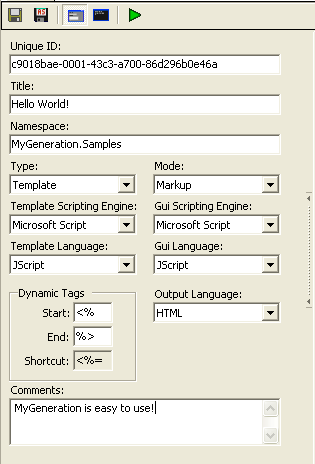
填充模板属性 - 你可以通过点击 Property 按钮查看或编辑模板的属性
按照如下的显示填充属性窗体
保存模板
- 选择File->Save As...保存模板
输入UI接口代码
通过切换到Interface Code的Tab页面,可以编辑接口代码。这里的接口代码在运行时,将会生成一个窗体,提示用户输入一个名称,而用户输入的名称将会替换掉“Hello World”中的World。
JScript
 //In the interface code segment, the setup function

  //is the initial function call.

  function setup()

  {

         //Set the form title bar to say "Hello World!!"

         ui.Title = "Hello World!!";

         //Set the height and width of the form in pixels

         ui.Height = 150;

         ui.Width = 340;

         //Add a label and a textbox to the form.

         ui.AddLabel("lblName", "Enter a Name:", "Enter a name below");

         ui.AddTextBox("txtName", "World", "Enter a name in here");

         //The number of times to repeat "Hellow World!!"

         input.item("timesToRepeat") = 10;

         //Tells MyGeneration to display the form. If this is

         //set to false. MyGeneration skips displaying the

         //form, but retains any changes made in the interface

         //code segment.

         ui.ShowGUI = true;

  }
VBScript
 'In the interface code segment, the setup function

  'is the initial function call.

  Sub setup()

         'Set the form title bar to say "Hello World!!"

         ui.Title = "Hello World!!"

         'Set the height and width of the form in pixels

         ui.Height =

         ui.Width =

         'Add a label and a textbox to the form.

         ui.AddLabel "lblName", "Enter a Name:", "Enter a name below"

         ui.AddTextBox "txtName", "World", "Enter a name in here"

         'The number of times to repeat "Hellow World!!"

         input.item("timesToRepeat") =

         'Tells MyGeneration to display the form. If this is

         'set to false. MyGeneration skips displaying the

         'form, but retains any changes made in the interface

         'code segment.

         ui.ShowGUI = true

  End Sub
测试UI接口
如果你想测试一下前面输入的内容的结果,你就需要执行模板。点击工具栏的Execute按钮(绿色的播放按钮),你将看到如下的结果

输入模板代码
通过切换到Template Code Tab页,可以查看和编辑模板代码。如下的代码将生成一个显示10各Hello Name!!!的HTML页面。
JScript
 <html>

         <body>

  <% for (var i = 0; i < input.item("timesToRepeat"); i++) { %>

                         <br>Hello <%= input.item("txtName") %>!!

  <% } %>

         </body>

  </html>
VBScript
 <html>

         <body>

  <% For i =  to input.item("timesToRepeat") %>

                         <br>Hello <%= input.item("txtName") %>!!

  <% Next %>

         </body>

  </html>
执行完成的模板
- 执行模板之前,保存模板
- 点击执行按钮,执行后的结果如下:
  <html>

         <body>

                         <br>Hello World!!

                         <br>Hello World!!

                         <br>Hello World!!

                         <br>Hello World!!

                         <br>Hello World!!

                         <br>Hello World!!

                         <br>Hello World!!

                         <br>Hello World!!

                         <br>Hello World!!

                         <br>Hello World!!

         </body>

  </html>
结束语
希望通过这个教程,你看到了 MyGeneration 通过你的指尖在键盘上的敲打而显现的强大的力量。当你开始熟悉 MyGeneration 之后,我建议你做如下的事情:
- 查看安装 MyGeneration 时附带的模板,我从哪儿学到了很多;
- 研究 Zeus 的API文档以及 MyMeta ;
- 思考一下,在你的工作中哪些需要使用 MyGeneration ,发现这些,你将会吃惊的发现,以前很多耗时的工作, MyGeneration 会使它们变得轻而易举。
使用MyGeneration创建模板:介绍(翻译)的更多相关文章
- Aurelia 创建模板
今天介绍一下Aurelia创建模板的三种方式. 模板既可以作为页面也可以作为组件. 1. View+View Model Aurelia的模板通常由一个html文件和一个同名的ts或js文件组成,文件 ...
- Sitecore CMS中创建模板
如何在Sitecore CMS中创建模板. 在/sitecore/templates选择应创建模板的文件夹中. 注意:在多站点项目中,通常会在模板所属的网站名称的/sitecore/templates ...
- Django项目的创建与介绍.应用的创建与介绍.启动项目.pycharm创建启动项目.生命周期.三件套.静态文件.请求及数据.配置Mysql完成数据迁移.单表ORM记录的增删改查
一.Django项目的创建与介绍 ''' 安装Django #在cmd中输入pip3 #出现这个错误Fatal error in launcher: Unable to create process ...
- LATEX学习和IEEE Tran模板介绍
目录 软件的选择 IEEE 模板下载 模板正文 图 表格 公式 算法 参考文献 Latex学习网站:http://www.latexstudio.net/page/tex-documents/ IEE ...
- Orchard之创建模板
orchard创建模板的两种基本方式: 第一种:通过候补创建(需要用到候补神器): 第二种:通过Shape Tracing创建:
- Django创建模板、URL模式、创建视图函数
1.在应用目录下创建模板(templates目录) 在模板目录下创建archive.html <!DOCTYPE html> <html lang="en"> ...
- 36.创建模板mylist
node.h #pragma once //创建模板 template <class T> class Node { public: T t;//数据 Node *pNext;//指针域 ...
- 使用powercli创建模板与克隆虚机
用powercli练练手,需从实际案例出发,本节将使用powercli写两个demo,一个是创建模板,并根据模板创建新的虚机:另一个demo是克隆虚机. [注意] 1.创建模板与克隆操作只能在vcen ...
- [人工智能]IBM Watson人工智能API|一步步创建智能微信翻译官|第一章
最近参加了IBM可认知内部创业活动,想从零创建一个微信翻译工具,这就是我的AI翻译官.
随机推荐
- 44-java断点调式dubug
转自:https://www.cnblogs.com/mq0036/p/3780538.html Eclipse 的单步调试 1.设置断点在程序里面放置一个断点,也就是双击需要放置断点的程序左边的栏目 ...
- 4-windows 用cmd 如何输入命令 进入文件夹
比如是你要到d盘的 tmp目录,那么敲入 cd d:\tmp 回车,然后在敲入 d:回车即可
- ubuntu关闭服务需要身份验证
service tomcat stop ==== AUTHENTICATING FOR org.freedesktop.systemd1.manage-units === 需要通过认证才能停止“tom ...
- 21.Mysql Server优化
21.优化Mysql Server21.1 Mysql体系结构概览Mysql由Mysql Server层和存储引擎层组成.Mysql实例由一组后台进程.一写内存块和若干服务线程组成.Mysql后台进程 ...
- list集合与HashMap的使用
List<Map<String, Object>> arrays= new ArrayList<Map<String, Object>>(); Hash ...
- Liunjx 文件
cat命令的用途是连接文件或标准输入并打印.这个命令常用来显示文件内容,或者将几个文件连接起来显示,或者从标准输入读取内容并显示,它常与重定向符号配合使用. 1.命令格式: cat [选项] [文件] ...
- 迈科DPI和运营商合作比较多
业界领先的DPI/DFI解决方案提供商 专注网络流量数据和应用性能数据的分析优化 业界领先的DPI/DFI解决方案提供商 专注网络流量数据和应用性能数据的分析优化 Previous Next DP ...
- Latex基本用法
空格 需要使用 \qquad,\quad,\,应该是占位符和变量之间需要有{}相隔. $$ C_{1} \qquad {C_2} $$ $$ C_{1} \quad {C_2} $$ $$ C_{1} ...
- Generate a Push Certificate
To send Push notification to an application/device couple you need an unique device token (see the O ...
- POJ 2014.K-th Number 区间第k小 (归并树)
K-th Number Time Limit: 20000MS Memory Limit: 65536K Total Submissions: 57543 Accepted: 19893 Ca ...