
beautifulSoup基本用法及find选择器
总结来源于官方文档:https://www.crummy.com/software/BeautifulSoup/bs4/doc/index.zh.html#find-all
示例代码段
html_doc = """
<html>
    <head><title>The Dormouse's story <!--Hey, buddy. Want to buy a used parser?-->
    <a><!--Hey, buddy. Want to buy a used parser?--></a></title>
    </head>
<body>
    <p class="title">
        <b>The Dormouse's story</b>
        <a><!--Hey, buddy. Want to buy a used parser?--></a>
    </p>
    <p class="story">Once upon a time there were three little sisters; and their names were
        <a href="http://example.com/elsie" class="sister" id="link1 link4">Elsie</a>,
        <a href="http://example.com/lacie" class="sister" id="link2">Lacie</a> and
        <a href="http://example.com/tillie" class="sister" id="link3">Tillie</a>;
        and they lived at the bottom of a well.
    </p>
    <p class="story">...</p>
"""
1、快速操作:
soup.title  == soup.find('title')

# <title>The Dormouse's story</title>

soup.title.name

# u'title'

soup.title.string  == soup.title.text  == soup.title.get_text()

# u'The Dormouse's story'

soup.title.parent.name

# u'head'

soup.p   == soup.find('p')  # . 点属性,只能获取当前标签下的第一个标签

# <p class="title"><b>The Dormouse's story</b></p>

soup.p['class']

# u'title'

soup.a  == soup.find('a')

# <a class="sister" href="http://example.com/elsie" id="link1">Elsie</a>

soup.find_all('a')

# [<a class="sister" href="http://example.com/elsie" id="link1">Elsie</a>,

#  <a class="sister" href="http://example.com/lacie" id="link2">Lacie</a>,

#  <a class="sister" href="http://example.com/tillie" id="link3">Tillie</a>]


soup.find_all(['a','b'])  # 查找所有的a标签和b标签
soup.find_all(id=["link1","link2"])  # 查找所有id=link1 和id=link2的标签

soup.find(id="link3")

# <a class="sister" href="http://example.com/tillie" id="link3">Tillie</a>
2、Beautiful Soup对象有四种类型:
1、BeautifulSoup
2、tag:标签
3、NavigableString : 标签中的文本,可包含注释内容
4、Comment :标签中的注释,纯注释,没有正文内容
标签属性的操做跟字典是一样一样的
html多值属性(xml不适合):
意思为一个属性名称,它是多值的,即包含多个属性值,即使属性中只有一个值也返回值为list,
如:class,rel , rev , accept-charset , headers , accesskey
其它属性为单值属性,即使属性值中有多个空格隔开的值,也是反回一个字符串
soup.a['class']  #['sister']

id_soup = BeautifulSoup('<p id="my id"></p>')

id_soup.p['id']  #'my id'
3、html中tag内容输出:
string:输出单一子标签文本内容或注释内容(选其一,标签中包含两种内容则输出为None)
strings: 返回所有子孙标签的文本内容的生成器(不包含注释)
stripped_strings:返回所有子孙标签的文本内容的生成器(不包含注释,并且在去掉了strings中的空行和空格)
text:只输出文本内容,可同时输出多个子标签内容
get_text():只输出文本内容,可同时输出多个子标签内容
string:
markup = "<b><!--Hey, buddy. Want to buy a used parser?--></b>"

soup = BeautifulSoup(markup, 'html.parser')

comm = soup.b.string

print(comm)  # Hey, buddy. Want to buy a used parser?

print(type(comm))  #<class 'bs4.element.Comment'>
strings:
head_tag = soup.body

for s in head_tag.strings:

    print(repr(s))

结果:

'\n'

"The Dormouse's story"

'\n'

'Once upon a time there were three little sisters; and their names were\n        '

'Elsie'

',\n        '

'Lacie'

' and\n        '

'Tillie'

';\n        and they lived at the bottom of a well.\n    '

'\n'

'...'

'\n'
stripped_strings:
head_tag = soup.body

for s in head_tag.stripped_strings:

    print(repr(s))

结果:

"The Dormouse's story"

'Once upon a time there were three little sisters; and their names were'

'Elsie'

','

'Lacie'

'and'

'Tillie'

';\n        and they lived at the bottom of a well.'

'...'
text:
soup = BeautifulSoup(html_doc, 'html.parser')

head_tag = soup.body

print(head_tag.text)

结果:

The Dormouse's story

Once upon a time there were three little sisters; and their names were

        Elsie,

        Lacie and

        Tillie;

        and they lived at the bottom of a well.

...
soup = BeautifulSoup(html_doc, 'html.parser')

head_tag = soup.body

print(repr(head_tag.text))

结果:

"\nThe Dormouse's story\nOnce upon a time there were three little sisters; and their names were\n        Elsie,\n        Lacie and\n        Tillie;\n        and they lived at the bottom of a well.\n    \n...\n"
4、返回子节点列表:
.contents: 以列表的方式返回节点下的直接子节点
.children:以生成器的方式反回节点下的直接子节点
soup = BeautifulSoup(html_doc, 'html.parser')

head_tag = soup.head

print(head_tag)

print(head_tag.contents)

print(head_tag.contents[])

print(head_tag.contents[].contents)

for ch in head_tag.children:

    print(ch)

结果:

<head><title>The Dormouse's story</title></head>

[<title>The Dormouse's story</title>]

<title>The Dormouse's story</title>

["The Dormouse's story"]

<title>The Dormouse's story</title>
5、返回子孙节点的生成器:
.descendants: 以列表的方式返回标签下的子孙节点
for ch in head_tag.descendants:

    print(ch)

结果:

<title>The Dormouse's story</title>

The Dormouse's story
6、父标签(parent):如果是bs4对象,不管本来是标签还是文本都可以找到其父标签,但是文本对象不能找到父标签
soup = BeautifulSoup(html_doc, 'html.parser')

tag_title = soup.b  # b标签

print(tag_title.parent)  # b标签的父标签 p

print(type(tag_title.string))  # b标签中的文本的类型,文本中有注释时结果为None <class 'bs4.element.NavigableString'>

print(tag_title.string.parent)  # b标签中文本的父标签 b

print(type(tag_title.text))  # b 标签中的文本类型为str,无bs4属性找到父标签
7、递归父标签(parents):递归得到元素的所有父辈节点
soup = BeautifulSoup(html_doc, 'html.parser')

link = soup.a

for parent in link.parents:

    print(parent.name)

结果:
p
body
html
[document]
8、前后节点查询(不是前后标签哦,文本也是节点之一):previous_sibling,next_sibling
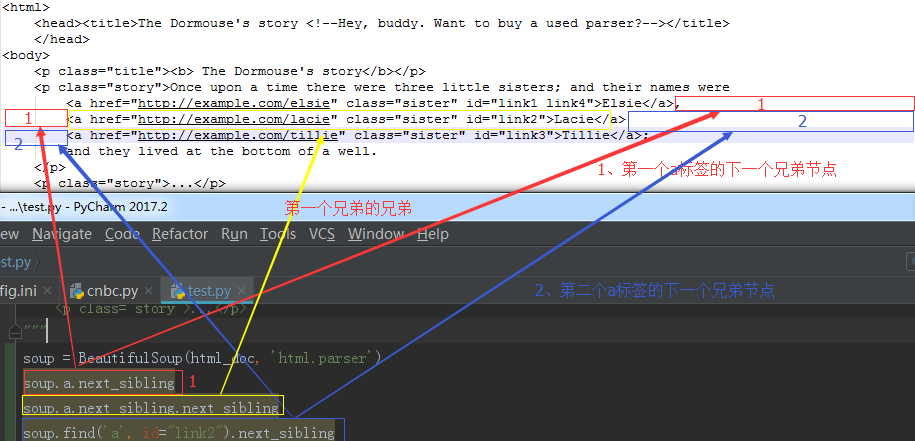
9、以生成器的方式迭代返回所有兄弟节点
for sib in soup.a.next_siblings:

    print(sib)

    print("---------")

结果:

-------------

,

---------

<a class="sister" href="http://example.com/lacie" id="link2">Lacie</a>

---------

---------

<a class="sister" href="http://example.com/tillie" id="link3">Tillie</a>

---------

;

        and they lived at the bottom of a well.

---------
10、搜索文档树
过滤器:
1、字符串
2、正则表达式
3、列表
4、True
5、方法
html_doc = """<html><head><title>The Dormouse's story</title></head>

<body>

<p class="title"><b>The Dormouse's story</b></p>

<p class="story">Once upon a time there were three little sisters; and their names were</p>

<a href="http://example.com/elsie" class="sister" id="link1">Elsie</a>,

<a href="http://example.com/lacie" class="sister" id="link2">Lacie</a> and

<a href="http://example.com/tillie" class="sister" id="link3">Tillie</a>;

and they lived at the bottom of a well.

<p class="story">...</p>

</body>

"""

from bs4 import BeautifulSoup

import re

soup = BeautifulSoup(html_doc, 'html.parser')

soup.find_all("a")  # 字符串参数

soup.find_all(re.compile("^b"))  # 正则参数

soup.find_all(re.compile("a"))  # 正则参数

soup.find_all(re.compile("l$"))  # 正则参数

soup.find_all(["a", "b"])  # 标签的列表参数

soup.find_all(True)  # 返回所有标签

def has_class_no_id(tag):

    return tag.has_attr("class") and not tag.has_attr("id")

soup.find_all(has_class_no_id)  # 方法参数
11、find选择器:
语法 :
    # find_all( name , attrs , recursive , text , **kwargs )

    #  name :要查找的标签名

    #  attrs: 标签的属性

    #  recursive: 递归

    #  text: 查找文本

    # **kwargs :其它 键值参数

  特殊情况:
    data-foo="value",因中横杠不识别的原因,只能写成attrs={"data-foo":"value"},
class="value",因class是关键字,所以要写成class_="value"或attrs={"class":"value"}
from bs4 import BeautifulSoup

import re

html_doc = """

<html><head><title>The Dormouse's story</title></head>

<p class="title"><b>The Dormouse's story</b></p>

<p class="story">Once upon a time there were three little sisters; and their names were

<a href="http://example.com/elsie" class="sister" id="link1">Elsie</a>,

<a href="http://example.com/lacie" class="sister" id="link2">Lacie</a> and

<a href="http://example.com/tillie" class="sister" id="link3">Tillie</a>;

and they lived at the bottom of a well.</p>

<p class="story">...</p>

"""

# find_all( name , attrs , recursive , text , **kwargs )

#  name :要查找的标签名(字符串、正则、方法、True)

#  attrs: 标签的属性

#  recursive: 递归

#  text: 查找文本

# **kwargs :其它 键值参数

soup = BeautifulSoup(html_doc, 'html.parser')

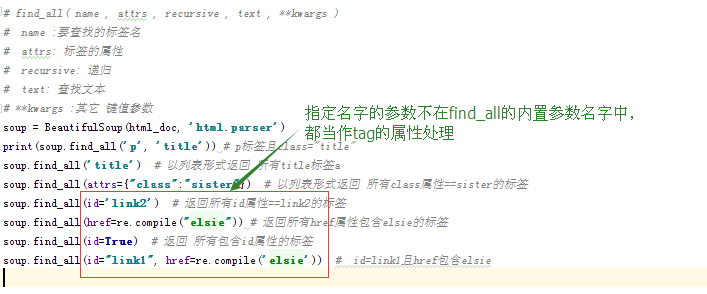
print(soup.find_all('p', 'title')) # p标签且class="title"

soup.find_all('title')  # 以列表形式返回 所有title标签a

soup.find_all(attrs={"class":"sister"})  # 以列表形式返回 所有class属性==sister的标签

soup.find_all(id='link2')  # 返回所有id属性==link2的标签

soup.find_all(href=re.compile("elsie")) # 返回所有href属性包含elsie的标签

soup.find_all(id=True)  # 返回 所有包含id属性的标签

soup.find_all(id="link1", href=re.compile('elsie'))  #  id=link1且href包含elsie
关于class的搜索
soup = BeautifulSoup(html_doc, 'html.parser')

css_soup = BeautifulSoup('<p class="body strikeout"></p>', 'html.parser')

css_soup.find_all("p", class_="body")  # 多值class,指定其中一个即可

css_soup.find_all("p", class_="strikeout")

css_soup.find_all("p", class_="body strikeout")  # 精确匹配

# text 参数可以是字符串,列表、方法、True

soup.find_all("a", text="Elsie")  # text="Elsie"的a标签
12、父节点方法:
find_parents( name , attrs , recursive , text , **kwargs )
find_parent( name , attrs , recursive , text , **kwargs )
html_doc = """<html>

    <head>

        <title>The Dormouse's story</title>

    </head>

<body>

    <p class="title"><b>The Dormouse's story</b></p>

    <p class="story">Once upon a time there were three little sisters; and their names were</p>

    <a href="http://example.com/elsie" class="sister" id="link1">Elsie</a>,

    <p>

        <a href="http://example.com/lacie" class="sister" id="link2">Lacie</a> and

    </p>

    <a href="http://example.com/tillie" class="sister" id="link3">Tillie</a>;

    and they lived at the bottom of a well.

    <p class="story">...</p>

</body>

"""

from bs4 import BeautifulSoup

soup = BeautifulSoup(html_doc, 'html.parser')

a_string = soup.find(text="Lacie")  # 文本为Lacie的节点

type(a_string), a_string  # <class 'bs4.element.NavigableString'> Lacie

a_parent = a_string.find_parent()  # a_string的父节点中的第一个节点

a_parent = a_string.find_parent("p")  # a_string的父节点中的第一个p节点

a_parents = a_string.find_parents()  # a_string的父节点

a_parents = a_string.find_parents("a")  # a_string的父点中所有a节点
13、后面的邻居节点:
find_next_siblings( name , attrs , recursive , text , **kwargs )
find_next_sibling( name , attrs , recursive , text , **kwargs )
html_doc = """<html><head><title>The Dormouse's story</title></head>

<body>

    <p class="title"><b>The Dormouse's story</b></p>

    <p class="story">Once upon a time there were three little sisters; and their names were</p>

    <a href="http://example.com/elsie" class="sister" id="link1">Elsie</a>,

    <b href="http://example.com/elsie" class="sister" id="link1">Elsie</b>,

    <a href="http://example.com/lacie" class="sister" id="link2">Lacie</a> and

    <a href="http://example.com/tillie" class="sister" id="link3">Tillie</a>;

        and they lived at the bottom of a well.

    <p class="story">...</p>

</body>

"""

from bs4 import BeautifulSoup

soup = BeautifulSoup(html_doc, 'html.parser')

first_link = soup.a  # 第一个a标签

a_sibling = first_link.find_next_sibling()  # 后面邻居的第一个

a_sibling = first_link.find_next_sibling("a")  # 后面邻居的第一个a

a_siblings = first_link.find_next_siblings()  # 后面的所有邻居

a_siblings = first_link.find_next_siblings("a")  # 后面邻居的所有a邻居
14、前面的邻居节点:
find_previous_siblings( name , attrs , recursive , text , **kwargs )
find_previous_sibling( name , attrs , recursive , text , **kwargs )
15、后面的节点:
find_all_next( name , attrs , recursive , text , **kwargs )
find_next( name , attrs , recursive , text , **kwargs )
html_doc = """<html>

    <head>

        <title>The Dormouse's story</title>

    </head>

<body>

    <p class="title"><b>The Dormouse's story</b></p>

    <p class="story">Once upon a time there were three little sisters; and their names were</p>

    <a href="http://example.com/elsie" class="sister" id="link1">Elsie</a>,

    <p>

        <a href="http://example.com/lacie" class="sister" id="link2">Lacie</a> and

    </p>

    <p>

        <a href="http://example.com/tillie" class="sister" id="link3">Tillie</a>;

    </p>

        and they lived at the bottom of a well.

    <p class="story">...</p>

</body>

"""

from bs4 import BeautifulSoup

soup = BeautifulSoup(html_doc, 'html.parser')

a_string = soup.find(text="Lacie")

a_next = a_string.find_next()  # 后面所有子孙标签的第一个

a_next = a_string.find_next('a')  # 后面所有子孙标签的第一个a标签

a_nexts = a_string.find_all_next()  # 后面的所有子孙标签

a_nexts = a_string.find_all_next('a')  # 后面的所有子孙标签中的所有a标签
16、前面的节点:
find_all_previous( name , attrs , recursive , text , **kwargs )
find_previous( name , attrs , recursive , text , **kwargs )
17、解析部分文档:
如果仅仅因为想要查找文档中的<a>标签而将整片文档进行解析,实在是浪费内存和时间.最快的方法是从一开始就把<a>标签以外的东西都忽略掉. SoupStrainer 类可以定义文档的某段内容,这样搜索文档时就不必先解析整篇文档,只会解析在 SoupStrainer 中定义过的文档. 创建一个 SoupStrainer 对象并作为 parse_only 参数给 BeautifulSoup 的构造方法即可。
SoupStrainer 类参数:name , attrs , recursive , text , **kwargs
html_doc = """<html>

    <head>

        <title>The Dormouse's story</title>

    </head>

<body>

    <p class="title"><b>The Dormouse's story</b></p>

    <p class="story">Once upon a time there were three little sisters; and their names were

        <a href="http://example.com/elsie" class="sister" id="link1">Elsie</a>,

        <a href="http://example.com/lacie" class="sister" id="link2">Lacie</a> and

        <a href="http://example.com/tillie" class="sister" id="link3">Tillie</a>;

    </p>

        and they lived at the bottom of a well.

    <p class="story">...</p>

</body>

"""

from bs4 import SoupStrainer

a_tags = SoupStrainer('a')  # 所有a标签

id_tags = SoupStrainer(id="link2")  # id=link2的标签

def is_short_string(string):

    return len(string) <   # string长度小于10,返回True

short_string = SoupStrainer(text=is_short_string)  # 符合条件的文本

from bs4 import BeautifulSoup

soup = BeautifulSoup(html_doc, 'html.parser', parse_only=a_tags).prettify()

soup = BeautifulSoup(html_doc, 'html.parser', parse_only=id_tags).prettify()

soup = BeautifulSoup(html_doc, 'html.parser', parse_only=short_string).prettify()
beautifulSoup基本用法及find选择器的更多相关文章
- 孤荷凌寒自学python第七十天学习并实践beautifulsoup对象用法3
孤荷凌寒自学python第七十天学习并实践beautifulsoup对象用法3 (完整学习过程屏幕记录视频地址在文末) 今天继续学习beautifulsoup对象的属性与方法等内容. 一.今天进一步了 ...
- 孤荷凌寒自学python第六十九天学习并实践beautifulsoup对象用法2
孤荷凌寒自学python第六十九天学习并实践beautifulsoup对象用法2 (完整学习过程屏幕记录视频地址在文末) 今天继续学习beautifulsoup对象的属性与方法等内容. 一.今天进一步 ...
- Python爬虫之BeautifulSoup的用法
之前看静觅博客,关于BeautifulSoup的用法不太熟练,所以趁机在网上搜索相关的视频,其中一个讲的还是挺清楚的:python爬虫小白入门之BeautifulSoup库,有空做了一下笔记: 一.爬 ...
- BeautifulSoup 的用法
转自:http://cuiqingcai.com/1319.html Beautiful Soup支持Python标准库中的HTML解析器,还支持一些第三方的解析器,如果我们不安装它,则 Python ...
- python爬虫---BeautifulSoup的用法
BeautifulSoup是一个灵活的网页解析库,不需要编写正则表达式即可提取有效信息. 推荐使用lxml作为解析器,因为效率更高. 在Python2.7.3之前的版本和Python3中3.2.2之前 ...
- python BeautifulSoup库用法总结
1. Beautiful Soup 简介 简单来说,Beautiful Soup是python的一个库,最主要的功能是从网页抓取数据.官方解释如下: Beautiful Soup提供一些简单的.pyt ...
- python beautifulsoup基本用法-文档搜索
以如下html段落为例进行介绍 <html> <head> <title>The Dormouse's story</title> </head& ...
- beautifulsoup简单用法
原文地址 http://www.cnblogs.com/yupeng/p/3362031.html 这篇文章讲的也很全 http://www.cnblogs.com/twinsclover/archi ...
- python BeautifulSoup基本用法
#coding:utf-8 import os from bs4 import BeautifulSoup #jsp 路径 folderPath = "E:/whm/google/src_j ...
随机推荐
- openresty redis all in one docker demo
一个简单的docker demo 集成openresty+ redis,可以实现基于redis的动态修改反向代理的处理 环境准备 docker-compose 文件 version: " ...
- 使用kompose 快速转换dokcer-compose 文件为k8s deploy 文件
kompose 是一个不错的快速转换docker-compose 文件为k8s 部署yaml文件的工具,使用次工具我们 可以将简单的docker-compose文件,转换为复杂的yaml文件,对于使用 ...
- mysql——创建索引、修改索引、删除索引的命令语句
查看表中已经存在 index:show index from table_name; 创建和删除索引索引的创建可以在CREATE TABLE语句中进行,也可以单独用CREATE INDEX或ALTER ...
- 一般化数值算法(accumluate,inner_product,partial_sum,adjacent_difference)
accumulate template<class InputIterator, class T> T accumulate( InputIterator _First, InputIte ...
- antd、react-router-dom v4 解决菜单和地址同步问题
点击不同的菜单,右边内容做相应的变化. 不过,对于后退操作和刷新页面操作无效,左边菜单无法保持选中项高亮. 解决思路如下: Menu 用 seletedKeys 来决定哪项被选中.需要判断当前选前的路 ...
- TP5一对一、一对多关联模型的使用
文章表SQL CREATE TABLE `tp_article` ( `id` int(11) NOT NULL AUTO_INCREMENT COMMENT '主键ID', `title` varc ...
- 自然语言处理之:搭建基于HanLP的开发环境(转)
环境搭建比FNLP的简单,具体参考:https://github.com/hankcs/HanLP 各个版本的下载:https://github.com/hankcs/HanLP/releases 完 ...
- DataFlow编程模型与Spark Structured streaming
流式(streaming)和批量( batch):流式数据,实际上更准确的说法应该是unbounded data(processing),也就是无边界的连续的数据的处理:对应的批量计算,更准确的说法是 ...
- 移动互联网终端的touch事件判断方向
var pressX = 0, pressY = 0; document.body.addEventListener('touchmove', function(event) { // 如果这个元素的 ...
- 【springboot】之将properties配置转为bean
将springboot里面非application.yml 或者application.properties 里面的key-value转为JavaBean /** * @Describe: DataS ...