
WPF DataGrid 数据绑定、样式、分页、增删改查,连接Access数据库
先上效果图:

XAML:
<UserControl

             xmlns="http://schemas.microsoft.com/winfx/2006/xaml/presentation"

             xmlns:x="http://schemas.microsoft.com/winfx/2006/xaml"

             xmlns:mc="http://schemas.openxmlformats.org/markup-compatibility/2006"

             xmlns:d="http://schemas.microsoft.com/expression/blend/2008"

             xmlns:local="clr-namespace:WpfAppFirst"

             xmlns:dxg="http://schemas.devexpress.com/winfx/2008/xaml/grid" xmlns:dxprg="http://schemas.devexpress.com/winfx/2008/xaml/propertygrid" xmlns:dxe="http://schemas.devexpress.com/winfx/2008/xaml/editors" x:Class="WpfAppFirst.CheckList"

             mc:Ignorable="d"

             d:DesignHeight="300" d:DesignWidth="1000">

    <Grid>

        <!--#region 网线-->

        <Grid.ColumnDefinitions>

            <ColumnDefinition Width="*"/>

            <ColumnDefinition Width="3*"/>

            <ColumnDefinition Width="3*"/>

            <ColumnDefinition Width="3*"/>

            <ColumnDefinition Width="3*"/>

            <ColumnDefinition Width="*"/>

        </Grid.ColumnDefinitions>

        <Grid.RowDefinitions>

            <RowDefinition Height="40*"/>

            <RowDefinition Height="60*"/>

            <RowDefinition Height="140*"/>

            <RowDefinition Height="60*"/>

        </Grid.RowDefinitions>

        <!--#endregion-->

        <!--#region 标题-->

        <Border Grid.Column="1" Grid.Row="0" Grid.ColumnSpan="4" Grid.RowSpan="1">

            <Label Content="核查单位管理" Foreground="#000" FontSize="24" VerticalContentAlignment="Center" HorizontalContentAlignment="Center"></Label>

        </Border>

        <!--#endregion-->

        <!--#region 单位名称-->

        <Label Content="单位名称" Grid.Column="1" Grid.Row="1" Grid.ColumnSpan="1" Grid.RowSpan="1" VerticalContentAlignment="Center" FontSize="18"></Label>

        <TextBox x:Name="Users_Company" Width="120" Height="30" Grid.Column="1" Grid.Row="1" Grid.ColumnSpan="1" Grid.RowSpan="1" VerticalAlignment="Center" HorizontalAlignment="Right" Margin="0,0,10,0"></TextBox>

        <!--#endregion-->

        <!--#region 负责人-->

        <Label Content="负责人" Grid.Column="2" Grid.Row="1" Grid.ColumnSpan="1" Grid.RowSpan="1" VerticalContentAlignment="Center" FontSize="18"></Label>

        <TextBox x:Name="Users_Name" Width="120" Height="30" Grid.Column="2" Grid.Row="1" Grid.ColumnSpan="1" Grid.RowSpan="1" VerticalAlignment="Center" HorizontalAlignment="Right" Margin="0,0,10,0"></TextBox>

        <!--#endregion-->

        <!--#region 状态-->

        <Label Content="状态" Grid.Column="3" Grid.Row="1" Grid.ColumnSpan="1" Grid.RowSpan="1" VerticalContentAlignment="Center" Padding="50,0,0,0" FontSize="18"></Label>

        <ComboBox x:Name="Users_IsDelete" Width="80" Height="30" Grid.Column="3" Grid.Row="1" Grid.ColumnSpan="1" Grid.RowSpan="1" VerticalAlignment="Center" HorizontalAlignment="Right" Margin="0,0,10,0">

            <ComboBoxItem IsSelected="True">全部</ComboBoxItem>

            <ComboBoxItem>有效</ComboBoxItem>

            <ComboBoxItem>无效</ComboBoxItem>

        </ComboBox>

        <!--#endregion-->

        <!--#region 查询 添加-->

        <Border Grid.Column="4" Grid.Row="1" Grid.ColumnSpan="1" Grid.RowSpan="1" Background="#2862AD" Height="30" Width="65" CornerRadius="2,2,2,2"  HorizontalAlignment="Left" MouseLeftButtonDown="Border_MouseLeftButtonDown" Cursor="Hand">

            <Label Content="查询" FontSize="18" Foreground="#fff" VerticalContentAlignment="Center" HorizontalContentAlignment="Center"></Label>

        </Border>

        <Border Grid.Column="4" Grid.Row="1" Grid.ColumnSpan="1" Grid.RowSpan="1" Background="#2862AD" Height="30" Width="65" CornerRadius="2,2,2,2"  HorizontalAlignment="Right" MouseLeftButtonDown="Border_MouseLeftButtonDown_1" Cursor="Hand">

            <Label Content="添加" FontSize="18" Foreground="#fff" VerticalContentAlignment="Center" HorizontalContentAlignment="Center"></Label>

        </Border>

        <!--<Border Grid.Column="4" Grid.Row="1" Grid.ColumnSpan="1" Grid.RowSpan="1" Background="Red" ></Border>-->

        <!--#endregion-->

        <!--#region 表格-->

        <DataGrid x:Name="dataGrid1" Grid.Column="1" Grid.Row="2" Grid.ColumnSpan="4" CanUserAddRows="False" AutoGenerateColumns="False" SelectionUnit="FullRow" ColumnHeaderHeight="40" Background="Transparent" SelectionMode="Single">

            <!--数据网格的样式属性-->

            <DataGrid.Style>

                <!--DataGrid样式-->

                <Style TargetType="DataGrid">

                    <!--设置HeadersVisibility:头部可见性,Column-->

                    <Setter Property="HeadersVisibility" Value="Column"/>

                    <!--水平网格线刷能见度-->

                    <Setter Property="HorizontalGridLinesBrush">

                        <Setter.Value>

                            <SolidColorBrush Color="#333" Opacity="0.2"/>

                        </Setter.Value>

                    </Setter>

                    <!--垂直网格线刷-->

                    <Setter Property="VerticalGridLinesBrush">

                        <Setter.Value>

                            <SolidColorBrush Color="#333" Opacity="0.2"/>

                            <!--Transparent-->

                        </Setter.Value>

                    </Setter>

                </Style>

            </DataGrid.Style>

            <!--数据网格的列标题样式属性-->

            <DataGrid.ColumnHeaderStyle>

                <!--样式类型:DataGridColumnHeader(数据网格列标题)-->

                <Style TargetType="{x:Type DataGridColumnHeader}">

                    <Setter Property="Background" Value="#E1F1FF"/>

                    <Setter Property="Foreground" Value="#000"/>

                    <Setter Property="HorizontalContentAlignment" Value="Center"/>

                    <!--设置边框笔刷(BorderBrush)-->

                    <Setter Property="BorderBrush">

                        <!--值-->

                        <Setter.Value>

                            <!--色刷,Opacity:透明度-->

                            <SolidColorBrush Color="#333" Opacity="0.2"></SolidColorBrush>

                        </Setter.Value>

                    </Setter>

                </Style>

            </DataGrid.ColumnHeaderStyle>

            <!--DataGrid的Rowstyle属性(数据表格的行样式)-->

            <DataGrid.RowStyle>

                <!--设置样式,类型:DataGridRow(数据表格行)-->

                <Style TargetType="DataGridRow">

                    <!--设置BorderThickness:边框粗细,value:值0-->

                    <Setter Property="BorderThickness" Value="0"/>

                    <!--<Setter Property="Background" Value="Transparent"/>Transparent:透明-->

                    <!--创建样式触发器-->

                    <Style.Triggers>

                        <!--是否是鼠标经过触发-->

                        <Trigger Property="IsMouseOver" Value="True">

                            <!--触发:背景颜色-->

                            <Setter Property="Background">

                                <!--Color:背景颜色值;Opacity:透明度-->

                                <Setter.Value>

                                    <SolidColorBrush Color="#E1F1FF" Opacity="1"></SolidColorBrush>

                                </Setter.Value>

                            </Setter>

                        </Trigger>

                        <!--是否选中时触发-->

                        <Trigger Property="IsSelected" Value="True">

                            <!--触发:Foreground(字体颜色);Value:颜色值:Red-->

                            <Setter Property="Foreground" Value="Red"/>

                        </Trigger>

                    </Style.Triggers>

                </Style>

            </DataGrid.RowStyle>

            <!--DataGrid的CellStyle属性(数据表格的单元格样式)-->

            <DataGrid.CellStyle >

                <!--设置样式,类型:DataGridCell(数据表格的单元格)-->

                <Style TargetType="DataGridCell">

                    <!--设置BorderThickness:边框粗细,value:值0-->

                    <Setter Property="BorderThickness" Value="0"/>

                    <!--样式的触发器-->

                    <Style.Triggers>

                        <!--是否选中是触发-->

                        <Trigger Property="IsSelected" Value="True">

                            <!--触发:背景-->

                            <Setter Property="Background">

                                <!--设置触发背景的值-->

                                <Setter.Value>

                                    <!--Color:颜色,Opacity:透明度-->

                                    <SolidColorBrush Color="AntiqueWhite" Opacity="0.9"/>

                                </Setter.Value>

                            </Setter>

                            <!--设置字体颜色(Foreground):红色(Red)-->

                            <Setter Property="Foreground" Value="Red"></Setter>

                        </Trigger>

                    </Style.Triggers>

                </Style>

            </DataGrid.CellStyle>

            <DataGrid.Columns>

                <!--用这种的话,单元格不能放多个可点击的控件,这个可以:DataGridTemplateColumn-->

                <!--<DataGridTextColumn Header="单位" Width="*" Binding="{Binding Company}" IsReadOnly="True">

                    <DataGridTextColumn.ElementStyle>

                        <Style TargetType="TextBlock">

                            <Setter Property="HorizontalAlignment" Value="Center"></Setter>

                            <Setter Property="FontSize" Value="14" />

                            <Setter Property="FontFamily" Value="微软雅黑" />

                            <Setter Property="Height" Value="40" />

                        </Style>

                    </DataGridTextColumn.ElementStyle>

                </DataGridTextColumn>-->

                <!--数据表格模板列;Header:标题,Width:{比例(*),固定值(int)}-->

                <DataGridTemplateColumn Header="编号" Width="*">

                    <!--数据表格模板列的单元格模板属性-->

                    <DataGridTemplateColumn.CellTemplate>

                        <!--数据模板-->

                        <DataTemplate>

                            <!--堆叠盘-->

                            <StackPanel VerticalAlignment="Center" HorizontalAlignment="Center">

                                <TextBlock Text="{Binding Id}"></TextBlock>

                            </StackPanel>

                        </DataTemplate>

                    </DataGridTemplateColumn.CellTemplate>

                </DataGridTemplateColumn>

                <DataGridTemplateColumn Header="负责人" Width="*">

                    <DataGridTemplateColumn.CellTemplate>

                        <DataTemplate>

                            <StackPanel VerticalAlignment="Center" HorizontalAlignment="Center">

                                <TextBlock Text="{Binding Name}"></TextBlock>

                            </StackPanel>

                        </DataTemplate>

                    </DataGridTemplateColumn.CellTemplate>

                </DataGridTemplateColumn>

                <DataGridTemplateColumn Header="单位" Width="*">

                    <DataGridTemplateColumn.CellTemplate>

                        <DataTemplate>

                            <StackPanel VerticalAlignment="Center" HorizontalAlignment="Center">

                                <TextBlock Text="{Binding Company}"></TextBlock>

                            </StackPanel>

                        </DataTemplate>

                    </DataGridTemplateColumn.CellTemplate>

                </DataGridTemplateColumn>

                <DataGridTemplateColumn Header="状态" Width="*">

                    <DataGridTemplateColumn.CellTemplate>

                        <DataTemplate>

                            <StackPanel VerticalAlignment="Center" HorizontalAlignment="Center">

                                <TextBlock Text="{Binding IsDelete}"></TextBlock>

                            </StackPanel>

                        </DataTemplate>

                    </DataGridTemplateColumn.CellTemplate>

                </DataGridTemplateColumn>

                <DataGridTemplateColumn Header="操作" Width="*">

                    <DataGridTemplateColumn.CellTemplate>

                        <DataTemplate>

                            <StackPanel Orientation="Horizontal" HorizontalAlignment="Center" Height="40">

                                <!--框-->

                                <Border x:Name="borderEdit" HorizontalAlignment="Center" VerticalAlignment="Center" MouseLeftButtonDown="s_MouseLeftButtonDown">

                                    <Label Content="编辑" FontSize="14" VerticalAlignment="Center" Cursor="Hand"></Label>

                                </Border>

                                <Border x:Name="borderDelete" HorizontalAlignment="Center" VerticalAlignment="Center" MouseLeftButtonDown="Label_MouseDoubleClick" Cursor="Hand">

                                    <Label Content="删除" FontSize="14" VerticalAlignment="Center"></Label>

                                </Border>

                            </StackPanel>

                        </DataTemplate>

                    </DataGridTemplateColumn.CellTemplate>

                    <!--<DataGridTemplateColumn.CellTemplate>

                        <DataTemplate>

                            <Label Content="修改" MouseDoubleClick="s_MouseLeftButtonDown" HorizontalContentAlignment="Center" VerticalContentAlignment="Center"></Label>

                        </DataTemplate>

                    </DataGridTemplateColumn.CellTemplate>-->

                </DataGridTemplateColumn>

            </DataGrid.Columns>

        </DataGrid>

        <!--#endregion-->

        <!--#region 总记录数据-->

        <Border Grid.Column="1" Grid.Row="3">

            <Label x:Name="count" FontSize="16" VerticalContentAlignment="Center" HorizontalContentAlignment="Center"></Label>

        </Border>

        <!--#endregion-->

        <!--#region 转到第几页-->

        <Border Grid.Column="4" Grid.Row="3">

            <Label Content="转到       页" VerticalContentAlignment="Center" HorizontalContentAlignment="Center" Padding="0,0,15,0"></Label>

        </Border>

        <Border Grid.Column="4" Grid.Row="3">

            <TextBox x:Name="Page" Width="30" Height="20" InputMethod.IsInputMethodEnabled="False" PreviewTextInput="Page_PreviewTextInput"></TextBox>

        </Border>

        <Border Grid.Column="4" Grid.Row="3" VerticalAlignment="Center" HorizontalAlignment="Right">

            <Button Content="确定" Width="60" Height="20" VerticalContentAlignment="Center" Click="Button_Click"></Button>

        </Border>

        <!--#endregion-->

        <!--#region 上一页-->

        <Border Grid.Column="3" Grid.Row="3">

            <Image Source="Img\右2.png" Width="20" Height="20" VerticalAlignment="Center" HorizontalAlignment="Left" Cursor="Hand" MouseUp="Image_MouseUp"></Image>

        </Border>

        <Border Grid.Column="3" Grid.Row="3">

            <Image Source="Img\右1.png" Width="20" Height="20" VerticalAlignment="Center" HorizontalAlignment="Left" Margin="20,0,0,0" Cursor="Hand" MouseUp="Image_MouseUp_1"></Image>

        </Border>

        <!--#endregion-->

        <!--#region 页数-->

        <Border Grid.Column="3" Grid.Row="3">

            <Label x:Name="CurrentPage" Content="1" Foreground="Red" FontSize="12" Width="30" Height="30" VerticalContentAlignment="Center" HorizontalContentAlignment="Center" Margin="0,0,100,0" Cursor="Hand"></Label>

        </Border>

        <Border Grid.Column="3" Grid.Row="3">

            <Label x:Name="CurrentPage2" Content="1" FontSize="12" Width="30" Height="30" VerticalContentAlignment="Center" HorizontalContentAlignment="Center" Margin="0,0,70,0" Cursor="Hand"></Label>

        </Border>

        <Border Grid.Column="3" Grid.Row="3">

            <Label x:Name="CurrentPage3" Content="1" FontSize="12" Width="30" Height="30" VerticalContentAlignment="Center" HorizontalContentAlignment="Center" Margin="0,0,40,0" Cursor="Hand"></Label>

        </Border>

        <Border Grid.Column="3" Grid.Row="3">

            <Label Content="...." FontSize="12" Width="20" Height="30" VerticalContentAlignment="Center" HorizontalContentAlignment="Center" Cursor="Hand"></Label>

        </Border>

        <Border Grid.Column="3" Grid.Row="3">

            <Label x:Name="MaxPage" FontSize="12" Width="30" Height="30" VerticalContentAlignment="Center" HorizontalContentAlignment="Center" Margin="50,0,0,0" Cursor="Hand"></Label>

        </Border>

        <!--#endregion-->

        <!--#region 下一页-->

        <Border Grid.Column="3" Grid.Row="3">

            <Image Source="Img\左1.png" Width="20" Height="20" VerticalAlignment="Center" HorizontalAlignment="Right" Margin="0,0,20,0" Cursor="Hand" MouseUp="Image_MouseUp_3"></Image>

        </Border>

        <Border Grid.Column="3" Grid.Row="3">

            <Image Source="Img\左2.png" Width="20" Height="20" VerticalAlignment="Center" HorizontalAlignment="Right" Cursor="Hand" MouseUp="Image_MouseUp_2"></Image>

        </Border>

        <!--#endregion-->

    </Grid>

</UserControl>
后台隐藏代码:
using ExerciseModel;
using System;
using System.Collections.Generic;
using System.Data;
using System.Data.OleDb;
using System.Linq;
using System.Text;
using System.Text.RegularExpressions;
using System.Threading.Tasks;
using System.Windows;
using System.Windows.Controls;
using System.Windows.Data;
using System.Windows.Documents;
using System.Windows.Input;
using System.Windows.Media;
using System.Windows.Media.Imaging;
using System.Windows.Navigation;
using System.Windows.Shapes; namespace WpfAppFirst
{
/// <summary>
/// CheckList.xaml 的交互逻辑
/// </summary>
public partial class CheckList : UserControl
{
/// <summary>
/// 当前页数
/// </summary>
private int Currentpage = ;
/// <summary>
/// 每页数据行
/// </summary>
private int pageRecord = ; /// <summary>
/// 构造函数
/// </summary>
public CheckList()
{
InitializeComponent();
this.count.Content = "共" + conns().Count() + "条数据";
SetCurrentPage(Currentpage.ToString());
this.MaxPage.Content = MaxPaging();
this.Page.Text = Currentpage.ToString();
} #region 连接数据库
OleDbConnection conn = new OleDbConnection("Provider=Microsoft.Jet.OLEDB.4.0;Data Source=D:\\用户目录\\我的文档\\Access\\Organization.mdb"); //Jet OLEDB:Database Password=
#endregion #region 事件 /// <summary>
/// 修改
/// </summary>
/// <param name="sender"></param>
/// <param name="e"></param>
private void s_MouseLeftButtonDown(object sender, MouseButtonEventArgs e)
{
GetSelectedRow();
UpdateUser uu = new WpfAppFirst.UpdateUser();
uu.Ids.Content = SubRowsId().Id;
uu.ShowDialog();
Paging(pageRecord, Currentpage);
//UpdateUser(SubRowsId().Name, SubRowsId().Company, SubRowsId().IsDelete, SubRowsId().Id);
} /// <summary>
/// 点击删除
/// </summary>
/// <param name="sender"></param>
/// <param name="e"></param>
private void Label_MouseDoubleClick(object sender, MouseButtonEventArgs e)
{
MessageBoxResult result = MessageBox.Show("请确认删除此条数据?", "", MessageBoxButton.YesNo);
if (result == MessageBoxResult.Yes)
{
DeleteUser(SubRowsId().Id);
Paging(pageRecord, Currentpage);
this.MaxPage.Content = MaxPaging();
this.Page.Text = MaxPaging().ToString();
this.count.Content = conns().Count();
}
} /// <summary>
/// 条件查询
/// </summary>
/// <param name="sender"></param>
/// <param name="e"></param>
private void Border_MouseLeftButtonDown(object sender, MouseButtonEventArgs e)
{
SeleteWhere(GetName(), GetCompany(), GetIsDelete());
} /// <summary>
/// 添加
/// </summary>
/// <param name="sender"></param>
/// <param name="e"></param>
private void Border_MouseLeftButtonDown_1(object sender, MouseButtonEventArgs e)
{
AddUser(GetName(), GetCompany(), GetIsDelete());
int max = Convert.ToInt32(MaxPaging());
Paging(pageRecord, max);
Currentpage = max;
this.MaxPage.Content = MaxPaging();
this.Page.Text = MaxPaging().ToString();
this.count.Content = conns().Count();
} /// <summary>
/// 跳转页数
/// </summary>
/// <param name="sender"></param>
/// <param name="e"></param>
private void Button_Click(object sender, RoutedEventArgs e)
{
var page = this.Page.Text;
var maxpage = MaxPaging();
if (Convert.ToDouble(page) > maxpage)
{
Paging(pageRecord, Convert.ToInt32(maxpage));
SetCurrentPage(maxpage.ToString());
Currentpage = Convert.ToInt32(maxpage);
Setpage(maxpage.ToString());
}
if (Convert.ToDouble(page) < )
{
Paging(pageRecord, );
SetCurrentPage("");
Currentpage = ;
Setpage("");
}
else if (Convert.ToDouble(page) <= maxpage && Convert.ToDouble(page) > )
{
Paging(pageRecord, Convert.ToInt32(page));
SetCurrentPage(page);
Currentpage = Convert.ToInt32(page);
Setpage(page);
}
} /// <summary>
/// 利用正则表达式禁用英文的写入
/// </summary>
/// <param name="sender"></param>
/// <param name="e"></param>
private void Page_PreviewTextInput(object sender, TextCompositionEventArgs e)
{
Regex re = new Regex("[^0-9.-]+");
e.Handled = re.IsMatch(e.Text);
} /// <summary>
/// 第一页
/// </summary>
/// <param name="sender"></param>
/// <param name="e"></param>
private void Image_MouseUp(object sender, MouseButtonEventArgs e)
{
if (Currentpage != )
{
Setpage("");
SetCurrentPage("");
Paging(pageRecord, );
Currentpage = ;
}
} /// <summary>
/// 上一页
/// </summary>
/// <param name="sender"></param>
/// <param name="e"></param>
private void Image_MouseUp_1(object sender, MouseButtonEventArgs e)
{
if (Currentpage != )
{
Setpage((Currentpage - ).ToString());
SetCurrentPage((Currentpage - ).ToString());
Paging(pageRecord, --Currentpage);
}
} /// <summary>
/// 最后一页
/// </summary>
/// <param name="sender"></param>
/// <param name="e"></param>
private void Image_MouseUp_2(object sender, MouseButtonEventArgs e)
{
double MaxPage = MaxPaging();
if (Currentpage != MaxPage)
{
Setpage(MaxPage.ToString());
SetCurrentPage(MaxPage.ToString());
Paging(pageRecord, (int)MaxPage);
Currentpage = (int)MaxPage;
}
} /// <summary>
/// 下一页
/// </summary>
/// <param name="sender"></param>
/// <param name="e"></param>
private void Image_MouseUp_3(object sender, MouseButtonEventArgs e)
{
double MaxPage = MaxPaging();
if (Currentpage != MaxPage)
{
Setpage((Currentpage + ).ToString());
SetCurrentPage((Currentpage + ).ToString());
Paging(pageRecord, ++Currentpage);
}
} #endregion #region 方法 private DataRowView GetSelectedRow()
{ /*优化
* 无论 DataGrid的SelectionUnit跟SelectionMode两个属性取任何值
* 都存在选中的单元格
* 可以根据选中的单元格做统一处理,获取选中的行
* GetSelectedRows()方法获取选中多行原理相同
*/ if (dataGrid1 != null && dataGrid1.SelectedCells.Count != )
{
//只选中一个单元格时:返回单元格所在行
//选中多个时:返回第一个单元格所在行
return dataGrid1.SelectedCells[].Item as DataRowView;
} return null;
} #region 连接开关
public void ConnOpen()
{
if (conn.State == System.Data.ConnectionState.Closed)
{
conn.Open();
}
}
public void ConnClose()
{
if (conn.State == System.Data.ConnectionState.Open)
{
conn.Close();
}
}
#endregion #region 设置当前页
/// <summary>
/// 设置当前页
/// </summary>
/// <param name="page">当前页数</param>
public void SetCurrentPage(string page)
{
this.CurrentPage.Content = page;
int max = Convert.ToInt32(MaxPaging());
if (Convert.ToInt32(page) <= max - )
{
this.CurrentPage2.Content = Convert.ToInt32(page) + ;
}
else
{
this.CurrentPage2.Content = "";
}
if (Convert.ToInt32(page) <= max - )
{
this.CurrentPage3.Content = Convert.ToInt32(page) + ;
}
else
{
this.CurrentPage3.Content = "";
}
}
/// <summary>
/// 设置文本框中的当前数值
/// </summary>
/// <param name="page"></param>
public void Setpage(string page)
{
this.Page.Text = page;
}
#endregion #region 最大页
/// <summary>
/// 获取最大页
/// </summary>
/// <returns></returns>
public double MaxPaging()
{
double count = conns().Count();
return Math.Ceiling(count / pageRecord);
}
#endregion #region 获取选中行的原始值
/// <summary>
/// 获取选中行的原始值
/// </summary>
/// <param name="rowindex"></param>
private Users1 SubRowsId()
{
return (Users1)dataGrid1.SelectedItem;
}
#endregion #region 获取文本
/// <summary>
/// 获取负责人
/// </summary>
public string GetName()
{
return this.Users_Name.Text;
} /// <summary>
/// 获取负责人单位
/// </summary>
/// <returns></returns>
public string GetCompany()
{
return this.Users_Company.Text;
} /// <summary>
/// 获取状态值
/// </summary>
/// <returns></returns>
public bool? GetIsDelete()
{
var bl = this.Users_IsDelete.Text.ToString();
if (bl == "全部")
{
return null;
}
else if (bl == "有效")
{
return true;
}
else
{
return false;
}
}
#endregion #region 查询全部数据
/// <summary>
/// 查询全部数据
/// </summary>
public List<Users1> conns()
{
OleDbCommand cmd = conn.CreateCommand();
cmd.CommandText = "select * from Users";
ConnOpen();
OleDbDataReader dr = cmd.ExecuteReader();
DataTable dt = new DataTable();
if (dr.HasRows)
{
for (int i = ; i < dr.FieldCount; i++)
{
dt.Columns.Add(dr.GetName(i));
}
dt.Rows.Clear();
}
while (dr.Read())
{
DataRow row = dt.NewRow();
for (int i = ; i < dr.FieldCount; i++)
{
row[i] = dr[i];
}
dt.Rows.Add(row);
}
cmd.Dispose();
ConnClose(); List<Users1> lus1 = new List<Users1>();
for (int i = ; i < dt.Rows.Count; i++)
{
lus1.Add(new Users1 { Id = Convert.ToInt32(dt.Rows[i][]), Name = dt.Rows[i][].ToString(), Company = dt.Rows[i][].ToString(), IsDelete = Convert.ToBoolean(dt.Rows[i][]) });
}
return lus1;
//this.dataGrid1.ItemsSource = lus1;
}
#endregion #region 分页
/// <summary>
///
/// </summary>
/// <param name="pageSize">页大小</param>
/// <param name="currentPage">当前页数</param>
/// <param name="totalCount">总页数</param>
public void Paging(int pageSize, int currentPage)
{
//pageSize 每页显示多少条数据
//pageNumber 页数 从客户端传来
//pages = pageSize * (currentPage - 1) + 1
int pages = pageSize * (currentPage - ) + ;
string sql = string.Format("select top {0} * from Users where id>=(select max(id) from (select top {1} id from Users order by id asc ) t )", pageSize, pages);
OleDbCommand cmd = conn.CreateCommand();
cmd.CommandText = sql;
ConnOpen();
OleDbDataReader dr = cmd.ExecuteReader();
DataTable dt = new DataTable();
if (dr.HasRows)
{
for (int i = ; i < dr.FieldCount; i++)
{
dt.Columns.Add(dr.GetName(i));
}
dt.Rows.Clear();
}
while (dr.Read())
{
DataRow row = dt.NewRow();
for (int i = ; i < dr.FieldCount; i++)
{
row[i] = dr[i];
}
dt.Rows.Add(row);
}
cmd.Dispose();
ConnClose(); List<Users1> lus1 = new List<Users1>();
for (int i = ; i < dt.Rows.Count; i++)
{
lus1.Add(new Users1 { Id = Convert.ToInt32(dt.Rows[i][]), Name = dt.Rows[i][].ToString(), Company = dt.Rows[i][].ToString(), IsDelete = Convert.ToBoolean(dt.Rows[i][]) });
}
this.dataGrid1.ItemsSource = lus1;
}
#endregion #region 条件查询
private void SeleteWhere(string Name, string Company, bool? IsDelete)
{
OleDbCommand cmd = conn.CreateCommand();
string sql1 = string.Format("select * from Users where Name='{0}' or Company='{1}' and IsDelete={2}", Name, Company, IsDelete);
string sql2 = string.Format("select * from Users where Name='{0}' or Company='{1}'", Name, Company);
if (IsDelete != null) { cmd.CommandText = sql1; } else { cmd.CommandText = sql2; }
ConnOpen();
OleDbDataReader dr = cmd.ExecuteReader();
DataTable dt = new DataTable();
if (dr.HasRows)
{
for (int i = ; i < dr.FieldCount; i++)
{
dt.Columns.Add(dr.GetName(i));
}
dt.Rows.Clear();
}
while (dr.Read())
{
DataRow row = dt.NewRow();
for (int i = ; i < dr.FieldCount; i++)
{
row[i] = dr[i];
}
dt.Rows.Add(row);
}
cmd.Dispose();
ConnClose(); List<Users1> lus1 = new List<Users1>();
for (int i = ; i < dt.Rows.Count; i++)
{
lus1.Add(new Users1 { Id = Convert.ToInt32(dt.Rows[i][]), Name = dt.Rows[i][].ToString(), Company = dt.Rows[i][].ToString(), IsDelete = Convert.ToBoolean(dt.Rows[i][]) });
}
this.dataGrid1.ItemsSource = lus1;
}
#endregion #region 删除
private void DeleteUser(int Id)
{
try
{
ConnOpen();
string strSql = string.Format("delete from Users where Id={0}", Id);
OleDbCommand cmd = new OleDbCommand(strSql, conn);
int a = cmd.ExecuteNonQuery();
ConnClose();
if (a > )
{
conns();
}
}
catch (Exception ex)
{
MessageBox.Show(ex.Message);
}
}
#endregion #region 修改
private void UpdateUser(string Name, string Company, bool IsDelete, int Id)
{
try
{
ConnOpen();
string strSql = string.Format("update Users set Name='{0}',Company='{1}',IsDelete={2} where Id={3}", Name, Company, IsDelete, Id);
OleDbCommand cmd = new OleDbCommand(strSql, conn);
int a = cmd.ExecuteNonQuery();
ConnClose();
if (a > )
{
conns();
}
}
catch (Exception ex)
{
MessageBox.Show(ex.Message);
}
} //一个单元格结束编辑后
//private void dataGrid1_CellEditEnding(object sender, DataGridCellEditEndingEventArgs e)
//{
// MessageBox.Show("123123");
//} //一行结束编辑后
//private void dataGrid1_RowEditEnding(object sender, DataGridRowEditEndingEventArgs e)
//{
// MessageBox.Show("345345");
//}
#endregion #region 添加
public void AddUser(string Name, string Company, bool? IsDelete)
{
try
{
ConnOpen();
//如果为空,默认设置为有效(未删除)
if (IsDelete == null) IsDelete = false;
string strSql = string.Format("insert into Users(Name,Company,IsDelete) values('{0}','{1}',{2})", Name, Company, IsDelete);
OleDbCommand cmd = new OleDbCommand(strSql, conn);
int a = cmd.ExecuteNonQuery();
ConnClose();
if (a > )
{
conns();
}
}
catch (Exception ex)
{
MessageBox.Show(ex.Message);
}
} #endregion #region gridcontrol设置
public void set()
{
//dataGrid1.OptionsView.ShowGroupPanel = false; //dataGrid1.Columns[0].AppearanceHeader.TextOptions.HAlignment = DevExpress.Utils.HorzAlignment.Center;
//dataGrid1.Columns[0].AppearanceCell.TextOptions.HAlignment = DevExpress.Utils.HorzAlignment.Center;
}
#endregion #endregion }
}
Users1类:
using System;

using System.Collections.Generic;

using System.ComponentModel;

using System.Linq;

using System.Text;

using System.Threading.Tasks;

namespace ExerciseModel

{

    public class Users1 : INotifyPropertyChanged

    {

        private int id;

        private string name;

        private string company;

        private bool isDelete;

        public event PropertyChangedEventHandler PropertyChanged;

        protected void OnPropertyChanged(string propertyName)

        {

            if (PropertyChanged != null)

            {

                PropertyChanged(this, new PropertyChangedEventArgs(propertyName));

            }

        }

        public int Id

        {

            get

            {

                return id;

            }

            set

            {

                id = value;

                OnPropertyChanged("Id");

            }

        }

        public string Name

        {

            get

            {

                return name;

            }

            set

            {

                name = value;

                OnPropertyChanged("Name");

            }

        }

        public string Company

        {

            get

            {

                return company;

            }

            set

            {

                company = value;

                OnPropertyChanged("Company");

            }

        }

        public bool IsDelete

        {

            get

            {

                return isDelete;

            }

            set

            {

                isDelete = value;

                OnPropertyChanged("IsDelete");

            }

        }

    }

}
点击修改运行的窗体效果图:
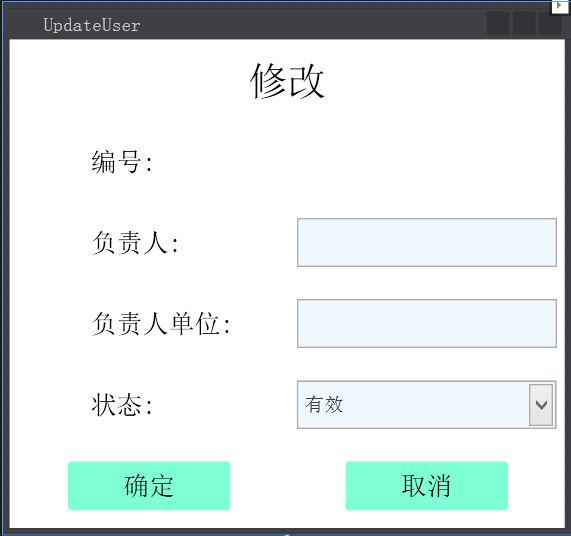
这个窗体的XAML:
<Window x:Class="WpfAppFirst.UpdateUser"

        xmlns="http://schemas.microsoft.com/winfx/2006/xaml/presentation"

        xmlns:x="http://schemas.microsoft.com/winfx/2006/xaml"

        xmlns:d="http://schemas.microsoft.com/expression/blend/2008"

        xmlns:mc="http://schemas.openxmlformats.org/markup-compatibility/2006"

        xmlns:local="clr-namespace:WpfAppFirst"

        mc:Ignorable="d"

        Title="UpdateUser" Height="327.988" Width="349.854" Loaded="Window_Loaded">

    <Grid>

        <Grid.ColumnDefinitions>

            <ColumnDefinition Width="*"/>

            <ColumnDefinition Width="*"/>

        </Grid.ColumnDefinitions>

        <Grid.RowDefinitions>

            <RowDefinition Height="*"/>

            <RowDefinition Height="*"/>

            <RowDefinition Height="*"/>

            <RowDefinition Height="*"/>

            <RowDefinition Height="*"/>

            <RowDefinition Height="*"/>

        </Grid.RowDefinitions>

        <Border Grid.ColumnSpan="2">

            <Label Content="修改" Foreground="#000" FontSize="24" VerticalContentAlignment="Center" HorizontalContentAlignment="Center"></Label>

        </Border>

        <Border Grid.Row="1" Grid.ColumnSpan="2">

            <Label Content="编号:" FontSize="16" Foreground="#000" VerticalContentAlignment="Center" Padding="50,0,0,0"></Label>

        </Border>

        <Border Grid.Row="1" Grid.Column="1" Grid.ColumnSpan="2">

            <Label x:Name="Ids" FontSize="14" Foreground="#000" VerticalContentAlignment="Center" HorizontalContentAlignment="Center"></Label>

        </Border>

        <Border Grid.Row="2" Grid.ColumnSpan="2">

            <Label Content="负责人:" FontSize="16" Foreground="#000" VerticalContentAlignment="Center" Padding="50,0,0,0"></Label>

        </Border>

        <Border Grid.Row="2" Grid.Column="1" Grid.ColumnSpan="2">

            <TextBox x:Name="UName" Background="AliceBlue" Height="30" Width="160"></TextBox>

        </Border>

        <Border Grid.Row="3" Grid.ColumnSpan="2">

            <Label Content="负责人单位:" FontSize="16" Foreground="#000" VerticalContentAlignment="Center" Padding="50,0,0,0"></Label>

        </Border>

        <Border Grid.Row="3" Grid.Column="1" Grid.ColumnSpan="2">

            <TextBox x:Name="UCompany" Background="AliceBlue" Height="30" Width="160"></TextBox>

        </Border>

        <Border Grid.Row="4" Grid.ColumnSpan="2">

            <Label Content="状态:" FontSize="16" Foreground="#000" VerticalContentAlignment="Center" Padding="50,0,0,0"></Label>

        </Border>

        <Border Grid.Row="4" Grid.Column="1" Grid.ColumnSpan="2">

            <ComboBox x:Name="UIsDelete" Background="AliceBlue" Height="30" Width="160">

                <ComboBoxItem IsSelected="True">有效</ComboBoxItem>

                <ComboBoxItem>无效</ComboBoxItem>

            </ComboBox>

        </Border>

        <Border Grid.Row="5" Grid.ColumnSpan="1">

            <Border Background="Aquamarine" CornerRadius="2,2,2,2" Width="100" Height="30" Cursor="Hand" MouseLeftButtonDown="Border_MouseLeftButtonDown">

                <Label Content="确定" FontSize="16" Foreground="#000" VerticalContentAlignment="Center" HorizontalContentAlignment="Center"></Label>

            </Border>

        </Border>

        <Border Grid.Row="5" Grid.Column="5" Grid.ColumnSpan="1">

            <Border Background="Aquamarine" CornerRadius="2,2,2,2" Width="100" Height="30" Cursor="Hand" MouseLeftButtonDown="Border_MouseLeftButtonDown_1">

                <Label Content="取消" FontSize="16" Foreground="#000" VerticalContentAlignment="Center" HorizontalContentAlignment="Center"></Label>

            </Border>

        </Border>

    </Grid>

</Window>
然后后台隐藏代码:
using ExerciseModel;

using System;

using System.Collections.Generic;

using System.Data;

using System.Data.OleDb;

using System.Linq;

using System.Text;

using System.Threading.Tasks;

using System.Windows;

using System.Windows.Controls;

using System.Windows.Data;

using System.Windows.Documents;

using System.Windows.Input;

using System.Windows.Media;

using System.Windows.Media.Imaging;

using System.Windows.Shapes;

namespace WpfAppFirst

{

    /// <summary>

    /// UpdateUser.xaml 的交互逻辑

    /// </summary>

    public partial class UpdateUser : Window

    {

        public UpdateUser()

        {

            InitializeComponent();

        }

        #region 连接开关

        OleDbConnection conn = new OleDbConnection("Provider=Microsoft.Jet.OLEDB.4.0;Data Source=D:\\用户目录\\我的文档\\Access\\Organization.mdb"); //Jet OLEDB:Database Password=

        public void ConnOpen()

        {

            if (conn.State == System.Data.ConnectionState.Closed)

            {

                conn.Open();

            }

        }

        public void ConnClose()

        {

            if (conn.State == System.Data.ConnectionState.Open)

            {

                conn.Close();

            }

        }

        #endregion

        private void UUser(string Name, string Company, bool IsDelete, int Id)

        {

            try

            {

                ConnOpen();

                string strSql = string.Format("update Users set Name='{0}',Company='{1}',IsDelete={2} where Id={3}", Name, Company, IsDelete, Id);

                OleDbCommand cmd = new OleDbCommand(strSql, conn);

                int a = cmd.ExecuteNonQuery();

                ConnClose();

                if (a > )

                {

                    MessageBox.Show("已修改");

                }

            }

            catch (Exception ex)

            {

                MessageBox.Show(ex.Message);

            }

        }

        #region 查询

        public DataTable SelectUser(int id)

        {

            OleDbCommand cmd = conn.CreateCommand();

            string sql = string.Format("select * from Users where id={0}", id);

            cmd.CommandText = sql;

            ConnOpen();

            OleDbDataReader dr = cmd.ExecuteReader();

            DataTable dt = new DataTable();

            if (dr.HasRows)

            {

                for (int i = ; i < dr.FieldCount; i++)

                {

                    dt.Columns.Add(dr.GetName(i));

                }

                dt.Rows.Clear();

            }

            while (dr.Read())

            {

                DataRow row = dt.NewRow();

                for (int i = ; i < dr.FieldCount; i++)

                {

                    row[i] = dr[i];

                }

                dt.Rows.Add(row);

            }

            cmd.Dispose();

            ConnClose();

            return dt;

            //List<Users1> lus1 = new List<Users1>();

            //for (int i = 0; i < dt.Rows.Count; i++)

            //{

            //    lus1.Add(new Users1 { Id = Convert.ToInt32(dt.Rows[i][0]), Name = dt.Rows[i][1].ToString(), Company = dt.Rows[i][2].ToString(), IsDelete = Convert.ToBoolean(dt.Rows[i][3]) });

            //}

        }

        #endregion

        /// <summary>

        /// 修改

        /// </summary>

        /// <param name="sender"></param>

        /// <param name="e"></param>

        private void Border_MouseLeftButtonDown(object sender, MouseButtonEventArgs e)

        {

            bool bl = false;

            if (this.UIsDelete.Text == "有效")

                bl = true;

            UUser(this.UName.Text, this.UCompany.Text, bl, Convert.ToInt32(this.Ids.Content));

        }

        /// <summary>

        /// 取消

        /// </summary>

        /// <param name="sender"></param>

        /// <param name="e"></param>

        private void Border_MouseLeftButtonDown_1(object sender, MouseButtonEventArgs e)

        {

            this.Close();

        }

        private void Window_Loaded(object sender, RoutedEventArgs e)

        {

            var sour = SelectUser(Convert.ToInt32(this.Ids.Content));

            this.UName.Text = sour.Rows[]["Name"].ToString();

            this.UCompany.Text = sour.Rows[]["Company"].ToString();

            this.UIsDelete.SelectedItem = sour.Rows[]["IsDelete"].ToString();

        }

    }

}
WPF DataGrid 数据绑定、样式、分页、增删改查,连接Access数据库的更多相关文章
- bootstrap-table 分页增删改查之一(分页)
记录一下 bootstrap-table插件的使用 先看下效果图 首先是导入js <!--js jquery --> <script type="text/javascri ...
- bootstrap-table 分页增删改查之一(增加 删除)
先上效果图 引入js文件 <!--js jquery --> <script type="text/javascript" src="${pageCon ...
- TP5.1:数据库的增删改查操作(基于数据库操作)
1.在app/index/controller文件夹下创建一个文件,名为:Operation 注意:起名一定要避开关键字,例如:mysql,curd等等,如果使用关键字起名,会造成报错! 在Opera ...
- 数据库Dao层编增删改查写,数据库事务,数据库升级
数据库事务 有两个特点 1.安全性 情景:正常的转账行为,这个时候如果出现停电等异常,已经扣钱但是没有加钱:这个时候就可用数据库事务解决问题 2.高效性: 使用数据库事务添加享受同数量的数据,对比耗时 ...
- MySQL_02之增删改查、PHP数据库操作
1.数据操作: ①插入记录: 插入单条记录:INSERT tbl_name(字段名称,--) VALUES(字段值,--); 插入多条记录:INSERT tbl_name(字段名称,--) VAL ...
- GZFramwork数据库层《四》单据主从表增删改查
同GZFramwork数据库层<三>普通主从表增删改查 不同之处在于:实例 修改为: 直接上效果: 本系列项目源码下载地址:https://github.com/GarsonZhang/G ...
- GZFramwork数据库层《三》普通主从表增删改查
运行结果: 使用代码生成器(GZCodeGenerate)生成tb_Cusomer和tb_CusomerDetail的Model 生成器源代码下载地址: https://github.com/Gars ...
- GZFramwork数据库层《二》单据表增删改查(自动生成单据号码)
运行效果: 使用代码生成器(GZCodeGenerate)生成tb_EmpLeave的Model 生成器源代码下载地址: https://github.com/GarsonZhang/GZCodeGe ...
- GZFramwork数据库层《一》普通表增删改查
运行结果: 使用代码生成器(GZCodeGenerate)生成tb_MyUser的Model 生成器源代码下载地址: https://github.com/GarsonZhang/GZCode ...
- MVC——数据库增删改查(aspx)
MVC: V(View) :视图→就是页面的模板 C(Control): 控制器→客户主要面对的就是控制器, M(Model):模板→在模板里面主要就是写关于数据库的各种增删改查的方法 它们之间的关系 ...
随机推荐
- golang channel几点总结
golang提倡使用通讯来共享数据,而不是通过共享数据来通讯.channel就是golang这种方式的体现. Channel 在golang中有两种channel:带缓存的和不带缓存. 带缓存的cha ...
- Spring Cloud(Dalston.SR5)--Eureka 服务提供者
要使微服务应用向注册中心发布自己,首先需要在 pom.xml 配置文件中增加对 spring-boot-starter-eureka 的依赖,然后在主类中增加 @EnableDiscoveryClie ...
- java强制删除文件机制
//启动资源强制回收机制 System.gc(); 然后就可以删除了
- java小程序(课堂作业06)
编写一个程序,此程序在运行时要求用户输入一个 整数,代表某门课的考试成绩,程序接着给出“不及格”.“及格”.“中”.“良”.“优”的结论. 要求程序必须具备足够的健壮性,不管用户输入什 么样的内容,都 ...
- TCP/UDP端口列表(WIKIpedia)
计算机之间依照互联网传输层TCP/IP协议不同的协议通信,都有不同的对应端口.所以,利用短信(datagram)的UDP,所采用的端口号码不一定和采用TCP的端口号码一样.以下为两种通信协议的端口列表 ...
- 苹果cms测试
配置好权限,搞了半天,一直以为是容器镜像的问题 sudo chgrp -hR www-data maccms10 启动容器 docker run --rm -d --network=isolated_ ...
- Maven编译错误记录:Some Enforcer rules have failed
一.错误信息 添加httpclient与httpcore依赖后编译Maven报错. 错误信息如下: Failed to execute goal org.apache.maven.plugins:ma ...
- C#连接Access数据库显示未在本地计算机注册解决方法
C#连接数据库时会出错 语句如下 string mystr = @"Provider=Microsoft.ACE.OLEDB.12.0; Data Source=C:\Users\hasee ...
- Node.js 搭建HTTP服务器,提供文件下载
直接上代码,这是第一版,可以判断扩展名 var http = require('http'); var express = require('express'); var fs=require(&qu ...
- ServiceLoader
先从业务场景分析,要完成数据的分析处理功能.根据数据的不同种类,先调用groovy或者python脚本等中的一种处理数据,处理完数据的后需要流程相同. 要支持处理能力的动态扩展,也就是框架完成后,可以 ...