
Python常用模块-时间模块(time&datetime)
Python常用模块-时间模块(time & datetime)
作者:尹正杰
版权声明:原创作品,谢绝转载!否则将追究法律责任。
一.初始time模块
 #!/usr/bin/env python

 #_*_coding:utf-8_*_

 #@author :yinzhengjie

 #blog:http://www.cnblogs.com/yinzhengjie/tag/python%E8%87%AA%E5%8A%A8%E5%8C%96%E8%BF%90%E7%BB%B4%E4%B9%8B%E8%B7%AF/

 #EMAIL:y1053419035@qq.com

 import time

 """"

 模块的分类:

     模块本质就是一个“*.py”文件,大致分为以下三类:

         1>.内置模块,指的是存在Python解释器内部的模块,如time模块;

         2>>第三方模块,指的是安装好Python后的lib文件夹中的模块;

         3>.自定义模块,指的是你自己写的Python程序;

 """

 print(time.time())      #返回当前的时间戳,表示从1971年1月1日"00:00:00"到此刻时间节点的秒数。

 s = time.localtime()    #创建一个时间对象,也可以说是在结构化时间对象,返回本地时间的struct_time对象格式。

 print(s)

 print(s.tm_year)        #获取年份。

 print(s.tm_mon)         #获取月份。

 s2 = time.gmtime()      #返回utc时间的struc时间对象格式。

 print(s2)

 #以上代码执行结果如下:

 1520176127.9244497

 time.struct_time(tm_year=2018, tm_mon=3, tm_mday=4, tm_hour=23, tm_min=8, tm_sec=47, tm_wday=6, tm_yday=63, tm_isdst=0)

 2018

 3

 time.struct_time(tm_year=2018, tm_mon=3, tm_mday=4, tm_hour=15, tm_min=8, tm_sec=47, tm_wday=6, tm_yday=63, tm_isdst=0)
二.时间模块的相互转换
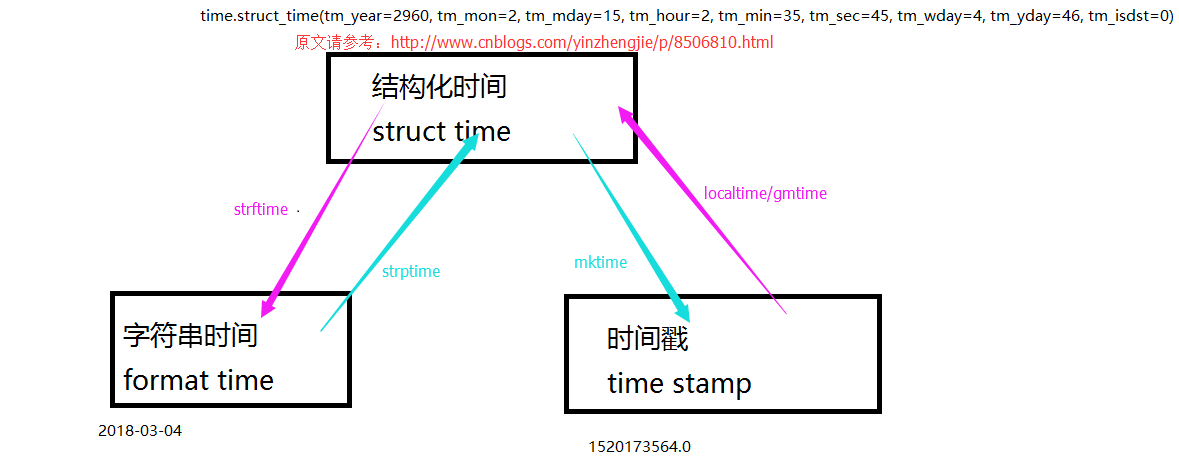
1.转换助记图
2.案例展示
 #!/usr/bin/env python

 #_*_coding:utf-8_*_

 #@author :yinzhengjie

 #blog:http://www.cnblogs.com/yinzhengjie/tag/python%E8%87%AA%E5%8A%A8%E5%8C%96%E8%BF%90%E7%BB%B4%E4%B9%8B%E8%B7%AF/

 #EMAIL:y1053419035@qq.com

 import time

 s = time.localtime(31245244545)                         #结构化时间对象,可以将时间戳转换成结构化时间。

 print(s)

 s2 = time.mktime(time.localtime())                      #将结构化时间转换成时间戳。

 print(s2)

 s3 = time.strftime("%Y-%m-%d",time.localtime())        #将结构化时间转换成字符串时间。

 print(s3)

 s4 = time.strptime("1993:05:19","%Y:%m:%d")         #将字符串时间转换成结构化时间。

 print(s4)

 #以上代码执行结果如下:

 time.struct_time(tm_year=2960, tm_mon=2, tm_mday=15, tm_hour=2, tm_min=35, tm_sec=45, tm_wday=4, tm_yday=46, tm_isdst=0)

 1520176194.0

 2018-03-04

 time.struct_time(tm_year=1993, tm_mon=5, tm_mday=19, tm_hour=0, tm_min=0, tm_sec=0, tm_wday=2, tm_yday=139, tm_isdst=-1)
三.time扩充
 #!/usr/bin/env python

 #_*_coding:utf-8_*_

 #@author :yinzhengjie

 #blog:http://www.cnblogs.com/yinzhengjie/tag/python%E8%87%AA%E5%8A%A8%E5%8C%96%E8%BF%90%E7%BB%B4%E4%B9%8B%E8%B7%AF/

 #EMAIL:y1053419035@qq.com

 import time

 print(time.asctime(time.localtime()))           #将结构化时间转换成字符串时间。

 print(time.ctime(565656446))                    #将时间戳转换成字符串时间。

 time.sleep(2)                                   #让程序暂停2秒钟,用于模拟I/O阻塞,并不占用CPU资源。

 #以上代码执行结果如下:

 Sun Mar  4 23:11:16 2018

 Sat Dec  5 06:47:26 1987
四.time模块小试牛刀
 #!/usr/bin/env python

 #_*_coding:utf-8_*_

 #@author :yinzhengjie

 #blog:http://www.cnblogs.com/yinzhengjie/tag/python%E8%87%AA%E5%8A%A8%E5%8C%96%E8%BF%90%E7%BB%B4%E4%B9%8B%E8%B7%AF/

 #EMAIL:y1053419035@qq.com

 import time

 s = "2018-03-04"

 def ChangeTime(string,number,format="%Y-%m-%d"):

     StructTime = time.strptime(string,format )

     print(StructTime)

     StampTime = time.mktime(StructTime)

     print(StampTime)

     NewStamp = StampTime + 3600 * 24 * number

     NewStringTime = time.strftime(format, time.localtime(NewStamp))

     print(NewStringTime)

 ChangeTime(s,3)     #推算3日后的时间

 #以上代码执行结果如下:

 time.struct_time(tm_year=2018, tm_mon=3, tm_mday=4, tm_hour=0, tm_min=0, tm_sec=0, tm_wday=6, tm_yday=63, tm_isdst=-1)

 1520092800.0

 2018-03-07
五.datetime介绍
 #!/usr/bin/env python

 #_*_coding:utf-8_*_

 #@author :yinzhengjie

 #blog:http://www.cnblogs.com/yinzhengjie/tag/python%E8%87%AA%E5%8A%A8%E5%8C%96%E8%BF%90%E7%BB%B4%E4%B9%8B%E8%B7%AF/

 #EMAIL:y1053419035@qq.com

 import time,datetime

 print(datetime.datetime.now())                                  #打印当前系统时间

 print(datetime.date.fromtimestamp(time.time()))                 #时间戳直接转成日期格式如:2018-03-04

 print(datetime.datetime.now() + datetime.timedelta(3))          #当前时间+3天

 print(datetime.datetime.now() + datetime.timedelta(-3))         #当前时间-3天

 print(datetime.datetime.now() + datetime.timedelta(hours=3))    #当前时间+3小时

 print(datetime.datetime.now() + datetime.timedelta(minutes=30)) #当前时间+30分

 c_time  = datetime.datetime.now()

 print(c_time.replace(minute=3,hour=2))                          ##时间替换

 #以上代码执行结果如下:

 2018-03-04 23:12:13.477416

 2018-03-04

 2018-03-07 23:12:13.477416

 2018-03-01 23:12:13.477416

 2018-03-05 02:12:13.477416

 2018-03-04 23:42:13.477416

 2018-03-04 02:03:13.477416
六.关于格式化参数的详细说明
| Directive | Meaning | Notes |
|---|---|---|
%a |
Locale’s abbreviated weekday name. | |
%A |
Locale’s full weekday name. | |
%b |
Locale’s abbreviated month name. | |
%B |
Locale’s full month name. | |
%c |
Locale’s appropriate date and time representation. | |
%d |
Day of the month as a decimal number [01,31]. | |
%H |
Hour (24-hour clock) as a decimal number [00,23]. | |
%I |
Hour (12-hour clock) as a decimal number [01,12]. | |
%j |
Day of the year as a decimal number [001,366]. | |
%m |
Month as a decimal number [01,12]. | |
%M |
Minute as a decimal number [00,59]. | |
%p |
Locale’s equivalent of either AM or PM. | (1) |
%S |
Second as a decimal number [00,61]. | (2) |
%U |
Week number of the year (Sunday as the first day of the week) as a decimal number [00,53]. All days in a new year preceding the first Sunday are considered to be in week 0. | (3) |
%w |
Weekday as a decimal number [0(Sunday),6]. | |
%W |
Week number of the year (Monday as the first day of the week) as a decimal number [00,53]. All days in a new year preceding the first Monday are considered to be in week 0. | (3) |
%x |
Locale’s appropriate date representation. | |
%X |
Locale’s appropriate time representation. | |
%y |
Year without century as a decimal number [00,99]. | |
%Y |
Year with century as a decimal number. | |
%z |
Time zone offset indicating a positive or negative time difference from UTC/GMT of the form +HHMM or -HHMM, where H represents decimal hour digits and M represents decimal minute digits [-23:59, +23:59]. | |
%Z |
Time zone name (no characters if no time zone exists). | |
%% |
A literal '%' character. |
Python常用模块-时间模块(time&datetime)的更多相关文章
- Python常用内建模块
Python常用内建模块 datetime 处理日期和时间的标准库. 注意到datetime是模块,datetime模块还包含一个datetime类,通过from datetime import da ...
- 模块-时间模块(new)
模块-时间模块 导入: import time 方法: _STRUCT_TM_ITEMS __doc__ __loader__ __name__ __package__ __spec__ altzon ...
- Python 中的时间处理包datetime和arrow
Python 中的时间处理包datetime和arrow 在获取贝壳分的时候用到了时间处理函数,想要获取上个月时间包括年.月.日等 # 方法一: today = datetime.date.today ...
- Python常用模块-时间模块
在写代码的过程中,我们常常需要与时间打交道,在python中,与时间处理有关的模块有time,datetime和calendar.,这里主要介绍time和datetime模块 在python中,表示时 ...
- python内建时间模块 time和datetime
时间模块 UTC(Coordinated Universal Time,世界协调时)亦即格林威治天文时间,世界标准时间.在中国为UTC+8.DST(Daylight Saving Time)即夏令时. ...
- python常用内建模块——datetime
datetime是python处理日期和时间的标准库. 获取当前日期和时间 >>>from datetime import datetime >>>now = da ...
- python常用内建模块--datetime
datetime模块中的datetime类: 获取当前时间:datetime.now() 当前操作系统时区时间,date.utctime(UTC时间) 转换成时间戳:timestamp() 和具体时区 ...
- python常用函数及模块
原文来源于博客园和CSDN 1.计算函数 abs()--取绝对值 max()--取序列最大值,包括列表.元组 min()--取序列最小值 len()--取长度 divmod(a,b)---取a//b除 ...
- python的time时间模块
模块概述 1.一个.py文件就是一个模块 2.通过import语句在一个模块中导入另一个模块,import sys,print (sys.path),sys.path的结果为一个列表,列表的第一个元素 ...
随机推荐
- 工具神器推荐 Vox 和 search everything
工具神器推荐 Vox 和 search everything vox官网: http://www.wox.one/
- C# 基于泛型的自定义线性节点链表集合示例
本例子实现了如何自定义线性节点集合,具体代码如下: using System; using System.Collections; using System.Collections.Generic; ...
- .Net-C#异步程序知识点梳理
:first-child{margin-top:0!important}.markdown-body>:last-child{margin-bottom:0!important}.markdow ...
- c++ Arx二次开发创建椭圆和样条曲线
一.本节课程 c++ Arx二次开发创建椭圆和样条曲线 二.本节要讲解的知识点 1.如何应用C++ ARX二次开发创建椭圆(对AcDbEllipse类的构造函数的直接封装和根据外接矩形来创建椭圆) 2 ...
- 现已告别五险一金?迎来社保商保时代保险INSURAUNCE
现已告别五险一金?迎来社保商保时代保险INSURAUNCE 经济工作会议提出,中国要降低社会保险费,研究精简归并"五险一金",可以说是为社保变革指明了大方向.未来,生育保险将与基本 ...
- Hadoop版本的选择问题
自从2013年下半年开始,hadoop的版本开始了快速的更新换代,这和通信和互联网行业(ICT)的发展是密切相关的.随着移动网络的和宽带网络的覆盖以及数据传输速率的提升,线上的数据有了爆炸式的增长.这 ...
- Docker swarm集群搭建教程
一.什么是Swarm Swarm这个项目名称特别贴切.在Wiki的解释中,Swarm behavior是指动物的群集行为.比如我们常见的蜂群,鱼群,秋天往南飞的雁群都可以称作Swarm behavio ...
- 机器学习1—简介及Python机器学习环境搭建
简介 前置声明:本专栏的所有文章皆为本人学习时所做笔记而整理成篇,转载需授权且需注明文章来源,禁止商业用途,仅供学习交流.(欢迎大家提供宝贵的意见,共同进步) 正文: 机器学习,顾名思义,就是研究计算 ...
- Google I/O 2018大会小结
Google I/O 2018大会于北京时间5月9日凌晨1点,在美国山景城Shoreline Amphitheatre(圆形剧场)举办.看了一下录播,字幕延迟,全程靠听,下面对上午的主会进行一个小结. ...
- 互联网寒冬,Python 程序员如何准备面试
虽说年年都在喊互联网寒冬,最难就业季,但是今年确实有点不一样,年前年后一波又一波互联网公司宣布『人员调整,结构优化』, 这是往年没发生过的. 是不是面试机会就少了很多呢?不是的. 搜索招聘网站我们可以 ...