
【Devops】【docker】【CI/CD】jenkins源码管理,添加SSH地址后报错+Jenkins构建报错:Please make sure you have the correct access rights and the repository exists.
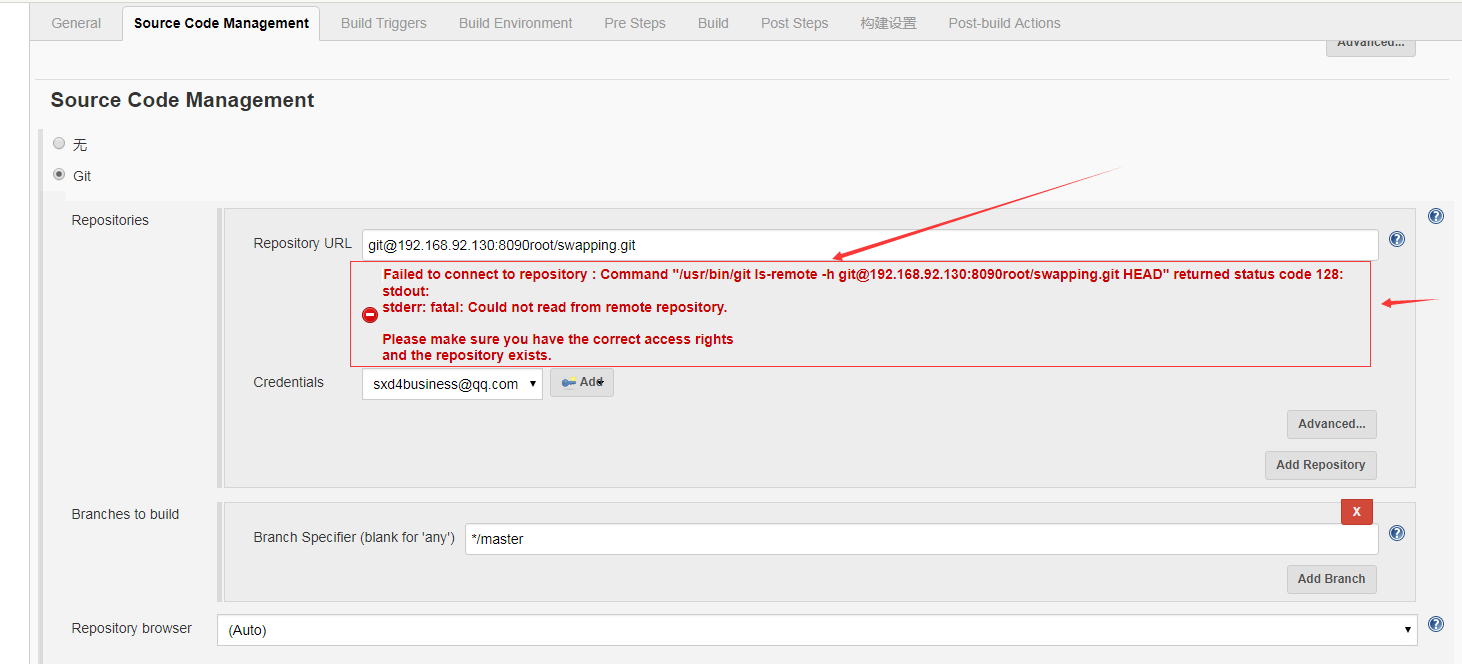
jenkins源码管理,添加SSH地址后报错:
Could not read from remote repository.
Please make sure you have the correct access rights and the repository exists.
有的在使用SSH地址,在jenkins上拉取Gitlab上的项目,可能会报错:
这是刚添加完gitlab地址,就报的错。
也有可能此时没有报错,但是在进行jenkins构建的时候,报错:
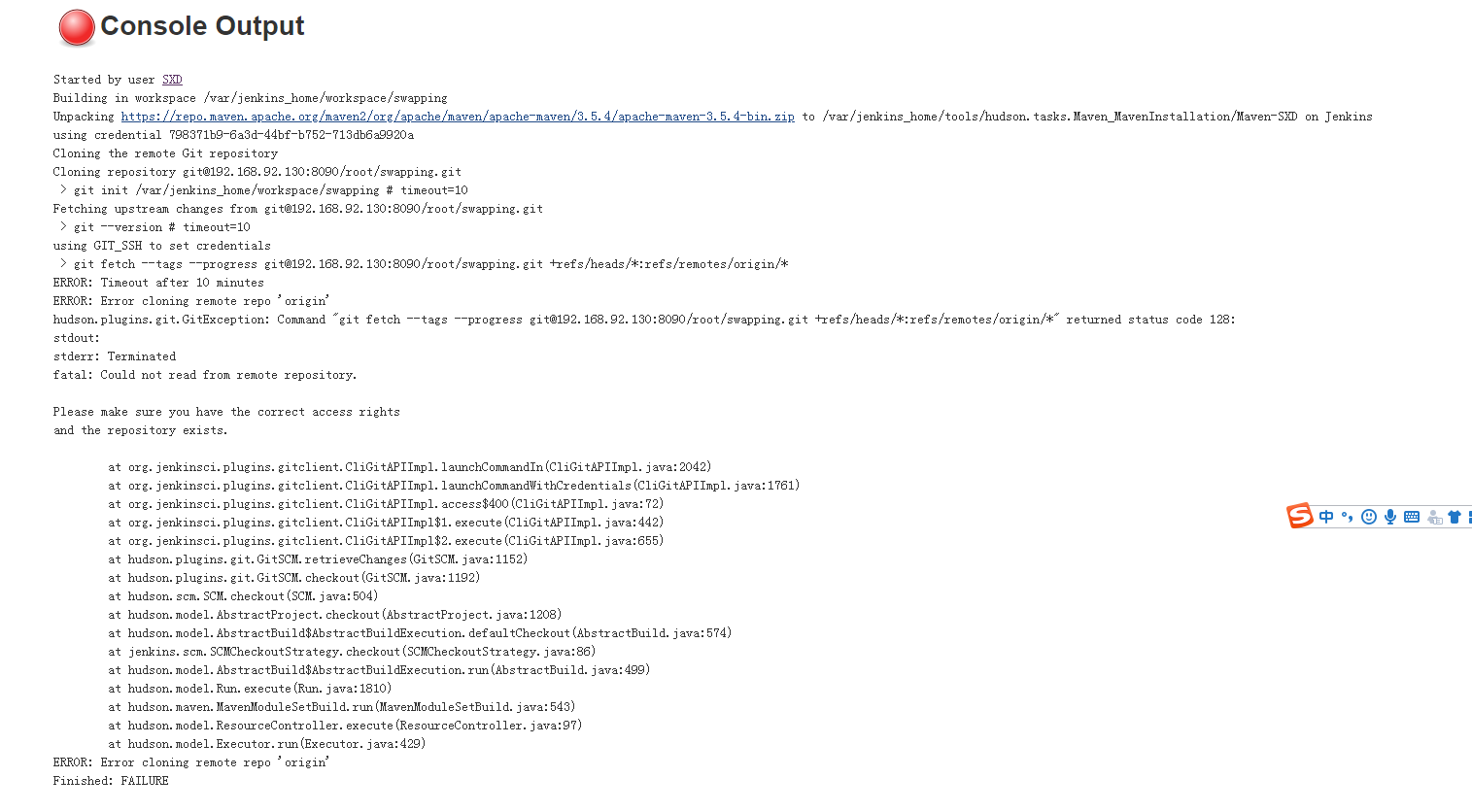
Started by GitLab push by AngelSXD

Started by GitLab push by AngelSXD

Building in workspace /var/jenkins_home/workspace/swapping

using credential 798371b9-6a3d-44bf-b752-713db6a9920a

Cloning the remote Git repository

Cloning repository git@192.168.92.130:8090/root/swapping.git

 > /usr/bin/git init /var/jenkins_home/workspace/swapping # timeout=10

Fetching upstream changes from git@192.168.92.130:8090/root/swapping.git

 > /usr/bin/git --version # timeout=10

using GIT_SSH to set credentials

 > /usr/bin/git fetch --tags --progress git@192.168.92.130:8090/root/swapping.git +refs/heads/*:refs/remotes/origin/*

ERROR: Timeout after 10 minutes

ERROR: Error cloning remote repo 'origin'

hudson.plugins.git.GitException: Command "/usr/bin/git fetch --tags --progress git@192.168.92.130:8090/root/swapping.git +refs/heads/*:refs/remotes/origin/*" returned status code 128:

stdout:

stderr: Terminated

fatal: Could not read from remote repository.

Please make sure you have the correct access rights

and the repository exists.

    at org.jenkinsci.plugins.gitclient.CliGitAPIImpl.launchCommandIn(CliGitAPIImpl.java:2042)

    at org.jenkinsci.plugins.gitclient.CliGitAPIImpl.launchCommandWithCredentials(CliGitAPIImpl.java:1761)

    at org.jenkinsci.plugins.gitclient.CliGitAPIImpl.access$400(CliGitAPIImpl.java:72)

    at org.jenkinsci.plugins.gitclient.CliGitAPIImpl$1.execute(CliGitAPIImpl.java:442)

    at org.jenkinsci.plugins.gitclient.CliGitAPIImpl$2.execute(CliGitAPIImpl.java:655)

    at hudson.plugins.git.GitSCM.retrieveChanges(GitSCM.java:1152)

    at hudson.plugins.git.GitSCM.checkout(GitSCM.java:1192)

    at hudson.scm.SCM.checkout(SCM.java:504)

    at hudson.model.AbstractProject.checkout(AbstractProject.java:1208)

    at hudson.model.AbstractBuild$AbstractBuildExecution.defaultCheckout(AbstractBuild.java:574)

    at jenkins.scm.SCMCheckoutStrategy.checkout(SCMCheckoutStrategy.java:86)

    at hudson.model.AbstractBuild$AbstractBuildExecution.run(AbstractBuild.java:499)

    at hudson.model.Run.execute(Run.java:1810)

    at hudson.maven.MavenModuleSetBuild.run(MavenModuleSetBuild.java:543)

    at hudson.model.ResourceController.execute(ResourceController.java:97)

    at hudson.model.Executor.run(Executor.java:429)

ERROR: Error cloning remote repo 'origin'

Finished: FAILURE
解决方法:
1.gitlab上拉取地址正确无误
2.各个必要的插件都安装成功
在确保了上面两点都无误的情况下,可以改用Http地址去clone项目!!!!!!!
【Devops】【docker】【CI/CD】jenkins源码管理,添加SSH地址后报错+Jenkins构建报错:Please make sure you have the correct access rights and the repository exists.的更多相关文章
- 【Devops】【docker】【CI/CD】Jenkins源码管理,设置gitlab上项目的clone地址 + jenkins构建报错:Please make sure you have the correct access rights and the repository exists.
注意,如果 jenkins构建报错:Please make sure you have the correct access rights and the repository exists. 而此时 ...
- jenkins源码管理git分支参数化
多个分支来回切换构建时,每次都需要去很多个job里面改分支名称,比较费时,分支参数化后可以只改一处就ok啦 步骤: 1.进入系统管理--系统设置 2.勾选全局变量,然后输入分支变量名和对应的分支名称 ...
- Docker:pipeline编写基本技巧- jenkins配置通过免交互方式拉取git源码管理仓库的代码
工作中,从git仓库拉取代码有2种方式:交互式和非交互式 什么是交互式?就是拉取需要权限才能访问的代码时,需要输入密码 免交互式呢? 是通过密钥,私钥的方式,让服务端信任客户端,产生信任后,任何一次客 ...
- 【Devops】【docker】【CI/CD】Jenkins自动安装JDK需要提供Oracle的账号密码,否则报错:Unable ro auto-install JDK until the license is accepted
Jenkins自动安装JDK需要提供Oracle的账号密码,否则报错:Unable ro auto-install JDK until the license is accepted 解决方法: ...
- Jenkins新建项目中源码管理Repository URL使用Git报错:Failed to connect to repository : Command "git ls-remote -h......
之前部署了Gitlab+Gerrit+Jenkins持续集成环境,但在Jenkins中新建项目的源码管理"Repository URL"中添加git地址环节出现了问题,信息为&qu ...
- jenkins配置源码管理git
一.首先安装上来jenkins 二.下载安装jenkins的git插件:Git plugin 三.新建一个jenkins项目,选择构建一个自由风格的软件项目: 源码管理选择git,Repository ...
- jenkins持续集成源码管理选项为None,构建失败找不到git.exe解决办法
我的jenkins版本为Jenkins ver. 2.19.1 1.源码管理选项只有None的解决办法: 在插件管理中心,搜索对应的源码管理插件这里以git为例,搜索git plugin点击右下角的安 ...
- 【Linux】Jenkins+Git源码管理(三)
摘要 本章介绍Jenkins配合Git源码管理,关于Jenkins的基本操作,参照[Linux]Jenkins配置和使用(二) 事例说明:在linux环境下,安装的jenkins,已安装git. 代码 ...
- CI Weekly #6 | 再谈 Docker / CI / CD 实践经验
CI Weekly 围绕『 软件工程效率提升』 进行一系列技术内容分享,包括国内外持续集成.持续交付,持续部署.自动化测试. DevOps 等实践教程.工具与资源,以及一些工程师文化相关的程序员 Ti ...
随机推荐
- wpf 查找children的方法
var newValue = (bool)args.NewValue; HZWaitLoadingEx source = (HZWaitLoadingEx)sender; ControlTemplat ...
- Android 插件化 开发
插件化知识详细分解及原理 之Binder机制https://blog.csdn.net/yulong0809/article/details/56841993 插件化知识详细分解及原理 之代理,hoo ...
- Mysql中count(*)和limit同时使用的问题
1.带有count的sql语句只会返回一条记录 , 结果如下图: 2.带有limit的sql语句是最后执行的 , 以上sql语句将返回空行,因为count(*)只会使sql语句产生一条结果记录,所以后 ...
- ModelDriven 和 Preparable 拦截器
Params 拦截器 Parameters 拦截器将把表单字段映射到 ValueStack 栈的栈顶对象的各个属性中. 如果某个字段在模型里没有匹配的属性, Param 拦截器将尝试 ValueSta ...
- 全局查询文件linux
在工作中,可能突然需要找到某个文件,这个又不知道,需要全局查询一下. 下面是命令行: find / -name "*.log" | xargs grep "elk&quo ...
- INSTALL_FAILED_CONFLICTING_PROVIDER
主要是由于调试的环境中已有一个同名的Provider存在. 解决方法是修改AndroidManifest.xml中的 <provider android:name=".apps.App ...
- BZOJ.2938.[POI2000]病毒(AC自动机)
题目链接 \(Description\) 给n个模式串,问是否存在长度无限的主串,使得任何一个模式串都没有在主串中出现. \(Solution\) 先建AC自动机. 假设我们有了一个无限长的安全代码, ...
- Codeforces.997C.Sky Full of Stars(容斥 计数)
题目链接 那场完整的Div2(Div1 ABC)在这儿.. \(Description\) 给定\(n(n\leq 10^6)\),用三种颜色染有\(n\times n\)个格子的矩形,求至少有一行或 ...
- Develop with asyncio部分的翻译
Develop with asyncio 异步程序和普通的连续程序(也就是同步程序)是很不一样的,这里会列出一些常见的陷阱,并介绍如何去避开他们. Debug mode of asyncio 我们用a ...
- [Java]如何把当前时间插入到数据库
[Java]如何把当前时间插入到数据库 1.在orderDao.java中 /** 设置订单*/ public void setOrder(Order order){ Date time = new ...