
android131 360 02 设置中心
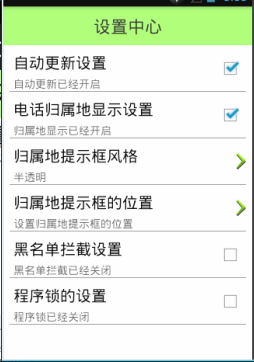
// 判断是否需要自动更新

        boolean autoUpdate = mPref.getBoolean("auto_update", true);

        if (autoUpdate) {

            checkVerson();

        } else {

            mHandler.sendEmptyMessageDelayed(CODE_ENTER_HOME, );// 延时2秒后发送消息

        }

        // 渐变的动画效果

        AlphaAnimation anim = new AlphaAnimation(0.3f, 1f);//透明度从0.3到1

        anim.setDuration();//延迟时间是2秒

        rlRoot.startAnimation(anim);//rlRoot是闪屏页xml的根布局
SettingActivity.java
package com.itheima52.mobilesafe.activity;

import android.app.Activity;

import android.content.SharedPreferences;

import android.os.Bundle;

import android.view.View;

import android.view.View.OnClickListener;

import com.itheima52.mobilesafe.R;

import com.itheima52.mobilesafe.view.SettingItemView;

/**

 * 设置中心

 */

public class SettingActivity extends Activity {

    private SettingItemView sivUpdate;// 设置升级

    private SharedPreferences mPref;

    @Override

    protected void onCreate(Bundle savedInstanceState) {

        super.onCreate(savedInstanceState);

        setContentView(R.layout.activity_setting);

        mPref = getSharedPreferences("config", MODE_PRIVATE);

        sivUpdate = (SettingItemView) findViewById(R.id.siv_update);

        // sivUpdate.setTitle("自动更新设置");

        boolean autoUpdate = mPref.getBoolean("auto_update", true);//是否自动更新,true是默认值。

        if (autoUpdate) {

            // sivUpdate.setDesc("自动更新已开启");

            sivUpdate.setChecked(true);

        } else {

            // sivUpdate.setDesc("自动更新已关闭");

            sivUpdate.setChecked(false);

        }

        sivUpdate.setOnClickListener(new OnClickListener() {

            @Override

            public void onClick(View v) {

                // 判断当前的勾选状态

                if (sivUpdate.isChecked()) {

                    // 设置不勾选

                    sivUpdate.setChecked(false);

                    // sivUpdate.setDesc("自动更新已关闭");

                    // 更新是否自动更新

                    mPref.edit().putBoolean("auto_update", false).commit();

                } else {

                    sivUpdate.setChecked(true);

                    // sivUpdate.setDesc("自动更新已开启");

                    // 更新是否自动更新

                    mPref.edit().putBoolean("auto_update", true).commit();

                }

            }

        });

    }

}
activity_setting.xml
<!--

    xmlns:android="http://schemas.android.com/apk/res/android"中的android是命名空间,

    xmlns:itheima="http://schemas.android.com/apk/res/com.itheima52.mobilesafe"中的itheima是命名空间,com.itheima52.mobilesafe是清单文件中的包名。

-->

<?xml version="1.0" encoding="utf-8"?>

<LinearLayout xmlns:android="http://schemas.android.com/apk/res/android"

    xmlns:itheima="http://schemas.android.com/apk/res/com.itheima52.mobilesafe"

    android:layout_width="match_parent"

    android:layout_height="match_parent"

    android:orientation="vertical" >

    <TextView

        style="@style/TitleStyle"

        android:text="设置中心" />

    <!--style.xml

        <style name="TitleStyle">

            <item name="android:layout_width">match_parent</item>

            <item name="android:layout_height">50dp</item>

            <item name="android:background">#8866ff00</item>

            <item name="android:gravity">center</item>

            <item name="android:textColor">@color/black</item>

            <item name="android:textSize">22sp</item>

        </style>

    -->

    <!-- 加载这个控件的时候会去调用SettingItemView的构造函数,

    调用构造函数的时候会去执行initView()方法加载R.layout.view_setting_item布局。 -->

    <com.itheima52.mobilesafe.view.SettingItemView

        android:id="@+id/siv_update"

        android:layout_width="match_parent"

        android:layout_height="wrap_content"

        itheima:desc_off="自动更新已关闭"

        itheima:desc_on="自动更新已开启"

        itheima:title="自动更新设置" />

<!--自定义属性,values文件夹下attrs.xml,SettingItemView相当于是一个TextView,下面是TextView的属性。

<?xml version="1.0" encoding="utf-8"?>

<resources>

    <declare-styleable name="SettingItemView">

        <attr name="title" format="string" />

        <attr name="desc_on" format="string" />

        <attr name="desc_off" format="string" />

    </declare-styleable>

</resources> -->

</LinearLayout>
自定义控件SettingItemView.java
package com.itheima52.mobilesafe.view;

import android.content.Context;

import android.util.AttributeSet;

import android.view.View;

import android.widget.CheckBox;

import android.widget.RelativeLayout;

import android.widget.TextView;

import com.itheima52.mobilesafe.R;

/**

 * 设置中心的自定义组合控件

 */

public class SettingItemView extends RelativeLayout {//RelativeLayout是一个ViewGroup也就是一个View的容器。

    //NAMESPACE是xmlns:itheima="http://schemas.android.com/apk/res/com.itheima52.mobilesafe"中itheima的位置。

    private static final String NAMESPACE = "http://schemas.android.com/apk/res/com.itheima52.mobilesafe";

    private TextView tvTitle;

    private TextView tvDesc;

    private CheckBox cbStatus;

    private String mTitle;

    private String mDescOn;

    private String mDescOff;

    //xml布局解析成java对象的时候有style走这个方法

    public SettingItemView(Context context, AttributeSet attrs, int defStyle) {

        super(context, attrs, defStyle);

        initView();

    }

    //xml布局解析成java对象的时候有属性走这个方法

    public SettingItemView(Context context, AttributeSet attrs) {

        super(context, attrs);

        mTitle = attrs.getAttributeValue(NAMESPACE, "title");// 根据属性名称,获取属性的值

        mDescOn = attrs.getAttributeValue(NAMESPACE, "desc_on");

        mDescOff = attrs.getAttributeValue(NAMESPACE, "desc_off");

        initView();

         int attributeCount = attrs.getAttributeCount();

         for (int i = 0; i < attributeCount; i++) {

             String attributeName = attrs.getAttributeName(i);

             String attributeValue = attrs.getAttributeValue(i);

             System.out.println(attributeName + "=" + attributeValue);

         }

    }

    //不通过xml布局用代码new走这个方法

    public SettingItemView(Context context) {

        super(context);

        initView();

    }

    /**

     * 初始化布局

     */

    private void initView() {

        // 将自定义好的布局文件设置给当前的SettingItemView,this将成为view_setting_item的父容器,this是一个ViewGroup是一个view容器可以拥有子布局。

        View.inflate(getContext(), R.layout.view_setting_item, this);//View里面用getContext()拿到context对象。

        //view_setting_item.xml

        /*<?xml version="1.0" encoding="utf-8"?>

        <RelativeLayout xmlns:android="http://schemas.android.com/apk/res/android"

            android:layout_width="match_parent"

            android:layout_height="70dp"        整个RelativeLayout的高度

            android:padding="5dp" >

            <TextView

                android:id="@+id/tv_title"

                android:layout_width="wrap_content"

                android:layout_height="wrap_content"

                android:textColor="@color/black"

                android:textSize="22sp" />

            <TextView

                android:id="@+id/tv_desc"

                android:layout_width="wrap_content"

                android:layout_height="wrap_content"

                android:layout_below="@id/tv_title"

                android:layout_marginTop="3dp"

                android:textColor="#a000"

                android:textSize="18sp" />

            <CheckBox

                android:id="@+id/cb_status"

                android:layout_width="wrap_content"

                android:layout_height="wrap_content"

                android:layout_alignParentRight="true"

                android:layout_centerVertical="true"

                android:clickable="false"                不能点击

                android:focusable="false"                不能获取焦点

                android:focusableInTouchMode="false" />     触摸状态能不能获取焦点

            <View

                android:layout_width="match_parent"

                android:layout_height="0.2dp"

                android:layout_alignParentBottom="true"

                android:background="#a000" />

        </RelativeLayout>*/

        tvTitle = (TextView) findViewById(R.id.tv_title);

        tvDesc = (TextView) findViewById(R.id.tv_desc);

        cbStatus = (CheckBox) findViewById(R.id.cb_status);

        setTitle(mTitle);// 设置标题

    }

    public void setTitle(String title) {

        tvTitle.setText(title);

    }

    public void setDesc(String desc) {

        tvDesc.setText(desc);

    }

    /**

     * 返回勾选状态

     */

    public boolean isChecked() {

        return cbStatus.isChecked();

    }

    public void setChecked(boolean check) {

        cbStatus.setChecked(check);

        // 根据选择的状态,更新文本描述

        if (check) {

            setDesc(mDescOn);

        } else {

            setDesc(mDescOff);

        }

    }

}
android131 360 02 设置中心的更多相关文章
- android131 360 01 闪屏页和主页面
主界面: 软件升级流程: 清单文件: <?xml version="1.0" encoding="utf-8"?> <manifest xml ...
- android131 360 03 输入密码
package com.itheima52.mobilesafe.activity; import android.app.Activity; import android.app.AlertDial ...
- android131 360 05 手势触摸滑动,sim卡,开机启动的广播,手机联系人,SharedPreferences,拦截短信
安卓手势触摸滑动: package com.itheima52.mobilesafe.activity; import android.app.Activity; import android.con ...
- android131 360 04 手机安全页面
## Root权限 ## > 什么是Root权限? Root权限相当于系统管理员权限, 有了root权限,就可以随意修改和删除手机内部的文件. > 一般手机购买之后, 都没有root权限. ...
- AWR報告詳解
AWR是Oracle 10g 版本 推出的新特性, 全称叫Automatic Workload Repository-自动负载信息库, AWR 是通过对比两次快照(snapshot)收集到的统计信息 ...
- 02.Windows2012R2安装360安全卫士失败及无法卸载问题
问题: Windows 2012 R2 安装360安全卫士失败及无法卸载,导致网络无法通信问题解决. 解决:1.进入 Windows2012R2 安全模式下:2.进行覆盖安装360安全卫士:3.覆盖安 ...
- [原创]LoadRunner 12.02 录制脚本时提示无Internet访问,如何解决?
在使用LoadRunner 12.02 进行录制脚本时提示无Internet访问,如下图: 翻译中文如下: 可以尝试以下方式解决:点击弹出框中的“Yes”即可. 若还是有问题,尝试以下方式: (1)L ...
- 《30天自制操作系统》笔记(02)——导入C语言
<30天自制操作系统>笔记(02)——导入C语言 进度回顾 在上一篇,记录了计算机开机时加载IPL程序(initial program loader,一个nas汇编程序)的情况,包括IPL ...
- 分享4种CSS3效果(360度旋转、旋转放大、放大、移动)
转自:http://www.j q-school.com/Show.aspx?id=281 本文仅供自己学习而转载,由于效果掩饰地址的转载出现问题,强烈建议去源 ...
随机推荐
- 【转】Git详解之一:Git起步
原文网址:http://blog.jobbole.com/25775/ 原文:<Pro Git> 起步 本章介绍开始使用 Git 前的相关知识.我们会先了解一些版本控制工具的历史背景,然后 ...
- 设计模式Day02
1.生成器模式 生成器模式也称为建造者模式.生成器模式的意图在于将一个复杂的构建与其表示相分离,使得同样的构建过程可以创建不同的表示. 生成器模式的编程步骤: (1)定义一个产品类: 由于不在该类完 ...
- 《深入Java虚拟机学习笔记》- 第10章 栈和局部变量操作
Java栈和局部变量操作 Java虚拟机是基于栈的机器,几乎所有Java虚拟机的指令都与操作数栈相关.栈操作包括把常量压入操作数栈.执行通用的栈操作.在操作数栈和局部变量之间往返传输值. 1常量入栈操 ...
- JPEG最优压缩参数试验【光影魔术手VS Image Optimizer】
样本数量:100张(1MB-2.6MB)旅游照 样本大小:157MB 156.44 样本尺寸:3M(204 ...
- gem install走代理,速度刚刚的
有个树莓pi,安装了shadowsocks 和 cow ,做代理,走ipv6,学校不收ipv6流量钱.速度也不错,快的下载可达10M/s. gem install xx遇到墙了. nano ~/.ge ...
- js模拟键盘按键事件
var WshShell = new ActiveXObject('WScript.Shell') WshShell.SendKeys('{ }'); 说明:大括号内的是键盘上的按键如: 空格:{ } ...
- Anti-Grain Geometry 概述
AGG是一个轻量.灵活.可靠的图形算法库,AGG各部分之间是松耦合的,也即是说各部分可以单独使用. The primary goal of Anti-Grain Geometry is to brea ...
- Obective-C之宏定义
优(dan)美(teng)的前奏 宏定义这个东东,估计大家在代码中应该天天用吧. 在我刚刚做的一个项目中,各种往代码里码“#define”这种预处理指令. 什么动画时长啊,cell高度啊,cell的个 ...
- Android Studio工程导入另一个工程作为lib
简单视频应用开发时,使用Vitamio作为视频解码库,官方建议直接以工程作为lib方便升级,将该工程导入到项目时不知道该怎么做,参考了下面的博客,这里存档标记一下. 参考:导入一个Android St ...
- POJ 1005 解题报告
1.题目描述 2.解题思路 好吧,这是个水题,我的目的暂时是把poj第一页刷之,所以水题也写写吧,这个题简单数学常识而已,给定坐标(x,y),易知当圆心为(0,0)时,半圆面积为0.5*PI*(x ...