
android -------- 压缩图片文件工具类
项目中常常遇到文件压缩问题,上传文件大小限制
今天简单的分享一点干货,文件压缩,图片压缩,压缩Bitmap
主要通过尺寸压缩和质量压缩,以达到清晰度最优
效果图
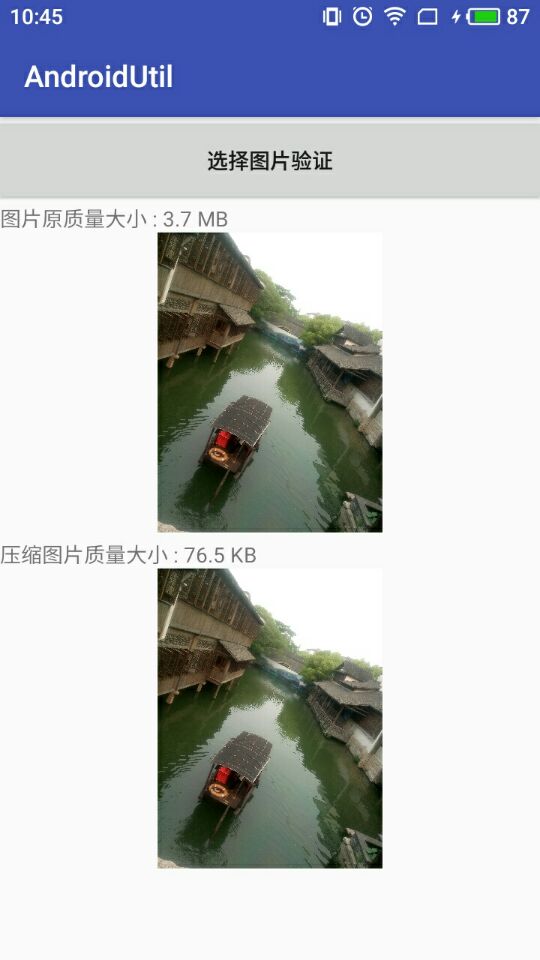
源码地址: https://github.com/DickyQie/android-util
工具类代码
public class CompressHelper {

    private static volatile CompressHelper INSTANCE;

    private Context context;

    /**

     * 最大宽度,默认为720

     */

    private float maxWidth = 720.0f;

    /**

     * 最大高度,默认为960

     */

    private float maxHeight = 960.0f;

    /**

     * 默认压缩后的方式为JPEG

     */

    private Bitmap.CompressFormat compressFormat = Bitmap.CompressFormat.JPEG;

    /**

     * 默认的图片处理方式是ARGB_8888

     */

    private Bitmap.Config bitmapConfig = Bitmap.Config.ARGB_8888;

    /**

     * 默认压缩质量为80

     */

    private int quality = 80;

    /**

     * 存储路径

     */

    private String destinationDirectoryPath;

    /**

     * 文件名前缀

     */

    private String fileNamePrefix;

    /**

     * 文件名

     */

    private String fileName;

    public static CompressHelper getDefault(Context context) {

        if (INSTANCE == null) {

            synchronized (CompressHelper.class) {

                if (INSTANCE == null) {

                    INSTANCE = new CompressHelper(context);

                }

            }

        }

        return INSTANCE;

    }

    private CompressHelper(Context context) {

        this.context = context;

        destinationDirectoryPath = context.getCacheDir().getPath() + File.pathSeparator + FileUtil.FILES_PATH;

    }

    /**

     * 压缩成文件

     * @param file  原始文件

     * @return      压缩后的文件

     */

    public File compressToFile(File file) {

        return BitmapUtil.compressImage(context, Uri.fromFile(file), maxWidth, maxHeight,

                compressFormat, bitmapConfig, quality, destinationDirectoryPath,

                fileNamePrefix, fileName);

    }

    /**

     * 压缩为Bitmap

     * @param file  原始文件

     * @return      压缩后的Bitmap

     */

    public Bitmap compressToBitmap(File file) {

        return BitmapUtil.getScaledBitmap(context, Uri.fromFile(file), maxWidth, maxHeight, bitmapConfig);

    }

    /**

     * 采用建造者模式,设置Builder

     */

    public static class Builder {

        private CompressHelper mCompressHelper;

        public Builder(Context context) {

            mCompressHelper = new CompressHelper(context);

        }

        /**

         * 设置图片最大宽度

         * @param maxWidth  最大宽度

         */

        public Builder setMaxWidth(float maxWidth) {

            mCompressHelper.maxWidth = maxWidth;

            return this;

        }

        /**

         * 设置图片最大高度

         * @param maxHeight 最大高度

         */

        public Builder setMaxHeight(float maxHeight) {

            mCompressHelper.maxHeight = maxHeight;

            return this;

        }

        /**

         * 设置压缩的后缀格式

         */

        public Builder setCompressFormat(Bitmap.CompressFormat compressFormat) {

            mCompressHelper.compressFormat = compressFormat;

            return this;

        }

        /**

         * 设置Bitmap的参数

         */

        public Builder setBitmapConfig(Bitmap.Config bitmapConfig) {

            mCompressHelper.bitmapConfig = bitmapConfig;

            return this;

        }

        /**

         * 设置压缩质量,建议80

         * @param quality   压缩质量,[0,100]

         */

        public Builder setQuality(int quality) {

            mCompressHelper.quality = quality;

            return this;

        }

        /**

         * 设置目的存储路径

         * @param destinationDirectoryPath  目的路径

         */

        public Builder setDestinationDirectoryPath(String destinationDirectoryPath) {

            mCompressHelper.destinationDirectoryPath = destinationDirectoryPath;

            return this;

        }

        /**

         * 设置文件前缀

         * @param prefix    前缀

         */

        public Builder setFileNamePrefix(String prefix) {

            mCompressHelper.fileNamePrefix = prefix;

            return this;

        }

        /**

         * 设置文件名称

         * @param fileName  文件名

         */

        public Builder setFileName(String fileName) {

            mCompressHelper.fileName = fileName;

            return this;

        }

        public CompressHelper build() {

            return mCompressHelper;

        }

    }

}
使用
File oldFile = CompressHelper.getDefault(getApplicationContext()).compressToFile(file);
自定义属性使用
File newFile = new CompressHelper.Builder(this)

                .setMaxWidth(720)  // 默认最大宽度为720

                .setMaxHeight(960) // 默认最大高度为960

                .setQuality(80)    // 默认压缩质量为80

                .setFileName(yourFileName) // 文件名称

                .setCompressFormat(CompressFormat.JPEG) // 设置默认压缩为jpg格式

                .setDestinationDirectoryPath(Environment.getExternalStoragePublicDirectory(

                        Environment.DIRECTORY_PICTURES).getAbsolutePath())//路径

                .build()

                .compressToFile(oldFile);
该案例参考了:
- https://github.com/zetbaitsu/Compressor
- https://github.com/Curzibn/Luban
- https://github.com/nanchen2251/CompressHelper
android -------- 压缩图片文件工具类的更多相关文章
- android ImageUtils 图片处理工具类
/** * 加入文字到图片.相似水印文字. * @param gContext * @param gResId * @param gText * @return */ public static Bi ...
- Android FileUtil(android文件工具类)
android开发和Java开发差不了多少,也会有许多相同的功能.像本文提到的文件存储,在Java项目和android项目里面用到都是相同的.只是android开发的一些路径做了相应的处理. 下面就是 ...
- Android开源项目大全 - 工具类
主要包括那些不错的开发库,包括依赖注入框架.图片缓存.网络相关.数据库ORM建模.Android公共库.Android 高版本向低版本兼容.多媒体相关及其他. 一.依赖注入DI 通过依赖注入减少Vie ...
- Android经常使用的工具类
主要介绍总结的Android开发中经常使用的工具类,大部分相同适用于Java. 眼下包含HttpUtils.DownloadManagerPro.ShellUtils.PackageUtils. Pr ...
- 图片处理工具类 - ImageUtils.java
纯JAVA实现的图片处理工具类,提供图片的裁剪.压缩.获取尺寸.制作圆角等方法. 源码如下:(点击下载 -ImageUtils.java .FolderUtils.java .commons-io-2 ...
- Java操作图片的工具类
操作图片的工具类: import java.awt.AlphaComposite; import java.awt.Color; import java.awt.Font; import java.a ...
- 自动扫描FTP文件工具类 ScanFtp.java
package com.util; import java.io.BufferedInputStream; import java.io.BufferedOutputStream; import ja ...
- java图片处理工具类
直接上代码: package com.zxd.tool; /** * Created by zhang on 14-3-1. * 图片的常用操作类 */ import java.awt.AlphaCo ...
- Android开发调试日志工具类[支持保存到SD卡]
直接上代码: package com.example.callstatus; import java.io.File; import java.io.FileWriter; import java.i ...
随机推荐
- centos7更改网卡名称
1.编辑/etc/sysconfig/grub文件,加入net.ifnames=0 biosdevname=0 2.执行命令grub2-mkconfig -o /boot/grub2/grub.cfg ...
- SQL两张表筛选相同数据和不同数据
原文链接:http://www.cnblogs.com/onesmail/p/6148979.html 方法一: select distinct A.ID from A where A.ID not ...
- Elasticsearch学习笔记(二)Search API 与 Query DSL
一. Search API eg: GET /mall/product/_search?q=name:productName&sort=price desc 特点:search的请求参数都是以 ...
- TZOJ:3660: 家庭关系
描述 给定若干家庭成员之间的关系,判断2个人是否属于同一家庭,即2个人之间均可以通过这些关系直接或者间接联系. 输入 输入数据有多组,每组数据的第一行为一个正整数n(1<=n<=100), ...
- js实现多行文本溢出省略
实现效果: css: position: relative; line-height: 20px; max-height: 60px; js: function overflowHiddon(el) ...
- 彻底解决(Microsoft Visual C++ 14.0 is required)的步骤123
之前要用协程gevent,安装pip install gevent包时遇到Microsoft Visual C++ 14.0 is required的报错提示,各种下载没有解决很头疼, 前两天安装sc ...
- Kubernetes 网络改进的三项实践分享
自研CNI IPAM插件 解决K8s功能问题 首先,在功能方面,Kubernetes 网络模型由于IP不固定,无法对IP资源进行精细管控,无法使用基于IP的监控和基于IP的安全策略,此外,一些IP发现 ...
- Nginx 多域名配置
nginx绑定多个域名可又把多个域名规则写一个配置文件里,也可又分别建立多个域名配置文件,我一般为了管理方便,每个域名建一个文件,有些同类域名也可又写在一个总的配置文件里.一.每个域名一个文件的写法 ...
- 关闭jtag保留swd
串行线JTAG 配置 (Serial wire JTAG configuration) 位26:24 这些位只能由软件写( 读这些位,将返回未定义的数值) ,用于配置SWJ和跟踪复用功能的I/O ...
- MongoDB 之 你得知道MongoDB是个什么鬼 MongoDB - 1
最近有太多的同学向我提起MongoDB,想要学习MongoDB,还不知道MongoDB到底是什么鬼,或者说,知道是数据库,知道是文件型数据库,但是不知道怎么来用 那么好,所谓千呼万唤始出来,现在我就拉 ...