
ckeditor5 安装高亮,颜色插件
ckeditor5 安装高亮插件
1、准备
git clone -b stable https://github.com/ckeditor/ckeditor5-build-classic.git

cd ckeditor5-build-classic

npm install
2、安装
npm install --save @ckeditor/ckeditor5-highlight
3、配置
/**

 * @license Copyright (c) 2003-2019, CKSource - Frederico Knabben. All rights reserved.

 * For licensing, see LICENSE.md.

 */

// The editor creator to use.

import ClassicEditorBase from '@ckeditor/ckeditor5-editor-classic/src/classiceditor';

import Essentials from '@ckeditor/ckeditor5-essentials/src/essentials';

import UploadAdapter from '@ckeditor/ckeditor5-adapter-ckfinder/src/uploadadapter';

import Autoformat from '@ckeditor/ckeditor5-autoformat/src/autoformat';

import Bold from '@ckeditor/ckeditor5-basic-styles/src/bold';

import Italic from '@ckeditor/ckeditor5-basic-styles/src/italic';

import BlockQuote from '@ckeditor/ckeditor5-block-quote/src/blockquote';

import CKFinder from '@ckeditor/ckeditor5-ckfinder/src/ckfinder';

import EasyImage from '@ckeditor/ckeditor5-easy-image/src/easyimage';

import Heading from '@ckeditor/ckeditor5-heading/src/heading';

import Image from '@ckeditor/ckeditor5-image/src/image';

import ImageCaption from '@ckeditor/ckeditor5-image/src/imagecaption';

import ImageStyle from '@ckeditor/ckeditor5-image/src/imagestyle';

import ImageToolbar from '@ckeditor/ckeditor5-image/src/imagetoolbar';

import ImageUpload from '@ckeditor/ckeditor5-image/src/imageupload';

import Link from '@ckeditor/ckeditor5-link/src/link';

import List from '@ckeditor/ckeditor5-list/src/list';

import MediaEmbed from '@ckeditor/ckeditor5-media-embed/src/mediaembed';

import Paragraph from '@ckeditor/ckeditor5-paragraph/src/paragraph';

import PasteFromOffice from '@ckeditor/ckeditor5-paste-from-office/src/pastefromoffice';

import Table from '@ckeditor/ckeditor5-table/src/table';

import TableToolbar from '@ckeditor/ckeditor5-table/src/tabletoolbar';

import Alignment from '@ckeditor/ckeditor5-alignment/src/alignment';   // <--- ADDED

import Highlight from '@ckeditor/ckeditor5-highlight/src/highlight';   // <--- ADDED

export default class ClassicEditor extends ClassicEditorBase {}

// Plugins to include in the build.

ClassicEditor.builtinPlugins = [

	Essentials,

	UploadAdapter,

	Autoformat,

	Bold,

	Italic,

	BlockQuote,

	CKFinder,

	EasyImage,

	Heading,

	Image,

	ImageCaption,

	ImageStyle,

	ImageToolbar,

	ImageUpload,

	Link,

	List,

	MediaEmbed,

	Paragraph,

	PasteFromOffice,

	Table,

	TableToolbar,

	Alignment,                                // <--- ADDED

	Highlight,							      // <--- ADDED

];

// Editor configuration.

ClassicEditor.defaultConfig = {

	toolbar: {

		items: [

			'heading',

			'|',

			'alignment',                             // <--- ADDED

			'highlight',						     // <--- ADDED

			'bold',

			'italic',

			'link',

			'bulletedList',

			'numberedList',

			'imageUpload',

			'blockQuote',

			'insertTable',

			'mediaEmbed',

			'undo',

			'redo'

		]

	},

	image: {

		toolbar: [

			'imageStyle:full',

			'imageStyle:side',

			'|',

			'imageTextAlternative'

		]

	},

	table: {

		contentToolbar: [

			'tableColumn',

			'tableRow',

			'mergeTableCells'

		]

	},

	// This value must be kept in sync with the language defined in webpack.config.js.

	language: 'zh-cn'

};
4、安装
yarn run build
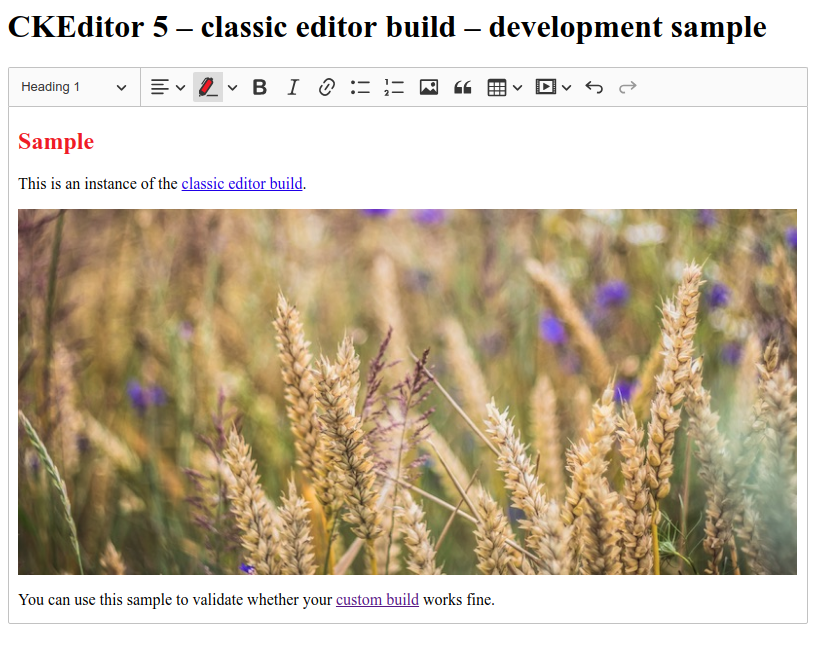
参考文档
https://ckeditor.com/docs/ckeditor5/latest/builds/guides/integration/installing-plugins.html

https://ckeditor.com/docs/ckeditor5/latest/features/highlight.html
ckeditor5 安装高亮,颜色插件的更多相关文章
- IntelliJ_2017_安装Grep Console插件(console输出内容加颜色)
官网下载:https://plugins.jetbrains.com/plugin/7125-grep-console 一.安装Grep Console插件 二.设置不同日志类型的不同 ...
- vscode中vue代码颜色插件
vue提示插件[Vscode] 编者寄语:vscode的确是前端开发中很好的工具,安装颜色插件,从视觉上是美的享受.曾经的我遇到了vscode代码全是灰色,黑色的困惑,后来整理找到方法,整 ...
- [个人配置] VSCode Better Comments 扩展配置、高亮注释插件
在VSCode IDE中,我的代码注释一般都有高亮颜色,那要怎么安装这个插件呢?
- vs 2012 设置选中的引用高亮 颜色
一个简单的小技巧,不用插件也可以做到,vs 2012 设置选中的引用高亮 颜色 .vs 默认的单击引用的变量时,显示的颜色是灰色,基本看不出来,所有特意抽空捣鼓了下 还真让我给找出来 工具==> ...
- sublime中如何安装vue.js插件,并使代码高亮显示
前提概要: sublime的下载地址:http://www.sublimetext.com/ notepad++下载地址:https://notepad-plus-plus.org/ .vue的文件在 ...
- VScode安装后的插件安装
杭州SEO:Chinese(Simplified) Language Pack for Visual Stidio Code 中文汉化包 对于一些英文不太好的小伙伴,上来第一件事肯定是要切换成中文语言 ...
- 代码高亮美化插件-----SyntaxHighlighter
IT类文章博客,代码高亮美化插件-----SyntaxHighlighter 最近在做一个类似个人博客的网站,因为文章中会用到各种代码,主要是Javascript,CSS,PHP,XML等.这些代码如 ...
- eclipse怎样在线安装hibernate tools插件并使用
不知不觉,小Alan已经将近3个月没有上班了,最近在复习一些知识,随时准备回到代码世界的战场,今天复习到了Hibernate,记录一下一点点小知识,那就是eclipse下hibernate Tools ...
- 在IntelliJ IDEA14中安装go语言插件
go语言的集成开发环境仍不成熟,试用了liteide,感觉很不适应,弹出菜单对程序员的干扰太大.所以就试大牌的IntelliJ IDEA,这工具本来是JAVA开发阵营的,不过它已经变为一个非常强大的支 ...
随机推荐
- 201621123049《java程序设计》第四周学习总结
1. 本周学习总结 1.1 写出你认为本周学习中比较重要的知识点关键词 继承 类型转换 覆盖 1.2 尝试使用思维导图将这些关键词组织起来.注:思维导图一般不需要出现过多的字. 2. 书面作业 1. ...
- linux ---部署django项目篇
uWSGI + nginx+ django + virtualenv + supervisor发布web服务器 项目部署步骤 1.项目准备阶段 1.准备项目代码,从本地拷贝 2.将项目上传到linux ...
- Codeforces 1089E - Easy Chess - [DFS+特判][2018-2019 ICPC, NEERC, Northern Eurasia Finals Problem E]
题目链接:https://codeforces.com/contest/1089/problem/E Elma is learning chess figures. She learned that ...
- OAuth2.0的原理介绍
OAuth2.0是一个关于授权(authorization)的开放网络标准,在全世界得到广泛应用,目前的版本是2.0版. OAuth2.0(开放授权)是一个正式的互联网标准协议. 允许第三方网站在用户 ...
- Weex小笔记(自己理解,有错请指正)
在Eros中,做的内容是封装了一些常用的框架,并且优化开发流程为将前端Vue文件打包出资源文件导入项目工程中(本地加载模式,需要注册文件.验证文件),然后原生移动端通过OC写module(功能模块类) ...
- [Day15]常用API(Object类、String类)
1.Java的API(API: Application(应用) Programming(程序) Interface(接口)) Java API是JDK中提供使用的类,类已经将底层代码进行封装 在JDK ...
- 图->有向无环图->求关键路径
文字描述 与AOV-网相对应的是AOE-网(Activity on Edge)即边表示活动的网.AOE-网是一个带权的有向无环图.其中,顶点表示事件Event,弧表示活动,权表示活动持续的时间.通常, ...
- Linux 两台服务器之间传输文件
一.scp命令的使用 1.传输文件(不包括目录) 命令格式:scp 源文件路径目录/需要传输的文件 目标主机的用户名@目标主机IP/主机别名:目标主机存储目录 举个例子:scp /root/ceshi ...
- node Sream
const fs = require('fs'); let readerStream = fs.createReadStream('input.txt'); let writerStream = fs ...
- 【Common】NO.81.Note.1.Common.1.002-【文章摘要】
1.0.0 Summary Tittle:[Common]NO.81.Note.1.Common.1.002-[文章摘要] Style:Common Series:Common Since:2018- ...