
使用itext生成pdf的,各种布局
代码如下,jar包为itext.jar,itextAsia.jar,最好都是最新的 ;2张图片也在最后贴出,把图片放到D盘可以直接生成制定格式的pdf。
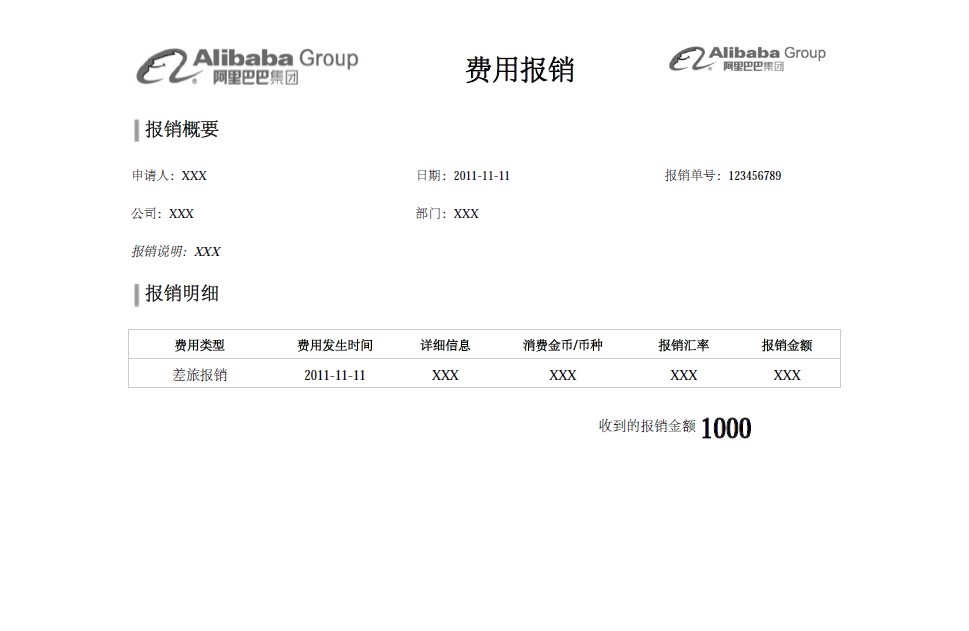
最后生成的pdf如下:
代码如下:
 package com.itext.test;

 import java.io.FileOutputStream;

 import com.itextpdf.text.BaseColor;

 import com.itextpdf.text.Document;

 import com.itextpdf.text.Element;

 import com.itextpdf.text.Image;

 import com.itextpdf.text.PageSize;

 import com.itextpdf.text.Paragraph;

 import com.itextpdf.text.pdf.BaseFont;

 import com.itextpdf.text.pdf.PdfPCell;

 import com.itextpdf.text.pdf.PdfPTable;

 import com.itextpdf.text.pdf.PdfWriter;

 public class BaoXiaoDan {

     public static void main(String[] args) {

         try

         {

              Document document = new Document(PageSize.A4.rotate());

              PdfWriter.getInstance(document, new FileOutputStream("D:\\Helloworld.PDF"));

             //设置字体

             BaseFont bfChinese = BaseFont.createFont("STSong-Light", "UniGB-UCS2-H",BaseFont.NOT_EMBEDDED);

             com.itextpdf.text.Font FontChinese24 = new com.itextpdf.text.Font(bfChinese, 24, com.itextpdf.text.Font.BOLD);

             com.itextpdf.text.Font FontChinese18 = new com.itextpdf.text.Font(bfChinese, 18, com.itextpdf.text.Font.BOLD);

             com.itextpdf.text.Font FontChinese16 = new com.itextpdf.text.Font(bfChinese, 16, com.itextpdf.text.Font.BOLD);

             com.itextpdf.text.Font FontChinese12 = new com.itextpdf.text.Font(bfChinese, 12, com.itextpdf.text.Font.NORMAL);

             com.itextpdf.text.Font FontChinese11Bold = new com.itextpdf.text.Font(bfChinese, 11, com.itextpdf.text.Font.BOLD);

             com.itextpdf.text.Font FontChinese11 = new com.itextpdf.text.Font(bfChinese, 11, com.itextpdf.text.Font.ITALIC);

             com.itextpdf.text.Font FontChinese11Normal = new com.itextpdf.text.Font(bfChinese, 11, com.itextpdf.text.Font.NORMAL);

             document.open();

             //table1

             PdfPTable table1 = new PdfPTable(3);

             PdfPCell cell11 = new PdfPCell(new Paragraph("费用报销",FontChinese24));

             cell11.setVerticalAlignment(Element.ALIGN_MIDDLE);

             cell11.setHorizontalAlignment(Element.ALIGN_CENTER);

             cell11.setBorder(0);

             String imagePath = "D:/alibaba.jpg";

             Image image1 = Image.getInstance(imagePath);

             Image image2 = Image.getInstance(imagePath);

             //设置每列宽度比例

             int width11[] = {35,40,25};

             table1.setWidths(width11);

             table1.getDefaultCell().setBorder(0);

             table1.addCell(image1);

             table1.addCell(cell11);

             table1.addCell(image2);

             document.add(table1);

             //加入空行

             Paragraph blankRow1 = new Paragraph(18f, " ", FontChinese18);

             document.add(blankRow1);

             //table2

             PdfPTable table2 = new PdfPTable(2);

             //设置每列宽度比例

             int width21[] = {2,98};

             table2.setWidths(width21);

             table2.getDefaultCell().setBorder(0);

             PdfPCell cell21 = new PdfPCell(new Paragraph("报销概要",FontChinese16));

             String imagePath2 = "D:/boder.jpg";

             Image image21 = Image.getInstance(imagePath2);

             cell21.setBorder(0);

             table2.addCell(image21);

             table2.addCell(cell21);

             document.add(table2);

             //加入空行

             Paragraph blankRow2 = new Paragraph(18f, " ", FontChinese18);

             document.add(blankRow2);

             //table3

             PdfPTable table3 = new PdfPTable(3);

             int width3[] = {40,35,25};

             table3.setWidths(width3);

             PdfPCell cell31 = new PdfPCell(new Paragraph("申请人:"+"XXX",FontChinese11Normal));

             PdfPCell cell32 = new PdfPCell(new Paragraph("日期:"+"2011-11-11",FontChinese11Normal));

             PdfPCell cell33 = new PdfPCell(new Paragraph("报销单号:"+"123456789",FontChinese11Normal));

             cell31.setBorder(0);

             cell32.setBorder(0);

             cell33.setBorder(0);

             table3.addCell(cell31);

             table3.addCell(cell32);

             table3.addCell(cell33);

             document.add(table3);

             //加入空行

             Paragraph blankRow31 = new Paragraph(18f, " ", FontChinese11);

             document.add(blankRow31);

             //table4

             PdfPTable table4 = new PdfPTable(2);

             int width4[] = {40,60};

             table4.setWidths(width4);

             PdfPCell cell41 = new PdfPCell(new Paragraph("公司:"+"XXX",FontChinese11Normal));

             PdfPCell cell42 = new PdfPCell(new Paragraph("部门:"+"XXX",FontChinese11Normal));

             cell41.setBorder(0);

             cell42.setBorder(0);

             table4.addCell(cell41);

             table4.addCell(cell42);

             document.add(table4);

             //加入空行

             Paragraph blankRow41 = new Paragraph(18f, " ", FontChinese11);

             document.add(blankRow41);

             //table5

             PdfPTable table5 = new PdfPTable(1);

             PdfPCell cell51 = new PdfPCell(new Paragraph("报销说明:"+"XXX",FontChinese11));

             cell51.setBorder(0);

             table5.addCell(cell51);

             document.add(table5);

             //加入空行

             Paragraph blankRow51 = new Paragraph(18f, " ", FontChinese18);

             document.add(blankRow51);

             //table6

             PdfPTable table6 = new PdfPTable(2);

             table6.getDefaultCell().setBorder(0);

             table6.setWidths(width21);

             PdfPCell cell61 = new PdfPCell(new Paragraph("报销明细",FontChinese16));

             cell61.setBorder(0);

             table6.addCell(image21);

             table6.addCell(cell61);

             document.add(table6);

             //加入空行

             Paragraph blankRow4 = new Paragraph(18f, " ", FontChinese16);

             document.add(blankRow4);

             //table7

             PdfPTable table7 = new PdfPTable(6);

             BaseColor lightGrey = new BaseColor(0xCC,0xCC,0xCC);

             int width7[] = {20,18,13,20,14,15};

             table7.setWidths(width7);

             PdfPCell cell71 = new PdfPCell(new Paragraph("费用类型",FontChinese11Bold));

             PdfPCell cell72 = new PdfPCell(new Paragraph("费用发生时间",FontChinese11Bold));

             PdfPCell cell73 = new PdfPCell(new Paragraph("详细信息",FontChinese11Bold));

             PdfPCell cell74 = new PdfPCell(new Paragraph("消费金币/币种",FontChinese11Bold));

             PdfPCell cell75 = new PdfPCell(new Paragraph("报销汇率",FontChinese11Bold));

             PdfPCell cell76 = new PdfPCell(new Paragraph("报销金额",FontChinese11Bold));

             //表格高度

             cell71.setFixedHeight(25);

             cell72.setFixedHeight(25);

             cell73.setFixedHeight(25);

             cell74.setFixedHeight(25);

             cell75.setFixedHeight(25);

             cell76.setFixedHeight(25);

             //水平居中

             cell71.setHorizontalAlignment(Element.ALIGN_CENTER);

             cell72.setHorizontalAlignment(Element.ALIGN_CENTER);

             cell73.setHorizontalAlignment(Element.ALIGN_CENTER);

             cell74.setHorizontalAlignment(Element.ALIGN_CENTER);

             cell75.setHorizontalAlignment(Element.ALIGN_CENTER);

             cell76.setHorizontalAlignment(Element.ALIGN_CENTER);

             //垂直居中

             cell71.setVerticalAlignment(Element.ALIGN_MIDDLE);

             cell72.setVerticalAlignment(Element.ALIGN_MIDDLE);

             cell73.setVerticalAlignment(Element.ALIGN_MIDDLE);

             cell74.setVerticalAlignment(Element.ALIGN_MIDDLE);

             cell75.setVerticalAlignment(Element.ALIGN_MIDDLE);

             cell76.setVerticalAlignment(Element.ALIGN_MIDDLE);

             //边框颜色

             cell71.setBorderColor(lightGrey);

             cell72.setBorderColor(lightGrey);

             cell73.setBorderColor(lightGrey);

             cell74.setBorderColor(lightGrey);

             cell75.setBorderColor(lightGrey);

             cell76.setBorderColor(lightGrey);

             //去掉左右边框

             cell71.disableBorderSide(8);

             cell72.disableBorderSide(4);

             cell72.disableBorderSide(8);

             cell73.disableBorderSide(4);

             cell73.disableBorderSide(8);

             cell74.disableBorderSide(4);

             cell74.disableBorderSide(8);

             cell75.disableBorderSide(4);

             cell75.disableBorderSide(8);

             cell76.disableBorderSide(4);

             table7.addCell(cell71);

             table7.addCell(cell72);

             table7.addCell(cell73);

             table7.addCell(cell74);

             table7.addCell(cell75);

             table7.addCell(cell76);

             document.add(table7);

                     //table8

                     PdfPTable table8 = new PdfPTable(6);

                     int width8[] = {20,18,13,20,14,15};

                     table8.setWidths(width8);

                     PdfPCell cell81 = new PdfPCell(new Paragraph("差旅报销",FontChinese12));

                     PdfPCell cell82 = new PdfPCell(new Paragraph("2011-11-11",FontChinese12));

                     PdfPCell cell83 = new PdfPCell(new Paragraph("XXX",FontChinese12));

                     PdfPCell cell84 = new PdfPCell(new Paragraph("XXX",FontChinese12));

                     PdfPCell cell85 = new PdfPCell(new Paragraph("XXX",FontChinese12));

                     PdfPCell cell86 = new PdfPCell(new Paragraph("XXX",FontChinese12));

                     //表格高度

                     cell81.setFixedHeight(25);

                     cell82.setFixedHeight(25);

                     cell83.setFixedHeight(25);

                     cell84.setFixedHeight(25);

                     cell85.setFixedHeight(25);

                     cell86.setFixedHeight(25);

                     //水平居中

                     cell81.setHorizontalAlignment(Element.ALIGN_CENTER);

                     cell82.setHorizontalAlignment(Element.ALIGN_CENTER);

                     cell83.setHorizontalAlignment(Element.ALIGN_CENTER);

                     cell84.setHorizontalAlignment(Element.ALIGN_CENTER);

                     cell85.setHorizontalAlignment(Element.ALIGN_CENTER);

                     cell86.setHorizontalAlignment(Element.ALIGN_CENTER);

                     //垂直居中

                     cell81.setVerticalAlignment(Element.ALIGN_MIDDLE);

                     cell82.setVerticalAlignment(Element.ALIGN_MIDDLE);

                     cell83.setVerticalAlignment(Element.ALIGN_MIDDLE);

                     cell84.setVerticalAlignment(Element.ALIGN_MIDDLE);

                     cell85.setVerticalAlignment(Element.ALIGN_MIDDLE);

                     cell86.setVerticalAlignment(Element.ALIGN_MIDDLE);

                     //边框颜色

                     cell81.setBorderColor(lightGrey);

                     cell82.setBorderColor(lightGrey);

                     cell83.setBorderColor(lightGrey);

                     cell84.setBorderColor(lightGrey);

                     cell85.setBorderColor(lightGrey);

                     cell86.setBorderColor(lightGrey);

                     //去掉左右边框

                     cell81.disableBorderSide(8);

                     cell82.disableBorderSide(4);

                     cell82.disableBorderSide(8);

                     cell83.disableBorderSide(4);

                     cell83.disableBorderSide(8);

                     cell84.disableBorderSide(4);

                     cell84.disableBorderSide(8);

                     cell85.disableBorderSide(4);

                     cell85.disableBorderSide(8);

                     cell86.disableBorderSide(4);

                     table8.addCell(cell81);

                     table8.addCell(cell82);

                     table8.addCell(cell83);

                     table8.addCell(cell84);

                     table8.addCell(cell85);

                     table8.addCell(cell86);

                     document.add(table8);

               //加入空行

               Paragraph blankRow5 = new Paragraph(18f, " ", FontChinese18);

               document.add(blankRow5);

             //table9

             PdfPTable table9 = new PdfPTable(3);

             int width9[] = {30,50,20};

             table9.setWidths(width9);

             PdfPCell cell91 = new PdfPCell(new Paragraph("",FontChinese12));

             PdfPCell cell92 = new PdfPCell(new Paragraph("收到的报销金额",FontChinese12));

             PdfPCell cell93 = new PdfPCell(new Paragraph("1000",FontChinese24));

             cell92.setHorizontalAlignment(Element.ALIGN_RIGHT);

             cell92.setVerticalAlignment(Element.ALIGN_MIDDLE);

             cell93.setHorizontalAlignment(Element.ALIGN_LEFT);

             cell93.setVerticalAlignment(Element.ALIGN_MIDDLE);

             cell91.setBorder(0);

             cell92.setBorder(0);

             cell93.setBorder(0);

             table9.addCell(cell91);

             table9.addCell(cell92);

             table9.addCell(cell93);

             document.add(table9);

              document.close();

         } catch (Exception ex)

         {

           ex.printStackTrace();

         }

     }

 }
使用itext生成pdf的,各种布局的更多相关文章
- 在linux环境下使用itext生成pdf
转载请注明出处 https://www.cnblogs.com/majianming/p/9537173.html 项目中需要对订单生成pdf文件,在不断的尝试之后,终于生成了比较满意的pdf文档. ...
- Java Itext 生成PDF文件
利用Java Itext生成PDF文件并导出,实现效果如下: PDFUtil.java package com.jeeplus.modules.order.util; import java.io.O ...
- 用itext生成PDF报错:Font 'STSong-Light1' with 'UniGB-UCS2-H' is not recognized.
用itext生成PDF报错,加上try catch捕获到异常是 BaseFont bFont = BaseFont.createFont("STSong-Light1", &quo ...
- 【PDF】java使用Itext生成pdf文档--详解
[API接口] 一.Itext简介 API地址:javadoc/index.html:如 D:/MyJAR/原JAR包/PDF/itext-5.5.3/itextpdf-5.5.3-javadoc/ ...
- Itext生成pdf文件
来源:https://my.oschina.net/lujianing/blog/894365 1.背景 在某些业务场景中,需要提供相关的电子凭证,比如网银/支付宝中转账的电子回单,签约的电子合同等. ...
- 【Java】使用iText生成PDF文件
iText介绍 iText是著名的开放源码的站点sourceforge一个项目,是用于生成PDF文档的一个java类库.通过iText不仅可以生成PDF或rtf的文档,而且可以将XML.Html文件转 ...
- java使用iText生成pdf表格
转载地址:http://www.open-open.com/code/view/1424011530749 首先需要你自己下载itext相关的jar包并添加引用,或者在maven中添加如下引用配置: ...
- 利用itext生成pdf的简单例子
一.itext简介 iText是著名的开放源码的站点sourceforge一个项目,是用于生成PDF文档的一个java类库.通过iText不仅可以生成PDF或rtf的文档,而且可以将XML.Html文 ...
- itext 生成pdf文件添加页眉页脚
原文来自:https://www.cnblogs.com/joann/p/5511905.html 我只是记录所有jar版本,由于版本冲突及不兼容很让人头疼的,一共需要5个jar, 其中itextpd ...
- iText生成PDF 格式报表
1.导包 <dependency> <groupId>com.lowagie</groupId> <artifactId>itext</artif ...
随机推荐
- linux添加zabbix service并开机自动启动
最近有个数据库相关操作后需要重启操作系统,重启后发现zabbix监控一直没有数据,迷了半天原来zabbix压根就没有启动.想了半天决定把zabbix添加到系统服务,并设置开机启动. 1.按一定的规则编 ...
- C++环境的配置( windows)
方法一.——VS: 使用windows开发神器visio studio.这种方法比较简单,直接下载一个最新的vs安装就行.不单单是C++,C.C#.VB等都可以开发. 方法二.——只安装C++编译器: ...
- 多线程之sleep和wait的区别
它们最大本质的区别是:sleep()不释放同步锁,wait()释放同步锁. 还有用法的上的不同是:sleep(milliseconds)可以用时间指定来使他自动醒过来,如果时间不到你只能调用inter ...
- 学习笔记:ECharts
(Highcharts 167K: ECharts 354K: jqChart 240K),如果用于网络,Highchart最小 ECharts (Enterprise Charts 商业产品图表库 ...
- gitlab Api接口使用
官方文档 https://docs.gitlab.com/search/?q=api&idx=gitlab&p=1 示例:获取每个项目下的用户信息 #!/usr/bin/env pyt ...
- iptables随笔
iptables 分为四表五链 四表: filter表 nat 表 mangle 表 raw 表 五链 INPUT 链 OUTPUT 链 FORWARD 链 PREROUTING(路由前) POSTR ...
- Linux下chkconfig命令介绍
一.引论 chkconfig命令检查.设置系统的各种服务.这是Red Hat公司遵循GPL规则所开发的程序,它可查询操作系统在每一个执行等级中会执行哪些系统服务, 其中包括各类常驻服务.谨记chkco ...
- App后台Keynote
[App后台Keynote] 一.基础. 1.一个 节省 流量 的 处理 方法 是 让 App 下载 经过 压缩 的 图片( 一般 是 几十 KB 以下), 当 用户 需要 查看 原图 时 才 下载 ...
- Cobbler安装CentOS7系统时报错 line 286: No space left on device
原因分析: 此报错并不是说磁盘空间不足,而是内存太小了. CentOS7安装系统时最小要2G以上内存,而当时我只给了1G. 所有报错,把内存加大到2G后可以正常安装系统.
- 微信小程序记账本进度六
//app.jsApp({ onLaunch: function () { //调用API从本地缓存中获取数据 var logs = wx.getStorageSync('logs') || [] l ...