
WeexSDK源码分析(iOS)
0.从工作原理谈起
Weex 表面上是一个客户端技术,但实际上它串联起了从本地开发、云端部署到分发的整个链路。开发者首先可在本地像编写 web 页面一样编写一个 app 的界面,然后通过命令行工具将之编译成一段 JavaScript 代码,生成一个 Weex 的 JS bundle;同时,开发者可以将生成的 JS bundle 部署至云端,然后通过网络请求或预下发的方式加载至用户的移动应用客户端;在移动应用客户端里,Weex SDK 会准备好一个 JavaScript 执行环境,并且在用户打开一个 Weex 页面时在这个执行环境中执行相应的 JS bundle,并将执行过程中产生的各种命令发送到 native 端进行界面渲染、数据存储、网络通信、调用设备功能及用户交互响应等功能;同时,如果用户希望使用浏览器访问这个界面,那么他可以在浏览器里打开一个相同的 web 页面,这个页面和移动应用使用相同的页面源代码,但被编译成适合Web展示的JS Bundle,通过浏览器里的 JavaScript 引擎及 Weex SDK 运行起来的。

上面是Weex官方的介绍。下面对Native端的原理做一下细分:

下面我们开始对Native端的解析,做一下分析。
1.WeexSDK初始化
我们新建一个Weex项目之后,通过“weex platform add ios”,可以添加iOS的工程代码。打开该工程,可以看到如下内容:
+ (void)initWeexSDK

{

    [WXAppConfiguration setAppGroup:@"AliApp"];

    [WXAppConfiguration setAppName:@"WeexDemo"];

    [WXAppConfiguration setAppVersion:@"1.8.3"];

    [WXAppConfiguration setExternalUserAgent:@"ExternalUA"];

    [WXSDKEngine initSDKEnvironment];

    [WXSDKEngine registerHandler:[WXImgLoaderDefaultImpl new] withProtocol:@protocol(WXImgLoaderProtocol)];

#ifdef DEBUG

    [WXLog setLogLevel:WXLogLevelLog];

#endif

}
该代码一般在application: didFinishLaunchingWithOptions:中进行调用,用于初始化WeexSDK,下面我们来看一下这部分的源码实现,通过查看源码,更深入的理解WeexSDK。
2.WXAppConfiguration
@interface WXAppConfiguration : NSObject

/**

 * @abstract Group or organization of your app, default value is nil.

 */

+ (NSString *)appGroup;

+ (void)setAppGroup:(NSString *) appGroup;

/**

 * @abstract Name of your app, default is value for CFBundleDisplayName in main bundle.

 */

+ (NSString *)appName;

+ (void)setAppName:(NSString *)appName;

/**

 * @abstract Version of your app, default is value for CFBundleShortVersionString in main bundle.

 */

+ (NSString *)appVersion;

+ (void)setAppVersion:(NSString *)appVersion;

/**

 * @abstract External user agent of your app, all requests sent by weex will set the user agent on header,  default value is nil.

 */

+ (NSString *)externalUserAgent;

+ (void)setExternalUserAgent:(NSString *)userAgent;

/**

 * @abstract JSFrameworkVersion

 */

+ (NSString *)JSFrameworkVersion;

+ (void)setJSFrameworkVersion:(NSString *)JSFrameworkVersion;

/**

 + * @abstract JSFrameworkLibSize

 + */

+ (NSUInteger)JSFrameworkLibSize;

+ (void)setJSFrameworkLibSize:(NSUInteger)JSFrameworkLibSize;

/*

 *  @abstract customizeProtocolClasses

 */

+ (NSArray*)customizeProtocolClasses;

+ (void)setCustomizeProtocolClasses:(NSArray*)customizeProtocolClasses;

@end
从.h文件可以看到,该类是用来用来记录App配置信息的。所有方法都是类方法,内部实现是用单例实现的,.h用类方法是为了方便调用。
3.实质初始化
[WXSDKEngine initSDKEnvironment];
该方法都做了哪些事情呢?
+ (void)initSDKEnvironment

{

    // 加载本地的main.js

    NSString *filePath = [[NSBundle bundleForClass:self] pathForResource:@"native-bundle-main" ofType:@"js"];

    NSString *script = [NSString stringWithContentsOfFile:filePath encoding:NSUTF8StringEncoding error:nil];

    // 初始化SDK环境

    [WXSDKEngine initSDKEnvironment:script];

    // 模拟器版本特殊代码

#if TARGET_OS_SIMULATOR

    static dispatch_once_t onceToken;

    dispatch_once(&onceToken, ^{

        [WXSimulatorShortcutManager registerSimulatorShortcutWithKey:@"i" modifierFlags:UIKeyModifierCommand | UIKeyModifierAlternate action:^{

            NSURL *URL = [NSURL URLWithString:@"http://localhost:8687/launchDebugger"];

            NSURLRequest *request = [NSURLRequest requestWithURL:URL];

            NSURLSession *session = [NSURLSession sharedSession];

            NSURLSessionDataTask *task = [session dataTaskWithRequest:request

                                                    completionHandler:

                                          ^(NSData *data, NSURLResponse *response, NSError *error) {

                                              // ...

                                          }];

            [task resume];

            WXLogInfo(@"Launching browser...");

            dispatch_after(dispatch_time(DISPATCH_TIME_NOW, (int64_t)( * NSEC_PER_SEC)), dispatch_get_main_queue(), ^{

                [self connectDebugServer:@"ws://localhost:8687/debugger/0/renderer"];

            });

        }];

    });

#endif

}

+ (void)initSDKEnvironment:(NSString *)script

{

    // 打点记录状态

    WX_MONITOR_PERF_START(WXPTInitalize)

    WX_MONITOR_PERF_START(WXPTInitalizeSync)

    if (!script || script.length <= ) {

        NSMutableString *errMsg = [NSMutableString stringWithFormat:@"[WX_KEY_EXCEPTION_SDK_INIT_JSFM_INIT_FAILED] script don't exist:%@",script];

        [WXExceptionUtils commitCriticalExceptionRT:@"WX_KEY_EXCEPTION_SDK_INIT" errCode:[NSString stringWithFormat:@"%d", WX_KEY_EXCEPTION_SDK_INIT] function:@"initSDKEnvironment" exception:errMsg extParams:nil];

        WX_MONITOR_FAIL(WXMTJSFramework, WX_ERR_JSFRAMEWORK_LOAD, errMsg);

        return;

    }

    static dispatch_once_t onceToken;

    dispatch_once(&onceToken, ^{

        // 注册Components,Modules,Handlers

        [self registerDefaults];

        // 执行JsFramework

        [[WXSDKManager bridgeMgr] executeJsFramework:script];

    });

    // 打点记录状态

    WX_MONITOR_PERF_END(WXPTInitalizeSync)

}
从源码可以看到,初始化总共做了四件事情:
- WXMonitor监视器记录状态;
- WXSDKEngine的初始化;
- 加载本地的main.js;
- 模拟器WXSimulatorShortcutManager连接本地server。
3.1WXMonitor
WXMonitor是一个普通的对象,它里面只存储了一个线程安全的字典WXThreadSafeMutableDictionary。
@interface WXThreadSafeMutableDictionary<KeyType, ObjectType> : NSMutableDictionary

@property (nonatomic, strong) dispatch_queue_t queue;

@property (nonatomic, strong) NSMutableDictionary* dict;

@end
WXMonitor在整个Weex里面担任的职责是记录下各个操作的tag值和记录成功和失败的原因。
3.2加载本地的main.js
3.3WXSDKEngine的初始化
+ (void)registerDefaults

{

    static dispatch_once_t onceToken;

    dispatch_once(&onceToken, ^{

        [self _registerDefaultComponents];

        [self _registerDefaultModules];

        [self _registerDefaultHandlers];

    });

}
从上面可以看到,WXSDKEngine在初始化的时候,分别注册了Components、Modules、Handlers。这是 Weex 与 Native 应用层交互最核心的部分,可以理解为“组件”。其中 Component 是为了映射 Html 的一些标签,Module 中是提供一些 Native 的方法供 Weex 调用,Handler 是一些协议的实现。
注册完 Weex 默认的“组件” 之后,注入3.2小节的那段 JS,这个时候 Vue 的标签和动作才能被 Weex 所识别和转换。
3.4执行JsFramework
[[WXSDKManager bridgeMgr] executeJsFramework:script];
WXSDKManager会调用WXBridgeManager去执行SDK里面的main.js文件。
- (void)executeJsFramework:(NSString *)script

{

    if (!script) return;

    __weak typeof(self) weakSelf = self;

    WXPerformBlockOnBridgeThread(^(){

        [weakSelf.bridgeCtx executeJsFramework:script];

    });

}
WXBridgeManager通过WXBridgeContext调用executeJsFramework:方法,这里的方法调用也是在子线程中进行的。
- (void)executeJsFramework:(NSString *)script

{

    WXAssertBridgeThread();

    WXAssertParam(script);

    WX_MONITOR_PERF_START(WXPTFrameworkExecute);

    [self.jsBridge executeJSFramework:script];

    WX_MONITOR_PERF_END(WXPTFrameworkExecute);

    if ([self.jsBridge exception]) {

        NSString *exception = [[self.jsBridge exception] toString];

        NSMutableString *errMsg = [NSMutableString stringWithFormat:@"[WX_KEY_EXCEPTION_SDK_INIT_JSFM_INIT_FAILED] %@",exception];

        [WXExceptionUtils commitCriticalExceptionRT:@"WX_KEY_EXCEPTION_SDK_INIT" errCode:[NSString stringWithFormat:@"%d", WX_KEY_EXCEPTION_SDK_INIT] function:@"" exception:errMsg extParams:nil];

        WX_MONITOR_FAIL(WXMTJSFramework, WX_ERR_JSFRAMEWORK_EXECUTE, errMsg);

    } else {

        WX_MONITOR_SUCCESS(WXMTJSFramework);

        //the JSFramework has been load successfully.

        // 至此JSFramework是完全加载完成了

        self.frameworkLoadFinished = YES;

        // 执行所有注册的JsService

        [self executeAllJsService];

        // 获取JSFramework版本号

        JSValue *frameworkVersion = [self.jsBridge callJSMethod:@"getJSFMVersion" args:nil];

        if (frameworkVersion && [frameworkVersion isString]) {

            // 把版本号存入WXAppConfiguration中

            [WXAppConfiguration setJSFrameworkVersion:[frameworkVersion toString]];

        }

        if (script) {

             [WXAppConfiguration setJSFrameworkLibSize:[script lengthOfBytesUsingEncoding:NSUTF8StringEncoding]];

        }

        //execute methods which has been stored in methodQueue temporarily.

        // 执行之前缓存在_methodQueue数组里面的所有方法

        for (NSDictionary *method in _methodQueue) {

            [self callJSMethod:method[@"method"] args:method[@"args"]];

        }

        [_methodQueue removeAllObjects];

        // 至此,初始化工作完成

        WX_MONITOR_PERF_END(WXPTInitalize);

    };

}
WX_MONITOR_PERF_START是在操作之前标记WXPTFrameworkExecute,执行完JSFramework以后,用WX_MONITOR_PERF_END标记执行完成。
- (void)executeJSFramework:(NSString *)frameworkScript

{

    WXAssertParam(frameworkScript);

    if (WX_SYS_VERSION_GREATER_THAN_OR_EQUAL_TO(@"8.0")) {

        [_jsContext evaluateScript:frameworkScript withSourceURL:[NSURL URLWithString:@"native-bundle-main.js"]];

    }else{

        [_jsContext evaluateScript:frameworkScript];

    }

}
加载完成JSFramework以后,就要开始加载之前缓存的JSService和JSMethod。JSService是在jsServiceQueue中缓存的(默认SDK里面,是没有的)。JSMethod(组件、模块中缓存的)是在methodQueue中缓存的。
- (void)executeAllJsService

{

    for(NSDictionary *service in _jsServiceQueue) {

        NSString *script = [service valueForKey:@"script"];

        NSString *name = [service valueForKey:@"name"];

        [self executeJsService:script withName:name];

    }

    [_jsServiceQueue removeAllObjects];

}

for (NSDictionary *method in _methodQueue) {

            [self callJSMethod:method[@"method"] args:method[@"args"]];

        }

- (JSValue *)callJSMethod:(NSString *)method args:(NSArray *)args

{

    WXLogDebug(@"Calling JS... method:%@, args:%@", method, args);

    return [[_jsContext globalObject] invokeMethod:method withArguments:args];

}
这里再补充讨论一下,jsBridge第一次是如何被加载进来的?
- (id<WXBridgeProtocol>)jsBridge

{

    WXAssertBridgeThread();

    _debugJS = [WXDebugTool isDevToolDebug];

    Class bridgeClass = _debugJS ? NSClassFromString(@"WXDebugger") : [WXJSCoreBridge class];

    if (_jsBridge && [_jsBridge isKindOfClass:bridgeClass]) {

        return _jsBridge;

    }

    if (_jsBridge) {

        [_methodQueue removeAllObjects];

        _frameworkLoadFinished = NO;

    }

    _jsBridge = _debugJS ? [NSClassFromString(@"WXDebugger") alloc] : [[WXJSCoreBridge alloc] init];

    [self registerGlobalFunctions];

    return _jsBridge;

}
第一次进入这个函数没有jsBridge实例的时候,会先生成WXJSCoreBridge的实例,然后紧接着注册全局的函数。等第二次再调用这个函数的时候,_jsBridge已经是WXJSCoreBridge类型了,就会直接return,下面的语句也不会再重复执行了。
typedef NSInteger(^WXJSCallNative)(NSString *instance, NSArray *tasks, NSString *callback);

typedef NSInteger(^WXJSCallAddElement)(NSString *instanceId,  NSString *parentRef, NSDictionary *elementData, NSInteger index);

typedef NSInteger(^WXJSCallCreateBody)(NSString *instanceId, NSDictionary *bodyData);

typedef NSInteger(^WXJSCallRemoveElement)(NSString *instanceId,NSString *ref);

typedef NSInteger(^WXJSCallMoveElement)(NSString *instanceId,NSString *ref,NSString *parentRef,NSInteger index);

typedef NSInteger(^WXJSCallUpdateAttrs)(NSString *instanceId,NSString *ref,NSDictionary *attrsData);

typedef NSInteger(^WXJSCallUpdateStyle)(NSString *instanceId,NSString *ref,NSDictionary *stylesData);

typedef NSInteger(^WXJSCallAddEvent)(NSString *instanceId,NSString *ref,NSString *event);

typedef NSInteger(^WXJSCallRemoveEvent)(NSString *instanceId,NSString *ref,NSString *event);

typedef NSInteger(^WXJSCallCreateFinish)(NSString *instanceId);

typedef NSInvocation *(^WXJSCallNativeModule)(NSString *instanceId, NSString *moduleName, NSString *methodName, NSArray *args, NSDictionary *options);

typedef void (^WXJSCallNativeComponent)(NSString *instanceId, NSString *componentRef, NSString *methodName, NSArray *args, NSDictionary *options);
上面的闭包,是OC封装暴露给JS的。对应的全局函数:
- (void)registerCallNative:(WXJSCallNative)callNative

{

    JSValue* (^callNativeBlock)(JSValue *, JSValue *, JSValue *) = ^JSValue*(JSValue *instance, JSValue *tasks, JSValue *callback){

        NSString *instanceId = [instance toString];

        NSArray *tasksArray = [tasks toArray];

        NSString *callbackId = [callback toString];

        WXLogDebug(@"Calling native... instance:%@, tasks:%@, callback:%@", instanceId, tasksArray, callbackId);

        return [JSValue valueWithInt32:(int32_t)callNative(instanceId, tasksArray, callbackId) inContext:[JSContext currentContext]];

    };

    _jsContext[@"callNative"] = callNativeBlock;

}

- (void)registerCallAddElement:(WXJSCallAddElement)callAddElement

{

    id callAddElementBlock = ^(JSValue *instanceId, JSValue *ref, JSValue *element, JSValue *index, JSValue *ifCallback) {

        NSString *instanceIdString = [instanceId toString];

        NSDictionary *componentData = [element toDictionary];

        NSString *parentRef = [ref toString];

        NSInteger insertIndex = [[index toNumber] integerValue];

        [WXTracingManager startTracingWithInstanceId:instanceIdString ref:componentData[@"ref"] className:nil name:WXTJSCall phase:WXTracingBegin functionName:@"addElement" options:@{@"threadName":WXTJSBridgeThread,@"componentData":componentData}];

         WXLogDebug(@"callAddElement...%@, %@, %@, %ld", instanceIdString, parentRef, componentData, (long)insertIndex);

        return [JSValue valueWithInt32:(int32_t)callAddElement(instanceIdString, parentRef, componentData, insertIndex) inContext:[JSContext currentContext]];

    };

    _jsContext[@"callAddElement"] = callAddElementBlock;

}

- (void)registerCallNativeModule:(WXJSCallNativeModule)callNativeModuleBlock

{

    _jsContext[@"callNativeModule"] = ^JSValue *(JSValue *instanceId, JSValue *moduleName, JSValue *methodName, JSValue *args, JSValue *options) {

        NSString *instanceIdString = [instanceId toString];

        NSString *moduleNameString = [moduleName toString];

        NSString *methodNameString = [methodName toString];

        NSArray *argsArray = [args toArray];

        NSDictionary *optionsDic = [options toDictionary];

        WXLogDebug(@"callNativeModule...%@,%@,%@,%@", instanceIdString, moduleNameString, methodNameString, argsArray);

        NSInvocation *invocation = callNativeModuleBlock(instanceIdString, moduleNameString, methodNameString, argsArray, optionsDic);

        JSValue *returnValue = [JSValue wx_valueWithReturnValueFromInvocation:invocation inContext:[JSContext currentContext]];

        [WXTracingManager startTracingWithInstanceId:instanceIdString ref:nil className:nil name:moduleNameString phase:WXTracingInstant functionName:methodNameString options:nil];

        return returnValue;

    };

}

- (void)registerCallNativeComponent:(WXJSCallNativeComponent)callNativeComponentBlock

{

    _jsContext[@"callNativeComponent"] = ^void(JSValue *instanceId, JSValue *componentName, JSValue *methodName, JSValue *args, JSValue *options) {

        NSString *instanceIdString = [instanceId toString];

        NSString *componentNameString = [componentName toString];

        NSString *methodNameString = [methodName toString];

        NSArray *argsArray = [args toArray];

        NSDictionary *optionsDic = [options toDictionary];

        WXLogDebug(@"callNativeComponent...%@,%@,%@,%@", instanceIdString, componentNameString, methodNameString, argsArray);

        callNativeComponentBlock(instanceIdString, componentNameString, methodNameString, argsArray, optionsDic);

    };

}
由于JS的方法的写法,多个参数是依次写在小括号里面的,和OC多个参数中间用:号隔开是不一样的,所有在暴露给JS的时候,需要把Block再包装一层。包装的4个方法如上,最后把这4个方法注入到JSContext中。
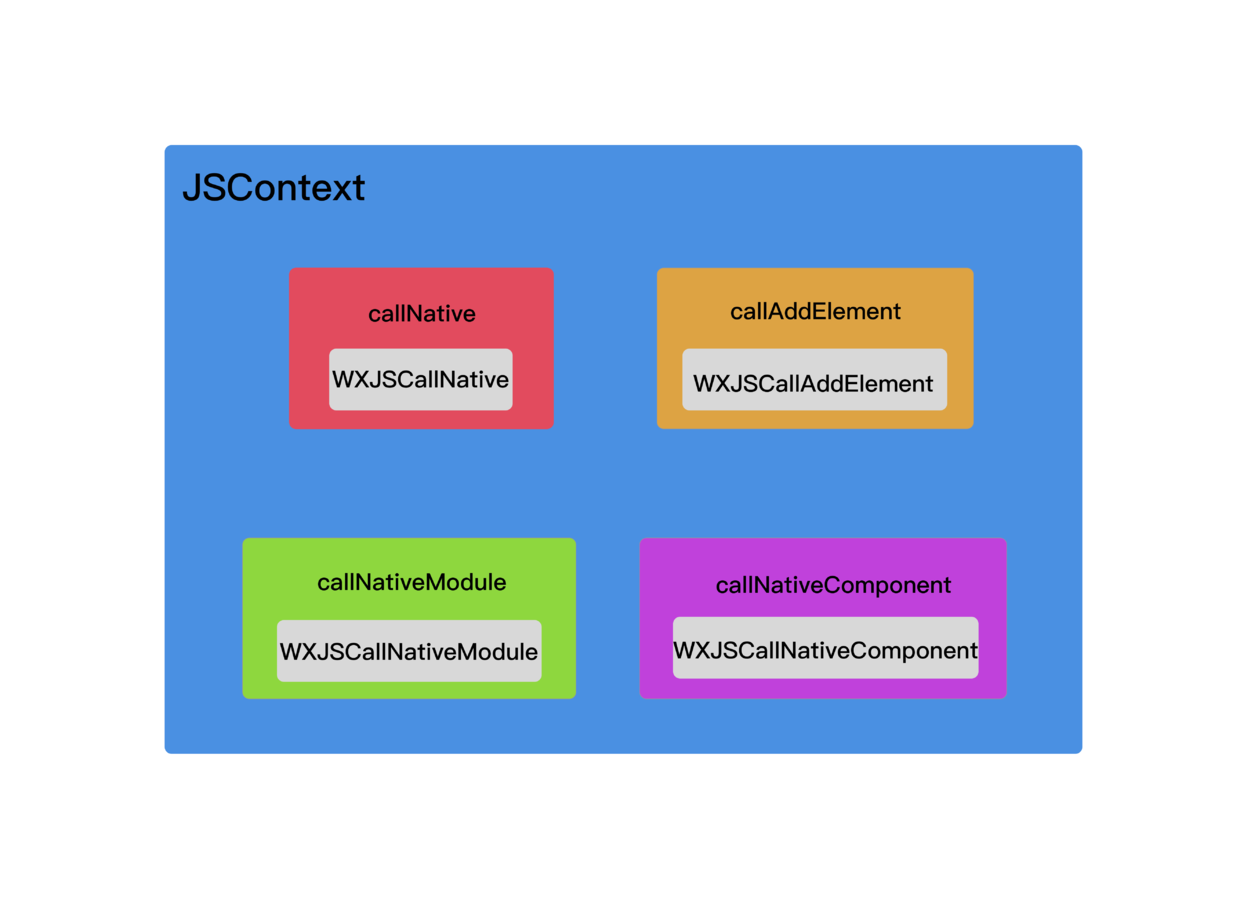
如上图,灰色的就是OC本地传入的Block,外面在包一层,变成JS的方法,注入到JSContext中。
WeexSDK源码分析(iOS)的更多相关文章
- iOS硬解H.264:-VideoToolboxDemo源码分析[草稿]
来源:http://www.cnblogs.com/michaellfx/p/understanding_-VideoToolboxDemo.html iOS硬解H.264:-VideoToolbox ...
- iOS常用框架源码分析
SDWebImage NSCache 类似可变字典,线程安全,使用可变字典自定义实现缓存时需要考虑加锁和释放锁 在内存不足时NSCache会自动释放存储的对象,不需要手动干预 NSCache的key不 ...
- jQuery 2.0.3 源码分析 事件绑定 - bind/live/delegate/on
事件(Event)是JavaScript应用跳动的心脏,通过使用JavaScript ,你可以监听特定事件的发生,并规定让某些事件发生以对这些事件做出响应 事件的基础就不重复讲解了,本来是定位源码分析 ...
- [Android实例] Scroll原理-附ScrollView源码分析
想象一下你拿着放大镜贴很近的看一副巨大的清明上河图, 那放大镜里可以看到的内容是很有限的, 而随着放大镜的上下左右移动,就可以看到不同的内容了 android中手机屏幕就相当于这个放大镜, 而看到的内 ...
- Go Mobile 例子 basic 源码分析
OpenGL ES(OpenGL for Embedded Systems)是 OpenGL 三维图形API的子集,针对手机.PDA和游戏主机等嵌入式设备而设计.该API由Khronos集团定义推广, ...
- AFNetworking源码分析
来源:zongmumask 链接:http://www.jianshu.com/p/8eac5b1975de 简述 在iOS开发中,与直接使用苹果框架中提供的NSURLConnection或NSURL ...
- YYCache 源码分析(一)
iOS 开发中总会用到各种缓存,YYCache或许是你最好的选择.性能上有优势,用法也很简单.作者ibireme曾经对比过同类轮子:http://blog.ibireme.com/2015/10/26 ...
- 安卓MonkeyRunner源码分析之启动
在工作中因为要追求完成目标的效率,所以更多是强调实战,注重招式,关注怎么去用各种框架来实现目的.但是如果一味只是注重招式,缺少对原理这个内功的了解,相信自己很难对各种框架有更深入的理解. 从几个月前开 ...
- Appium Server源码分析之作为Bootstrap客户端
Appium Server拥有两个主要的功能: 它是个http服务器,它专门接收从客户端通过基于http的REST协议发送过来的命令 他是bootstrap客户端:它接收到客户端的命令后,需要想办法把 ...
随机推荐
- javascript:控制台详解
javascript工具——浏览器控制台详解 大神这篇博客是写在2011年,主要介绍 “Firefox” 浏览器插件 “Firebug” 的操作,如今主流浏览器对控制台都已经提供了很好的支持.我自己 ...
- codeforces 1041A Heist
electronic a.电子的 heist v.抢劫 in ascending order 升序 indice n.标记 device n.装置设备 staff n.职员 in arbitrary ...
- linux 的那些hung 检测机制
在dmesg中,看到如下信息: [:: seconds [:: seconds [:af: seconds [:af: seconds [:: seconds [:3b: seconds [:: se ...
- redis make编译失败的原因
make clean redis编译失败可能是: 1.未安装gcc,gcc-c++ yum install gcc yum install gcc-c++ 2.未安装tcl yum install t ...
- DB2 公共表表达式(WITH语句的使用)
----start 说起WITH 语句,除了那些第一次听说WITH语句的人,大部分人都觉得它是用来做递归查询的.其实那只是它的一个用途而已,它的本名正如我们标题写的那样,叫做:公共表表达式(Commo ...
- 【转】Appium 优化版
Appium 开源分享优化版 之前分享过PageObject+Python+Appium 本版本是对上次版本较大改版,主要解决了: 失败重连一次(默认一次)可配置多次 基于appium1.7.1 ui ...
- FloatingActionButton FAB 悬浮按钮
FloatingActionButton简称FAB,这是一种比较美观的按钮: 1.使用前: FAB代表一个App或一个页面中最主要的操作,如果一个App的每个页面都有FAB,则通常表示该App最主要的 ...
- linux环境:创建数据库用户,表空间,启动数据库
1.启动数据库 首先使用oracle用户登录Linux,然后在shell命令行中执行下面的命令:第一步:打开Oracle监听(先查看状态:oracle监听是否启动:lsnrctl status)$ l ...
- jquery全国省市区三级联动插件distpicker
使用步骤: 1.引入js <script src="distpicker/jquery.min.js" type="text/javascript" ch ...
- [leetcode]70. Climbing Stairs爬楼梯
You are climbing a stair case. It takes n steps to reach to the top. Each time you can either climb ...