
java第十三周测试记录
 今天课上遇到了问题,在我的上一篇随笔,这个阻碍了我很长时间,而且上一次也是这个问题,真的吃一堑不长一智,这次我应该就记住了,嗯。
设计思路:
俩个库:
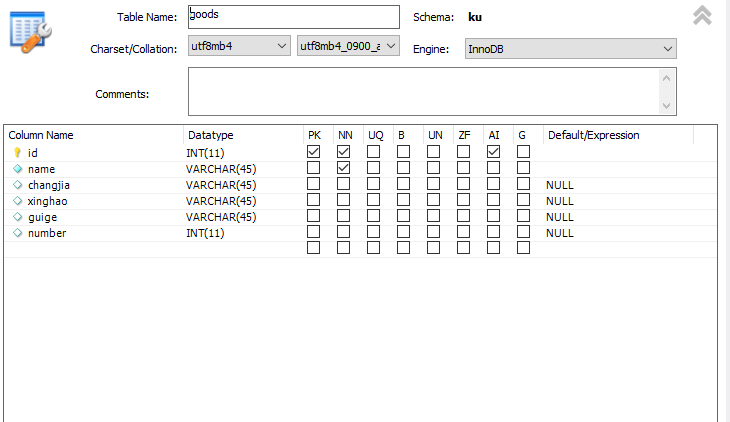
1.一个库存商品,商品的基本属性和商品的数量(数量这个数据与后面的库里面数据会结合)被称为库存数量。
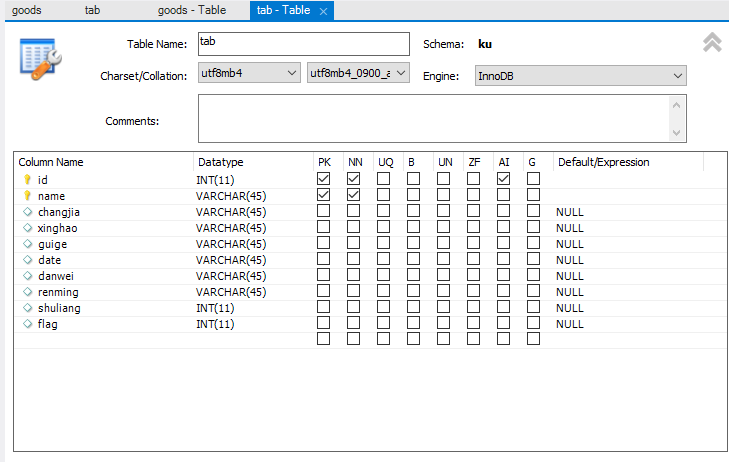
2.一个库存商品出入库信息,有取货和送货的信息。
①我用一个Int型(flag)来区分,flag=0为出库,flag=1为入库。
②也有一个数量,是挪动数量,这个数量与前面那个库的数量有一定的关联,就是取出货后,那个库存数量会减少,当存入货后,那个库存数量会增加。
③剩下的属性全用字符串类型。
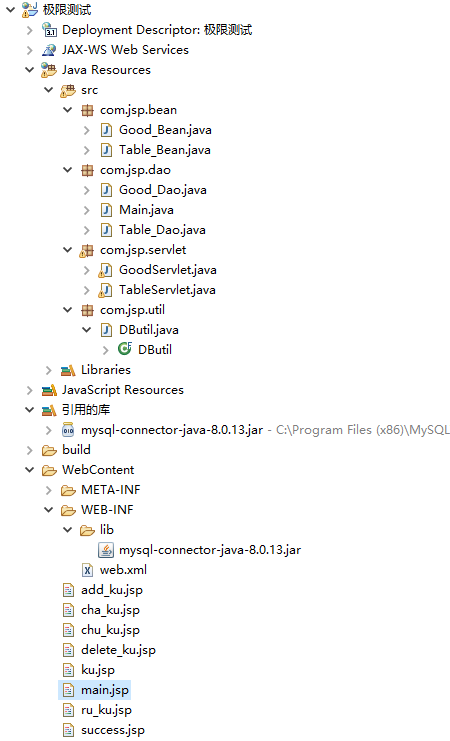
我采用的是jsp+severlet+dao+bean模式:
代码:
jsp:
主要函数表的几个jsp:
main.jsp:
<%@ page language="java" contentType="text/html; charset=utf-8"

    pageEncoding="utf-8"%>

<!DOCTYPE html PUBLIC "-//W3C//DTD HTML 4.01 Transitional//EN" "http://www.w3.org/TR/html4/loose.dtd">

<html>

<head>

<style>

body{ text-align:center}

/* css注释:为了观察效果设置宽度 边框 高度等样式 */

</style>

<meta http-equiv="Content-Type" content="text/html; charset=utf-8">

<title>main</title>

</head>

<body>

<br><br><br><br><br><br><br>//格式好看一点,下面同理

<div>

<input type="button" onclick="test1()" value="ru_ku" style="width:200px;height:50px" />

<script >

function test1(){

var url = "ru_ku.jsp";

window.location.href= url;

}

</script>

</div>

<br><br><br><br><br>

<div>

<input type="button" onclick="test2()" value="chu_ku" style="width:200px;height:50px"/>

<script >

function test2(){

var url = "chu_ku.jsp";

window.location.href= url;

}

</script>

</div>

<br><br><br><br><br>

<div>

<input type="button" onclick="test3()" value="cha_ku" style="width:200px;height:50px"/>

<script >

function test3(){

var url = "cha_ku.jsp";

window.location.href= url;

}

</script>

</div>

<br><br><br><br><br>

<div>

<input type="button" onclick="test4()" value="ku" style="width:200px;height:50px"/>

<script >

function test4(){

var url = "ku.jsp";

window.location.href= url;

}

</script>

</div>

</body>

</html>
chuku.jsp:
<%@ page language="java" contentType="text/html; charset=utf-8"

    pageEncoding="utf-8"%>

<!DOCTYPE html PUBLIC "-//W3C//DTD HTML 4.01 Transitional//EN" "http://www.w3.org/TR/html4/loose.dtd">

<html>

<head>

<style>

	.a{

		margin-top: 20px;

	}

	.b{

		font-size: 20px;

		width: 160px;

		color: white;

		background-color: greenyellow;

	}

</style>

<meta http-equiv="Content-Type" content="text/html; charset=utf-8">

<title>add</title>

</head>

<body>

<div align="center">

		<h1 style="color: red;">出库信息填表</h1>

		<a href="main.jsp">返回主页</a>

		<form action="TableServlet?method=chu_ku" method="post">

			<div class="a">

				商品名<input type="text" id="name" name="name"/>

			</div>

			<div class="a">

				厂家名<input type="text" id="changjia" name="changjia" />

			</div>

			<div class="a">

				型号<input type="text" id="xinghao" name="xinghao" />

			</div>

				<div class="a">

				规格<input type="text" id="guige" name="guige" />

			</div>

				<div class="a">

				数量<input type="text" id="shuliang" name="shuliang" />

			</div>

			<div class="a">

				日期<input type="text" id="date" name="date" />

			</div>

				<div class="a">

				单位<input type="text" id="danwei" name="danwei" />

			</div>

				<div class="a">

				提货人<input type="text" id="renming" name="renming" />

			</div>

			<div class="a">

				<button type="submit" class="b">保   存</button>

			</div>

		</form>

	</div>

</body>

</html>
ru_ku.jsp:
<%@ page language="java" contentType="text/html; charset=utf-8"

    pageEncoding="utf-8"%>

<!DOCTYPE html PUBLIC "-//W3C//DTD HTML 4.01 Transitional//EN" "http://www.w3.org/TR/html4/loose.dtd">

<html>

<head>

<style>

	.a{

		margin-top: 20px;

	}

	.b{

		font-size: 20px;

		width: 160px;

		color: white;

		background-color: greenyellow;

	}

</style>

<meta http-equiv="Content-Type" content="text/html; charset=utf-8">

<title>add</title>

</head>

<body>

<div align="center">

		<h1 style="color: red;">入库信息填表</h1>

		<a href="main.jsp">返回主页</a>

		<form  method="post" action="TableServlet?action=in"  >

			<div class="a">

				商品名<input type="text" id="name" name="name"/>

			</div>

			<div class="a">

				厂家名<input type="text" id="changjia" name="changjia" />

			</div>

			<div class="a">

				型号<input type="text" id="xinghao" name="xinghao" />

			</div>

				<div class="a">

				规格<input type="text" id="guige" name="guige" />

			</div>

				<div class="a">

				数量<input type="text" id="shuliang" name="shuliang" />

			</div>

			<div class="a">

				日期<input type="text" id="date" name="date" />

			</div>

				<div class="a">

				单位<input type="text" id="danwei" name="danwei" />

			</div>

				<div class="a">

				送货人<input type="text" id="renming" name="renming" />

			</div>

			<div class="a">

				<button type="submit" class="b">保   存</button>

			</div>

		</form>

	</div>

</body>

</html>
接下来是操作商品库的jsp
ku.jsp:
<%@ page language="java" contentType="text/html; charset=utf-8"

    pageEncoding="utf-8"%>

<!DOCTYPE html PUBLIC "-//W3C//DTD HTML 4.01 Transitional//EN" "http://www.w3.org/TR/html4/loose.dtd">

<html>

<head>

<style>

body{ text-align:center}

/* css注释:为了观察效果设置宽度 边框 高度等样式 */

</style>

<meta http-equiv="Content-Type" content="text/html; charset=utf-8">

<title>cang_ku</title>

</head>

<body>

<body>

<br><br><br><br><br><br><br>

<div>

<input type="button" onclick="test1()" value="cha_ku" style="width:200px;height:50px" />

<script >

function test1(){

var url = "cha_ku.jsp";

window.location.href= url;

}

</script>

</div>

<br><br><br><br><br>

<div>

<input type="button" onclick="test2()" value="add_ku" style="width:200px;height:50px"/>

<script >

function test2(){

var url = "add_ku.jsp";

window.location.href= url;

}

</script>

</div>

<br><br><br><br><br>

<div>

<input type="button" onclick="test3()" value="delete_ku" style="width:200px;height:50px"/>

<script >

function test3(){

var url = "delete_ku.jsp";

window.location.href= url;

}

</script>

</div>

<br><br><br><br><br>

</body>

</html>
add_ku.jsp:
<%@ page language="java" contentType="text/html; charset=utf-8"

    pageEncoding="utf-8"%>

<!DOCTYPE html PUBLIC "-//W3C//DTD HTML 4.01 Transitional//EN" "http://www.w3.org/TR/html4/loose.dtd">

<html>

<head>

<style>

	.a{

		margin-top: 20px;

	}

	.b{

		font-size: 20px;

		width: 160px;

		color: white;

		background-color: greenyellow;

	}

	</style>

<meta http-equiv="Content-Type" content="text/html; charset=utf-8">

<title>add_ku</title>

</head>

<body>

<div align="center">

		<h1 style="color: red;">库内物品录入</h1>

		<a href="ku.jsp">返回主页</a>

		<form action="GoodServlet?action=add" method="post" >

			<div class="a">

				商品名<input type="text" id="name" name="name"/>

			</div>

			<div class="a">

				厂家名<input type="text" id="changjia" name="changjia" />

			</div>

			<div class="a">

				型号<input type="text" id="xinghao" name="xinghao" />

			</div>

				<div class="a">

				规格<input type="text" id="guige" name="guige" />

			</div>

				<div class="a">

				数量<input type="text" id="number" name="number" />

			</div>

			<div class="a">

				<button type="submit" class="b">保   存</button>

			</div>

		</form>

	</div>

</body>

</html>
delete.jsp:
<%@ page language="java" contentType="text/html; charset=utf-8"

    pageEncoding="utf-8"%>

<!DOCTYPE html PUBLIC "-//W3C//DTD HTML 4.01 Transitional//EN" "http://www.w3.org/TR/html4/loose.dtd">

<html>

<head>

<style>

	.a{

		margin-top: 20px;

	}

	.b{

		font-size: 20px;

		width: 160px;

		color: white;

		background-color: greenyellow;

	}

</style>

<meta http-equiv="Content-Type" content="text/html; charset=utf-8">

<title>delete_ku</title>

</head>

<body>

<div align="center">

		<h1 style="color: red;">库内物品删除</h1>

		<a href="ku.jsp">返回主页</a>

		<form action="GoodServlet?action=delete" method="post" >

			<div class="a">

				商品名<input type="text" id="name" name="name"/>

			</div>

			<div class="a">

				厂家名<input type="text" id="changjia" name="changjia" />

			</div>

			<div class="a">

				型号<input type="text" id="xinghao" name="xinghao" />

			</div>

				<div class="a">

				规格<input type="text" id="guige" name="guige" />

			</div>

		</form>

	</div>

</body>

</html>
cha_ku.jsp:
<%@ page language="java" contentType="text/html; charset=utf-8"

    pageEncoding="utf-8"%>

<!DOCTYPE html PUBLIC "-//W3C//DTD HTML 4.01 Transitional//EN" "http://www.w3.org/TR/html4/loose.dtd">

<html>

<head>

<meta http-equiv="Content-Type" content="text/html; charset=utf-8">

<title>chao_zhao</title>

</head>

<body>

<div align="center">

		<h1 style="color: red;">库内物品查询</h1>

		<a href="ku.jsp">返回主页</a>

		<form action="GoodServlet?action=cha_xun" method="post" >

			<br><br><br><br><br><br><br><br><br>

			<br><br><br><br>

			<div class="a">

				<button type="submit" class="b">保   存</button>

			</div>

		</form>

	</div>

</body>

</html>
java代码:
Bean:
package com.jsp.bean;

public class Good_Bean {

	int id;

	String name;

	String xinghao;

	String guige;

	String changjia;

	int number;

	public Good_Bean()

	{}

	public Good_Bean(int id, String name,String changjia ,String xinghao, String guige, int number) {

		// TODO 自动生成的构造函数存根

		this.id=id;

		this.xinghao=xinghao;

		this.guige=guige;

		this.changjia=changjia;

		this.number=number;

	}

	public Good_Bean(String name, String changjia,String xinghao, String guige, int number) {

		// TODO 自动生成的构造函数存根

		this.xinghao=xinghao;

		this.guige=guige;

		this.changjia=changjia;

		this.number=number;

	}

	public int getId() {

		return id;

	}

	public void setId(int id) {

		this.id = id;

	}

	public String getName() {

		return name;

	}

	public void setName(String name) {

		this.name = name;

	}

	public String getXinghao() {

		return xinghao;

	}

	public void setXinghao(String xinghao) {

		this.xinghao = xinghao;

	}

	public String getGuige() {

		return guige;

	}

	public void setGuige(String guige) {

		this.guige = guige;

	}

	public String getChangjia() {

		return changjia;

	}

	public void setChangjia(String changjia) {

		this.changjia = changjia;

	}

	public int getNumber() {

		return number;

	}

	public void setNumber(int number) {

		this.number = number;

	}

}
package com.jsp.bean;

public class Table_Bean {

	int id;

	String name;

	String xinghao;

	String guige;

	String changjia;

	int shuliang;

	String date;

	String danwei;

	String renming;

	int flag;

	public Table_Bean(int id, String name, String changjia, String xinghao, String guige, String date,

			String danwei, String renming, int shuliang, int flag) {

		this.id=id;

		this.name=name;

		this.changjia=changjia;

		this.xinghao=xinghao;

		this.guige=guige;

		this.date=date;

		this.danwei=danwei;

		this.renming=renming;

		this.shuliang=shuliang;

		this.flag=flag;

		// TODO 自动生成的构造函数存根

	}

	public Table_Bean( String name, String changjia, String xinghao, String guige, String date,

			String danwei, String renming, int shuliang, int flag) {

		this.name=name;

		this.changjia=changjia;

		this.xinghao=xinghao;

		this.guige=guige;

		this.date=date;

		this.danwei=danwei;

		this.renming=renming;

		this.shuliang=shuliang;

		this.flag=flag;

		// TODO 自动生成的构造函数存根

	}

	public int getId() {

		return id;

	}

	public void setId(int id) {

		this.id = id;

	}

	public String getName() {

		return name;

	}

	public void setName(String name) {

		this.name = name;

	}

	public String getXinghao() {

		return xinghao;

	}

	public void setXinghao(String xinghao) {

		this.xinghao = xinghao;

	}

	public String getGuige() {

		return guige;

	}

	public void setGuige(String guige) {

		this.guige = guige;

	}

	public String getChangjia() {

		return changjia;

	}

	public void setChangjia(String changjia) {

		this.changjia = changjia;

	}

	public int getShuliang() {

		return shuliang;

	}

	public void setShuliang(int shuliang) {

		this.shuliang = shuliang;

	}

	public String getDate() {

		return date;

	}

	public void setDate(String date) {

		this.date = date;

	}

	public String getDanwei() {

		return danwei;

	}

	public void setDanwei(String danwei) {

		this.danwei = danwei;

	}

	public String getRenming() {

		return renming;

	}

	public void setRenming(String renming) {

		this.renming = renming;

	}

	public int getFlag() {

		return flag;

	}

	public void setFlag(int flag) {

		this.flag = flag;

	}

}
Dao:
package com.jsp.dao;

import java.sql.Connection;

import java.sql.ResultSet;

import java.sql.SQLException;

import java.sql.Statement;

import java.util.ArrayList;

import java.util.List;

import com.jsp.bean.Good_Bean;

import com.jsp.util.*;

public class Good_Dao {

	/**

	 *

	 * 查看数据是否存在

	 * @param name

	 * @param xinghao

	 * @param guige

	 * @param changjia

	 * @return

	 */

	public  boolean  cha_xun (String name,String xinghao,String guige,String changjia)

	{

		DButil DB= new DButil();

		int i =0;

		Connection con =DB.getConn("ku");

		try {

			Statement state = con.createStatement();

			ResultSet rs = state.executeQuery("select * from goods where name='" + name + "'");

			if (rs.next())

			{

				if(rs.getString("guige").equals(guige))

				{

					i++;

				}

				if(rs.getString("changjia").equals(changjia))

				{

					i++;

				}

				if(rs.getString("xinghao").equals(xinghao))

				{

					i++;

				}

			}

		} catch (SQLException e) {

			// TODO 自动生成的 catch 块

			e.printStackTrace();

		}

		if(i==3)

		{

			return true;

		}

		else

		{

			return false;

		}

	}

	public  int cha__xun(String name,String xinghao,String guige,String changjia)

	{

		DButil DB= new DButil();

		int i =0;

		int id=0;

		Connection con =DB.getConn("ku");

		try {

			Statement state = con.createStatement();

			ResultSet rs = state.executeQuery("select * from goods where name='" + name + "'");

			if (rs.next())

			{

				if(rs.getString("guige").equals(guige))

				{

					i++;

				}

				if(rs.getString("changjia").equals(changjia))

				{

					i++;

				}

				if(rs.getString("xinghao").equals(xinghao))

				{

					i++;

				}

				if(i==3)

				{

					id=rs.getInt("id");

				}

			}

		} catch (SQLException e) {

			// TODO 自动生成的 catch 块

			e.printStackTrace();

		}

		return id;

	}

	/**

	 * 全显示商品数据

	 * @return

	 */

	public List<Good_Bean> list() {

		DButil DB =new DButil();

		String sql = "select * from goods";

		List<Good_Bean> list = new ArrayList<>();

		Connection conn = DB.getConn();

		Statement state = null;

		ResultSet rs = null;

		try {

			state = conn.createStatement();

			rs = state.executeQuery(sql);

			Good_Bean good_bean = null;

			while (rs.next()) {

				int id2 = rs.getInt("id");

				String name2 = rs.getString("name");

				String changjia2 = rs.getString("changjia");

				String xinghao2 = rs.getString("xinghao");

				String guige2 = rs.getString("guige");

				int  number2 =rs.getInt("number");

				good_bean = new Good_Bean();

				good_bean.setId(id2);

				good_bean.setName(name2);

				good_bean.setChangjia(changjia2);

				good_bean.setXinghao(xinghao2);

				good_bean.setGuige(guige2);

				good_bean.setNumber(number2);

				list.add(good_bean);

			}

		} catch (SQLException e) {

			e.printStackTrace();

		} finally {

			DB.close(rs, state, conn);

		}

		return list;

	}

	/**

	 * 增加

	 * @param good_bean

	 * @return

	 */

	public boolean add(Good_Bean good_bean) {

		DButil DB =new DButil();

		String sql = "insert into goods(name, changjia, xinghao,guige,number) values('" + good_bean.getName() + "','" + good_bean.getChangjia() + "','" + good_bean.getXinghao() + "','" + good_bean.getGuige()+"','" + good_bean.getNumber()+"')";

		Connection conn = DB.getConn();

		Statement state = null;

		boolean f = false;

		int a = 0;

		try {

			state = conn.createStatement();

			a=state.executeUpdate(sql);

		} catch (Exception e) {

			e.printStackTrace();

		} finally {

			DB.close(state, conn);

		}

		if (a > 0) {

			f = true;

		}

		return f;

	}

/**

 * 删除

 * @param

 * @return

 */

public boolean delete (String name) {

	boolean f = false;

	String sql = "delete from goods where name='" + name + "'";

	DButil DB =new DButil();

	Connection conn = DB.getConn("goods");

	Statement state = null;

	int a = 0;

	try {

		state = conn.createStatement();

		a = state.executeUpdate(sql);

	} catch (SQLException e) {

		e.printStackTrace();

	} finally {

		DB.close(state, conn);

	}

	if (a > 0) {

		f = true;

	}

	return f;

}

}
package com.jsp.dao;

import java.sql.Connection;

import java.sql.ResultSet;

import java.sql.SQLException;

import java.sql.Statement;

import java.util.ArrayList;

import java.util.List;

import com.jsp.bean.Table_Bean;

import com.jsp.util.*;

public class Table_Dao {

	public List<Table_Bean> list() {

		DButil DB =new DButil();

		String sql = "select * from tab";

		List<Table_Bean> list = new ArrayList<>();

		Connection conn = DB.getConn("ku");

		Statement state = null;

		ResultSet rs = null;

		try {

			state = conn.createStatement();

			rs = state.executeQuery(sql);

			Table_Bean table_bean = null;

			while (rs.next()) {

				int id2 = rs.getInt("id");

				String name2 = rs.getString("name");

				String xinghao2 = rs.getString("xinghao");

				String changjia2 = rs.getString("changjia");

				String guige2 = rs.getString("guige");

				String date2 = rs.getString("date");

				String danwei2 = rs.getString("danwei");

				String renming2 = rs.getString("renming");

				int flag =rs.getInt("flag");

				int  shuliang2 =rs.getInt("shuliang");

				table_bean = new Table_Bean(id2, name2, changjia2,xinghao2,guige2,date2,danwei2,renming2,shuliang2,flag);

				list.add(table_bean);

			}

		} catch (SQLException e) {

			e.printStackTrace();

		} finally {

			DB.close(rs, state, conn);

		}

		return list;

	}

	public boolean _ku(Table_Bean table_bean) throws SQLException

	{

		DButil DB =new DButil();

		Connection conn = DB.getConn();

		Statement state = null;

		String sql = "insert into tab(name,changjia,xinghao,guige,date,danwei,renming,shuliang,flag) values('" + table_bean.getName() + "','" + table_bean.getChangjia() + "','" + table_bean.getXinghao() + "','" + table_bean.getGuige()+"','" + table_bean.getDate()+"','"+table_bean.getDanwei()+"','" + table_bean.getRenming()+"','" +table_bean.getShuliang()+"','" + table_bean.getFlag()+ "')";

		boolean f = false;

		int a=0;

		try {

			state = conn.createStatement();

			state.execute(sql);

			a=1;

		} catch (Exception e) {

			e.printStackTrace();

		} finally {

			DB.close(state,conn);

		}

		DB.close(state,conn);

		if (a > 0) {

			f = true;

		}

		return f;

	}

}
Severlet:
package com.jsp.servlet;

import java.io.IOException;

import java.io.PrintWriter;

import java.sql.SQLException;

import java.util.ArrayList;

import java.util.List;

import javax.servlet.ServletException;

import javax.servlet.annotation.WebServlet;

import javax.servlet.http.HttpServlet;

import javax.servlet.http.HttpServletRequest;

import javax.servlet.http.HttpServletResponse;

import com.jsp.bean.Good_Bean;

import com.jsp.bean.Table_Bean;

import com.jsp.dao.Good_Dao;

import com.jsp.dao.Table_Dao;

/**

 * Servlet implementation class GoodServlet

 */

@WebServlet("/GoodServlet")

public class GoodServlet extends HttpServlet {

	private static final long serialVersionUID = 1L;

    /**

     * @see HttpServlet#HttpServlet()

     */

    public GoodServlet() {

        super();

        // TODO Auto-generated constructor stub

    }

	/**

	 * @see HttpServlet#doGet(HttpServletRequest request, HttpServletResponse response)

	 */

	protected void doGet(HttpServletRequest request, HttpServletResponse response) throws ServletException, IOException {

		// TODO Auto-generated method stub

		request.setCharacterEncoding("UTF-8");

		response.setContentType("text/html;charsetUTF-8");

		response.setCharacterEncoding("UTF-8");

		String action=request.getParameter("action");

		if (action.equals("add")) {

			add( request,  response);

			}

		else if (action.equals("delete")) {

			delete( request,  response);

			}

		else if (action.equals("cha_xun")) {

			cha_xun( request,  response);

		}

		else

		{}

	}

	private void cha_xun(HttpServletRequest request, HttpServletResponse response) throws IOException, ServletException {

		// TODO 自动生成的方法存根

		Good_Dao good_dao =new Good_Dao();

		List<Good_Bean> list = new ArrayList<>();

		request.setAttribute("goods", list);

		list =good_dao.list();

		PrintWriter out= response.getWriter();

		out = response.getWriter();

		out.println("仓库详情");

		for(int i=0;i<list.size();i++)

		{

			out.print("                                 ");

			out.print(list.get(i).getId()+" ");

			out.print(list.get(i).getChangjia()+" ");

			out.print(list.get(i).getXinghao()+" ");

			out.print(list.get(i).getGuige()+" ");

			out.print(list.get(i).getNumber()+" ");

			out.println();

			out.println();

		}

		//request.getRequestDispatcher("cha_ku.jsp").forward(request,response);

	}

	private void delete(HttpServletRequest request, HttpServletResponse response) {

		// TODO 自动生成的方法存根

		Good_Dao good_dao =new Good_Dao();

		String name = request.getParameter("name");

		String changjia = request.getParameter("changjia");

		String xinghao = request.getParameter("xinghao");

		String guige = request.getParameter("guige");

		if(good_dao.cha_xun(name, xinghao, guige, changjia))

		{

			good_dao.delete(name);

		}

	}

	private void add(HttpServletRequest request, HttpServletResponse response) {

		// TODO 自动生成的方法存根

		Good_Dao good_dao =new Good_Dao();

		String name = request.getParameter("name");

		String changjia = request.getParameter("changjia");

		String xinghao = request.getParameter("xinghao");

		String guige = request.getParameter("guige");

		String number = request.getParameter("number");

		 int i_number=Integer.parseInt(number);

		Good_Bean good_bean= new Good_Bean(name, changjia,xinghao, guige,i_number );

		good_dao.add(good_bean);

	}

	/**

	 * @see HttpServlet#doPost(HttpServletRequest request, HttpServletResponse response)

	 */

	protected void doPost(HttpServletRequest request, HttpServletResponse response) throws ServletException, IOException {

		// TODO Auto-generated method stub

		doGet(request, response);

	}

}
package com.jsp.servlet;

import java.io.IOException;

import java.io.PrintWriter;

import java.sql.SQLException;

import java.util.ArrayList;

import java.util.List;

import javax.servlet.ServletException;

import javax.servlet.annotation.WebServlet;

import javax.servlet.http.HttpServlet;

import javax.servlet.http.HttpServletRequest;

import javax.servlet.http.HttpServletResponse;

import com.jsp.bean.Good_Bean;

import com.jsp.bean.Table_Bean;

import com.jsp.dao.Good_Dao;

import com.jsp.dao.Table_Dao;

/**

 * Servlet implementation class TableServlet

 */

@WebServlet("/TableServlet")

public class TableServlet extends HttpServlet {

	private static final long serialVersionUID = 1L;

    /**

     * @see HttpServlet#HttpServlet()

     */

    public TableServlet() {

        super();

        // TODO Auto-generated constructor stub

    }

	/**

	 * @see HttpServlet#doGet(HttpServletRequest request, HttpServletResponse response)

	 */

	protected void doGet(HttpServletRequest request, HttpServletResponse response) throws ServletException, IOException {

		// TODO Auto-generated method stub

		request.setCharacterEncoding("UTF-8");

		response.setContentType("text/html;charsetUTF-8");

		response.setCharacterEncoding("UTF-8");

		String action=request.getParameter("action");

		xian_shi(request,response);

		if (action.equals("in")) {

			try {

				ru_ku(request, response);

			} catch (SQLException e) {

				// TODO 自动生成的 catch 块

				e.printStackTrace();

			}

		} else if (action.equals("out")) {

			try {

				chu_ku(request, response);

			} catch (SQLException e) {

				// TODO 自动生成的 catch 块

				e.printStackTrace();

			}

		}

		else

		{}

		response.getWriter().append("Served at: ").append(request.getContextPath());

	}

private void xian_shi(HttpServletRequest request, HttpServletResponse response) throws IOException {

		// TODO 自动生成的方法存根

	Table_Dao table_dao =new Table_Dao();

	List<Table_Bean> list = new ArrayList<>();

	request.setAttribute("goods", list);

	list =table_dao.list();

	PrintWriter out= response.getWriter();

	out = response.getWriter();

	out.println("仓库搬运详情");

	for(int i=0;i<list.size();i++)

	{

		out.print("                                 ");

		out.print(list.get(i).getId()+" ");

		out.print(list.get(i).getChangjia()+" ");

		out.print(list.get(i).getXinghao()+" ");

		out.print(list.get(i).getGuige()+" ");

		out.print(list.get(i).getDate()+" ");

		out.print(list.get(i).getDanwei()+" ");

		out.print(list.get(i).getRenming()+" ");

		out.print(list.get(i).getShuliang()+" ");

		out.print(list.get(i).getFlag()+" ");

		out.println();

		out.println();

	}

	}

/**

 * flag=0是出库

 * @param request

 * @param response

 * @throws SQLException

 */

	private void chu_ku(HttpServletRequest request, HttpServletResponse response) throws SQLException {

		// TODO 自动生成的方法存根

		Table_Dao table_dao =new Table_Dao();

		String name = request.getParameter("name");

		String changjia = request.getParameter("changjia");

		String xinghao = request.getParameter("xinghao");

		String guige = request.getParameter("guige");

		String danwei = request.getParameter("danwei");

		String renming = request.getParameter("renming");

		String shuliang = request.getParameter("shuliang");

		String date = request.getParameter("date");

	     int i_shuliang=Integer.parseInt(shuliang);

	     int flag =0;

	     Table_Bean table_bean= new Table_Bean(name, changjia,xinghao, guige, date, danwei, renming, i_shuliang, flag );

		table_dao._ku(table_bean);

	}

/**

 * flag=1是入库

 * @param request

 * @param response

 * @throws IOException

 * @throws ServletException

 * @throws SQLException

 */

	private void ru_ku(HttpServletRequest request, HttpServletResponse response) throws IOException, ServletException, SQLException {

		// TODO 自动生成的方法存根

		Table_Dao table_dao =new Table_Dao();

		String name = request.getParameter("name");

		String changjia = request.getParameter("changjia");

		String xinghao = request.getParameter("xinghao");

		String guige = request.getParameter("guige");

		String danwei = request.getParameter("danwei");

		String renming = request.getParameter("renming");

		String shuliang = request.getParameter("shuliang");

		String date = request.getParameter("date");

		 int i_shuliang=Integer.parseInt(shuliang);

	     int flag =1;

		PrintWriter out= response.getWriter();

			out = response.getWriter();

			out.println("入库成功");

			Table_Bean table_bean= new Table_Bean(name, changjia,xinghao, guige, date, danwei, renming, i_shuliang, flag );

			table_bean.setShuliang(i_shuliang);

			table_dao._ku(table_bean);

			out.println(table_bean.getName());

		request.getRequestDispatcher("ru_ku.jsp").forward(request,response);

	}

	/**

	 * @see HttpServlet#doPost(HttpServletRequest request, HttpServletResponse response)

	 */

	protected void doPost(HttpServletRequest request, HttpServletResponse response) throws ServletException, IOException {

		// TODO Auto-generated method stub

		doGet(request, response);

	}

}
DB:
package com.jsp.util;

import java.sql.Connection;

import java.sql.DriverManager;

import java.sql.ResultSet;

import java.sql.SQLException;

import java.sql.Statement;

/**

 * 数据库的工具类

 *

 * @author 达达超可爱

 *

 */

public final class DButil {

	/**

	 * 数据库的连接函数

	 * 库名    账号   密码

	 * @return 数据库的连接

	 *

	 */

	public  Connection getConn(String date_Base,String root,String password)

	{

		Connection connection =null;

		// student 为数据库名称  ? 后面加的是条件

		String db_url1="jdbc:mysql://localhost:3306/";

		String db_url2="?serverTimezone=UTC";

		String db_url=db_url1+date_Base+db_url2;

		try {

			Class.forName("com.mysql.cj.jdbc.Driver");

			connection = DriverManager.getConnection(db_url, root, password);

			// System.out.println("Success connect MySql server!");

		} catch (Exception e) {

		}

		return connection;

	}

	public  Connection getConn(String date_Base)

	{

		Connection connection =null;

		// student 为数据库名称  ? 后面加的是条件

		String db_url1="jdbc:mysql://localhost:3306/";

		String db_url2="?serverTimezone=UTC";

		String db_url=db_url1+date_Base+db_url2;

		try {

			Class.forName("com.mysql.cj.jdbc.Driver");

			connection = DriverManager.getConnection(db_url, "root", "123456");

			// System.out.println("Success connect MySql server!");

		} catch (Exception e) {

		}

		return connection;

	}

	/**

	 *  数据库的连接函数

	 *  可修改的

	 *

	 * @return 数据库的连接

	 */

	public  Connection getConn()

	{

		Connection connection =null;

		// student 为数据库名称  ? 后面加的是条件

		String db_url="jdbc:mysql://localhost:3306/ku?serverTimezone=UTC";

		try {

			Class.forName("com.mysql.cj.jdbc.Driver");

			connection = DriverManager.getConnection(db_url, "root", "123456");

			// System.out.println("Success connect MySql server!");

		} catch (Exception e) {

		}

		return connection;

	}

	public void close(Connection con)

	{

		if(con!=null)

		{

			try {

				con.close();

			} catch (SQLException e) {

				e.printStackTrace();

			}

		}

	}

	public  void close(Statement state, Connection conn) {

		if (state != null) {

			try {

				state.close();

			} catch (SQLException e) {

				e.printStackTrace();

			}

		}

		if (conn != null) {

			try {

				conn.close();

			} catch (SQLException e) {

				e.printStackTrace();

			}

		}

	}

	public  void close(ResultSet rs, Statement state, Connection conn) {

		if (rs != null) {

			try {

				rs.close();

			} catch (SQLException e) {

				e.printStackTrace();

			}

		}

		if (state != null) {

			try {

				state.close();

			} catch (SQLException e) {

				e.printStackTrace();

			}

		}

		if (conn != null) {

			try {

				conn.close();

			} catch (SQLException e) {

				e.printStackTrace();

			}

		}

	}

}
遇到的问题:
1.我上面说的问题
2.如何做到俩个库里面数量的关系
3.查询理解错误:我是把所有信息输出出来,而不是按照相关数据查找,我会在之后改正。
4.tomacat8080占用问题:打开任务管理器,把正在用的但是不给显示界面的关掉。
5.时间输入问题,我是把时间按照String输入,在网上查了怎样 把Date改成String。
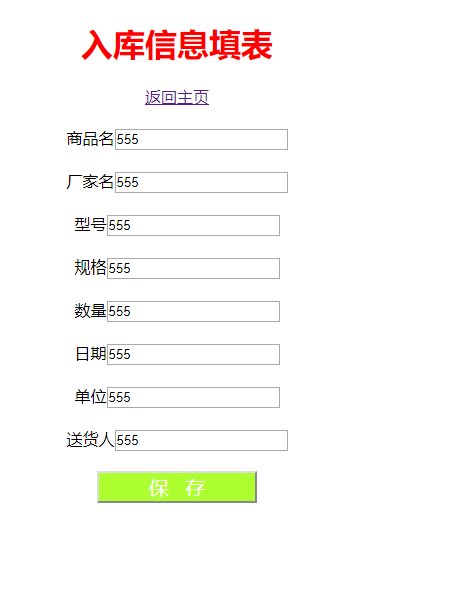
运行截图:

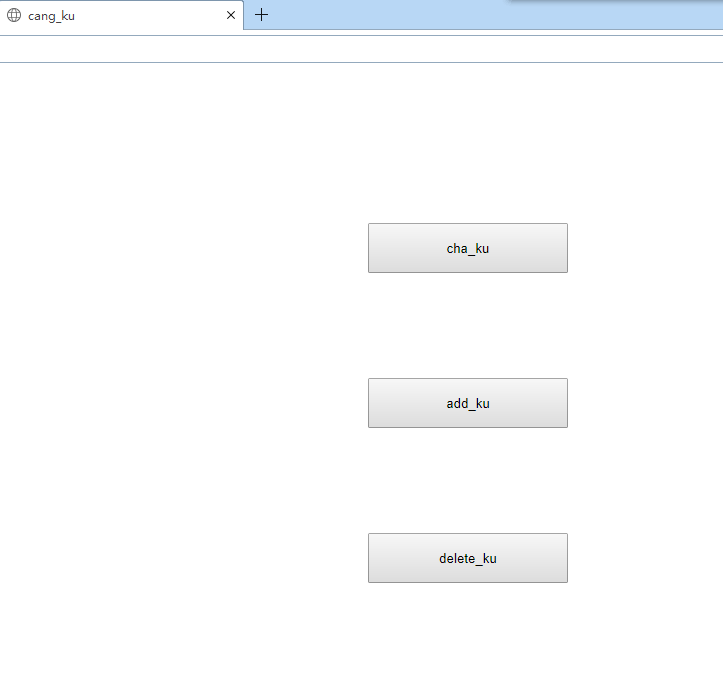
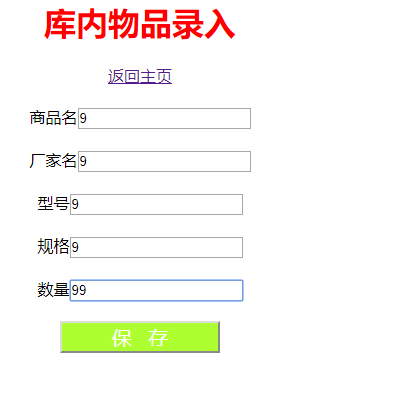

显示全部数据:


java第十三周测试记录的更多相关文章
- java开学第一周测试自我感想
开学第一周,王建民老师就对我们进行了java测试,对我们说测试题目是基于期末考试的基础难度来出的.我们的考试完全是靠暑假在家自学的基础,如果在家没有自学java,那完全就是看不懂试卷到底要考什么.由于 ...
- 201521123093 java 第十三周学习总结
1. 本周学习总结 以你喜欢的方式(思维导图.OneNote或其他)归纳总结多网络相关内容. 2. 书面作业 1. 网络基础 1.1 比较ping www.baidu.com与ping cec.jmu ...
- Java第十三周学习总结
1. 本周学习总结 以你喜欢的方式(思维导图.OneNote或其他)归纳总结多网络相关内容. 2. 书面作业 1. 网络基础 1.1 比较ping www.baidu.com与ping cec.jmu ...
- 在Python中调用Java扩展包HanLP测试记录
最近在研究中文分词及自然语言相关的内容,关注到JAVA环境下的HanLP,HanLP是一个致力于向生产环境普及NLP技术的开源Java工具包,支持中文分词(N-最短路分词.CRF分词.索引分词.用户自 ...
- Java第十三周实验作业
实验十三 图形界面事件处理技术 实验时间 2018-11-22 1.实验目的与要求 (1) 掌握事件处理的基本原理,理解其用途: 事件源:能够产生事件的对象都可以成为事件源,如文本框.按钮等,一个事 ...
- Java第十三周总结
1. 本周学习总结 以你喜欢的方式(思维导图.OneNote或其他)归纳总结多网络相关内容. 2. 书面作业 1. 网络基础 1.1 比较ping www.baidu.com与ping cec.jmu ...
- java开学第一周测试代码
Account.java /* 信1705-3 20173612 陈阳阳 */package ATM; public class Account { private String accountID ...
- java第十三周课后作业 0529
1.把多个企鹅的信息添加到集合中查看企鹅的数量及所有企鹅的信息删除集合中部分企鹅的元素判断集合中是否包含指定企鹅 package homework; import java.util.ArrayLis ...
- 201521123122 《java程序设计》第十三周学习总结
## 201521123122 <java程序设计>第十三周实验总结 ## 1. 本周学习总结 以你喜欢的方式(思维导图.OneNote或其他)归纳总结多网络相关内容. 2. 书面作业 1 ...
随机推荐
- 记录sql server中数据创建时间和最后修改时间,方便查找问题
getdate()用例: 2008-12-29 16:25:46.635 1.创建时间:将字段设置为datetime类型,并设置默认值为 getdate() 2.修改时间:通过触发器,在 update ...
- WCF与WebService的区别(转)
1.WebService:严格来说是行业标准,不是技术,使用XML扩展标记语言来表示数据(这个是夸语言和平台的关键).微软的Web服务实现称为ASP.NET Web Service.它使用Soap简单 ...
- golang ffmpeg 做网络直播
最近在公司做在线视频转码的工作,研究了下ffmpeg 最后直接研究了下网络直播,我是在我自己的mac 上面测试的,效果,还可以,先看看效果图吧 ffmpeg 我是通过brew安装 的,这步就略了 VL ...
- 初学python 遇到的坑
这最近人工智能比较火,看了一下大多都是python的代码,最近看看python 的代码,一出来就遇到了坑,空格的问题先不说了直接上代码吧 # coding = utf-8 import urllib. ...
- CentOS下配置SFTP操作日志
1.修改ssh的配置 vi /etc/ssh/sshd_config 在36行左右修改如下配置 Subsystem sftp /usr/libexec/openssh/sftp-server -l I ...
- ionic 3 安卓手机获取经纬度坐标
现在有个需求:每隔一段时间需向后台服务器返回当前用户的经纬度坐标. ionic 官方提供的有定位插件cordova-plugin-geolocation,兼容ios和android版本,网上查资料说最 ...
- MySQL的预处理技术
所谓的预处理技术,最初也是由MySQL提出的一种减轻服务器压力的一种技术! 传统mysql处理流程 1, 在客户端准备sql语句 2, 发送sql语句到MySQL服务器 3, 在MySQL服务器 ...
- 3步实现ssh面密码登录
1.上次本机的公钥和私钥 [root@vicweb ~]#ssh-keygen -t rsa Generating public/private rsa key pair. Enter file in ...
- python全栈开发day60-django_app ORM 完整登录案例
day60 内容回顾: 1. HTTP协议: 1.请求(浏览器发给服务端的消息——request) 请求方法 URL 协议版本\r\n k1:v1\r\n k2:v2\r\n \r\n 请求体 —— ...
- tmux 安装
安装libevent wget https://github.com/downloads/libevent/libevent/libevent-2.0.21-stable.tar.gz tar xzv ...