
windows 上 OpenSSH 服务 启用秘钥登录(微软真心逆天)
windows 上 OpenSSH 服务 启用秘钥登录(微软真心逆天)
windows 安装 OpenSSH 服务
最近需要在windows 服务器上部署自动发布程序,那么就需要用到 scp 和 ssh 的免密登录了
首先需要安装 OpenSSH 服务,过程可以看我上篇
windows 创建秘钥
定位到 C:\Program Files\OpenSSH,启用 powershell
cd 'C:\Program Files\OpenSSH'

$ .\ssh-keygen  <== 建立密钥对

Generating public/private rsa key pair. ...

一路enter
定位到 C:\Users\Administrator.ssh 生成 authorized_keys 文件
cd C:\Users\Administrator\.ssh

cat id_rsa.pub >> authorized_keys
到这里你以为就可以像linux一样使用秘钥登录了?
不你错了!!! 这坑了我好长时间,我以为是权限问题,后来Google发现 微软真心坑爹
解决办法如下
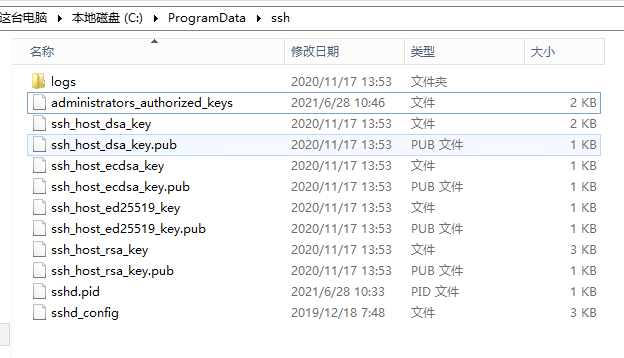
找到 C:\ProgramData\ssh 文件夹中的 sshd_config
看看最后一行!!
# override default of no subsystems

Subsystem	sftp	sftp-server.exe

# Example of overriding settings on a per-user basis

#Match User anoncvs

#	AllowTcpForwarding no

#	PermitTTY no

#	ForceCommand cvs server

Match Group administrators

       AuthorizedKeysFile __PROGRAMDATA__/ssh/administrators_authorized_keys
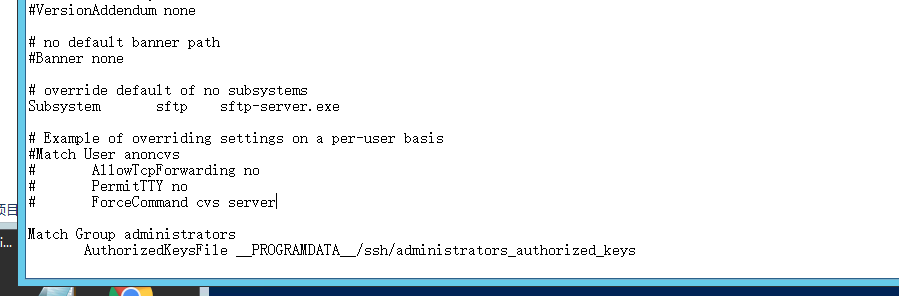
这啥意思呢? 就是刚刚生成的authorized_keys 文件要放在 C:\ProgramData\ssh 文件夹下,还要改名成 administrators_authorized_keys !!!
执行 cat id_rsa.pub >> administrators_authorized_keys
还有就是修改ssh 配置也是在 sshd_config 里面!
修改 sshd_config
完整配置
# This is the sshd server system-wide configuration file.  See

# sshd_config(5) for more information.

# The strategy used for options in the default sshd_config shipped with

# OpenSSH is to specify options with their default value where

# possible, but leave them commented.  Uncommented options override the

# default value.

#Port 22

#AddressFamily any

#ListenAddress 0.0.0.0

#ListenAddress ::

#HostKey __PROGRAMDATA__/ssh/ssh_host_rsa_key

#HostKey __PROGRAMDATA__/ssh/ssh_host_dsa_key

#HostKey __PROGRAMDATA__/ssh/ssh_host_ecdsa_key

#HostKey __PROGRAMDATA__/ssh/ssh_host_ed25519_key

# Ciphers and keying

#RekeyLimit default none

# Logging

#SyslogFacility AUTH

#LogLevel INFO

# Authentication:

#LoginGraceTime 2m

RSAAuthentication yes

PubkeyAuthentication yes

PermitRootLogin yes

#PermitRootLogin prohibit-password

#StrictModes yes

#MaxAuthTries 6

#MaxSessions 10

#PubkeyAuthentication yes

# The default is to check both .ssh/authorized_keys and .ssh/authorized_keys2

# but this is overridden so installations will only check .ssh/authorized_keys

AuthorizedKeysFile	.ssh/authorized_keys

#AuthorizedPrincipalsFile none

# For this to work you will also need host keys in %programData%/ssh/ssh_known_hosts

#HostbasedAuthentication no

# Change to yes if you don't trust ~/.ssh/known_hosts for

# HostbasedAuthentication

#IgnoreUserKnownHosts no

# Don't read the user's ~/.rhosts and ~/.shosts files

#IgnoreRhosts yes

# To disable tunneled clear text passwords, change to no here!

#PasswordAuthentication yes

#PermitEmptyPasswords no

# GSSAPI options

#GSSAPIAuthentication no

#AllowAgentForwarding yes

#AllowTcpForwarding yes

#GatewayPorts no

#PermitTTY yes

#PrintMotd yes

#PrintLastLog yes

#TCPKeepAlive yes

#UseLogin no

#PermitUserEnvironment no

#ClientAliveInterval 0

#ClientAliveCountMax 3

#UseDNS no

#PidFile /var/run/sshd.pid

#MaxStartups 10:30:100

#PermitTunnel no

#ChrootDirectory none

#VersionAddendum none

# no default banner path

#Banner none

# override default of no subsystems

Subsystem	sftp	sftp-server.exe

# Example of overriding settings on a per-user basis

#Match User anoncvs

#	AllowTcpForwarding no

#	PermitTTY no

#	ForceCommand cvs server

Match Group administrators

       AuthorizedKeysFile __PROGRAMDATA__/ssh/administrators_authorized_keys
与原配置相比增加三行
RSAAuthentication yes # 允许rsa

PubkeyAuthentication yes # 允许公钥登录

PermitRootLogin yes # 允许root登录
好吧 我照做
复制 id_rsa 到 linux 文件夹下 , chmod 600 id_rsa 设置 权限
ssh 登录
ssh -i ~/.ssh/keys/118.190.102.245/id_rsa Administrator@118.190.102.245
好吧 我照做,成功了 ...
windows 上 OpenSSH 服务 启用秘钥登录(微软真心逆天)的更多相关文章
- windows上OpenSSH服务安装及启动
一.windows安装OpenSSH 1,下载openSSH windows版 GitHub下载链接 我安装的是64位版本 OpenSSH-Win64.zip 2,解压到C:\Program File ...
- 腾讯云服务器,使用xshell ssh秘钥登录的时候报错:所选的用户密钥未在远程主机上注册
1.背景 新买了台腾讯云服务器,在腾讯云控制台新建了SSH私钥,然后下载到本地. 在本地使用xshell工具,导入下载好的私钥进行登录,报错:所选的用户密钥未在远程主机上注册 2.解决方案 在确定选择 ...
- SSH设置秘钥登录
设置 SSH 通过密钥登录 我们一般使用 PuTTY 等 SSH 客户端来远程管理 Linux 服务器.但是,一般的密码方式登录,容易有密码被暴力破解的问题.所以,一般我们会将 SSH 的端口设置为默 ...
- SSH配置免秘钥登录
一. SSH 配置免秘要登录 配置SSH 免秘要登录,虽然就那么几步,但总是会出现点小问题,今天就做下记录.SSH 免秘钥就是让两台机器相互信任,不需要输入密码就能相互登录.配置相互信任就是把各自的 ...
- linux秘钥登录
秘钥登录首先要了解四个文件: 公钥文件,私钥文件, authorized_keys, 还有/etc/ssh/sshd_config配置文件. 公钥文件存放在被登陆的机器上, 要将公钥添加进author ...
- 非对称加密 秘钥登录 https
非对称加密简介: 对称加密算法在加密和解密时使用的是同一个秘钥:而非对称加密算法需要两个密钥来进行加密和解密,这两个秘钥是公开密钥(public key,简称公钥)私有密钥(private key,简 ...
- Windows安装OpenSSH服务
一.背景 在做国盛通项目的时候,有两套并行测试环境,因为基本架构采用的是供应商提供的程序,需要将两套banner图做同步,因为图片数量多,进GitLab版本控制进行分支策略管理,进而同步两套环境,意义 ...
- linux使用秘钥登录(禁用root密码登录)
目的:为了巩固线上外网服务器的安全,避免黑客攻击植入木马,初步决定禁用root密码登录(安全强度低),统一使用秘钥登录(4096位长度,安全性较高) 具体操作如下: 一.生成ssh秘钥: ssh-ke ...
- ssh设置免秘钥登录
系统:CentOS7.2 需求:A服务器的fab用户需要使用www用户免秘钥登录到B服务器 换句话说,就是在A服务器的fab用户下,ssh www@B服务ip -p 端口 ,然后登录过去 ...
随机推荐
- Codeforces Round #660 (Div. 2)
A. Captain Flint and Crew Recruitment 题意:定义了一种数(接近质数),这种数可以写成p*q并且p和q都是素数,问n是否可以写成四个不同的数的和,并且保证至少三个数 ...
- Visual Lab Online —— 事后分析
项目 内容 班级:北航2020春软件工程 博客园班级博客 作业:事后分析 事后分析 设想和目标 我们的软件要解决什么问题?是否定义得很清楚?是否对典型用户和典型场景有清晰的描述? 我们的软件使得编写简 ...
- GIT·版本回退的指令
阅文时长 | 0.46分钟 字数统计 | 499.2字符 主要内容 | 1.引言&背景 2.指令集合&示例 3.声明与参考资料 『GIT·版本回退的指令』 编写人 | SCscHero ...
- 使用find命令查找大文件
使用find命令查找大文件 find命令是Linux系统管理员工具库中最强大的工具之一.它允许您根据不同的标准(包括文件大小)搜索文件和目录. 例如,如果在当前工作目录中要搜索大小超过100MB的文件 ...
- Sql Server 课堂笔记
创建表 --创建学生表 create table student (sno char(8) primary key, sname char(8) not null unique, ssex char( ...
- 014.Ansible Playbook Role 及调试
一 role 简介 在ansible中,role是将playbook分割为多个文件的主要机制,大大简化了复杂的playbook的编写,同时已与复用 role各个目录的作用及可用文件 files:存放由 ...
- C++ short/int/long/long long 等数据类型大小
表 1 整型数据类型 数据类型 字节大小 数值范围 short int (短整型) 2 字节 -32 768 〜+32 767 unsigned short int(无符号短整型) 2 字节 0 〜+ ...
- 5.1-5 uname、hostname、dmesg、stat、du
5.1 uname:显示系统信息 uname命令用于显示系统相关信息,比如内核版本号.硬件架构等. -a 显示系统所有相关信息 -v 显示内核版本 -m 显示计算机硬件架构 ...
- 第9章 case条件语句的应用实践
case语句企业级生产案例 范例9-7:实现通过传参的方式往/etc/openvpn_authfile.conf里添加用户,具体要求如下. 1)命令用法为: USAGE: sh adduser {-a ...
- 第13讲 | 套接字Socket:Talk is cheap, show me the code
第13讲 | 套接字Socket:Talk is cheap, show me the code 基于 TCP 和 UDP 协议的 Socket 编程.在讲 TCP 和 UDP 协议的时候,我们分客户 ...