
springcloud starter(一)
Spring Cloud - Getting Started Example,
转载自:https://www.logicbig.com/tutorials/spring-framework/spring-cloud/hello-world.html
Following is a quick-start example of Spring Cloud. We are going to develop very simple microservices using Spring Cloud, Spring Boot and Eureka Server.
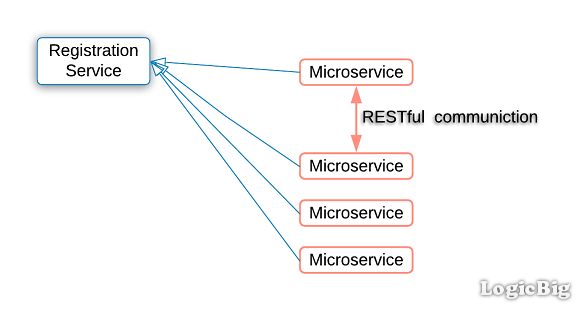
In microservice architecture, an application is composed of loosely coupled small services as opposed to a single monolithic application.
In microservice architecture a registry service is used to register the microservices so that they can be discovered.
Example
In this example we are going to use Eureka Server as the service registry. Eureka is developed by Netflix; it is open source. Spring has integrated Eureka into dedicated Spring Cloud modules to make it easier to use it.
We are going to develop two microservices:
First is 'hello-service' which will just return a hello message.
Second service 'hello-web-client-service' will handle the request coming from a client. On receiving a request it will call 'hello-service' and will return a web page in response.
There will be three separate servers; one for Eureka and two of microservices. Also there will be three separate maven projects.
Eureka Server
Maven dependencies
pom.xml
<project .....>

    <modelVersion>4.0.0</modelVersion>

    <groupId>com.logicbig.example</groupId>

    <artifactId>hello-eureka-server</artifactId>

    <version>1.0-SNAPSHOT</version>

    <parent>

        <groupId>org.springframework.boot</groupId>

        <artifactId>spring-boot-starter-parent</artifactId>

        <version>2.0.4.RELEASE</version>

    </parent>

    <properties>

        <java.version>1.8</java.version>

    </properties>

    <dependencies>

        <dependency>

            <groupId>org.springframework.cloud</groupId>

            <artifactId>spring-cloud-starter-netflix-eureka-server</artifactId>

        </dependency>

    </dependencies>

    <dependencyManagement>

        <dependencies>

            <dependency>

                <groupId>org.springframework.cloud</groupId>

                <artifactId>spring-cloud-dependencies</artifactId>

                <version>Finchley.SR1</version>

                <type>pom</type>

                <scope>import</scope>

            </dependency>

        </dependencies>

    </dependencyManagement>

</project>
Configuration
src/main/resources/application.yml
server:

  port: 7777

eureka:

  instance:

    hostname: localhost

  client:

    registerWithEureka: false

    fetchRegistry: false

In above configuration, the properties eureka.client.* are related to the service clients who want to register with Eureka.

The property eureka.client.register-with-eureka=false specifies that this server should not be registered to the service client itself.

The property eureka.client.fetch-registry=false specifies that the server should not fetch the registered information to itself.
Main class
@SpringBootApplication

@EnableEurekaServer

public class HelloEurekaServerMain {

  public static void main(String[] args) {

      SpringApplication.run(HelloEurekaServerMain.class, args);

  }

}
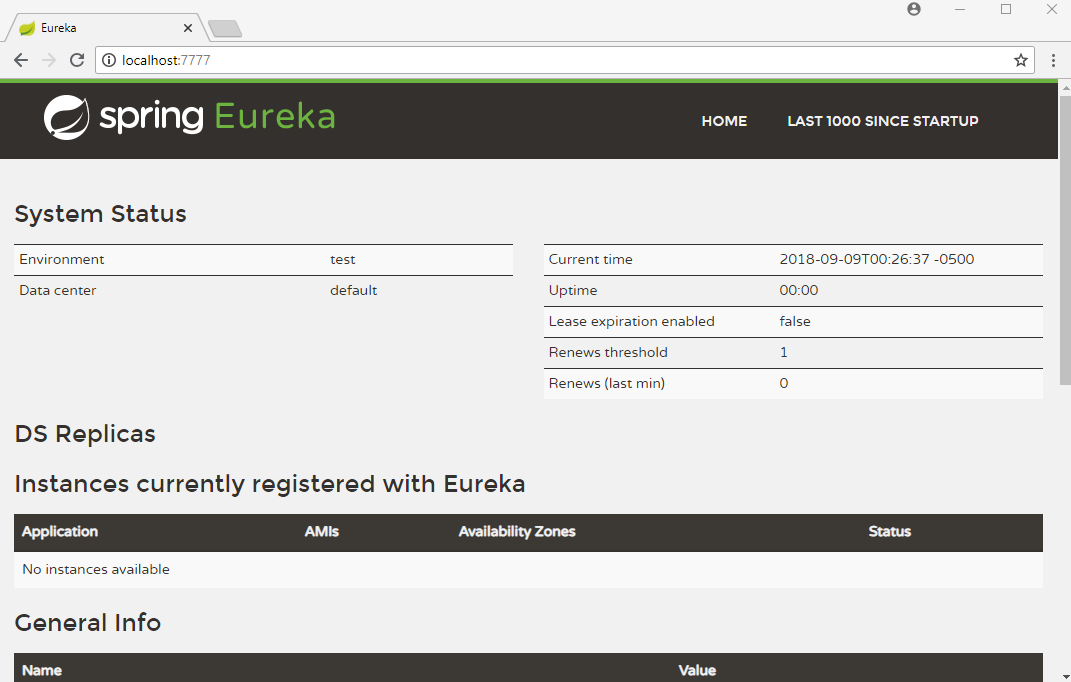
Run above main class from your IDE. That will start the Eureka Server.
Now we can access the Eureka server at http://localhost:7777 as shown:
hello-service
Maven dependencies
pom.xml
<project .....>

    <modelVersion>4.0.0</modelVersion>

    <groupId>com.logicbig.example</groupId>

    <artifactId>hello-service</artifactId>

    <version>1.0-SNAPSHOT</version>

    <parent>

        <groupId>org.springframework.boot</groupId>

        <artifactId>spring-boot-starter-parent</artifactId>

        <version>2.0.4.RELEASE</version>

    </parent>

    <properties>

        <java.version>1.8</java.version>

    </properties>

    <dependencies>

        <dependency>

            <groupId>org.springframework.boot</groupId>

            <artifactId>spring-boot-starter-web</artifactId>

        </dependency>

        <dependency>

            <groupId>org.springframework.cloud</groupId>

            <artifactId>spring-cloud-starter-netflix-eureka-client</artifactId>

        </dependency>

    </dependencies>

    <dependencyManagement>

        <dependencies>

            <dependency>

                <groupId>org.springframework.cloud</groupId>

                <artifactId>spring-cloud-dependencies</artifactId>

                <version>Finchley.SR1</version>

                <type>pom</type>

                <scope>import</scope>

            </dependency>

        </dependencies>

    </dependencyManagement>

</project>
Domain object
public class HelloObject {

  private String message;

  public String getMessage() {

      return message;

  }

  public void setMessage(String message) {

      this.message = message;

  }

}
A Rest Controller
@RestController

public class HelloController {

  private AtomicLong counter = new AtomicLong();

  @GetMapping("/hello")

  public HelloObject getHelloWordObject() {

      HelloObject hello = new HelloObject();

      hello.setMessage("Hi there! you are number " + counter.incrementAndGet());

      return hello;

  }

}
src/main/resources/application.properties
eureka.client.serviceUrl.defaultZone=http://localhost:7777/eureka/
src/main/resources/bootstrap.properties
spring.application.name=hello-service
Boot main class
@SpringBootApplication

@EnableDiscoveryClient

public class HelloServiceMain{

	public static void main(String[] args) {

		SpringApplication.run(HelloServiceMain.class, args);

	}

}
Run above main class from your IDE.
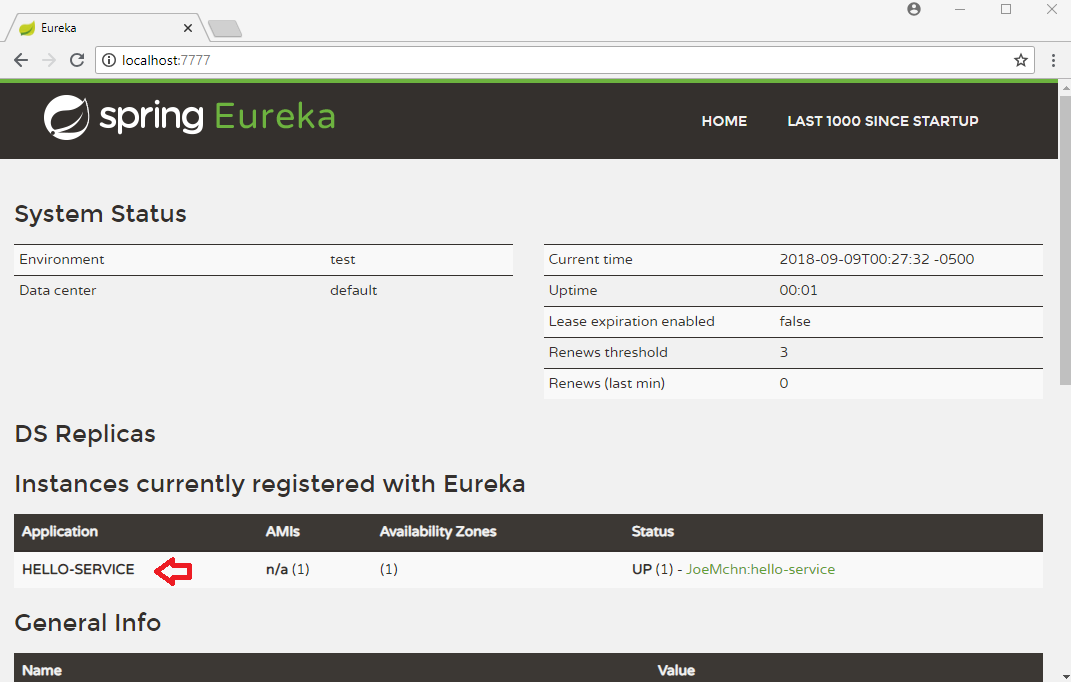
On refreshing Eureka page you should see HELLO-SERVICE instance listed in the registry:
hello-web-client-service
pom.xml
<project .....>

    <modelVersion>4.0.0</modelVersion>

    <groupId>com.logicbig.example</groupId>

    <artifactId>hello-web-client-service</artifactId>

    <version>1.0-SNAPSHOT</version>

    <parent>

        <groupId>org.springframework.boot</groupId>

        <artifactId>spring-boot-starter-parent</artifactId>

        <version>2.0.4.RELEASE</version>

    </parent>

    <properties>

        <java.version>1.8</java.version>

    </properties>

    <dependencies>

        <dependency>

            <groupId>org.springframework.boot</groupId>

            <artifactId>spring-boot-starter-web</artifactId>

        </dependency>

        <dependency>

            <groupId>org.springframework.boot</groupId>

            <artifactId>spring-boot-starter-thymeleaf</artifactId>

        </dependency>

        <dependency>

            <groupId>org.springframework.cloud</groupId>

            <artifactId>spring-cloud-starter-netflix-eureka-client</artifactId>

        </dependency>

    </dependencies>

    <dependencyManagement>

        <dependencies>

            <dependency>

                <groupId>org.springframework.cloud</groupId>

                <artifactId>spring-cloud-dependencies</artifactId>

                <version>Finchley.SR1</version>

                <type>pom</type>

                <scope>import</scope>

            </dependency>

        </dependencies>

    </dependencyManagement>

</project>
A Spring MVC Controller
@Controller

public class HelloWebClientController {

  @Autowired

  private DiscoveryClient discoveryClient;

  @GetMapping("/")

  public String handleRequest(Model model) {

      //accessing hello-service

      List<ServiceInstance> instances = discoveryClient.getInstances("hello-service");

      if (instances != null && instances.size() > 0) {//todo: replace with a load balancing mechanism

          ServiceInstance serviceInstance = instances.get(0);

          String url = serviceInstance.getUri().toString();

          url = url + "/hello";

          RestTemplate restTemplate = new RestTemplate();

          HelloObject helloObject = restTemplate.getForObject(url,

                  HelloObject.class);

          model.addAttribute("msg", helloObject.getMessage());

          model.addAttribute("time", LocalDateTime.now());

      }

      return "hello-page";

  }

}
c/main/resources/templates/hello-page.html
<!DOCTYPE html>

<html xmlns="http://www.w3.org/1999/xhtml"

      xmlns:th="http://www.thymeleaf.org">

<body>

<h2>Hello Page</h2>

<div th:text="${msg}"/>

<div>Time: <span th:text="${time}"/></div>

</body>

</html>
src/main/resources/application.properties
server.port=9080

eureka.client.serviceUrl.defaultZone=http://localhost:7777/eureka/
src/main/resources/bootstrap.properties
spring.application.name=hello-service
Boot main class
@SpringBootApplication

@EnableDiscoveryClient

public class HelloWebClientServiceMain {

	public static void main(String[] args) {

		SpringApplication.run(HelloWebClientServiceMain.class, args);

	}

}
Run above class from your IDE.
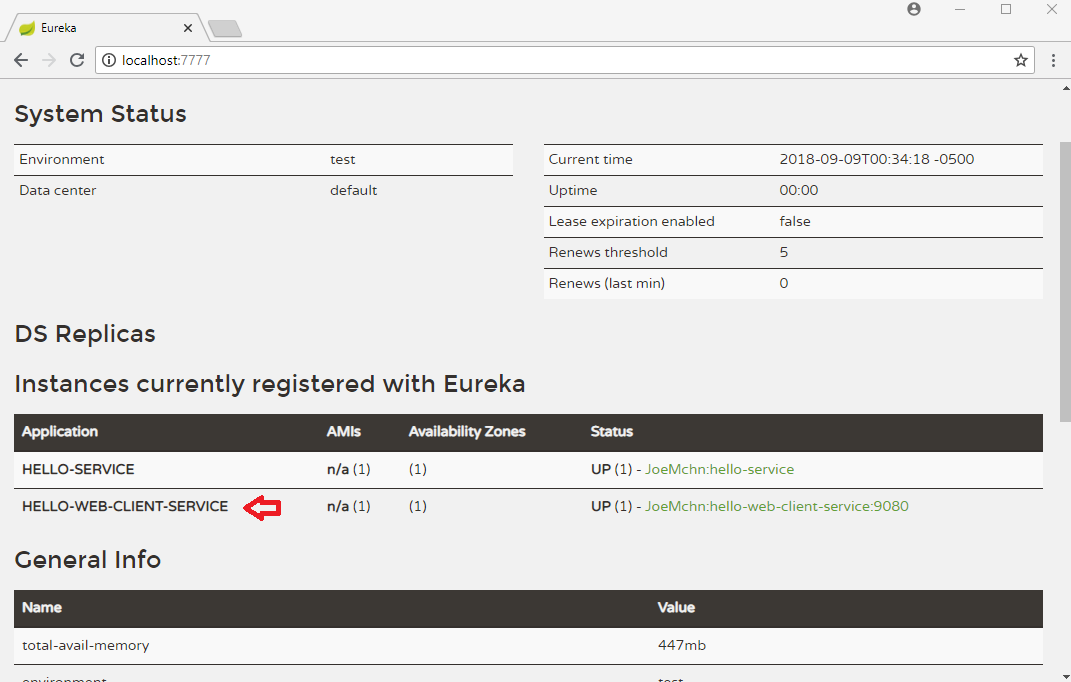
Refresh Eureka web page again:
Final output
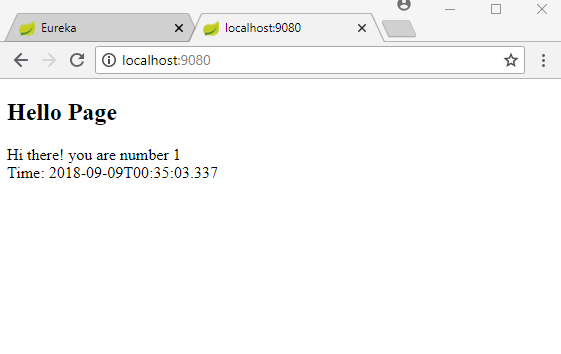
Now make request to 'hello-web-client-service' by entering localhost:9080 in web-browser:
Example Project
Dependencies and Technologies Used:
- Spring Boot 2.0.4.RELEASE
Corresponding Spring Version 5.0.8.RELEASE - Spring Cloud Finchley.SR1
- spring-cloud-starter-netflix-eureka-server 2.0.1.RELEASE: Spring Cloud Starter Netflix Eureka Server.
- spring-boot-starter-web : Starter for building web, including RESTful, applications using Spring MVC. Uses Tomcat as the default embedded container.
- spring-cloud-starter-netflix-eureka-client 2.0.1.RELEASE: Spring Cloud Starter Netflix Eureka Client.
- spring-boot-starter-thymeleaf : Starter for building MVC web applications using Thymeleaf views.
Uses org.thymeleaf:thymeleaf-spring5 version 3.0.9.RELEASE - JDK 1.8
- Maven 3.5.4


springcloud starter(一)的更多相关文章
- spring boot:使用分布式事务seata(druid 1.1.23 / seata 1.3.0 / mybatis / spring boot 2.3.2)
一,什么是seata? Seata:Simpe Extensible Autonomous Transcaction Architecture, 是阿里中间件开源的分布式事务解决方案. 前身是阿里的F ...
- 极速体验|使用 Erda 微服务观测接入 Jaeger Trace
在大型网站系统设计中,随着分布式架构,特别是微服务架构的流行,我们将系统解耦成更小的单元,通过不断的添加新的.小的模块或者重用已经有的模块来构建复杂的系统.随着模块的不断增多,一次请求可能会涉及到十几 ...
- SpringCloud接入EDAS——服务发现篇
旁白 很久没有写技术文章了,最近不是写水文就是写小说.说到底,还是最近很少研究技术的缘故,已经到了江郎才尽的地步了. 不过,LZ无意间看到自己团队的小伙伴写的一些文章,觉得还是不错的,于是便动了心思, ...
- Spring SpringMVC SpringBoot SpringCloud概念、关系及区别
一.正面解读: Spring主要是基于IOC反转Beans管理Bean类,主要依存于SSH框架(Struts+Spring+Hibernate)这个MVC框架,所以定位很明确,Struts主要负责表示 ...
- SpringCloud注解和配置以及pom依赖说明
在本文中说明了pom依赖可以支持什么功能,以及支持什么注解,引入该依赖可以在application.properties中添加什么配置. 1.SpringCloud 的pom依赖 序号 pom依赖 说 ...
- 每天学点SpringCloud(十):SpringCloud监控
今天我们来学习一下actuator这个组件,它不是SpringCloud之后才有的,而是SpringBoot的一个starter,Spring Boot Actuator.我们使用SpringClou ...
- SpringCloud Hystrix
⒈Hystrix是什么? Hystrix使一个用于处理分布式系统的延迟和容错的开源库.在分布式系统里,许多依赖不可避免的因服务超时.服务异常等导致调用失败,Hystrix能够保证在一个依赖出现问题的情 ...
- SpringBoot和SpringCloud面试题
一. 什么是springboot 1.用来简化spring应用的初始搭建以及开发过程 使用特定的方式来进行配置(properties或yml文件) 2.创建独立的spring引用程序 main方法运行 ...
- spring、springmvc、springboot、springcloud
Spring 最初利用“工厂模式”( DI )和“代理模式”( AOP )解耦应用组件.大家觉得挺好用,于是按照这种模式搞了一个 MVC 框架(一些用 Spring 解耦的组件),用开发 web 应用 ...
随机推荐
- sync/fsync/fdatasync的简单比较
此文主要转载自 http://blog.csdn.net/zbszhangbosen/article/details/7956558 官网上有关于MySQL的flush method的设置参数说明,但 ...
- 如何让py生成pyd
pyd文件类似于C++中的dll,可以编译,但是看不到源代码. py转换成pyd参考链接:https://blog.csdn.net/weixin_44493841/article/details/1 ...
- C++第四十一篇 -- 安装成功的第一个驱动文件
参考链接:https://blog.csdn.net/LEON1741/article/details/87291839 一.新建工程 二.写一个Driver.c #include <ntddk ...
- 构建前端第13篇之---VUE的method:{}的括号未括到方法导致 _vm.linkProps is not a function
- 快速设置 JAVA_HOME
快速设置 JAVA_HOME %SystemRoot%\System32\rundll32.exe sysdm.cpl,EditEnvironmentVariables
- 使用Fileupload完成文件的上传下载
目录 使用Fileupload完成文件的上传下载 为什么需要进行文件上传下载? 引入jar包 文件上传 注意事项 编写一个简单的文件上传jsp页面 编写Servlet Student类用于封装数据,后 ...
- JSP的执行原理、JSP的内置对象、四大作用域解析、MVC模式理解>从零开始学JAVA系列
目录 JSP的执行原理.JSP的内置对象.四大作用域解析.MVC模式理解 JSP的执行原理 这里拿一个小例子来解析JSP是如何被访问到的 首先将该项目部署到tomcat,并且通过tomcat启动 通过 ...
- javascript的入门学习
目录 JavaScript的学习 什么是javascript,如下简称JS 正式使用js js的两种引入方式 head标签与body标签的区别 js定义变量 可以分为如下四种类型: 有3种特殊的数据类 ...
- SpringBoot @ModelAttribute 用法
前言 项目中遇到这么一个使用场景,用户的登录信息给予token保存,在需要有登录信息的地方,每次都要去获取用户Id,但每次在请求方法中去获取用户信息,代码重复,冗余,很low于是想到了用@ModelA ...
- csaw2013reversing2 writeup
csaw2013reversing2 writeup 1.程序分析 题目是一个exe文件,提示运行即可拿到flag,但是窗口弹出之后会出现一堆乱码.这时候,我们把文件丢入IDA之中,看到程序大致流程如 ...