效果:
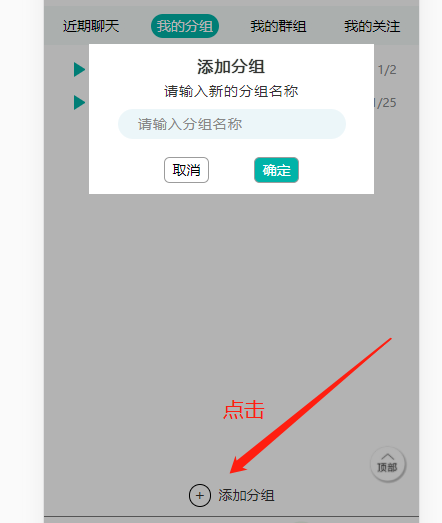
HTML:
<!-- 添加分组按钮 -->
<div class="group_add" onclick = "document.getElementById('light').style.display='block';document.getElementById('fade').style.display='block'">
<div class="group_add_icon">+</div>
<div class="group_add_title">添加分组</div>
</div>
<!-- 遮罩层 -->
<div id="light" class="content_box">
<div class="content_box_one">添加分组</div>
<div class="content_box_two">请输入新的分组名称</div>
<div class="content_box_three">
<input type="text" placeholder="请输入分组名称" type="text" class="content_box_three_input">
</div>
<div class="content_box_four">
<div class="content_box_four_btn1" onclick = "document.getElementById('light').style.display='none';document.getElementById('fade').style.display='none'">取消</div>
<div class="content_box_four_btn2">确定</div>
</div>
</div>
<div id="fade" class="black_overlay" onclick = "document.getElementById('light').style.display='none';document.getElementById('fade').style.display='none'"></div>
CSS(弹出内容、遮罩层样式)
/* 遮罩层 */
.black_overlay{
display: none;
position: absolute;
top: 0%;
left: 0%;
width: 100%;
height: 100%;
background-color: black;
z-index: 98;
-moz-opacity: 0.8;
opacity:.30;
filter: alpha(opacity=88);
}
.content_box {
display: none;
position: absolute;
overflow: auto;
width: 76vw;
height: 40vw;
background-color: #fff;
top: 34%;
left: 12vw;
z-index: 99;
}
.content_box_one {
display: flex;
flex-direction: row;
align-items: center;
justify-content: center;
font-size: 16px;
/* font-weight: bold; */
letter-spacing: 1px;
margin-top: 3vw;
text-shadow: 0 0 1px #000;
}
.content_box_two {
font-size: 14px;
letter-spacing: 1px;
display: flex;
flex-direction: row;
align-items: center;
justify-content: center;
margin-top: 1vw;
}
.content_box_three {
width: 80%;
height: 8vw;
margin-left: 10%;
background-color: #ecf6f9;
border-radius: 20vw;
display: flex;
flex-direction: row;
align-items: center;
justify-content: center;
margin-top: 2vw;
}
.content_box_three_input {
background-color: #ecf6f9;
outline: none;
border: none;
width: 84%;
/* height: 26px; */
/* margin-top: 3px; */
/* margin-left: 5%; */
font-size: 14px;
letter-spacing: 1px;
}
.content_box_three_input::-webkit-input-placeholder {
color: rgb(136, 136, 136);
font-size: 14px;
}
.content_box_three_input:focus {
color: #000;
font-size: 14px;
}
.content_box_three_input:focus{
border:none;
font-size: 14px;
}
.content_box_four {
width: 60vw;
display: flex;
flex-direction: row;
margin-top: 5vw;
margin-left: 8vw;
}
.content_box_four_btn1 {
width: 12vw;
background-color: #fff;
border: 1px solid rgb(156, 156, 156);
color: #000;
margin-left: 12vw;
display: flex;
flex-direction: row;
align-items: center;
justify-content: center;
padding: 0.5vw 0;
border-radius: 1.5vw;
}
.content_box_four_btn2 {
width: 12vw;
background-color: #00b3a8;
border: 1px solid rgb(156, 156, 156);
color: #fff;
margin-left: 12vw;
display: flex;
flex-direction: row;
align-items: center;
justify-content: center;
padding: 0.5vw 0;
border-radius: 1.5vw;
}
参考来源:https://www.jb51.net/article/112380.htm
- js点击弹出div层
<!DOCTYPE html PUBLIC "-//W3C//DTD XHTML 1.0 Transitional//EN" "http://www.w3.org/ ...
- 工作当中实际运用(3)——js原生实现鼠标点击弹出div层 在点击隐藏
function onmou(){ var divs=document.getElementById('kefuDV');//获取到你要操作的div if (divs.style.display==& ...
- 使用js弹出div刷新时闪烁解决方法
<div style="visibility: hidden"> //弹出div内容 </div>
- js弹出div层内容(按回退键关闭div层及遮罩)
<!--弹出的div列表对应的详情--> <div id="newhtml" class="white_content"> <di ...
- jQuery实现打开网页自动弹出遮罩层或点击弹出遮罩层功能示例
本文实例讲述了jQuery实现打开网页自动弹出遮罩层或点击弹出遮罩层功能.分享给大家供大家参考,具体如下: 弹出层:两种方式 一是打开网页就自动弹出层二是点击弹出 <!DOCTYPE html ...
- 创建一个弹出DIV窗口
创建一个弹出DIV窗口 摘自: http://www.cnblogs.com/TivonStone/archive/2012/03/20/2407919.html 创建一个弹出DIV窗口可能是现在 ...
- 点击弹出 +1放大效果 -- jQuery插件
20140110更新: <!doctype html> <html> <head> <meta charset="UTF-8"> & ...
- jquery---点击弹出层
<!DOCTYPE html PUBLIC "-//W3C//DTD XHTML 1.0 Transitional//EN" "http://www.w3.org/ ...
- js弹窗 js弹出DIV,并使整个页面背景变暗
1.首先写一个遮罩层div,然后再写一个弹窗的div <!-- 遮罩层 --> <div id="cover" style="background: # ...
随机推荐
- golang中字符串的底层实现原理和常见功能
1. 字符串的底层实现原理 package main import ( "fmt" "strconv" "unicode/utf8" ) f ...
- ansible roles实践——安装httpd
1. vim httpd.yml 2.执行
- What Goes Up Must Come Down
跳转链接 题目描述 给定一个序列, 求出将此序列变换为单调递增.单调递减 或者先增后减 样例1 输入 7 3 1 4 1 5 9 2 输出 3 样例2 输入 9 10 4 6 3 15 9 1 1 1 ...
- [SDOI2017]数字表格 & [MtOI2019]幽灵乐团
P3704 [SDOI2017]数字表格 首先根据题意写出答案的表达式 \[\large\prod_{i=1}^n\prod_{j=1}^mf_{\gcd(i,j)} \] 按常规套路改为枚举 \(d ...
- java.lang.IllegalArgumentException: Failed to register servlet with name 'dispatcher'.Check if there is another servlet registered under the same name
前言 一年前接手了一个项目,项目始终无法运行,不管咋样,都无法处理,最近,在一次尝试中,终于成功处理了. 含义 意思很明显了,注册了一个相同的dispatcher,可是找了很久,没有相同的Contro ...
- git删除误传的.idea文件
问题: 提交项目的时候忘记添加.gitignore文件,误上传了文件(如.idea)如何解决?如何删除Gitee地址上项目的.idea文件?(本文以.idea文件夹举例) 拉取项目 拉取项目 git ...
- RedHat Linux 忘记密码
一.无法进入系统 在虚拟机开机3秒时按e 选择第二个选项带有quite的那个 进入界面后,在quite后,空格+single 进入单用户模式 然后输入passwd +账号(要修改的账号) 输入新的密码 ...
- scons: 使用 SCons 轻松建造程序
转载请注明来源:https://www.cnblogs.com/hookjc/ 在软件项目开发过程中,make 工具通常被用来建造程序.make 工具通过一个被称为 Makefile 的配置文件可以自 ...
- NSArray 遍历
1.NSArray的下标遍历 NSArray *arr = @[p1, p2, p3, p4, p5]; for (int i = 0; i < arr.count; ++i) { Person ...
- JAVA初学--Servlet详解
一.什么是servlet? 处理请求和发送响应的过程是由一种叫做Servlet的程序来完成的,并且Servlet是为了解决实现动态页面而衍生的东西.理解这个的前提是了解一些http协议的东西,并且知道 ...
