
Java(30)集合五Set
作者:季沐测试笔记
原文地址:https://www.cnblogs.com/testero/p/15228440.html
博客主页:https://www.cnblogs.com/testero
1.Set集合
1.1Set集合概述和特点
- Set集合的特点
- 元素存取无序
- 没有索引、只能通过迭代器或增强for循环遍历
- 不能存储重复元素
- Set集合的基本使用
public class SetDemo {

    public static void main(String[] args) {

        //创建集合对象

        Set<String> set = new HashSet<String>();

        //添加元素

        set.add("hello");

        set.add("world");

        set.add("java");

        //不包含重复元素的集合

        set.add("world");

        //遍历

        for(String s : set) {

            System.out.println(s);

        }

    }

}
1.2哈希值
哈希值简介
是JDK根据对象的地址或者字符串或者数字算出来的int类型的数值
如何获取哈希值
Object类中的public int hashCode():返回对象的哈希码值
哈希值的特点
- 同一个对象多次调用hashCode()方法返回的哈希值是相同的
- 默认情况下,不同对象的哈希值是不同的。而重写hashCode()方法,可以实现让不同对象的哈希值相同
获取哈希值的代码
- 学生类
public class Student {

    private String name;

    private int age;

    public Student() {

    }

    public Student(String name, int age) {

        this.name = name;

        this.age = age;

    }

    public String getName() {

        return name;

    }

    public void setName(String name) {

        this.name = name;

    }

    public int getAge() {

        return age;

    }

    public void setAge(int age) {

        this.age = age;

    }

//    @Override

//    public int hashCode() {

//        return 0;

//    }

}
- 测试类
public class HashDemo {

    public static void main(String[] args) {

        //创建学生对象

        Student s1 = new Student("张三",30);

        //同一个对象多次调用hashCode()方法返回的哈希值是相同的

        System.out.println(s1.hashCode()); //1510467688

        System.out.println(s1.hashCode()); //1510467688

        System.out.println("--------");

        Student s2 = new Student("张三",30);

        //默认情况下,不同对象的哈希值是不相同的

        //通过方法重写,可以实现不同对象的哈希值是相同的

        System.out.println(s2.hashCode()); //1995265320

        System.out.println("--------");

        System.out.println("hello".hashCode()); //99162322

        System.out.println("world".hashCode()); //113318802

        System.out.println("java".hashCode()); //3254818

        System.out.println("world".hashCode()); //113318802

        System.out.println("--------");

        System.out.println("重地".hashCode()); //1179395

        System.out.println("通话".hashCode()); //1179395

    }

}
1.3HashSet集合概述和特点
HashSet集合的特点
- 底层数据结构是哈希表
- 对集合的迭代顺序不作任何保证,也就是说不保证存储和取出的元素顺序一致
- 没有带索引的方法,所以不能使用普通for循环遍历
- 由于是Set集合,所以是不包含重复元素的集合
HashSet集合的基本使用
public class HashSetDemo01 {

    public static void main(String[] args) {

        //创建集合对象

        HashSet<String> hs = new HashSet<String>();

        //添加元素

        hs.add("hello");

        hs.add("world");

        hs.add("java");

        hs.add("world");

        //遍历

        for(String s : hs) {

            System.out.println(s);

        }

    }

}
1.4HashSet集合保证元素唯一性源码分析
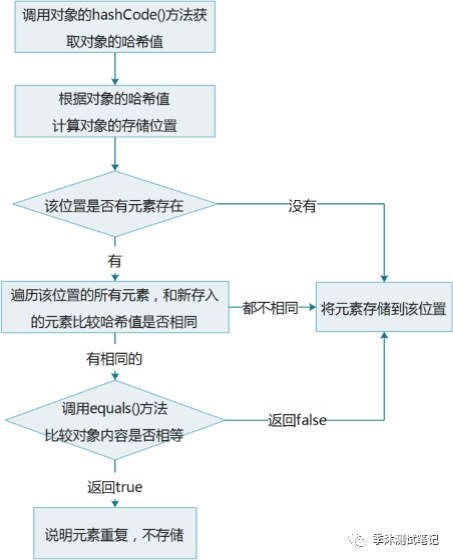
HashSet集合保证元素唯一性的原理
1.根据对象的哈希值计算存储位置
如果当前位置没有元素则直接存入
如果当前位置有元素存在,则进入第二步
2.当前元素的元素和已经存在的元素比较哈希值
如果哈希值不同,则将当前元素进行存储
如果哈希值相同,则进入第三步
3.通过equals()方法比较两个元素的内容
如果内容不相同,则将当前元素进行存储
如果内容相同,则不存储当前元素
HashSet集合保证元素唯一性的图解
1.5HashSet集合存储学生对象并遍历
案例需求
- 创建一个存储学生对象的集合,存储多个学生对象,使用程序实现在控制台遍历该集合
- 要求:学生对象的成员变量值相同,我们就认为是同一个对象
代码实现
学生类
public class Student {

    private String name;

    private int age;

    public Student() {

    }

    public Student(String name, int age) {

        this.name = name;

        this.age = age;

    }

    public String getName() {

        return name;

    }

    public void setName(String name) {

        this.name = name;

    }

    public int getAge() {

        return age;

    }

    public void setAge(int age) {

        this.age = age;

    }

    @Override

    public boolean equals(Object o) {

        if (this == o) return true;

        if (o == null || getClass() != o.getClass()) return false;

        Student student = (Student) o;

        if (age != student.age) return false;

        return name != null ? name.equals(student.name) : student.name == null;

    }

    @Override

    public int hashCode() {

        int result = name != null ? name.hashCode() : 0;

        result = 31 * result + age;

        return result;

    }

}
测试类
public class HashSetDemo02 {

    public static void main(String[] args) {

        //创建HashSet集合对象

        HashSet<Student> hs = new HashSet<Student>();

        //创建学生对象

        Student s1 = new Student("张三", 30);

        Student s2 = new Student("李四", 35);

        Student s3 = new Student("王五", 33);

        Student s4 = new Student("王五", 33);

        //把学生添加到集合

        hs.add(s1);

        hs.add(s2);

        hs.add(s3);

        hs.add(s4);

        //遍历集合(增强for)

        for (Student s : hs) {

            System.out.println(s.getName() + "," + s.getAge());

        }

    }

}
1.6LinkedHashSet集合概述和特点
LinkedHashSet集合特点
- 哈希表和链表实现的Set接口,具有可预测的迭代次序
- 由链表保证元素有序,也就是说元素的存储和取出顺序是一致的
- 由哈希表保证元素唯一,也就是说没有重复的元素
LinkedHashSet集合基本使用
public class LinkedHashSetDemo {

    public static void main(String[] args) {

        //创建集合对象

        LinkedHashSet<String> linkedHashSet = new LinkedHashSet<String>();

        //添加元素

        linkedHashSet.add("hello");

        linkedHashSet.add("world");

        linkedHashSet.add("java");

        linkedHashSet.add("world");

        //遍历集合

        for(String s : linkedHashSet) {

            System.out.println(s);

        }

    }

}
2.Set集合排序
2.1TreeSet集合概述和特点
TreeSet集合概述
- 元素有序,可以按照一定的规则进行排序,具体排序方式取决于构造方法
- TreeSet():根据其元素的自然排序进行排序
- TreeSet(Comparator comparator) :根据指定的比较器进行排序
- 没有带索引的方法,所以不能使用普通for循环遍历
- 由于是Set集合,所以不包含重复元素的集合
- 元素有序,可以按照一定的规则进行排序,具体排序方式取决于构造方法
TreeSet集合基本使用
public class TreeSetDemo01 {

    public static void main(String[] args) {

        //创建集合对象

        TreeSet<Integer> ts = new TreeSet<Integer>();

        //添加元素

        ts.add(10);

        ts.add(40);

        ts.add(30);

        ts.add(50);

        ts.add(20);

        ts.add(30);

        //遍历集合

        for(Integer i : ts) {

            System.out.println(i);

        }

    }

}
2.2自然排序Comparable的使用
案例需求
- 存储学生对象并遍历,创建TreeSet集合使用无参构造方法
- 要求:按照年龄从小到大排序,年龄相同时,按照姓名的字母顺序排序
实现步骤
- 用TreeSet集合存储自定义对象,无参构造方法使用的是自然排序对元素进行排序的
- 自然排序,就是让元素所属的类实现Comparable接口,重写compareTo(T o)方法
- 重写方法时,一定要注意排序规则必须按照要求的主要条件和次要条件来写
代码实现
学生类
public class Student implements Comparable<Student> {

    private String name;

    private int age;

    public Student() {

    }

    public Student(String name, int age) {

        this.name = name;

        this.age = age;

    }

    public String getName() {

        return name;

    }

    public void setName(String name) {

        this.name = name;

    }

    public int getAge() {

        return age;

    }

    public void setAge(int age) {

        this.age = age;

    }

    @Override

    public int compareTo(Student s) {

//        return 0;

//        return 1;

//        return -1;

        //按照年龄从小到大排序

       int num = this.age - s.age;

//        int num = s.age - this.age;

        //年龄相同时,按照姓名的字母顺序排序

       int num2 = num==0?this.name.compareTo(s.name):num;

        return num2;

    }

}
测试类
public class TreeSetDemo02 {

    public static void main(String[] args) {

        //创建集合对象

        TreeSet<Student> ts = new TreeSet<Student>();

        //创建学生对象

        Student s1 = new Student("xishi", 29);

        Student s2 = new Student("wangzhaojun", 28);

        Student s3 = new Student("diaochan", 30);

        Student s4 = new Student("yangyuhuan", 33);

        Student s5 = new Student("linqingxia",33);

        Student s6 = new Student("linqingxia",33);

        //把学生添加到集合

        ts.add(s1);

        ts.add(s2);

        ts.add(s3);

        ts.add(s4);

        ts.add(s5);

        ts.add(s6);

        //遍历集合

        for (Student s : ts) {

            System.out.println(s.getName() + "," + s.getAge());

        }

    }

}
2.3比较器排序Comparator的使用
案例需求
- 存储学生对象并遍历,创建TreeSet集合使用带参构造方法
- 要求:按照年龄从小到大排序,年龄相同时,按照姓名的字母顺序排序
实现步骤
- 用TreeSet集合存储自定义对象,带参构造方法使用的是比较器排序对元素进行排序的
- 比较器排序,就是让集合构造方法接收Comparator的实现类对象,重写compare(T o1,T o2)方法
- 重写方法时,一定要注意排序规则必须按照要求的主要条件和次要条件来写
代码实现
学生类
public class Student {

    private String name;

    private int age;

    public Student() {

    }

    public Student(String name, int age) {

        this.name = name;

        this.age = age;

    }

    public String getName() {

        return name;

    }

    public void setName(String name) {

        this.name = name;

    }

    public int getAge() {

        return age;

    }

    public void setAge(int age) {

        this.age = age;

    }

}
测试类
public class TreeSetDemo {

    public static void main(String[] args) {

        //创建集合对象

        TreeSet<Student> ts = new TreeSet<Student>(new Comparator<Student>() {

            @Override

            public int compare(Student s1, Student s2) {

                //this.age - s.age

                //s1,s2

                int num = s1.getAge() - s2.getAge();

                int num2 = num == 0 ? s1.getName().compareTo(s2.getName()) : num;

                return num2;

            }

        });

        //创建学生对象

        Student s1 = new Student("xishi", 29);

        Student s2 = new Student("wangzhaojun", 28);

        Student s3 = new Student("diaochan", 30);

        Student s4 = new Student("yangyuhuan", 33);

        Student s5 = new Student("linqingxia",33);

        Student s6 = new Student("linqingxia",33);

        //把学生添加到集合

        ts.add(s1);

        ts.add(s2);

        ts.add(s3);

        ts.add(s4);

        ts.add(s5);

        ts.add(s6);

        //遍历集合

        for (Student s : ts) {

            System.out.println(s.getName() + "," + s.getAge());

        }

    }

}
2.4成绩排序案例
案例需求
- 用TreeSet集合存储多个学生信息(姓名,语文成绩,数学成绩),并遍历该集合
- 要求:按照总分从高到低出现
代码实现
学生类
public class Student {

    private String name;

    private int chinese;

    private int math;

    public Student() {

    }

    public Student(String name, int chinese, int math) {

        this.name = name;

        this.chinese = chinese;

        this.math = math;

    }

    public String getName() {

        return name;

    }

    public void setName(String name) {

        this.name = name;

    }

    public int getChinese() {

        return chinese;

    }

    public void setChinese(int chinese) {

        this.chinese = chinese;

    }

    public int getMath() {

        return math;

    }

    public void setMath(int math) {

        this.math = math;

    }

    public int getSum() {

        return this.chinese + this.math;

    }

}
测试类
public class TreeSetDemo {

    public static void main(String[] args) {

        //创建TreeSet集合对象,通过比较器排序进行排序

        TreeSet<Student> ts = new TreeSet<Student>(new Comparator<Student>() {

            @Override

            public int compare(Student s1, Student s2) {

//                int num = (s2.getChinese()+s2.getMath())-(s1.getChinese()+s1.getMath());

                //主要条件

                int num = s2.getSum() - s1.getSum();

                //次要条件

                int num2 = num == 0 ? s1.getChinese() - s2.getChinese() : num;

                int num3 = num2 == 0 ? s1.getName().compareTo(s2.getName()) : num2;

                return num3;

            }

        });

        //创建学生对象

        Student s1 = new Student("林青霞", 98, 100);

        Student s2 = new Student("张曼玉", 95, 95);

        Student s3 = new Student("王祖贤", 100, 93);

        Student s4 = new Student("柳岩", 100, 97);

        Student s5 = new Student("风清扬", 98, 98);

        Student s6 = new Student("左冷禅", 97, 99);

        Student s7 = new Student("赵云", 97, 99);

        //把学生对象添加到集合

        ts.add(s1);

        ts.add(s2);

        ts.add(s3);

        ts.add(s4);

        ts.add(s5);

        ts.add(s6);

        ts.add(s7);

        //遍历集合

        for (Student s : ts) {

            System.out.println(s.getName() + "," + s.getChinese() + "," + s.getMath() + "," + s.getSum());

        }

    }

}
2.5不重复的随机数案例
案例需求
- 编写一个程序,获取10个1-20之间的随机数,要求随机数不能重复,并在控制台输出
代码实现
public class SetDemo {

    public static void main(String[] args) {

        //创建Set集合对象

//        Set<Integer> set = new HashSet<Integer>();

        Set<Integer> set = new TreeSet<Integer>();

        //创建随机数对象

        Random r = new Random();

        //判断集合的长度是不是小于10

        while (set.size()<10) {

            //产生一个随机数,添加到集合

            int number = r.nextInt(20) + 1;

            set.add(number);

        }

        //遍历集合

        for(Integer i : set) {

            System.out.println(i);

        }

    }

}
Java(30)集合五Set的更多相关文章
- Java之集合(五)LinkedList
转载请注明源出处:http://www.cnblogs.com/lighten/p/7298017.html 1.前言 Java中另一个常见的list就是本章将要讲的LinkedList.ArrayL ...
- Java面试集合(三)-30道面试题
前言 大家好,我是 Vic,今天给大家带来Java面试集合(三)的概述,希望你们喜欢 三 1.在Java中是否可以含有多个类?答:可以含有多个类,但只有一个是public类,public类的类名与文件 ...
- Java实习生常规技术面试题每日十题Java基础(五)
目录 1.启动一个线程是用run()还是start()? . 2.线程的基本状态以及状态之间的关系. 3.Set和List的区别,List和Map的区别? 4.同步方法.同步代码块区别? 5.描述Ja ...
- Java 字符串拼接 五种方法的性能比较分析 从执行100次到90万次
[请尊重原创版权,如需引用,请注明来源及地址] > 字符串拼接一般使用“+”,但是“+”不能满足大批量数据的处理,Java中有以下五种方法处理字符串拼接,各有优缺点,程序开发应选择合适的方法实现 ...
- Java学习-集合(转)
在编写java程序中,我们最常用的除了八种基本数据类型,String对象外还有一个集合类,在我们的的程序中到处充斥着集合类的身影!java中集合大家族的成员实在是太丰富了,有常用的ArrayList. ...
- Java中的五种单例模式实现方法
[代码] Java中的五种单例模式实现方法 1 2 3 4 5 6 7 8 9 10 11 12 13 14 15 16 17 18 19 20 21 22 23 24 25 26 27 28 2 ...
- 浅谈Java的集合框架
浅谈Java的集合框架 一. 初识集合 重所周知,Java有四大集合框架群,Set.List.Queue和Map.四种集合的关注点不同,Set 关注事物的唯一性,List 关注事物的索引列表,Q ...
- Java面试集合(三)
前言 大家好,给大家带来Java面试集合(三)的概述,希望你们喜欢 三 1.在Java中是否可以含有多个类? 答:可以含有多个类,但只有一个是public类,public类的类名与文件名必须一致. 2 ...
- 算法篇(前序)——Java的集合
菜鸟拙见,望请纠正:附上JDK参考文档(中文文档和英文文档):链接:https://pan.baidu.com/s/14KDmCtQxeGCViq7e0zENjA 密码:e9xs 以及算法篇全文链接 ...
- Java基础-集合的嵌套
Java基础-集合的嵌套 作者:尹正杰 版权声明:原创作品,谢绝转载!否则将追究法律责任. 一.静态导入 静态导入是在JDK1.5后的新特性,可以减少开发的代码量,但是实际用处是很一般,静态导入的标准 ...
随机推荐
- C#使用异步需要注意的几个问题
C#异步使用需要注意的几个问题1.异步方法如果只是对别的方法的简单的转发调用,没哟复杂的逻辑(比如等待A的结果,再调用B,等待A调用的返回值拿到内部做一些处理再返回),那么就可以去掉async关键字. ...
- RTSP H264/HEVC 流 Wasm 播放
本文将介绍 RTSP H264/HEVC 裸流如何于网页前端播放.涉及 WebSocket 代理发送流数据, Wasm 前端解码等. 代码: https://github.com/ikuokuo/rt ...
- 性能测试工具JMeter 基础(一)—— 安装、配置环境变量
JMeter下载 下载地址:https://jmeter.apache.org/download_jmeter.cgi 下载完成后解压后可直接使用,不用进行安装 环境变量配置 新增变量名:JMETER ...
- 前端搭建Linux云服务器,Nginx配置详解及部署自己项目到服务器上
目录 搭建Linux云服务器 购买与基本配置 链接linux服务器 目录结构 基本命令 软件安装 Linux 系统启动 启动过程 运行级别 Nginx详解 1.安装 方式一:yum安装 方式二:自定义 ...
- 20210712 noip12
考场 第一次和 hzoi 联考,成功给 sdfz 丢人 尝试戴耳罩,发现太紧了... 决定改变策略,先用1h看题,想完3题再写. T1 一下想到枚举最大值,单调栈求出每个点能作为最大值的区间,然后以这 ...
- 谈谈Linux系统启动流程
@ 目录 大体流程分析 一.BIOS 1.1 BIOS简介 1.2 POST 二.BootLoader (GRUB) 2.1 What's MBR? 2.2 What's GRUB? 2.3 boot ...
- Redis——set,hash与列表
一.List列表 基于Linked List实现 元素是字符串类型 列表头尾增删快,中间增删慢,增删元素是常态 元素可以重复出现 最多包含2^32-1元素 列表的索引 从左至右,从0开始 从右至左,从 ...
- 使用私有gitlab发布自动生成版本号和标签(version和tag)(骚)
设置 semantic ,自动生成版本号和标签 FROM node:14-buster-slim LABEL maintainer="wangyunpeng" COPY sourc ...
- CodeForce-811C Vladik and Memorable Trip(动态规划)
Vladik and Memorable Trip CodeForces - 811C 有一个长度为 n 的数列,其中第 i 项为 ai. 现在需要你从这个数列中选出一些互不相交的区间,并且保证整个数 ...
- python 爬虫新手入门教程
python 爬虫新手教程 一.什么是爬虫 爬虫就是把一个网站里的内容读取下来 这里我们就要学习一个知识 我们看到的网页是有一种叫HTML的语言编写的 他可以给文字显示不同的样式 如:<p> ...