
Java Swing设计简单商品信息管理系统(java swing+mysql+eclipse)
一、概述
为了管理好商店库存信息,提升店铺管理工作效率,结合实际工作需要,设计和开发本系统,主要用于商店商品信息维护出入库等。包含商品库存信息查看、商品信息修改,新增商品信息,删除信息等功能。
二、功能清单
1、查询,如图
查询界面,请从数据库查询学生信息表数据并显示在控件上,通过底部功能菜单执行相应功能,添加、修改按钮点击后课弹出相应窗体执行相应操作,点击刷新按钮课刷新当前数据,删除按钮点击后可删除选中行数据并刷新

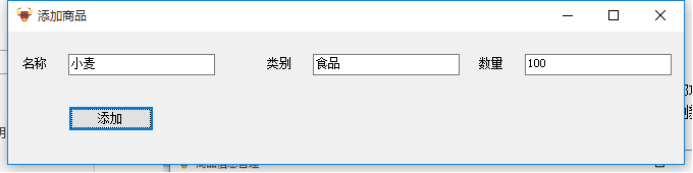
2、添加,如图
填写姓名和班级后,点击添加按钮后可添加数据
3、修改,如图
通过点击查询界面中“修改按钮”,可在修改界面修改当前选中行数据

三、数据库
注意:数据库名称为“班级_姓名”,如“1705_小白”。
表名称:tGoods
字段
|
字段名 |
数据类型 |
描述 |
约束 |
|
goodsID |
int |
商品编号 |
主键自增长 |
|
name |
varchar(20) |
商品名称 |
|
|
typeName |
varchar(20) |
类别名称 |
|
|
stock |
Int |
库存 |
四、评分规则(共100分)
|
标题 |
分值 |
|
合理注释 |
10分 |
|
命名规范 |
10分 |
|
查询 |
20分 |
|
修改 |
10分 |
|
删除 |
10分 |
|
添加 |
10分 |
|
数据库创建 |
10分 |
|
数据库连接 |
10分 |
|
整体效果 |
10分 |
实现代码:
数据库 链接:https://pan-yz.chaoxing.com/external/m/file/483246110958415872
Java文件 链接:https://pan-yz.chaoxing.com/external/m/file/483246085097291776

数据库:
-- ----------------------------

-- Table structure for tgoods

-- ----------------------------

DROP TABLE IF EXISTS `tgoods`;

CREATE TABLE `tgoods` (

  `goodsID` int(11) NOT NULL AUTO_INCREMENT,

  `name` varchar(20) DEFAULT NULL,

  `typeName` varchar(20) DEFAULT NULL,

  `stock` int(11) DEFAULT NULL,

  PRIMARY KEY (`goodsID`)

) ENGINE=InnoDB AUTO_INCREMENT=11 DEFAULT CHARSET=utf8;

-- ----------------------------

-- Records of tgoods

-- ----------------------------

INSERT INTO `tgoods` VALUES ('9', '统一冰红茶', '饮料', '24');

INSERT INTO `tgoods` VALUES ('10', '娃哈哈营养快线', '饮料', '23');
com.test.db >>> DbConnection
package com.test.db;

import java.sql.Connection;

import java.sql.DriverManager;

import java.sql.PreparedStatement;

import java.sql.ResultSet;

import java.sql.SQLException;

import com.mysql.jdbc.Statement;

public class DbConnection {

	//驱动类的类名

	private static final String DRIVERNAME="com.mysql.jdbc.Driver";

	//连接数据的URL路径

	private static final String URL="jdbc:mysql://localhost:3306/1902_杨明金";

	//数据库登录账号

	private static final String USER="root";

	//数据库登录密码

	private static final String PASSWORD="root123";

	//加载驱动

	static{

		try {

			Class.forName(DRIVERNAME);

		} catch (ClassNotFoundException e) {

			e.printStackTrace();

		}

	}

    //获取数据库连接

	public static Connection getConnection() {

	          try {

		return DriverManager.getConnection(URL,USER,PASSWORD);

	           } catch (SQLException e) {

		e.printStackTrace();

	           }

			return null;

	}

	//查询

	public static ResultSet query(String sql) {

		System.out.println(sql);

		//获取连接

		Connection connection=getConnection();

		PreparedStatement psd;

		try {

			psd = connection.prepareStatement(sql);

			return psd.executeQuery();

		} catch (SQLException e) {

			e.printStackTrace();

		}

		return null;

	}

	//增、删、改、查

		public static int updataInfo(String sql) {

			System.out.println(sql);

			//获取连接

			Connection connection=getConnection();

			try {

				PreparedStatement psd=connection.prepareStatement(sql);

				return psd.executeUpdate();

			} catch (SQLException e) {

				e.printStackTrace();

			}

			return 0;

		}

	//关闭连接

	public  static  void colse(ResultSet rs,Statement stmt,Connection  conn) throws Exception{

	          try { if (rs != null){ rs.close(); }

                         	 if (stmt != null) { stmt.cancel(); }

		 if (conn != null) { conn.close(); }

	   } catch (Exception e) {

		   e.printStackTrace(); throw new Exception();

	   }

	}

}
com.test.entity >>> Goods
package com.test.entity;

public class Goods {

	private int goodsID;//商品ID

	private String name;//商品名称

	private String typeName;//商品类别

	private int stock;//库存

	public Goods(int goodsID, String name, String typeName, int stock) {

		super();

		this.goodsID = goodsID;

		this.name = name;

		this.typeName = typeName;

		this.stock = stock;

	}

	public Goods() {

		super();

	}

	public int getGoodsID() {

		return goodsID;

	}

	public void setGoodsID(int goodsID) {

		this.goodsID = goodsID;

	}

	public String getName() {

		return name;

	}

	public void setName(String name) {

		this.name = name;

	}

	public String getTypeName() {

		return typeName;

	}

	public void setTypeName(String typeName) {

		this.typeName = typeName;

	}

	public int getStock() {

		return stock;

	}

	public void setStock(int stock) {

		this.stock = stock;

	}

}
com.test.controller >>> Updata
package com.test.controller;

import com.test.db.DbConnection;

public class Updata {

	//添加数据

	public static int addData(String sql) {

		return DbConnection.updataInfo(sql);

	}

}
com.test.controller >>> Select
package com.test.controller;

import java.sql.ResultSet;

import java.sql.SQLException;

import java.util.ArrayList;

import com.test.db.DbConnection;

import com.test.entity.Goods;

public class Select {

	public static Object[][] getGoods() {

		String sql = "SELECT * FROM tgoods";

		ResultSet resultSet = DbConnection.query(sql);

		ArrayList<Goods> list=new ArrayList<Goods>();

		try {

			while (resultSet.next()) {

				Goods goods=new Goods();

				goods.setGoodsID(resultSet.getInt(1));

				goods.setName(resultSet.getString(2));

				goods.setTypeName(resultSet.getString(3));

				goods.setStock(resultSet.getInt(4));

				list.add(goods);

			}

		} catch (SQLException e) {

			e.printStackTrace();

		}

		Object[][] objects=new Object[list.size()][4];

		for(int i=0;i<list.size();i++) {

			objects[i][0]=list.get(i).getGoodsID();

			objects[i][1]=list.get(i).getName();

			objects[i][2]=list.get(i).getTypeName();

			objects[i][3]=list.get(i).getStock();

		}

		return objects;

	}

}
com.test.View >>> IndexGUI
package com.test.view;

import java.awt.event.ActionEvent;

import java.awt.event.ActionListener;

import javax.swing.JButton;

import javax.swing.JFrame;

import javax.swing.JOptionPane;

import javax.swing.JScrollPane;

import javax.swing.JTable;

import javax.swing.table.DefaultTableModel;

import com.test.controller.Select;

import com.test.controller.Updata;

import com.test.entity.Goods;

public class IndexGUI extends JFrame {

	Object[] columnNames = {"商品编号","名称","类别名称","库存"};

	Object[][] data = Select.getGoods();

	DefaultTableModel df = new DefaultTableModel(data, columnNames);

	public IndexGUI() {

		super("商品信息管理");

		this.setBounds(0, 0, 780, 500);

		this.setLocationRelativeTo(null);//让窗口在屏幕中间显示

		this.setResizable(false);//让窗口大小不可改变

		this.setLayout(null);

		JTable jTable=new JTable(df);

		JScrollPane jp = new JScrollPane(jTable);

		jp.setBounds(0, 10, 780, 350);

		this.add(jp);

		JButton tj = new JButton("添加");

		tj.setBounds(50, 400, 100, 30);

		tj.addActionListener(new ActionListener() {

			@Override

			public void actionPerformed(ActionEvent e) {

				IncreaseGUL i = new IncreaseGUL();

				i.setVisible(true);

			}

		});

		JButton sc = new JButton("删除");

		sc.setBounds(180, 400, 100, 30);

		sc.addActionListener(new ActionListener() {

			@Override

			public void actionPerformed(ActionEvent e) {

				if (jTable.getSelectedColumn()<0) {

					JOptionPane.showMessageDialog(null, "请选中要删除的数据!");

				} else {

					int goodsID = Integer.parseInt(jTable.getValueAt(jTable.getSelectedRow(), 0).toString());

					String sql="delete from tgoods where goodsid="+goodsID;

					Updata updata = new Updata();

					int result = updata.addData(sql);

					if (result>0) {

						JOptionPane.showMessageDialog(null, "删除成功!");

						JOptionPane.showMessageDialog(null, "记得刷新一下哦!");

					} else {

						JOptionPane.showMessageDialog(null, "删除失败!");

					}

				}

			}

		});

		JButton xg = new JButton("修改");

		xg.setBounds(310, 400, 100, 30);

		xg.addActionListener(new ActionListener() {

			@Override

			public void actionPerformed(ActionEvent e) {

				if (jTable.getSelectedColumn()<0) {

					JOptionPane.showMessageDialog(null, "请选择要修改的数据!");

				} else {

					int goodsID = Integer.parseInt(jTable.getValueAt(jTable.getSelectedRow(), 0).toString());

					String name = jTable.getValueAt(jTable.getSelectedRow(), 1).toString();

					String typeName = jTable.getValueAt(jTable.getSelectedRow(), 2).toString();

					int stock = Integer.parseInt(jTable.getValueAt(jTable.getSelectedRow(), 3).toString());

					Goods goods = new Goods(goodsID,name,typeName,stock);

					ModifyGUI modifyGUI = new ModifyGUI(goods);

					modifyGUI.setVisible(true);

				}

			}

		});

		JButton sx = new JButton("刷新");

		sx.setBounds(440, 400, 100, 30);

		sx.addActionListener(new ActionListener() {

			@Override

			public void actionPerformed(ActionEvent e) {

				Object[][] data = Select.getGoods();

				df.setDataVector(data, columnNames);

			}

		});

		this.add(tj);

		this.add(sc);

		this.add(xg);

		this.add(sx);

	}

}
com.test.View >>> IncreaseGUL
package com.test.view;

import java.awt.event.ActionEvent;

import java.awt.event.ActionListener;

import javax.swing.JButton;

import javax.swing.JFrame;

import javax.swing.JLabel;

import javax.swing.JOptionPane;

import javax.swing.JTextField;

import com.test.controller.Updata;

public class IncreaseGUL extends JFrame implements ActionListener {

	JTextField name = new JTextField();

	JTextField type = new JTextField();

	JTextField num = new JTextField();

	public IncreaseGUL() {

		super.setTitle("添加商品");

		this.setBounds(0, 0, 780, 250);

		this.setLocationRelativeTo(null);

		this.setResizable(false);

		this.setLayout(null);

		JLabel nameT = new JLabel("名称");

		nameT.setBounds(50, 30, 40, 25);

		name.setBounds(100, 30, 145, 30);

		JLabel typeT = new JLabel("类别");

		typeT.setBounds(280, 30, 40, 25);

		type.setBounds(335, 30, 145, 30);

		JLabel numT = new JLabel("数量");

		numT.setBounds(515, 30, 40, 25);

		num.setBounds(575, 30, 145, 30);

		JButton tj = new JButton("添加");

		tj.setBounds(100, 115, 100, 30);

		tj.addActionListener(this);

		this.add(nameT);

		this.add(name);

		this.add(typeT);

		this.add(type);

		this.add(numT);

		this.add(num);

		this.add(tj);

	}

	@Override

	public void actionPerformed(ActionEvent e) {

		String sql = null;

		String addName = name.getText();

		String addType = type.getText();

		String addNum = num.getText();

		if (addName.equals("")||addType.equals("")||addNum.equals("")) {

			JOptionPane.showMessageDialog(null, "请完整输入要添加的数据");

		} else {

			sql="INSERT INTO tgoods VALUES("+"null,'"+addName+"','"+addType+"','"+addNum+"')";

			int result = Updata.addData(sql);

			if (result>0) {

				JOptionPane.showMessageDialog(null, "添加成功!");

                JOptionPane.showMessageDialog(null, "记得刷新一下哦!");

				dispose();

				IndexGUI i = new IndexGUI();

			} else {

				JOptionPane.showMessageDialog(null, "添加失败!");

			}

		}

	}

}
com.test.View >>> ModifyGUI
package com.test.view;

import java.awt.event.ActionEvent;

import java.awt.event.ActionListener;

import javax.swing.JButton;

import javax.swing.JFrame;

import javax.swing.JLabel;

import javax.swing.JOptionPane;

import javax.swing.JTextField;

import com.test.controller.Updata;

import com.test.entity.Goods;

public class ModifyGUI extends JFrame implements ActionListener {

	JTextField name = new JTextField();

	JTextField type = new JTextField();

	JTextField num = new JTextField();

	int id;

	public ModifyGUI(Goods goods) {

		super.setTitle("修改商品");

		this.setBounds(0, 0, 780, 250);

		this.setLocationRelativeTo(null);

		this.setLayout(null);

		JLabel nameT = new JLabel("名称");

		nameT.setBounds(50, 30, 40, 25);

		name.setBounds(100, 30, 145, 30);

		JLabel typeT = new JLabel("类别");

		typeT.setBounds(280, 30, 40, 25);

		type.setBounds(335, 30, 145, 30);

		JLabel numT = new JLabel("库存");

		numT.setBounds(515, 30, 40, 25);

		num.setBounds(575, 30, 145, 30);

		JButton xg = new JButton("修改");

		xg.setBounds(100, 115, 100, 30);

		xg.addActionListener(this);

		this.add(nameT);

		this.add(name);

		this.add(typeT);

		this.add(type);

		this.add(numT);

		this.add(num);

		this.add(xg);

		name.setText(goods.getName());

		type.setText(goods.getTypeName());

		num.setText(Integer.toString(goods.getStock()));

		id = goods.getGoodsID();

	}

	@Override

	public void actionPerformed(ActionEvent e) {

		String sql = null;

		String addName = name.getText();

		String addType = type.getText();

		int addNum = Integer.parseInt(num.getText());

		if (addName.equals("")||addType.equals("")||addNum==0) {

			JOptionPane.showMessageDialog(null, "请完整输入要修改的数据");

		}else {

			Updata up=new Updata();

			sql="UPDATE tgoods SET "+"name='"+addName+"',typeName='"+addType+"',stock='"+addNum+"'where goodsid="+id;

			int result = Updata.addData(sql);

			Updata.addData(sql);

			if (result>0) {

				JOptionPane.showMessageDialog(null, "修改成功!");

                JOptionPane.showMessageDialog(null, "记得刷新一下哦!");

				dispose();

				IndexGUI i = new IndexGUI();

				i.setVisible(true);

			} else {

				JOptionPane.showMessageDialog(null, "修改失败!");

			}

		}

	}

}
com.test.Test >>> Test
package com.test.Test;

import com.test.view.IndexGUI;

public class Test {

	public static void main(String[] args) {

		IndexGUI i = new IndexGUI();

		i.setVisible(true);

	}

}
Java Swing设计简单商品信息管理系统(java swing+mysql+eclipse)的更多相关文章
- 【Java Web】简易商品信息管理系统——首个Web项目
正文之前 在学习了一段时间的Java Web的内容之后,当然需要有个项目来练练手,我相信大多数人的首选项目都是信息管理系统吧,所以我选择了商品信息管理系统 目前项目源码已全部上传至GitHub,欢迎大 ...
- 简易商品信息管理系统——首个Web项目
正文之前 在学习了一段时间的Java Web的内容之后,当然需要有个项目来练练手,我相信大多数人的首选项目都是信息管理系统吧,所以我选择了商品信息管理系统 目前项目源码已全部上传至GitHub,欢迎大 ...
- 用C语言制作小型商品信息管理系统过程中的问题
大神请默默飘过... 以下是第一次制作时的源码: // 商品信息管理.cpp : 定义控制台应用程序的入口点. // // 小型商品信息管理系统.cpp : 定义控制台应用程序的入口点. // #in ...
- PHP基础示例:商品信息管理系统v1.1[转]
实现目标:使用php和mysql写一个商品信息管理系统,并带有购物车功能 一.创建数据库和表 1.创建数据库和表:demodb 2.创建表格:goods 字段:商品编号,商品名称,商品类型,商品图 ...
- PHP基础示例:商品信息管理系统v1.1
实现目标:使用php和mysql写一个商品信息管理系统,并带有购物车功能 一.创建数据库和表 1.创建数据库和表:demodb 2.创建表格:goods 字段:商品编号,商品名称,商品类型,商品图片, ...
- Java之从头开始编写简单课程信息管理系统
编写简单的课程管理系统对于新手并不友好,想要出色的完成并不容易以下是我的一些经验和方法 详情可参考以下链接: https://www.cnblogs.com/dream0-0/p/10090828.h ...
- Java课设(学生信息管理系统)
1.团队课程设计博客链接 http://www.cnblogs.com/Min21/p/7064093.html 2.个人负责模板或任务说明 设计登陆界面和学生信息界面的设计,学生信息的显示.退出等功 ...
- 【JAVA】简陋的学生信息管理系统
因为之前写了一个学生信息管理系统,但还是处于命令行界面,不美观,于是打算做一个完整的界面出来. 在网上查阅资料后发现C++本身是不支持图形化界面的(可以使用第三方的Qt来做) 权衡之下还是选择了JAV ...
- java后台设计简单的json数据接口,设置可跨域访问,前端ajax获取json数据
在开发的过程中,有时候我们需要设计一个数据接口.有时候呢,数据接口和Web服务器又不在一起,所以就有跨域访问的问题. 第一步:简单的设计一个数据接口. 数据接口,听起来高大上,其实呢就是一个简单的Se ...
随机推荐
- 转 Android 多线程:手把手教你使用AsyncTask
转自:https://www.jianshu.com/p/ee1342fcf5e7 前言 多线程的应用在Android开发中是非常常见的,常用方法主要有: 继承Thread类 实现Runnable接口 ...
- 链式栈——Java实现
1 package struct; 2 3 //接口 4 interface ILinkStack{ 5 //栈中元素个数(栈大小) 6 int size(); 7 //取栈顶元素 8 Object ...
- Linux基础命令---ntpdate网络时间服务器
ntpdate ntpdate指令通过轮询指定为服务器参数的网络时间协议(NTP)服务器来设置本地日期和时间,从而确定正确的时间. 此命令的适用范围:RedHat.RHEL.Ubuntu.CentOS ...
- proxysql+MHA+半同步复制
先配置成主从同步 先在各节点安装服务 [root@inotify ~]# yum install mariadb-server -y 编辑主节点的配置文件,并启动 [root@centos7 ~]# ...
- spring的核心容器ApplicationContext
//bean.xml配置文件 <?xml version="1.0" encoding="UTF-8"?><beans xmlns=" ...
- jstl中的choose标签
<%@ page contentType="text/html;charset=UTF-8" language="java" %><%@ ta ...
- 【力扣】剑指 Offer 50. 第一个只出现一次的字符
在字符串 s 中找出第一个只出现一次的字符.如果没有,返回一个单空格. s 只包含小写字母. 示例: s = "abaccdeff"返回 "b" s = &qu ...
- 正则表达式入门(js版)
什么是正则表达式 正则表达式 Regular Expression (构造函数 RegExp) 用于字符串匹配规则 要么匹配字符,要么匹配位置 如何新建正则表达式 字面量 /[ab]/gim cons ...
- ASP.NET Web API路由解析
前言 本篇文章比较长,仔细思考阅读下来大约需要15分钟,涉及类图有可能在手机显示不完整,可以切换电脑版阅读. 做.Net有好几年时间了从ASP.NET WebForm到ASP.NET MVC再到ASP ...
- Nginx区分浏览器
目录 一.简介 二.配置 一.简介 场景: 不同浏览器对网页的兼容性是不一样的,所以针对火狐和curl,返回不同内容 原理: 使用if对http_user_agent变量进行判断,这个变量会显示访问时 ...